23. Comparator (COMP)
23.1 COMP introduction
The device embeds two ultra-low-power comparators, COMP1 and COMP2. These comparators can be used for a variety of functions including:
- • Wake-up from low-power mode triggered by an analog signal
- • Analog signal conditioning
- • Cycle-by-cycle current control loop when combined with a PWM output from a timer
23.2 COMP main features
- • Each comparator has configurable plus and minus inputs used for flexible voltage selection:
- – Multiplexed I/O pins
- – Internal reference voltage and three sub-multiple values (1/4, 1/2, 3/4) provided by a scaler (buffered voltage divider)
- • Programmable hysteresis
- • Programmable speed/consumption
- • Outputs that can be redirected to an I/O or to timer inputs for triggering break events for fast PWM shutdowns
- • Comparator outputs with blanking source
- • Comparators that can be combined as a window comparator
- • Interrupt generation capability for each comparator with wake-up from Sleep and Stop 0 and Stop 1 modes (through the EXTI controller)
23.3 COMP implementation
Table 168. COMP instances on devices
| COMP features (1) | COMP1 | COMP2 |
|---|---|---|
| STM32WBA62/63/65xx | X | X |
| STM32WBA64xx | X | - |
1. X = supported.
23.4 COMP functional description
23.4.1 COMP block diagram
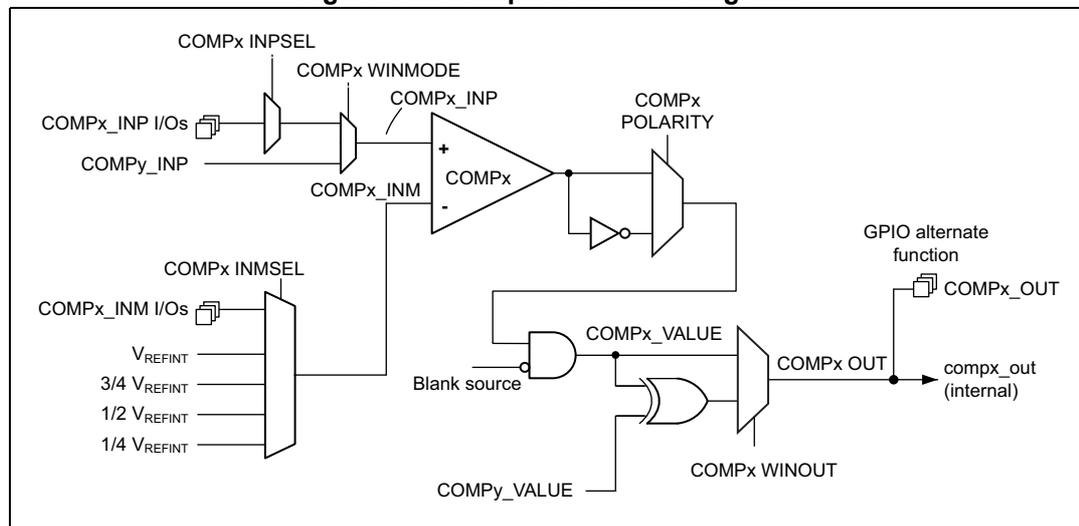
Figure 103. Comparator block diagrams
23.4.2 COMP pins and internal signals
The I/Os used as comparators inputs must be configured in analog mode in the GPIOs registers.
The comparator output can be connected to the I/Os using the alternate function channel given in “Alternate function mapping” table in the datasheet.
The output can also be internally redirected to a variety of timer input for the following purposes:
- • Emergency shut-down of PWM signals, using BKIN and BKIN2 inputs
- • Cycle-by-cycle current control, using OCREF_CLR inputs
- • Input capture for timing measures
The comparator output can be simultaneously redirected internally and externally.
Table 169. COMP1 non-inverting input assignment
| COMP1_INP | COMP1_INPSEL[2:0] |
|---|---|
| COMP1_INP1 | 00 |
| Open | 01 |
| Open | 10 |
| Open | 11 |
Table 170. COMP1 inverting input assignment
| COMP1_INM | COMP1_INMSEL[3:0] |
|---|---|
| \( \frac{1}{4} V_{REFINT} \) | 0000 |
| \( \frac{1}{2} V_{REFINT} \) | 0001 |
| \( \frac{3}{4} V_{REFINT} \) | 0010 |
| \( V_{REFINT} \) | 0011 |
| Open | 0100 |
| Open | 0101 |
| COMP1_INM1 | 0110 |
| Open | 0111 |
| Open | 1000 |
| Reserved | > 1000 |
Table 171. COMP2 non-inverting input assignment
| COMP2_INP | COMP2_INPSEL[1:0] |
|---|---|
| COMP2_INP1 | 00 |
| Open | 01 |
| Open | 10 |
| Open | 11 |
Table 172. COMP2 inverting input assignment
| COMP2_INM | COMP2_INMSEL[3:0] |
|---|---|
| \( \frac{1}{4} V_{REFINT} \) | 0000 |
| \( \frac{1}{2} V_{REFINT} \) | 0001 |
| \( \frac{3}{4} V_{REFINT} \) | 0010 |
| \( V_{REFINT} \) | 0011 |
| Open | 0100 |
| Open | 0101 |
| COMP2_INM1 | 0110 |
| Open | 0111 |
| Open | 1000 |
| Reserved | > 1000 |
| PWM output | COMP1_BLANKSEL[4:0] |
|---|---|
| None (no blanking) | 00000 |
| tim1_oc5 | xxxx1 |
| tim2_oc3 | xxx1x |
| tim3_oc3 | xx1xx |
| Reserved | Others |
| PWM output | COMP2_BLANKSEL[4:0] |
|---|---|
| None (no blanking) | 00000 |
| tim3_oc4 | xxxx1 |
| Reserved | Others |
23.4.3 Comparator LOCK mechanism
The comparators can be used for safety purposes, such as over-current or thermal protection. For applications having specific functional safety requirements, the comparator programming must not be altered in case of spurious register access or program counter corruption. For this purpose, the comparator control and status registers can be write-protected (read-only).
Once the programming is completed, the COMPxLOCK bit can be set to 1. This causes the whole COMPx_CSR register to become read-only, including the COMPxLOCK bit.
The write protection can be reset only by an MCU reset.
23.4.4 Window comparator
The purpose of the window comparator is to monitor if the analog voltage is within the range defined by the lower and upper thresholds.
The two embedded comparators can be used to create a window comparator. The monitored analog voltage is connected to the non-inverting (plus) inputs of the two comparators. The upper and lower threshold voltages are connected to the inverting (minus) inputs of the comparators.
Two non-inverting inputs can be connected internally by enabling the WINMODE bit to save one IO for other purposes.
Figure 104. Window mode
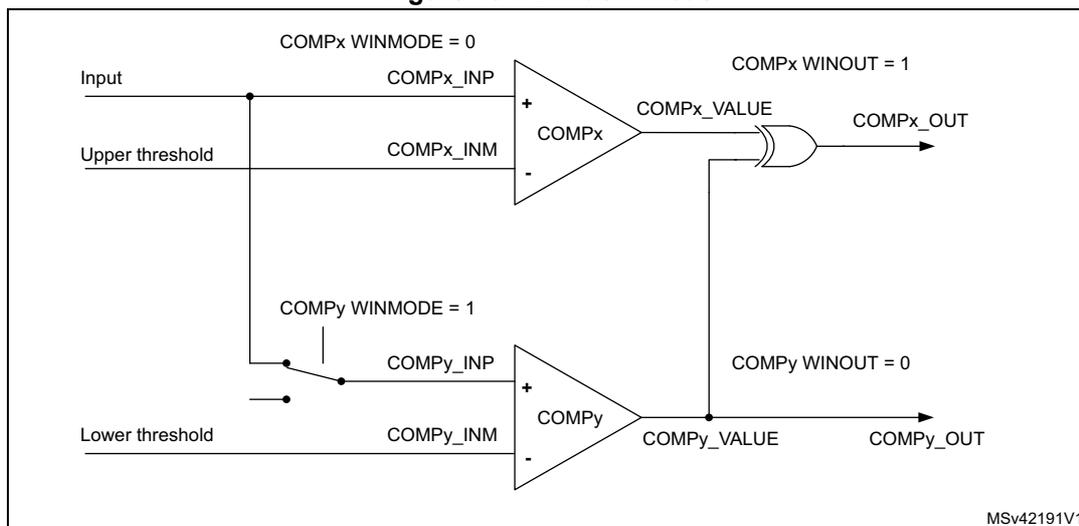
The diagram illustrates the window mode configuration. It features two comparators, COMPx and COMPy, and an OR gate. COMPx is configured with WINMODE = 0. Its non-inverting input (COMPx_INP) is connected to a common 'Input' line, and its inverting input (COMPx_INM) is connected to an 'Upper threshold'. The output of COMPx is labeled COMPx_VALUE. COMPy is configured with WINMODE = 1. Its non-inverting input (COMPy_INP) is connected to the common 'Input' line through a switch, and its inverting input (COMPy_INM) is connected to a 'Lower threshold'. The output of COMPy is labeled COMPy_VALUE. The outputs COMPx_VALUE and COMPy_VALUE are connected to the inputs of an OR gate. The output of the OR gate is labeled COMPx_OUT. Labels indicate COMPx WINOUT = 1 and COMPy WINOUT = 0. The diagram is labeled MSv42191V1.
23.4.5 Hysteresis
The comparator includes a programmable hysteresis to avoid spurious output transitions in case of noisy signals. The hysteresis can be disabled if not needed (for instance when exiting a low-power mode), to be able to force the hysteresis value using external components.
Figure 105. Comparator hysteresis
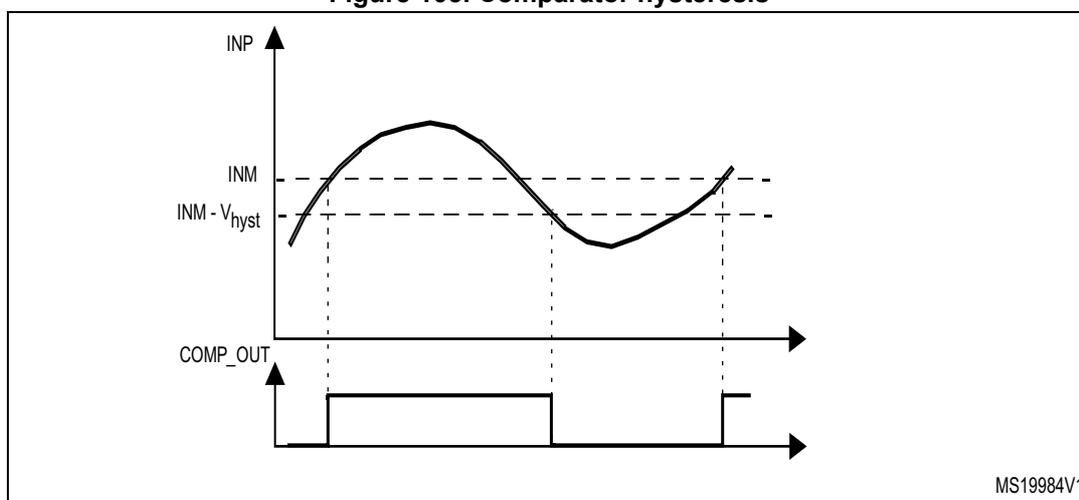
The figure shows a timing diagram for comparator hysteresis. The top graph plots the inverting input (INP) as a sinusoidal signal against a reference level (INM). The hysteresis is indicated by two dashed lines: INM - V hyst and INM + V hyst . The bottom graph shows the output (COMP_OUT) as a digital signal. The output transitions from a low state to a high state when the input crosses the INM - V hyst level and returns to a low state when the input crosses the INM + V hyst level. The diagram is labeled MS19984V1.
23.4.6 Comparator output-blanking function
The blanking function prevents the current regulation to trip upon short current spikes at the beginning of the PWM period (typically the recovery current in power switches antiparallel diodes). This blanking function consists of a selection of a blanking window that is a timer output compare signal. The selection is done by software (refer to the comparator register description for possible blanking signals).
The complementary of the blanking signal is AND-ed with the comparator output to provide the wanted comparator output (see the example in Figure 106).
Figure 106. Comparator output blanking
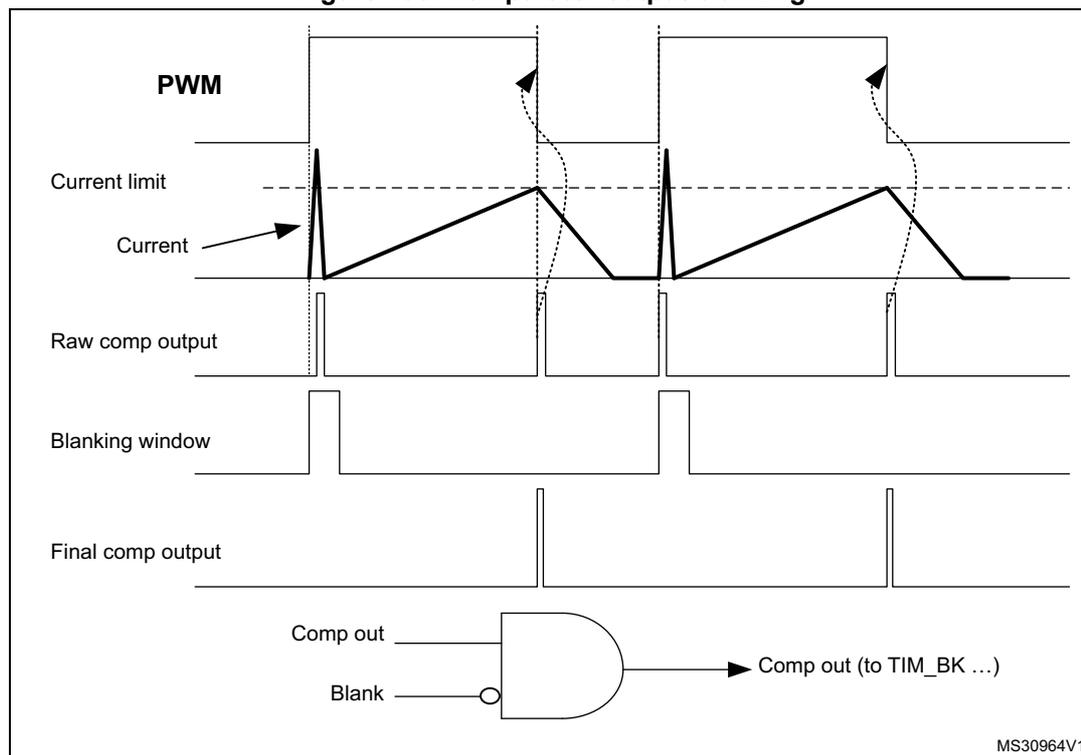
The figure illustrates the comparator output blanking mechanism. The top part is a timing diagram showing the relationship between the PWM signal, the current limit, the actual current, the raw comparator output, the blanking window, and the final comparator output. The bottom part is a logic schematic showing that the final output is the AND of the raw output and the inverted blanking signal.
23.4.7 COMP power and speed modes
COMP1 and COMP2 power consumption versus propagation delay can be adjusted to have the optimum trade-off for a given application.
23.4.8 Scaler function
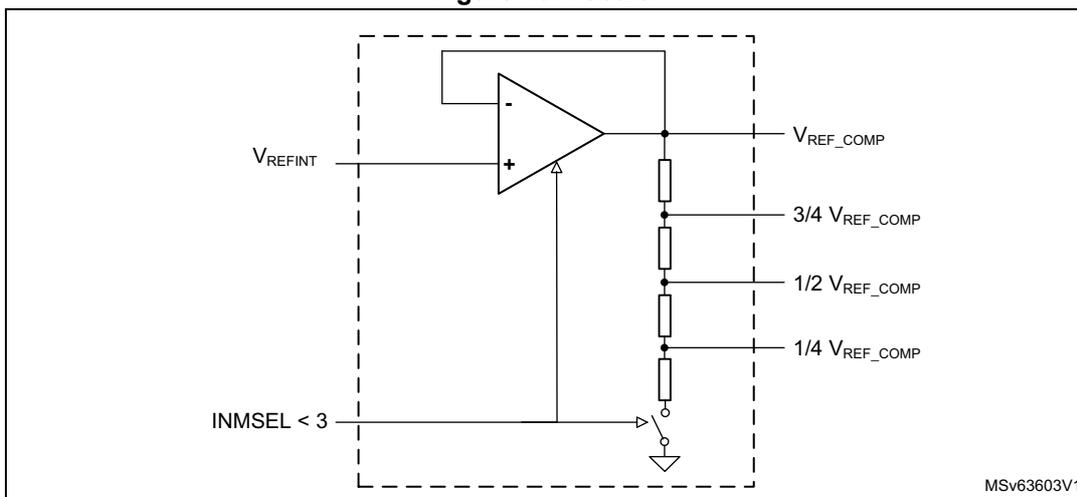
The scaler block provides the different voltage reference levels to the comparator inputs. This block is based on an amplifier driving a resistor bridge. The amplifier input is connected to the internal voltage reference. The amplifier and the resistor bridge are enabled by setting the INMSEL value in the COMP_CFGRx registers, to connect the corresponding inverting input to the scaler output.
When the divided voltage is not used, the resistor bridge and the amplifier are disabled to reduce power consumption. When the resistor bridge is disconnected, the 1/4 VREF_COMP, 1/2 VREF_COMP, and 3/4 VREF_COMP levels are equal to VREF_COMP.
Figure 107. Scaler
23.5 COMP low-power modes
Table 175. Comparator behavior in the low-power modes
| Mode | Description |
|---|---|
| Sleep | No effect on the comparators. Comparator interrupts cause the device to exit Sleep mode. |
| Stop 0 and Stop 1 | No effect on the comparators. Comparator interrupts cause the device to exit Stop mode. |
| Stop 2 | |
| Standby | COMP registers are powered down and must be reinitialized after exiting the mode. |
23.6 COMP interrupts
The comparator outputs are internally connected to the extended interrupts and events controller (EXTI). Each comparator has its own EXTI line and can generate either interrupts or events. The same mechanism is used to exit the low-power modes.
Refer to Section 19: Extended interrupts and event controller (EXTI) for more details.
To enable the COMPx interrupt, follow this sequence:
- 1. Configure and enable the EXTI line corresponding to the COMPx output event in interrupt mode and select the rising, falling or both edges sensitivity.
- 2. Configure and enable the NVIC IRQ channel mapped to the corresponding EXTI lines.
- 3. Enable the COMPx.
Table 176. Interrupt control bits
| Interrupt event | Event flag | Enable control bit | Exit Sleep mode | Exit Stop 0 and Stop 1 modes | Exit Stop 2 and Standby modes |
|---|---|---|---|---|---|
| COMP1 output | In EXTI | Through EXTI | Yes | Yes | No |
| COMP2 output | In EXTI | Through EXTI | Yes | Yes | No |
23.7 COMP registers
23.7.1 COMP1 control and status register (COMP1_CSR)
Address offset: 0x00
Reset value: 0x0000 0000
| 31 | 30 | 29 | 28 | 27 | 26 | 25 | 24 | 23 | 22 | 21 | 20 | 19 | 18 | 17 | 16 |
|---|---|---|---|---|---|---|---|---|---|---|---|---|---|---|---|
| LOCK | VALUE | Res. | Res. | Res. | Res. | Res. | BLANKSEL[4:0] | PWRMODE[1:0] | HYST[1:0] | ||||||
| rw | r | rw | rw | rw | rw | rw | rw | rw | rw | rw | |||||
| 15 | 14 | 13 | 12 | 11 | 10 | 9 | 8 | 7 | 6 | 5 | 4 | 3 | 2 | 1 | 0 |
|---|---|---|---|---|---|---|---|---|---|---|---|---|---|---|---|
| POLARITY | WIN OUT | Res. | Res. | WIN MODE | INPSEL[2:0] | INMSEL[3:0] | Res. | Res. | Res. | EN | |||||
| rw | rw | rw | rw | rw | rw | rw | rw | rw | rw | rw | |||||
Bit 31 LOCK : COMP1_CSR register lock
This bit is set by software and cleared by reset. It locks the whole content of COMP1_CSR.
0: COMP1_CSR read/write bits can be written by software.
1: COMP1_CSR bits can be read but not written by software.
Bit 30 VALUE : COMP1 output status
This bit is read-only. It reflects the level of the COMP1 output after the polarity selector and blanking (see Figure 106 ).
Bits 29:25 Reserved, must be kept at reset value.
Bits 24:20 BLANKSEL[4:0] : COMP1 blanking source selector
This field is controlled by software (if not locked) and selects the blanking source:
00000: None (no blanking)
xxx1: tim1_oc5
xxx1x: tim2_oc3
xx1xx: tim3_oc3
Others: Reserved
Bits 19:18 PWRMODE[1:0] : COMP1 power mode selector
Controlled by software (if not locked), selects the power consumption and, as a consequence, the speed of the COMP1.
00: High speed
01: Intermediate speed and power
10: Medium speed and power
11: Ultra-low-power
- Bits 17:16
HYST[1:0]
: COMP1 hysteresis selector
Controlled by software (if not locked), selects the COMP1 hysteresis.
00: None
01: Low hysteresis
10: Medium hysteresis
11: High hysteresis - Bit 15
POLARITY
: COMP1 polarity selector
Controlled by software (if not locked), selects the COMP1 output polarity.
0: Noninverted
1: Inverted - Bit 14
WINOUT
: COMP1 output selector
Controlled by software (if not locked), selects the COMP1 output.
0: COMP1_VALUE
1: COMP1_VALUE XOR COMP2_VALUE (required for window mode, see Figure 104 ) - Bits 13:12 Reserved, must be kept at reset value.
- Bit 11
WINMODE
: COMP1 noninverting input selector for window mode
Controlled by software (if not locked), selects the signal for the COMP1_INP input of the COMP1.
0: Signal selected with INPSEL[1:0]
1: COMP2_INP signal of COMP2 (required for window mode, see Figure 104 ) - Bits 10:8
INPSEL[2:0]
: COMP1 signal selector for noninverting input
Controlled by software (if not locked), selects the signal for the noninverting input COMP1_INP (see Table 169 for the assignment). - Bits 7:4
INMSEL[3:0]
: COMP1 signal selector for inverting input INM
Controlled by software (if not locked), selects the signal for the inverting input COMP1_INM (see Table 170 for the assignment). - Bits 3:1 Reserved, must be kept at reset value.
- Bit 0
EN
: COMP1 enable
Controlled by software (if not locked), enables COMP1.
0: COMP1 disabled
1: COMP1 enabled
23.7.2 COMP2 control and status register (COMP2_CSR)
Address offset: 0x04
Reset value: 0x0000 0000
| 31 | 30 | 29 | 28 | 27 | 26 | 25 | 24 | 23 | 22 | 21 | 20 | 19 | 18 | 17 | 16 |
|---|---|---|---|---|---|---|---|---|---|---|---|---|---|---|---|
| LOCK | VALUE | Res. | Res. | Res. | Res. | Res. | BLANKSEL[4:0] | PWRMODE[1:0] | HYST[1:0] | ||||||
| rw | r | rw | rw | rw | rw | rw | rw | rw | rw | rw | |||||
| 15 | 14 | 13 | 12 | 11 | 10 | 9 | 8 | 7 | 6 | 5 | 4 | 3 | 2 | 1 | 0 |
| POLARITY | WIN OUT | Res. | Res. | WIN MODE | Res. | INPSEL[1:0] | INMSEL[3:0] | Res. | Res. | Res. | EN | ||||
| rw | rw | rw | rw | rw | rw | rw | rw | rw | rw | ||||||
Bit 31 LOCK : COMP2_CSR register lock
This bit is set by software and cleared by reset. It locks the whole content of COMP2_CSR.
0: COMP2_CSR read/write bits can be written by software.
1: COMP2_CSR bits can be read but not written by software.
Bit 30 VALUE : COMP2 output status
This bit is read-only. It reflects the level of the COMP2 output after the polarity selector and blanking (see Figure 106 ).
Bits 29:25 Reserved, must be kept at reset value.
Bits 24:20 BLANKSEL[4:0] : COMP2 blanking source selector
Controlled by software (if not locked) and selects the blanking source:
00000: None (no blanking)
xxxx1: tim3_oc4
Others: Reserved
Bits 19:18 PWRMODE[1:0] : COMP2 power mode selector
Controlled by software (if not locked), selects the power consumption and, as a consequence, the speed of the COMP2.
00: High speed
01: Intermediate speed and power
10: Medium speed and power
11: Ultra-low-power
Bits 17:16 HYST[1:0] : COMP2 hysteresis selector
Controlled by software (if not locked), selects the COMP2 hysteresis.
00: None
01: Low hysteresis
10: Medium hysteresis
11: High hysteresis
Bit 15 POLARITY : COMP2 polarity selector
Controlled by software (if not locked), selects the COMP2 output polarity.
0: Noninverted
1: Inverted
Bit 14 WINOUT : COMP2 output selector
Controlled by software (if not locked), selects the COMP2 output.
0: COMP2_VALUE
1: COMP1_VALUE XOR COMP2_VALUE (required for window mode, see Figure 104 )
Bits 13:12 Reserved, must be kept at reset value.
Bit 11 WINMODE : COMP2 noninverting input selector for window mode
Controlled by software (if not locked), selects the signal for the COMP2_INP input of the COMP2.
0: Signal selected with INPSEL[1:0]
1: COMP1_INP signal of COMP1 (required for window mode, see Figure 104 )
Bit 10 Reserved, must be kept at reset value.
Bits 9:8 INPSEL[1:0] : COMP2 signal selector for noninverting input
Controlled by software (if not locked), selects the signal for the noninverting input COMP2_INP (see Table 171 for the assignment).
Bits 7:4 INMSEL[3:0] : COMP2 signal selector for inverting input INM
Controlled by software (if not locked), selects the signal for the inverting input COMP2_INM (see Table 172 for the assignment).
Bits 3:1 Reserved, must be kept at reset value.
Bit 0 EN : COMP2 enable
Controlled by software (if not locked), enables COMP2.
0: COMP2 disabled
1: COMP2 enabled
23.7.3 COMP register map
Table 177. COMP register map and reset values
| Offset | Register name | 31 | 30 | 29 | 28 | 27 | 26 | 25 | 24 | 23 | 22 | 21 | 20 | 19 | 18 | 17 | 16 | 15 | 14 | 13 | 12 | 11 | 10 | 9 | 8 | 7 | 6 | 5 | 4 | 3 | 2 | 1 | 0 |
|---|---|---|---|---|---|---|---|---|---|---|---|---|---|---|---|---|---|---|---|---|---|---|---|---|---|---|---|---|---|---|---|---|---|
| 0x00 | COMP1_CSR | LOCK | VALUE | Res. | Res. | Res. | Res. | Res. | BLANKSEL[4:0] | PWRMODE [1:0] | HYST [1:0] | POLARITY | WINOUT | Res. | Res. | WINMODE | INPSEL [2:0] | INPSEL[3:0] | Res. | Res. | Res. | EN | |||||||||||
| Reset value | 0 | 0 | 0 | 0 | 0 | 0 | 0 | 0 | 0 | 0 | 0 | 0 | 0 | 0 | 0 | 0 | 0 | 0 | 0 | 0 | 0 | 0 | 0 | 0 | 0 | 0 | |||||||
| 0x04 | COMP2_CSR (1) | LOCK | VALUE | Res. | Res. | Res. | Res. | Res. | BLANKSEL[4:0] | PWRMODE [1:0] | HYST [1:0] | POLARITY | WINOUT | Res. | Res. | WINMODE | INPSEL [1:0] | INPSEL[3:0] | Res. | Res. | Res. | EN | |||||||||||
| Reset value | 0 | 0 | 0 | 0 | 0 | 0 | 0 | 0 | 0 | 0 | 0 | 0 | 0 | 0 | 0 | 0 | 0 | 0 | 0 | 0 | 0 | 0 | 0 | 0 | 0 | ||||||||
1. Register only available on STM32WBA62/63/65xx devices.
Refer to Section 2.3: Memory organization for the register boundary addresses.