34. Independent watchdog (IWDG)
34.1 Introduction
The independent watchdog (IWDG) peripheral offers a high safety level, thanks to its capability to detect malfunctions due to software or hardware failures.
The IWDG is clocked by an independent clock, and stays active even if the main clock fails.
In addition, the watchdog function is performed in the \( V_{DD} \) voltage domain, allowing the IWDG to remain functional even in low power modes. Refer to Section 34.3 to check the capability of the IWDG in this product.
The IWDG is best suited for applications that require the watchdog to run as a totally independent process outside the main application, making it very reliable to detect any unexpected behavior.
34.2 IWDG main features
- • 12-bit down-counter
- • Dual voltage domain, thus enabling operation in low power modes
- • Independent clock
- • Early wake-up interrupt generation
- • Reset generation
- – In case of timeout
- – In case of refresh outside the expected window
34.3 IWDG implementation
Table 322. IWDG features (1)
| IWDG modes/features | IWDG |
|---|---|
| LSI used as IWDG kernel clock (iwdg_ker_ck) | X |
| Window function | X |
| Early wake-up interrupt generation | X |
| System reset generation (2) | X |
| Capability to work in system Stop | X |
| Capability to work in system Standby | X |
| Capability to generate an interrupt in system Stop | X |
| Capability to generate an interrupt in system Standby | X |
| Capability to be frozen when the microcontroller enters in Debug mode (3) | X |
| Option bytes to control the activity in Stop mode (4) | X |
| Option bytes to control the activity in Standby mode (5) | X |
| Option bytes to control the Hardware mode (6) | X |
1. 'X' = supported, '-' = not supported.
2. Refer to the RCC section for additional information.
3. Controlled via DBG_IWDG_STOP in DBG section.
- 4. Controlled via the option byte IWDG_STOP in FLASH section.
- 5. Controlled via the option byte IWDG_STDBY in FLASH section.
- 6. Controlled via the option byte IWDG_SW in FLASH section.
34.4 IWDG functional description
34.4.1 IWDG block diagram
Figure 373 shows the functional blocks of the independent watchdog module.
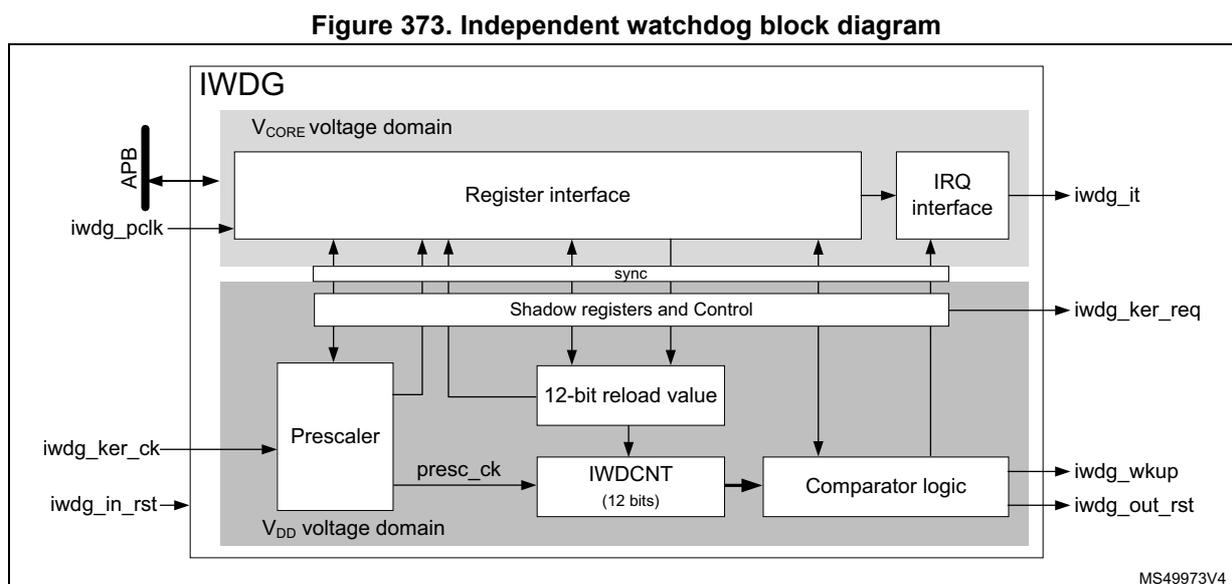
Figure 373. Independent watchdog block diagram
The register and IRQ interfaces are located into the \( V_{CORE} \) voltage domain. The watchdog function itself is located into the \( V_{DD} \) voltage domain to remain functional in low power modes. See Section 34.3 for IWDG capabilities.
The register and IRQ interfaces are mainly clocked by the APB clock (iwdg_pclk), while the watchdog function is clocked by a dedicated kernel clock (iwdg_ker_ck). A synchronization mechanism makes the data exchange between the two domains possible. Note that most of the registers located in the register interface are shadowed into the \( V_{DD} \) voltage domain.
The IWDG down-counter (IWDCNT) is clocked by the prescaled clock (presc_ck). The prescaled clock is generated from the kernel clock iwdg_ker_ck divided by the prescaler, according to PR[3:0] bitfield.
The table below gives the timing delays according to the actions performed on the IWDG: changing the prescaler, the timeout, the window or the early wake-up comparator values or doing a refresh.
Table 323. IWDG delays versus actions (1)
| TD RVU , TD PVU | TD WVU | TD EWU | TD Refresh | TD RefAuto | |||||
|---|---|---|---|---|---|---|---|---|---|
| Min | Max | Min | Max | Min | Max | Min | Max | Min | Max |
| 5 T k | 6 T k | - | 6 T k | - | 6 T k | 2 T k | 2 T k + T p | - | T p |
- 1.
\(
T_k
\)
represents a period of the kernel clock input,
\(
T_p
\)
represents a period of
presc_ck.
34.4.2 IWDG internal signals
The list of IWDG internal signals is detailed in Table 324 .
Table 324. IWDG internal input/output signals
| Signal name | Signal type | Description |
|---|---|---|
iwdg_ker_ck | Input | IWDG kernel clock |
iwdg_ker_req | Input | IWDG kernel clock request |
iwdg_pclk | Input | IWDG APB clock |
iwdg_out_rst | Output | IWDG reset output |
iwdg_in_rst | Input | IWDG reset input |
iwdg_wkup | Output | IWDG wake-up event |
iwdg_it | Output | IWDG early wake-up interrupt |
34.4.3 Software and hardware watchdog modes
The watchdog modes allow the application to select the way the IWDG is enabled, either by software commands (Software watchdog mode), or automatically (Hardware watchdog mode). All other functions work similarly for both Software and Hardware modes.
The Software watchdog mode is the default working mode. The independent watchdog is started by writing the value 0x0000 CCCC into the IWDG key register (IWDG_KR) , and the IWDCNT starts counting down from the reset value (0xFFFF).
In the hardware watchdog mode the independent watchdog is started automatically at power-on, or every time it is reset (via
iwdg_in_rst
). The IWDCNT down-counter starts counting down from the reset value 0xFFFF. The hardware watchdog mode feature is enabled through the device option bits, see
Section 34.3
for details.
When the IWDG is enabled the ONF flag is set to 1.
When the IWDCNT reaches 0x0000, a reset signal is generated (
iwdg_out_rst
asserted).
Whenever the key value 0x0000 AAAA is written in the IWDG key register (IWDG_KR) , the IWDG_RLR value is reloaded into the IWDCNT, and the watchdog reset is prevented.
Due to re-synchronization delays, the IWDG must be refreshed before the IWDCNT down-counter reaches 1.
Once started, the IWDG can be stopped only when it is reset (
iwdg_in_rst
asserted).
As shown in
Figure 374
, when the refresh command is executed, one period of
presc_ck
later, the IWDCNT is reloaded with the content of RL[11:0].
Figure 374. Reset timing due to timeout
![Figure 374. Reset timing due to timeout. A timing diagram showing the IWDCNT value decreasing linearly from RL[11:0]. A 'Refresh not allowed' window is shown when IWDCNT > WIN[11:0]+1, and a 'Refresh allowed' window follows. When IWDCNT reaches 0, iwdg_out_rst is asserted (goes low) and iwdg_in_rst is subsequently asserted to clear the reset. A detail view shows the final count steps 2, 1, 0 with a period of T_presc_ck.](/RM0493-STM32WBA5/cac86201f3ea7bdc008832e4586f6220_img.jpg)
The figure is a timing diagram titled 'Figure 374. Reset timing due to timeout'. It illustrates the behavior of the IWDG counter (IWDCNT) over time. The vertical axis represents the IWDCNT value, with key levels marked: 0xFFF, RL[11:0], and WIN[11:0]. The horizontal axis represents Time. The counter starts at RL[11:0] and counts down. A vertical line marks the point where IWDCNT equals WIN[11:0]+1. The period before this is labeled 'Refresh not allowed (1) ' and is shaded. The period after is labeled 'Refresh allowed'. Below the graph, signals are shown: 'Writing 0xAAAA into IWDG_KR' (a pulse), 'iwdg_out_rst' (active low reset signal), and 'iwdg_in_rst'. When the counter reaches 0, iwdg_out_rst is asserted. A circular inset provides a zoomed-in view of the counter reaching 0, showing steps 2, 1, and 0, each lasting one T presc_ck period. The diagram is identified by the code MS49974V2.
1. If window option activated.
If the IWDG is not refreshed before the IWDCNT reaches 1, the IWDG generates a reset (iwdg_out_rst is asserted). In return, the RCC resets the IWDG (assertion of iwdg_in_rst) to clear the reset source.
34.4.4 Window option
The IWDG can also work as a window watchdog, by setting the appropriate window in the IWDG window register (IWDG_WINR) .
If the reload operation is performed while the counter is greater than WIN[11:0] + 1, a reset is generated. WIN[11:0] is located in the IWDG window register (IWDG_WINR) . As shown in Figure 375, the reset is generated one period of presc_ck after the unexpected refresh command.
The default value of the IWDG window register (IWDG_WINR) is 0x0000 0FFF, so, if not updated, the window option is disabled.
As soon as the window value changes, the down-counter (IWDCNT) is reloaded with the RL[11:0] value, to ease the estimation for where the next refresh must take place.
Figure 375. Reset timing due to refresh in the not allowed area
![Timing diagram for IWDG reset due to refresh in the not allowed area. The diagram shows the IWDGCNT value, RL[11:0], WIN[11:0] + 1, Writing 0xAAAA into IWDG_KR, iwdg_out_rst, and iwdg_in_rst signals over time. The IWDGCNT value starts at 0xFFF and decreases. The RL[11:0] value is shown as a step function. The WIN[11:0] + 1 value is shown as a step function. The Writing 0xAAAA into IWDG_KR signal is shown as a pulse. The iwdg_out_rst signal is shown as a pulse. The iwdg_in_rst signal is shown as a pulse. The 'Refresh not allowed' period is indicated by a shaded region. The time interval between the two pulses of the Writing 0xAAAA into IWDG_KR signal is labeled T_presc_ck.](/RM0493-STM32WBA5/abe067d2195d88a218ff502caf877cae_img.jpg)
The figure is a timing diagram illustrating the reset timing due to a refresh in the not allowed area. The vertical axis represents the IWDGCNT value, with markers for 0xFFF, RL[11:0], and WIN[11:0] + 1. The horizontal axis represents Time. The diagram shows the following signals and events:
- IWDGCNT value: Starts at 0xFFF and decreases linearly. It reaches the RL[11:0] value, then the WIN[11:0] + 1 value, and finally reaches 0x0000, triggering a reset.
- RL[11:0]: A step function that is high during the 'Refresh not allowed' period.
- WIN[11:0] + 1: A step function that is high during the 'Refresh not allowed' period.
- Writing 0xAAAA into IWDG_KR: Two pulses of this signal, separated by a time interval \( T_{presc\_ck} \) . The first pulse occurs before the 'Refresh not allowed' period, and the second pulse occurs during it.
- iwdg_out_rst: A pulse that goes high when the IWDGCNT value reaches 0x0000 and goes low when the IWDG_KR register is written with 0xAAAA.
- iwdg_in_rst: A pulse that goes high when the IWDGCNT value reaches 0x0000 and goes low when the IWDG_KR register is written with 0x0000.
- Refresh not allowed: A shaded region between the two pulses of the Writing 0xAAAA into IWDG_KR signal.
MS49975V3
Configuring the IWDG when the window option is enabled
- 1. Enable the IWDG by writing 0x0000 CCCC in the IWDG key register (IWDG_KR) .
- 2. Enable register access by writing 0x0000 5555 in the IWDG key register (IWDG_KR) .
- 3. Write the IWDG prescaler by programming IWDG prescaler register (IWDG_PR) .
- 4. Write the IWDG reload register (IWDG_RLR) .
- 5. If needed, enable the early wake-up interrupt, and program the early wake-up comparator, by writing the proper values into the IWDG early wake-up interrupt register (IWDG_EWCR) .
- 6. Write to the IWDG window register (IWDG_WINR) . This automatically reloads the IWDGCNT down-counter with the RL[11:0] value.
- 7. Wait for the registers to be updated (IWDG_SR = 0x0000 0000).
- 8. Write 0x0000 0000 into IWDG key register (IWDG_KR) to write-protect registers.
Note: Step 7 can be skipped if the application does not intend to disable the APB clock after the completion of this sequence.
Configuring the IWDG when the window option is disabled
When the window option is not used, the IWDG can be configured as follows:
- 1. Enable the IWDG by writing 0x0000 CCCC in the IWDG key register (IWDG_KR) .
- 2. Enable register access by writing 0x0000 5555 in the IWDG key register (IWDG_KR) .
- 3. Write the prescaler by programming the IWDG prescaler register (IWDG_PR) .
- 4. Write the IWDG reload register (IWDG_RLR) .
- 5. If needed, enable the early wake-up interrupt, and program the early wake-up comparator, by writing the proper values into the IWDG early wake-up interrupt register (IWDG_EWCR) .
- 6. Wait for the registers to be updated ( IWDG_SR = 0x0000 0000).
- 7. Refresh the counter with RL[11:0] value, and write-protect registers by writing 0x0000 AAAA into IWDG key register (IWDG_KR) .
The figure below shows a sequence example changing the prescaler, the reload value, and then performing a refresh.
Figure 376. Changing PR, RL, and performing a refresh (1)
![Timing diagram showing the sequence of operations to change the prescaler, reload value, and perform a refresh. The diagram includes signals for iwdg_ker_ck, WDGcnt counter, PVU, RVU, Prescaler, RL[11:0], and CPU activity. It shows the counter counting down from N to N-k, then N-k-1 to N-k-t, and finally N-k-t-1 to M. The prescaler is changed from ÷4 to ÷8. The reload value is changed from P to M. The CPU activity shows writes to IWDG_PR, IWDG_KR, and IWDG_KR. The diagram also indicates the refresh ignored region and the timeout delays TD_PVU, TD_RVU, and TD_Refresh.](/RM0493-STM32WBA5/26d6f0eb5c196a529f6f991e61b533f3_img.jpg)
The diagram illustrates the timing sequence for configuring the IWDG. The top signal is iwdg_ker_ck , a high-frequency clock. Below it is the WDGcnt counter , which counts down from N to N-k , then from N-k-1 to N-k-t , and finally from N-k-t-1 to M . The counter is divided by 4, then 8, and then 1. The PVU (Prescaler Value Update) signal is active low and is used to update the prescaler. The RVU (Reload Value Update) signal is active low and is used to update the reload value. The Prescaler is initially set to ÷ 4 and is changed to ÷ 8 . The RL[11:0] register is initially set to P and is changed to M . The CPU activity shows three write operations: Write 1 into IWDG_PR , Write 0x5555 into IWDG_KR (Registers unlock), and Write into M into RL[11:0] . The final write is Write 0xAAAA into IWDG_KR (Refresh + Registers lock). The diagram also indicates the Refresh ignored region and the timeout delays TD_PVU , TD_RVU , and TD_Refresh .
- 1. Refer to Table 323: IWDG delays versus actions for details on timing values.
Note: When the new prescaler value is accepted by the IWDG (falling edge of PVU), the new division ratio is effective when the current division sequence is completed ( N-k in the drawing).
Note: The timeout delay between the refresh (write 0xAAAA into IWDG_KR) and the watchdog reset is increased by TD_Refresh .
If a refresh command is sent while the previous refresh command is not yet completed, this last refresh command is ignored.
Updating the window comparator
It is possible to update the window comparator when the IWDG is already running. The IWDCNT is reloaded as well. The following sequence can be performed to update the window comparator:
- 1. Enable register access by writing 0x0000 5555 in the IWDG key register (IWDG_KR).
- 2. Write to the IWDG window register (IWDG_WINR). This automatically reloads the IWDCNT down-counter with RL[11:0] value.
- 3. Wait for WVU = 0
- 4. Lock registers by writing IWDG_KR to 0x0000 0000
Step 3 can be skipped if the application does not intend to disable the APB clock after the completion of this sequence.
Figure 377 shows this sequence. As soon as the IWDG_WINR register is written, the WVU flag goes high for TD WVU . After a window comparator update, a refresh is automatically performed. The refresh is effective in the worst case, on the next prescaler clock active edge after the falling edge of WVU (TD RefAuto )
Figure 377. Window comparator update (1)
![Timing diagram for window comparator update. The diagram shows five horizontal signal lines: iwdg_ker_ck (clock pulses), WDGCNT counter (values N, ..., N-k, M, M-1, M-2, ...), WVU (flag), WIN[11:0] (values 500, 800), and CPU activity. CPU activity shows three discrete write events: 'Write 0x5555 into IWDG_KR' (Registers unlock), 'Write 800 into IWDG_WINR', and 'Write 0x0000 into IWDG_KR' (Registers lock). The WVU flag goes high immediately after the WIN[11:0] write and goes low after a duration TD_WVU. The WDGCNT counter reloads to value M after the WIN[11:0] write. A yellow shaded area labeled 'Refresh ignored region' is shown between the falling edge of WVU and the next clock edge, with a duration TD_RefAuto indicated. RL[11:0] is shown as a constant value M.](/RM0493-STM32WBA5/c5955e479775ca07203fff704c3cb6f8_img.jpg)
MSv75427V1
- 1. Refer to Table 323: IWDG delays versus actions for details on timing values.
34.4.5 Debug
When the processor enters into Debug mode (core halted), the IWDCNT down-counter either continues to work normally or stops, depending on debug capability of the product. Refer to Section 34.3 for details on the capabilities of this product.
34.4.6 Register access protection
Write accesses to IWDG prescaler register (IWDG_PR) , IWDG reload register (IWDG_RLR) , IWDG early wake-up interrupt register (IWDG_EWCR) and IWDG window register (IWDG_WINR) are protected. To modify them, first write 0x0000 5555 in the IWDG key register (IWDG_KR) . A write access to this register with a different value breaks the
sequence and register access is protected again. This is the case of the reload operation (writing 0x0000 AAAA).
A status register is available to indicate that an update of the prescaler or the down-counter reload value or the window value is ongoing.
34.5 IWDG low power modes
Depending on option bytes configuration, the IWDG can continue counting or not during the low power modes. Refer to Section 34.3 for details.
Table 325. Effect of low power modes on IWDG
| Mode | Description |
|---|---|
| Sleep | No effect. IWDG interrupts cause the device to exit from the mode. |
| Stop | The IWDG remains active or not, depending on option bytes configuration. Refer to
Section 34.3
for details. IWDG interrupts cause the device exit the Stop mode. |
| Standby | The IWDG remains active or not, depending on option bytes configuration. Refer to
Section 34.3
for details. IWDG interrupts cause the device to exit from Standby mode. |
34.6 IWDG interrupts
The IWDG offers the possibility to generate an early interrupt depending on the value of the down-counter. The early interrupt is enabled by setting the EWIE bit of the IWDG early wake-up interrupt register (IWDG_EWCR) to 1.
A comparator value (EWIT[11:0]) allows the application to define the position where the early interrupt must be generated.
When the IWDGCNT down-counter reaches the value of EWIT[11:0] - 1, the iwdg_wkup is activated, making it possible for the system to exit from low power modes, if needed.
When the APB clock is available, the iwdg_it is activated as well.
In addition, the flag EWIF of the IWDG status register (IWDG_SR) is set to 1.
The EWI interrupt is acknowledged by writing 1 to the EWIC bit in the IWDG early wake-up interrupt register (IWDG_EWCR) .
Writing into the IWDG_EWCR register also triggers a refresh of the down-counter (IWDGCNT) with the reload value RL[11:0].
Figure 378. Independent watchdog interrupt timing diagram
![Figure 378. Independent watchdog interrupt timing diagram. The diagram shows the relationship between the IWDGCNT value, APB write accesses, iwdg_wkup_it signal, pclk signal, and iwdg_it signal over time. The IWDGCNT value starts at EWIT[11:0] and decreases linearly. A vertical dashed line marks the point where IWDGCNT = EWIT - 1. At this point, the iwdg_wkup_it signal goes high. A write to EWIC to '1' is shown. The pclk signal is active during this period. The iwdg_it signal goes high when the pclk is active and the iwdg_wkup_it signal is high.](/RM0493-STM32WBA5/0114b77e3345b02a5490775fef811f2e_img.jpg)
The figure is a timing diagram illustrating the Independent Watchdog (IWDG) interrupt sequence. The top graph shows the IWDGCNT value decreasing linearly over time. A horizontal line represents the EWIT[11:0] threshold. A vertical dashed line indicates the point where IWDGCNT = EWIT - 1. Below the graph, four signal lines are shown: APB write accesses, iwdg_wkup_it, pclk, and iwdg_it. The iwdg_wkup_it signal goes high at the IWDGCNT = EWIT - 1 point. A write to EWIC to '1' is shown. The pclk signal is active during this period. The iwdg_it signal goes high when the pclk is active and the iwdg_wkup_it signal is high. The diagram is labeled MS49976V1.
The early wake-up interrupt (EWI) can be used if specific safety operations or data logging must be performed before the watchdog reset is generated.
Changing the early wake-up comparator value
It is possible to change the early wake-up comparator value or to enable/disable the interrupt generation at any time, by performing the following sequence:
- 1. Enable register access by writing 0x0000 5555 in the IWDG key register (IWDG_KR) .
- 2. Enable or disable the early wake-up interrupt, and/or program the early wake-up comparator, by writing the proper values into the IWDG early wake-up interrupt register (IWDG_EWCR) .
- 3. Wait for EWU = 0, EWU is located into the IWDG status register (IWDG_SR) .
- 4. Write-protect registers by writing 0x0000 0000 to IWDG key register (IWDG_KR) .
Step 3 can be skipped if the application does not intend to disable the APB clock after the completion of this sequence.
Figure 378 shows this sequence. During the early wake-up comparator update operation the flag EWU remains to 1 for TDewu. A refresh is automatically performed. The refresh is effective on the worst case, on the next prescaler clock active edge after the falling edge of EWU (TDRefAuto).
Figure 379. Early wake-up comparator update (1)![Timing diagram for early wake-up comparator update. It shows the relationship between iwdg_ker_ck, WDGCNT counter, EWU, EWIT[11:0], RL[11:0], and CPU activity. The counter counts down from N to M, where M is the refresh ignored region. The EWU is updated from 500 to 300. The RL is updated to M. CPU activity includes writing into EWIT[11:0], writing 0x5555 into IWDG_KR (Registers unlock), and writing 0x0000 into IWDG_KR (Registers lock).](/RM0493-STM32WBA5/91c210e7f3d61b5e26832a0452996b8d_img.jpg)
The diagram illustrates the timing for updating the early wake-up comparator. The iwdg_ker_ck signal is a periodic clock. The WDGCNT counter counts down from N to M . The time interval between N and N-k is TD EWU , and the interval between N-k and M is TD RefAuto . The region around M is labeled as the Refresh ignored region . The EWU (Early Wake-Up) signal is shown. The EWIT[11:0] register is updated from 500 to 300 . The RL[11:0] register is updated to M . CPU activity includes writing into EWIT[11:0] , writing 0x5555 into IWDG_KR (Registers unlock), and writing 0x0000 into IWDG_KR (Registers lock). The diagram is labeled MSv75425V1 .
1. Refer to Table 323: IWDG delays versus actions for details on timing values.
Table 326 summarizes the IWDG interrupt request.
Table 326. IWDG interrupt request
| Interrupt event | Event flag | Interrupt clear method | Interrupt enable control bit | Activated interrupt | |
|---|---|---|---|---|---|
| iwdg_it | iwdg_wkup_it | ||||
| IWDGCNT reaches EWIT value | EWIF | Writing EWIC to 1 | EWIE | γ (1) | γ (2) |
- 1. Generated when a clock is present on iwdg_pclk input.
- 2. Generated when a clock is present on iwdg_ker_ck input.
34.7 IWDG registers
Refer to Section 1.2 on page 70 for a list of abbreviations used in register descriptions.
The peripheral registers can be accessed by half-words (16-bit) or words (32-bit).
Most of the registers located into the register interface are shadowed into the \( V_{DD} \) voltage domain. When the iwdg_in_rst is asserted, the watchdog logic and the shadow registers located into the \( V_{DD} \) voltage domain are reset.
When the application reads back a watchdog register, the hardware transfers the value of the corresponding shadow register to the register interface.
When the application writes a watchdog register, the hardware updates the corresponding shadow register.
34.7.1 IWDG key register (IWDG_KR)
Address offset: 0x00
Reset value: 0x0000 0000
| 31 | 30 | 29 | 28 | 27 | 26 | 25 | 24 | 23 | 22 | 21 | 20 | 19 | 18 | 17 | 16 |
|---|---|---|---|---|---|---|---|---|---|---|---|---|---|---|---|
| Res. | Res. | Res. | Res. | Res. | Res. | Res. | Res. | Res. | Res. | Res. | Res. | Res. | Res. | Res. | Res. |
| 15 | 14 | 13 | 12 | 11 | 10 | 9 | 8 | 7 | 6 | 5 | 4 | 3 | 2 | 1 | 0 |
| KEY[15:0] | |||||||||||||||
| w | w | w | w | w | w | w | w | w | w | w | w | w | w | w | w |
Bits 31:16 Reserved, must be kept at reset value.
Bits 15:0 KEY[15:0] : Key value (write only, read 0x0000)
These bits can be used for several functions, depending upon the value written by the application:
- - 0xAAAA: reloads the RL[11:0] value into the IWDGCNT down-counter (watchdog refresh), and write-protects registers. This value must be written by software at regular intervals, otherwise the watchdog generates a reset when the counter reaches 0.
- - 0x5555: enables write-accesses to the registers.
- - 0xCCCC: enables the watchdog (except if the hardware watchdog option is selected) and write-protects registers.
- - values different from 0x5555: write-protects registers.
Note that only IWDG_PR, IWDG_RLR, IWDG_EWCR and IWDG_WINR registers have a write-protection mechanism.
34.7.2 IWDG prescaler register (IWDG_PR)
Address offset: 0x04
Reset value: 0x0000 0000
| 31 | 30 | 29 | 28 | 27 | 26 | 25 | 24 | 23 | 22 | 21 | 20 | 19 | 18 | 17 | 16 |
|---|---|---|---|---|---|---|---|---|---|---|---|---|---|---|---|
| Res. | Res. | Res. | Res. | Res. | Res. | Res. | Res. | Res. | Res. | Res. | Res. | Res. | Res. | Res. | Res. |
| 15 | 14 | 13 | 12 | 11 | 10 | 9 | 8 | 7 | 6 | 5 | 4 | 3 | 2 | 1 | 0 |
| Res. | Res. | Res. | Res. | Res. | Res. | Res. | Res. | Res. | Res. | Res. | Res. | PR[3:0] | |||
| rw | rw | rw | rw | ||||||||||||
Bits 31:4 Reserved, must be kept at reset value.
Bits 3:0 PR[3:0] : Prescaler divider
These bits are write access protected, see Section 34.4.6 . They are written by software to select the prescaler divider feeding the counter clock. PVU bit of the IWDG status register (IWDG_SR) must be reset to be able to change the prescaler divider.
0000: divider / 4
0001: divider / 8
0010: divider / 16
0011: divider / 32
0100: divider / 64
0101: divider / 128
0110: divider / 256
0111: divider / 512
Others: divider / 1024
Note: Reading this register returns the prescaler value from the \( V_{DD} \) voltage domain. This value may not be up to date/valid if a write operation to this register is ongoing. For this reason the value read from this register is valid only when the PVU bit in the IWDG status register (IWDG_SR) is reset.
34.7.3 IWDG reload register (IWDG_RLR)
Address offset: 0x08
Reset value: 0x0000 0FFF
| 31 | 30 | 29 | 28 | 27 | 26 | 25 | 24 | 23 | 22 | 21 | 20 | 19 | 18 | 17 | 16 |
|---|---|---|---|---|---|---|---|---|---|---|---|---|---|---|---|
| Res. | Res. | Res. | Res. | Res. | Res. | Res. | Res. | Res. | Res. | Res. | Res. | Res. | Res. | Res. | Res. |
| 15 | 14 | 13 | 12 | 11 | 10 | 9 | 8 | 7 | 6 | 5 | 4 | 3 | 2 | 1 | 0 |
| Res. | Res. | Res. | Res. | RL[11:0] | |||||||||||
| rw | rw | rw | rw | rw | rw | rw | rw | rw | rw | rw | rw | ||||
Bits 31:12 Reserved, must be kept at reset value.
Bits 11:0 RL[11:0] : Watchdog counter reload value
These bits are write access protected, see Section 34.4.6 . They are written by software to define the value to be loaded in the watchdog counter each time the value 0xAAAA is written in the IWDG key register (IWDG_KR) . The watchdog counter counts down from this value. The timeout period is a function of this value and the prescaler/clock. It is not recommended to set RL[11:0] to a value lower than 2.
The RVU bit in the IWDG status register (IWDG_SR) must be reset to be able to change the reload value.
Note: Reading this register returns the reload value from the \( V_{DD} \) voltage domain. This value may not be up to date/valid if a write operation to this register is ongoing, hence the value read from this register is valid only when the RVU bit in the IWDG status register (IWDG_SR) is reset.
34.7.4 IWDG status register (IWDG_SR)
Address offset: 0x0C
Reset value: 0x0000 0000 (0xFFFF FEFF)
This register contains various status flags. Note that the mask value between parenthesis means that the reset value of ONF bit is not defined. When the IWDG is configured in
software mode, the reset value of ONF bit is 0, when the IWDG is configured in hardware mode, the reset value of ONF bit is 1.
| 31 | 30 | 29 | 28 | 27 | 26 | 25 | 24 | 23 | 22 | 21 | 20 | 19 | 18 | 17 | 16 |
|---|---|---|---|---|---|---|---|---|---|---|---|---|---|---|---|
| Res. | Res. | Res. | Res. | Res. | Res. | Res. | Res. | Res. | Res. | Res. | Res. | Res. | Res. | Res. | Res. |
| 15 | 14 | 13 | 12 | 11 | 10 | 9 | 8 | 7 | 6 | 5 | 4 | 3 | 2 | 1 | 0 |
| Res. | EWIF | Res. | Res. | Res. | Res. | Res. | ONF | Res. | Res. | Res. | Res. | EWU | WVU | RVU | PVU |
| r | r | r | r | r | r |
Bits 31:15 Reserved, must be kept at reset value.
Bit 14 EWIF : Watchdog early interrupt flag
This bit is set to '1' by hardware in order to indicate that an early interrupt is pending. This bit must be cleared by the software by writing the bit EWIC of IWDG_EWCR register to '1'.
Bits 13:9 Reserved, must be kept at reset value.
Bit 8 ONF : Watchdog enable status bit
Set to '1' by hardware as soon as the IWDG is started. In software mode, it remains to '1' until the IWDG is reset. In hardware mode, this bit is always set to '1'.
0: The IWDG is not activated
1: The IWDG is activated and needs to be refreshed regularly by the application
Bits 7:4 Reserved, must be kept at reset value.
Bit 3 EWU : Watchdog interrupt comparator value update
This bit is set by hardware to indicate that an update of the interrupt comparator value (EWIT[11:0]) or an update of the EWIE is ongoing. It is reset by hardware when the update operation is completed in the V DD voltage domain. Refer to Table 323: IWDG delays versus actions for delay values.
The EWIT[11:0] and EWIE fields can be updated only when EWU bit is reset.
Bit 2 WVU : Watchdog counter window value update
This bit is set by hardware to indicate that an update of the window value is ongoing. It is reset by hardware when the reload value update operation is completed in the V DD voltage domain. Refer to Table 323: IWDG delays versus actions for delay values.
The window value can be updated only when WVU bit is reset.
This bit is generated only if generic "window" = 1.
Bit 1 RVU : Watchdog counter reload value update
This bit is set by hardware to indicate that an update of the reload value is ongoing. It is reset by hardware when the reload value update operation is completed in the V DD voltage domain. Refer to Table 323: IWDG delays versus actions for delay values.
The reload value can be updated only when RVU bit is reset.
Bit 0 PVU : Watchdog prescaler value update
This bit is set by hardware to indicate that an update of the prescaler value is ongoing. It is reset by hardware when the prescaler update operation is completed in the V DD voltage domain. Refer to Table 323: IWDG delays versus actions for delay values.
The prescaler value can be updated only when PVU bit is reset.
Note: If several reload, prescaler, early interrupt position or window values are used by the application, it is mandatory to wait until RVU bit is reset before changing the reload value, to wait until PVU bit is reset before changing the prescaler value, to wait until WVU bit is reset before changing the window value, and to wait until EWU bit is reset before changing the
early interrupt position value. After updating the prescaler and/or the reload/window/early interrupt value, it is not necessary to wait until RVU or PVU or WVU or EWU is reset before continuing code execution, except in case of low power mode entry.
34.7.5 IWDG window register (IWDG_WINR)
Address offset: 0x10
Reset value: 0x0000 0FFF
| 31 | 30 | 29 | 28 | 27 | 26 | 25 | 24 | 23 | 22 | 21 | 20 | 19 | 18 | 17 | 16 |
|---|---|---|---|---|---|---|---|---|---|---|---|---|---|---|---|
| Res. | Res. | Res. | Res. | Res. | Res. | Res. | Res. | Res. | Res. | Res. | Res. | Res. | Res. | Res. | Res. |
| 15 | 14 | 13 | 12 | 11 | 10 | 9 | 8 | 7 | 6 | 5 | 4 | 3 | 2 | 1 | 0 |
| Res. | Res. | Res. | Res. | WIN[11:0] | rw | rw | rw | rw | rw | rw | rw | rw | |||
Bits 31:12 Reserved, must be kept at reset value.
Bits 11:0 WIN[11:0] : Watchdog counter window value
These bits are write access protected, see Section 34.4.6 . They contain the high limit of the window value to be compared with the downcounter.
To prevent a reset, the IWDGCNT downcounter must be reloaded when its value is lower than WIN[11:0] + 1 and greater than 1.
The WVU bit in the IWDG status register (IWDG_SR) must be reset to be able to change the reload value.
Note: Reading this register returns the reload value from the V DD voltage domain. This value may not be valid if a write operation to this register is ongoing. For this reason the value read from this register is valid only when the WVU bit in the IWDG status register (IWDG_SR) is reset.
34.7.6 IWDG early wake-up interrupt register (IWDG_EWCR)
Address offset: 0x14
Reset value: 0x0000 0000
| 31 | 30 | 29 | 28 | 27 | 26 | 25 | 24 | 23 | 22 | 21 | 20 | 19 | 18 | 17 | 16 |
|---|---|---|---|---|---|---|---|---|---|---|---|---|---|---|---|
| Res. | Res. | Res. | Res. | Res. | Res. | Res. | Res. | Res. | Res. | Res. | Res. | Res. | Res. | Res. | Res. |
| 15 | 14 | 13 | 12 | 11 | 10 | 9 | 8 | 7 | 6 | 5 | 4 | 3 | 2 | 1 | 0 |
| EWIE | EWIC | Res. | Res. | EWIT[11:0] | rw | rw | rw | rw | rw | rw | rw | rw | |||
Bits 31:16 Reserved, must be kept at reset value.
Bit 15 EWIE : Watchdog early interrupt enable
Set and reset by software.
0: The early interrupt interface is disabled.
1: The early interrupt interface is enabled.
The EWU bit in the IWDG status register (IWDG_SR) must be reset to be able to change the value of this bit.
Bit 14 EWIC : Watchdog early interrupt acknowledge
The software must write a 1 into this bit in order to acknowledge the early wake-up interrupt and to clear the EWIF flag. Writing 0 has no effect, reading this flag returns a 0.
Bits 13:12 Reserved, must be kept at reset value.
Bits 11:0 EWIT[11:0] : Watchdog counter window value
These bits are write access protected (see Section 34.4.6 ). They are written by software to define at which position of the IWDGCNT down-counter the early wake-up interrupt must be generated. The early interrupt is generated when the IWDGCNT is lower or equal to EWIT[11:0] - 1.
EWIT[11:0] must be bigger than 1.
An interrupt is generated only if EWIE = 1.
The EWU bit in the IWDG status register (IWDG_SR) must be reset to be able to change the reload value.
Note: Reading this register returns the Early wake-up comparator value and the Interrupt enable bit from the \( V_{DD} \) voltage domain. This value may not be up to date/valid if a write operation to this register is ongoing, hence the value read from this register is valid only when the EWU bit in the IWDG status register (IWDG_SR) is reset.
34.7.7 IWDG register map
Table 327. IWDG register map and reset values
| Offset | Register name | 31 | 30 | 29 | 28 | 27 | 26 | 25 | 24 | 23 | 22 | 21 | 20 | 19 | 18 | 17 | 16 | 15 | 14 | 13 | 12 | 11 | 10 | 9 | 8 | 7 | 6 | 5 | 4 | 3 | 2 | 1 | 0 | |
|---|---|---|---|---|---|---|---|---|---|---|---|---|---|---|---|---|---|---|---|---|---|---|---|---|---|---|---|---|---|---|---|---|---|---|
| 0x00 | IWDG_KR | Res. | Res. | Res. | Res. | Res. | Res. | Res. | Res. | Res. | Res. | Res. | Res. | Res. | Res. | Res. | Res. | KEY[15:0] | ||||||||||||||||
| Reset value | 0 | 0 | 0 | 0 | 0 | 0 | 0 | 0 | 0 | 0 | 0 | 0 | 0 | 0 | 0 | 0 | ||||||||||||||||||
| 0x04 | IWDG_PR | Res. | Res. | Res. | Res. | Res. | Res. | Res. | Res. | Res. | Res. | Res. | Res. | Res. | Res. | Res. | Res. | Res. | Res. | Res. | Res. | Res. | Res. | Res. | Res. | Res. | Res. | Res. | Res. | Res. | PR[3:0] | |||
| Reset value | 0 | 0 | 0 | 0 | ||||||||||||||||||||||||||||||
| 0x08 | IWDG_RLR | Res. | Res. | Res. | Res. | Res. | Res. | Res. | Res. | Res. | Res. | Res. | Res. | Res. | Res. | Res. | Res. | Res. | Res. | Res. | Res. | RL[11:0] | ||||||||||||
| Reset value | 1 | 1 | 1 | 1 | 1 | 1 | 1 | 1 | 1 | 1 | 1 | 1 | ||||||||||||||||||||||
| 0x0C | IWDG_SR | Res. | Res. | Res. | Res. | Res. | Res. | Res. | Res. | Res. | Res. | Res. | Res. | Res. | Res. | Res. | Res. | Res. | EMIF | Res. | Res. | Res. | Res. | Res. | ONF | Res. | Res. | Res. | Res. | EWU | WUJ | RJU | PVU | |
| Reset value | 0 | x | 0 | 0 | 0 | 0 | ||||||||||||||||||||||||||||
| 0x10 | IWDG_WINR | Res. | Res. | Res. | Res. | Res. | Res. | Res. | Res. | Res. | Res. | Res. | Res. | Res. | Res. | Res. | Res. | Res. | Res. | Res. | Res. | WIN[11:0] | ||||||||||||
| Reset value | 1 | 1 | 1 | 1 | 1 | 1 | 1 | 1 | 1 | 1 | 1 | 1 | ||||||||||||||||||||||
| 0x14 | IWDG_EWCR | Res. | Res. | Res. | Res. | Res. | Res. | Res. | Res. | Res. | Res. | Res. | Res. | Res. | Res. | Res. | Res. | EWIE | EWIC | Res. | Res. | EWIT[11:0] | ||||||||||||
| Reset value | 0 | 0 | 0 | 0 | 0 | 0 | 0 | 0 | 0 | 0 | 0 | 0 | 0 | 0 | ||||||||||||||||||||