3. System security
The device is designed with a comprehensive set of security features, some of which are based on the standard Arm TrustZone® technology (a) .
These features simplify the process of evaluating IoT devices against security standards. They also significantly reduce the cost and complexity of software development for OEM and third-party developers, by facilitating the reuse, improving the interoperability, and minimizing the API fragmentation.
This section explains the different security features available on the device.
3.1 Key security features
- • Resource isolation using privileged mode and Armv8-M mainline security extension of Cortex-M33, extended to securable I/Os, memories, and peripherals
- • Secure firmware installation (SFI) with device unique cryptographic key pair
(a)
- – leveraging the on-chip immutable bootloader that supports the download of image through USART, I 2 C, SPI, and JTAG
- • Secure boot thanks to the unique boot entry feature and hide-protect area (HDP) mechanism (a)
- • Secure storage, featuring:
- – Nonvolatile on-chip secure storage, protected with secure and HDP areas (a)
- – Volatile secure storage, automatically erased in case of tamper
- – Write-only key registers in the AES engines
- – Device 96-bit unique ID and JTAG 32-bit device-specific ID
- – On-chip enhanced storage technology, using hardware secret nonvolatile derived hardware unique key (DHUK), and application-defined volatile secret boot hardware key (BHK), both loadable by hardware to the DPA-resistant SAES engine (a)
- • General purpose cryptographic acceleration
- – AES 256-bit engine, supporting ECB, CBC, CTR, GCM, and CCM chaining modes
- – Secure AES 256-bit security coprocessor, supporting ECB, CBC, CTR, GCM, and CCM chaining modes with side-channel countermeasures and mitigations (a)
- – HASH processor, supporting MD5/SHA-1 checksums and SHA-2 secure hash
- – Public key accelerator (PKA) for RSA/DH (up to 4096 bits) and ECC (up to 640 bits), implementing side-channel counter measures and mitigations when manipulating secrets
- – True random number generator (RNG), NIST SP800-90B precertified
- • Flexible life cycle scheme with readout protection (RDP), including support for product decommissioning (auto-erase)
- – Debug protection, depending on the RDP level
- – Optional password-based RDP level regressions, including for RDP Level 2
a. Available only on STM32WBA52/4/5x devices.
- • Protected firmware distribution scheme, using TrustZone and RDP Level 0.5 (a)
- • Active tamper and protection
- – Six active inputs, six active output tamper pins, available in all power modes
3.2 Secure firmware install (a)
The secure firmware install (SFI) is an immutable secure service embedded in the devices. The SFI allows secure and counted installation of OEM firmware in an untrusted production environment (such as OEM contract manufacturer).
The confidentiality of the installed images written in the internal flash memory is protected using the AES.
The SFI native service leverages the following hardware security features:
- • secure boot (see Section 3.3 )
- • resource isolation using TrustZone (see Section 3.5 )
- • temporal isolation using hide protection (see Section 3.6.1 )
- • secure execution (see Section 3.7 )
- • secure storage, with associated cryptographic engines (see Section 3.8 and Section 3.10 )
Further information can be found in AN4992 STM32 MCUs secure firmware install (SFI) overview , available on www.st.com .
3.3 Secure boot (a)
Secure boot, whose specifically designed features are described in this section, is an immutable code that is always executed after a system reset. As a root of trust, this code checks the device static protections and activates available device runtime protections, reducing the risk that invalid or malicious code runs on the platform. As root of trust, the secure boot also checks the integrity and authenticity of the next level firmware before executing it.
The actual functions of the secure boot depend on the availability of TrustZone features, and on the firmware stored in the device. However, the secure boot typically initializes the secure storage.
The device Trusted Firmware-M (TFM) application, supported by the STM32 ecosystem, provides a root of trust solution including secure boot functions.
In the devices, the secure boot benefits of hardware security features such as:
- • resource isolation using TrustZone (see Section 3.5 )
- • temporal isolation using hide protection (see Section 3.6.1 )
- • secure execution (see Section 3.7 )
- • secure install and update (see Section 3.2 and Section 3.4 )
- • secure storage, with associated cryptographic engines if available (see Section 3.8 and Section 3.10 )
a. Available only on STM32WBA52/4/5x devices.
3.3.1 Unique boot entry and BOOT_LOCK
When TrustZone is activated (TZEN = 1) and BOOT_LOCK secure option bit is cleared, the application selects a boot entry point located either in the system flash memory (see Section 3.3.2 ), or in the secure user flash memory, at the address defined by SECBOOTADD0 option bytes.
When TrustZone is activated (TZEN = 1) and BOOT_LOCK secure option bit is set, the device unique boot entry is the unmodifiable secure address defined by SECBOOTADD0 option bytes. All these option bytes cannot be modified by the application anymore when BOOT_LOCK is set.
Note: As long as it is cleared, the BOOT_LOCK option bit can be set without any constraint. But once set, the BOOT_LOCK option bit cannot be cleared when RDP level > 0.
For more information on the boot mechanisms, refer to Section 4: Boot modes .
3.3.2 Immutable root of trust in system flash memory
The immutable root of trust code stored in the system flash memory is first used to perform SFI, allowing secure and counted installation of OEM firmware in untrusted production environment (such as OEM contract manufacturer).
The STMicroelectronics immutable code also includes secure runtime services that can be called at runtime, when a secure application sets the SYSCFG_RSSCMDR register to a non-null value, before triggering a system reset. This runtime feature is deactivated when the BOOT_LOCK secure option bit is set.
3.4 Secure firmware update (a)
The secure firmware update is a secure service that runs after a secure boot. Its actual functions depend on the availability of the TrustZone features and on the firmware stored in the device.
The device Trusted Firmware-M (TFM) application, supported by the STM32 ecosystem, allows the update of the microcontroller built-in program with new firmware versions, adding new features and correcting potential issues. The update process is performed in a secure way to prevent unauthorized updates and access to confidential on-device data.
A firmware update can be done either on a single firmware image including both secure and nonsecure parts, or on the secure (respectively nonsecure) part of the firmware image, independently.
In the devices, the secure update application leverages the same hardware security as the firmware install described in Section 3.2 .
3.5 Resource isolation using TrustZone (a)
In the devices, the hardware and software resources can be partitioned so that they exist either in the secure world or in the nonsecure world, as shown in Figure 3 .
a. Available only on STM32WBA52/4/5x devices.
Figure 3. Secure/nonsecure partitioning using TrustZone technology
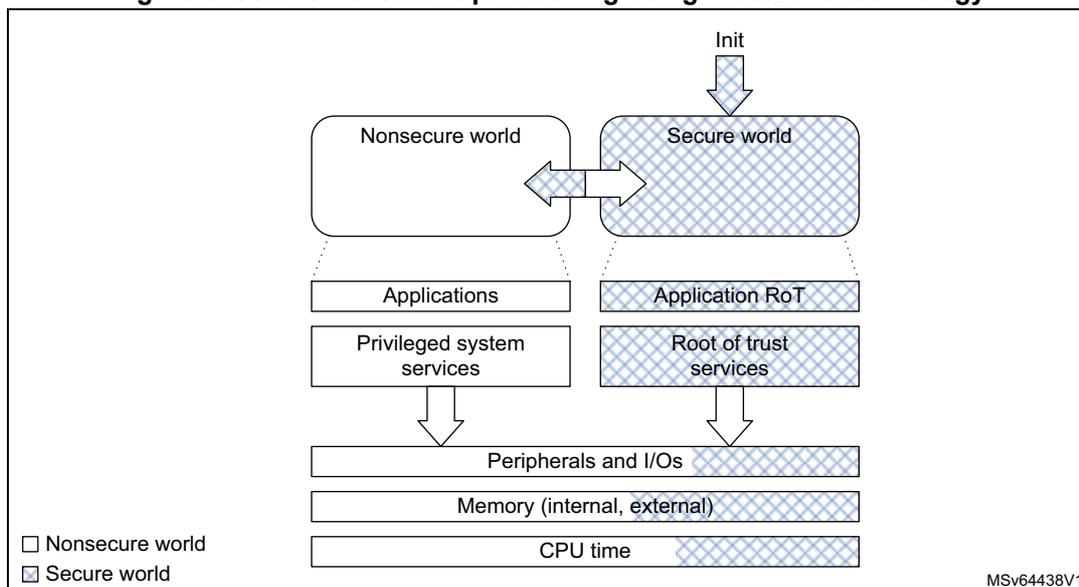
The diagram illustrates the secure/nonsecure partitioning using TrustZone technology. It is divided into two main columns: the Nonsecure world (left) and the Secure world (right). At the top, an 'Init' signal points to the Secure world. The Nonsecure world contains 'Applications' and 'Privileged system services'. The Secure world contains 'Application RoT' and 'Root of trust services'. Both worlds share a common layer of 'Peripherals and I/Os', 'Memory (internal, external)', and 'CPU time'. A legend at the bottom left shows a white box for 'Nonsecure world' and a hatched box for 'Secure world'. The diagram is labeled 'MSV64438V1' in the bottom right corner.
Note: The initial partitioning of the platform is under the responsibility of the secure firmware executed after reset of the device.
Thanks to this resource isolation technology, the secure world can be used to protect critical code against intentional or unintentional tampering from the more exposed code running in the nonsecure world.
Note: The secure code is typically small and rarely modified, while nonsecure code is more exposed, and prone to firmware updates.
3.5.1 TrustZone security architecture
The Armv8-M TrustZone technology is a comprehensive hardware architecture that proposes to developers a comprehensive, holistic protection across the entire processor and system. The device TrustZone hardware features include:
- • the Armv8-M mainline security extension of Cortex-M33, enabling a new processor secure state, with its associated secure interrupts
- • the dynamic allocation of memory and peripherals to TrustZone using eight security attribution unit (SAU) regions of Cortex-M33
- • a global TrustZone framework (GTZC), extending the TrustZone protection against transactions coming from other masters in the system than the Cortex-M33
- • TrustZone-aware embedded flash memory and peripherals
Note: The TrustZone security is activated by the TZEN option bit in the FLASH_OPTR register.
3.5.2 Armv8-M security extension of Cortex-M33
The Arm security extension of the Cortex-M33 is an evolution, not a revolution. It uses the programmer model from earlier Cortex-M subfamilies like Cortex-M4. Indeed, Armv8-M is architecturally similar to Armv7-M, using the same 32-bit architecture, the same memory mapped resources protected with an MPU. Armv8-M also uses the nested vectored interrupt controller (NVIC).
The Armv8-M TrustZone implementation is composed of the following features:
- • a new processor state, with almost no additional code/cycle overhead, as opposed to Armv8-A TrustZone that uses a dedicated exception routine for triggering a secure/nonsecure world change
- • two memory map views of a shared 4-Gbyte address space
- • a low interrupt latency for both secure and nonsecure domains, and a new interrupt configuration for security grouping and priority setting
- • separated exception vector tables for the secure and nonsecure exceptions
- • Micro-coded context preservation
- • banking of specific registers across secure/nonsecure states, including stack pointers with stack-limit checkers
- • banking of the following Cortex-M33 programmable components (two separate units for secure and nonsecure):
- – SysTick timer
- – MPU configuration registers (eight MPU regions in secure, eight in nonsecure)
- – some of the system control block (SCB) registers
- • new system exception (SecureFault) for handling of security violations
- • configurable debug support, as defined in Section 3.12
For more information, refer to Cortex-M33 programming manual (PM0264).
3.5.3 Memory and peripheral allocation using IDAU/SAU
Security attributes
The Armv8-M nonsecure memory view (see Figure 4 ) is similar to Armv7-M (that can be found in Cortex-M4), with the difference that the secure memory is hidden. The secure memory view shows the flash memory, SRAM, and peripherals that are only accessible while the Cortex processor executes in Secure state.
Note: Figure 4 shows the 32-bit address space viewed by the secure code after the SAU configuration.
Figure 4. Sharing memory map between CPU in secure and nonsecure state
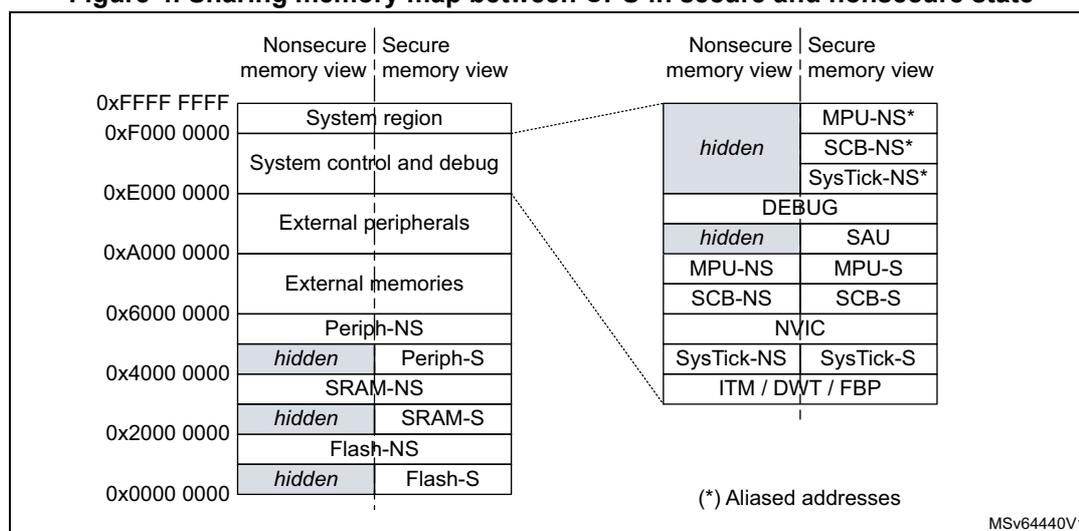
| Nonsecure memory view | Secure memory view | Nonsecure memory view | Secure memory view |
|---|---|---|---|
| 0xFFFF FFFF | System region | hidden | MPU-NS* |
| 0xF000 0000 | System control and debug | SCB-NS* | |
| 0xE000 0000 | External peripherals | SysTick-NS* | |
| 0xA000 0000 | External memories | DEBUG | |
| 0x6000 0000 | Periph-NS | hidden | SAU |
| 0x4000 0000 | hidden | MPU-NS | MPU-S |
| 0x2000 0000 | hidden | SCB-NS | SCB-S |
| 0x0000 0000 | hidden | NVIC | |
| SysTick-NS | SysTick-S | ||
| ITM / DWT / FBP |
(*) Aliased addresses
MSv64440V1
Note: The devices have no support for external memories and external peripherals.
The Cortex processor state (and associated rights) depends on the security attribute assigned to the memory region where it is executed:
- • A processor in a nonsecure state only executes from nonsecure (NS) program memory, while a processor in a secure state only executes from secure (S) program memory.
- • While running in secure state, the processor can access data from both S and NS memories. Running in nonsecure state, the CPU is limited to nonsecure memories.
To manage transitions to the secure world, developers must create nonsecure callable (NSC) regions that contain valid entry points to the secure libraries. The first instruction in these entry points must be the new secure gate (SG) instruction, used by the nonsecure code to call a secure function (see Figure 5).
Figure 5. Secure world transition and memory partitioning
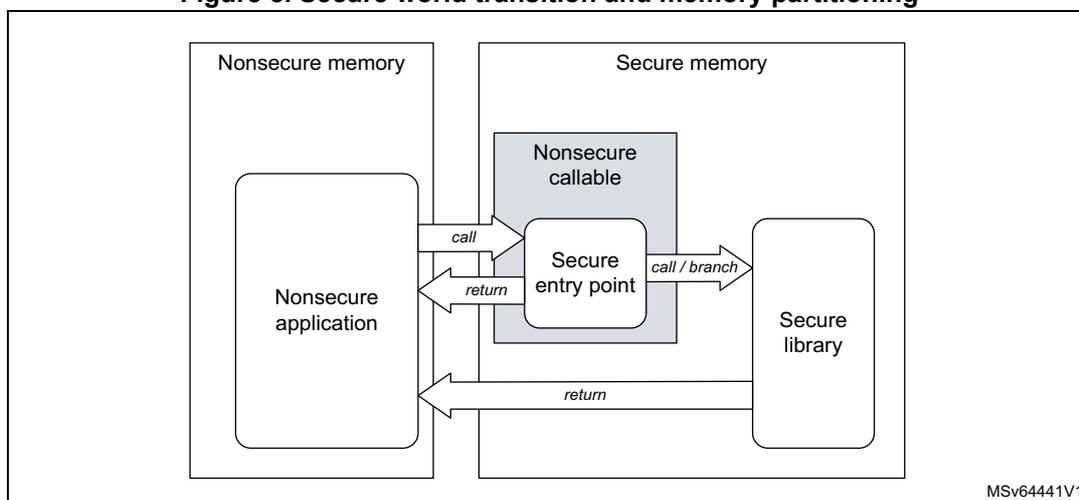
The diagram illustrates the memory architecture and execution flow for secure world transitions. On the left, a box labeled 'Nonsecure memory' contains a 'Nonsecure application'. On the right, a box labeled 'Secure memory' contains a 'Nonsecure callable' region, which in turn contains a 'Secure entry point', and a 'Secure library'. Arrows indicate the flow of execution: a 'call' arrow from the 'Nonsecure application' to the 'Secure entry point', a 'return' arrow from the 'Secure entry point' back to the 'Nonsecure application', a 'call / branch' arrow from the 'Secure entry point' to the 'Secure library', and a 'return' arrow from the 'Secure library' back to the 'Nonsecure application'. The identifier 'MSV64441V1' is visible in the bottom right corner of the diagram.
Programming security attributes
In Cortex-M33, the static implementation-defined attribution unit (IDAU) works with the programmable security attribution unit (SAU) to assign a specific security attribute (S, NS, or NSC) to a specific address, as shown in Table 6.
Table 6. Configuring security attributes with IDAU and SAU
| IDAU security attribution | SAU security attribution (1) | Final security attribution |
|---|---|---|
| Nonsecure | Secure | Secure |
| Secure-NSC | Secure-NSC | |
| Nonsecure | Nonsecure | |
| Secure-NSC | Secure | Secure |
| Nonsecure | Secure-NSC |
1. Defined regions are aligned to 32-byte boundaries.
The SAU can be configured by the Cortex-M33 only in the secure-privileged state. When the TrustZone is enabled, the SAU defaults all addresses as secure (S). A secure boot application can then program the SAU to create NSC or NS regions, as shown in Table 6 .
Note: The SAU/IDAU settings are applicable only to the Cortex-M33. The other masters (like DMA) are not affected by these policies.
3.5.4 Memory and peripheral allocation using GTZC
Global TrustZone framework architecture
On top of the Armv8-M TrustZone security extension in Cortex-M33, the devices embed complementary security features that reinforce, in a flexible way, the isolation between the secure and the nonsecure worlds. Unlike the SAU/IDAU, the GTZC can protect legacy memories and peripherals against nonsecure transactions coming from other masters than the Cortex-M33.
Figure 6. Global TrustZone framework and TrustZone awareness
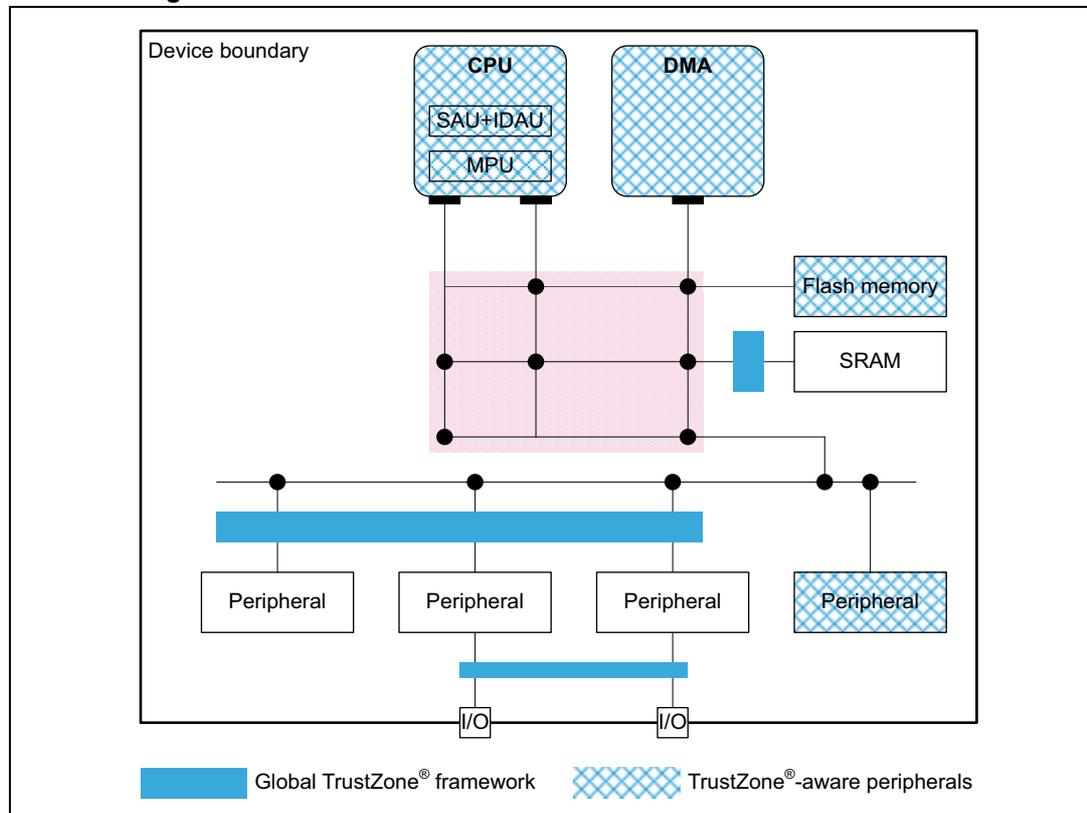
The diagram illustrates the Global TrustZone framework and TrustZone awareness within a device boundary. At the top, a CPU (containing SAU+IDAU and MPU) and a DMA are connected to a central pink-shaded area representing the Global TrustZone framework. To the right of this framework are Flash memory and SRAM. Below the framework is a horizontal blue bar representing the Global TrustZone framework bus. Four Peripherals are connected to this bus: three are standard Peripherals, and one is a TrustZone-aware peripheral (indicated by a cross-hatch pattern). Below the bus, two I/O blocks are shown, each connected to a vertical blue bar representing another part of the Global TrustZone framework. A legend at the bottom indicates that the solid blue color represents the Global TrustZone framework and the cross-hatch pattern represents TrustZone-aware peripherals.
Securing peripherals with TZSC
When the TrustZone security is active, a peripheral is either securable through the TZSC block in GTZC, or is natively TrustZone-aware, as shown in the previous figure:
- • A securable peripheral or memory is protected by an AHB/APB firewall gate, controlled by the TrustZone security controller (TZSC).
- • A TrustZone-aware peripheral or memory is connected directly to AHB or APB interconnect, implementing a specific TrustZone behavior, such as a subset of secure registers or a secure memory area.
TrustZone-aware AHB masters like Cortex-M33 or DMAs, drive a secure signal in the AHB interconnect, according to their security mode, independently from the TZSC.
Note: Like with TrustZone, a peripheral can be made privileged-only with TZSC (see Section 3.6.3 ). In this case, if this peripheral is master on the interconnect, it automatically issues privileged transactions.
Securing memories with MPCBB
The MPCBB blocks in GTZC provide the capability to configure the security and privilege of embedded SRAM blocks, as defined in Table 7 .
Table 7. MPCBBx resources
| Memory | MPC resource |
|---|---|
| SRAM1 | GTZC1_MPCBB1 |
| SRAM2 | GTZC1_MPCBB2 |
| 2.4 GHz RADIO RXTXRAM | GTZC1_MPCBB6 |
For more information, refer to Section 5: Global TrustZone controller (GTZC) .
Applying GTZC configurations
The TZSC and MPCBB blocks can be used in one of the following ways:
- • statically programmed during the secure boot, locked and not changed afterwards
- • dynamically re-programmed using a specific application code or real-time kernel
When the dynamic option is selected and the configuration is not locked:
- • MPCBB secure blocks region size can be changed by a secure software. This software can be unprivileged if the particular block is not privileged-only.
- • The secure (respectively privilege) state of each peripheral can be changed writing to GTZC_TZSC_SECCFRGx (respectively GTZC_TZSC_PRIVCFGx) registers.
Securing peripherals with TZSC
The TZSC block in GTZC provides the capability to manage the security and the privilege for all securable peripherals. The list of these peripherals can be found in Section 5: Global TrustZone controller (GTZC) .
Note: When the TrustZone is deactivated, the resource isolation hardware GTZC can still be used to isolate peripherals to privileged code only (see Section 3.6.3 ).
When the TrustZone is activated, peripherals are set as nonsecure and unprivileged after reset.
TrustZone-aware peripherals
The devices include the following TrustZone-aware peripherals:
- • GPIOA to GPIOC and GPIOH
- • GTZC1_MPCBBx, GTZC1_TZIC and GTZC1_TZSC (GTZC blocks)
- • EXTI
- • Flash memory
- • RCC and PWR
- • GPDMA
- • SYSCFG
- • RTC and TAMP
- • MCU debug unit DBGMCU
- • HSEM
Illegal accesses to those peripherals are monitored through the TZIC registers, as described in Section 5: Global TrustZone controller (GTZC) . For more details, refer to Section 3.5.5 .
Illegal access controller with TZIC
The TZIC block in GTZC gathers all illegal access events originated from sources protected by GTZC or TrustZone-aware peripherals, generating a global secure interrupt towards the NVIC.
TZIC is available only when the system is TrustZone enabled (TZEN = 1). All accesses to TZIC registers must be secured and privileged.
For each illegal event source, a status flag and a clear bit exist. Each illegal event can be masked, not generating an interrupt towards the NVIC.
Note: By default, all events are masked.
3.5.5 Managing security in TrustZone-aware peripherals
Embedded flash memory
When the TrustZone security is enabled through option bytes (TZEN = 1), the whole flash memory is secure after reset and the following protections, shown in Figure 7 , are available to the application:
- • nonvolatile user secure areas, defined with nonvolatile secure user option bytes
- – watermark-based secure only area
- – secure hide protection (HDP) area, stickily hidden after boot
- • volatile user secure pages, defined with volatile secure registers (lost after reset)
- – any page set as nonsecure (such as outside watermark-based secure only area) can be set as secure on-the-fly using the block-based configuration registers.
Note: All areas are aligned on the flash memory page granularity.
The flash memory area can be configured as secure while it is tagged as nonsecure in Cortex-M33 IDAU/SAU. In this case, nonsecure accesses by the CPU to the flash memory are denied.
Erase or program operations can be available to secure (resp. nonsecure) code only for secure (resp. nonsecure) pages or memory. A flash memory is considered secure if at least one page is secure.
Figure 7. Flash memory TrustZone protections
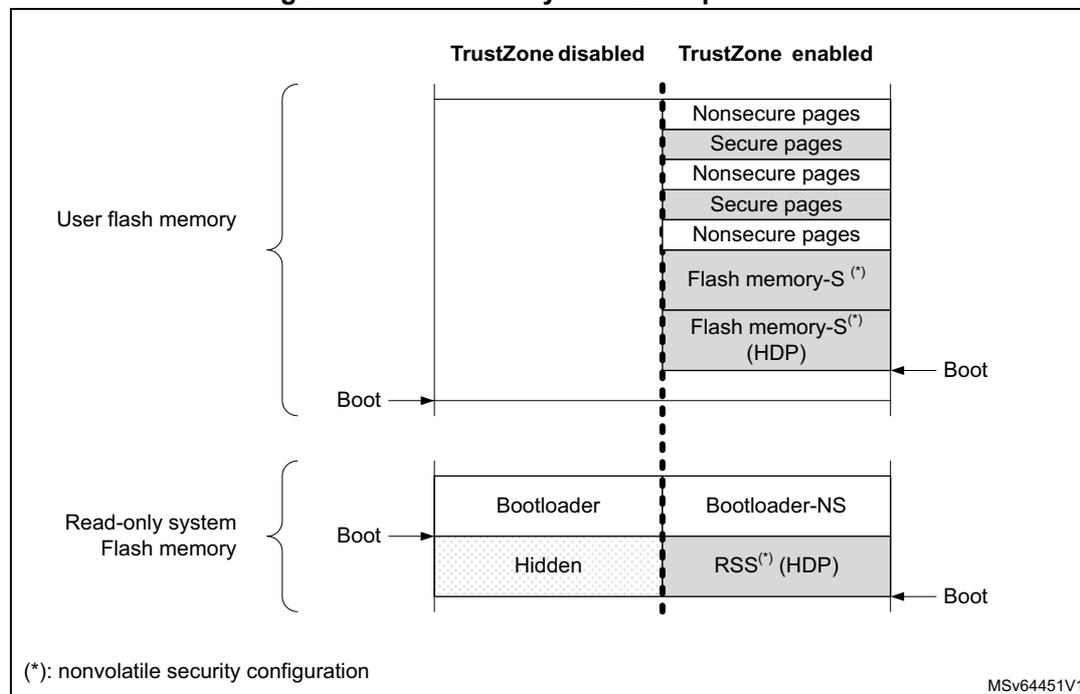
The diagram shows the memory layout for User flash memory and Read-only system Flash memory when TrustZone is disabled versus when it is enabled.
- User flash memory:
- TrustZone disabled: All pages are nonsecure. The Boot address points to the start of this memory.
- TrustZone enabled: Pages are divided into alternating Nonsecure and Secure pages. The bottom section is Flash memory-S(*) and Flash memory-S(*) (HDP). The Boot address points to the start of the HDP area.
- Read-only system Flash memory:
- TrustZone disabled: Contains Bootloader and Hidden areas. The Boot address points to the start of the Bootloader.
- TrustZone enabled: Contains Bootloader-NS and RSS(*) (HDP). The Boot address points to the start of the RSS(*) (HDP) area.
(*): nonvolatile security configuration
MSv64451V1
As shown above, when TrustZone is activated (TZEN = 1), the application code can use the HDP area that is part of the flash watermark-based secure area. When the application sets the HDP_ACCDIS bit, data read, write, and instruction fetch on this HDP area are denied until the next system reset.
For example, the software code in the secure flash HDP area can be executed only once, with any further access to this area denied until the next system reset. Additionally, any flash memory page belonging to an active HDP area cannot be erased anymore.
When the TrustZone is deactivated (TZEN = 0), the volatile/non-volatile secure area features are deactivated and all secure registers are RAZ/WI.
See Section 7: Embedded flash memory (FLASH) for more details.
Direct memory access controller (GPDMA)
When a DMA channel x is defined as secure (SECx = 1 in GPDMA_SECCFGR), the source and destination transfers can be independently set as secure or nonsecure by a secure application using SSEC and DSEC bits in GPDMA_CxTR1. Table 8 summarizes the security options available in each DMA channel.
Table 8. DMA channel use (security) (1)| Destination type | Secure DMA channel x (SECx = 1) | Nonsecure DMA channel y (SECy = 0) | ||
|---|---|---|---|---|
| Secure source | Nonsecure source | Secure source | Nonsecure source | |
| Secure destination | OK | OK (2) | Transfer blocked | |
| Nonsecure destination | OK (3) | OK (4) | Transfer blocked | OK |
- 1. When a transfer is blocked, it completes, but the corresponding writes are ignored, and reads return zeros. Also an illegal access event to TZIC is automatically triggered by the memory/peripheral used as source or destination.
- 2. If the source is a memory, the transfer is possible only if SSEC = 0, otherwise the transfer is blocked.
- 3. If the destination is a memory, the transfer is possible only if DSEC = 0, otherwise the transfer is blocked.
- 4. The memory-to-memory transfer is possible only if SSEC = 0 and DSEC = 0, otherwise it is blocked.
When a channel is configured as secure:
- • Registers allocated to this channel (excluding GPDMA_SECCFGR, GPDMA_PRIVCFGR and GPDMA_RCFGLOCKR) are read as zero. Write are ignored for nonsecure accesses. A secure illegal access event may also be triggered toward the TZIC peripheral.
- – Writes to GPDMA_SECCFGR and GPDMA_RCFGLOCKR must be secure. For each bit in GPDMA_PRIVCFGR, write must be secure if the corresponding bit in GPDMA_SECCFGR is set.
- • In linked-list mode, the loading of the next linked-list data structure from memory is performed with secure transfers.
- • When switching to a nonsecure state, the secure application must abort the channel or wait until the secure channel is completed before doing the switch.
Note: DMA secure channels are not available when TrustZone is deactivated.
When a channel is configured as nonsecure in linked-list mode, the loading of the next linked-list data structure from memory is performed with nonsecure transfers. See Section 17: General purpose direct memory access controller (GPDMA) for more details.
Power control (PWR)
When the TrustZone security is activated (TZEN = 1), the selected PWR registers can be secured through PWR_SECCFGR, protecting the following PWR features:
- • low-power mode setup
- • wake-up (WKUP) pins definition
- • voltage detection
- • backup domain control
Other PWR configuration bits become secure:
- • when the system clock selection is secure in the RCC: the voltage scaling (VOS) configuration become secure
- • when a GPIO is configured as secure: its corresponding bit for standby mode retention configuration becomes secure
- • when the 2.4 GHz RADIO is configured as secure: its corresponding control bits become secure
See Section 11: Power control (PWR) for details.
Secure clock and reset (RCC)
When the TrustZone security is activated (TZEN = 1) and security is enabled in the RCC, the bits controlling the peripheral clocks and resets become TrustZone-aware:
- • If the peripheral is securable and programmed as secure in the TZSC, the peripheral clock and reset bits become secure.
- • If the peripheral is TrustZone-aware, the peripheral clock and reset bits become secure as soon as at least one function is configured as secure inside the peripheral.
When a peripheral is defined as secure, its related clock, reset, and clock source selection in the RCC, become secure and in some case the selection of clock source during low-power modes as well.
Note: Refer to Table 3 and Table 4 for the list of securable and TrustZone-aware peripherals.
Additionally, the following configurations can be made secure-only using RCC_SECCFGR:
- • external clock (such as HSE32 or LSE), internal oscillator (such as HSI16, or LSI)
- • PLL
- • AHB and APB prescalers
- • system clock source, SysTick, and MCO clock output selection
- • reset flag clearing
See Section 12: Reset and clock control (RCC) for details.
Real time clock (RTC)
Like all TrustZone-aware peripherals, a nonsecure read/write access to a secured RTC register is RAZ/WI. It also generates an illegal access event that triggers a secure illegal access interrupt if the RTC illegal access event is enabled in the TZIC.
After a Backup domain power-on reset, all RTC registers can be read or written in both secure and nonsecure modes. The secure boot code can then change its security setup, making registers Alarm A, alarm B, wake-up timer and timestamp secure or not, using RTC_SECCFGR.
When the SEC bit is set in secure-only RTC_SECCFGR:
- • Writing the RTC registers is possible only in secure mode.
- • Reading RTC_SECCFGR, RTC_PRIVCFGR, RTC_MISR, RTC_TR, RTC_DR, RTC_SSR, RTC_PRER, and RTC_CALR is always possible in secure and nonsecure modes. All the other RTC registers can be read only in secure mode.
When SEC is cleared in secure-only RTC_SECCFGR, it is still possible to restrict access in secure mode to some RTC registers by setting dedicated control bits: INITSEC, CALSEC, TSSEC, WUTSEC, ALRASEC, and ALRBSEC.
Note: The RTC security configuration is not affected by an NRST pin reset.
See Section 36: Real-time clock (RTC) for more details.
Tamper and backup registers (TAMP)
Like all TrustZone-aware peripherals, a nonsecure read/write access to a secured TAMP register is RAZ/WI. It also generates an illegal access event that triggers a secure illegal access interrupt if the TAMP illegal access event is enabled in the TZIC.
After a Backup domain power-on reset, all TAMP registers can be read or written in both secure and nonsecure modes. The secure boot code can change its security setup, making some registers secure or not as needed, using TAMP_SECCFGR register.
When TAMPSEC is set in TAMP_SECCFGR:
- • Writing the TAMP registers is possible only in secure mode. Backup registers have their own write protection (see below).
- • Reading the TAMP registers (except for TAMP_SECCFGR, TAMP_PRIVCFGR and TAMP_MISR) returns zero if the access is nonsecure. Backup registers have their own read protection (see below).
The application can also:
- • make TAMP_COUNTR register read and write secure-only by setting the CNT1SEC bit in TAMP_SECCFGR secure register
- • in backup registers increase security for two of the three protection zones configured using BKPRWSEC[7:0] and BKPWSEC[7:0] bitfields in TAMP_SECCFGR:
- – protection zone 1 is read secure, write secure
- – protection zone 2 is read nonsecure, write secure
- – protection zone 3 is read nonsecure, write nonsecure
Note: The TAMP security configuration is not affected by an NRST reset.
See Section 37: Tamper and backup registers (TAMP) for more details.
General-purpose I/Os (GPIO)
When the TrustZone security is activated (TZEN = 1), each I/O pin of the GPIO port can be individually configured as secure through the GPIOx_SECCFGR registers. Only a secure application can write to GPIOx_SECCFGR registers. After boot, each I/O pin of GPIO is set as secure.
When an I/O pin is configured as secure, its corresponding configuration bits for alternate function (AF), mode selection (MODE), and I/O data are RAZ/WI in case of nonsecure access.
When digital alternate function is used (input/output mode), to protect the data transiting from/to the I/O managed by a secure peripheral, the devices add a secure alternate function gate on the path between the peripheral and its allocated I/Os:
- • If the peripheral is secure, the I/O pin must also be secure to allow input/output of data.
- • If the peripheral is not secure, the connection is allowed regardless of the I/O pin state.
The TrustZone-aware logic around GPIO ports, used as alternate function, is summarized in Table 9 .
Table 9. Secure alternate function between peripherals and allocated I/Os
| Security configuration | Alternate function logic | Comment | ||
|---|---|---|---|---|
| Peripheral | Allocated I/O pin | Input | Output | |
| Secure | Secure | I/O data | Peripheral data | - |
| Nonsecure | Out of reset configuration | |||
| Secure | Nonsecure | 0 | 0 | - |
| Nonsecure | I/O data | Peripheral data | ||
When an analog function with an analog switch is used, the connection to the peripherals listed in Table 10 , is blocked by hardware when the peripheral is nonsecure and the I/O is secure.
Table 10. Nonsecure peripheral functions not connected to secure I/Os
| Peripheral | Analog function (1) | Input | Output | How to set the peripheral or the function as secure |
|---|---|---|---|---|
| ADC4 | ADC4_INy (y = 1 to 10) | X | - | Set ADC4SEC in GTZC1_TZSC |
| COMPx (2) (x = 1, 2) | COMPx_INM1 COMPx_INP1 | Set COMPSEC in GTZC1_TZSC |
- 1. Used to find the I/O corresponding to the signal/function on the package (refer to the product datasheet).
- 2. Available only on STM32WBA54/55xx devices.
Table 11 summarizes the list of peripheral functions that do not have any hardware protection linked to TrustZone. The listed signals (input and/or outputs) are not blocked when the I/O is set as secure and the associated peripheral function is nonsecure.
For example, when a secure application sets an I/O port pin as secure to be used as LPTIM2_OUT, if the RTC_OUTx is nonsecure, it can be programmed to output data to the I/O port pin, potentially causing malfunction to the secure application.
Similarly, when a secure application sets an I/O port pin as secure to be used as USART1_TX, if TAMP_INx is nonsecure, it can be programmed to capture the USART input traffic.
It is important that, for each case described in Table 11 , the secure application decides if a potential effect on data integrity or confidentiality is critical or not. For example, if the USART situation described above is not acceptable (data transiting on secure USART is confidential), the application must configure the TAMP as secure, even if it does not use it.
Note: How to make a peripheral secure is summarized in the right column of Table 11 .
Table 11. Nonsecure peripheral functions that can be connected to secure I/Os
| Peripheral | Signal (1) | Input | Output | How to set the peripheral or the function as secure |
|---|---|---|---|---|
| TAMP | TAMP_INx (x = 1 to 6) | X | - | Set TAMPSEC in TAMP_SECCFGR |
| TAMP_OUTx (x = 1 to 6) | - | X | ||
| RTC | RTC_OUTx (x = 1, 2) | - | X | Set SEC in RTC_SECCFGR |
| RTC_TS | X | - | Set TSSEC in RTC_SECCFGR | |
| PWR | WKUPx (x = 1 to 8) | X | - | Set WUPxSEC in PWR_SECCFGR |
| RCC | LSCO | - | X | Set LSESEC in RCC_SECCFGR |
| EXTI | EXTIx (x = 0 to 15) | X | - | Set SECx bit in EXTI_SECCFGR |
- 1. To find the I/O corresponding to the signal/function on the package refer to the product datasheet.
Refer to Section 14: General-purpose I/Os (GPIO) for more details.
Extended interrupts and event controller (EXTI)
When the TrustZone security is activated (TZEN = 1), the EXTI is able to protect event register bits from being modified by nonsecure accesses. The protection can individually be activated per input event via the register bits in EXTI_SECCFGR1. When an input event is configured as secure, only a secure application can change the configuration (including security if applicable), change the masking or clear the status of this input event.
The security configuration in EXTI_SECCFGR1 can be globally locked after reset in EXTI_LOCKR.
See Section 19: Extended interrupts and event controller (EXTI) for more details.
System configuration controller (SYSCFG)
Like all TrustZone-aware peripherals, when the TrustZone security is activated (TZEN = 1), a nonsecure read/write access to a secured SYSCFG register is RAZ/WI. Such access also generates an illegal access event that triggers a secure illegal access interrupt if the SYSCFG illegal access event is not masked in the TZIC.
See Section 15: System configuration controller (SYSCFG) for more details.
Hardware semaphore (HSEM)
Like all TrustZone-aware peripherals, when the TrustZone security is activated (TZEN = 1), a nonsecure read/write access to a secured HSEM register is RAZ/WI. Such access also generates an illegal access event that triggers a secure illegal access interrupt if the HSEM illegal access event is not masked in the TZIC.
See Section 13: Hardware semaphore (HSEM) for more details.
Microcontroller debug unit (DBGMCU)
The MCU debug component (DBGMCU) helps the debugger, providing support for:
- • low-power modes behavior during debug
- • peripheral freeze during debug, applicable to I2Cs, IWDG, WWDG, timers, low-power timers, and DMA channels
The DBGMCU is a TrustZone-aware peripheral, managing accesses to its control registers as described in Table 12 .
Table 12. TrustZone-aware DBGMCU accesses management
| Debug profile | Peripheral status (1) | DBG_xx_STOP control bits | |
|---|---|---|---|
| Write access | Read access | ||
| Nonsecure invasive (SPIDEN = 0) | NS | Yes (S (2) or NS) | Yes (S or NS) |
| S | None (S or NS) | ||
| Secure invasive (SPIDEN = 1) | NS | Yes (S or NS) | |
| S | Yes (S only) | ||
1. As reported by the GTZC or the TrustZone-aware peripheral feature.
2. Secure access from debugger is converted to nonsecure access in the device.
Refer to Section 45.13: Microcontroller debug unit (DBGMCU) for more details.
3.5.6 Activating TrustZone security
The TrustZone is deactivated by default in the device. It can be activated by setting the TZEN user option bit in FLASH_OPTR when in RDP Level 0. Once TZEN has changed from 0 to 1, the default security state, after reset, is always the following:
- • CPU subsystem
- – Cortex-M33 exits reset in secure state, hence the boot address must point toward a secure memory area.
- – All interrupt sources are secure (in NVIC).
- – The memory mapped viewed by the CPU through IDAU/SAU is fully secure.
- • Embedded flash memory
- – Flash memory nonvolatile secure areas (with the HDP zone), are defined with nonvolatile registers FLASH_SECWMR. Default secure option bytes setup is all user flash secure, without HDP area defined.
- – Volatile block-based security attributions of the flash memory are nonsecure. The secure boot code can change this setup, making blocks secure.
- • Embedded SRAM memories
- – All SRAMs are secure, as defined in GTZC/MPCBB (see Section 3.5.4 ). The secure boot code can change this security setup, making blocks no-secure.
- • All GPIOs are secure
- • All GPDMA channels are nonsecure
- • Backup registers are nonsecure
- • Peripherals and GTZC:
- – Securable peripherals are nonsecure and unprivileged.
- – TrustZone-aware peripherals are nonsecure, with their secure configuration registers being secure.
- – All illegal access interrupts in GTZC_TZIC are disabled.
Note: Refer to Table 3 and Table 4 for the list of securable and TrustZone-aware peripherals.
3.5.7 Deactivating TrustZone security
Once activated, TrustZone it can be deactivated only during an RDP regression to Level 0.
Note: Such RDP regression triggers the erase of embedded memories (flash memory, SRAM1, SRAM2, PKA SRAM and TAMP backup registers), and the reset of all peripherals, including all crypto engines.
Note: Before launching an RDP regression, the software must invalidate the ICACHE and wait for the BUSYF bit to get cleared.
After the TrustZone deactivation, most of the features mentioned in Section 3.5 are no longer available:
- • The nonvolatile secure area of the embedded flash memory is deactivated, including the HDP area.
- • The NVIC only manages nonsecure interrupts.
- • All secure registers in TrustZone-aware peripherals are RAZ/WI.
Note: When the TrustZone is deactivated, the resource isolation using privilege stays available (see Section 3.6.3 for details).
3.6 Isolation of other resources (a)
These are hardware mechanisms offering an additional level of isolation on top of the TrustZone technology.
3.6.1 Temporal isolation using secure hide protection (HDP)
When the TrustZone security is enabled (TZEN = 1), the embedded flash memory allows an HDP area in the watermarked-secure area (8-Kbyte page granularity) to be defined. The code executed in this HDP area (with its related data and keys) can be hidden after boot until the next system reset. The hide protection principle is shown in Figure 8.
Figure 8. Flash memory secure HDP area
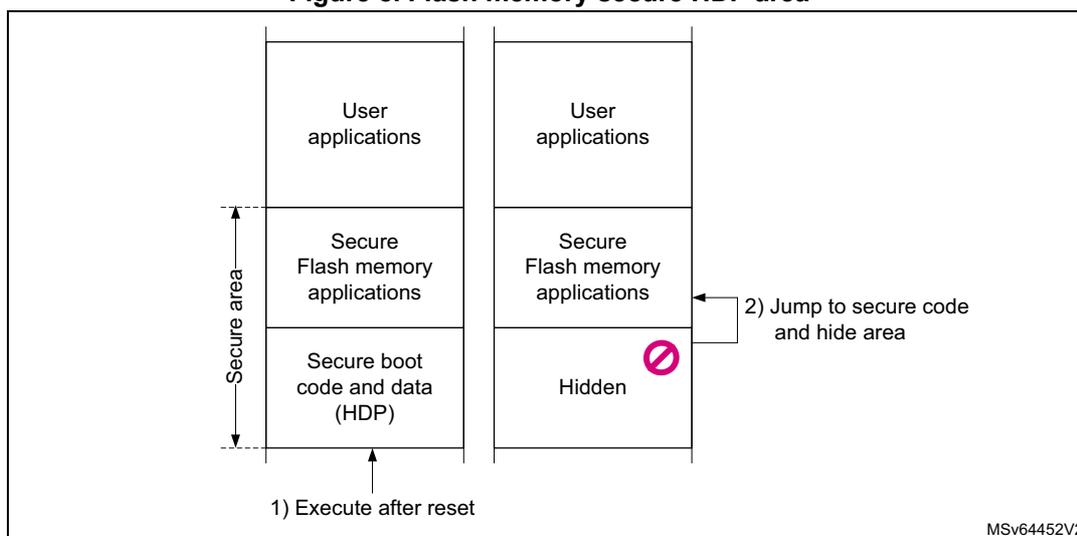
When the HDPEN and HDP_ACCDIS bits are set, data read, write, and instruction fetch on the area defined by SECWM_PSTRT and HDP_PEND option bytes are denied until the next device reset.
Note: Mass erase aborts when it contains a write-protected area (WRP or HDP area).
The HDP area can be resized by a secure application if the area is not hidden and if RDP Level \( \neq \) 2.
3.6.2 RSSLIB functions
The RSS provides runtime services thanks to RSS library. As other microcontroller peripherals features and mapping, the RSS library functions are exposed to user within the CMSIS device header file provided by the STM32Cube firmware package. Please refer to UM3131 to get more details regarding STM32Cube firmware package. RSS library functions are named RSSLIB functions hereafter.
The user firmware calls RSSLIB functions using RSSLIB_PFUNC C defined macro, that points to a location within nonsecure system memory. Hence prior calling RSSLIB functions, the secure user firmware must define a nonsecure region above this location within SAU of the Cortex ® -M33. This nonsecure region starts from
a. Available only on STM32WBA52/4/5xx devices.
RSSLIB_SYS_FLASH_NS_PFUNC_START up to RSSLIB_SYS_FLASH_NS_PFUNC_END. These last addresses are provided within the CMSIS device header file. The user can set this nonsecure region either by using the CMSIS system partition header file or by implementing its own code for SAU setup. The CMSIS system partition header file is part of the STM32Cube firmware package.
RSSLIB functions are split between non-secure callable and secure callable function.
The RSS library functions are described within sections hereafter.
CloseExitHDP
Bootloader ID:
CloseExitHDP1 function
Secure attribute:
Secure callable function.
Prototype:
uint32_t CloseExitHDP(uint32_t HdpArea, uint32_t VectorTableAddr)
Arguments:
- • HdpArea:
Values can be: RSSLIB_HDP_AREA1_Msk. - • VectorTableAddr:
Input parameter, address of the next vector table to apply.
The vector table format is the one used by the Cortex®-M33 core.
Description:
The user calls CloseExitHDP to close flash HDP secure memory area and jump to the reset handler embedded within the vector table which address is passed as input parameter.
CloseExitHDP sets the SP provided by the passed vector table, however it is up to the caller to first set the new vector table. Then it clears all general-purpose.
A Cortex®-M33 registers (r0, r1, ...) before jumping to new vector table reset handler. On successful execution, the function does not return and does not push LR onto the stack.
In case of failure (bad input parameter value), this function returns RSSLIB_ERROR.
Refer to section Section 7.5.3: Secure hide protection (HDP) to get more details on flash memory HDP protection.
3.6.3 Resource isolation using Cortex privileged mode
In parallel to the TrustZone isolation described in Section 3.5 , the hardware and software resources can be partitioned so that they are restricted to software running in Cortex privileged mode.
Thanks to this hardware isolation technology, available even if TrustZone is deactivated (TZEN = 0), critical code or data can be protected against intentional or unintentional tampering from the more exposed unprivileged code.
Memory and peripheral privileged allocation using MPU
The Cortex-M33 MPU divides the unified memory into eight regions, each aligned to a multiple of 32 bytes. Each memory regions can be programmed to generate faults when accessed inappropriately by unprivileged software.
Memory and peripheral privileged allocation using GTZC
For the Cortex-M33 master, to complement the coarse isolation provided by the MPU, the GTZC reinforces, in a flexible way, the isolation between privileged and unprivileged tasks, for peripherals and selected memories.
- • Securing peripherals with TZSC (privileged-only)
In the devices, a peripheral is either securable privileged-only through GTZC, or is natively privileged-aware:
- – A securable privileged-only peripheral or memory is protected by an AHB/APB firewall gate that is controlled by the TZSC.
- – A privileged-aware peripheral or memory is connected directly to AHB or APB interconnect, implementing a specific behavior such as a subset of registers or a memory area is privileged-only.
The list of securable peripherals can be found in Table 3 .
- • Securing memories with MPCBB (privileged-only)
The GTZC provides the capability to configure the privilege level of embedded SRAM blocks, programming the MPCBB resources defined in Section 3.5.4 .
- • Error management (privileged-only)
- – Any unprivileged transaction trying to access a privileged resource is considered as illegal. There is no illegal access event generated for illegal unprivileged read and write accesses.
- – The addressed resource follows a silent-fail behavior, returning all zero data for read and ignoring any write.
- – When an illegal unprivileged access occurs, no bus error is generated, except when this access is an instruction fetch, accessing a privileged memory or a peripheral register.
Managing security in privileged-aware peripherals
TrustZone-aware peripherals also implement privileged-only access mode. The privileged protection is valid even if TZEN = 0:
- • Embedded flash memory
By default all embedded flash registers can be read or programmed in both privileged and unprivileged modes.
When secure privileged bit SPRIV is set in FLASH_PRIVCFGGR, reading and writing the flash secure registers are possible only in privileged mode. Write access to this bit is ignored if TrustZone is deactivated (TZEN = 0).
When nonsecure privileged bit NSPRIV is set in FLASH_PRIVCFGGR, reading and writing the flash nonsecure registers are possible only in privileged mode.
Regarding privileged protection of the embedded flash memory, the devices offer the following features:
- – The system flash memory can be accessed in privileged and unprivileged modes.
- – Each watermark-based secure area, including its secure HDP area, is accessible in secure-privileged and secure-unprivileged mode, if applicable.
- – Each 8-Kbyte page of the embedded flash memory can be programmed on-the-fly as privileged only, using the block-based privileged configuration register FLASH_PRIVBBRx. An unprivileged page is accessible either by a privileged or by an unprivileged access.
Note: Switching a page from privileged to unprivileged does not erase the content of the page. When applicable, an erase or program operation is always available to privileged code, and to unprivileged code only for unprivileged pages or memory.
- • Direct memory access controllers (GPDMA)
When a DMA channel x is defined as privileged (PRIVx = 1 in GPDMA_PRIVCFGGR), special rules apply when accessing privileged/unprivileged source or destination (see Table 13 ).
Table 13. DMA channel use (privilege)
| Destination | Privileged DMA channel x (PRIVx = 1) | Unprivileged DMA channel y (PRIVy = 0) | ||
|---|---|---|---|---|
| Privileged source | Unprivileged source | Privileged source | Unprivileged source | |
| Privileged | OK | Transfer blocked (1) | ||
| Unprivileged | OK | Transfer blocked | OK | |
1. When a transfer is blocked, the transfer completes but the corresponding writes are ignored, and reads return 0s.
See Section 17: General purpose direct memory access controller (GPDMA) for more details.
- • Power control (PWR)
By default, after a reset, all PWR registers but PWR_PRIVCFGGR, can be read or written in both privileged and unprivileged modes.
When secure privileged bit SPRIV is set in PWR_PRIVCFGGR, reading and writing the PWR securable registers are possible only in privileged mode. Write access to this bit is ignored if TrustZone is disabled (TZEN = 0).
When nonsecure privileged bit NSPRIV is set in PWR_PRIVCFGGR, reading and writing the PWR nonsecure registers are possible only in privileged mode.
See Section 11: Power control (PWR) for details.
- • Secure clock and reset (RCC)
By default, after a reset, all RCC registers but RCC_PRIVCFGGR can be read or written in both privileged and unprivileged modes.
When secure privileged bit SPRIV is set in RCC_PRIVCFGGR, reading and writing the RCC securable bits are possible only in privileged mode. Write access to this bit is ignored if TrustZone is disabled (TZEN = 0).
When the nonsecure privileged bit NSPRIV is set in RCC_PRIVCFGGR, reading and writing the RCC nonsecure bits are possible only in privileged mode.
See Section 12: Reset and clock control (RCC) for details.
- • Real time clock (RTC)
By default after a Backup domain reset, all RTC registers but RTC_PRIVCFGR, can be read or written in both privileged and unprivileged modes.
When PRIV bit is set in privileged-only RTC_PRIVCFGR:
- – Writing the RTC registers is possible only in privileged mode.
- – Reading the RTC_SECCFGR, RTC_PRIVCFGR, RTC_TR, RTC_DR, RTC_SSR, RTC_PRER and RTC_CALR is always possible in privileged and unprivileged modes.
All the other RTC registers can be read only in privileged mode.
When the PRIV bit is cleared in privileged-only RTC_PRIVCFGR register, it is still possible to restrict access to privileged mode to some RTC registers by setting dedicated control bits: INITPRIV, CALPRIV, TSPRIV, WUTPRIV, ALRAPRV, or ALRBPRIV.
See Section 36: Real-time clock (RTC) for details.
- • Tamper and backup registers (TAMP)
By default after a Backup domain reset, all TAMP registers but TAMP_PRIVCFGR can be read or written in both privileged and unprivileged modes.
When PRIV bit is set in privileged-only TAMP_PRIVCFGR:
- – Writing the TAMP registers is possible only in privileged mode, except for the backup registers and the monotonic counters that have their own protection setting.
- – Reading the TAMP_SECCFGR or TAMP_PRIVCFGR is always possible in privileged and unprivileged modes. All the other TAMP registers can be read only in privileged mode, except for the backup registers and the monotonic counters that have their own protection setting.
The application can also:
- – make TAMP_COUNT1R register read and write privileged-only by setting the CNTPRIV bit in TAMP_PRIVCFGR
- – increase security for two of the three protection zones in backup registers, using BKPRWPRIV and BKPWPRIV bits in TAMP_PRIVCFGR:
- – Make protection zone 1 read privileged, write privileged.
- – Make protection zone 2 read privileged or unprivileged, write privileged.
- – Protection zone 3 is always read and write privileged or unprivileged.
- • General-purpose I/Os (GPIO)
All GPIO registers can be read and written by privileged and unprivileged accesses, whatever the security state (secure or nonsecure).
- • Extended interrupts and event controller (EXTI)
The EXTI peripheral can protect event register bits from being modified by unprivileged accesses. The protection is individually activated per input event via the register bits in the privileged-only EXTI_PRIVCFGR1 register. When an input event is configured as privileged, only a privileged application can change the configuration (including security if applicable), change the masking or clear the status of this input event.
The security configuration in EXTI_PRIVCFG1 can be globally locked after reset in EXTI_LOCKR.
See Section 19: Extended interrupts and event controller (EXTI) for more details.
- • System configuration controller (SYSCFG)
All SYSCFG registers can be read and written in both privileged and unprivileged modes, except:
- – FPUSEC bit in SYSCFG_SECCFGR registers (privileged only)
- – SYSCFG registers for CPU configuration: SYSCFG_CSLCKR, SYSCFG_FPUIMR, and SYSCFG_CNSLCKR
See Section 15: System configuration controller (SYSCFG) for more details.
3.7 Secure execution
Through a mix of special software and hardware features, the devices ensure the correct operation of their functions against abnormal situations caused by programmer errors, software attacks through network access, or local attempt for tampering code execution.
This section describes the hardware features specifically designed for secure execution.
3.7.1 Memory protection unit (MPU)
The Cortex-M33 includes a memory protection unit (MPU) that can restrict the read and write accesses to memory regions (including regions mapped to peripherals), based the Cortex-M33 operating mode (privileged, unprivileged), and the data/instruction fetch.
The memory map and the programming of the nonsecure and secure MPUs split memory into regions (up to eight per MPU). Secure MPU is available only when TrustZone is activated (a) .
3.7.2 Embedded flash memory write protection
The embedded flash memory write protection (WRP) prevents illegal or unwanted write/erase to special sections of the embedded flash memory user area (system area is permanently write protected).
Write protected areas are defined through option bytes, writing the start and end addresses: two write-protected areas can be defined, with page size granularity.
WRP areas can be modified through option byte changes unless the corresponding FLASH_WRPA/BR has its UNLOCK option bit cleared (meaning ROM emulation). UNLOCK can be set only when regressing from RDP Level 1 to Level 0.
Note: Mass erase aborts when it contains a write-protected area (WRP or HDP area).
a. Available only on STM32WBA52/4/5xx devices.
3.7.3 Tamper detection and response
Principle
The devices include active protection of critical security assets attacks, with the following features:
- • erasing of device secrets upon tamper detection
- • improved guarantee of safe execution for the CPU and its associated security peripherals, including:
- – out-of-range clocking LSE detection
- – security watchdog IWDG clocked by the internal oscillator LSI
- – possible selection of internal oscillator HSI16 as system clock
- – secure ADC4 window watchdog monitoring
See Section 37: Tamper and backup registers (TAMP) for more details.
Tamper detection sources
The devices support six active input/output pins, allowing three independent active-tamper meshes, or up to five meshes if the same output pin is shared by several input pins (for a total of six active-tamper I/Os).
The active pins when clocked by the LSE are functional in all system operating modes (Run, Sleep, Stop, and Standby).
Detection time is programmable, and a digital filtering is available (tamper triggered after two false comparisons in four consecutive comparison samples).
Note: Timestamps are automatically generated when a tamper event occurs.
The internal tamper sources are listed in Table 14 .
Table 14. Internal tamper sources in TAMP
| Tamper input | Tamper source |
|---|---|
| itamp3 | LSE clock security monitoring |
| itamp5 | RTC calendar overflow (rtc_calovf) |
| itamp6 | JTAG/SWD access when RDP > 0 |
| itamp7, 12, 13 | Voltage monitoring ( \( V_{CORE} \) , \( V_{SENSE} \) ) through ADC4 analog watchdog, functional down to Stop 1 mode |
| itamp8 | TAMP monotonic counter overflow |
| itamp9 | Fault generation for cryptographic peripherals (SAES, PKA, AES, RNG) |
| itamp11 | IWDG timeout and potential tamper (IWDG reset when at least one enabled tamper flag is set) |
Response to tamperers
Each source of tamper in the device can be configured to trigger the following events:
- • Generate an interrupt, capable of waking up the device from Stop and Standby modes (see TAMPxMSK bits in TAMP_CR2 register).
- • Generate a hardware trigger for the low-power timers.
- • Erase device secrets if the corresponding TAMPxPOM bit in TAMP_CR2 (for tamper pins) or ITAMPxPOM bit in TAMP_CR3 (for internal tamper) is cleared. The erasable secrets are:
- – keys stored in backup registers (x32), in AES and HASH
- – keys stored in PKA SRAM
- – other secrets stored in SRAM2 and CPU instruction cache memory
- – nonvolatile information used to derive the DHUK in SAES is zeroed until complete SRAM2 erase
Read/write accesses by software to all these secrets can be blocked, by setting the BKBLOCK bit in TAMP_CR2. The device secrets access is possible only when BKBLOCK is cleared, and no tamper flag is set for any enabled tamper source.
Device secrets erase is also triggered by setting the BKERASE bit in TAMP_CR2.
Software filtering mechanism
Each tamper source can be configured not to launch an immediate erase, by setting the corresponding TAMPxPOM bit in TAMP_CR2 (for external tamper pin) or ITAMPxPOM bit in TAMP_CR3 (for internal tamper).
In such a situation, when the tamper flag is raised, access to below secrets is blocked until all tamper flags are cleared:
- • DHUK in SAES: fixed to a dummy value
- • Backup registers, SRAM2: read-as-zero, write-ignored
- • AES, SAES, and HASH peripherals: automatically reset.
- • PKA peripheral: reset, with memory use blocked (meaning PKA not usable)
Once the application, notified by the tamper event, analyzes the situation, there are two possible cases:
- • The application launches secrets erase with a software command (confirmed tamper).
- • The application just clears the flags to release secrets blocking (false tamper).
Note: If the tamper software fails to react to such a tamper flag, an IWDG reset triggers automatically the erase of secrets.
Tamper detection and low-power modes
Table 15. Effect of low-power modes on TAMP| Mode | Description |
|---|---|
| Sleep | No effect on tamper detection features. TAMP interrupts cause the device to exit the Sleep mode. |
| Stop | No effect on tamper detection features, except for level detection with filtering and active tamper modes that remain active only when the clock source is LSE or LSI. Tamper events cause the device to exit the Stop mode. |
| Standby | No effect on tamper detection features, except for level detection with filtering and active tamper modes which remain active only when the clock source is LSE or LSI. Tamper events cause the device to exit the Standby mode. |
3.8 Secure storage (a)
A critical feature of any security system is how long term keys are stored, protected, and provisioned. Such keys are typically used to load a boot image, or to handle critical user data.
Figure 9 shows how key management service application can use the AES engine, for example to compute decryption keys. A nonvolatile key can be stored in the embedded secure HDP area (see Section 3.6.1 ), while volatile keys can be stored in registers in the TrustZone-aware TAMP. Figure 9 also shows keys that are managed only by hardware (like DHUK). More information on those hardware keys can be found in Section 3.8.1 .
a. Available only on STM32WBA52/4/5xx devices.
Figure 9. Key management principle
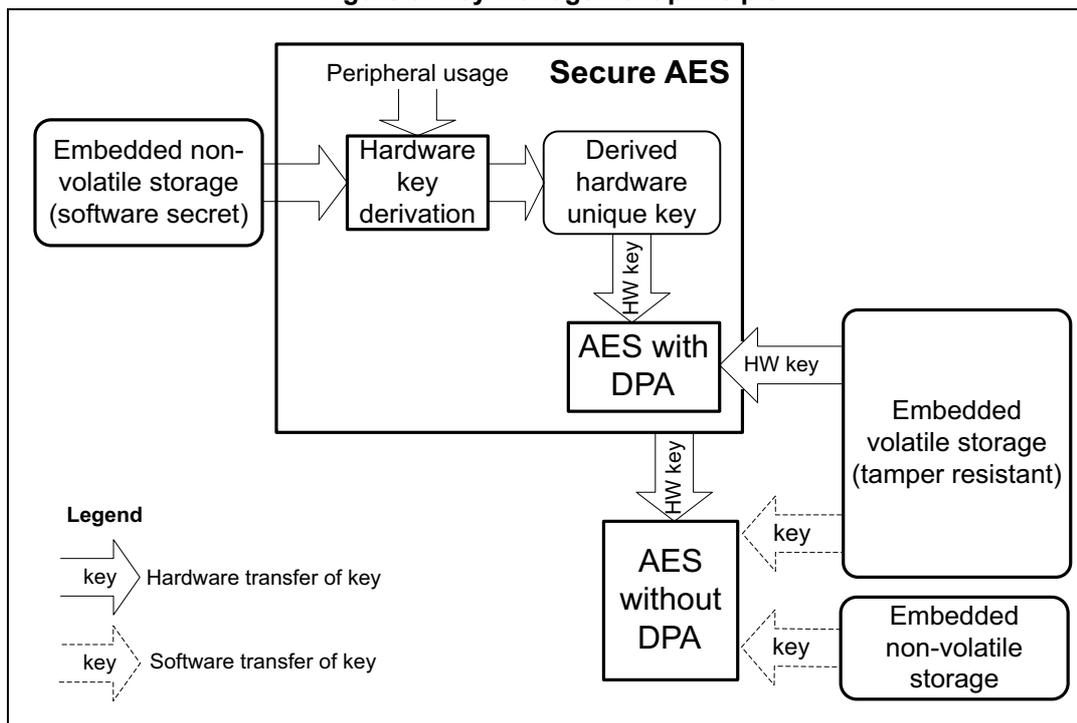
The diagram illustrates the key management principle. It shows the flow of keys from various sources through different AES engines. A legend indicates that solid arrows represent hardware transfer of key, and dashed arrows represent software transfer of key.
- Embedded non-volatile storage (software secret) provides a key via hardware transfer to Hardware key derivation .
- Peripheral usage also feeds into Hardware key derivation .
- Hardware key derivation outputs a Derived hardware unique key via hardware transfer.
- The Derived hardware unique key is used by AES with DPA via hardware transfer.
- AES with DPA outputs a HW key via hardware transfer to Embedded volatile storage (tamper resistant) .
- The HW key is also used by AES without DPA via hardware transfer.
- AES without DPA outputs a key via software transfer to Embedded volatile storage (tamper resistant) .
- AES without DPA outputs a key via software transfer to Embedded non-volatile storage .
Details on tamper protection is found in Section 3.7.3 , while TAMP TrustZone features are briefly described in Section 3.5.5 .
3.8.1 Hardware secret key management
As shown in the previous figure, the devices propose a better protection for application keys, using hardware secret keys. These AES keys can be made usable to the application, without exposing them in clear-text (unencrypted). Such keys also become immediately unusable in case of tamper.
There are three different sources of hardware secret keys:
- 1. DHUK: derived key based on a 256-bit nonvolatile device unique secret in flash memory. The generation of this key takes into account the TrustZone state and key use state (KMOD).
- 2. BHK: 256-bit application key stored in tamper-resistant volatile storage in TAMP. This key is written at boot time, then read/write locked to application until the next reset.
- 3. XORK: result of an XOR of BHK and DHUK
Those keys can be used:
- • as a normal key, loading in write-only key registers (software key mode)
- • as an encryption/decryption key for another key, to be used in the DPA-resistant SAES (wrapped key mode)
- • as an encryption/decryption key for another key, to be used in a faster AES engine (shared key mode)
3.9 Unique ID
The devices store a 96-bit ID that is unique to each device (see Section 46.1.2: DESIG 96-bit unique device ID register 1 (DESIG_UIDR1) ).
Application services can use this unique identity key to identify the product in the cloud network, or to make it difficult for counterfeit devices or clones to inject untrusted data into the network.
Alternatively, the 256-bit device unique key (DHUK) can be used (see Section 3.8.1 ).
3.10 Crypto engines
The devices implement state-of-the-art cryptographic algorithms featuring key sizes and computing protection as recommended by national security agencies such as NIST for the U.S.A, BSI for Germany or ANSSI for France. Those algorithms are used to support privacy, authentication, integrity, entropy, and identity attestation.
The crypto engine embedded in STM32 reduces weaknesses on the implementation of critical cryptographic functions, preventing, for example, the use of weak cryptographic algorithms and key sizes. They also enable lower processing times and lower power consumption when performing cryptographic operations, offloading those computations from Cortex-M33. This is especially true for asymmetric cryptography.
For product certification purposes, ST can provide certified device information on how these security functions are implemented and validated.
For more information on crypto engine processing times, refer to their respective sections in the reference manual.
3.10.1 Crypto engines features
Table 16 lists the accelerated cryptographic operations available in the devices. Two AES accelerators are available (both can be reserved to secure application only).
Note: Additional operations can be added using firmware.
The PKA can accelerate asymmetric crypto operations (like key pair generation, ECC scalar multiplication, point on curve check). See Section 28: Public key accelerator (PKA) for more details.
Table 16. Accelerated cryptographic operations
| Operations | Algorithm | Specification | Key length (in bit) | Modes |
|---|---|---|---|---|
| Get entropy | RNG | NIST SP800-90B (1) | N/A | Software and hardware (2) modes running in parallel |
| Encryption, decryption | AES | FIPS PUB 197 NIST SP800-38A | 128, 256 | ECB, CBC, CTR |
| Authenticated encryption or decryption | NIST SP800-38C NIST SP800-38D | GCM, CCM | ||
| Cipher-based message authentication code | NIST SP800-38D | GMAC |
| Operations | Algorithm | Specification | Key length (in bit) | Modes |
|---|---|---|---|---|
| Checksum | MD5 | IETF RFC 1321 | N/A | Digest 128-bit |
| SHA-1 | FIPS PUB 180-4 | Digest 160-bit | ||
| Cryptographic hash | SHA2-224 | FIPS PUB 180-4 | Digest 224-bit | |
| SHA2-256 | Digest 256-bit | |||
| Keyed-hashing for message authentication | HMAC | FIPS PUB 198-1 IETF RFC 2104 | Short, long (>64 bytes) | - |
| Encryption/decryption key-pair generation (3) | RSA | IETF RFC 8017 NIST SP800-56B | Up to 4160 | RSAES-OAEP |
| Signature
(3)
with hashing Signature verification | RSA | IETF RFC 8017 FIPS PUB 186-4 | Up to 4160 | PKCS1-v1_5, PSS |
| ECDSA | ANSI X9.62 IETF RFC 7027 FIPS PUB 186-4 | Up to 640 | Table 241: Family of supported curves for ECC operations | |
| Key agreement | ECDH | ANSI X9.42 | ||
- 1. Certifiable using STMicroelectronics reviewed documents.
- 2. Random numbers distribution to SAES and PKA using a dedicated hardware bus.
- 3. Private key cryptography protected against side-channel and timing attacks.
Note: Binary curves, Edwards curves and Curve25519 are not supported by the PKA.
3.10.2 Secure AES coprocessor (SAES) (a)
The devices provide an additional on-chip hardware AES encryption and decryption engine, implementing counter-measures and mitigations against power and electromagnetic side-channel attacks.
Due to these counter-measures the SAES is slower than the AES, to provide best-in-class side-channel protections.
As shown in Section 3.8 , the SAES can be used for extra-secure on-chip storage for sensitive information. It can also be made secure-only.
For more information, refer to Section 26: Secure AES coprocessor (SAES) .
3.11 Product life cycle
A typical IoT device life cycle is summarized in Figure 10 . For each step, the devices propose secure life cycle management mechanisms embedded in the hardware.
a. Available only on STM32WBA52/4/5xx devices.
Figure 10. Device life-cycle security
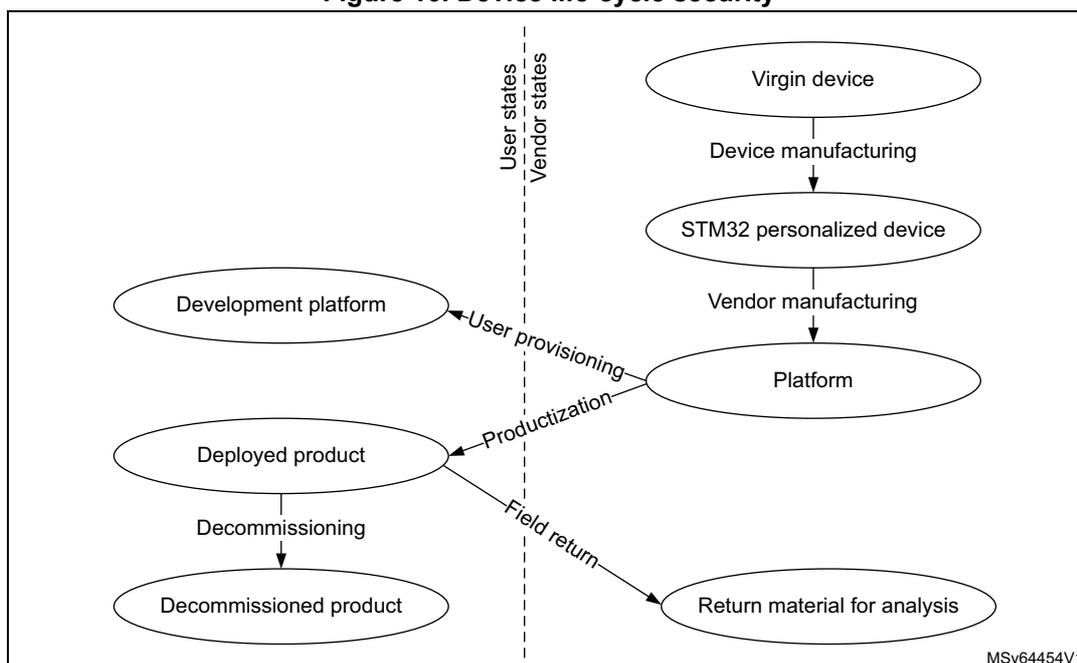
The diagram illustrates the device life-cycle security flow, divided into two columns by a vertical dashed line: 'User states' on the left and 'Vendor states' on the right.
- Vendor states (right column):
- Starts with an oval labeled 'Virgin device'.
- An arrow labeled 'Device manufacturing' points down to an oval labeled 'STM32 personalized device'.
- An arrow labeled 'Vendor manufacturing' points down to an oval labeled 'Platform'.
- Transitions:
- An arrow labeled 'User provisioning' points from the 'Platform' oval to the 'Development platform' oval in the User states.
- An arrow labeled 'Productionization' points from the 'Platform' oval to the 'Deployed product' oval in the User states.
- An arrow labeled 'Field return' points from the 'Deployed product' oval to the 'Return material for analysis' oval in the User states.
- User states (left column):
- Contains ovals for 'Development platform', 'Deployed product', and 'Decommissioned product'.
- An arrow labeled 'Decommissioning' points from the 'Deployed product' oval to the 'Decommissioned product' oval.
MSv64454V1
More details on the various phases and associated transitions, found either at the vendor or end-user premises, are summarized in Table 17 .
Table 17. Main product life-cycle transitions
| Transitions | Description |
|---|---|
| Device manufacturing | STMicroelectronics creates new STM32 devices, always checking for manufacturing defects. During this process STM32 is provisioned with ROM firmware, secure firmware install (SFI) unique key pair, and a public ID. |
| Vendor manufacturing | One (or more) vendor is responsible for the platform assembly, initialization, and provisioning before delivery to the end user. This end user can use the final product (“productionization” transition) or use the platform for software development (“user provisioning” transition). |
| Productionization | The end user gets a product ready for use. All security functions of the platform are enabled, the debugging/testing features are restricted/disabled, and unique boot entry to immutable code is enforced. |
| User provisioning | Platform vendor prepares an individual platform for development, not to be connected to a production cloud network. |
| Field return or decommissioning | Those are one-way transitions, with devices kept in user premises or returned to the manufacturer. In both cases, all data including user data are destroyed, therefore the devices lose the ability to operate securely (like connecting to a managed IoT network). |
The features described hereafter contribute to secure the device life cycle.
3.11.1 Life-cycle management with readout protection (RDP)
The readout protection mechanism (full hardware feature) controls the access to the devices debug, test and provisioned secrets, as summarized in Table 18 .
Table 18. Typical product life-cycle phases
| RDP protection level | Debug | Comments | |
|---|---|---|---|
| 0 | Device open | Secure (1) and nonsecure | Boot address must target a secure area when TrustZone is enabled (secure SRAM, secure flash memory, RSS in system flash memory). Both OEM1 and OEM2 unlocking keys can be provisioned in the User options. |
| 0.5 (2) | Device partially closed (closed secure) | Nonsecure only | Boot address must target a secure area when TrustZone is enabled (secure user or system flash memory). Boot on SRAM is not permitted. Access to nonsecure flash memory is allowed when debug is connected. Both OEM1 and OEM2 unlocking keys can be provisioned in the User options. |
| 1 | Device memories protected | Nonsecure only (conditioned) | Boot address must target the secure user flash memory. Accesses to nonsecure flash memory, SRAM2, and backup registers are not allowed when debug is connected. Both OEM1 and OEM2 unlocking keys can be provisioned in the User options. |
| 2 | Device closed | None (JTAG fuse) | Boot address must target the user flash memory (secure if TZEN = 1). Option bytes are read-only, hence RDP level 2 cannot be changed, unless OEM2 unlocking key is activated (see Table 19 ). |
1. Debug is not available when executing RSS code.
2. Only applicable when TrustZone security is activated in the product (STM32WBA52/4/5xx devices only).
Note:
OEM1KEY option byte can be modified when OEM1LOCK = 0 (RDP = 0.5 or 1 only).
OEM2KEY option byte can be modified when OEM2LOCK = 0 (RDP = 1 only).
The supported transitions, summarized in Figure 11 , can be requested (when available) through the debug interface or via the system bootloader.
Figure 11. RDP level transition scheme
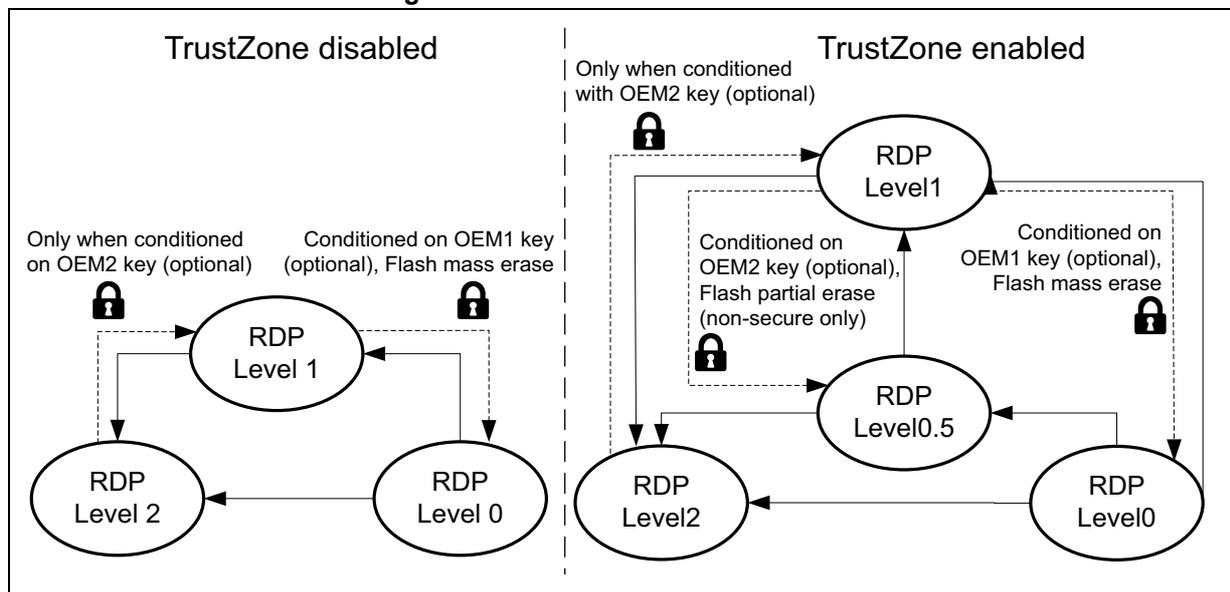
The diagram illustrates the RDP level transition scheme, divided into two main sections: TrustZone disabled and TrustZone enabled.
TrustZone disabled:
- RDP Level 0 to RDP Level 1: Conditioned on OEM1 key (optional), Flash mass erase.
- RDP Level 1 to RDP Level 2: Only when conditioned on OEM2 key (optional).
- RDP Level 2 to RDP Level 0: No specific condition mentioned.
TrustZone enabled:
- RDP Level 0 to RDP Level 1: Conditioned on OEM1 key (optional), Flash mass erase.
- RDP Level 1 to RDP Level 0.5: Conditioned on OEM2 key (optional), Flash partial erase (non-secure only).
- RDP Level 0.5 to RDP Level 2: Only when conditioned with OEM2 key (optional).
- RDP Level 2 to RDP Level 0: No specific condition mentioned.
The user flash memory is automatically erased, either partially or in totality, during an RDP regression from level 1. Those regressions can be conditioned to dedicated 64-bit password keys, if provisioned by the OEM (see next subsection). During the regression from RDP Level 1 to RDP Level 0.5, only nonsecure embedded flash memory is erased, keeping functional, for example, the secure boot and the secure firmware update. In all regressions from RDP Level 1 the OTP area in the flash memory is kept, and targeted device secrets are erased. No secrets must be stored in the OTP as they are nonsecure. The same secrets are erased, as those erased as response to tamper, defined in Section 3.7.3 .
Note: Enabling TrustZone using option byte TZEN is possible only when RDP level is 0.
For more details on RDP, refer to Section 7: Embedded flash memory (FLASH) .
RDP regression and erase
When regressing RDP to level 0.5 or level 0, the SRAM1, SRAM2, PKA SRAM memories and TAMP backup registers are erased.
Note: Before launching an RDP regression, the software must invalidate the ICACHE and wait for the BUSYF bit to get cleared.
RDP unlocking sequences
The use of the two OEM password keys described in Figure 11 is described hereafter.
Note: The devices support both permanent RDP Level 2 (legacy mode) or password-based RDP Level 2 regression to Level 1. This Level 2 regression does not erase the application code, and it does not change the RDP Level 1 protections in place.
Details on the password-based regression can be found in Table 19 .
Table 19. OEM key RDP unlocking methods
| OEM1 password options | OEM2 password options | ||||
|---|---|---|---|---|---|
| OEM1 LOCK | Initial RDP level | RDP regression | OEM2 LOCK | Initial RDP level | RDP regression |
| 1 | 1 | Regression to Level 0 possible only through OEM1 unlock sequence (see below) | 1 | 1 | Regression to Level 0.5 possible only through OEM2 unlock sequence A (see below) |
| 2 | Automatic regression to Level 1 triggered upon successful OEM2 unlock sequence B (see below) | ||||
| 0 | Regression to Level 0 always granted | 0 | 1 | Regression to Level 0.5 always granted | |
| 2 | Regression to Level 1 never granted. RDP level 2 remains a permanent state. | ||||
- • OEM1 unlock sequence, starting at RDP Level 1:
- – Shift password key through JTAG/SWD (see the note below).
- – If this key matches the OEM1KEY provisioned in the device, the application can trigger a regression sequence to Level 0. After the regression is completed, the nonsecure embedded flash memory and device secrets are erased. The OTP area is not erased.
- – In case of mismatch value, the RDP regression is blocked and RDP Level 1 protections are enforced until next power-on reset.
- • OEM2 unlock sequence A, starting at RDP Level 1:
- – Shift password key through JTAG/SWD under reset (see the note below).
- – If this key matches the OEM2KEY provisioned in the device, the application can trigger a regression sequence to Level 0.5. After the regression is completed, the nonsecure part of the embedded flash memory and the device secrets are erased. The OTP area is not erased.
- – In case of mismatch value, the RDP regression is blocked and RDP Level 1 protections are enforced until next power-on reset.
- • OEM2 unlock sequence B, starting at RDP Level 2:
- – Shift password key through JTAG/SWD under reset (see the note below).
- – If this key matches the OEM2KEY provisioned in the device, the device automatically triggers a regression sequence to Level 1. After the regression is completed, a power-on reset has to be applied.
- – In case of mismatch value, the RDP regression is blocked and RDP Level 2 protections are enforced until the next power-on reset.
Note: Unlocking the device with a password is possible only once per power cycle.
Shifting the password key through JTAG/SWD corresponds to writing two 32-bit key words, AUTH_KEY[31:0], then AUTH_KEY[63:32], in DBGMCU_DBG_AUTH_HOST register.
JTAG 32-bit device specific ID
Unless the JTAG port is deactivated (OEM2LOCK = 0 and RDP Level = 2), a 32-bit device specific quantity can always be read through the JTAG port. This information is stored in DBGMCU_DBG_AUTH_DEVICE.
The OEM can use this 32-bit information to derive the expected OEM password keys to unlock this specific device.
3.11.2 Recommended option byte settings
Most of the time, the user threat model focuses mainly on software attacks. In this case, it may be sufficient to keep the RDP Level 1 as device protection.
For a more aggressive threat model, where the user fears physical attacks on the STM32 device, it is recommended to optimize the level of security by setting the RDP Level 2.
The recommended settings are detailed below:
- • If TrustZone is disabled (TZEN = 0)
- – RDP Level 2
- – nonsecure boot address option bytes set in user flash memory
- • If TrustZone is enabled (TZEN = 1)
(a)
- – RDP Level 2
- – BOOT_LOCK = 1
- – secure boot address option bytes set in user secure flash memory
As described in the previous section, the customer can decide to allow any RDP Level 2 part to regress to RDP Level 1, provided the OEM2 key has been successfully provisioned, and OEM2LOCK option bit is set.
3.12 Access controlled debug
The device restricts access to embedded debug features, to guarantee the confidentiality of customer assets against unauthorized usage of debug and trace features.
3.12.1 Debug protection with readout protection (RDP)
As described in Section 3.11.1 , the hardware RDP mechanism automatically controls the accesses to the device debug and test. The protection of these debug features are defined in Table 20 . Possible password-based regressions are described in Section 3.11.1 .
Table 20. Debug protection with RDP
| RDP protection level | Debug features protection | |
|---|---|---|
| 0 | Device open | Any debug (1) |
| 0.5 (2) | Device partially closed | Secure debug is no longer available. |
| 1 | Device memories protected | Nonsecure debug can no longer debug code and data stored in the embedded flash memory, SRAM2, and backup registers. |
| 2 | Device closed | JTAG is physically deactivated, unless it is kept operational only for password key injection (OEM2LOCK = 1). See Section 3.11.1 . |
1. Including ST engineering test modes, used for field returns.
2. Only applicable when TrustZone security is activated in the product (STM32WBA52/4/5xx devices only).
a. Available only on STM32WBA52/4/5xx devices.
3.13 Software intellectual property protection and collaborative development
Thanks to software intellectual property protection and collaborative model, the devices allow the design of solutions integrating innovative third-party libraries.
Collaborative development is summarized Figure 12 . Starting from a personalized device sold by STMicroelectronics, a vendor A can integrate a portion of hardware and software on a platform A, which can then be used by a vendor B, who does the same before deploying a final product to the end users.
Note: Each platform vendor can provision individual platforms for development not to be connected to a production cloud network (“Development Platform X”).
Figure 12. Collaborative development principle
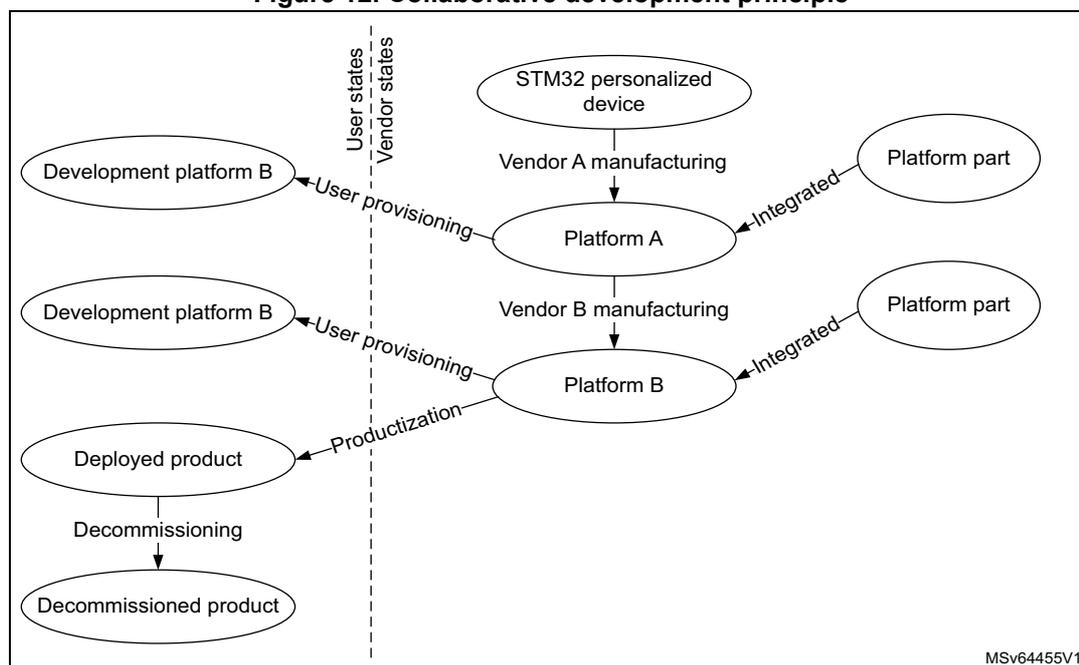
The diagram illustrates the collaborative development principle. It is divided into two vertical sections by a dashed line: 'User states' on the left and 'Vendor states' on the right. The process starts in the Vendor states with an 'STM32 personalized device'. This leads to 'Vendor A manufacturing', which produces 'Platform A'. 'Platform A' is then 'Integrated' with a 'Platform part'. 'Platform A' is also 'User provisioning' to a 'Development platform B' in the User states. From 'Platform A', the process goes to 'Vendor B manufacturing', which produces 'Platform B'. 'Platform B' is 'Integrated' with another 'Platform part' and is also 'User provisioning' to another 'Development platform B' in the User states. 'Platform B' leads to 'Productization', which results in a 'Deployed product' in the User states. Finally, 'Decommissioning' of the 'Deployed product' leads to a 'Decommissioned product' in the User states. The diagram is labeled 'MSv64455V1' in the bottom right corner.
The features described hereafter contribute to securing the software intellectual property within such a collaborative development.
3.13.1 Software intellectual property protection with RDP
As described in Section 3.11.1 , the hardware RDP mechanism automatically controls the accesses to secrets provisioned in the device. The protection of these secrets is defined in Table 21 .
Table 21. Software intellectual property protection with RDP| RDP protection level | Secrets protection | |
|---|---|---|
| Level 0 | Device open | No special protections. |
| Level 0.5 (1) | Device partially closed | All peripherals and memories mapped as secure during secure boot cannot be dumped, debugged or traced |
| Level 1 | Device memories protected | Data and code stored in embedded flash memory, SRAM2 and backup registers are no more accessible via debugger. |
| Level 2 | Device closed | All data and code stored in the device cannot be dumped, debugged or traced. |
1. Only applicable when TrustZone ® security is activated in the product (STM32WBA52/4/5xx devices only).
3.13.2 Other software intellectual property protections
The device additional protections to software intellectual property are:
- • Invasive attacks such as physical tampering are countered by detection then decommissioning of the device before the detected attack succeeds.
- • Non-invasive attacks, such as side channel attacks, are countered by not leaking secret information via side channels such as timing, power and EM emissions.