29. Liquid crystal display controller (LCD)
This section applies to STM32U356/366 devices only. Refer to the device datasheet for more details.
29.1 LCD introduction
The LCD controller is a digital controller/driver for monochrome passive liquid crystal display (LCD) with up to eight common terminals, and up to 44 segment terminals to drive 176 (44x4) or 320 (40x8) LCD picture elements (pixels). The exact number of terminals depends on the device pinout, as described in the datasheet.
The LCD is made up of several segments (pixels or complete symbols) that can be turned visible or invisible. Each segment consists of a layer of liquid crystal molecules aligned between two electrodes. When a voltage greater than a threshold voltage is applied across the liquid crystal, the segment becomes visible. The segment voltage must be alternated to avoid an electrophoresis effect in the liquid crystal (which degrades the display). The waveform across a segment must then be generated, to avoid having a direct current (DC).
Glossary
Bias: number of voltage levels used when driving an LCD, defined as \( 1 / (\text{number of voltage levels used to drive an LCD display} - 1) \)
Boost circuit: contrast controller circuit
Common: electrical connection terminal connected to several (44) segments
Duty ratio: number defined as \( 1 / (\text{number of common terminals on a given LCD display}) \)
Frame: one period of the waveform written to a segment
Frame rate: number of frames per second (number of times the LCD segments are energized per second)
LCD (liquid crystal display): passive display panel with terminals leading directly to a segment
Segment: smallest viewing element (a single bar or dot used to help create a character on an LCD display)
29.2 LCD main features
- • Highly flexible frame rate control
- • Static, 1/2, 1/3, 1/4, and 1/8 duty supported
- • Static, 1/2, 1/3, and 1/4 bias supported
- • Double-buffered memory allowing data in LCD_RAM registers to be updated at any time by the application firmware without affecting the integrity of the displayed data
- – LCD data RAM of up to 16 x 32-bit registers, which contain pixel information (active/inactive)
- • Software selectable LCD output voltage (contrast), from \( V_{LCDmin} \) to \( V_{LCDmax} \)
- • No need for external analog components:
- – Step-up converter, embedded to generate an internal \( V_{LCD} \) voltage higher than \( V_{DD} \)
- – Software selection between external and internal \( V_{LCD} \) voltage source. In case of an external source, the internal boost circuit is disabled to reduce power consumption.
- – Structure of the resistive network configurable by software to adapt the power consumption to match the capacitive charge required by the LCD panel
- – Integrated voltage output buffers with low power mode for higher LCD driving capability
- • Contrast that can be adjusted using two different methods:
- – When using the internal step-up converter, the software can adjust \( V_{LCD} \) between \( V_{LCDmin} \) and \( V_{LCDmax} \)
- – Programmable dead time (up to eight phase periods) between frames
- • Full support of low-power modes: the LCD controller can be displayed in Sleep, Low-power run, Low-power sleep, and Stop, or can be fully disabled to reduce power consumption
- • Built-in phase inversion for reduced power consumption and EMI (electromagnetic interference)
- • Start-of-frame interrupt to synchronize the software when updating the LCD data RAM
- • Blink capability:
- – Up to 1, 2, 3, 4, 8, or all pixels that can be programmed to blink at a configurable frequency
- – Software adjustable blink frequency to achieve around 0.5, 1, 2, or 4 Hz
- • Used LCD segment and common pins must be configured as GPIO alternate functions, and unused segment and common pins can be used for GPIO or for another peripheral alternate function
Note: When the LCD relies on the internal step-up converter, the VLCD pin must be connected to \( V_{SS} \) with a capacitor. Its typical value is 0.47 \( \mu F \) (see \( C_{EXT} \) value in the datasheet for details).
29.3 LCD functional description
29.3.1 General description
The LCD controller has five main blocks (see Figure 284 ):
Figure 284. LCD controller block diagram
![Figure 284. LCD controller block diagram. The diagram shows the internal architecture of the LCD controller. On the left, an 'Address bus' and 'Data bus' are shown. The 'Data bus' connects to 'LCD regs', 'LCD RAM (32x16 bits)', and another 'LCD regs' block. The 'LCD RAM' connects to an '8-to-1 mux', which then connects to a 'SEG driver'. The 'SEG driver' outputs to an 'Analog switch array' via 'SEG[43:0]' (44 lines) and 'SEG[39:0]' (40 lines). The 'SEG driver' also connects to a 'COM driver' via 'ck_div'. The 'COM driver' outputs to the 'Analog switch array' via 'COM[3:0]' and 'COM[7:4]'. The 'COM driver' also has an 'Interrupt' output. The 'Frequency generator' block contains a '16-bit prescaler' (input: LCDCLK, output: LCDCLK/32768), a 'CLOCK MUX' (inputs: LCDCLK, PS[3:0], DIV[3:0], output: ck_ps), and a 'Divide by 16 to 31' block (input: ck_ps, output: ck_div). The 'ck_div' signal is also connected to the 'SEG COM MUX'. The 'SEG COM MUX' outputs to the 'Analog switch array' via 'SEG[43:40]' (4 lines). The 'Analog switch array' has multiple output lines: COM0, ..., COM3, SEG0, ..., SEG39, SEG40/COM4, SEG41/COM5, SEG42/COM6, SEG43/COM7. Below the 'SEG COM MUX' is an 'Analog step-up converter' block containing a 'Voltage generator' (inputs: STATIC, VSEL, EN, HD, BUFEN, BIAS[1:0], CC[2:0]; outputs: Vss, 1/3 - 1/4 Vlcd, 2/3 - 3/4 Vlcd, 1/2 Vlcd, Vlcd) and a 'Contrast controller' (input: READY). The 'Voltage generator' and 'Contrast controller' outputs are connected to the 'Analog switch array'. The 'I/O ports' are also connected to the 'Analog switch array'. The diagram is labeled MS56895V2.](/RM0487-STM32U3/e178f60045ba3d2b75f7c56148b67162_img.jpg)
Note: LCDCLK is the same as RTCCLK. Refer to the RTC/LCD clock description in the RCC section.
The frequency generator allows the user to achieve various LCD frame rates starting from an LCD input clock frequency (LCDCLK), which can vary from 32 kHz up to 1 MHz.
Different clock sources can be used to provide the LCD clock (LCDCLK/RTCCLK):
- • 32 kHz low-speed external RC (LSE)
- • 32 kHz low-speed internal RC (LSI)
- • High-speed external (HSE) divided by 32
29.3.2 Frequency generator
This clock source must be stable to obtain accurate LCD timing, and hence to minimize DC voltage offset across LCD segments. The input clock LCDCLK can be divided by any value from 1 to \( 2^{15} \times 31 \) (see Section 29.6.2 ).
The frequency generator consists of a prescaler (16-bit ripple counter), and a 16 to 31 clock divider. PS[3:0] in LCD_FCR selects LCDCLK divided by \( 2^{PS[3:0]} \) . If a finer resolution rate is required, DIV[3:0] in LCD_FCR can be used to divide the clock further by 16 to 31.
In this way, the user can roughly scale the frequency, and then fine-tune it by linearly scaling the clock with the counter. The output of the frequency generator block is \( f_{ck\_div} \) , which is the time base for the entire LCD controller. This frequency is equivalent to the LCD phase frequency, rather than the frame frequency (they are equal only in case of static duty).
The frame frequency ( \( f_{frame} \) ) is obtained from \( f_{ck\_div} \) by dividing it by the number of active common terminals (or by multiplying it for the duty).
The relation between the input clock frequency ( \( f_{LCDCLK} \) ) of the frequency generator and its output clock frequency \( f_{ck\_div} \) is:
This makes the frequency generator very flexible. An example of frame rate calculation is shown in the following table.
Table 272. Example of frame rate calculation
| LCDCLK | PS[3:0] | DIV[3:0] | Ratio | Duty | \( f_{frame} \) |
|---|---|---|---|---|---|
| 32.768 kHz | 3 | 1 | 136 | 1/8 | 30.12 Hz |
| 4 | 1 | 272 | 1/4 | 30.12 Hz | |
| 4 | 6 | 352 | 1/3 | 31.03 Hz | |
| 5 | 1 | 544 | 1/2 | 30.12 Hz | |
| 6 | 1 | 1088 | Static | 30.12 Hz | |
| 1 | 4 | 40 | 1/8 | 102.40 Hz | |
| 2 | 4 | 80 | 1/4 | 102.40 Hz | |
| 2 | 11 | 108 | 1/3 | 101.14 Hz | |
| 3 | 4 | 160 | 1/2 | 102.40 Hz | |
| 4 | 4 | 320 | Static | 102.40 Hz | |
| 1.00 MHz | 6 | 3 | 1216 | 1/8 | 102.80 Hz |
| 7 | 3 | 2432 | 1/4 | 102.80 Hz | |
| 7 | 10 | 3328 | 1/3 | 100.16 Hz | |
| 8 | 3 | 4864 | 1/2 | 102.80 Hz | |
| 9 | 3 | 9728 | Static | 102.80 Hz |
The frame frequency must be selected within a range between 30 and 100 Hz. This is a compromise between power consumption and acceptable refresh rate. In addition, a dedicated prescaler selects the blink frequency.
This frequency is defined as \( f_{\text{BLINK}} = f_{\text{ck\_div}} / 2^{(\text{BLINKF} + 3)} \) , with BLINKF[2:0] = 0, 1, 2, ..., 7.
The achieved blink frequency is in the range of 0.5, 1, 2, or 4 Hz.
29.3.3 Common driver
Common signals are generated by the common driver block (see Figure 284).
COM signal bias
Each COM signal has identical waveforms, but different phases. It has its maximum amplitude \( V_{\text{LCD}} \) or \( V_{\text{SS}} \) only in the corresponding phase of a frame cycle, while, during the other phases, the signal amplitude is:
- • \( 1/4 V_{\text{LCD}} \) or \( 3/4 V_{\text{LCD}} \) in case of \( 1/4 \) bias
- • \( 1/3 V_{\text{LCD}} \) or \( 2/3 V_{\text{LCD}} \) in case of \( 1/3 \) bias
- • \( 1/2 V_{\text{LCD}} \) in case of \( 1/2 \) bias
The selection between \( 1/2 \) , \( 1/3 \) , and \( 1/4 \) bias modes can be done through BIAS[1:0] in LCD_CR.
A pixel is activated when both of its corresponding common and segment lines are active during the same phase, when the voltage difference between common and segment is maximum during this phase. Common signals are phase-inverted to reduce EMI.
As shown in Figure 285, with phase inversion, there is a mean voltage of \( 1/2 V_{\text{LCD}} \) at the end of every odd cycle.
Figure 285. \( 1/3 \) bias, \( 1/4 \) duty
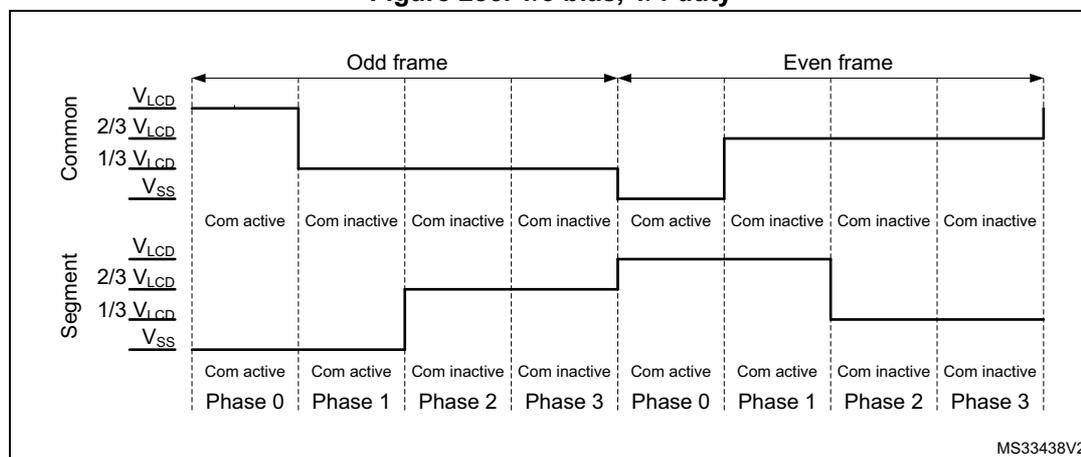
The figure is a timing diagram titled "Figure 285. 1/3 bias, 1/4 duty". It shows the relationship between Common (COM) and Segment (SEG) signals over two frames: an Odd frame and an Even frame. Each frame is divided into four phases: Phase 0, Phase 1, Phase 2, and Phase 3. The Common signal levels are \( V_{\text{LCD}} \) , \( 2/3 V_{\text{LCD}} \) , \( 1/3 V_{\text{LCD}} \) , and \( V_{\text{SS}} \) . The Segment signal levels are \( V_{\text{LCD}} \) , \( 2/3 V_{\text{LCD}} \) , \( 1/3 V_{\text{LCD}} \) , and \( V_{\text{SS}} \) . The Common signal is active in Phase 0 and inactive in Phases 1, 2, and 3. The Segment signal is active in Phase 1 and inactive in Phases 0, 2, and 3. The signals are phase-inverted between odd and even frames. The mean voltage of the Common signal at the end of every odd cycle is \( 1/2 V_{\text{LCD}} \) .
| Frame | Phase | Common Signal | Segment Signal |
|---|---|---|---|
| Odd frame | Phase 0 | Com active | Com inactive |
| Phase 1 | Com inactive | Com active | |
| Phase 2 | Com inactive | Com inactive | |
| Phase 3 | Com inactive | Com inactive | |
| Even frame | Phase 0 | Com inactive | Com active |
| Phase 1 | Com active | Com inactive | |
| Phase 2 | Com inactive | Com inactive | |
| Phase 3 | Com inactive | Com inactive |
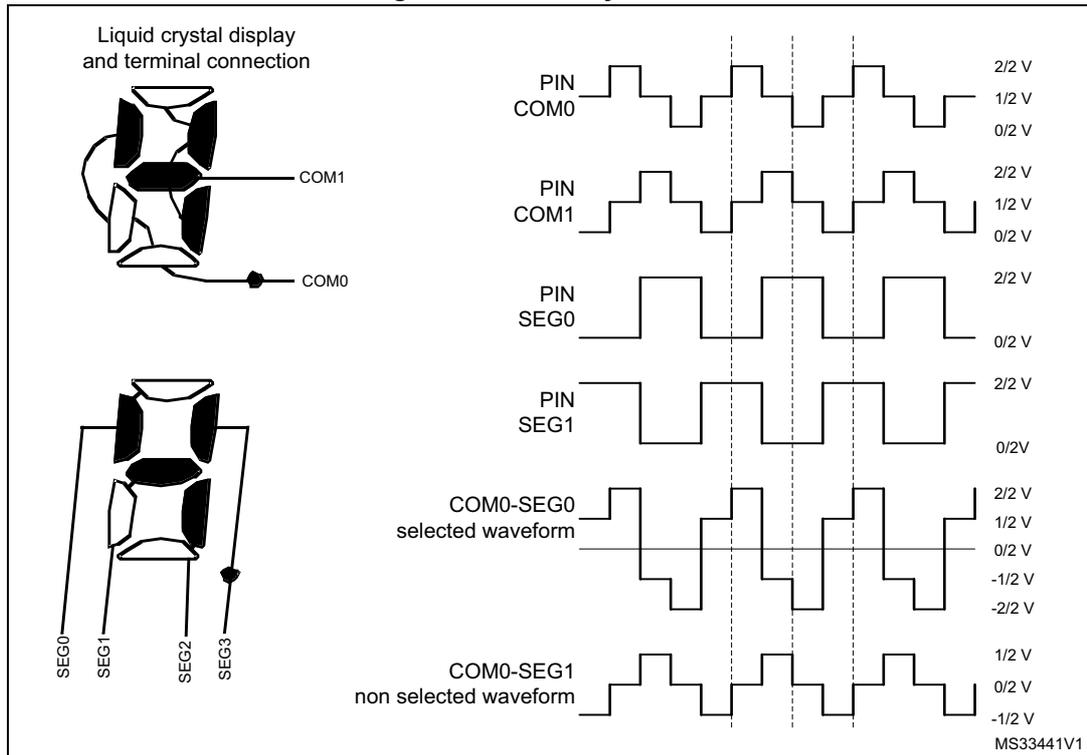
In case of \( 1/2 \) bias (BIAS = 01), the \( V_{\text{LCD}} \) pin generates an intermediate voltage equal to \( 1/2 V_{\text{LCD}} \) on node b for odd and even frames (see Figure 288).
COM signal duty
Depending on DUTY[2:0] in LCD_CR, the COM signals are generated with static duty (Figure 287), 1/2 duty (Figure 288), 1/3 duty (Figure 289), 1/4 duty (Figure 290), or 1/8 duty (Figure 291).
COM[ n ] n [0 to 7] is active during phase n in the odd frame, so the COM pin is driven to \( V_{LCD} \) .
During phase n of the even frame, the COM pin is driven to \( V_{SS} \) .
In the case of 1/3 (1/4) bias, COM[ n ] is inactive during phases other than n , so the COM pin is driven to 1/3 (1/4) \( V_{LCD} \) during odd frames, and to 2/3 (3/4) \( V_{LCD} \) during even frames.
In the case of 1/2 bias, if COM[ n ] is inactive during phases other than n , the COM pin is always driven (odd and even frame) to 1/2 \( V_{LCD} \) .
When static duty is selected, the segment lines are not multiplexed, which means that each segment output corresponds to one pixel. In this way, only up to 44 pixels can be driven. COM[0] is always active while COM[7:1] are not used, and are driven to \( V_{SS} \) .
When LCDEN in LCD_CR is reset, all common lines are pulled down to \( V_{SS} \) , and the ENS flag in LCD_SR becomes 0. Static duty means that COM[0] is always active, and only two voltage levels are used for segment and common lines: \( V_{LCD} \) and \( V_{SS} \) . A pixel is active if the corresponding SEG line has a voltage opposite to that of the COM, and inactive when the voltages are equal. In this way the LCD has maximum contrast (see Figure 286, Figure 287).
In Figure 286, pixel 0 is active, while pixel 1 is inactive.
Figure 286. Static duty case 1
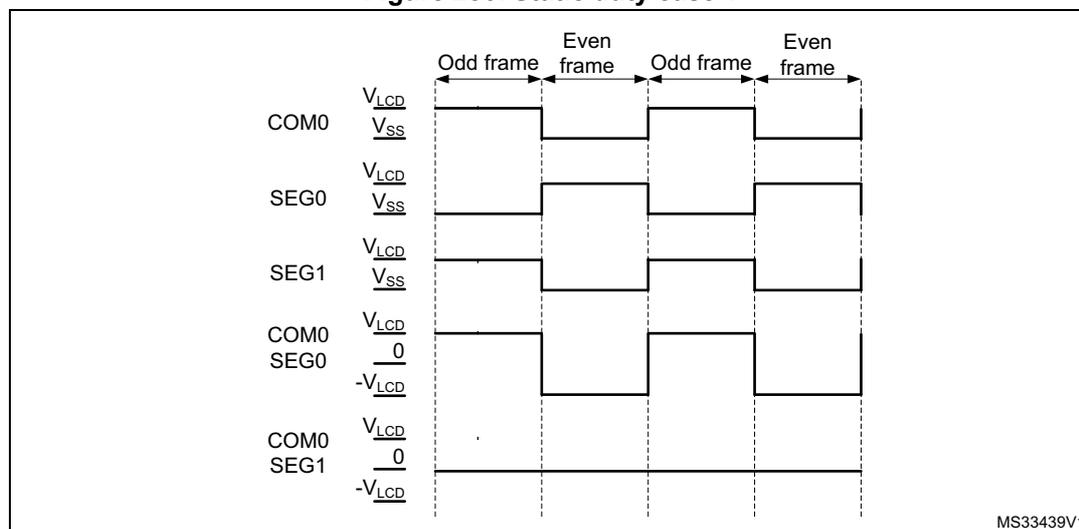
The diagram illustrates the waveforms for static duty over four frames: Odd frame, Even frame, Odd frame, and Even frame. The vertical axis shows voltage levels \( V_{LCD} \) and \( V_{SS} \) for individual signals, and \( V_{LCD} \) , 0, and \( -V_{LCD} \) for differential signals.
- COM0: High ( \( V_{LCD} \) ) in odd frames and low ( \( V_{SS} \) ) in even frames.
- SEG0: Low ( \( V_{SS} \) ) in odd frames and high ( \( V_{LCD} \) ) in even frames.
- SEG1: High ( \( V_{LCD} \) ) in odd frames and low ( \( V_{SS} \) ) in even frames.
- COM0-SEG0 (Differential): Results in \( V_{LCD} \) in odd frames and \( -V_{LCD} \) in even frames, indicating an active pixel (Pixel 0).
- COM0-SEG1 (Differential): Results in 0V across all frames, indicating an inactive pixel (Pixel 1).
The diagram is labeled MS33439V1 in the bottom right corner.
In each frame, there is only one phase, hence \( f_{frame} \) is equal to \( f_{LCD} \) . If 1/4 duty is selected, there are four phases in a frame: COM[0] is active during phase 0, COM[1] is active during phase 1, COM[2] is active during phase 2, and COM[3] is active during phase 3.
Figure 287. Static duty case 2
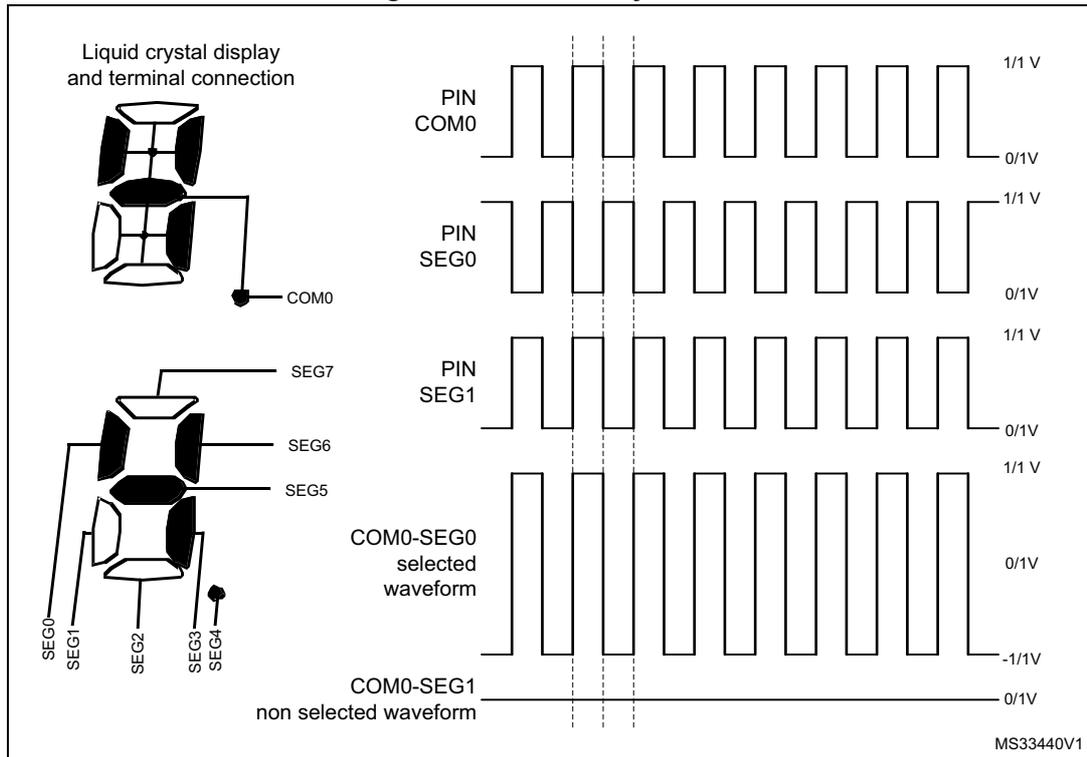
The figure illustrates the static duty case 2 for an LCD controller. On the left, a diagram shows the liquid crystal display and its terminal connections. The COM0 terminal is connected to a common line, and the SEG terminals (SEG0 through SEG7) are connected to segment lines. The SEG0 terminal is connected to a pixel, and the SEG1 terminal is connected to another pixel. The SEG2, SEG3, and SEG4 terminals are also shown. On the right, timing waveforms are shown for the PIN COM0, PIN SEG0, and PIN SEG1 terminals. The waveforms are square waves with a period of 1/1 V and a duty cycle of 0/1 V. The COM0-SEG0 selected waveform is shown as a square wave with a period of 1/1 V and a duty cycle of 0/1 V. The COM0-SEG1 non selected waveform is shown as a constant 0/1 V level. The diagram is labeled MS33440V1.
In this mode, the segment terminals are multiplexed, and each of them control four pixels. A pixel is activated only when both its corresponding SEG and COM lines are active in the same phase. In case of 1/4 duty, to deactivate pixel 0 connected to COM[0], SEG[0] must be inactive during the phase 0 when COM[0] is active. To activate pixel 0 connected to COM[1], SEG[0] needs to be active during phase 1 when COM[1] is active (see Figure 290 ). To activate pixels from 0 to 43 connected to COM[0], SEG[0:43] must be active during phase 0 when COM[0] is active. These considerations can be extended to the other pixels.
8-to-1 mux
When COM[0] is active in the common driver block, it also drives the 8-to-1 mux shown in Figure 284 , to select the content of the first two RAM register locations. When COM[7] is active, the output of the 8-to-1 mux is the content of the last two RAM locations.
Figure 288. 1/2 duty, 1/2 bias
29.3.4 Segment driver
The segment driver block controls the SEG lines according to the pixel data coming from the 8-to-1 mux driven in each phase by the common driver block.
In the case of 1/4 or 1/8 duty
When COM[0] is active, the pixel information (active/inactive) related to the pixel connected to COM[0] (content of the first two LCD_RAM locations) goes through the 8-to-1 mux.
The SEG[ \( n \) ] pin \( n \) [0 to 43] is driven to \( V_{SS} \) (indicating pixel \( n \) is active when COM[0] is active) in phase 0 of the odd frame.
The SEG[ \( n \) ] pin is driven to \( V_{LCD} \) in phase 0 of the even frame. If pixel \( n \) is inactive, the SEG[ \( n \) ] pin is driven to \( 2/3 \) ( \( 2/4 \) ) \( V_{LCD} \) in the odd frame, or to \( 1/3 \) ( \( 2/4 \) ) \( V_{LCD} \) in the even frame (current inversion in \( V_{LCD} \) pad), see Figure 285 .
In case of 1/2 bias, if the pixel is inactive, the SEG[ \( n \) ] pin is driven to \( V_{LCD} \) in the odd and to \( V_{SS} \) in the even frame.
When the LCD controller is disabled (LCDEN cleared in LCD_CR) the SEG lines are pulled down to \( V_{SS} \) .
Figure 289. 1/3 duty, 1/3 bias
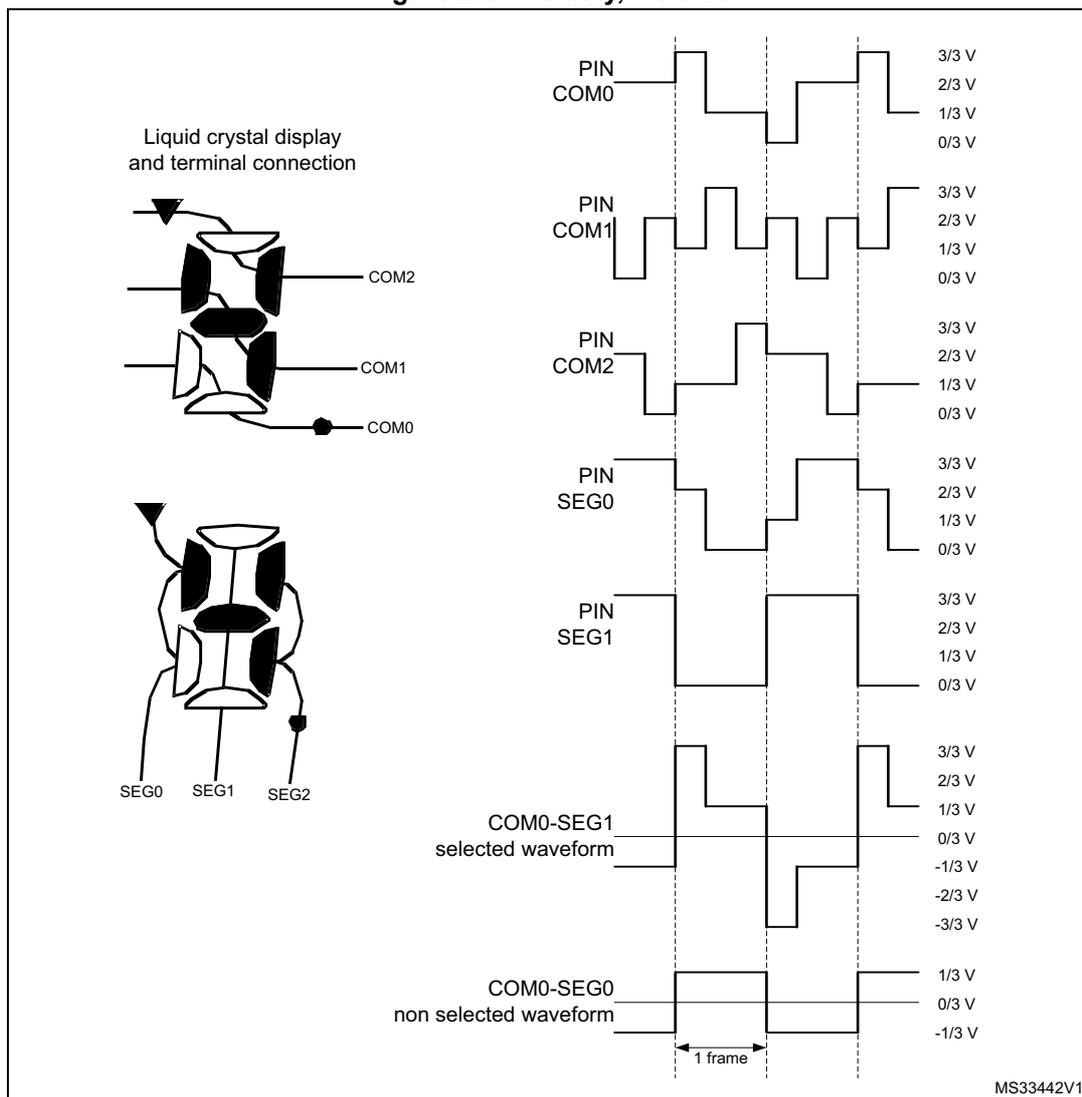
Liquid crystal display and terminal connection
Diagram illustrating the liquid crystal display and terminal connection, showing COM0, COM1, COM2, SEG0, SEG1, and SEG2 terminals.
Timing diagram showing the relationship between the Liquid Crystal Display (LCD) terminals and the controller pins over one frame (1 frame).
The diagram displays the voltage levels (V) for the selected and non-selected waveforms across the pins and terminals:
- PIN COM0: 3/3 V, 2/3 V, 1/3 V, 0/3 V
- PIN COM1: 3/3 V, 2/3 V, 1/3 V, 0/3 V
- PIN COM2: 3/3 V, 2/3 V, 1/3 V, 0/3 V
- PIN SEG0: 3/3 V, 2/3 V, 1/3 V, 0/3 V
- PIN SEG1: 3/3 V, 2/3 V, 1/3 V, 0/3 V
- COM0-SEG1 selected waveform: 3/3 V, 2/3 V, 1/3 V, 0/3 V, -1/3 V, -2/3 V, -3/3 V
- COM0-SEG0 non selected waveform: 1/3 V, 0/3 V, -1/3 V
The duration of one frame is indicated as 1 frame.
MS33442V1
Figure 290. 1/4 duty, 1/3 bias
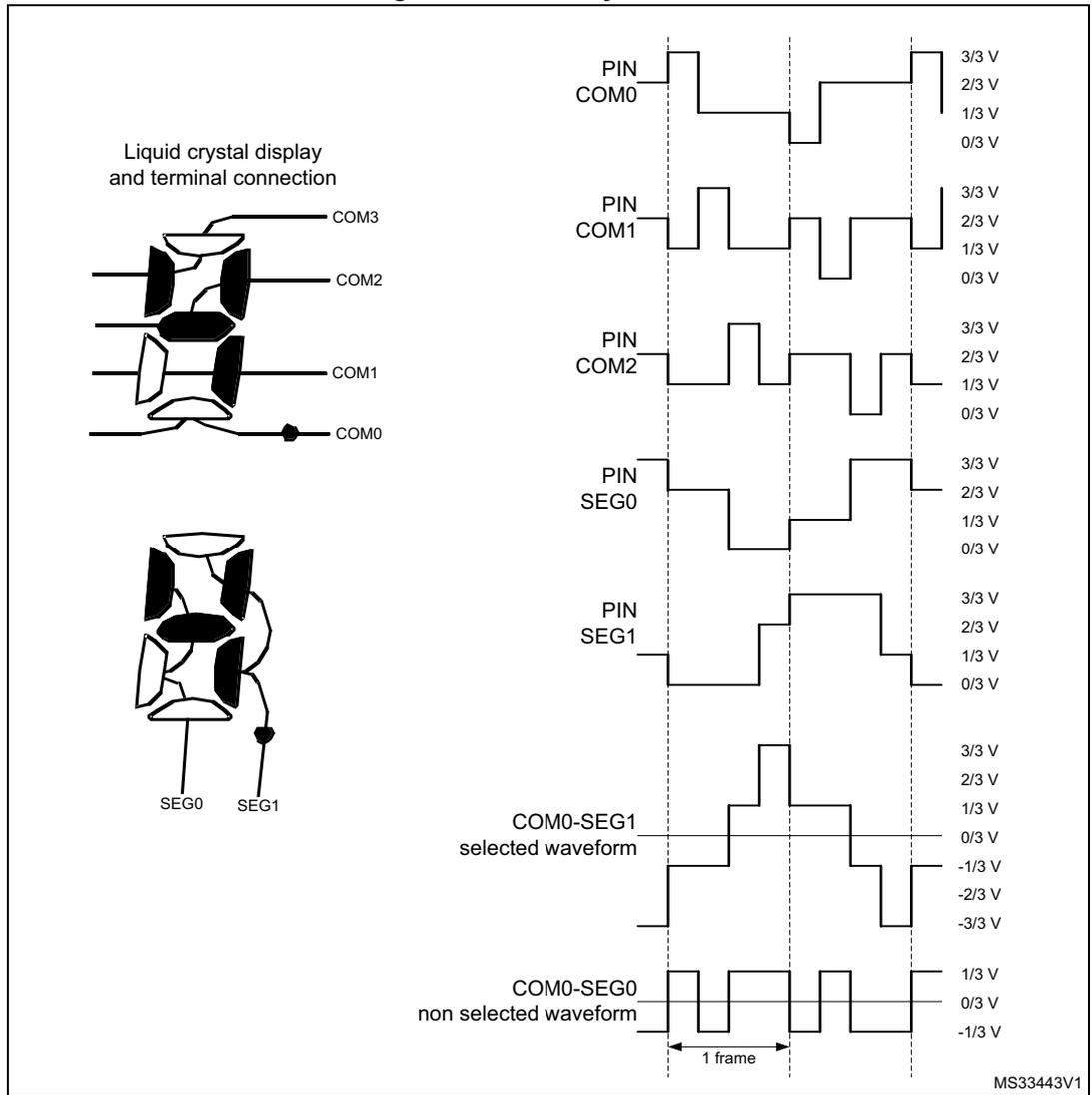
Liquid crystal display
and terminal connection
COM3
COM2
COM1
COM0
SEG0 SEG1
PIN
COM0
PIN
COM1
PIN
COM2
PIN
SEG0
PIN
SEG1
COM0-SEG1
selected waveform
COM0-SEG0
non selected waveform
3/3 V
2/3 V
1/3 V
0/3 V
3/3 V
2/3 V
1/3 V
0/3 V
3/3 V
2/3 V
1/3 V
0/3 V
3/3 V
2/3 V
1/3 V
0/3 V
3/3 V
2/3 V
1/3 V
0/3 V
3/3 V
2/3 V
1/3 V
0/3 V
-1/3 V
-2/3 V
-3/3 V
1/3 V
0/3 V
-1/3 V
1 frame
MS33443V1
Figure 291. 1/8 duty, 1/4 bias
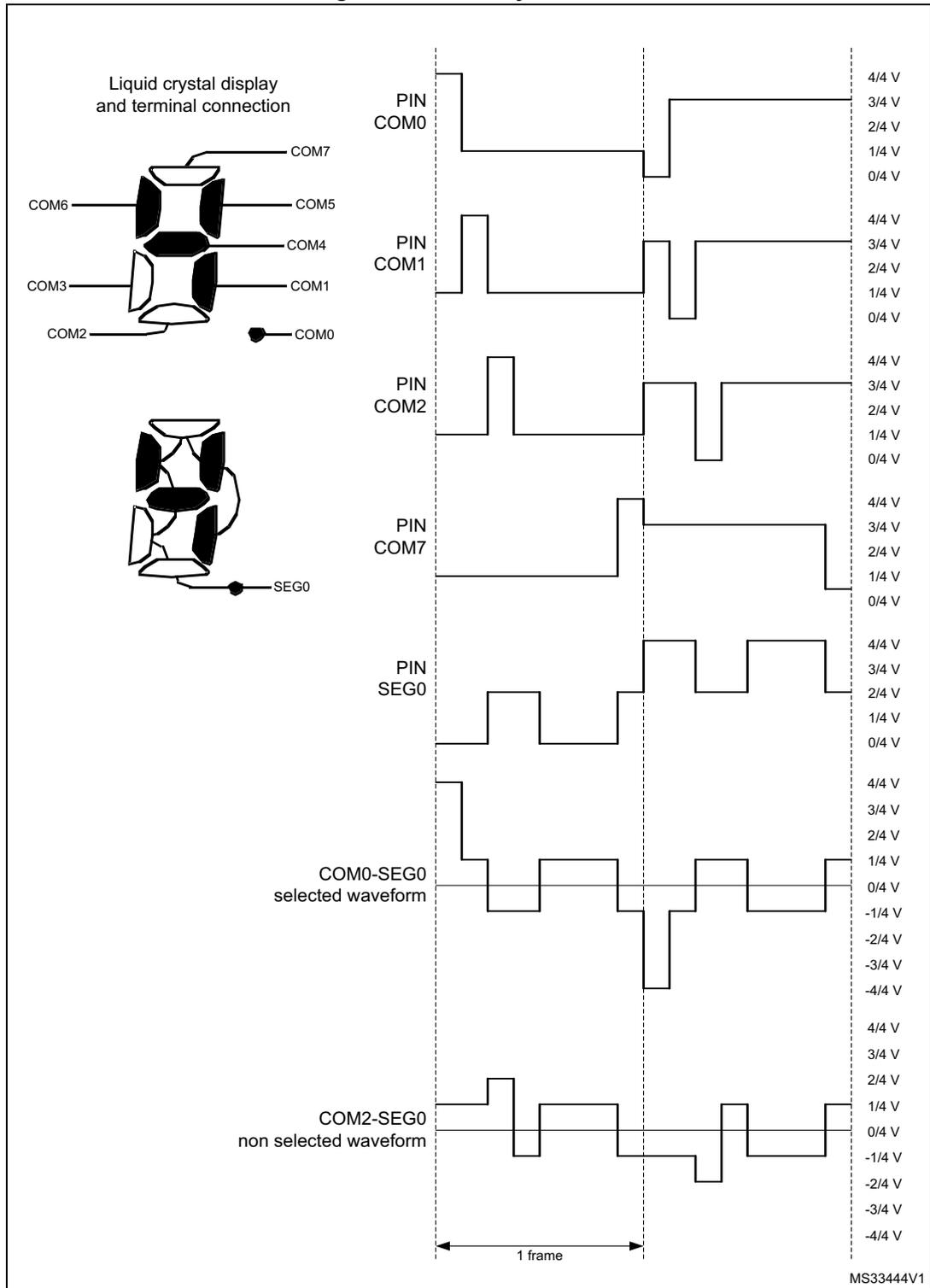
The figure illustrates the terminal connections and voltage waveforms for an LCD controller operating in 1/8 duty and 1/4 bias mode. On the left, a diagram shows the 'Liquid crystal display and terminal connection' with terminals COM0 through COM7 and SEG0. The main part of the figure displays the voltage waveforms for these terminals over a single frame. The vertical axis represents voltage levels from -4/4 V to 4/4 V in increments of 1/4 V. The horizontal axis represents time, with a '1 frame' duration indicated. The waveforms are as follows:
- PIN COM0: A square wave switching between 0/4 V and 3/4 V.
- PIN COM1: A square wave switching between 0/4 V and 3/4 V, with a different phase than COM0.
- PIN COM2: A square wave switching between 0/4 V and 3/4 V.
- PIN COM7: A square wave switching between 0/4 V and 3/4 V.
- PIN SEG0: A more complex waveform with multiple levels: 0/4 V, 1/4 V, 2/4 V, 3/4 V, and 4/4 V.
- COM0-SEG0 selected waveform: The difference waveform for the selected segment, showing levels from -4/4 V to 4/4 V.
- COM2-SEG0 non selected waveform: The difference waveform for a non-selected segment, showing levels from -2/4 V to 2/4 V.
The diagram is labeled with 'MS33444V1' in the bottom right corner.
Blink
The segment driver also implements a programmable blink feature to allow some pixels to continuously switch on at a specific frequency. The blink mode can be configured by BLINK[1:0] in LCD_FCR, making it possible to blink up to 1, 2, 4, 8, or all pixels (see Section 29.6.2 ). The blink frequency can be selected from eight different values using BLINKF[2:0] in LCD_FCR.
Table 273 gives examples of different blink frequencies (as a function of ck_div frequency).
Table 273. Blink frequency
| BLINKF[2:0] | ck_div frequency (with LCDCLK frequency of 32.768 kHz) | |||||
|---|---|---|---|---|---|---|
| 32 Hz | 64 Hz | 128 Hz | 256 Hz | |||
| 0 | 0 | 0 | 4.0 Hz | N/A | N/A | N/A |
| 0 | 0 | 1 | 2.0 Hz | 4.0 Hz | N/A | N/A |
| 0 | 1 | 0 | 1.0 Hz | 2.0 Hz | 4.0 Hz | N/A |
| 0 | 1 | 1 | 0.5 Hz | 1.0 Hz | 2.0 Hz | 4.0 Hz |
| 1 | 0 | 0 | 0.25 Hz | 0.5 Hz | 1.0 Hz | 2.0 Hz |
| 1 | 0 | 1 | N/A | 0.25 Hz | 0.5 Hz | 1.0 Hz |
| 1 | 1 | 0 | N/A | N/A | 0.25 Hz | 0.5 Hz |
| 1 | 1 | 1 | N/A | N/A | N/A | 0.25 Hz |
29.3.5 Voltage generator and contrast control
LCD supply source
The LCD power supply source comes from either the internal step-up converter, or from an external voltage applied on the VLCD pin after alternate function is set, and the LCD controller is enabled. The internal or external voltage source can be selected using VSEL in LCD_CR. If an external source is selected, the internal boost circuit (step-up converter) is disabled to reduce power consumption.
When the step-up converter is selected as the \( V_{LCD} \) source, the \( V_{LCD} \) value can be chosen among a wide set of values from \( V_{LCDmin} \) to \( V_{LCDmax} \) by means of CC[2:0] (contrast control) in LCD_FCR (see Section 29.6.2 ). New values of \( V_{LCD} \) take effect at the beginning of a new frame.
When an external power source is selected as \( V_{LCD} \) source, the \( V_{LCD} \) voltage must be chosen in the range of \( V_{LCDmin} \) to \( V_{LCDmax} \) (see datasheets). The contrast can then be controlled by programming a dead time between frames (see Deadtime ).
A specific software sequence must be performed to configure the LCD, depending upon the power supply source. The LCD controller is considered as disabled prior to the configuration sequence.
If the internal step-up converter is used (capacitor \( C_{EXT} \) on VLCD pin is required):
- Configure the VLCD pin as alternate function LCD in the GPIO_AFRH and GPIO_AFRH registers.
- • Wait for the external capacitor \( C_{EXT} \) to be charged ( \( C_{EXT} \) connected to the VLCD pin, approximately 2 ms for \( C_{EXT} = 1 \mu F \) )
- • Set voltage source to internal source by resetting VSEL in LCD_CR.
- • Enable the LCD controller by setting LCDEN in LCD_CR.
If the LCD external power source is used:
- • Set voltage source to external source by setting VSEL in LCD_CR.
- • Configure the VLCD pin as alternate function LCD in GPIO_AFR.
- • Enable the LCD controller by setting LCDEN in LCD_CR.
LCD intermediate voltages
The LCD intermediate voltage levels are generated through an internal resistor divider network, as shown in Figure 292 .
The LCD voltage generator issues intermediate voltage levels between \( V_{SS} \) and \( V_{LCD} \) :
- • \( 1/3 V_{LCD} \) and \( 2/3 V_{LCD} \) in case of 1/3 bias
- • \( 1/4 V_{LCD} \) , \( 2/4 V_{LCD} \) , and \( 3/4 V_{LCD} \) in case of 1/4 bias
- • only \( 1/2 V_{LCD} \) in case of 1/2 bias.
LCD drive selection
Two resistive networks, one with low-value resistors ( \( R_L \) ), and one with high-value resistors ( \( R_H \) ) are respectively used to increase the current during transitions, and to reduce power consumption in static state.
The EN switch follows the rules described below (see Figure 292 ):
- • If LCDEN is set in LCD_CR, the EN switch is closed.
- • When clearing LCDEN in LCD_CR, the EN switch is open at the end of the even frame, to avoid a medium voltage level different from 0 considering the entire frame odd plus even.
PON[2:0] (pulse on duration) in LCD_FCR configures the time during which \( R_L \) is enabled through the HD (high drive) switch when the levels of the common and segment lines change (see Figure 292 ). A short drive time leads to lower power consumption, but displays with high internal resistance may need a longer drive time to achieve satisfactory contrast.
Figure 292. LCD voltage control
![Figure 292. LCD voltage control circuit diagram. The diagram shows a voltage control circuit for an LCD. It features two main resistor networks: a low-value network (R_LN) and a high-value network (R_HN). The R_LN network consists of three stages of resistors (3 R_L, R_L, 2 R_L) connected between Vss and a node labeled STATIC. The R_HN network consists of three stages of resistors (3 R_H, R_H, 2 R_H) connected between V_LCD and the same STATIC node. Switches controlled by HD and EN signals select different tap points from these networks. The selected voltages are 1/4 x V_LCD, 1/3 x V_LCD, 1/2 x V_LCD, 2/3 x V_LCD, and 3/4 x V_LCD. These intermediate voltages are then buffered by three pairs of BUFEN buffers to produce three output rails: V_LCDRail1, V_LCDRail2, and V_LCDRail3. A BIAS[1] input is also shown, connected to an inverter.](/RM0487-STM32U3/baef2ee4e79204dc29772946fc9b6835_img.jpg)
- 1. \( R_{LN} \) and \( R_{HN} \) are, respectively, the low and the high value resistance network.
The \( R_{LN} \) divider can be always switched on using HD in LCD_FCR (see Section 29.6.2 ).
The HD switch follows the rules described below:
- • If HD and PON[2:0] are reset in LCD_FCR, the HD switch is open.
- • If HD is reset in LCD_FCR, and PON[2:0] in LCD_FCR are different from 00, the HD switch is closed during the number of pulses defined in PON[2:0].
- • If HD = 1 in LCD_FCR, then HD switch is always closed.
After LCDEN is activated, RDY is set in LCD_SR to indicate that voltage levels are stable and the LCD controller can start operation.
Buffered mode
When voltage output buffers are enabled by setting BUFEN in LCD_CR, the LCD driving capability is improved, as buffers prevent the LCD capacitive loads from loading the resistor bridge unacceptably and interfering with its voltage generation. As a result, intermediate voltage levels are more stable, which improves RMS voltage applied to the LCD pixels.
In buffer mode, intermediate voltages are generated by the high value resistor bridge \( R_{HN} \) to reduce power consumption. The low value resistor bridge \( R_{LN} \) is automatically disabled whatever HD or PON[2:0] configuration.
Buffers can be used independently of the \( V_{LCD} \) supply source (internal or external), but they can be enabled or disabled only when the LCD controller is not activated.
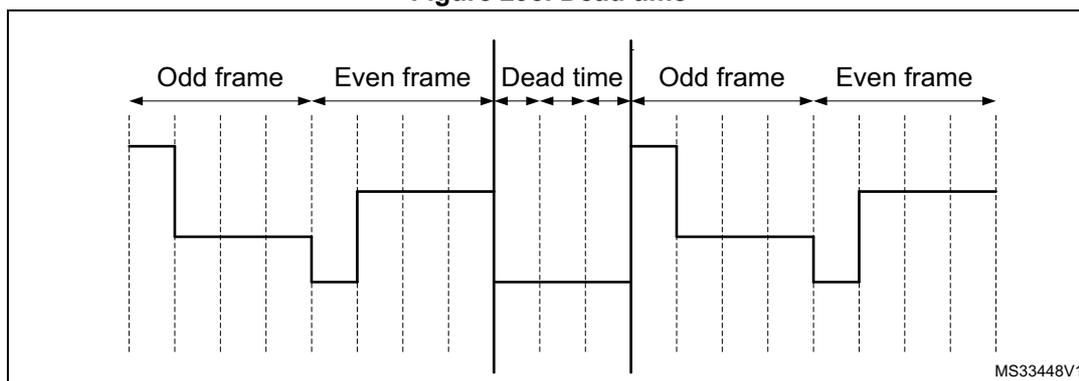
Deadtime
In addition to using CC[2:0], the contrast can be controlled by programming a dead time between each frame. During the dead time, the COM and SEG values are put to \( V_{SS} \) . DEAD[2:0] in LCD_FCR can be used to program a time of up to eight phase periods. This dead time reduces the contrast without modifying the frame rate.
Figure 293. Dead time
29.3.6 Double-buffer memory
Using its double-buffer memory, the LCD controller ensures the coherency of the displayed information without having to use interrupts to control the LCD_RAM modification.
The application software can access the first buffer level (LCD_RAM) through the APB interface. Once it has modified the LCD_RAM, it sets UDR in LCD_SR. This UDR flag (update display request) requests the updated information to be moved into the second buffer level (LCD_DISPLAY).
This operation is done synchronously with the frame (at the beginning of the next frame). Until the update is completed, the LCD_RAM is write protected, and the UDR flag stays high. Once the update is completed, another flag (UDD, update display done) is set and generates an interrupt if UDDIE is set in LCD_FCR.
The time it takes to update LCD_DISPLAY is, in the worst case, one odd and one even frame. The update does not occur (UDR = 1 and UDD = 0) until the display is enabled (LCDEN = 1).
29.3.7 COM and SEG multiplexing
Output pins versus duty modes
The output pins consist of:
- • SEG[43:0]
- • COM[3:0]
Depending on the duty configuration, the COM and SEG output pins can have different functions:
- • In static, 1/2, 1/3, and 1/4 duty modes, there are up to 44 SEG pins and, respectively, one, two, three, and four COM pins
- • In 1/8 duty mode (DUTY[2:0] = 100), COM[7:4] outputs are available on SEG[43:40] pins, reducing to the number of available segments to 40.
Remapping capability for small packages
Additionally, it is possible to remap four segments by setting MUX_SEG in LCD_CR. This is particularly useful when using smaller device types with fewer external pins.
When MUX_SEG is set, output pins SEG[43:40] have the same function as SEG[31:28].
This feature is available only if the mode 1/8 duty is not selected.
Check the availability of this feature by referring to the pinout section of the datasheet.
For the considered package, check the availability of the SEG/COM multiplexing pin as follows (n = number of segments for the considered package):
- • LCD_SEG[n-1]/LCD_COM7/LCD_SEG[31]
- • LCD_SEG[n-2]/LCD_COM6/LCD_SEG[30]
- • LCD_SEG[n-3]/LCD_COM5/LCD_SEG[29]
- • LCD_SEG[n-4]/LCD_COM4/LCD_SEG[28]
Summary of COM and SEG functions versus duty and remap
The possible ways of multiplexing the COM and SEG functions are described in the following table.
Table 274. Remapping capability
| Configuration bits | SEG x COM | Output pin | Function | |
|---|---|---|---|---|
| DUTY | MUX_SEG | |||
| 1/8 | 0/1 | 40x8 | SEG[43:40]/SEG[31:28]/COM[7:4] | COM[7:4] |
| COM[3:0] | COM[3:0] | |||
| SEG[39:0] | SEG[39:0] | |||
| 0/1 | 28x8 | SEG[43:40]/SEG[31:28]/COM[7:4] | COM[7:4] | |
| COM[3:0] | COM[3:0] | |||
| SEG[27:0] | SEG[27:0] | |||
Table 274. Remapping capability (continued)
| Configuration bits | SEG x COM | Output pin | Function | |
|---|---|---|---|---|
| DUTY | MUX_SEG | |||
| 1/4 | 0 | 44x4 | COM[3:0] | COM[3:0] |
| SEG[43:40]/SEG[31:28]/COM[7:4] | SEG[43:40] | |||
| SEG[39:0] | SEG[39:0] | |||
| 1 | 40x4 | COM[3:0] | COM[3:0] | |
| SEG[43:40]/SEG[31:28]/COM[7:4] | SEG[31:28] | |||
| SEG[39:32] | SEG[39:32] | |||
| SEG[31:28] | Not used | |||
| SEG[27:0] | SEG[27:0] | |||
| 0 | 28x4 | COM[3:0] | COM[3:0] | |
| SEG[43:40]/SEG[31:28]/COM[7:4] | Not used | |||
| SEG[27:0] | SEG[27:0] | |||
| 1 | 32x4 | COM[3:0] | COM[3:0] | |
| SEG[43:40]/SEG[31:28]/COM[7:4] | SEG[31:28] | |||
| SEG[27:0] | SEG[27:0] | |||
| 1/3 | 0 | 44x3 | COM3 | Not used |
| COM[2:0] | COM[2:0] | |||
| SEG[43:40]/SEG[31:28]/COM[7:4] | SEG[43:40] | |||
| SEG[39:0] | SEG[39:0] | |||
| 1 | 40x3 | COM3 | Not used | |
| COM[2:0] | COM[2:0] | |||
| SEG[43:40]/SEG[31:28]/COM[7:4] | SEG[31:28] | |||
| SEG[39:32] | SEG[39:32] | |||
| SEG[31:28] | Not used | |||
| SEG[27:0] | SEG[27:0] | |||
| 0 | 28x3 | COM3 | Not used | |
| COM[2:0] | COM[2:0] | |||
| SEG[43:40]/SEG[31:28]/COM[7:4] | Not used | |||
| SEG[31:0] | SEG[31:0] | |||
| 1 | 32x3 | COM3 | Not used | |
| COM[2:0] | COM[2:0] | |||
| SEG[43:40]/SEG[31:28]/COM[7:4] | SEG[31:28] | |||
| SEG[27:0] | SEG[27:0] | |||
Table 274. Remapping capability (continued)
| Configuration bits | SEG x COM | Output pin | Function | |
|---|---|---|---|---|
| DUTY | MUX_SEG | |||
| 1/2 | 0 | 44x2 | COM[3:2] | Not used |
| COM[1:0] | COM[1:0] | |||
| SEG[43:40]/SEG[31:28]/COM[7:4] | SEG[43:40] | |||
| SEG[39:0] | SEG[39:0] | |||
| 1 | 40x2 | COM[3:2] | Not used | |
| COM[1:0] | COM[1:0] | |||
| SEG[43:40]/SEG[31:28]/COM[7:4] | SEG[31:28] | |||
| SEG[39:32] | SEG[39:32] | |||
| 1/2 | 0 | 28x2 | SEG[31:28] | Not used |
| SEG[27:0] | SEG[27:0] | |||
| COM[3:2] | Not used | |||
| COM[1:0] | COM[1:0] | |||
| 1 | 32x2 | SEG[43:40]/SEG[31:28]/COM[7:4] | SEG[31:28] | |
| SEG[27:0] | SEG[27:0] | |||
| COM[3:2] | Not used | |||
| COM[1:0] | COM[1:0] | |||
Table 274. Remapping capability (continued)
| Configuration bits | SEG x COM | Output pin | Function | |
|---|---|---|---|---|
| DUTY | MUX_SEG | |||
| STATIC | 0 | 44x1 | COM[3:1] | Not used |
| COM0 | COM0 | |||
| SEG[43:40]/SEG[31:28]/COM[7:4] | SEG[43:40] | |||
| SEG[39:0] | SEG[39:0] | |||
| 1 | 40x1 | COM[3:1] | Not used | |
| COM0 | COM0 | |||
| SEG[43:40]/SEG[31:28]/COM[7:4] | SEG[31:28] | |||
| SEG[39:32] | SEG[39:32] | |||
| SEG[31:28] | Not used | |||
| SEG[27:0] | SEG[27:0] | |||
| 0 | 28x1 | COM[3:1] | Not used | |
| COM0 | COM0 | |||
| SEG[43:40]/SEG[31:28]/COM[7:4] | Not used | |||
| SEG[27:0] | SEG[27:0] | |||
| 1 | 32x1 | COM[3:1] | Not used | |
| COM0 | COM0 | |||
| SEG[43:40]/SEG[31:28]/COM[7:4] | SEG[31:28] | |||
| SEG[27:0] | SEG[27:0] | |||
The following figure gives examples of signal connections to the external pins.
Figure 294. SEG/COM mux feature example
![Three diagrams showing SEG/COM mux feature examples for LCD controller signal connections. Each diagram shows an LCD controller with SEG driver, COM driver, and SEG COM MUX blocks. The first diagram shows SEG[43] connected to LCD_SEG[43] PIN with DUTY ≠ 1/8 and MUX_SEG = 0. The second diagram shows SEG[31] connected to LCD_SEG[31] PIN with DUTY ≠ 1/8 and MUX_SEG = 1. The third diagram shows COM[7] connected to COM[7] PIN with DUTY = 1/8 and MUX_SEG = 0.](/RM0487-STM32U3/ecd40195a90220f1a151a50480b2f350_img.jpg)
The figure illustrates three examples of signal connections to external pins using the SEG/COM mux feature in an LCD controller. Each example is separated by a dashed line.
Top Example: The LCD controller contains a SEG driver with outputs SEG[43] and SEG[31], and a COM driver with output COM[7]. The SEG COM MUX selects between SEG[43] and COM[7]. In this case, SEG[43] is selected and connected to the external LCD_SEG[43] PIN. The condition for this connection is \( DUTY \neq 1/8 \) and \( MUX\_SEG = 0 \) .
Middle Example: Similar to the top example, but the SEG COM MUX selects SEG[31] instead of SEG[43]. The output is connected to the external LCD_SEG[31] PIN. The condition for this connection is \( DUTY \neq 1/8 \) and \( MUX\_SEG = 1 \) .
Bottom Example: The SEG driver outputs are SEG[43] and SEG[31], and the COM driver output is COM[7]. The SEG COM MUX selects between SEG[43] and COM[7]. In this case, COM[7] is selected and connected to the external COM[7] PIN. The condition for this connection is \( DUTY = 1/8 \) and \( MUX\_SEG = 0 \) .
MS33449V2
29.3.8 Flowchart
Figure 295. Flowchart example
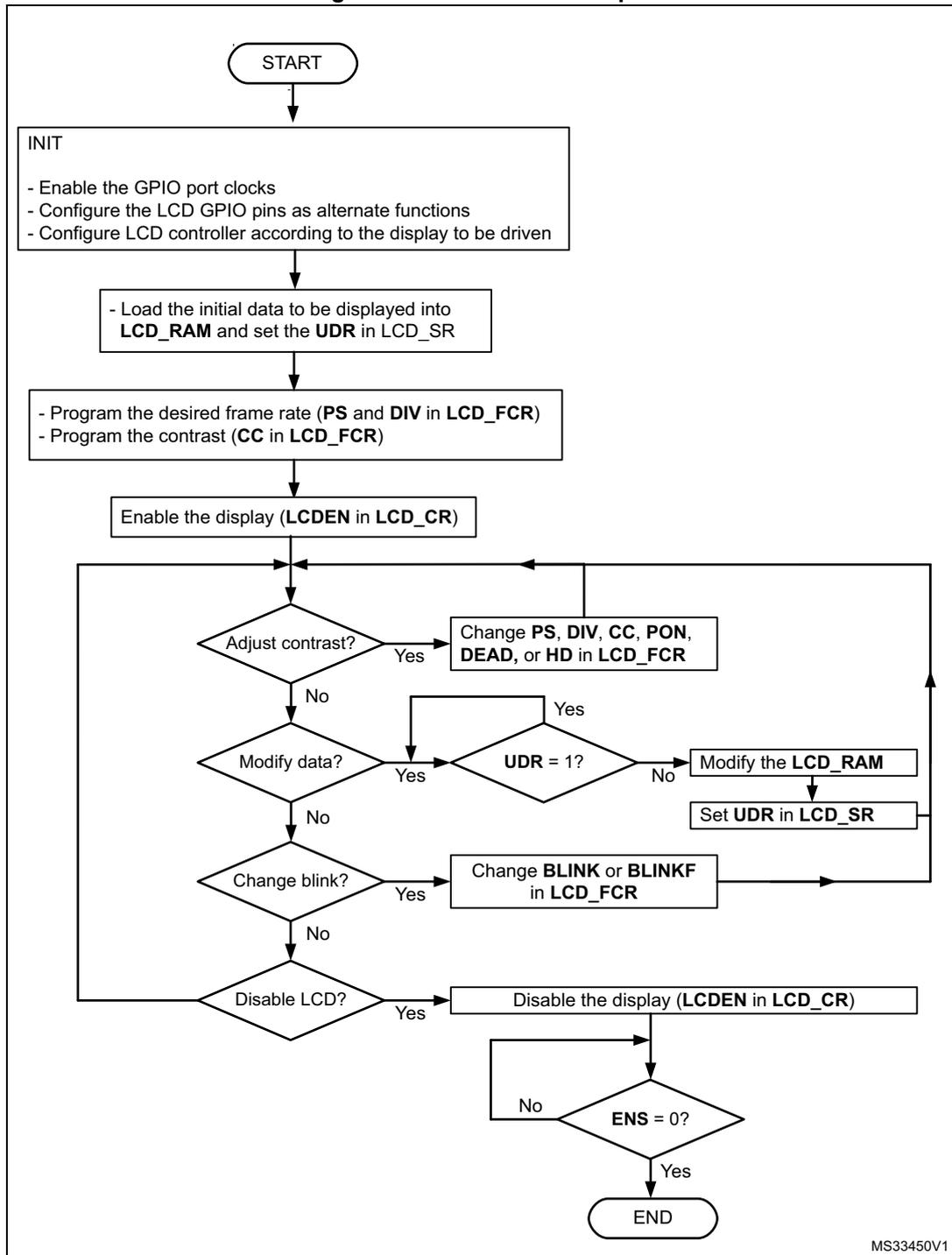
graph TD; START([START]) --> INIT["INIT<br/>- Enable the GPIO port clocks<br/>- Configure the LCD GPIO pins as alternate functions<br/>- Configure LCD controller according to the display to be driven"]; INIT --> LoadData["- Load the initial data to be displayed into<br/>LCD_RAM and set the UDR in LCD_SR"]; LoadData --> ProgramFCR["- Program the desired frame rate (PS and DIV in LCD_FCR)<br/>- Program the contrast (CC in LCD_FCR)"]; ProgramFCR --> EnableDisplay["Enable the display (LCDEN in LCD_CR)"]; EnableDisplay --> AdjustContrast{Adjust contrast?}; AdjustContrast -- Yes --> ChangeFCR["Change PS, DIV, CC, PON,<br/>DEAD, or HD in LCD_FCR"]; AdjustContrast -- No --> ModifyData{Modify data?}; ModifyData -- Yes --> UDR1{UDR = 1?}; UDR1 -- Yes --> AdjustContrast; UDR1 -- No --> ModifyRAM["Modify the LCD_RAM"]; ModifyRAM --> SetUDR["Set UDR in LCD_SR"]; SetUDR --> AdjustContrast; ModifyData -- No --> ChangeBlink{Change blink?}; ChangeBlink -- Yes --> ChangeBlinkFCR["Change BLINK or BLINKF<br/>in LCD_FCR"]; ChangeBlinkFCR --> AdjustContrast; ChangeBlink -- No --> DisableLCD{Disable LCD?}; DisableLCD -- Yes --> DisableDisplay["Disable the display (LCDEN in LCD_CR)"]; DisableDisplay --> ENS0{ENS = 0?}; ENS0 -- No --> DisableDisplay; ENS0 -- Yes --> END([END]);MS33450V1
29.4 LCD low-power modes
The LCD controller can be displayed in Stop mode, or can be fully disabled to reduce power consumption.
Table 275. LCD behavior in low-power modes
| Mode | Description |
|---|---|
| Sleep | No effect. LCD interrupt causes the device to exit Sleep mode. |
| Low-power Run | No effect. |
| Low-power Sleep | No effect. LCD interrupt causes the device to exit Low-power Sleep mode. |
| Stop 0 | No effect. LCD interrupt causes the device to exit Stop mode. |
| Stop 1 | |
| Stop 2 | |
| Stop 3 | No effect. |
| Standby | The LCD is powered down and must be reinitialized after exiting Standby or Shutdown mode. |
| Shutdown |
29.5 LCD interrupts
The following table gives the list of LCD interrupt requests.
Table 276. LCD interrupt requests
| Interrupt event | Event flag | Event flag Interrupt clearing method | Interrupt enable control bit |
|---|---|---|---|
| Start of frame (SOF) | SOF | Write SOFC = 1 | SOFIE |
| Update display done (UDD) | UDD | Write UDDC = 1 | UDDIE |
Start of frame (SOF)
The LCD start of frame interrupt is executed if SOFIE (start of frame interrupt enable) is set in LCD_FCR. SOF is cleared by writing SOFC to 1 in LCD_CLR when executing the corresponding interrupt handling vector.
Update display done (UDD)
The LCD update display interrupt is executed if UDDIE (update display done interrupt enable) is set in LCD_FCR. UDD is cleared by writing UDDC to 1 in LCD_CLR when executing the corresponding interrupt handling vector.
Depending on the product implementation, all these interrupts events can either share the same interrupt vector (LCD global interrupt), or be grouped into two interrupt vectors (LCD SOF and LCD UDD). Refer to Table 134: STM32U3 series vector table for details.
To enable the LCD interrupts, the following sequence is required:
- 1. Configure and enable the LCD IRQ channel in the NVIC.
- 2. Configure the LCD to generate interrupts.
29.6 LCD registers
These registers are accessed by words (32-bit).
29.6.1 LCD control register (LCD_CR)
Address offset: 0x00
Reset value: 0x0000 0000
VSEL, MUX_SEG, BIAS, DUTY, and BUFEN bitfields are write-protected when the LCD is enabled (ENS = 1 in LCD_SR).
| 31 | 30 | 29 | 28 | 27 | 26 | 25 | 24 | 23 | 22 | 21 | 20 | 19 | 18 | 17 | 16 |
|---|---|---|---|---|---|---|---|---|---|---|---|---|---|---|---|
| Res. | Res. | Res. | Res. | Res. | Res. | Res. | Res. | Res. | Res. | Res. | Res. | Res. | Res. | Res. | Res. |
| 15 | 14 | 13 | 12 | 11 | 10 | 9 | 8 | 7 | 6 | 5 | 4 | 3 | 2 | 1 | 0 |
| Res. | Res. | Res. | Res. | Res. | Res. | Res. | BUFEN | MUX_SEG | BIAS[1:0] | DUTY[2:0] | VSEL | LCDEN | |||
| rw | rw | rw | rw | rw | rw | rw | rw | rw | |||||||
Bits 31:9 Reserved, must be kept at reset value.
Bit 8 BUFEN : Voltage output buffer enable
This bit is used to enable/disable the voltage output buffer for higher driving capability.
0: Output buffer disabled
1: Output buffer enabled
Bit 7 MUX_SEG : Mux segment enable
This bit is used to enable SEG pin remapping. Four SEG pins can be multiplexed with SEG[31:28]. See Section 29.3.7 .
0: SEG pin multiplexing disabled
1: SEG[31:28] multiplexed with SEG[43:40]
Bits 6:5 BIAS[1:0] : Bias selector
These bits determine the bias used. Value 11 is forbidden.
00: Bias 1/4
01: Bias 1/2
10: Bias 1/3
11: Reserved
Bits 4:2 DUTY[2:0] : Duty selection
These bits determine the duty cycle. Values 101, 110, and 111 are forbidden.
000: Static duty
001: 1/2 duty
010: 1/3 duty
011: 1/4 duty
100: 1/8 duty
Others: Reserved
Bit 1 VSEL : Voltage source selection
This bit determines the voltage source for the LCD.
0: Internal source (voltage step-up converter)
1: External source (VLCD pin)
Bit 0 LCDEN : LCD controller enable
This bit is set by software to enable the LCD controller/driver. It is cleared by software to turn off the LCD at the beginning of the next frame. When the LCD is disabled, all COM and SEG pins are driven to \( V_{SS} \) .
0: LCD controller disabled
1: LCD controller enabled
29.6.2 LCD frame control register (LCD_FCR)
Address offset: 0x04
Reset value: 0x0000 0000
This register can be updated at any time, but the new values are applied only at the beginning of the next frame (except for UDDIE and SOFIE, which affect the device behavior immediately). The new value of CC[2:0] is also applied immediately, but its effect on the device is delayed at the beginning of the next frame by the voltage generator.
Reading this register gives the last value written in it, and not the configuration used to display the current frame.
When BUFEN is set in LCD_CR, the low resistor divider network is automatically disabled whatever HD or PON[2:0] configuration.
| 31 | 30 | 29 | 28 | 27 | 26 | 25 | 24 | 23 | 22 | 21 | 20 | 19 | 18 | 17 | 16 |
|---|---|---|---|---|---|---|---|---|---|---|---|---|---|---|---|
| Res. | Res. | Res. | Res. | Res. | Res. | PS[3:0] | DIV[3:0] | BLINK[1:0] | |||||||
| rw | rw | rw | rw | rw | rw | rw | rw | rw | rw | ||||||
| 15 | 14 | 13 | 12 | 11 | 10 | 9 | 8 | 7 | 6 | 5 | 4 | 3 | 2 | 1 | 0 |
| BLINKF[2:0] | CC[2:0] | DEAD[2:0] | PON[2:0] | UDDIE | Res. | SOFIE | HD | ||||||||
| rw | rw | rw | rw | rw | rw | rw | rw | rw | rw | rw | rw | rw | rw | rw | |
Bits 31:26 Reserved, must be kept at reset value.
Bits 25:22 PS[3:0] : PS 16-bit prescaler
These bits are written by software to define the division factor of the PS 16-bit prescaler.
\( ck\_ps = LCDCLK / (2^{PS[3:0]}) \) . See Section 29.3.2 .
0000: \( ck\_ps = LCDCLK \)
0001: \( ck\_ps = LCDCLK/2 \)
0002: \( ck\_ps = LCDCLK/4 \)
...
1111: \( ck\_ps = LCDCLK/32768 \)
Bits 21:18 DIV[3:0] : DIV clock divider
These bits are written by software to define the division factor of the DIV divider (see Section 29.3.2 .)
0000: \( ck\_div = ck\_ps/16 \)
0001: \( ck\_div = ck\_ps/17 \)
0002: \( ck\_div = ck\_ps/18 \)
...
1111: \( ck\_div = ck\_ps/31 \)
Bits 17:16 BLINK[1:0] : Blink mode selection
- 00: Blink disabled
- 01: Blink enabled on SEG[0], COM[0] (1 pixel)
- 10: Blink enabled on SEG[0], all COMs (up to 8 pixels depending on the programmed duty)
- 11: Blink enabled on all SEGs and all COMs (all pixels)
Bits 15:13 BLINKF[2:0] : Blink frequency selection
- 000: \( f_{LCD}/8 \)
- 001: \( f_{LCD}/16 \)
- 010: \( f_{LCD}/32 \)
- 011: \( f_{LCD}/64 \)
- 100: \( f_{LCD}/128 \)
- 101: \( f_{LCD}/256 \)
- 110: \( f_{LCD}/512 \)
- 111: \( f_{LCD}/1024 \)
Bits 12:10 CC[2:0] : Contrast control
These bits specify one of the \( V_{LCD} \) maximum voltages (independent of \( V_{DD} \) ).
- 000: \( V_{LCD0} \)
- 001: \( V_{LCD1} \)
- 010: \( V_{LCD2} \)
- 011: \( V_{LCD3} \)
- 100: \( V_{LCD4} \)
- 101: \( V_{LCD5} \)
- 110: \( V_{LCD6} \)
- 111: \( V_{LCD7} \)
Note: Refer to the datasheet for the \( V_{LCDx} \) values.
Bits 9:7 DEAD[2:0] : Dead time duration
These bits are written by software to configure the length of the dead time between frames. During the dead time the COM and SEG voltage levels are held at 0 V to reduce the contrast without modifying the frame rate.
- 000: No dead time
- 001: 1 phase period dead time
- 010: 2 phase period dead time
- .....
- 111: 7 phase period dead time
Bits 6:4 PON[2:0] : Pulse ON duration
These bits are written by software to define the pulse duration in terms of ck_ps pulses. A short pulse leads to lower power consumption, but displays with high internal resistance may need a longer pulse to achieve satisfactory contrast.
Note that the pulse is never longer than one half prescaled LCD clock period.
000: 0
001: 1/ck_ps
010: 2/ck_ps
011: 3/ck_ps
100: 4/ck_ps
101: 5/ck_ps
110: 6/ck_ps
111: 7/ck_ps
PON duration example with LCDCLK = 32.768 kHz and PS=0x03:
000: 0 µs
001: 244 µs
010: 488 µs
011: 782 µs
100: 976 µs
101: 1.22 ms
110: 1.46 ms
111: 1.71 ms
Bit 3 UDDIE : Update display done interrupt enable
This bit is set and cleared by software.
0: LCD update display done interrupt disabled
1: LCD update display done interrupt enabled
Bit 2 Reserved, must be kept at reset value.
Bit 1 SOFIE : Start of frame interrupt enable
This bit is set and cleared by software.
0: LCD start-of-frame interrupt disabled
1: LCD start-of-frame interrupt enabled
Bit 0 HD : High drive enable
This bit is written by software to enable a low resistance divider. Displays with high internal resistance may need a longer drive time to achieve satisfactory contrast. This bit is useful in this case if some additional power consumption can be tolerated.
0: Permanent high drive disabled
1: Permanent high drive enabled. When HD = 1, PON[2:0] must be programmed to 001.
29.6.3 LCD status register (LCD_SR)
Address offset: 0x08
Reset value: 0x0000 0020
| 31 | 30 | 29 | 28 | 27 | 26 | 25 | 24 | 23 | 22 | 21 | 20 | 19 | 18 | 17 | 16 |
|---|---|---|---|---|---|---|---|---|---|---|---|---|---|---|---|
| Res. | Res. | Res. | Res. | Res. | Res. | Res. | Res. | Res. | Res. | Res. | Res. | Res. | Res. | Res. | Res. |
| 15 | 14 | 13 | 12 | 11 | 10 | 9 | 8 | 7 | 6 | 5 | 4 | 3 | 2 | 1 | 0 |
| Res. | Res. | Res. | Res. | Res. | Res. | Res. | Res. | Res. | Res. | FCRSF | RDY | UDD | UDR | SOF | ENS |
| r | r | r | rs | r | r |
Bits 31:6 Reserved, must be kept at reset value.
Bit 5 FCRSF : LCD frame control register synchronization flag
This bit is set by hardware each time the LCD_FCR register is updated in the LCDCLK domain. It is cleared by hardware when writing to the LCD_FCR register.
0: LCD frame control register not yet synchronized
1: LCD frame control register synchronized
Bit 4 RDY : Ready flag
This bit is set and cleared by hardware. It indicates the status of the step-up converter.
0: Not ready
1: Step-up converter enabled and ready to provide the correct voltage
Bit 3 UDD : Update display done
This bit is set by hardware. It is cleared by writing 1 to UDDC in LCD_CLR. The bit set has priority over the clear.
0: No event
1: Update display request done. A UDD interrupt is generated if UDDIE = 1 in LCD_FCR.
Note: If the device is in Stop mode (PCLK not provided), UDD does not generate an interrupt even if UDDIE = 1. If the display is not enabled, the UDD interrupt never occurs.
Bit 2 UDR : Update display request
Each time software modifies the LCD_RAM, it must set this bit to transfer the updated data to the second level buffer. This bit stays set until the end of the update. During this time, the LCD_RAM is write-protected.
0: No effect
1: Update display request
Note: When the display is disabled, the update is performed for all LCD_DISPLAY locations. When the display is enabled, the update is performed only for locations for which commons are active (depending on DUTY). For example, if DUTY = 1/2, only the LCD_DISPLAY of COM0 and COM1 are updated. Writing 0 on this bit or writing 1 when it is already 1 has no effect. This bit can be cleared only by hardware when LCDEN = 1
Bit 1 SOF : Start-of-frame flag
This bit is set by hardware at the beginning of a new frame, at the same time as the display data is updated. It is cleared by writing a 1 to SOFC in LCD_CLR. The bit clear has priority over the set.
0: No event
1: Start-of-frame event occurred. An LCD SOF interrupt is generated if SOFIE is set.
Bit 0 ENS : LCD enabled status
This bit is set and cleared by hardware. It indicates the LCD controller status.
0: LCD controller disabled
1: LCD controller enabled
Note: This bit is set immediately when LCDEN in LCD_CR goes from 0 to 1. On deactivation, it reflects the real LCD status. It becomes 0 at the end of the last displayed frame.
29.6.4 LCD clear register (LCD_CLR)
Address offset: 0x0C
Reset value: 0x0000 0000
| 31 | 30 | 29 | 28 | 27 | 26 | 25 | 24 | 23 | 22 | 21 | 20 | 19 | 18 | 17 | 16 |
|---|---|---|---|---|---|---|---|---|---|---|---|---|---|---|---|
| Res. | Res. | Res. | Res. | Res. | Res. | Res. | Res. | Res. | Res. | Res. | Res. | Res. | Res. | Res. | Res. |
| 15 | 14 | 13 | 12 | 11 | 10 | 9 | 8 | 7 | 6 | 5 | 4 | 3 | 2 | 1 | 0 |
| Res. | Res. | Res. | Res. | Res. | Res. | Res. | Res. | Res. | Res. | Res. | Res. | UDDC | Res. | SOFC | Res. |
| w | w |
Bits 31:4 Reserved, must be kept at reset value.
Bit 3 UDDC : Update display done clear
This bit is written by software to clear UDD in LCD_SR.
0: No effect
1: Clear UDD flag.
Bit 2 Reserved, must be kept at reset value.
Bit 1 SOFC : Start-of-frame flag clear
This bit is written by software to clear SOF in LCD_SR.
0: No effect
1: Clear SOF flag.
Bit 0 Reserved, must be kept at reset value.
29.6.5 LCD display memory (LCD_RAMx)
Address offset: 0x14 + 0x4 * x (x = 0, 2, 4, 6, 8, 10, 12, 14)
Reset value: 0x0000 0000
| 31 | 30 | 29 | 28 | 27 | 26 | 25 | 24 | 23 | 22 | 21 | 20 | 19 | 18 | 17 | 16 |
|---|---|---|---|---|---|---|---|---|---|---|---|---|---|---|---|
| SEGMENT_DATA[31:16] | |||||||||||||||
| rw | rw | rw | rw | rw | rw | rw | rw | rw | rw | rw | rw | rw | rw | rw | rw |
| 15 | 14 | 13 | 12 | 11 | 10 | 9 | 8 | 7 | 6 | 5 | 4 | 3 | 2 | 1 | 0 |
| SEGMENT_DATA[15:0] | |||||||||||||||
| rw | rw | rw | rw | rw | rw | rw | rw | rw | rw | rw | rw | rw | rw | rw | rw |
Bits 31:0 SEGMENT_DATA[31:0] :
Each bit corresponds to one pixel of the LCD display.
0: Pixel inactive
1: Pixel active
29.6.6 LCD display memory (LCD_RAMx)
Address offset: 0x14 + 0x4 * x (x = 1, 3, 5, 7)
Reset value: 0x0000 0000
| 31 | 30 | 29 | 28 | 27 | 26 | 25 | 24 | 23 | 22 | 21 | 20 | 19 | 18 | 17 | 16 |
|---|---|---|---|---|---|---|---|---|---|---|---|---|---|---|---|
| Res. | Res. | Res. | Res. | Res. | Res. | Res. | Res. | Res. | Res. | Res. | Res. | Res. | Res. | Res. | Res. |
| 15 | 14 | 13 | 12 | 11 | 10 | 9 | 8 | 7 | 6 | 5 | 4 | 3 | 2 | 1 | 0 |
| Res. | Res. | Res. | Res. | SEGMENT_DATA[43:32] | |||||||||||
| rw | rw | rw | rw | rw | rw | rw | rw | rw | rw | rw | rw | ||||
Bits 31:12 Reserved, must be kept at reset value.
Bits 11:0 SEGMENT_DATA[43:32] :
Each bit corresponds to one pixel of the LCD display.
0: Pixel inactive
1: Pixel active
29.6.7 LCD display memory (LCD_RAMx)
Address offset: 0x14 + 0x4 * x ( x = 9, 11, 13, 15)
Reset value: 0x0000 0000
| 31 | 30 | 29 | 28 | 27 | 26 | 25 | 24 | 23 | 22 | 21 | 20 | 19 | 18 | 17 | 16 |
|---|---|---|---|---|---|---|---|---|---|---|---|---|---|---|---|
| Res. | Res. | Res. | Res. | Res. | Res. | Res. | Res. | Res. | Res. | Res. | Res. | Res. | Res. | Res. | Res. |
| 15 | 14 | 13 | 12 | 11 | 10 | 9 | 8 | 7 | 6 | 5 | 4 | 3 | 2 | 1 | 0 |
| Res. | Res. | Res. | Res. | Res. | Res. | Res. | Res. | SEGMENT_DATA[39:32] | |||||||
| rw | rw | rw | rw | rw | rw | rw | rw | ||||||||
Bits 31:8 Reserved, must be kept at reset value.
Bits 7:0 SEGMENT_DATA[39:32] :
Each bit corresponds to one pixel of the LCD display.
0: Pixel inactive
1: Pixel active
29.6.8 LCD register map
Table 277. LCD register map and reset values
| Offset | Register name | 31 | 30 | 29 | 28 | 27 | 26 | 25 | 24 | 23 | 22 | 21 | 20 | 19 | 18 | 17 | 16 | 15 | 14 | 13 | 12 | 11 | 10 | 9 | 8 | 7 | 6 | 5 | 4 | 3 | 2 | 1 | 0 |
|---|---|---|---|---|---|---|---|---|---|---|---|---|---|---|---|---|---|---|---|---|---|---|---|---|---|---|---|---|---|---|---|---|---|
| 0x00 | LCD_CR | Res. | Res. | Res. | Res. | Res. | Res. | Res. | Res. | Res. | Res. | Res. | Res. | Res. | Res. | Res. | Res. | Res. | Res. | Res. | Res. | Res. | Res. | BUFEN | MUX_SEG | Res. | BIAS [1:0] | DUTY [2:0] | VSEL | LCDEN | |||
| Reset value | 0 | 0 | 0 | 0 | 0 | 0 | 0 | 0 | 0 | ||||||||||||||||||||||||
| 0x04 | LCD_FCR | Res. | Res. | Res. | Res. | Res. | Res. | PS[3:0] | DIV[3:0] | BLINK [1:0] | BLINKF [2:0] | CC[2:0] | DEAD [2:0] | PON[2:0] | UDDIE | Res. | SOFIE | HD | |||||||||||||||
| Reset value | 0 | 0 | 0 | 0 | 0 | 0 | 0 | 0 | 0 | 0 | 0 | 0 | 0 | 0 | 0 | 0 | 0 | 0 | 0 | 0 | 0 | 0 | 0 | 0 | 0 | ||||||||
| 0x08 | LCD_SR | Res. | Res. | Res. | Res. | Res. | Res. | Res. | Res. | Res. | Res. | Res. | Res. | Res. | Res. | Res. | Res. | Res. | Res. | Res. | Res. | Res. | Res. | Res. | Res. | Res. | FCRSF | RDY | UDD | UDR | Res. | SOF | ENS |
| Reset value | 1 | 0 | 0 | 0 | 0 | 0 | |||||||||||||||||||||||||||
| 0x0C | LCD_CLR | Res. | Res. | Res. | Res. | Res. | Res. | Res. | Res. | Res. | Res. | Res. | Res. | Res. | Res. | Res. | Res. | Res. | Res. | Res. | Res. | Res. | Res. | Res. | Res. | Res. | Res. | Res. | UDDC | Res. | Res. | SOFC | Res. |
| Reset value | 0 | 0 | |||||||||||||||||||||||||||||||
Table 277. LCD register map and reset values (continued)
| Offset | Register name | 31 | 30 | 29 | 28 | 27 | 26 | 25 | 24 | 23 | 22 | 21 | 20 | 19 | 18 | 17 | 16 | 15 | 14 | 13 | 12 | 11 | 10 | 9 | 8 | 7 | 6 | 5 | 4 | 3 | 2 | 1 | 0 |
|---|---|---|---|---|---|---|---|---|---|---|---|---|---|---|---|---|---|---|---|---|---|---|---|---|---|---|---|---|---|---|---|---|---|
| 0x14 | LCD_RAM (COM0) | S31 | S30 | S29 | S28 | S27 | S26 | S25 | S24 | S23 | S22 | S21 | S20 | S19 | S18 | S17 | S16 | S15 | S14 | S13 | S12 | S11 | S10 | S09 | S08 | S07 | S06 | S05 | S04 | S03 | S02 | S01 | S00 |
| 0x18 | Res | Res | Res | Res | Res | Res | Res | Res | Res | Res | Res | Res | Res | Res | Res | Res | Res | Res | Res | Res | S43 | S42 | S41 | S40 | S39 | S38 | S37 | S36 | S35 | S34 | S33 | S32 | |
| 0x1C | LCD_RAM (COM1) | S31 | S30 | S29 | S28 | S27 | S26 | S25 | S24 | S23 | S22 | S21 | S20 | S19 | S18 | S17 | S16 | S15 | S14 | S13 | S12 | S11 | S10 | S09 | S08 | S07 | S06 | S05 | S04 | S03 | S02 | S01 | S00 |
| 0x20 | Res | Res | Res | Res | Res | Res | Res | Res | Res | Res | Res | Res | Res | Res | Res | Res | Res | Res | Res | Res | S43 | S42 | S41 | S40 | S39 | S38 | S37 | S36 | S35 | S34 | S33 | S32 | |
| 0x24 | LCD_RAM (COM2) | S31 | S30 | S29 | S28 | S27 | S26 | S25 | S24 | S23 | S22 | S21 | S20 | S19 | S18 | S17 | S16 | S15 | S14 | S13 | S12 | S11 | S10 | S09 | S08 | S07 | S06 | S05 | S04 | S03 | S02 | S01 | S00 |
| 0x28 | Res | Res | Res | Res | Res | Res | Res | Res | Res | Res | Res | Res | Res | Res | Res | Res | Res | Res | Res | Res | S43 | S42 | S41 | S40 | S39 | S38 | S37 | S36 | S35 | S34 | S33 | S32 | |
| 0x2C | LCD_RAM (COM3) | S31 | S30 | S29 | S28 | S27 | S26 | S25 | S24 | S23 | S22 | S21 | S20 | S19 | S18 | S17 | S16 | S15 | S14 | S13 | S12 | S11 | S10 | S09 | S08 | S07 | S06 | S05 | S04 | S03 | S02 | S01 | S00 |
| 0x30 | Res | Res | Res | Res | Res | Res | Res | Res | Res | Res | Res | Res | Res | Res | Res | Res | Res | Res | Res | Res | S43 | S42 | S41 | S40 | S39 | S38 | S37 | S36 | S35 | S34 | S33 | S32 | |
| 0x34 | LCD_RAM (COM4) | S31 | S30 | S29 | S28 | S27 | S26 | S25 | S24 | S23 | S22 | S21 | S20 | S19 | S18 | S17 | S16 | S15 | S14 | S13 | S12 | S11 | S10 | S09 | S08 | S07 | S06 | S05 | S04 | S03 | S02 | S01 | S00 |
| 0x38 | Res | Res | Res | Res | Res | Res | Res | Res | Res | Res | Res | Res | Res | Res | Res | Res | Res | Res | Res | Res | Res | Res | Res | Res | S39 | S38 | S37 | S36 | S35 | S34 | S33 | S32 | |
| 0x3C | LCD_RAM (COM5) | S31 | S30 | S29 | S28 | S27 | S26 | S25 | S24 | S23 | S22 | S21 | S20 | S19 | S18 | S17 | S16 | S15 | S14 | S13 | S12 | S11 | S10 | S09 | S08 | S07 | S06 | S05 | S04 | S03 | S02 | S01 | S00 |
| 0x40 | Res | Res | Res | Res | Res | Res | Res | Res | Res | Res | Res | Res | Res | Res | Res | Res | Res | Res | Res | Res | Res | Res | Res | Res | S39 | S38 | S37 | S36 | S35 | S34 | S33 | S32 | |
| 0x44 | LCD_RAM (COM6) | S31 | S30 | S29 | S28 | S27 | S26 | S25 | S24 | S23 | S22 | S21 | S20 | S19 | S18 | S17 | S16 | S15 | S14 | S13 | S12 | S11 | S10 | S09 | S08 | S07 | S06 | S05 | S04 | S03 | S02 | S01 | S00 |
| 0x48 | Res | Res | Res | Res | Res | Res | Res | Res | Res | Res | Res | Res | Res | Res | Res | Res | Res | Res | Res | Res | Res | Res | Res | Res | S39 | S38 | S37 | S36 | S35 | S34 | S33 | S32 | |
| 0x4C | LCD_RAM (COM7) | S31 | S30 | S29 | S28 | S27 | S26 | S25 | S24 | S23 | S22 | S21 | S20 | S19 | S18 | S17 | S16 | S15 | S14 | S13 | S12 | S11 | S10 | S09 | S08 | S07 | S06 | S05 | S04 | S03 | S02 | S01 | S00 |
| 0x50 | Res | Res | Res | Res | Res | Res | Res | Res | Res | Res | Res | Res | Res | Res | Res | Res | Res | Res | Res | Res | Res | Res | Res | Res | S39 | S38 | S37 | S36 | S35 | S34 | S33 | S32 |
Refer to Section 2.3 for the register boundary addresses table.