15. Analog-to-digital converter (ADC)
15.1 Introduction
The 12-bit ADC is a successive approximation analog-to-digital converter. It has up to 19 multiplexed channels allowing it to measure signals from 10 external and 3 internal sources. A/D conversion of the various channels can be performed in single, continuous, scan or discontinuous mode. The result of the ADC is stored in a left-aligned or right-aligned 16-bit data register.
The analog watchdog feature allows the application to detect if the input voltage goes outside the user-defined higher or lower thresholds.
An efficient low-power mode is implemented to allow very low consumption at low frequency.
15.2 ADC main features
- • High performance
- – 12-bit, 10-bit, 8-bit or 6-bit configurable resolution
- – ADC conversion time: 0.4 µs for 12-bit resolution (2.5Msps), faster conversion times can be obtained by lowering resolution.
- – Self-calibration
- – Programmable sampling time
- – Data alignment with built-in data coherency
- – DMA support
- • Low-power
- – The application can reduce PCLK frequency for low-power operation while still keeping optimum ADC performance. For example, 0.4 µs conversion time is kept, whatever the PCLK frequency
- – Wait mode: prevents ADC overrun in applications with low PCLK frequency
- – Auto off mode: ADC is automatically powered off except during the active conversion phase. This dramatically reduces the power consumption of the ADC.
- • Analog input channels
- – 10 external analog inputs
- – 1 channel for internal temperature sensor ( \( V_{TS} \) )
- – 1 channel for internal reference voltage ( \( V_{REFINT} \) )
- – 1 channel for monitoring external \( V_{BAT} \) power supply pin
- • Start-of-conversion can be initiated:
- – By software
- – By hardware triggers with configurable polarity (timer events or GPIO input events)
- • Conversion modes
- – Can convert a single channel or can scan a sequence of channels.
- – Single mode converts selected inputs once per trigger
- – Continuous mode converts selected inputs continuously
- – Discontinuous mode
- • Interrupt generation at the end of sampling, end of conversion, end of sequence conversion, and in case of analog watchdog or overrun events
- • Analog watchdog
- • ADC input range: \( V_{SSA} \leq V_{IN} \leq V_{DDA} \)
15.3 ADC functional description
Figure 30 shows the ADC block diagram and Table 62 gives the ADC pin description.
Figure 30. ADC block diagram
![Figure 30. ADC block diagram. This is a detailed functional block diagram of the ADC. At the top, the 'Analog supply (VDDA)' pin is shown. Below it, the 'ADC_IN [11:2]' pins are connected to 'Analog input channels'. These channels pass through an 'Input selection & scan control' block which is configured by 'SCANDIR', 'CHSEL[18:0]', and 'CONT' (single/continuous) signals. The 'V_BAT', 'V_REFINT', and 'V_Ts' pins are also connected to this block. The 'Input selection & scan control' block feeds into the 'SAR ADC' core. The 'SAR ADC' is controlled by 'ADEN/ADDIS', 'AUTOFF' (Auto-off mode), 'LFTRIG', 'ADCAL' (self-calibration), and 'start' signals. It outputs 'CONVERTED DATA' to a 'DATA[15:0]' bus. This bus connects to an 'APB interface' which includes 'ADREADY', 'EOSMP', 'EOSEQ', 'EOC', 'OVR', and 'AWDx' signals. The 'APB interface' is connected to an 'ADC interrupt' and a 'DMA request'. The 'APB interface' also includes 'DMAEN' and 'DMACFG' signals. The 'SAR ADC' also outputs 'ADC_AWD1_OUT' to an 'analog watchdog 1'. This output is generated by a comparator that compares the 'CONVERTED DATA' with 'AWDCH[4:0]', 'LT[11:0]', and 'HT[11:0]' thresholds. The 'ADC_AWD1_OUT' is also connected to the 'APB interface'. The 'SAR ADC' is triggered by 'ADSTART' (SW trigger) and 'HW trigger' signals. The 'HW trigger' is generated by 'TIM1_TRGO2', 'TIM1_CC4', 'TIM2_TRGO', 'TIM2_CH4', 'TIM2_CH3', and 'EXTI11' signals. The 'HW trigger' is controlled by 'EXTEN[1:0]' (trigger enable and edge selection) and 'EXTSEL[1:0]' (trigger selection) signals. The 'SAR ADC' also includes 'OVRMOD' (overrun mode), 'ALIGN' (left/right), and 'RES[1:0]' (12, 10, 8 bits) configuration. The 'SAR ADC' is also connected to 'SMP[2:0]' (sampling time) and 'DISCEN' (Discontinuous mode enable) signals. The 'Start & Stop control' block includes 'AUTDLY' (Auto-delayed conversion), 'ADSTP' (stop conversion), and 'ADSTART' (SW trigger) signals. The 'Supply and reference' block is connected to the 'SAR ADC' and provides 'start' and 'V_IN' signals. The 'MSv63935V3' identifier is at the bottom right.](/RM0478-STM32WB10CC/f72f610dea3304378b6430626fe132fd_img.jpg)
15.3.1 ADC pins and internal signals
Table 62. ADC input/output pins
| Name | Signal type | Remarks |
|---|---|---|
| VDDA | Input, analog power supply | Analog power supply and positive reference voltage for the ADC |
| VSSA | Input, analog supply ground | Ground for analog power supply |
| ADC_INx | Analog input signals | 10 external analog input channels |
| Internal signal name | Signal type | Description |
|---|---|---|
| V IN [x] | Analog input channels | Connected either to internal channels or to ADC_IN i external channels |
| TRGx | Input | ADC conversion triggers |
| V TS | Input | Internal temperature sensor output voltage |
| V REFINT | Input | Internal voltage reference output voltage |
| V BAT/3 | Input | VBAT pin input voltage divided by 3 |
| ADC_AWDx_OUT | Output | Internal analog watchdog output signal connected to on-chip timers (x = Analog watchdog number = 1) |
| Name | Source | EXTSEL[2:0] |
|---|---|---|
| TRG0 | TIM1_TRGO2 | 000 |
| TRG1 | TIM1_CC4 | 001 |
| TRG2 | TIM2_TRGO | 010 |
| TRG3 | TIM2_CH4 | 011 |
| TRG4 | Reserved | 100 |
| TRG5 | TIM2_CH3 | 101 |
| TRG6 | Reserved | 110 |
| TRG7 | EXTI11 | 111 |
15.3.2 ADC voltage regulator (ADVREGEN)
The ADC has a specific internal voltage regulator which must be enabled and stable before using the ADC.
The ADC internal voltage regulator can be enabled by setting ADVREGEN bit to 1 in the ADC_CR register. The software must wait for the ADC voltage regulator startup time ( \( t_{ADCVREG\_STUP} \) ) before launching a calibration or enabling the ADC. This delay must be managed by software (for details on \( t_{ADCVREG\_STUP} \) , refer to the device datasheet).
After ADC operations are complete, the ADC is disabled (ADEN = 0). To keep power consumption low, it is important to disable the ADC voltage regulator before entering low-power mode (LPRun, LPSleep or Stop mode). Refer to Section : ADC voltage regulator disable sequence .
Note: When the internal voltage regulator is disabled, the internal analog calibration is kept.
Analog reference from the power control unit
The internal ADC voltage regulator internally uses an analog reference delivered by the power control unit through a buffer. This buffer is always enabled when the main voltage regulator of the power control unit operates in normal Run mode (refer to Reset and clock control and power control sections).
If the main voltage regulator enters low-power mode (such as Low-power run mode), this buffer is disabled and the ADC cannot be used.
ADC Voltage regulator enable sequence
To enable the ADC voltage regulator, set ADVREGEN bit to 1 in ADC_CR register.
ADC voltage regulator disable sequence
To disable the ADC voltage regulator, follow the sequence below:
- 1. Make sure that the ADC is disabled (ADEN = 0).
- 2. Clear ADVREGEN bit in ADC_CR register.
15.3.3 Calibration (ADCAL)
The ADC has a calibration feature. During the procedure, the ADC calculates a calibration factor which is internally applied to the ADC until the next ADC power-off. The application must not use the ADC during calibration and must wait until it is complete.
Calibration should be performed before starting A/D conversion. It removes the offset error which may vary from chip to chip due to process variation.
The calibration is initiated by software by setting bit ADCAL to 1. It can be initiated only when all the following conditions are met:
- • the ADC voltage regulator is enabled (ADVREGEN = 1),
- • the ADC is disabled (ADEN = 0), and
- • the Auto-off mode is disabled (AUTOFF = 0).
ADCAL bit stays at 1 during all the calibration sequence. It is then cleared by hardware as soon the calibration completes. After this, the calibration factor can be read from the ADC_DR register (from bits 6 to 0).
The internal analog calibration is kept if the ADC is disabled (ADEN = 0). When the ADC operating conditions change ( \( V_{DDA} \) changes are the main contributor to ADC offset variations and temperature change to a lesser extend), it is recommended to re-run a calibration cycle.
The calibration factor is lost in the following cases:
- • The power supply is removed from the ADC (for example when the product enters Standby or VBAT mode)
- • The ADC peripheral is reset.
The calibration factor is lost each time power is removed from the ADC (for example when the product enters Standby or VBAT mode). Still, it is possible to save and restore the calibration factor by software to save time when re-starting the ADC (as long as temperature and voltage are stable during the ADC power-down).
The calibration factor can be written if the ADC is enabled but not converting (ADEN = 1 and ADSTART = 0). Then, at the next start of conversion, the calibration factor is automatically injected into the analog ADC. This loading is transparent and does not add any cycle latency to the start of the conversion.
Software calibration procedure
- 1. Ensure that ADEN = 0, AUTOFF = 0, ADVREGEN = 1 and DMAEN = 0.
- 2. Set ADCAL = 1.
- 3. Wait until ADCAL = 0 (or until EOCAL = 1). This can be handled by interrupt if the interrupt is enabled by setting the EOCALIE bit in the ADC_IER register
- 4. The calibration factor can be read from bits 6:0 of ADC_DR or ADC_CALFACT registers.
- 5. To reduce the noise effect of the calibration factor extraction, the software can make average of eight CALFACT[6:0] values (optional).
Figure 31. ADC calibration
![Timing diagram for ADC calibration showing ADCAL, ADC State, and ADC_DR[6:0] signals over time. The diagram shows the sequence: OFF -> Startup -> CALIBRATE -> OFF. The CALIBRATE state corresponds to tCAB. ADC_DR[6:0] is 0x00 during CALIBRATE and becomes CALIBRATION FACTOR after. Legend: by SW (up arrow), by HW (down arrow). MSv33703V2](/RM0478-STM32WB10CC/bfcf5893e44fda146175c32ef2edc884_img.jpg)
Calibration factor forcing software procedure
- 1. Ensure that ADEN = 1 and ADSTART = 0 (ADC started with no conversion ongoing)
- 2. Write ADC_CALFACT with the saved calibration factor
- 3. The calibration factor is used as soon as a new conversion is launched.
Figure 32. Calibration factor forcing
![Timing diagram for calibration factor forcing showing ADC state, Internal calibration factor[6:0], Start conversion, WRITE ADC_CALFACT, and CALFACT[6:0] signals. The diagram shows the sequence: Ready (not converting) -> Converting channel (Single ended) -> Ready -> Converting channel (Single ended). Internal calibration factor changes from F1 to F2 during the first conversion. Legend: by S/W (up arrow), by H/W (up arrow). MSv31925V2](/RM0478-STM32WB10CC/b46667c4dbb33b77bdcdfd9c819d133c_img.jpg)
15.3.4 ADC on-off control (ADEN, ADDIS, ADRDY)
At power-up, the ADC is disabled and put in power-down mode (ADEN = 0).
As shown in Figure 33 , the ADC needs a stabilization time of \( t_{\text{STAB}} \) before it starts converting accurately.
Two control bits are used to enable or disable the ADC:
- • Set ADEN = 1 to enable the ADC. The ADRDY flag is set as soon as the ADC is ready for operation.
- • Set ADDIS = 1 to disable the ADC and put the ADC in power down mode. The ADEN and ADDIS bits are then automatically cleared by hardware as soon as the ADC is fully disabled.
Conversion can then start either by setting ADSTART to 1 (refer to Section 15.4: Conversion on external trigger and trigger polarity (EXTSEL, EXTEN) ) or when an external trigger event occurs if triggers are enabled.
Follow this procedure to enable the ADC:
- 1. Clear the ADRDY bit in ADC_ISR register by programming this bit to 1.
- 2. Set ADEN = 1 in the ADC_CR register.
- 3. Wait until ADRDY = 1 in the ADC_ISR register (ADRDY is set after the ADC startup time). This can be handled by interrupt if the interrupt is enabled by setting the ADRDYIE bit in the ADC_IER register.
Follow this procedure to disable the ADC:
- 1. Check that ADSTART = 0 in the ADC_CR register to ensure that no conversion is ongoing. If required, stop any ongoing conversion by writing 1 to the ADSTP bit in the ADC_CR register and waiting until this bit is read at 0.
- 2. Set ADDIS = 1 in the ADC_CR register.
- 3. If required by the application, wait until ADEN = 0 in the ADC_CR register, indicating that the ADC is fully disabled (ADDIS is automatically reset once ADEN = 0).
- 4. Clear the ADRDY bit in ADC_ISR register by programming this bit to 1 (optional).
Figure 33. Enabling/disabling the ADC
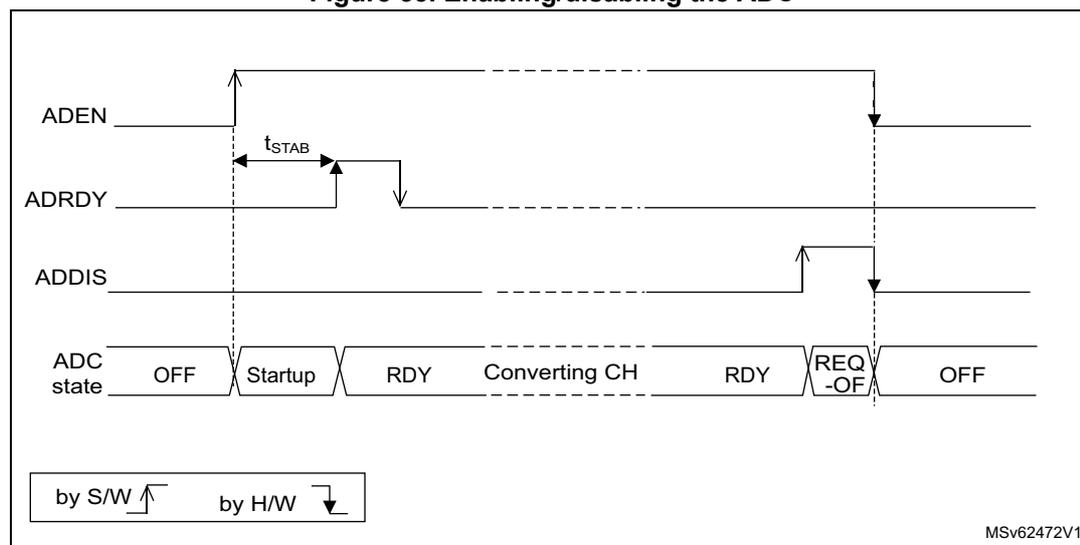
The diagram illustrates the timing for enabling and disabling the ADC. The top signal, ADEN, is set high by software (S/W) to enable the ADC. Following this, a stabilization time \( t_{\text{STAB}} \) is required. The ADRDY signal then goes high (indicated by a downward arrow, meaning active-low logic) by hardware (H/W), indicating the ADC is ready (RDY state). To disable the ADC, the ADDIS signal is set high by software. This causes the ADRDY signal to go low (indicated by an upward arrow) by hardware, entering the REQ-OFF state. Finally, the ADEN signal goes low (indicated by a downward arrow) by hardware, returning the ADC to the OFF state. The bottom row shows the ADC state transitions: OFF → Startup → RDY → Converting CH → RDY → REQ-OFF → OFF. A legend at the bottom left indicates that upward arrows represent 'by S/W' (software) and downward arrows represent 'by H/W' (hardware). The diagram is labeled MSv62472V1.
Note: In Auto-off mode ( AUTOFF = 1) the power-on/off phases are performed automatically, by hardware and the ADRDY flag is not set.
When the bus clock is much faster than the analog ADC clock ( \( f_{ADC} \) ), a minimum delay of ten \( f_{ADC} \) clock cycles must be respected between ADEN and ADDIS bit settings.
15.3.5 ADC clock (CKMODE, PRESC[3:0])
The ADC has a dual clock-domain architecture, so that the ADC can be fed with a clock (ADC asynchronous clock) independent from the APB clock ( PCLK ).
Figure 34. ADC clock scheme
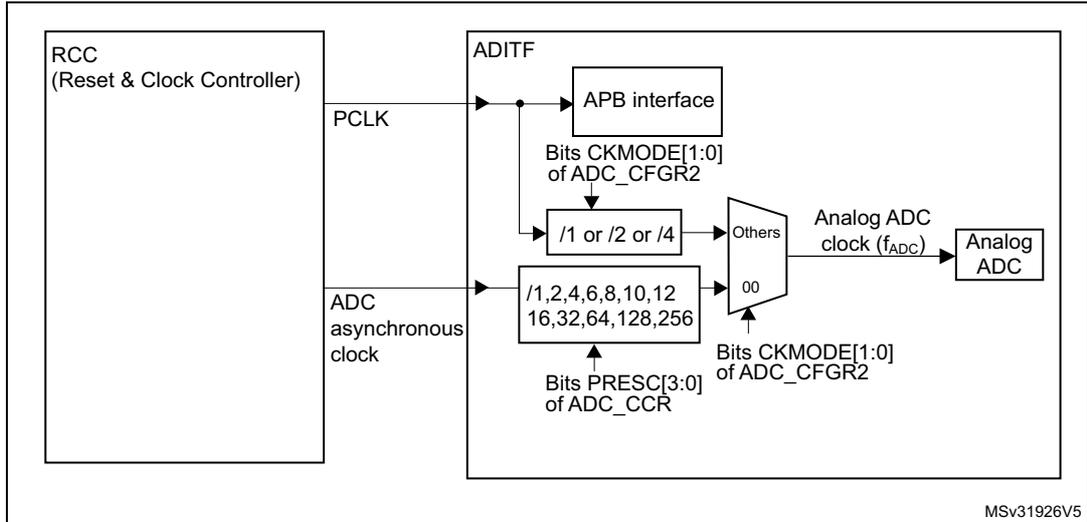
The diagram illustrates the ADC clock generation logic. On the left, the RCC (Reset & Clock Controller) provides two signals: PCLK and ADC asynchronous clock . These enter the ADITF block. The PCLK goes to the APB interface and also to a divider block with options /1, /2, or /4, controlled by bits CKMODE[1:0] of the ADC_CFGR2 register. The ADC asynchronous clock goes through a prescaler block with division factors /1, 2, 4, 6, 8, 10, 12, 16, 32, 64, 128, 256, controlled by bits PRESC[3:0] of the ADC_CCR register. A multiplexer then selects between the divided PCLK (when CKMODE is not 00) and the prescaled ADC asynchronous clock (when CKMODE is 00) to produce the Analog ADC clock (f ADC ) which feeds the Analog ADC .
- 1. Refer to Section Reset and clock control (RCC) for how the PCLK clock and ADC asynchronous clock are enabled.
The input clock of the analog ADC can be selected between two different clock sources (see Figure 34: ADC clock scheme to see how the PCLK clock and the ADC asynchronous clock are enabled):
- a) The ADC clock can be a specific clock source, named “ADC asynchronous clock” which is independent and asynchronous with the APB clock.
Refer to RCC Section for more information on generating this clock source.
To select this scheme, bits CKMODE[1:0] of the ADC_CFGR2 register must be reset. - b) The ADC clock can be derived from the APB clock of the ADC bus interface, divided by a programmable factor (1, 2 or 4) according to bits
CKMODE[1:0]
.
To select this scheme, bits CKMODE[1:0] of the ADC_CFGR2 register must be different from “00”.
In option a), the generated ADC clock can eventually be divided by a prescaler (1, 2, 4, 6, 8, 10, 12, 16, 32, 64, 128, 256) when programming the bits PRESC[3:0] in the ADC_CCR register.
Option a) has the advantage of reaching the maximum ADC clock frequency whatever the APB clock scheme selected.
Option b) has the advantage of bypassing the clock domain resynchronizations. This can be useful when the ADC is triggered by a timer and if the application requires that the ADC is
precisely triggered without any uncertainty (otherwise, an uncertainty of the trigger instant is added by the resynchronizations between the two clock domains).
Table 65. Latency between trigger and start of conversion (1)
| ADC clock source | CKMODE[1:0] | Latency between the trigger event and the start of conversion |
|---|---|---|
| HSI16, SYSCLK, or PLLPCLK (2) | 00 | Latency is not deterministic (jitter) |
| PCLK divided by 2 | 01 | Latency is deterministic (no jitter) and equal to \( 3.25 f_{ADC} \) cycles |
| PCLK divided by 4 | 10 | Latency is deterministic (no jitter) and equal to \( 3.125 f_{ADC} \) cycles |
| PCLK divided by 1 | 11 | Latency is deterministic (no jitter) and equal to \( 3 f_{ADC} \) cycles |
1. Refer to the device datasheet for the maximum \( f_{ADC} \) frequency.
2. Selected with ADCSEL bitfield of the RCC_CCIPR register.
- Caution: For correct operation of the ADC analog block, the analog ADC clock ( \( f_{ADC} \) ) must have a duty cycle ranging from 45% to 55%. This is granted when the incoming clock (PCLK or ADC asynchronous clock) is divided by a factor of two or higher, using one of the scaler blocks inside the ADC. If it is not the case, some additional rules must be followed:
- • When CKMODE[1:0] = 11 (PCLK divided by one), the AHB and APB prescalers in the RCC must be configured in bypass mode.
- • When the analog ADC clock is derived from the HSE or LSE bypass clock, this bypass clock must have a 45-to-55% duty cycle unless this clock is routed to the ADC through the PLL.
15.3.6 ADC connectivity
ADC inputs are connected to the external channels as well as internal sources as described in Figure 35.
Figure 35. ADC connectivity
![Schematic diagram of ADC connectivity for STM32WB MCU showing 19 channels (V_IN[0] to V_IN[18]) connected to a SAR ADC1 block. External pins ADC_IN2 through ADC_IN11 are connected to V_IN[2] through V_IN[11]. Internal sources include V_TS, V_REFINT, and V_BAT/3 connected to V_IN[12], V_IN[13], and V_IN[14] respectively. Other channels are NC (Not Connected).](/RM0478-STM32WB10CC/83590db96b6024fb7d2abb24bb1b67c4_img.jpg)
The diagram illustrates the internal architecture of the ADC within an STM32WB MCU. A vertical bus labeled 'ADC' contains 19 input lines, V IN [0] through V IN [18]. Each line has a switch symbol pointing towards a common vertical rail. This rail is connected to the V IN input of a 'SAR ADC1' block. The SAR ADC1 block also has V REF+ and V REF- inputs. The switches are controlled by a 'Channel selection' mechanism. The connections are as follows:
- V IN [0] and V IN [1] are labeled 'NC' (Not Connected).
- External pin ADC_IN2 connects to V IN [2].
- External pin ADC_IN3 connects to V IN [3].
- External pin ADC_IN4 connects to V IN [4].
- External pin ADC_IN5 connects to V IN [5].
- External pin ADC_IN6 connects to V IN [6].
- External pin ADC_IN7 connects to V IN [7].
- External pin ADC_IN8 connects to V IN [8].
- External pin ADC_IN9 connects to V IN [9].
- External pin ADC_IN10 connects to V IN [10].
- External pin ADC_IN11 connects to V IN [11].
- Internal source V TS connects to V IN [12].
- Internal source V REFINT connects to V IN [13].
- Internal source V BAT/3 connects to V IN [14].
- V IN [15], V IN [16], V IN [17], and V IN [18] are all labeled 'NC' (Not Connected).
MSV63936V1
15.3.7 Configuring the ADC
The software must write the ADCAL and ADEN bits in the ADC_CR register and configure the ADC_CFGR1 and ADC_CFGR2 registers only when the ADC is disabled (ADEN must be cleared).
The software must only write to the ADSTART and ADDIS bits in the ADC_CR register only if the ADC is enabled and there is no pending request to disable the ADC (ADEN = 1 and ADDIS = 0).
For all the other control bits in the ADC_IER, ADC_SMPR, ADC_TR, ADC_CHSELR and ADC_CCR registers, refer to the description of the corresponding control bit in Section 15.11: ADC registers .
The software must only write to the ADSTP bit in the ADC_CR register if the ADC is enabled (and possibly converting) and there is no pending request to disable the ADC (ADSTART = 1 and ADDIS = 0).
Note: There is no hardware protection preventing software from making write operations forbidden by the above rules. If such a forbidden write access occurs, the ADC may enter an undefined state. To recover correct operation in this case, the ADC must be disabled (clear ADEN = 0 and all the bits in the ADC_CR register).
15.3.8 Channel selection (CHSEL, SCANDIR, CHSELROMOD)
There are up to 19 multiplexed channels:
- • 10 analog inputs from GPIO pins (ADC_INx)
- • 3 internal analog inputs (temperature sensor, internal reference voltage, V BAT channel)
It is possible to convert a single channel or a sequence of channels.
The sequence of the channels to be converted can be programmed in the ADC_CHSELR channel selection register: each analog input channel has a dedicated selection bit (CHSELx).
The ADC scan sequencer can be used in two different modes:
- • Sequencer not fully configurable:
The order in which the channels are scanned is defined by the channel number (CHSELROMOD bit must be cleared in ADC_CFGR1 register):- – Sequence length configured through CHSELx bits in ADC_CHSELR register
- – Sequence direction: the channels are scanned in a forward direction (from the lowest to the highest channel number) or backward direction (from the highest to the lowest channel number) depending on the value of SCANDIR bit (SCANDIR = 0: forward scan, SCANDIR = 1: backward scan)
- – Any channel can belong to in these sequences
- • Sequencer fully configurable
The CHSELRMOD bit is set in ADC_CFGR1 register.- – Sequencer length is up to 8 channels
- – The order in which the channels are scanned is independent from the channel number. Any order can be configured through SQ1[3:0] to SQ8[3:0] bits in ADC_CHSELR register.
- – Only channel 0 to channel 14 can be selected in this sequence
- – If the sequencer detects SQx[3:0] = 0b1111, the following SQx[3:0] registers are ignored.
- – If no 0b1111 is programmed in SQx[3:0], the sequencer scans full eight channels.
After programming ADC CHSELR, SCANDIR and CHSELRMOD bits, it is mandatory to wait for CCRDY flag before starting conversions. It indicates that the new channel setting has been applied. If a new configuration is required, the CCRDY flag must be cleared prior to starting the conversion.
The software is allowed to program the CHSEL, SCANDIR, CHSELRMOD bits only when ADSTART bit is cleared (which ensures that no conversion is ongoing).
Temperature sensor, \( V_{REFINT} \) and \( V_{BAT} \) internal channels
The temperature sensor is connected to channel ADC \( V_{IN}[12] \) .
The internal voltage reference \( V_{REFINT} \) is connected to channel ADC \( V_{IN}[13] \) .
\( V_{BAT} \) channel is connected to ADC \( V_{IN}[14] \) channel.
When \( V_{REF+} \) is lower than \( V_{DDA} \) , this channel is not converted.
15.3.9 Programmable sampling time (SMPx[2:0])
Before starting a conversion, the ADC needs to establish a direct connection between the voltage source to be measured and the embedded sampling capacitor of the ADC. This sampling time must be enough for the input voltage source to charge the sample and hold capacitor to the input voltage level.
Having a programmable sampling time allows the conversion speed to be trimmed according to the input resistance of the input voltage source.
The ADC samples the input voltage for a number of ADC clock cycles that can be modified using the SMP1[2:0] and SMP2[2:0] bits in the ADC_SMPR register.
Each channel can choose one out of two sampling times configured in SMP1[2:0] and SMP2[2:0] bitfields, through SMPSELx bits in ADC_SMPR register.
The total conversion time is calculated as follows:
Example:
With \( f_{ADC} = 16 \text{ MHz} \) and a sampling time of 1.5 ADC clock cycles:
The ADC indicates the end of the sampling phase by setting the EOSMP flag.
15.3.10 Single conversion mode (CONT = 0)
In Single conversion mode, the ADC performs a single sequence of conversions, converting all the channels once. This mode is selected when CONT = 0 in the ADC_CFGR1 register. Conversion is started by either:
- • Setting the ADSTART bit in the ADC_CR register
- • Hardware trigger event
Inside the sequence, after each conversion is complete:
- • The converted data are stored in the 16-bit ADC_DR register
- • The EOC (end of conversion) flag is set
- • An interrupt is generated if the EOCIE bit is set
After the sequence of conversions is complete:
- • The EOS (end of sequence) flag is set
- • An interrupt is generated if the EOSIE bit is set
Then the ADC stops until a new external trigger event occurs or the ADSTART bit is set again.
Note: To convert a single channel, program a sequence with a length of 1.
15.3.11 Continuous conversion mode (CONT = 1)
In continuous conversion mode, when a software or hardware trigger event occurs, the ADC performs a sequence of conversions, converting all the channels once and then automatically re-starts and continuously performs the same sequence of conversions. This mode is selected when CONT = 1 in the ADC_CFGR1 register. Conversion is started by either:
- • Setting the ADSTART bit in the ADC_CR register
- • Hardware trigger event
Inside the sequence, after each conversion is complete:
- • The converted data are stored in the 16-bit ADC_DR register
- • The EOC (end of conversion) flag is set
- • An interrupt is generated if the EOCIE bit is set
After the sequence of conversions is complete:
- • The EOS (end of sequence) flag is set
- • An interrupt is generated if the EOSIE bit is set
Then, a new sequence restarts immediately and the ADC continuously repeats the conversion sequence.
Note: To convert a single channel, program a sequence with a length of 1.
It is not possible to have both discontinuous mode and continuous mode enabled: it is forbidden to set both bits DISCEN = 1 and CONT = 1.
15.3.12 Starting conversions (ADSTART)
Software starts ADC conversions by setting ADSTART = 1.
When ADSTART is set, the conversion:
- • Starts immediately if EXTEN = 00 (software trigger)
- • At the next active edge of the selected hardware trigger if EXTEN ≠ 00
The ADSTART bit is also used to indicate whether an ADC operation is currently ongoing. It is possible to re-configure the ADC while ADSTART = 0, indicating that the ADC is idle.
The ADSTART bit is cleared by hardware:
- • In single mode with software trigger (CONT = 0, EXTEN = 00)
- – At any end of conversion sequence (EOS = 1)
- • In discontinuous mode with software trigger (CONT = 0, DISCEN = 1, EXTEN = 00)
- – At end of conversion (EOC = 1)
- • In all cases (CONT = x, EXTEN = XX)
- – After execution of the ADSTP procedure invoked by software (see Section 15.3.14: Stopping an ongoing conversion (ADSTP) on page 362 )
Note: In continuous mode (CONT = 1), the ADSTART bit is not cleared by hardware when the EOS flag is set because the sequence is automatically relaunched.
When hardware trigger is selected in single mode (CONT = 0 and EXTEN = 01), ADSTART is not cleared by hardware when the EOS flag is set (except if DMAEN = 1 and DMACFG = 0 in which case ADSTART is cleared at end of the DMA transfer). This avoids the need for software having to set the ADSTART bit again and ensures the next trigger event is not missed.
After changing channel selection configuration (by programming ADC_CHSELR register or changing CHSELRMOD or SCANDIR), it is mandatory to wait until CCRDY flag is asserted before asserting ADSTART, otherwise the value written to ADSTART is ignored.
15.3.13 Timings
The elapsed time between the start of a conversion and the end of conversion is the sum of the configured sampling time plus the successive approximation time depending on data resolution:
Figure 36. Analog-to-digital conversion time
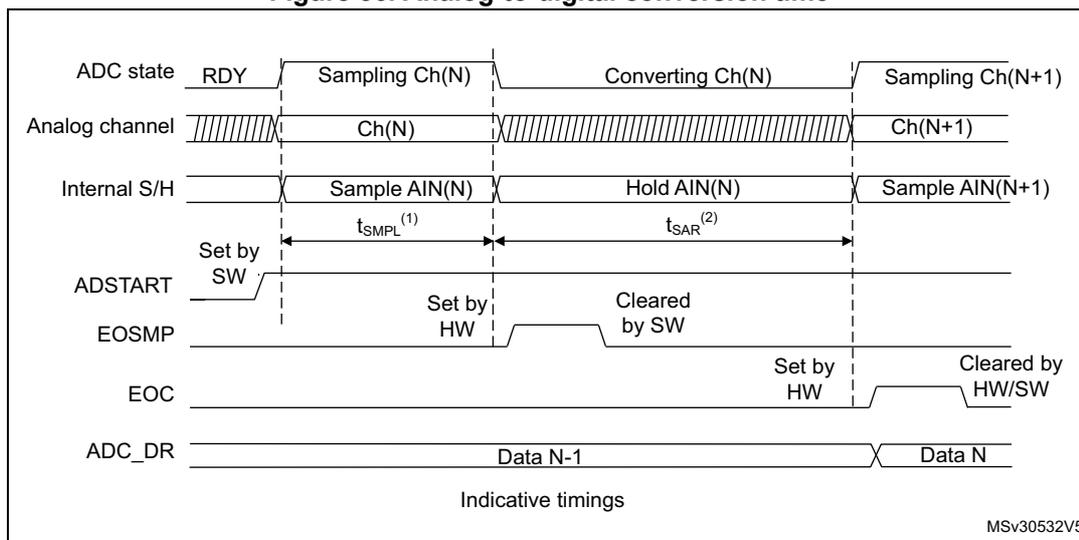
The diagram shows the timing of an ADC conversion. The top row, 'ADC state', shows a transition from 'RDY' to 'Sampling Ch(N)', then 'Converting Ch(N)', and finally 'Sampling Ch(N+1)'. The 'Analog channel' row shows 'Ch(N)' being sampled and then 'Ch(N+1)'. The 'Internal S/H' row shows 'Sample AIN(N)' and 'Hold AIN(N)' phases. The 'ADSTART' signal is set by software (SW) to start the conversion. The 'EOSMP' signal is set by hardware (HW) and cleared by software (SW). The 'EOC' signal is set by hardware (HW) and cleared by hardware/software (HW/SW). The 'ADC_DR' row shows 'Data N-1' and 'Data N' being output. The sampling time \( t_{\text{SAMPL}}^{(1)} \) and conversion time \( t_{\text{SAR}}^{(2)} \) are indicated. The diagram is labeled 'Indicative timings' and 'MSV30532V5'.
- 1. \( t_{\text{SAMPL}} \) depends on SMP[2:0].
- 2. \( t_{\text{SAR}} \) depends on RES[2:0].
- 3. The synchronization between the analog clock and the digital clock domains is not described in the above figure.
Figure 37. ADC conversion timings
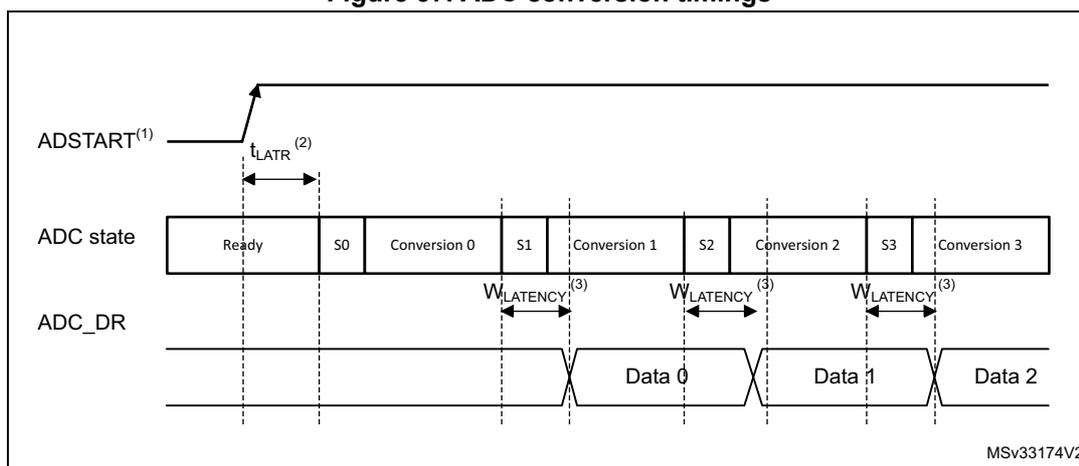
The diagram shows the timing of multiple ADC conversions. The 'ADSTART' signal is triggered, and the latency \( t_{\text{LATR}}^{(2)} \) is shown. The 'ADC state' row shows a sequence of 'Ready', 'S0', 'Conversion 0', 'S1', 'Conversion 1', 'S2', 'Conversion 2', 'S3', and 'Conversion 3'. The 'ADC_DR' row shows 'Data 0', 'Data 1', and 'Data 2' being output. The write latency \( W_{\text{LATENCY}}^{(3)} \) is indicated between the start of a conversion and the output of its data. The diagram is labeled 'MSV33174V2'.
- 1. EXTEN = 00 or EXTEN ≠ 00.
- 2. Trigger latency (refer to datasheet for more details).
- 3. ADC_DR register write latency (refer to datasheet for more details).
15.3.14 Stopping an ongoing conversion (ADSTP)
The software can decide to stop any ongoing conversions by setting ADSTP = 1 in the ADC_CR register.
This resets the ADC operation and the ADC is idle, ready for a new operation.
When the ADSTP bit is set by software, any ongoing conversion is aborted and the result is discarded (ADC_DR register is not updated with the current conversion).
The scan sequence is also aborted and reset (meaning that restarting the ADC would restart a new sequence).
Once this procedure is complete, the ADSTP and ADSTART bits are both cleared by hardware and the software must wait until ADSTART=0 before starting new conversions.
Figure 38. Stopping an ongoing conversion
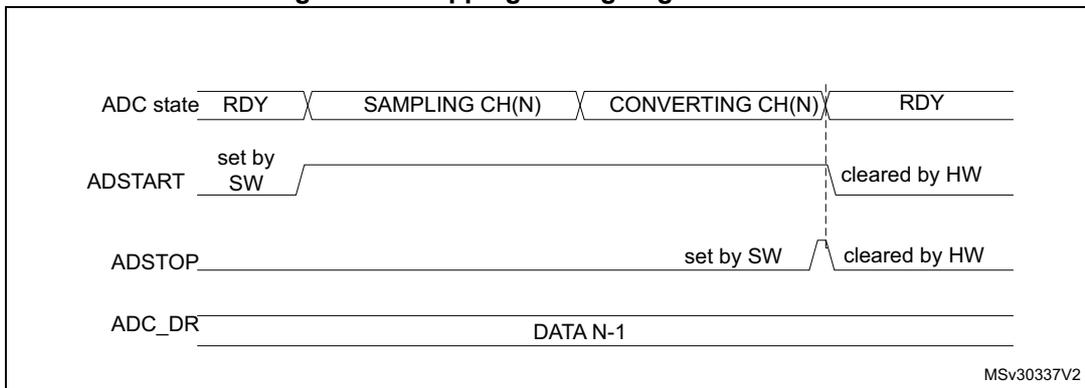
The diagram illustrates the timing for stopping an ongoing conversion. The top row shows the ADC state: RDY → SAMPLING CH(N) → CONVERTING CH(N) → RDY. The second row shows the ADSTART signal: it is set by software (SW) at the start of the SAMPLING CH(N) state and cleared by hardware (HW) at the end of the CONVERTING CH(N) state. The third row shows the ADSTOP signal: it is set by software (SW) during the CONVERTING CH(N) state and cleared by hardware (HW) at the end of the CONVERTING CH(N) state. The bottom row shows the ADC_DR register: it contains DATA N-1 during the conversion and is updated when the ADC returns to the RDY state. A vertical dashed line marks the end of the conversion. The diagram is labeled MSv30337V2.
15.4 Conversion on external trigger and trigger polarity (EXTSEL, EXTEN)
A conversion or a sequence of conversion can be triggered either by software or by an external event (for example timer capture). If the EXTEN[1:0] control bits are not equal to “0b00”, then external events are able to trigger a conversion with the selected polarity. The trigger selection is effective once software has set bit ADSTART = 1.
Any hardware triggers which occur while a conversion is ongoing are ignored.
If bit ADSTART = 0, any hardware triggers which occur are ignored.
Table 66 provides the correspondence between the EXTEN[1:0] values and the trigger polarity.
Table 66. Configuring the trigger polarity
| Source | EXTEN[1:0] |
|---|---|
| Trigger detection disabled | 00 |
| Detection on rising edge | 01 |
| Detection on falling edge | 10 |
| Detection on both rising and falling edges | 11 |
Note: The polarity of the external trigger can be changed only when the ADC is not converting ( \( ADSTART = 0 \) ).
The EXTSEL[2:0] control bits are used to select which of 8 possible events can trigger conversions.
Refer to Table 64: External triggers in Section 15.3.1: ADC pins and internal signals for the list of all the external triggers that can be used for regular conversion.
The software source trigger events can be generated by setting the ADSTART bit in the ADC_CR register.
Note: The trigger selection can be changed only when the ADC is not converting ( \( ADSTART = 0 \) ).
15.4.1 Discontinuous mode (DISCEN)
This mode is enabled by setting the DISCEN bit in the ADC_CFGR1 register.
In this mode ( \( DISCEN = 1 \) ), a hardware or software trigger event is required to start each conversion defined in the sequence. On the contrary, if \( DISCEN = 0 \) , a single hardware or software trigger event successively starts all the conversions defined in the sequence.
Example:
- •
\(
DISCEN = 1
\)
, channels to be converted = 0, 3, 7, 10
- – 1st trigger: channel 0 is converted and an EOC event is generated
- – 2nd trigger: channel 3 is converted and an EOC event is generated
- – 3rd trigger: channel 7 is converted and an EOC event is generated
- – 4th trigger: channel 10 is converted and both EOC and EOS events are generated.
- – 5th trigger: channel 0 is converted and an EOC event is generated
- – 6th trigger: channel 3 is converted and an EOC event is generated
- – ...
- •
\(
DISCEN = 0
\)
, channels to be converted = 0, 3, 7, 10
- – 1st trigger: the complete sequence is converted: channel 0, then 3, 7 and 10. Each conversion generates an EOC event and the last one also generates an EOS event.
- – Any subsequent trigger events restarts the complete sequence.
Note: It is not possible to have both discontinuous mode and continuous mode enabled: it is forbidden to set both bits \( DISCEN = 1 \) and \( CONT = 1 \) .
15.4.2 Programmable resolution (RES) - Fast conversion mode
It is possible to obtain faster conversion times ( \( t_{SAR} \) ) by reducing the ADC resolution.
The resolution can be configured to be either 12, 10, 8, or 6 bits by programming the RES[1:0] bits in the ADC_CFGR1 register. Lower resolution allows faster conversion times for applications where high data precision is not required.
Note: The \( RES[1:0] \) bit must only be changed when the ADEN bit is reset.
The result of the conversion is always 12 bits wide and any unused LSB bits are read as zeros.
Lower resolution reduces the conversion time needed for the successive approximation steps as shown in Table 67 .
Table 67. \( t_{SAR} \) timings depending on resolution
| RES[1:0] (bits) | \(
t_{SAR}
\) ( \( f_{ADC} \) cycles) | \(
t_{SAR}
\)
at \( f_{ADC} = 35 \) MHz (ns) | \(
t_{SMPL(min)}
\) ( \( f_{ADC} \) cycles) | \(
t_{CONV}
\)
with min.
\(
t_{SMPL}
\) ( \( f_{ADC} \) cycles) | \(
t_{CONV(min)}
\)
at \( f_{ADC} = 35 \) MHz (ns) |
|---|---|---|---|---|---|
| 12 | 12.5 | 357 | 1.5 | 14 | 400 |
| 10 | 10.5 | 300 | 1.5 | 12 | 343 |
| 8 | 8.5 | 243 | 1.5 | 10 | 286 |
| 6 | 6.5 | 186 | 1.5 | 8 | 229 |
15.4.3 End of conversion, end of sampling phase (EOC, EOSMP flags)
The ADC indicates each end of conversion (EOC) event.
The ADC sets the EOC flag in the ADC_ISR register as soon as a new conversion data result is available in the ADC_DR register. An interrupt can be generated if the EOCIE bit is set in the ADC_IER register. The EOC flag is cleared by software either by writing 1 to it, or by reading the ADC_DR register.
The ADC also indicates the end of sampling phase by setting the EOSMP flag in the ADC_ISR register. The EOSMP flag is cleared by software by writing 1 to it. An interrupt can be generated if the EOSMPIE bit is set in the ADC_IER register.
The aim of this interrupt is to allow the processing to be synchronized with the conversions. Typically, an analog multiplexer can be accessed in hidden time during the conversion phase, so that the multiplexer is positioned when the next sampling starts.
Note: As there is only a very short time left between the end of the sampling and the end of the conversion, it is recommenced to use polling or a WFE instruction rather than an interrupt and a WFI instruction.
15.4.4 End of conversion sequence (EOS flag)
The ADC notifies the application of each end of sequence (EOS) event.
The ADC sets the EOS flag in the ADC_ISR register as soon as the last data result of a conversion sequence is available in the ADC_DR register. An interrupt can be generated if the EOSIE bit is set in the ADC_IER register. The EOS flag is cleared by software by writing 1 to it.
15.4.5 Example timing diagrams (single/continuous modes hardware/software triggers)
Figure 39. Single conversions of a sequence, software trigger
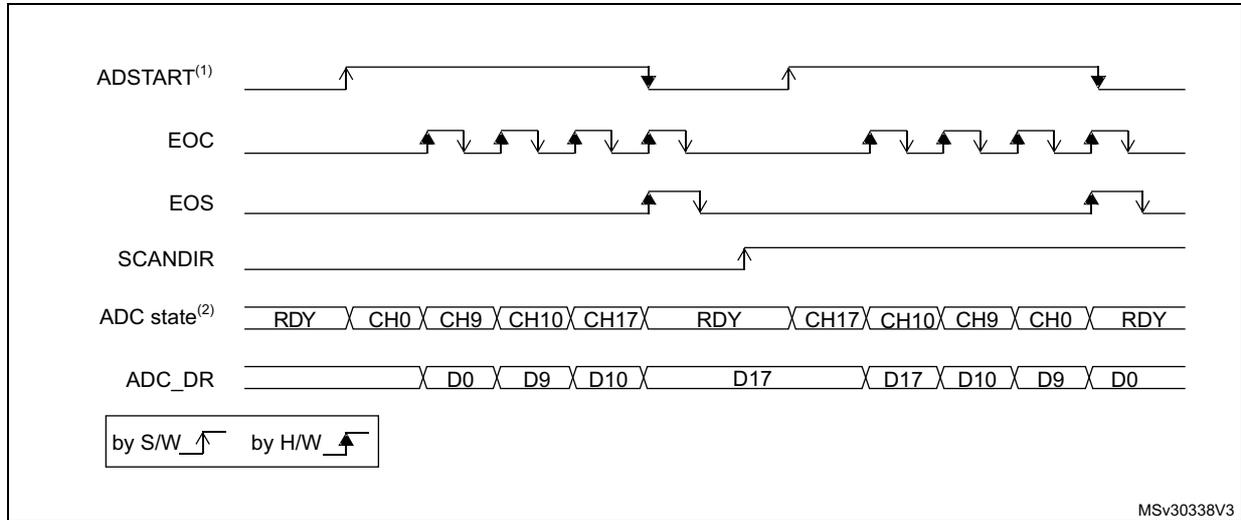
MSv30338V3
- 1. EXTEN = 00, CONT = 0
- 2. CHSEL = 0x20601, WAIT = 0, AUTOFF = 0
Figure 40. Continuous conversion of a sequence, software trigger
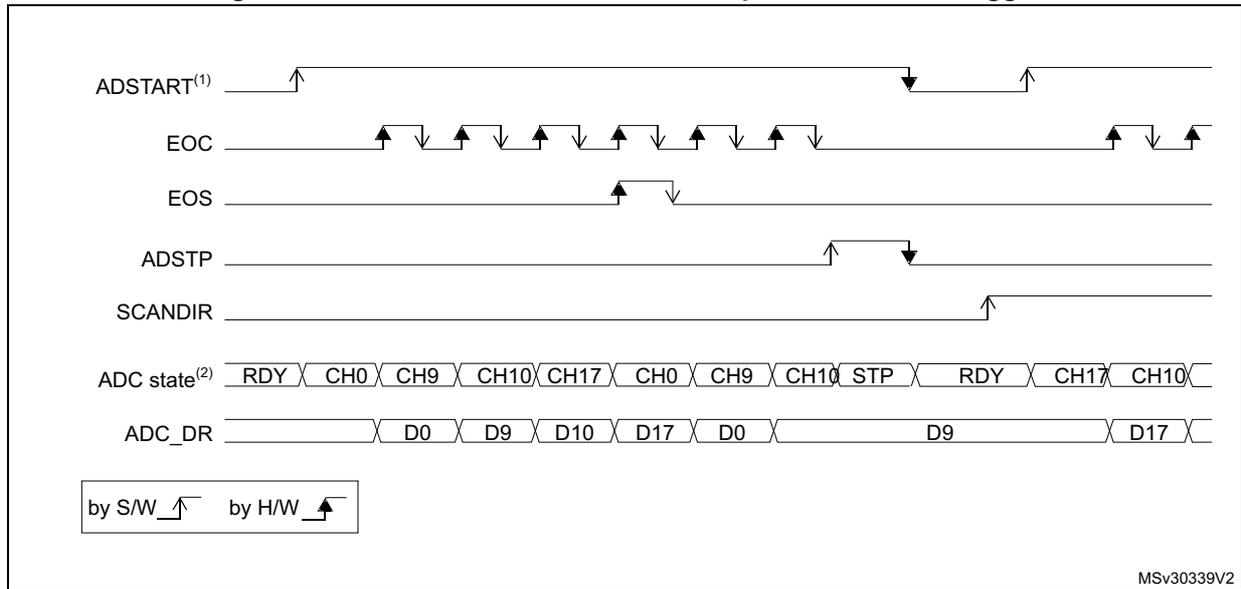
MSv30339V2
- 1. EXTEN = 00, CONT = 1,
- 2. CHSEL = 0x20601, WAIT = 0, AUTOFF = 0
Figure 41. Single conversions of a sequence, hardware trigger
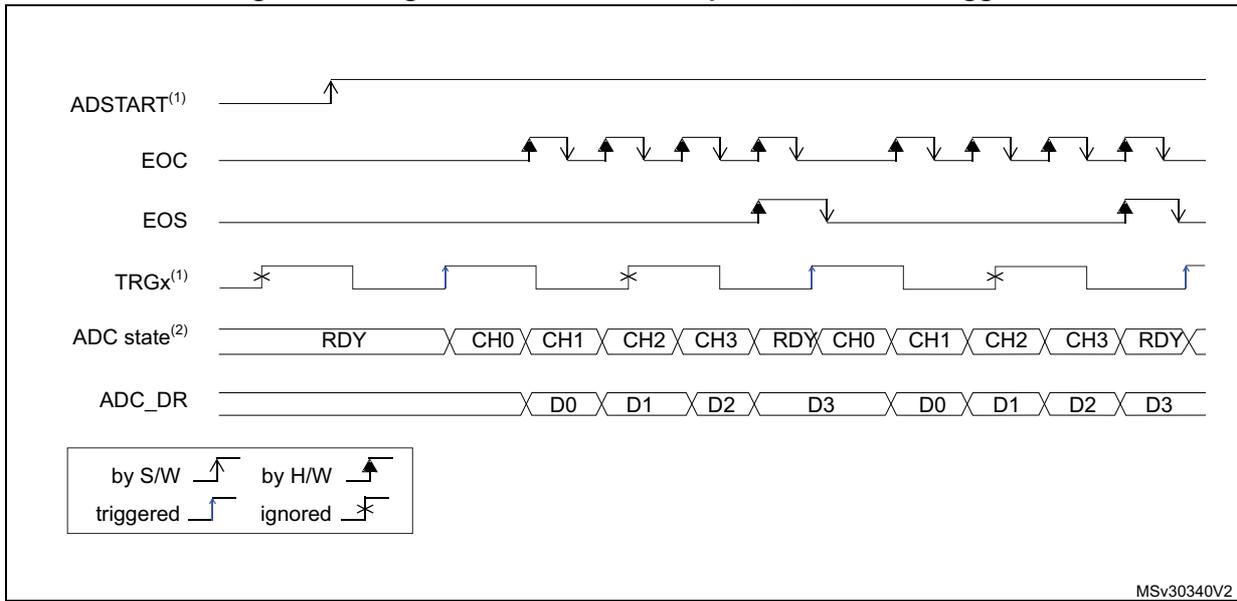
MSv30340V2
- 1. EXTSEL = TRGx (over-frequency), EXTEN = 01 (rising edge), CONT = 0
- 2. CHSEL = 0xF, SCANDIR = 0, WAIT = 0, AUTOFF = 0
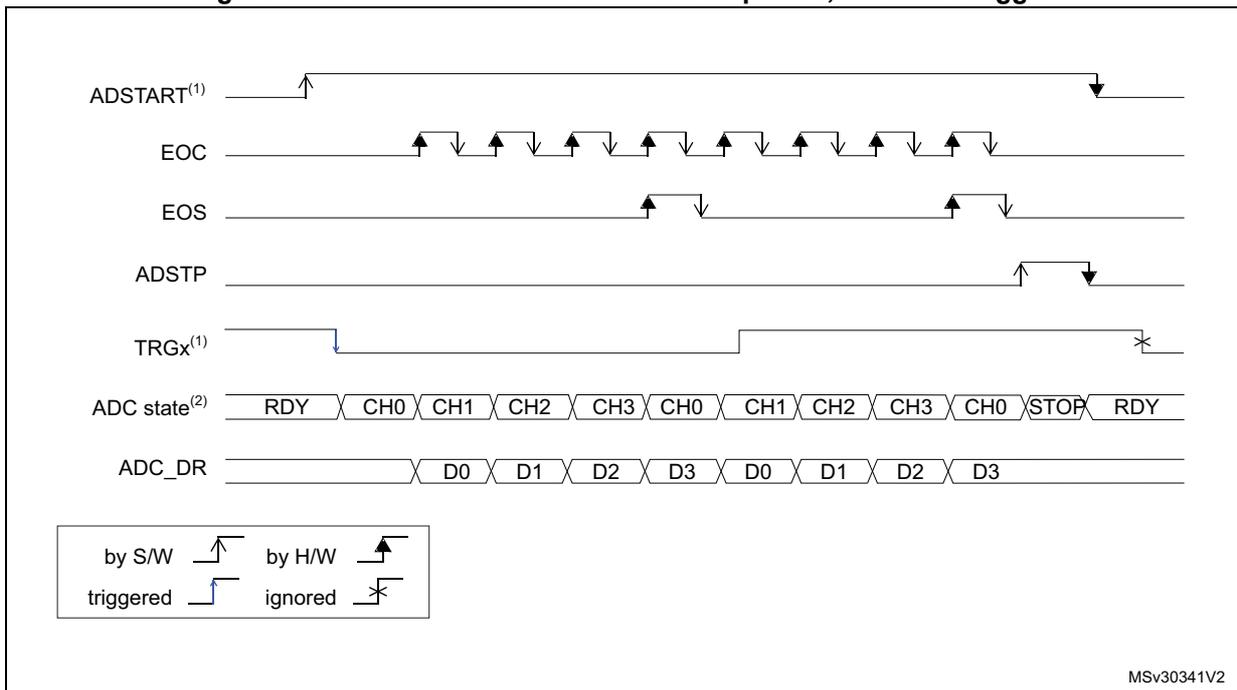
Figure 42. Continuous conversions of a sequence, hardware trigger
MSv30341V2
- 1. EXTSEL = TRGx, EXTEN = 10 (falling edge), CONT = 1
- 2. CHSEL = 0xF, SCANDIR = 0, WAIT = 0, AUTOFF = 0
15.4.6 Low frequency trigger mode
Once the ADC is enabled or the last ADC conversion is complete, the ADC is ready to start a new conversion. The ADC needs to be started at a predefined time ( \( t_{idle} \) ) otherwise ADC converted data might be corrupted due to the transistor leakage (refer to the device datasheet for the maximum value of \( t_{idle} \) ).
If the application has to support a time longer than the maximum \( t_{idle} \) value (between one trigger to another for single conversion mode or between the ADC enable and the first ADC conversion), then the ADC internal state needs to be rearmed. This mechanism can be enabled by setting LFTRIG bit to 1 in ADC_CFGR2 register. By setting this bit, any trigger (software or hardware) sends a rearm command to ADC. The conversion starts after a one ADC clock cycle delay compared to LFTRIG cleared.
It is not necessary to use this mode when AUTOFF bit is set. For Wait mode, only the first trigger generates an internal rearm command.
15.5 Data management
15.5.1 Data register and data alignment (ADC_DR, ALIGN)
At the end of each conversion (when an EOC event occurs), the result of the converted data is stored in the ADC_DR data register which is 16-bit wide.
The format of the ADC_DR depends on the configured data alignment and resolution.
The ALIGN bit in the ADC_CFGR1 register selects the alignment of the data stored after conversion. Data can be right-aligned (ALIGN = 0) or left-aligned (ALIGN = 1) as shown in Figure 43.
Figure 43. Data alignment and resolution
| ALIGN | RES | 15 | 14 | 13 | 12 | 11 | 10 | 9 | 8 | 7 | 6 | 5 | 4 | 3 | 2 | 1 | 0 |
|---|---|---|---|---|---|---|---|---|---|---|---|---|---|---|---|---|---|
| 0 | 0x0 | 0x0 | DR[11:0] | ||||||||||||||
| 0x1 | 0x00 | DR[9:0] | |||||||||||||||
| 0x2 | 0x00 | DR[7:0] | |||||||||||||||
| 0x3 | 0x00 | DR[5:0] | |||||||||||||||
| 1 | 0x0 | DR[11:0] | 0x0 | ||||||||||||||
| 0x1 | DR[9:0] | 0x00 | |||||||||||||||
| 0x2 | DR[7:0] | 0x00 | |||||||||||||||
| 0x3 | 0x00 | DR[5:0] | 0x0 | ||||||||||||||
MS30342V1
15.5.2 ADC overrun (OVR, OVRMOD)
The overrun flag (OVR) indicates a data overrun event, when the converted data was not read in time by the CPU or the DMA, before the data from a new conversion is available.
The OVR flag is set in the ADC_ISR register if the EOC flag is still at '1' at the time when a new conversion completes. An interrupt can be generated if the OVRIE bit is set in the ADC_IER register.
When an overrun condition occurs, the ADC keeps operating and can continue to convert unless the software decides to stop and reset the sequence by setting the ADSTP bit in the ADC_CR register.
The OVR flag is cleared by software by writing 1 to it.
It is possible to configure if the data is preserved or overwritten when an overrun event occurs by programming the OVRMOD bit in the ADC_CFGR1 register:
- • OVRMOD = 0
- – An overrun event preserves the data register from being overwritten: the old data is maintained and the new conversion is discarded. If OVR remains at 1, further conversions can be performed but the resulting data is discarded.
- • OVRMOD = 1
- – The data register is overwritten with the last conversion result and the previous unread data is lost. If OVR remains at 1, further conversions can be performed and the ADC_DR register always contains the data from the latest conversion.
Figure 44. Example of overrun (OVR)
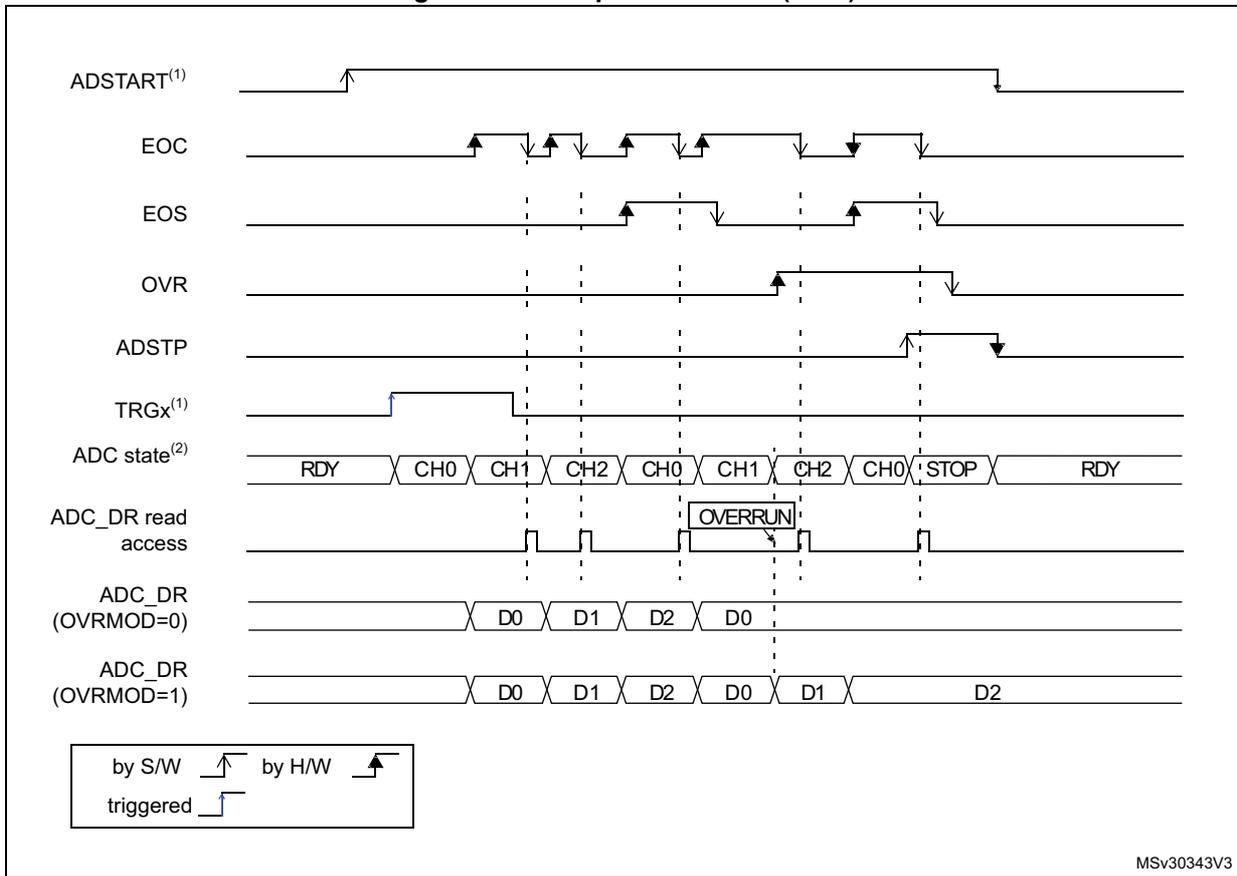
The diagram illustrates the timing of an ADC overrun. The top signal, ADSTART (1) , is a software trigger that goes high to start conversions. TRGx (1) is a hardware trigger that also goes high. The EOC (End of Conversion) signal pulses for each conversion. The EOS (End of Sequence) signal goes high after the last conversion in a sequence. The OVR (Overrun) flag goes high when a new conversion starts before the previous data in the ADC_DR register has been read. The ADSTP (Stop) bit is set by software to stop the ADC. The ADC state shows a sequence of RDY (Ready), CH0, CH1, CH2, CH0, CH1, CH2, CH0, STOP, and then back to RDY. The 'ADC_DR read access' signal shows when the data register is read. In the OVRMOD=0 case, the data register holds D0, D1, D2, and then D0 again when an overrun occurs. In the OVRMOD=1 case, the data register is overwritten with D1, and then D2 when the overrun occurs. A legend at the bottom left indicates that rising edges are 'by S/W' (software) and falling edges are 'by H/W' (hardware).
MSV30343V3
15.5.3 Managing a sequence of data converted without using the DMA
If the conversions are slow enough, the conversion sequence can be handled by software. In this case the software must use the EOC flag and its associated interrupt to handle each data result. Each time a conversion is complete, the EOC bit is set in the ADC_ISR register and the ADC_DR register can be read. The OVRMOD bit in the ADC_CFGR1 register should be configured to 0 to manage overrun events as an error.
15.5.4 Managing converted data without using the DMA without overrun
It may be useful to let the ADC convert one or more channels without reading the data after each conversion. In this case, the OVRMOD bit must be configured at 1 and the OVR flag should be ignored by the software. When OVRMOD = 1, an overrun event does not prevent the ADC from continuing to convert and the ADC_DR register always contains the latest conversion data.
15.5.5 Managing converted data using the DMA
Since all converted channel values are stored in a single data register, it is efficient to use DMA when converting more than one channel. This avoids losing the conversion data results stored in the ADC_DR register.
When DMA mode is enabled (DMAEN bit set in the ADC_CFGR1 register), a DMA request is generated after the conversion of each channel. This allows the transfer of the converted data from the ADC_DR register to the destination location selected by the software.
Note: The DMAEN bit in the ADC_CFGR1 register must be set after the ADC calibration phase.
Despite this, if an overrun occurs (OVR = 1) because the DMA could not serve the DMA transfer request in time, the ADC stops generating DMA requests and the data corresponding to the new conversion is not transferred by the DMA. Which means that all the data transferred to the RAM can be considered as valid.
Depending on the configuration of OVRMOD bit, the data is either preserved or overwritten (refer to Section 15.5.2: ADC overrun (OVR, OVRMOD) on page 367 ).
The DMA transfer requests are blocked until the software clears the OVR bit.
Two different DMA modes are proposed depending on the application use and are configured with bit DMACFG in the ADC_CFGR1 register:
- • DMA one shot mode (DMACFG = 0).
This mode should be selected when the DMA is programmed to transfer a fixed number of data words. - • DMA circular mode (DMACFG = 1)
This mode should be selected when programming the DMA in circular mode or double buffer mode.
DMA one shot mode (DMACFG = 0)
In this mode, the ADC generates a DMA transfer request each time a new conversion data word is available and stops generating DMA requests once the DMA has reached the last DMA transfer (when a transfer complete interrupt occurs, see Section 11: Direct memory access controller (DMA) on page 284 ) even if a conversion has been started again.
When the DMA transfer is complete (all the transfers configured in the DMA controller have been done):
- • The content of the ADC data register is frozen.
- • Any ongoing conversion is aborted and its partial result discarded
- • No new DMA request is issued to the DMA controller. This avoids generating an overrun error if there are still conversions which are started.
- • The scan sequence is stopped and reset
- • The DMA is stopped
DMA circular mode (DMACFG = 1)
In this mode, the ADC generates a DMA transfer request each time a new conversion data word is available in the data register, even if the DMA has reached the last DMA transfer. This allows the DMA to be configured in circular mode to handle a continuous analog input data stream.
15.6 Low-power features
15.6.1 Wait mode conversion
Wait mode conversion can be used to simplify the software as well as optimizing the performance of applications clocked at low frequency where there might be a risk of ADC overrun occurring.
When the WAIT bit is set in the ADC_CFGR1 register, a new conversion can start only if the previous data has been treated, once the ADC_DR register has been read or if the EOC bit has been cleared.
This is a way to automatically adapt the speed of the ADC to the speed of the system that reads the data.
Note: Any hardware triggers which occur while a conversion is ongoing or during the wait time preceding the read access are ignored.
Figure 45. Wait mode conversion (continuous mode, software trigger)
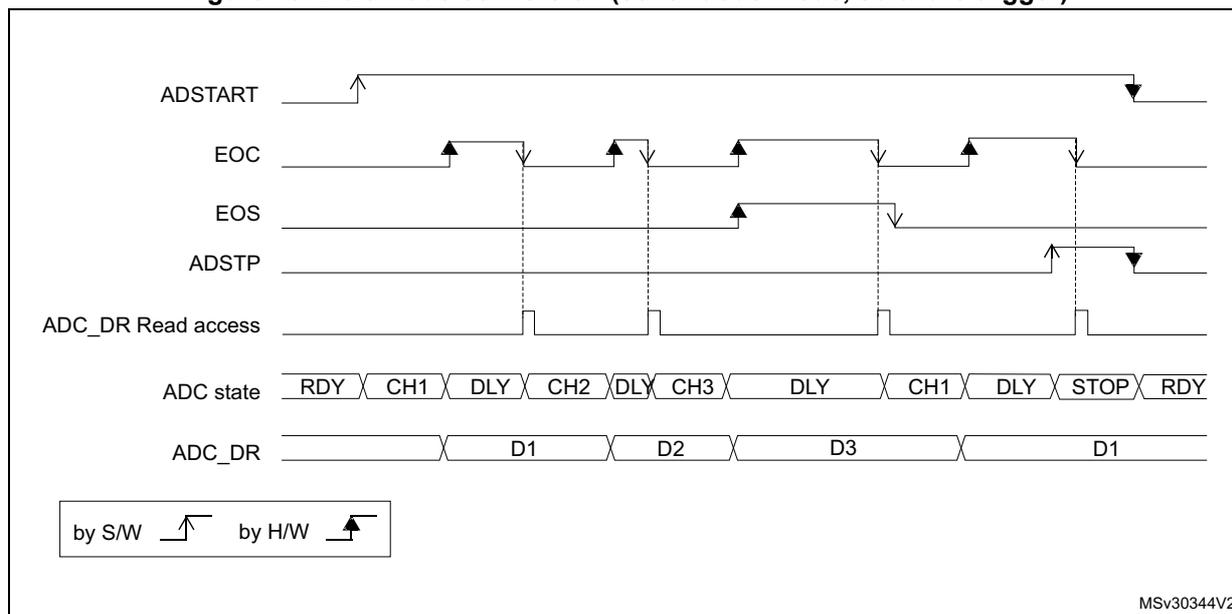
The timing diagram illustrates the sequence of events for a software-triggered continuous conversion in wait mode. The ADSTART signal is a rising edge (S/W) that initiates the conversion. The EOC signal is a rising edge (H/W) that indicates the end of each conversion. The EOS signal is a rising edge (H/W) that indicates the end of the sequence. The ADSTP signal is a falling edge (H/W) that stops the conversion. The ADC_DR Read access signal is a series of pulses that occur when the ADC_DR register is read. The ADC state sequence is RDY, CH1, DLY, CH2, DLY, CH3, DLY, CH1, DLY, STOP, RDY. The ADC_DR data sequence is D1, D2, D3, D1. A legend indicates that rising edges are triggered by software (S/W) and falling edges by hardware (H/W).
MSV30344V2
- 1. EXTEN = 00, CONT = 1
- 2. CHSEL = 0x3, SCANDIR = 0, WAIT = 1, AUTOFF = 0
15.6.2 Auto-off mode (AUTOFF)
The ADC has an automatic power management feature which is called auto-off mode, and is enabled by setting AUTOFF = 1 in the ADC_CFGR1 register.
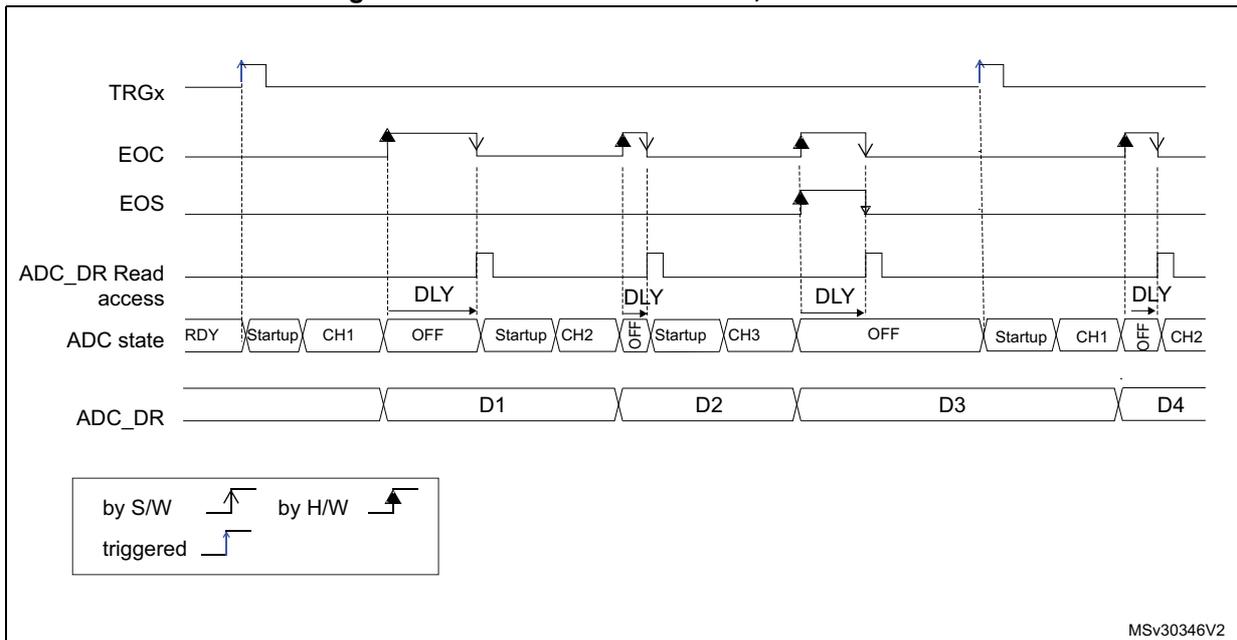
When AUTOFF = 1, the ADC is always powered off when not converting and automatically wakes-up when a conversion is started (by software or hardware trigger). A startup-time is automatically inserted between the trigger event which starts the conversion and the sampling time of the ADC. The ADC is then automatically disabled once the sequence of conversions is complete.
Auto-off mode can cause a dramatic reduction in the power consumption of applications which need relatively few conversions or when conversion requests are timed far enough apart (for example with a low frequency hardware trigger) to justify the extra power and extra time used for switching the ADC on and off.
Auto-off mode can be combined with the wait mode conversion (WAIT = 1) for applications clocked at low frequency. This combination can provide significant power savings if the ADC is automatically powered-off during the wait phase and restarted as soon as the ADC_DR register is read by the application (see Figure 47: Behavior with WAIT = 1, AUTOFF = 1 ).
Note: Refer to the Section Reset and clock control (RCC) for the description of how to manage the dedicated 14 MHz internal oscillator. The ADC interface can automatically switch ON/OFF the 14 MHz internal oscillator to save power.
Figure 46. Behavior with WAIT = 0, AUTOFF = 1
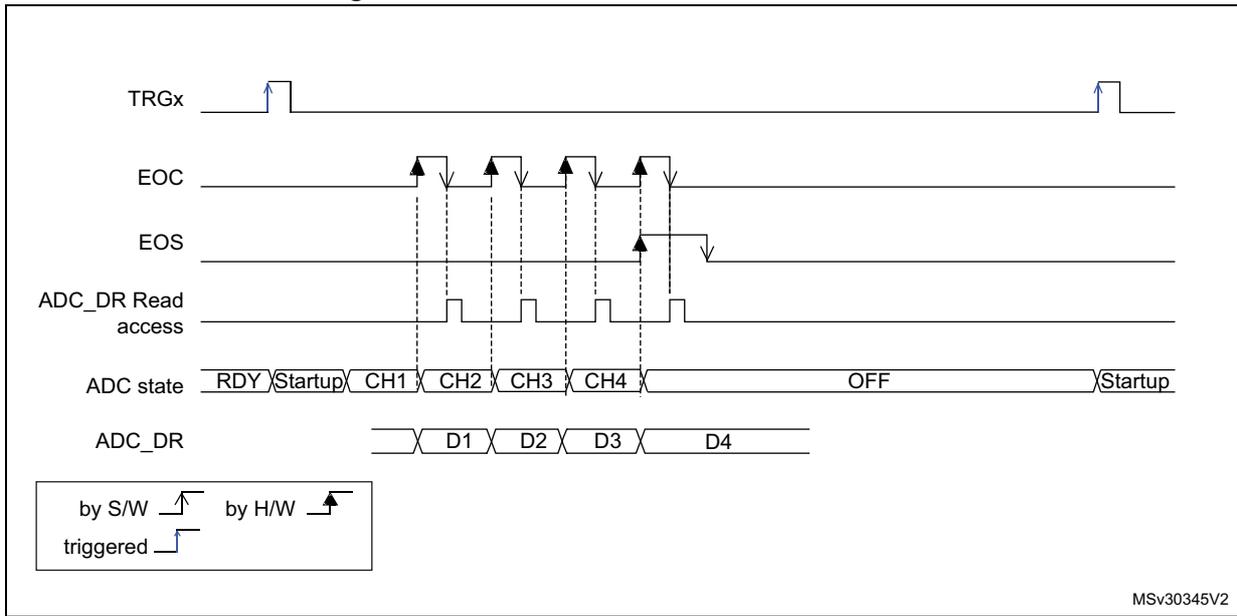
MSv30345V2
- 1. EXTSEL = TRGx, EXTEN = 01 (rising edge), CONT = x, ADSTART = 1, CHSEL = 0xF, SCANDIR = 0, WAIT = 1, AUTOFF = 1
Figure 47. Behavior with WAIT = 1, AUTOFF = 1
MSv30346V2
- 1. EXTSEL = TRGx, EXTEN = 01 (rising edge), CONT = x, ADSTART = 1, CHSEL = 0xF, SCANDIR = 0, WAIT = 1, AUTOFF = 1
15.7 Analog window watchdog
15.7.1 Description of the analog watchdog
The AWD analog watchdog is enabled by setting the AWDEN bit in the ADC_CFGR1 register. It is used to monitor that either one selected channel or all enabled channels (see Table 69: Analog watchdog channel selection ) remain within a configured voltage range (window) as shown in Figure 48 .
The AWD analog watchdog status bit is set if the analog voltage converted by the ADC is below a lower threshold or above a higher threshold. These thresholds are programmed in HT[11:0] and LT[11:0] bit of ADC_TR register. An interrupt can be enabled by setting the AWDIE bit in the ADC_IER register.
The AWD flag is cleared by software by programming it to 0.
When converting data with a resolution of less than 12-bit (according to bits RES[1:0]), the LSB of the programmed thresholds must be kept cleared because the internal comparison is always performed on the full 12-bit raw converted data (left aligned).
Table 68 describes how the comparison is performed for all the possible resolutions.
Table 68. Analog watchdog comparison
| Resolution bits RES[1:0] | Analog watchdog comparison between: | Comments | |
|---|---|---|---|
| Raw converted data, left aligned (1) | Thresholds | ||
| 00: 12-bit | DATA[11:0] | LT[11:0] and HT[11:0] | - |
| 01: 10-bit | DATA[11:2],00 | LT[11:0] and HT[11:0] | The user must configure LT1[1:0] and HT1[1:0] to "00" |
| 10: 8-bit | DATA[11:4],0000 | LT[11:0] and HT[11:0] | The user must configure LT1[3:0] and HT1[3:0] to "0000" |
| 11: 6-bit | DATA[11:6],000000 | LT[11:0] and HT[11:0] | The user must configure LT1[5:0] and HT1[5:0] to "000000" |
1. The watchdog comparison is performed on the raw converted data before any alignment calculation.
Table 69 shows how to configure the AWDSGL and AWDEN bits in the ADC_CFGR1 register to enable the analog watchdog on one or more channels.
Figure 48. Analog watchdog guarded area

The diagram illustrates the analog watchdog guarded area. A vertical axis represents the analog voltage. Two horizontal lines are shown: the upper line is labeled 'Higher threshold' and 'HTx', and the lower line is labeled 'Lower threshold' and 'LTx'. The rectangular region between these two lines is shaded gray and labeled 'Guarded area'. The text 'MS45396V1' is visible in the bottom right corner of the diagram area.
Table 69. Analog watchdog channel selection
| Channels guarded by the analog watchdog | AWDSGL bit | AWDEN bit |
|---|---|---|
| None | x | 0 |
| All channels | 0 | 1 |
| Single (1) channel | 1 | 1 |
1. Selected by the AWDCH[4:0] bits
15.7.2 ADC_AWD1_OUT output signal generation
The analog watchdog is associated to an internal hardware signal, ADC_AWD1_OUT that is directly connected to the ETR input (external trigger) of some on-chip timers (refer to the timers section for details on how to select the ADC_AWD1_OUT signal as ETR).
ADC_AWD1_OUT is activated when the analog watchdog is enabled:
- • ADC_AWD1_OUT is set when a guarded conversion is outside the programmed thresholds.
- • ADC_AWD1_OUT is reset after the end of the next guarded conversion which is inside the programmed thresholds. It remains at 1 if the next guarded conversions are still outside the programmed thresholds.
- • ADC_AWD1_OUT is also reset when disabling the ADC (when setting ADDIS to 1). Note that stopping conversions (ADSTP set), might clear the ADC_AWD1_OUT state.
- • ADC_AWD1_OUT state does not change when the ADC converts the none-guarded channel (see Figure 49 )
AWD flag is set by hardware and reset by software: AWD flag has no influence on the generation of ADC_AWD1_OUT (as an example, ADC_AWD1_OUT can toggle while AWD flag remains at 1 if the software has not cleared the flag).
The ADC_AWD1_OUT signal is generated by the analog ADC clock domain. This signal can be generated even the APB clock is stopped.
The AWD comparison is performed at the end of each ADC conversion. The ADC_AWD1_OUT rising edge and falling edge occurs two \( f_{ADC} \) clock cycles after the comparison.
As ADC_AWD1_OUT is generated by the analog ADC clock domain and AWD flag is generated by the APB clock domain, the rising edges of these signals are not synchronized.
Figure 49. ADC_AWD1_OUT signal generation
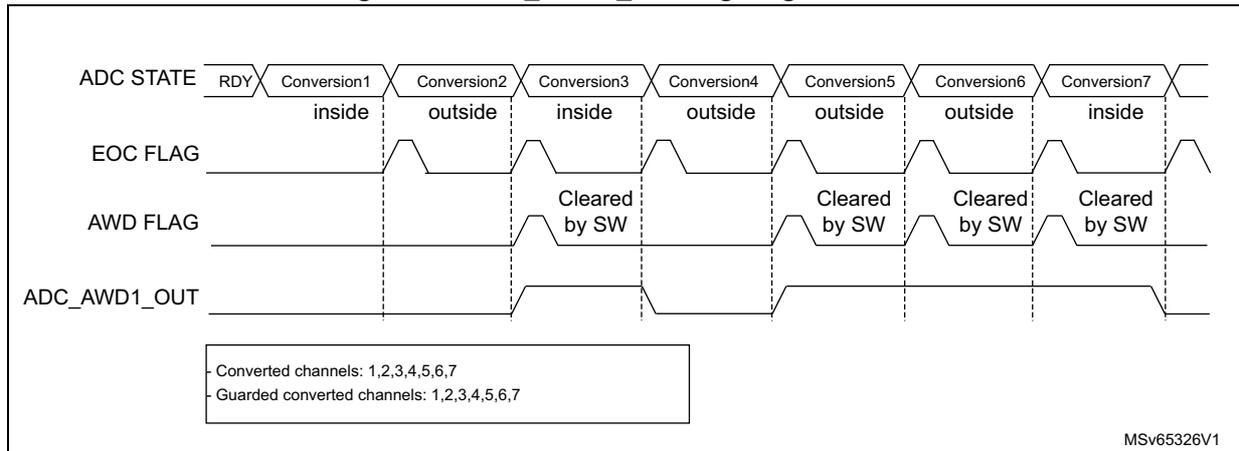
ADC STATE: RDY | Conversion1 (inside) | Conversion2 (outside) | Conversion3 (inside) | Conversion4 (outside) | Conversion5 (outside) | Conversion6 (outside) | Conversion7 (inside)
EOC FLAG: Pulses at the end of each conversion.
AWD FLAG: Pulses when a conversion is 'outside'. It is manually cleared by software (SW) after each 'outside' conversion.
ADC_AWD1_OUT: High during Conversion2, Conversion4, Conversion5, and Conversion6. Low during Conversion1, Conversion3, and Conversion7.
- Guarded converted channels: 1,2,3,4,5,6,7
MSv65326V1
Figure 50. ADC_AWD1_OUT signal generation (AWD flag not cleared by software)
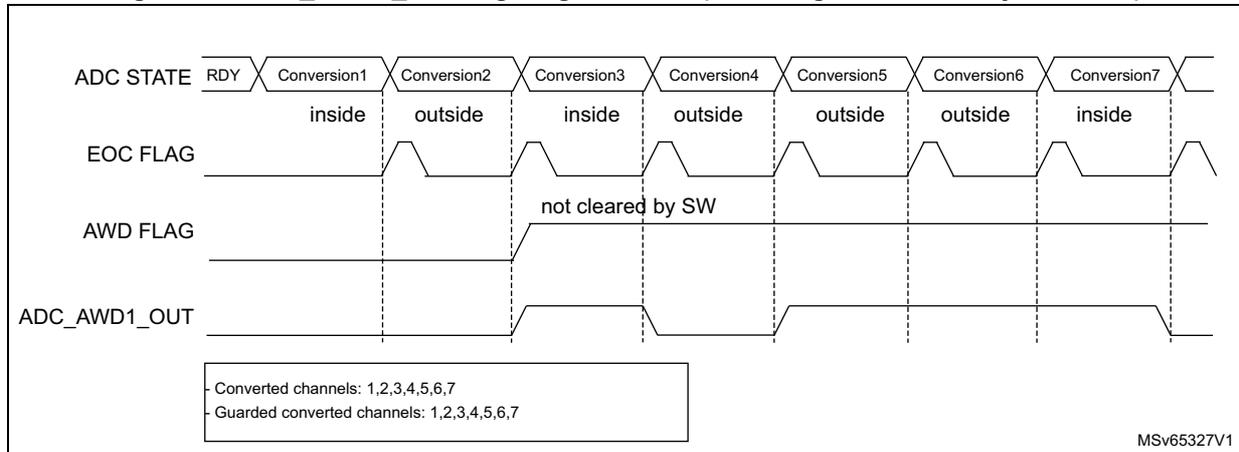
ADC STATE: RDY | Conversion1 (inside) | Conversion2 (outside) | Conversion3 (inside) | Conversion4 (outside) | Conversion5 (outside) | Conversion6 (outside) | Conversion7 (inside)
EOC FLAG: Pulses at the end of each conversion.
AWD FLAG: Pulses when a conversion is 'outside' (starting at Conversion2) and is not cleared by software. It remains high until the end of the sequence.
ADC_AWD1_OUT: High from Conversion2 to the end of the sequence.
- Guarded converted channels: 1,2,3,4,5,6,7
MSv65327V1
Figure 51. ADC1_AWD_OUT signal generation (on a single channel)
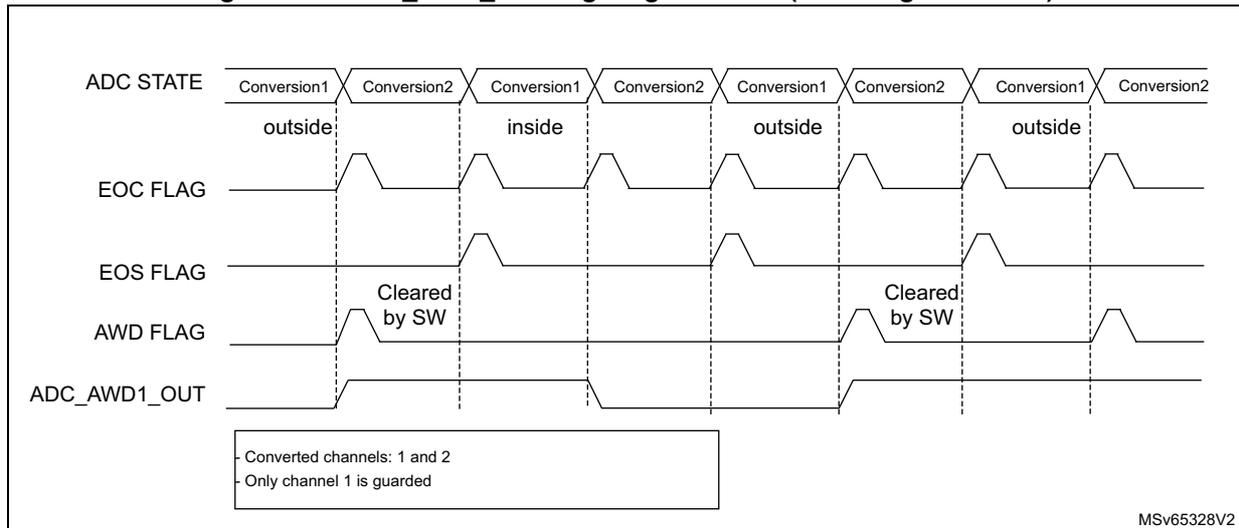
ADC STATE: Conversion1 (outside) | Conversion2 | Conversion1 (inside) | Conversion2 | Conversion1 (outside) | Conversion2 | Conversion1 (outside) | Conversion2
EOC FLAG: Pulses at the end of each conversion.
EOS FLAG: Pulses at the end of the sequence.
AWD FLAG: Pulses when Conversion1 is 'outside'. It is manually cleared by software (SW).
ADC_AWD1_OUT: High during the first, fifth, and seventh conversion intervals (when Conversion1 is 'outside').
- Only channel 1 is guarded
MSv65328V2
15.7.3 Analog watchdog threshold control
LT[11:0] and HT[11:0] can be changed during an analog-to-digital conversion (that is between the start of the conversion and the end of conversion of the ADC internal state). If LT and HT bits are programmed during the ADC guarded channel conversion, the watchdog function is masked for this conversion. This mask is cleared when starting a new conversion, and the resulting new AWD threshold is applied starting the next ADC conversion result. AWD comparison is performed at each end of conversion. If the current ADC data are out of the new threshold interval, this does not generate any interrupt or an ADC_AWD1_OUT signal. The Interrupt and the ADC_AWD1_OUT generation only occurs at the end of the ADC conversion that started after the threshold update. If ADC_AWD1_OUT is already asserted, programming the new threshold does not deassert the ADC_AWD1_OUT signal.
Figure 52. Analog watchdog threshold update
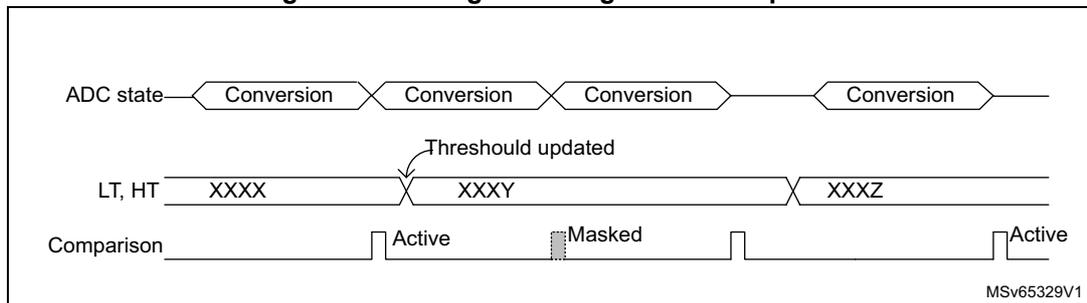
The diagram illustrates the timing of an analog watchdog threshold update. It consists of three horizontal tracks:
- ADC state: Shows four consecutive 'Conversion' blocks.
- LT, HT: Shows the threshold values. It starts at 'XXXX'. During the first conversion, a 'Threshold updated' event occurs, changing the value to 'XXXY'. During the third conversion, it changes to 'XXXZ'.
- Comparison: Shows the status of the watchdog comparison. It is 'Active' at the end of the first conversion. Because the threshold was updated during the first conversion, the comparison at the end of the second conversion is 'Masked'. The comparison becomes 'Active' again at the end of the fourth conversion using the 'XXXZ' threshold.
15.8 Temperature sensor and internal reference voltage
The temperature sensor can be used to measure the junction temperature ( \( T_J \) ) of the device. The temperature sensor is internally connected to the ADC \( V_{IN}[12] \) input channel which is used to convert the sensor's output voltage to a digital value. The sampling time for the temperature sensor analog pin must be greater than the minimum \( T_{S\_temp} \) value specified in the datasheet. When not in use, the sensor can be put in power down mode.
The internal voltage reference (VREFINT) provides a stable (bandgap) voltage output for the ADC and comparators. VREFINT is internally connected to the ADC \( V_{IN}[13] \) input channel. The precise voltage of VREFINT is individually measured for each part by ST during production test and stored in the system memory area.
Figure 53 shows the block diagram of connections between the temperature sensor, the internal voltage reference and the ADC.
The TSEN bit must be set to enable the conversion of ADC \( V_{IN}[12] \) (temperature sensor) and the VREFEN bit must be set to enable the conversion of ADC \( V_{IN}[13] \) (VREFINT).
The temperature sensor output voltage changes linearly with temperature. The offset of this line varies from chip to chip due to process variation (up to 45 °C from one chip to another).
The uncalibrated internal temperature sensor is more suited for applications that detect temperature variations instead of absolute temperatures. To improve the accuracy of the temperature sensor measurement, calibration values are stored in system memory for each device by ST during production.
During the manufacturing process, the calibration data of the temperature sensor and the internal voltage reference are stored in the system memory area. The user application can
then read them and use them to improve the accuracy of the temperature sensor or the internal reference. Refer to the datasheet for additional information.
Note: Before entering any Stop mode, the temperature sensor and the internal reference voltage must be disabled by clearing TSEN and VREFEN, respectively.
Main features
- • Linearity: \( \pm 2\text{ }^{\circ}\text{C} \) max, precision depending on calibration
Figure 53. Temperature sensor and V REFINT channel block diagram
![Figure 53. Temperature sensor and VREFINT channel block diagram. The diagram shows two input blocks on the left: 'Temperature sensor' and 'Internal power block'. The 'Temperature sensor' is connected to an operational amplifier (op-amp) whose non-inverting input (+) is connected to the sensor. The op-amp's output is labeled V_TS and is connected to the ADC's V_IN[12] input. The op-amp is controlled by a 'TSEN control bit'. The 'Internal power block' is connected to another op-amp whose non-inverting input (+) is connected to the power block. The op-amp's output is labeled V_REFINT and is connected to the ADC's V_IN[13] input. This op-amp is controlled by a 'VREFEN control bit'. Both op-amps have their inverting inputs (-) connected to their respective outputs. The ADC block receives both V_TS and V_REFINT signals. The ADC outputs 'converted data' to an 'Address/data bus'. A small identifier 'MSV45366V2' is in the bottom right corner of the diagram.](/RM0478-STM32WB10CC/8ad13567558930046cf99f74f4dec41f_img.jpg)
Reading the temperature
- 1. Select the ADC V IN [12] input channel.
- 2. Select an appropriate sampling time specified in the device datasheet (T S_temp ).
- 3. Set the TSEN bit in the ADC_CCR register to wake up the temperature sensor from power down mode and wait for its stabilization time (t START ).
- 4. Start the ADC conversion by setting the ADSTART bit in the ADC_CR register (or by external trigger).
- 5. Read the resulting V TS data in the ADC_DR register.
- 6. Calculate the temperature using the following formula
Where:
- • TS_CAL2 is the temperature sensor calibration value acquired at TS_CAL2_TEMP (refer to the datasheet for TS_CAL2 value)
- • TS_CAL1 is the temperature sensor calibration value acquired at TS_CAL1_TEMP (refer to the datasheet for TS_CAL1 value)
- • TS_DATA is the actual temperature sensor output value converted by ADC
Refer to the specific device datasheet for more information about TS_CAL1 and TS_CAL2 calibration points.
Note: The sensor has a startup time after waking from power down mode before it can output \( V_{TS} \) at the correct level. The ADC also has a startup time after power-on, so to minimize the delay, the ADEN and TSEN bits should be set at the same time.
Calculating the actual \( V_{DDA} \) voltage using the internal reference voltage
The \( V_{DDA} \) power supply voltage applied to the device may be subject to variation or not precisely known. The embedded internal voltage reference ( \( V_{REFINT} \) ) and its calibration data, acquired by the ADC during the manufacturing process at \( V_{DDA\_Charac} \) , can be used to evaluate the actual \( V_{DDA} \) voltage level.
The following formula gives the actual \( V_{DDA} \) voltage supplying the device:
Where:
- • \( V_{DDA\_Charac} \) is the value of \( V_{DDA} \) voltage characterized at \( V_{REFINT} \) during the manufacturing process. It is specified in the device datasheet.
- • VREFINT_CAL is the VREFINT calibration value
- • VREFINT_DATA is the actual VREFINT output value converted by ADC
Converting a supply-relative ADC measurement to an absolute voltage value
The ADC is designed to deliver a digital value corresponding to the ratio between the analog power supply and the voltage applied on the converted channel. For most application use cases, it is necessary to convert this ratio into a voltage independent of \( V_{DDA} \) . For applications where \( V_{DDA} \) is known and ADC converted values are right-aligned you can use the following formula to get this absolute value:
For applications where \( V_{DDA} \) value is not known, you must use the internal voltage reference and \( V_{DDA} \) can be replaced by the expression provided in Calculating the actual \( V_{DDA} \) voltage using the internal reference voltage , resulting in the following formula:
Where:
- • \( V_{DDA\_Charac} \) is the value of \( V_{DDA} \) voltage characterized at \( V_{REFINT} \) during the manufacturing process. It is specified in the device datasheet.
- • \( VREFINT\_CAL \) is the \( VREFINT \) calibration value
- • \( ADC\_DATA_x \) is the value measured by the ADC on channelx (right-aligned)
- • \( VREFINT\_DATA \) is the actual \( VREFINT \) output value converted by the ADC
- • \( NUM\_CODES \) is the number of ADC output codes. For example with 12-bit resolution, it is \( 2^{12} = 4096 \) or with 8-bit resolution, \( 2^8 = 256 \) .
Note: If ADC measurements are done using an output format other than 12 bit right-aligned, all the parameters must first be converted to a compatible format before the calculation is done.
15.9 Battery voltage monitoring
The VBATEN bit in the ADC_CCR register allows the application to measure the backup battery voltage on the VBAT pin. As the \( V_{BAT} \) voltage can be higher than \( V_{DDA} \) , to ensure the correct operation of the ADC, the VBAT pin is internally connected to a bridge divider. This bridge is automatically enabled when VBATEN is set, to connect \( V_{BAT} \) to the ADC \( V_{IN}[14] \) input channel. As a consequence, the converted digital value is \( V_{BAT}/3 \) . To prevent any unwanted consumption on the battery, it is recommended to enable the bridge divider only when needed for ADC conversion.
Figure 54. \( V_{BAT} \) channel block diagram
![Figure 54. VBAT channel block diagram. The diagram shows a switch controlled by the VBATEN control bit, connecting the VBAT pin to a bridge divider. The bridge divider consists of two resistors in series, with the midpoint connected to the non-inverting input (+) of an operational amplifier. The output of the operational amplifier is connected to the ADC VIN[14] input. The ADC is connected to an Address/data bus. The VBAT pin is also connected to the inverting input (-) of the operational amplifier. The diagram is labeled MSv69533V1.](/RM0478-STM32WB10CC/1b419032955a6b5b7a96c0be1aa005fa_img.jpg)
The diagram illustrates the internal circuitry for battery voltage monitoring. A switch, controlled by the VBATEN control bit, connects the external VBAT pin to a bridge divider. The bridge divider is composed of two resistors in series. The midpoint between these resistors is connected to the non-inverting input (+) of an operational amplifier. The output of this operational amplifier is connected to the ADC's VIN[14] input. The inverting input (-) of the operational amplifier is connected to the VBAT pin. The ADC is shown as a block connected to an Address/data bus. The diagram is labeled MSv69533V1 in the bottom right corner.
15.10 ADC interrupts
An interrupt can be generated by any of the following events:
- • End Of Calibration (EOCAL flag)
- • ADC power-up, when the ADC is ready (ADRDY flag)
- • End of any conversion (EOC flag)
- • End of a sequence of conversions (EOS flag)
- • When an analog watchdog detection occurs (AWD flag)
- • When the Channel configuration is ready (CCRDY flag)
- • When the end of sampling phase occurs (EOSMP flag)
- • when a data overrun occurs (OVR flag)
Separate interrupt enable bits are available for flexibility.
Table 70. ADC interrupts
| Interrupt event | Event flag | Enable control bit |
|---|---|---|
| End Of Calibration | EOCAL | EOCALIE |
| ADC ready | ADRDY | ADRDYIE |
| End of conversion | EOC | EOCIE |
| End of sequence of conversions | EOS | EOSIE |
| Analog watchdog status bit is set | AWD | AWDIE |
| Channel Configuration Ready | CCRDY | CCRDYIE |
| End of sampling phase | EOSMP | EOSMPIE |
| Overrun | OVR | OVRIE |
15.11 ADC registers
Refer to Section 1.2 for a list of abbreviations used in register descriptions.
15.11.1 ADC interrupt and status register (ADC_ISR)
Address offset: 0x00
Reset value: 0x0000 0000
| 31 | 30 | 29 | 28 | 27 | 26 | 25 | 24 | 23 | 22 | 21 | 20 | 19 | 18 | 17 | 16 |
|---|---|---|---|---|---|---|---|---|---|---|---|---|---|---|---|
| Res. | Res. | Res. | Res. | Res. | Res. | Res. | Res. | Res. | Res. | Res. | Res. | Res. | Res. | Res. | Res. |
| 15 | 14 | 13 | 12 | 11 | 10 | 9 | 8 | 7 | 6 | 5 | 4 | 3 | 2 | 1 | 0 |
| Res. | Res. | CCRDY | Res. | EOCAL | Res. | Res. | Res. | AWD | Res. | Res. | OVR | EOS | EOC | EOSMP | ADRDY |
| rc_w1 | rc_w1 | rc_w1 | rc_w1 | rc_w1 | rc_w1 | rc_w1 | rc_w1 |
Bits 31:14 Reserved, must be kept at reset value.
Bit 13 CCRDY : Channel Configuration Ready flag
This flag bit is set by hardware when the channel configuration is applied after programming to ADC_CHSELR register or changing CHSELRMOD or SCANDIR. It is cleared by software by programming it to 0.
0: Channel configuration update not applied.
1: Channel configuration update is applied.
Note: When the software configures the channels (by programming ADC_CHSELR or changing CHSELRMOD or SCANDIR), it must wait until the CCRDY flag rises before configuring again or starting conversions, otherwise the new configuration (or the START bit) is ignored. Once the flag is asserted, if the software needs to configure again the channels, it must clear the CCRDY flag before proceeding with a new configuration.
Bit 12 Reserved, must be kept at reset value.
Bit 11 EOCAL : End Of Calibration flag
This bit is set by hardware when calibration is complete. It is cleared by software writing 1 to it.
0: Calibration is not complete
1: Calibration is complete
Bit 10 Reserved, must be kept at reset value.
Bits 9:8 Reserved, must be kept at reset value.
Bit 7 AWD : Analog watchdog flag
This bit is set by hardware when the converted voltage crosses the values programmed in ADC_TR register. It is cleared by software by programming it to 1.
0: No analog watchdog event occurred (or the flag event was already acknowledged and cleared by software)
1: Analog watchdog event occurred
Bits 6:5 Reserved, must be kept at reset value.
Bit 4 OVR : ADC overrun
This bit is set by hardware when an overrun occurs, meaning that a new conversion has complete while the EOC flag was already set. It is cleared by software writing 1 to it.
0: No overrun occurred (or the flag event was already acknowledged and cleared by software)
1: Overrun has occurred
Bit 3 EOS : End of sequence flag
This bit is set by hardware at the end of the conversion of a sequence of channels selected by the CHSEL bits. It is cleared by software writing 1 to it.
0: Conversion sequence not complete (or the flag event was already acknowledged and cleared by software)
1: Conversion sequence complete
Bit 2 EOC : End of conversion flag
This bit is set by hardware at the end of each conversion of a channel when a new data result is available in the ADC_DR register. It is cleared by software writing 1 to it or by reading the ADC_DR register.
0: Channel conversion not complete (or the flag event was already acknowledged and cleared by software)
1: Channel conversion complete
Bit 1 EOSMP : End of sampling flag
This bit is set by hardware during the conversion, at the end of the sampling phase. It is cleared by software by programming it to '1'.
0: Not at the end of the sampling phase (or the flag event was already acknowledged and cleared by software)
1: End of sampling phase reached
Bit 0 ADRDY : ADC ready
This bit is set by hardware after the ADC has been enabled (ADEN = 1) and when the ADC reaches a state where it is ready to accept conversion requests.
It is cleared by software writing 1 to it.
0: ADC not yet ready to start conversion (or the flag event was already acknowledged and cleared by software)
1: ADC is ready to start conversion
15.11.2 ADC interrupt enable register (ADC_IER)
Address offset: 0x04
Reset value: 0x0000 0000
| 31 | 30 | 29 | 28 | 27 | 26 | 25 | 24 | 23 | 22 | 21 | 20 | 19 | 18 | 17 | 16 |
|---|---|---|---|---|---|---|---|---|---|---|---|---|---|---|---|
| Res. | Res. | Res. | Res. | Res. | Res. | Res. | Res. | Res. | Res. | Res. | Res. | Res. | Res. | Res. | Res. |
| 15 | 14 | 13 | 12 | 11 | 10 | 9 | 8 | 7 | 6 | 5 | 4 | 3 | 2 | 1 | 0 |
| Res. | Res. | CCRDYIE | Res. | EOCALIE | Res. | Res. | Res. | AWDIE | Res. | Res. | OVRIE | EOSIE | EOCIE | EOSMPIE | ADRDYIE |
| rw | rw | rw | rw | rw | rw | rw | rw |
Bits 31:14 Reserved, must be kept at reset value.
Bit 13 CCRDYIE : Channel Configuration Ready Interrupt enable
This bit is set and cleared by software to enable/disable the channel configuration ready interrupt.
0: Channel configuration ready interrupt disabled
1: Channel configuration ready interrupt enabled
Note: The software is allowed to write this bit only when ADSTART bit is cleared (this ensures that no conversion is ongoing).
Bit 12 Reserved, must be kept at reset value.
Bit 11 EOCALIE : End of calibration interrupt enable
This bit is set and cleared by software to enable/disable the end of calibration interrupt.
0: End of calibration interrupt disabled
1: End of calibration interrupt enabled
Note: The software is allowed to write this bit only when ADSTART bit is cleared (this ensures that no conversion is ongoing).
Bit 10 Reserved, must be kept at reset value.
Bits 9:8 Reserved, must be kept at reset value.
Bit 7 AWDIE : Analog watchdog interrupt enable
This bit is set and cleared by software to enable/disable the analog watchdog interrupt.
0: Analog watchdog interrupt disabled
1: Analog watchdog interrupt enabled
Note: The Software is allowed to write this bit only when ADSTART bit is cleared (this ensures that no conversion is ongoing).
Bits 6:5 Reserved, must be kept at reset value.
Bit 4 OVRIE : Overrun interrupt enable
This bit is set and cleared by software to enable/disable the overrun interrupt.
0: Overrun interrupt disabled
1: Overrun interrupt enabled. An interrupt is generated when the OVR bit is set.
Note: The software is allowed to write this bit only when ADSTART bit is cleared (this ensures that no conversion is ongoing).
Bit 3 EOSIE : End of conversion sequence interrupt enable
This bit is set and cleared by software to enable/disable the end of sequence of conversions interrupt.
0: EOS interrupt disabled
1: EOS interrupt enabled. An interrupt is generated when the EOS bit is set.
Note: The software is allowed to write this bit only when ADSTART bit is cleared (this ensures that no conversion is ongoing).
Bit 2 EOCIE : End of conversion interrupt enable
This bit is set and cleared by software to enable/disable the end of conversion interrupt.
0: EOC interrupt disabled
1: EOC interrupt enabled. An interrupt is generated when the EOC bit is set.
Note: The software is allowed to write this bit only when ADSTART bit is cleared (this ensures that no conversion is ongoing).
Bit 1 EOSMPIE : End of sampling flag interrupt enable
This bit is set and cleared by software to enable/disable the end of the sampling phase interrupt.
0: EOSMP interrupt disabled.
1: EOSMP interrupt enabled. An interrupt is generated when the EOSMP bit is set.
Note: The software is allowed to write this bit only when ADSTART bit is cleared (this ensures that no conversion is ongoing).
Bit 0 ADRDYIE : ADC ready interrupt enable
This bit is set and cleared by software to enable/disable the ADC Ready interrupt.
0: ADRDY interrupt disabled.
1: ADRDY interrupt enabled. An interrupt is generated when the ADRDY bit is set.
Note: The software is allowed to write this bit only when ADSTART bit is cleared (this ensures that no conversion is ongoing).
15.11.3 ADC control register (ADC_CR)

The logo for STMicroelectronics, featuring a stylized 'ST' in a square.
Address offset: 0x08
Reset value: 0x0000 0000
| 31 | 30 | 29 | 28 | 27 | 26 | 25 | 24 | 23 | 22 | 21 | 20 | 19 | 18 | 17 | 16 |
|---|---|---|---|---|---|---|---|---|---|---|---|---|---|---|---|
| ADCAL | Res. | Res. | ADVREGEN | Res. | Res. | Res. | Res. | Res. | Res. | Res. | Res. | Res. | Res. | Res. | Res. |
| rs | rw | ||||||||||||||
| 15 | 14 | 13 | 12 | 11 | 10 | 9 | 8 | 7 | 6 | 5 | 4 | 3 | 2 | 1 | 0 |
| Res. | Res. | Res. | Res. | Res. | Res. | Res. | Res. | Res. | Res. | Res. | ADSTP | Res. | ADSTART | ADDIS | ADEN |
| rs | rs | rs | rs |
Bit 31 ADCAL : ADC calibration
This bit is set by software to start the calibration of the ADC.
It is cleared by hardware after calibration is complete.
0: Calibration complete
1: Write 1 to calibrate the ADC. Read at 1 means that a calibration is in progress.
Note: The software is allowed to set ADCAL only when the ADC is disabled (ADCAL = 0, ADSTART = 0, ADSTP = 0, ADDIS = 0, AUTOFF = 0, and ADEN = 0).
The software is allowed to update the calibration factor by writing ADC_CALFACT only when ADEN = 1 and ADSTART = 0 (ADC enabled and no conversion is ongoing).
Bits 30:29 Reserved, must be kept at reset value.
Bit 28 ADVREGEN : ADC Voltage Regulator Enable
This bit is set by software, to enable the ADC internal voltage regulator. The voltage regulator output is available after \( t_{\text{ADCVREG\_STUP}} \) .
It is cleared by software to disable the voltage regulator. It can be cleared only if ADEN is cleared.
0: ADC voltage regulator disabled
1: ADC voltage regulator enabled
Note: The software is allowed to program this bit field only when the ADC is disabled (ADCAL = 0, ADSTART = 0, ADSTP = 0, ADDIS = 0 and ADEN = 0).
Bits 27:5 Reserved, must be kept at reset value.
Bit 4 ADSTP : ADC stop conversion command
This bit is set by software to stop and discard an ongoing conversion (ADSTP Command).
It is cleared by hardware when the conversion is effectively discarded and the ADC is ready to accept a new start conversion command.
0: No ADC stop conversion command ongoing
1: Write 1 to stop the ADC. Read 1 means that an ADSTP command is in progress.
Note: Setting ADSTP to '1' is only effective when ADSTART = 1 and ADDIS = 0 (ADC is enabled and may be converting and there is no pending request to disable the ADC)
Bit 3 Reserved, must be kept at reset value.
Bit 2 ADSTART: ADC start conversion command
This bit is set by software to start ADC conversion. Depending on the EXTEN [1:0] configuration bits, a conversion either starts immediately (software trigger configuration) or once a hardware trigger event occurs (hardware trigger configuration).
It is cleared by hardware:
- – In single conversion mode (CONT = 0, DISCEN = 0), when software trigger is selected (EXTEN = 00): at the assertion of the end of Conversion Sequence (EOS) flag.
- – In discontinuous conversion mode (CONT = 0, DISCEN = 1), when the software trigger is selected (EXTEN = 00): at the assertion of the end of Conversion (EOC) flag.
- – In all other cases: after the execution of the ADSTP command, at the same time as the ADSTP bit is cleared by hardware.
0: No ADC conversion is ongoing.
1: Write 1 to start the ADC. Read 1 means that the ADC is operating and may be converting.
Note: The software is allowed to set ADSTART only when ADEN = 1 and ADDIS = 0 (ADC is enabled and there is no pending request to disable the ADC).
After writing to ADC_CHSELR register or changing CHSELRMOD or SCANDIRW, it is mandatory to wait until CCRDY flag is asserted before setting ADSTART, otherwise, the value written to ADSTART is ignored.
Bit 1 ADDIS: ADC disable command
This bit is set by software to disable the ADC (ADDIS command) and put it into power-down state (OFF state).
It is cleared by hardware once the ADC is effectively disabled (ADEN is also cleared by hardware at this time).
0: No ADDIS command ongoing
1: Write 1 to disable the ADC. Read 1 means that an ADDIS command is in progress.
Note: Setting ADDIS to '1' is only effective when ADEN = 1 and ADSTART = 0 (which ensures that no conversion is ongoing)
Bit 0 ADEN: ADC enable command
This bit is set by software to enable the ADC. The ADC is effectively ready to operate once the ADRDY flag has been set.
It is cleared by hardware when the ADC is disabled, after the execution of the ADDIS command.
0: ADC is disabled (OFF state)
1: Write 1 to enable the ADC.
Note: The software is allowed to set ADEN only when ADCAL = 0, ADSTP = 0, ADSTART = 0, ADDIS = 0, ADEN = 0, and ADVREGEN = 1.
15.11.4 ADC configuration register 1 (ADC_CFGR1)
Address offset: 0x0C
Reset value: 0x0000 0000
The software is allowed to program ADC_CFGR1 only when ADEN is cleared in ADC_CR.
| 31 | 30 | 29 | 28 | 27 | 26 | 25 | 24 | 23 | 22 | 21 | 20 | 19 | 18 | 17 | 16 |
|---|---|---|---|---|---|---|---|---|---|---|---|---|---|---|---|
| Res. | AWDCH[4:0] | Res. | Res. | AWDEN | AWDSGL | CHSELRMOD | Res. | Res. | Res. | Res. | DISCEN | ||||
| rw | rw | rw | rw | rw | rw | rw | rw | rw | |||||||
| 15 | 14 | 13 | 12 | 11 | 10 | 9 | 8 | 7 | 6 | 5 | 4 | 3 | 2 | 1 | 0 |
| AUTOFF | WAIT | CONT | OVRMOD | EXTEN[1:0] | Res. | EXTSEL[2:0] | ALIGN | RES[1:0] | SCANDIR | DMACFG | DMAEN | ||||
| rw | rw | rw | rw | rw | rw | rw | rw | rw | rw | rw | rw | rw | rw | rw | |
Bit 31 Reserved, must be kept at reset value.
Bits 30:26 AWDCH[4:0] : Analog watchdog channel selection
These bits are set and cleared by software. They select the input channel to be guarded by the analog watchdog.
00000: ADC analog input Channel 0 monitored by AWD
00001: ADC analog input Channel 1 monitored by AWD
.....
10001: ADC analog input Channel 17 monitored by AWD
10010: ADC analog input Channel 18 monitored by AWD
Others: Reserved
Note: The channel selected by the AWDCH[4:0] bits must be also set into the CHSELR register.
Bits 25:24 Reserved, must be kept at reset value.
Bit 23 AWDEN : Analog watchdog enable
This bit is set and cleared by software.
0: Analog watchdog disabled
1: Analog watchdog enabled
Bit 22 AWDSGL : Enable the watchdog on a single channel or on all channels
This bit is set and cleared by software to enable the analog watchdog on the channel identified by the AWDCH[4:0] bits or on all the channels
0: Analog watchdog enabled on all channels
1: Analog watchdog enabled on a single channel
Bit 21 CHSELROMOD : Mode selection of the ADC_CHSELR register
This bit is set and cleared by software to control the ADC_CHSELR feature:
0: Each bit of the ADC_CHSELR register enables an input
1: ADC_CHSELR register is able to sequence up to 8 channels
Note: If CCRDY is not yet asserted after channel configuration (writing ADC_CHSELR register or changing CHSELROMOD or SCANDIR), the value written to this bit is ignored.
Bits 20:17 Reserved, must be kept at reset value.
Bit 16 DISCEN : Discontinuous mode
This bit is set and cleared by software to enable/disable discontinuous mode.
0: Discontinuous mode disabled
1: Discontinuous mode enabled
Note: It is not possible to have both discontinuous mode and continuous mode enabled: it is forbidden to set both bits DISCEN = 1 and CONT = 1.
Bit 15 AUTOFF : Auto-off mode
This bit is set and cleared by software to enable/disable auto-off mode.
0: Auto-off mode disabled
1: Auto-off mode enabled
Bit 14 WAIT : Wait conversion modeThis bit is set and cleared by software to enable/disable wait conversion mode.
0: Wait conversion mode off
1: Wait conversion mode on
Bit 13 CONT : Single / continuous conversion modeThis bit is set and cleared by software. If it is set, conversion takes place continuously until it is cleared.
0: Single conversion mode
1: Continuous conversion mode
Note: It is not possible to have both discontinuous mode and continuous mode enabled: it is forbidden to set both bits DISCEN = 1 and CONT = 1.
Bit 12 OVRMOD : Overrun management modeThis bit is set and cleared by software and configure the way data overruns are managed.
0: ADC_DR register is preserved with the old data when an overrun is detected.
1: ADC_DR register is overwritten with the last conversion result when an overrun is detected.
Bits 11:10 EXTEN[1:0] : External trigger enable and polarity selectionThese bits are set and cleared by software to select the external trigger polarity and enable the trigger.
00: Hardware trigger detection disabled (conversions can be started by software)
01: Hardware trigger detection on the rising edge
10: Hardware trigger detection on the falling edge
11: Hardware trigger detection on both the rising and falling edges
Bit 9 Reserved, must be kept at reset value.
Bits 8:6 EXTSEL[2:0] : External trigger selectionThese bits select the external event used to trigger the start of conversion (refer to Table 64: External triggers for details):
000: TRG0
001: TRG1
010: TRG2
011: TRG3
100: TRG4
101: TRG5
110: TRG6
111: TRG7
Bit 5 ALIGN : Data alignmentThis bit is set and cleared by software to select right or left alignment. Refer to Figure 43: Data alignment and resolution on page 367
0: Right alignment
1: Left alignment
Bits 4:3
RES[1:0]
: Data resolution
These bits are written by software to select the resolution of the conversion.
00: 12 bits
01: 10 bits
10: 8 bits
11: 6 bits
Bit 2
SCANDIR
: Scan sequence direction
This bit is set and cleared by software to select the direction in which the channels is scanned in the sequence. It is effective only if CHSELMOD bit is cleared.
0: Upward scan (from CHSEL0 to CHSEL18)
1: Backward scan (from CHSEL18 to CHSEL0)
Note: If CCRDY is not yet asserted after channel configuration (writing ADC_CHSELR register or changing CHSELROMOD or SCANDIR), the value written to this bit is ignored.
Bit 1
DMACFG
: Direct memory access configuration
This bit is set and cleared by software to select between two DMA modes of operation and is effective only when DMAEN = 1.
0: DMA one shot mode selected
1: DMA circular mode selected
For more details, refer to
Section 15.5.5: Managing converted data using the DMA on page 369
.
Bit 0
DMAEN
: Direct memory access enable
This bit is set and cleared by software to enable the generation of DMA requests. This allows the DMA controller to be used to manage automatically the converted data. For more details, refer to
Section 15.5.5: Managing converted data using the DMA on page 369
.
0: DMA disabled
1: DMA enabled
15.11.5 ADC configuration register 2 (ADC_CFGR2)
Address offset: 0x10
Reset value: 0x0000 0000
The software is allowed to program ADC_CFGR2 only when ADEN is cleared in ADC_CR.
| 31 | 30 | 29 | 28 | 27 | 26 | 25 | 24 | 23 | 22 | 21 | 20 | 19 | 18 | 17 | 16 |
|---|---|---|---|---|---|---|---|---|---|---|---|---|---|---|---|
| CKMODE[1:0] | LFTRIG | Res. | Res. | Res. | Res. | Res. | Res. | Res. | Res. | Res. | Res. | Res. | Res. | Res. | |
| rw | rw | rw | |||||||||||||
| 15 | 14 | 13 | 12 | 11 | 10 | 9 | 8 | 7 | 6 | 5 | 4 | 3 | 2 | 1 | 0 |
| Res. | Res. | Res. | Res. | Res. | Res. | Res. | Res. | Res. | Res. | Res. | Res. | Res. | Res. | Res. | Res. |
These bits are set and cleared by software to define how the analog ADC is clocked:
00: ADCCLK (Asynchronous clock mode), generated at product level (refer to RCC section)
01: PCLK/2 (Synchronous clock mode)
10: PCLK/4 (Synchronous clock mode)
11: PCLK (Synchronous clock mode). This configuration must be enabled only if PCLK has a 50% duty clock cycle (APB prescaler configured inside the RCC must be bypassed and the system clock must be 50% duty cycle)
In all synchronous clock modes, there is no jitter in the delay from a timer trigger to the start of a conversion.
Note: The software is allowed to write these bits only when the ADC is disabled (ADCAL = 0, ADSTART = 0, ADSTP = 0, ADDIS = 0 and ADEN = 0).
Bit 29 LFTRIG : Low frequency trigger mode enableThis bit is set and cleared by software.
0: Low Frequency Trigger Mode disabled
1: Low Frequency Trigger Mode enabled
Note: The software is allowed to write this bit only when ADEN bit is cleared.
Bits 28:10 Reserved, must be kept at reset value.
Bits 9:0 Reserved, must be kept at reset value.
15.11.6 ADC sampling time register (ADC_SMPR)
Address offset: 0x14
Reset value: 0x0000 0000
| 31 | 30 | 29 | 28 | 27 | 26 | 25 | 24 | 23 | 22 | 21 | 20 | 19 | 18 | 17 | 16 |
|---|---|---|---|---|---|---|---|---|---|---|---|---|---|---|---|
| Res. | Res. | Res. | Res. | Res. | SMPSE L18 | SMPSE L17 | SMPSE L16 | SMPSE L15 | SMPSE L14 | SMPSE L13 | SMPSE L12 | SMPSE L11 | SMPSE L10 | SMPSE L9 | SMPSE L8 |
| rw | rw | rw | rw | rw | rw | rw | rw | rw | rw | rw | |||||
| 15 | 14 | 13 | 12 | 11 | 10 | 9 | 8 | 7 | 6 | 5 | 4 | 3 | 2 | 1 | 0 |
| SMPSE L7 | SMPSE L6 | SMPSE L5 | SMPSE L4 | SMPSE L3 | SMPSE L2 | SMPSE L1 | SMPSE L0 | Res. | SMP2[2:0] | Res. | SMP1[2:0] | ||||
| rw | rw | rw | rw | rw | rw | rw | rw | rw | rw | rw | rw | rw | rw | ||
Bits 31:27 Reserved, must be kept at reset value.
Bits 26:8 SMPSELx : Channel-x sampling time selection (x = 18 to 0)These bits are written by software to define which sampling time is used.
0: Sampling time of CHANNELx use the setting of SMP1[2:0] register.
1: Sampling time of CHANNELx use the setting of SMP2[2:0] register.
Note: The software is allowed to write this bit only when ADSTART = 0 (which ensures that no conversion is ongoing).
Bit 7 Reserved, must be kept at reset value.
Bits 6:4 SMP2[2:0] : Sampling time selection 2
These bits are written by software to select the sampling time that applies to all channels.
- 000: 1.5 ADC clock cycles
- 001: 3.5 ADC clock cycles
- 010: 7.5 ADC clock cycles
- 011: 12.5 ADC clock cycles
- 100: 19.5 ADC clock cycles
- 101: 39.5 ADC clock cycles
- 110: 79.5 ADC clock cycles
- 111: 160.5 ADC clock cycles
Note: The software is allowed to write this bit only when ADSTART = 0 (which ensures that no conversion is ongoing).
Bit 3 Reserved, must be kept at reset value.
Bits 2:0 SMP1[2:0] : Sampling time selection 1
These bits are written by software to select the sampling time that applies to all channels.
- 000: 1.5 ADC clock cycles
- 001: 3.5 ADC clock cycles
- 010: 7.5 ADC clock cycles
- 011: 12.5 ADC clock cycles
- 100: 19.5 ADC clock cycles
- 101: 39.5 ADC clock cycles
- 110: 79.5 ADC clock cycles
- 111: 160.5 ADC clock cycles
Note: The software is allowed to write this bit only when ADSTART = 0 (which ensures that no conversion is ongoing).
15.11.7 ADC watchdog threshold register (ADC_TR)
Address offset: 0x20
Reset value: 0x0FFF 0000
| 31 | 30 | 29 | 28 | 27 | 26 | 25 | 24 | 23 | 22 | 21 | 20 | 19 | 18 | 17 | 16 |
|---|---|---|---|---|---|---|---|---|---|---|---|---|---|---|---|
| Res. | Res. | Res. | Res. | HT[11:0] | |||||||||||
| rw | rw | rw | rw | rw | rw | rw | rw | rw | rw | rw | rw | ||||
| 15 | 14 | 13 | 12 | 11 | 10 | 9 | 8 | 7 | 6 | 5 | 4 | 3 | 2 | 1 | 0 |
| Res. | Res. | Res. | Res. | LT[11:0] | |||||||||||
| rw | rw | rw | rw | rw | rw | rw | rw | rw | rw | rw | rw | ||||
Bits 31:28 Reserved, must be kept at reset value.
Bits 27:16 HT[11:0] : Analog watchdog higher threshold
These bits are written by software to define the higher threshold for the analog watchdog. Refer to Section 15.7: Analog window watchdog on page 373
Note: The software is allowed to write this bit only when ADSTART = 0 (which ensures that no conversion is ongoing).
Bits 15:12 Reserved, must be kept at reset value.
Bits 11:0 LT[11:0] : Analog watchdog lower threshold
These bits are written by software to define the lower threshold for the analog watchdog.
Refer to Section 15.7: Analog window watchdog on page 373 .
Note: The software is allowed to write this bit only when ADSTART = 0 (which ensures that no conversion is ongoing).
15.11.8 ADC channel selection register (ADC_CHSELR)
Address offset: 0x28
Reset value: 0x0000 0000
The same register can be used in two different modes:
- – Each ADC_CHSELR bit enables an input (CHSELRMOD = 0 in ADC_CFGR1). Refer to the current section.
- – ADC_CHSELR is able to sequence up to 8 channels (CHSELRMOD = 1 in ADC_CFGR1). Refer to next section.
CHSELRMOD = 0 in ADC_CFGR1
| 31 | 30 | 29 | 28 | 27 | 26 | 25 | 24 | 23 | 22 | 21 | 20 | 19 | 18 | 17 | 16 |
|---|---|---|---|---|---|---|---|---|---|---|---|---|---|---|---|
| Res. | Res. | Res. | Res. | Res. | Res. | Res. | Res. | Res. | Res. | Res. | Res. | Res. | CHSEL 18 | CHSEL 17 | CHSEL 16 |
| rw | rw | rw | |||||||||||||
| 15 | 14 | 13 | 12 | 11 | 10 | 9 | 8 | 7 | 6 | 5 | 4 | 3 | 2 | 1 | 0 |
| CHSEL 15 | CHSEL 14 | CHSEL 13 | CHSEL 12 | CHSEL 11 | CHSEL 10 | CHSEL 9 | CHSEL 8 | CHSEL 7 | CHSEL 6 | CHSEL 5 | CHSEL 4 | CHSEL 3 | CHSEL 2 | CHSEL 1 | CHSEL 0 |
| rw | rw | rw | rw | rw | rw | rw | rw | rw | rw | rw | rw | rw | rw | rw | rw |
Bits 31:19 Reserved, must be kept at reset value.
Bits 18:0 CHSEL[18:0] : Channel-x selection
These bits are written by software and define which channels are part of the sequence of channels to be converted. Refer to Figure 35: ADC connectivity for ADC inputs connected to external channels and internal sources.
0: Input Channel-x is not selected for conversion
1: Input Channel-x is selected for conversion
Note: The software is allowed to write this bit only when ADSTART = 0 (which ensures that no conversion is ongoing).
If CCRDY is not yet asserted after channel configuration (writing ADC_CHSELR register or changing CHSELRMOD or SCANDIR), the value written to this bit is ignored.
15.11.9 ADC channel selection register [alternate] (ADC_CHSELR)
Address offset: 0x28
Reset value: 0x0000 0000
The same register can be used in two different modes:
- – Each ADC_CHSELR bit enables an input (CHSELRMOD = 0 in ADC_CFGR1). Refer to the current previous section.
- – ADC_CHSELR is able to sequence up to 8 channels (CHSELRMOD = 1 in ADC_CFGR1). Refer to this section.
| 31 | 30 | 29 | 28 | 27 | 26 | 25 | 24 | 23 | 22 | 21 | 20 | 19 | 18 | 17 | 16 |
|---|---|---|---|---|---|---|---|---|---|---|---|---|---|---|---|
| SQ8[3:0] | SQ7[3:0] | SQ6[3:0] | SQ5[3:0] | ||||||||||||
| rw | rw | rw | rw | rw | rw | rw | rw | rw | rw | rw | rw | rw | rw | rw | rw |
| 15 | 14 | 13 | 12 | 11 | 10 | 9 | 8 | 7 | 6 | 5 | 4 | 3 | 2 | 1 | 0 |
| SQ4[3:0] | SQ3[3:0] | SQ2[3:0] | SQ1[3:0] | ||||||||||||
| rw | rw | rw | rw | rw | rw | rw | rw | rw | rw | rw | rw | rw | rw | rw | rw |
These bits are programmed by software with the channel number (0...14) assigned to the 8th conversion of the sequence. 0b1111 indicates the end of the sequence.
When 0b1111 (end of sequence) is programmed to the lower sequence channels, these bits are ignored.
0000: CH0
0001: CH1
...
1100: CH12
1101: CH13
1110: CH14
1111: No channel selected (End of sequence)
Note: The software is allowed to write this bit only when ADSTART = 0 (which ensures that no conversion is ongoing).
Bits 27:24 SQ7[3:0]: 7th conversion of the sequenceThese bits are programmed by software with the channel number (0...14) assigned to the 8th conversion of the sequence. 0b1111 indicates end of the sequence.
When 0b1111 (end of sequence) is programmed to the lower sequence channels, these bits are ignored.
Refer to SQ8[3:0] for a definition of channel selection.
Note: The software is allowed to write this bit only when ADSTART = 0 (which ensures that no conversion is ongoing).
Bits 23:20 SQ6[3:0]: 6th conversion of the sequenceThese bits are programmed by software with the channel number (0...14) assigned to the 8th conversion of the sequence. 0b1111 indicates end of the sequence.
When 0b1111 (end of sequence) is programmed to the lower sequence channels, these bits are ignored.
Refer to SQ8[3:0] for a definition of channel selection.
Note: The software is allowed to write this bit only when ADSTART = 0 (which ensures that no conversion is ongoing).
Bits 19:16 SQ5[3:0]: 5th conversion of the sequenceThese bits are programmed by software with the channel number (0...14) assigned to the 8th conversion of the sequence. 0b1111 indicates end of the sequence.
When 0b1111 (end of sequence) is programmed to the lower sequence channels, these bits are ignored.
Refer to SQ8[3:0] for a definition of channel selection.
Note: The software is allowed to write this bit only when ADSTART = 0 (which ensures that no conversion is ongoing).
Bits 15:12 SQ4[3:0] : 4th conversion of the sequenceThese bits are programmed by software with the channel number (0...14) assigned to the 8th conversion of the sequence. 0b1111 indicates end of the sequence.
When 0b1111 (end of sequence) is programmed to the lower sequence channels, these bits are ignored.
Refer to SQ8[3:0] for a definition of channel selection.
Note: The software is allowed to write this bit only when ADSTART = 0 (which ensures that no conversion is ongoing).
Bits 11:8 SQ3[3:0] : 3rd conversion of the sequenceThese bits are programmed by software with the channel number (0...14) assigned to the 8th conversion of the sequence. 0b1111 indicates end of the sequence.
When 0b1111 (end of sequence) is programmed to the lower sequence channels, these bits are ignored.
Refer to SQ8[3:0] for a definition of channel selection.
Note: The software is allowed to write this bit only when ADSTART = 0 (which ensures that no conversion is ongoing).
Bits 7:4 SQ2[3:0] : 2nd conversion of the sequenceThese bits are programmed by software with the channel number (0...14) assigned to the 8th conversion of the sequence. 0b1111 indicates end of the sequence.
When 0b1111 (end of sequence) is programmed to the lower sequence channels, these bits are ignored.
Refer to SQ8[3:0] for a definition of channel selection.
Note: The software is allowed to write this bit only when ADSTART = 0 (which ensures that no conversion is ongoing).
Bits 3:0 SQ1[3:0] : 1st conversion of the sequenceThese bits are programmed by software with the channel number (0...14) assigned to the 8th conversion of the sequence. 0b1111 indicates end of the sequence.
When 0b1111 (end of sequence) is programmed to the lower sequence channels, these bits are ignored.
Refer to SQ8[3:0] for a definition of channel selection.
Note: The software is allowed to write this bit only when ADSTART = 0 (which ensures that no conversion is ongoing).
15.11.10 ADC data register (ADC_DR)
Address offset: 0x40
Reset value: 0x0000 0000
| 31 | 30 | 29 | 28 | 27 | 26 | 25 | 24 | 23 | 22 | 21 | 20 | 19 | 18 | 17 | 16 |
|---|---|---|---|---|---|---|---|---|---|---|---|---|---|---|---|
| Res. | Res. | Res. | Res. | Res. | Res. | Res. | Res. | Res. | Res. | Res. | Res. | Res. | Res. | Res. | Res. |
| 15 | 14 | 13 | 12 | 11 | 10 | 9 | 8 | 7 | 6 | 5 | 4 | 3 | 2 | 1 | 0 |
| DATA[15:0] | |||||||||||||||
| r | r | r | r | r | r | r | r | r | r | r | r | r | r | r | r |
Bits 31:16 Reserved, must be kept at reset value.
Bits 15:0 DATA[15:0] : Converted data
These bits are read-only. They contain the conversion result from the last converted channel. The data are left- or right-aligned as shown in Figure 43 .
Just after a calibration is complete, DATA[6:0] contains the calibration factor.
15.11.11 ADC calibration factor (ADC_CALFACT)
Address offset: 0xB4
Reset value: 0x0000 0000
| 31 | 30 | 29 | 28 | 27 | 26 | 25 | 24 | 23 | 22 | 21 | 20 | 19 | 18 | 17 | 16 |
|---|---|---|---|---|---|---|---|---|---|---|---|---|---|---|---|
| Res. | Res. | Res. | Res. | Res. | Res. | Res. | Res. | Res. | Res. | Res. | Res. | Res. | Res. | Res. | Res. |
| 15 | 14 | 13 | 12 | 11 | 10 | 9 | 8 | 7 | 6 | 5 | 4 | 3 | 2 | 1 | 0 |
| Res. | Res. | Res. | Res. | Res. | Res. | Res. | Res. | Res. | CALFACT[6:0] | ||||||
| rw | rw | rw | rw | rw | rw | rw | |||||||||
Bits 31:7 Reserved, must be kept at reset value.
Bits 6:0 CALFACT[6:0] : Calibration factor
These bits are written by hardware or by software.
- – Once a calibration is complete, they are updated by hardware with the calibration factors.
- – Software can write these bits with a new calibration factor. If the new calibration factor is different from the current one stored into the analog ADC, it is then applied once a new conversion is launched.
- – Just after a calibration is complete, DATA[6:0] contains the calibration factor.
Note: Software can write these bits only when ADEN=1 (ADC is enabled and no calibration is ongoing and no conversion is ongoing).
15.11.12 ADC common configuration register (ADC_CCR)
Address offset: 0x308
Reset value: 0x0000 0000
| 31 | 30 | 29 | 28 | 27 | 26 | 25 | 24 | 23 | 22 | 21 | 20 | 19 | 18 | 17 | 16 |
|---|---|---|---|---|---|---|---|---|---|---|---|---|---|---|---|
| Res. | Res. | Res. | Res. | Res. | Res. | Res. | VBATEN | TSEN | VREFEN | PRESC[3:0] | Res. | Res. | |||
| rw | rw | rw | rw | rw | rw | rw | |||||||||
| 15 | 14 | 13 | 12 | 11 | 10 | 9 | 8 | 7 | 6 | 5 | 4 | 3 | 2 | 1 | 0 |
| Res. | Res. | Res. | Res. | Res. | Res. | Res. | Res. | Res. | Res. | Res. | Res. | Res. | Res. | Res. | Res. |
Bits 31:25 Reserved, must be kept at reset value.
Bit 24 VBATEN : V BAT enableThis bit is set and cleared by software to enable/disable the V BAT channel.
0: V BAT channel disabled
1: V BAT channel enabled
Note: The software is allowed to write this bit only when ADSTART = 0 (which ensures that no conversion is ongoing)
Bit 23 TSEN : Temperature sensor buffer enableThis bit is set and cleared by software to enable/disable the temperature sensor buffer.
0: Temperature sensor buffer disabled
1: Temperature sensor buffer enabled
Note: Software is allowed to write this bit only when ADSTART = 0 (which ensures that no conversion is ongoing).
This bit must be cleared before entering low-power modes to avoid unwanted power consumption.
Bit 22 VREFEN : V REFINT buffer enableThis bit is set and cleared by software to enable/disable the V REFINT buffer.
0: V REFINT buffer disabled
1: V REFINT buffer enabled
Note: Software is allowed to write this bit only when ADSTART = 0 (which ensures that no conversion is ongoing).
This bit must be cleared before entering low-power modes to avoid unwanted power consumption.
Bits 21:18 PRESC[3:0] : ADC prescalerSet and cleared by software to select the frequency of the clock to the ADC.
0000: input ADC clock not divided
0001: input ADC clock divided by 2
0010: input ADC clock divided by 4
0011: input ADC clock divided by 6
0100: input ADC clock divided by 8
0101: input ADC clock divided by 10
0110: input ADC clock divided by 12
0111: input ADC clock divided by 16
1000: input ADC clock divided by 32
1001: input ADC clock divided by 64
1010: input ADC clock divided by 128
1011: input ADC clock divided by 256
Other: Reserved
Note: Software is allowed to write these bits only when the ADC is disabled (ADCAL = 0, ADSTART = 0, ADSTP = 0, ADDIS = 0 and ADEN = 0).
Bits 17:0 Reserved, must be kept at reset value.
15.12 ADC register map
The following table summarizes the ADC registers.
Table 71. ADC register map and reset values
| Offset | Register name Reset value | 31 | 30 | 29 | 28 | 27 | 26 | 25 | 24 | 23 | 22 | 21 | 20 | 19 | 18 | 17 | 16 | 15 | 14 | 13 | 12 | 11 | 10 | 9 | 8 | 7 | 6 | 5 | 4 | 3 | 2 | 1 | 0 | |
|---|---|---|---|---|---|---|---|---|---|---|---|---|---|---|---|---|---|---|---|---|---|---|---|---|---|---|---|---|---|---|---|---|---|---|
| 0x00 | ADC_ISR | Res. | Res. | Res. | Res. | Res. | Res. | Res. | Res. | Res. | Res. | Res. | Res. | Res. | Res. | Res. | Res. | Res. | Res. | CCRDY | Res. | EOCAL | Res. | Res. | Res. | Res. | AWD | Res. | Res. | OVR | EOS | EOC | EOSMP | ADRDY |
| Reset value | 0 | 0 | 0 | 0 | 0 | 0 | 0 | 0 | ||||||||||||||||||||||||||
| 0x04 | ADC_IER | Res. | Res. | Res. | Res. | Res. | Res. | Res. | Res. | Res. | Res. | Res. | Res. | Res. | Res. | Res. | Res. | Res. | Res. | CCRDYIE | Res. | EOCALIE | Res. | Res. | Res. | Res. | AWDIE | Res. | Res. | OVRIE | EOSIE | EOCIE | EOSMPIE | ADRDYIE |
| Reset value | 0 | 0 | 0 | 0 | 0 | 0 | 0 | 0 | ||||||||||||||||||||||||||
| 0x08 | ADC_CR | ADCAL | Res. | Res. | ADVRGEN | Res. | Res. | Res. | Res. | Res. | Res. | Res. | Res. | Res. | Res. | Res. | Res. | Res. | Res. | Res. | Res. | Res. | Res. | Res. | Res. | Res. | Res. | Res. | ADSTP | Res. | ADSTART | ADDIS | ADEN | |
| Reset value | 0 | 0 | 0 | 0 | 0 | 0 | ||||||||||||||||||||||||||||
| 0x0C | ADC_CFGR1 | Res. | AWDCH[4:0] | Res. | Res. | AWDEN | AWDSGL | CHSELRMOD | Res. | Res. | Res. | Res. | DISCEN | AUTOFF | WAIT | CONT | OVRMOD | EXTEN[1:0] | Res. | EXTSEL [2:0] | ALIGN | RES [1:0] | SCANDIR | DMACFG | DMAEN | |||||||||
| Reset value | 0 | 0 | 0 | 0 | 0 | 0 | 0 | 0 | 0 | 0 | 0 | 0 | 0 | 0 | 0 | 0 | 0 | 0 | 0 | 0 | 0 | 0 | 0 | 0 | ||||||||||
| 0x10 | ADC_CFGR2 | CKMODE[1:0] | LFTRIG | Res. | Res. | Res. | Res. | Res. | Res. | Res. | Res. | Res. | Res. | Res. | Res. | Res. | Res. | Res. | Res. | Res. | Res. | Res. | Res. | Res. | Res. | Res. | Res. | Res. | Res. | Res. | Res. | Res. | ||
| Reset value | 0 | 0 | 0 | |||||||||||||||||||||||||||||||
| 0x14 | ADC_SMPR | Res. | Res. | Res. | Res. | Res. | SMPSEL18 | SMPSEL17 | SMPSEL16 | SMPSEL15 | SMPSEL14 | SMPSEL13 | SMPSEL12 | SMPSEL11 | SMPSEL10 | SMPSEL9 | SMPSEL8 | SMPSEL7 | SMPSEL6 | SMPSEL5 | SMPSEL4 | SMPSEL3 | SMPSEL2 | SMPSEL1 | SMPSEL0 | Res. | SMP2 [2:0] | Res. | SMP1 [2:0] | |||||
| Reset value | 0 | 0 | 0 | 0 | 0 | 0 | 0 | 0 | 0 | 0 | 0 | 0 | 0 | 0 | 0 | 0 | 0 | 0 | 0 | 0 | 0 | 0 | 0 | 0 | 0 | |||||||||
| 0x18 | Reserved | Reserved | ||||||||||||||||||||||||||||||||
| 0x1C | Reserved | Reserved | ||||||||||||||||||||||||||||||||
| 0x20 | ADC_TR | Res. | Res. | Res. | Res. | HT[11:0] | Res. | Res. | Res. | Res. | LT[11:0] | |||||||||||||||||||||||
| Reset value | 1 | 1 | 1 | 1 | 1 | 1 | 1 | 1 | 1 | 1 | 1 | 1 | 0 | 0 | 0 | 0 | 0 | 0 | 0 | 0 | 0 | 0 | 0 | 0 | ||||||||||
| 0x24 | Reserved | Reserved | ||||||||||||||||||||||||||||||||
| 0x28 | ADC_CHSELR (CHSELRMOD=0) | Res. | Res. | Res. | Res. | Res. | Res. | Res. | Res. | Res. | Res. | Res. | Res. | Res. | CHSEL18 | CHSEL17 | CHSEL16 | CHSEL15 | CHSEL14 | CHSEL13 | CHSEL12 | CHSEL11 | CHSEL10 | CHSEL9 | CHSEL8 | CHSEL7 | CHSEL6 | CHSEL5 | CHSEL4 | CHSEL3 | CHSEL2 | CHSEL1 | CHSEL0 | |
| Reset value | 0 | 0 | 0 | 0 | 0 | 0 | 0 | 0 | 0 | 0 | 0 | 0 | 0 | 0 | 0 | 0 | 0 | 0 | ||||||||||||||||
| 0x28 | ADC_CHSELR (CHSELRMOD=1) | SQ8[3:0] | SQ7[3:0] | SQ6[3:0] | SQ5[3:0] | SQ4[3:0] | SQ3[3:0] | SQ2[3:0] | SQ1[3:0] | |||||||||||||||||||||||||
| Reset value | 0 | 0 | 0 | 0 | 0 | 0 | 0 | 0 | 0 | 0 | 0 | 0 | 0 | 0 | 0 | 0 | 0 | 0 | 0 | 0 | 0 | 0 | 0 | 0 | 0 | 0 | 0 | 0 | 0 | 0 | 0 | 0 | ||
Table 71. ADC register map and reset values (continued)
| Offset | Register name Reset value | 31 | 30 | 29 | 28 | 27 | 26 | 25 | 24 | 23 | 22 | 21 | 20 | 19 | 18 | 17 | 16 | 15 | 14 | 13 | 12 | 11 | 10 | 9 | 8 | 7 | 6 | 5 | 4 | 3 | 2 | 1 | 0 |
|---|---|---|---|---|---|---|---|---|---|---|---|---|---|---|---|---|---|---|---|---|---|---|---|---|---|---|---|---|---|---|---|---|---|
| 0x2C 0x30 0x34 0x38 0x3C | Reserved | Reserved | |||||||||||||||||||||||||||||||
| 0x40 | ADC_DR | Res. | Res. | Res. | Res. | Res. | Res. | Res. | Res. | Res. | Res. | Res. | Res. | Res. | Res. | Res. | Res. | Res. | DATA[15:0] | ||||||||||||||
| Reset value | 0 | 0 | 0 | 0 | 0 | 0 | 0 | 0 | 0 | 0 | 0 | 0 | 0 | 0 | |||||||||||||||||||
| ... | Reserved | Reserved | |||||||||||||||||||||||||||||||
| ... | Reserved | Reserved | |||||||||||||||||||||||||||||||
| 0xB4 | ADC_CALFACT | Res. | Res. | Res. | Res. | Res. | Res. | Res. | Res. | Res. | Res. | Res. | Res. | Res. | Res. | Res. | Res. | Res. | Res. | Res. | Res. | Res. | Res. | Res. | Res. | Res. | Res. | Res. | Res. | Res. | CALFACT[6:0] | ||
| Reset value | 0 | 0 | 0 | ||||||||||||||||||||||||||||||
| ... | Reserved | Reserved | |||||||||||||||||||||||||||||||
| 0x308 | ADC_CCR | Res. | Res. | Res. | Res. | Res. | Res. | Res. | VBATEN | TSEN | VREFEN | PRESC3 | PRESC2 | PRESC1 | PRESC0 | Res. | Res. | Res. | Res. | Res. | Res. | Res. | Res. | Res. | Res. | Res. | Res. | Res. | Res. | Res. | Res. | Res. | Res. |
| Reset value | 0 | 0 | 0 | 0 | 0 | 0 | 0 | ||||||||||||||||||||||||||
Refer to Section 2.2 for the register boundary addresses.