2. Memory and bus architecture
The following definition is used in this section:
- • CPU = Arm Cortex-M4 with MPU and DSP
2.1 System architecture
The main system consists of a 32-bit multilayer AHB bus matrix that interconnects the following masters and slaves:
- • Five masters:
- – CPU core I-bus
- – CPU core D-bus
- – CPU core S-bus
- – DMA1
- – DMA2
- • Eight slaves:
- – Internal flash memory on the CPU Code bus
- – Internal flash memory on CPU DCode bus
- – Internal SRAM1 (up to 32 Kbytes, size depending on the device, refer to the datasheet)
- – Internal SRAM2 (up to 32 Kbytes, size depending on the device, refer to the datasheet)
- – AHB1 peripherals including AHB to APB bridges and APB peripherals (connected to APB1 and APB2)
- – AHB2 peripherals
- – AHB3 peripherals including AHB to APB bridges and APB peripherals (connected to APB3)
The bus matrix provides access from a master to a slave, enabling concurrent access and efficient operation even when several high-speed peripherals work simultaneously.
This architecture is shown in the figure below.
Figure 1. System architecture
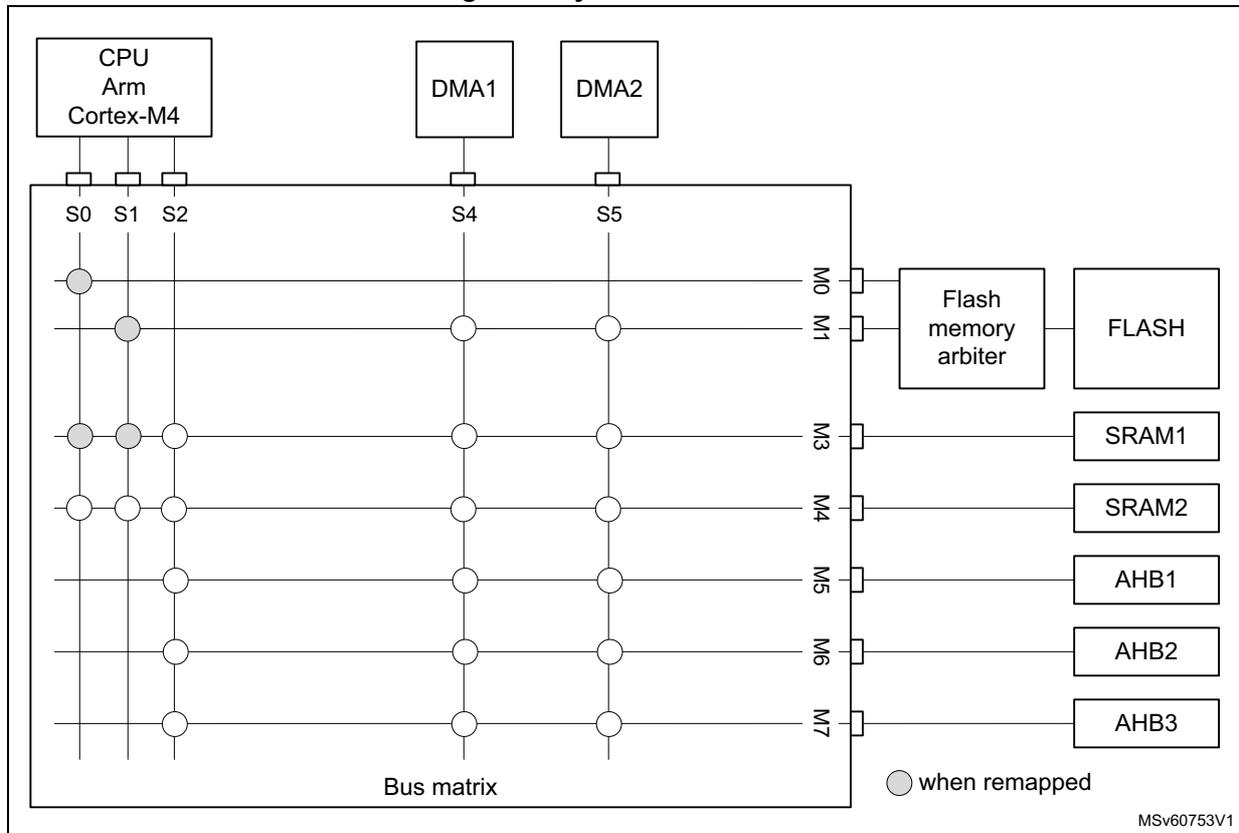
The diagram illustrates the system architecture of a microcontroller. At the top, three main components are shown: a CPU (Arm Cortex-M4), DMA1, and DMA2. The CPU is connected to the bus matrix via three interfaces: S0 (I-bus), S1 (D-bus), and S2 (S-bus). DMA1 is connected to S4, and DMA2 is connected to S5. The bus matrix is a central grid with seven slave interfaces (M0 to M7) on the right side. These interfaces are connected to various memory and peripheral blocks:
- M0 is connected to a Flash memory arbiter, which in turn connects to FLASH.
- M1 is connected to FLASH.
- M3 is connected to SRAM1.
- M4 is connected to SRAM2.
- M5 is connected to AHB1.
- M6 is connected to AHB2.
- M7 is connected to AHB3.
2.1.1 S0: CPU I-bus
This bus connects the instruction bus of the CPU core to the bus matrix. This bus is used by the core to fetch instructions. The targets of this bus are the internal flash memory, SRAM1 and SRAM2.
2.1.2 S1: CPU D-bus
This bus connects the data bus of the CPU core to the bus matrix. This bus is used by the core for literal load and debug access. The targets of this bus are the internal flash memory, SRAM1 and SRAM2.
2.1.3 S2: CPU S-bus
This bus connects the system bus of the CPU core to the bus matrix. This bus is used by the core to access data located in a peripheral or SRAM area. The targets of this bus are the SRAM1, SRAM2, the AHB1 peripherals including the APB1 and APB2 peripherals, the AHB2 peripherals and the AHB3 peripherals including the APB3.
2.1.4 S4, S5: DMA-bus
These buses connect the AHB master interface of the DMAs to the bus matrix. The targets of this bus are the internal flash memory, SRAM1, SRAM2 the AHB1 peripherals including the APB1 and APB2 peripherals, the AHB2 peripherals and the AHB3 peripherals including the APB3 peripherals.
AHB/APB bridges
The two bridges AHB to APB1 and AHB to APB2 provide full synchronous connections between the AHB1 and the two APB buses, allowing flexible selection of the peripheral frequency.
The bridge AHB to APB3 provides full synchronous connections between the AHB and the APB bus, allowing flexible selection of the frequency between the AHB and peripherals.
Refer to Section 2.4.2: Memory map and register boundary addresses for the address mapping of the peripherals connected to this bridge.
After each device reset, all peripheral clocks are disabled, except for the SRAM1/2 and the flash memory interface. Before using a peripheral, its clock must be enabled in the RCC_AHBxENR and RCC_APBxENR registers.
Note: When a 16- or 8-bit access is performed on an APB register, the access is transformed into a 32-bit access: the bridge duplicates the 16- or 8-bit data to feed the 32-bit vector.
2.2 Boot configuration
Three different CPU boot modes can be selected through the BOOT0 pin and nBOOT1 bit in the user options.
Boot is furthermore conditioned by the CPU boot lock enable and the user flash memory empty check, as shown in the table below.
Table 1. Device boot mode
| Boot mode selection | Valid options | User Flash empty | CPU aliasing space | ||||
|---|---|---|---|---|---|---|---|
| nBOOT1 option | nBOOT0 option | PH3/BOOT0 | nSWBOOT0 option | BOOT_LOCK | |||
| x | x | 0 | 1 | x | No | x | Hold |
| 1 | 1 | SRAM1 boot | |||||
| 1 | x | 0 | Hold | ||||
| 0 | 0 | SRAM1 boot | |||||
Table 1. Device boot mode (continued)
| Boot mode selection | Valid options | User Flash empty | CPU aliasing space | ||||
|---|---|---|---|---|---|---|---|
| nBOOT1 option | nBOOT0 option | PH3/BOOT0 | nSWBOOT0 option | BOOT_LOCK | |||
| x | x | 0 | 1 | 0 | Yes | 0 | User Flash boot |
| 1 | System Flash boot | ||||||
| 1 | 1 | x | System Flash boot | ||||
| 0 | SRAM1 boot | ||||||
| x | 1 | x | 0 | 1 | 0 | User Flash boot | |
| 0 | System Flash boot | ||||||
| 1 | x | x | System Flash boot | ||||
| 0 | 0 | SRAM1 boot | |||||
| x | 1 | User Flash boot | |||||
Values on BOOT0 and BOOT1 are latched after a reset. It is up to the user to provide the correct value for the required boot mode.
BOOT0 and BOOT1 are also re-sampled when exiting Standby mode. Consequently they must be kept in the required boot mode. After the startup delay, the CPU fetches the top-of-stack from address 0x0000 0000, then starts code execution from the boot memory at 0x0000 0004.
Depending on the selected boot mode, main flash memory, system flash memory and SRAM1 are accessible as follows:
- • Boot from main flash memory
The main flash memory is aliased in the CPU boot memory space at address 0x0000 0000 and is also still accessible from its physical address 0x0800 0000. In other words, the flash memory contents can be accessed starting from address 0x0000 0000 or 0x0800 0000.
- • Boot from system flash memory
The system flash memory is aliased in the CPU boot memory space at address 0x0000 0000 and is also still accessible from its physical address 0x1FFF 0000.
- • Boot from SRAM memory
The SRAM memory is aliased in the CPU boot memory space at address 0x0000 0000 and is also still accessible from its physical address 0x2000 0000.
CPU SRAM physical remap
Following CPU boot, the application software can modify the memory map at address 0x0000 0000. This modification is performed by programming the SYSCFG memory remap register (SYSCFG_MEMRMP) in the SYSCFG controller.
The following memories can be remapped:
- • Main flash memory
- • System flash memory
- • SRAM memory
Embedded bootloader
The embedded bootloader is located in the system flash memory, programmed by STMicroelectronics during production. It is used to program the flash memory using one of the following device interfaces:
- • USART1 on pins PA9 and PA10
- • USART2 on pins PA2 and PA3
- • SPI1 on pins PA4, PA5, PA6 and PA7
- • SPI2S2 on pins PB12, PB13, PB14 and PB15
The embedded bootloader runs on the CPU and can be used to load content in memory areas.
2.3 SRAM erase
SRAM1, SRAM2 and PKA SRAM provide an SRAM erase feature.
These SRAMs are erased under the conditions detailed in the table below.
Table 2. SRAM erase conditions
| Condition | SRAM1 (1) | SRAM2 (1) | PKA SRAM (2) |
|---|---|---|---|
| System reset (3) (user option SRAM_RST = 1) | Retained | Retained | Hardware erased |
| System reset (user option SRAM_RST = 0) | Hardware erased | Hardware erased | Hardware erased |
| OBL with invalid user options | Hardware erased | Hardware erased | Hardware erased |
| RDP regression from 1 to 0, on OPTSTRT. | Hardware erased (4) | Hardware erased | Hardware erased |
| Tamper (5) | Retained | Hardware erased | Hardware erased |
| SYSCFG_SCSR.SRAM2ER | Retained | Hardware erased | Retained |
1. An ongoing SRAM1 or SRAM2 erase can be monitored by SYSCFG_SCSR.SRAMBSY flag.
2. An ongoing PKA SRAM erase can be monitored by SYSCFG_SCSR.PKASRAMBSY flag.
3. POR, NRST, and wake-up from Standby.
4. For more details, see Table 12: RDP regression from level 1 to level 0 and memory erase .
5. To be able to debug without SRAM erase on tamper, especially ITAM6 debug access, the tamper erase must be disabled in the TAMP by firmware.
2.4 Memory organization
2.4.1 Introduction
Program memory, data memory, registers and I/O ports are organized within the same linear 4-Gbyte address space.
The bytes are coded in memory in Little Endian format. The lowest numbered byte in a word is considered the word's least significant byte and the highest numbered byte the most significant.
2.4.2 Memory map and register boundary addresses
Figure 2. Memory map
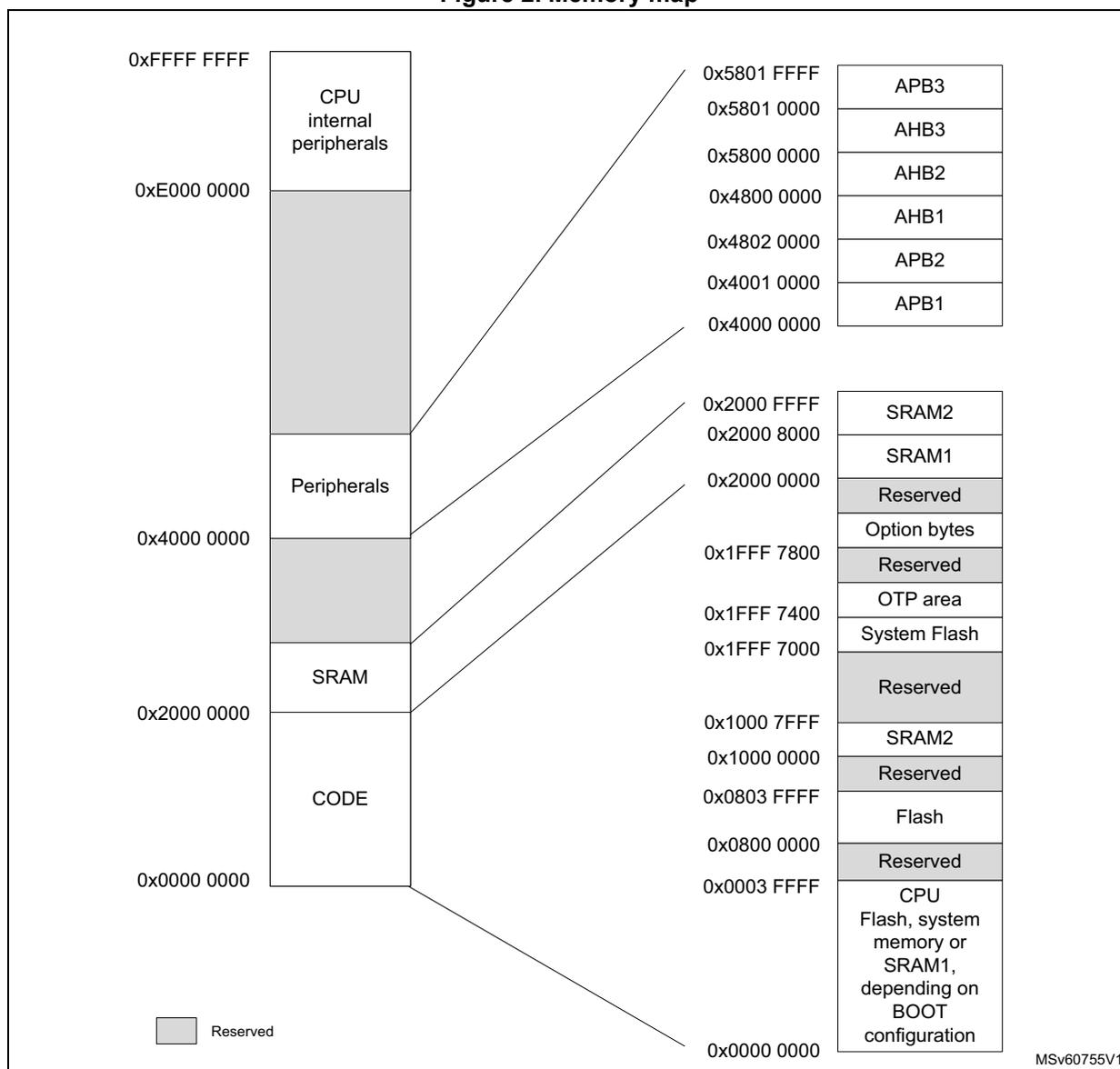
The memory map illustrates the allocation of memory for CPU internal peripherals, peripherals, SRAM, and CODE. The diagram is divided into two main columns of addresses. The left column shows the main memory regions, and the right column provides a detailed breakdown of specific address ranges for peripherals and memory.
Memory Regions and Address Ranges:
- CPU internal peripherals: 0xE000 0000 to 0xFFFF FFFF
- Peripherals: 0x4000 0000 to 0xE000 0000
- SRAM: 0x2000 0000 to 0x4000 0000
- CODE: 0x0000 0000 to 0x2000 0000
Detailed Address Ranges:
- 0x5801 FFFF to 0x5801 0000: APB3
- 0x5801 0000 to 0x5800 0000: AHB3
- 0x5800 0000 to 0x4800 0000: AHB2
- 0x4800 0000 to 0x4802 0000: AHB1
- 0x4802 0000 to 0x4001 0000: APB2
- 0x4001 0000 to 0x4000 0000: APB1
- 0x2000 FFFF to 0x2000 8000: SRAM2
- 0x2000 8000 to 0x2000 0000: SRAM1
- 0x2000 0000 to 0x1FFF 7800: Reserved
- 0x1FFF 7800 to 0x1FFF 7400: Option bytes
- 0x1FFF 7400 to 0x1FFF 7000: Reserved
- 0x1FFF 7000 to 0x1000 7FFF: OTP area
- 0x1000 7FFF to 0x1000 0000: System Flash
- 0x1000 0000 to 0x0803 FFFF: Reserved
- 0x0803 FFFF to 0x0800 0000: SRAM2
- 0x0800 0000 to 0x0003 FFFF: Reserved
- 0x0003 FFFF to 0x0000 0000: Flash
Legend:
- Reserved
MSv60755V1
Any memory area not allocated to on-chip memories and peripherals is considered "Reserved".
The table below details the boundary addresses of peripherals available in the device.
Table 3. Memory map and peripheral register boundary addresses
| Bus | Boundary address | Size (bytes) | Peripheral | Peripheral register map |
|---|---|---|---|---|
| APB3 | 0x5801 0400 - 0x5801 FFFF | - | Reserved | - |
| 0x5801 0000 - 0x5801 03FF | 1 K | SUBGHZSPI | Section 35.9.10: SPI/I2S register map | |
| AHB3 | 0x5800 4400 - 0x5800 FFFF | - | Reserved | - |
| 0x5800 4000 - 0x5800 43FF | 1 K | FLASH | Section 3.8.14: FLASH register map | |
| 0x5800 3400 - 0x5800 3FFF | 8 K | PKA continue | Section 22.7.5: PKA register map | |
| 0x5800 2400 - 0x5800 33FF | PKA RAM | |||
| 0x5800 2000 - 0x5800 23FF | PKA | |||
| 0x5800 1C00 - 0x5800 1FFF | - | Reserved | - | |
| 0x5800 1800 - 0x5800 1BFF | 1 K | AES | Section 21.7.18: AES register map | |
| 0x5800 1400 - 0x5800 17FF | 1 K | HSEM | Section 7.4.9: HSEM register map | |
| 0x5800 1000 - 0x5800 13FF | 1 K | True RNG | Section 20.7.5: RNG register map | |
| 0x5800 0C00 - 0x5800 0FFF | - | Reserved | - | |
| 0x5800 0800 - 0x5800 0BFF | 1 K | EXTI | Section 14.6.12: EXTI register map | |
| 0x5800 0400 - 0x5800 07FF | 1 K | PWR | Section 5.5.19: PWR register map | |
| 0x5800 0000 - 0x5800 03FF | 1 K | RCC | Section 6.4.33: RCC register map | |
| AHB2 | 0x4800 2000 - 0x57FF FFFF | - | Reserved | - |
| 0x4800 1C00 - 0x4800 1FFF | 8 K | GPIO | Section 8.4.36: GPIOH register map | |
| 0x4800 0C00 - 0x4800 1BFF | Reserved | |||
| 0x4800 0800 - 0x4800 0BFF | Section 8.4.35: GPIOC register map | |||
| 0x4800 0400 - 0x4800 07FF | Section 8.4.34: GPIOB register map | |||
| 0x4800 0000 - 0x4800 03FF | Section 8.4.33: GPIOA register map | |||
| AHB1 | 0x4260 0000 - 0x47FF FFFF | - | Reserved | - |
| 0x4240 0000 - 0x425F FFFF | 2048 K | AHB1 bit banding | - | |
| 0x4220 0000 - 0x423F FFFF | 2048 K | APB2 bit banding | - | |
| 0x4200 0000 - 0x421F FFFF | 2048 K | APB1 bit banding | - | |
| 0x4002 3400 - 0x41FF FFFF | - | Reserved | - | |
| 0x4002 3000 - 0x4002 33FF | 1 K | CRC | Section 15.4.6: CRC register map | |
| 0x4002 0C00 - 0x4002 2FFF | - | Reserved | - | |
| 0x4002 0800 - 0x4002 0BFF | 1 K | DMAMUX1 | Section 12.6.7: DMAMUX register map | |
| 0x4002 0400 - 0x4002 07FF | 1 K | DMA2 | Section 11.6.7: DMA register map | |
| 0x4002 0000 - 0x4002 03FF | 1 K | DMA1 | Section 11.6.7: DMA register map |
Table 3. Memory map and peripheral register boundary addresses (continued)
| Bus | Boundary address | Size (bytes) | Peripheral | Peripheral register map |
|---|---|---|---|---|
| APB2 | 0x4001 4C00 - 0x4001 FFFF | - | Reserved | - |
| 0x4001 4800 - 0x4001 4BFF | 1 K | TIM17 | Section 25.4.23: TIM16/TIM17 register map | |
| 0x4001 4400 - 0x4001 47FF | 1 K | TIM16 | Section 25.4.23: TIM16/TIM17 register map | |
| 0x4001 3C00 - 0x4001 43FF | - | Reserved | - | |
| 0x4001 3800 - 0x4001 3BFF | 1 K | USART1 | Section 33.8.15: USART register map | |
| 0x4001 3400 - 0x4001 37FF | - | Reserved | - | |
| 0x4001 3000 - 0x4001 33FF | 1 K | SPI1 | Section 35.9.10: SPI/I2S register map | |
| 0x4001 2C00 - 0x4001 2FFF | 1 K | TIM1 | Section 23.4.30: TIM1 register map | |
| 0x4001 2800 - 0x4001 2BFF | - | Reserved | - | |
| 0x4001 2400 - 0x4001 27FF | 1 K | ADC | Section 16.13: ADC register map | |
| 0x4001 0400 - 0x4001 23FF | - | Reserved | - | |
| 0x4001 0200 - 0x4001 03FF | 1 K | COMP | Section 19.6.3: COMP register map | |
| 0x4001 0100 - 0x4001 01FF | SYSCFG continue | Section 9.2.12: SYSCFG register map | ||
| 0x4001 0030 - 0x4001 00FF | VREFBUF | Section 18.3.3: VREFBUF register map | ||
| 0x4001 0000 - 0x4001 002F | SYSCFG | Section 9.2.12: SYSCFG register map |
Table 3. Memory map and peripheral register boundary addresses (continued)
| Bus | Boundary address | Size (bytes) | Peripheral | Peripheral register map |
|---|---|---|---|---|
| APB1 | 0x4000 B400 - 0x4000 FFFF | - | Reserved | - |
| 0x4000 B000 - 0x4000 B3FF | 1 K | TAMP | Section 31.6.11: TAMP register map | |
| 0x4000 9C00 - 0x4000 AFFF | - | Reserved | - | |
| 0x4000 9800 - 0x4000 9BFF | 1 K | LPTIM3 | Section 26.7.13: LPTIM register map | |
| 0x4000 9400 - 0x4000 97FF | 1 K | LPTIM2 | Section 26.7.13: LPTIM register map | |
| 0x4000 8400 - 0x4000 93FF | - | Reserved | - | |
| 0x4000 8000 - 0x4000 83FF | 1 K | LPUART1 | Section 34.7.13: LPUART register map | |
| 0x4000 7C00 - 0x4000 7FFF | 1 K | LPTIM1 | Section 26.7.13: LPTIM register map | |
| 0x4000 7800 - 0x4000 7BFF | - | Reserved | - | |
| 0x4000 7400 - 0x4000 77FF | 1K | DAC | Section 17.7.13: DAC register map | |
| 0x4000 6000 - 0x4000 73FF | - | Reserved | - | |
| 0x4000 5C00 - 0x4000 5FFF | 1 K | I2C3 | Section 32.9.12: I2C register map | |
| 0x4000 5800 - 0x4000 5BFF | 1 K | I2C2 | Section 32.9.12: I2C register map | |
| 0x4000 5400 - 0x4000 57FF | 1 K | I2C1 | Section 32.9.12: I2C register map | |
| 0x4000 4800 - 0x4000 53FF | - | Reserved | - | |
| 0x4000 4400 - 0x4000 47FF | 1 K | USART2 | Section 33.8.15: USART register map | |
| 0x4000 3C00 - 0x4000 43FF | - | Reserved | - | |
| 0x4000 3800 - 0x4000 3BFF | 1 K | SPI2S2 | Section 35.9.10: SPI/I2S register map | |
| 0x4000 3400 - 0x4000 37FF | - | Reserved | - | |
| 0x4000 3000 - 0x4000 33FF | 1 K | IWDG | Section 28.4.6: IWDG register map | |
| 0x4000 2C00 - 0x4000 2FFF | 1 K | WWDG | Section 29.5.4: WWDG register map | |
| 0x4000 2800 - 0x4000 2BFF | 1 K | RTC | Section 30.6.23: RTC register map | |
| 0x4000 0400 - 0x4000 27FF | - | Reserved | - | |
| 0x4000 0000 - 0x4000 03FF | 1 K | TIM2 | Section 24.4.25: TIMx register map | |
| - | 0x2220 0000 - 0x3FFF FFFF | - | Reserved | - |
| AHB3 | 0x2210 0000 - 0x221F FFFF | 1024 K (1) | SRAM2 bit banding | - |
| 0x2200 0000 - 0x220F FFFF | 1024 K (1) | SRAM1 bit banding | - | |
| - | 0x2001 0000 - 0x21FF FFFF | - | Reserved | - |
| AHB3 | 0x2000 8000 - 0x2000 FFFF | 32 K (1) | SRAM2 | - |
| 0x2000 0000 - 0x2000 7FFF | 32 K (1) | SRAM1 | - | |
| - | 0x1FFF 8080 - 0x1FFF FFFF | - | Reserved | - |
| Bus | Boundary address | Size (bytes) | Peripheral | Peripheral register map |
|---|---|---|---|---|
| AHB3 | 0x1FFF 7800 - 0x1FFF 7FFF | 2 K | Flash user options | Section 3.8.14: FLASH register map |
| 0x1FFF 7400 - 0x1FFF 77FF | 1 K | Flash Engi | - | |
| 0x1FFF 7000 - 0x1FFF 73FF | 1 K | Flash OTP | - | |
| 0x1FFF 0000 - 0x1FFF 6FFF | 28 K | Flash RSS and bootloader | - | |
| - | 0x1000 8000 - 0x1FFE FFFF | - | Reserved | - |
| AHB3 | 0x1000 0000 - 0x1000 7FFF | 32 K (1) | SRAM2 | - |
| - | 0x0804 0000 - 0x0FFF FFFF | - | Reserved | - |
| AHB3 | 0x0800 0000 - 0x0803 FFFF | 256 K (1) | User flash | - |
| - | 0x0004 0000 - 0x07FF FFFF | - | Reserved | - |
| BOOT (2) | 0x0000 0000 - 0x0003 FFFF | 256 K (1) | CPU boot area | - |
1. Size depending on the device. Refer to the datasheet for more details.
2. Bus depends on the selected CPU boot area.
2.4.3 CPU bit banding
The CPU map includes two bit-band regions. These regions map each word in an alias region of memory to a bit in a bit-band region of memory. Writing to a word in the alias region has the same effect as a read-modify-write operation on the targeted bit in the bit-band region.
The AHB1, APB1, APB2 peripheral registers and the SRAM1 and SRAM2 are mapped to a bit-band region, so that single bit-band write and read operations are allowed. The operations are only available for CPU accesses and not from other bus masters (such as DMA).
The peripheral bit-band alias is located from address 0x4200 0000 to 0x425F FFFF.
The SRAM bit-band alias is located from address 0x2200 0000 to 0x221F FFFF.
A mapping formula shows how to reference each word in the alias region to a corresponding bit in the bit-band region.
The mapping formula is the following:
where:
- •
bit_word_addris the address of the word in the alias memory region that maps to the targeted bit. - •
bit_band_baseis the starting address of the alias region. - •
byte_offsetis the number of the byte in thebit_bandregion that contains the targeted bit. - •
bit_numberis the bit position (0-7) of the targeted bit.
Example
The following example shows how to map bit [2] of the byte located at SRAM1 address 0x2000 0300 to the alias region. The formula is then:
Writing to address 0x2200 6008 has the same effect as a read-modify-write operation on bit [2] of the byte at SRAM1 address 0x2000 0300.
Reading address 0x2200 6008 returns the value 0x01 or 0x00 of bit [2] of the byte at SRAM1 address 0x2000 0300.
For more information on bit-band, refer to the Cortex-M4 programming manual.