24. Debug support (DBG)
24.1 Overview
The STM32L010xx devices are built around a Cortex ® -M0+ core which contains hardware extensions for advanced debugging features. The debug extensions allow the core to be stopped either on a given instruction fetch (breakpoint) or data access (watchpoint). When stopped, the core's internal state and the system's external state may be examined. Once examination is complete, the core and the system may be restored and program execution resumed.
The debug features are used by the debugger host when connecting to and debugging the STM32L010xx MCUs.
One interface for debug is available:
- • Serial wire
Figure 230. Block diagram of STM32L010xx MCU and Cortex ® -M0+-level debug support
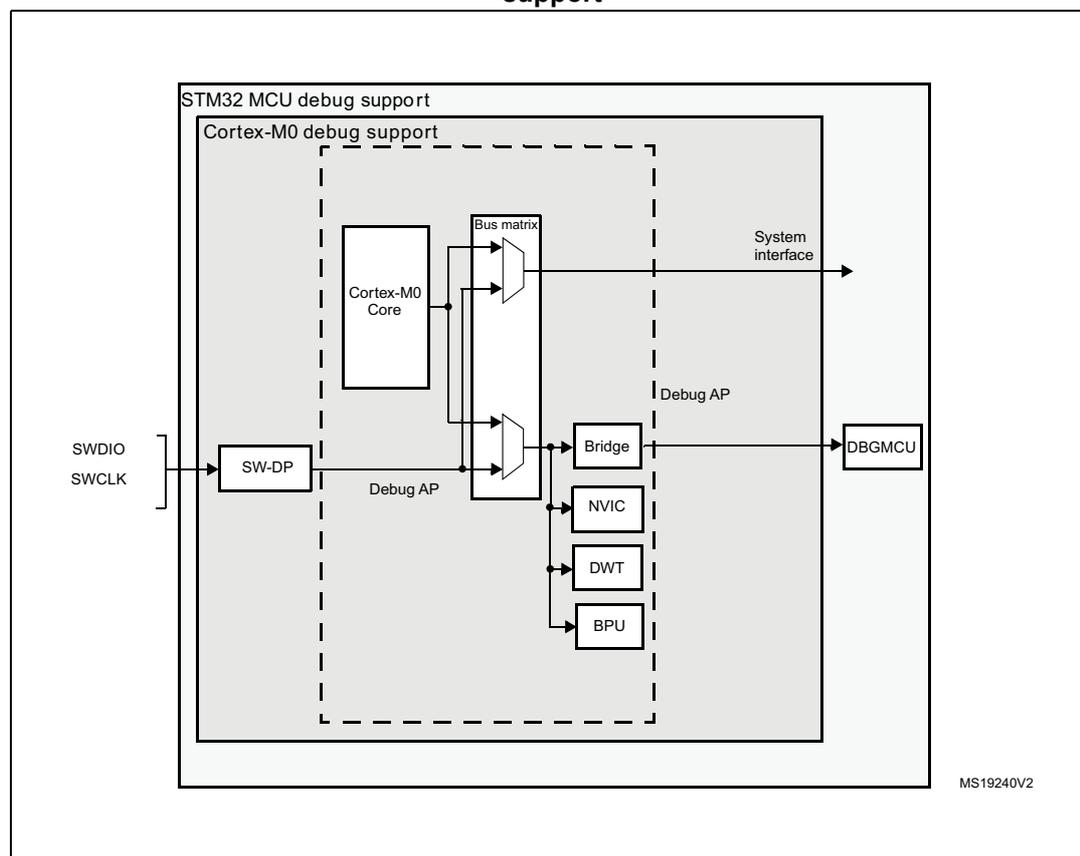
The diagram illustrates the internal architecture of the STM32L010xx MCU's debug support. It is organized into nested boxes. The outermost box is labeled 'STM32 MCU debug support'. Inside it is a dashed box labeled 'Cortex-M0 debug support'. Within this dashed box, a 'Cortex-M0 Core' is connected to a 'Bus matrix'. The 'Bus matrix' has multiple output paths: one labeled 'System interface' pointing out of the dashed box, and another pointing to a 'Bridge' block. The 'Bridge' block is connected to a 'DBGMCU' block outside the dashed box. Below the 'Bridge' are three blocks: 'NVIC', 'DWT', and 'BPU', each connected to the 'Bus matrix'. To the left of the 'Cortex-M0 Core' is an 'SW-DP' block, which is connected to external pins 'SWDIO' and 'SWCLK'. A 'Debug AP' label is placed near the 'SW-DP' and 'Bus matrix' connection. The reference 'MS19240V2' is located in the bottom right corner of the diagram area.
1. The debug features embedded in the Cortex ® -M0+ core are a subset of the Arm ® CoreSight Design Kit.
The Arm ® Cortex ® -M0+ core provides integrated on-chip debug support. It is comprised of:
- • SW-DP: Serial wire
- • BPU: Break point unit
- • DWT: Data watchpoint trigger
It also includes debug features dedicated to the STM32L010xx microcontrollers:
- • Flexible debug pinout assignment
- • MCU debug box (support for low-power modes, control over peripheral clocks, etc.)
Note: For further information on debug functionality supported by the Arm ® Cortex ® -M0+ core, refer to the Cortex ® -M0+ Technical Reference Manual (see Section 24.2: Reference Arm ® documentation ).
24.2 Reference Arm ® documentation
- • Cortex
®
-M0+ Technical Reference Manual (TRM)
It is available from www.infocenter.arm.com - • Arm ® Debug Interface V5
- • Arm ® CoreSight Design Kit revision r1p1 Technical Reference Manual
24.3 Pinout and debug port pins
The STM32L010xx MCUs are available in various packages with different numbers of available pins.
24.3.1 SWD port pins
Two pins are used as outputs for the SW-DP as alternate functions of general purpose I/Os. These pins are available on all packages.
Table 122. SW debug port pins
| SW-DP pin name | SW debug port | Pin assignment | |
|---|---|---|---|
| Type | Debug assignment | ||
| SWDIO | IO | Serial Wire Data Input/Output | PA13 |
| SWCLK | I | Serial Wire Clock | PA14 |
24.3.2 SW-DP pin assignment
After reset (SYSRESETn or PORESETn), the pins used for the SW-DP are assigned as dedicated pins which are immediately usable by the debugger host.
However, the MCU offers the possibility to disable the SWD port and can then release the associated pins for general-purpose I/O (GPIO) usage. For more details on how to disable SW-DP port pins, please refer to Section 8.3.2: I/O pin alternate function multiplexer and mapping on page 194 .
24.3.3 Internal pull-up & pull-down on SWD pins
Once the SW I/O is released by the user software, the GPIO controller takes control of these pins. The reset states of the GPIO control registers put the I/Os in the equivalent states:
- • SWDIO: input pull-up
- • SWCLK: input pull-down
Embedded pull-up and pull-down resistors remove the need to add external resistors.
24.4 ID codes and locking mechanism
There are several ID codes inside the MCU. ST strongly recommends the tool manufacturers to lock their debugger using the MCU device ID located at address 0x40015800.
24.4.1 MCU device ID code
The STM32L010xx products integrate an MCU ID code. This ID identifies the ST MCU part number and the die revision.
This code is accessible by the software debug port (two pins) or by the user software.
Only the DEV_ID[15:0] should be used for identification by the debugger/programmer tools (the revision ID must not be taken into account).
For code example, refer to A.18.1: DBG read device Id code example .
DBG_IDCODE
Address: 0x4001 5800
Only 32-bit access supported. Read-only
| 31 | 30 | 29 | 28 | 27 | 26 | 25 | 24 | 23 | 22 | 21 | 20 | 19 | 18 | 17 | 16 |
|---|---|---|---|---|---|---|---|---|---|---|---|---|---|---|---|
| REV_ID | |||||||||||||||
| r | r | r | r | r | r | r | r | r | r | r | r | r | r | r | r |
| 15 | 14 | 13 | 12 | 11 | 10 | 9 | 8 | 7 | 6 | 5 | 4 | 3 | 2 | 1 | 0 |
| Res. | Res. | Res. | Res. | DEV_ID | |||||||||||
| r | r | r | r | r | r | r | r | r | r | r | |||||
Bits 31:16 REV_ID[15:0] : Revision identifier
This field indicates the revision of the device (see Table 123: REV_ID values ).
Bits 15:12 Reserved: read 0b0110.
Bits 11:0 DEV_ID[11:0] : Device identifier
This field indicates the device ID:
Category 1 devices: 0x457
Category 2 devices: 0x425
Category 3 devices: 0x417
Category 5 devices: 0x447
Table 123. REV_ID values
| REV_ID | Cat. 1 devices | Cat. 2 devices | Cat. 3 devices | Cat. 5 devices |
|---|---|---|---|---|
| 0x1000 | Rev A | |||
| 0x1008 | Rev 1, Z | - | Rev Z | - |
| 0x1018 | - | - | Rev Y | - |
| 0x1038 | - | - | Rev 1, P, Q, X | - |
| 0x2000 | - | Rev B | - | Rev B |
| 0x2008 | - | Rev Y | - | Rev 1, P, Q, Z |
| 0x2018 | - | Rev 1, X | - | - |
24.5 SWD port
24.5.1 SWD protocol introduction
This synchronous serial protocol uses two pins:
- • SWCLK: clock from host to target
- • SWDIO: bidirectional
The protocol allows two banks of registers (DPACC registers and APACC registers) to be read and written to.
Bits are transferred LSB-first on the wire.
For SWDIO bidirectional management, the line must be pulled-up on the board (100 k \( \Omega \) recommended by Arm ® ). These pull-up resistors can be configured internally. No external pull-up resistors are required. .
Each time the direction of SWDIO changes in the protocol, a turnaround time is inserted where the line is not driven by the host nor the target. By default, this turnaround time is one bit time, however this can be adjusted by configuring the SWCLK frequency.
24.5.2 SWD protocol sequence
Each sequence consist of three phases:
- 1. Packet request (8 bits) transmitted by the host
- 2. Acknowledge response (3 bits) transmitted by the target
- 3. Data transfer phase (33 bits) transmitted by the host or the target
Table 124. Packet request (8-bits)
| Bit | Name | Description |
|---|---|---|
| 0 | Start | Must be “1” |
| 1 | APnDP | 0: DP Access 1: AP Access |
| 2 | RnW | 0: Write Request 1: Read Request |
| Bit | Name | Description |
|---|---|---|
| 4:3 | A[3:2] | Address field of the DP or AP registers (refer to Table 128 on page 721 ) |
| 5 | Parity | Single bit parity of preceding bits |
| 6 | Stop | 0 |
| 7 | Park | Not driven by the host. Must be read as “1” by the target because of the pull-up |
Refer to the Cortex ® -M0+ TRM for a detailed description of DPACC and APACC registers. The packet request is always followed by the turnaround time (default 1 bit) where neither the host nor target drive the line.
Table 125. ACK response (3 bits)| Bit | Name | Description |
|---|---|---|
| 0..2 | ACK | 001: FAULT 010: WAIT 100: OK |
The ACK Response must be followed by a turnaround time only if it is a READ transaction or if a WAIT or FAULT acknowledge has been received.
Table 126. DATA transfer (33 bits)| Bit | Name | Description |
|---|---|---|
| 0..31 | WDATA or RDATA | Write or Read data |
| 32 | Parity | Single parity of the 32 data bits |
The DATA transfer must be followed by a turnaround time only if it is a READ transaction.
24.5.3 SW-DP state machine (reset, idle states, ID code)
The State Machine of the SW-DP has an internal ID code which identifies the SW-DP. It follows the JEP-106 standard. This ID code is the default Arm ® one and is set to 0x0BC1 1477 (corresponding to Cortex ® -M0+).
Note: Note that the SW-DP state machine is inactive until the target reads this ID code.
- • The SW-DP state machine is in RESET STATE either after power-on reset, or after the line is high for more than 50 cycles
- • The SW-DP state machine is in IDLE STATE if the line is low for at least two cycles after RESET state.
- • After RESET state, it is mandatory to first enter into an IDLE state AND to perform a READ access of the DP-SW ID CODE register. Otherwise, the target will issue a FAULT acknowledge response on another transactions.
Further details of the SW-DP state machine can be found in the Cortex®-M0+ TRM and the CoreSight Design Kit r1p0 TRM .
24.5.4 DP and AP read/write accesses
- • Read accesses to the DP are not posted: the target response can be immediate (if ACK=OK) or can be delayed (if ACK=WAIT).
- • Read accesses to the AP are posted. This means that the result of the access is returned on the next transfer. If the next access to be done is NOT an AP access, then the DP-RDBUFF register must be read to obtain the result.
The READOK flag of the DP-CTRL/STAT register is updated on every AP read access or RDBUFF read request to know if the AP read access was successful. - • The SW-DP implements a write buffer (for both DP or AP writes), that enables it to accept a write operation even when other transactions are still outstanding. If the write buffer is full, the target acknowledge response is “WAIT”. With the exception of IDCODE read or CTRL/STAT read or ABORT write which are accepted even if the write buffer is full.
- • Because of the asynchronous clock domains SWCLK and HCLK, two extra SWCLK cycles are needed after a write transaction (after the parity bit) to make the write effective internally. These cycles should be applied while driving the line low (IDLE state)
This is particularly important when writing the CTRL/STAT for a power-up request. If the next transaction (requiring a power-up) occurs immediately, it will fail.
24.5.5 SW-DP registers
Access to these registers are initiated when APnDP=0
Table 127. SW-DP registers
| A[3:2] | R/W | CTRLSEL bit of SELECT register | Register | Notes |
|---|---|---|---|---|
| 00 | Read | IDCODE | The manufacturer code is set to the default Arm® code for Cortex®-M0+: 0x0BC1 1477 (identifies the SW-DP) | |
| 00 | Write | ABORT | ||
| 01 | Read/Write | 0 | DP-CTRL/STAT | Purpose is to:
|
| 01 | Read/Write | 1 | WIRE CONTROL | Purpose is to configure the physical serial port protocol (like the duration of the turnaround time) |
Table 127. SW-DP registers (continued)
| A[3:2] | R/W | CTRLSEL bit of SELECT register | Register | Notes |
|---|---|---|---|---|
| 10 | Read | READ RESEND | Enables recovery of the read data from a corrupted debugger transfer, without repeating the original AP transfer. | |
| 10 | Write | SELECT | The purpose is to select the current access port and the active 4-words register window | |
| 11 | Read/Write | READ BUFFER | This read buffer is useful because AP accesses are posted (the result of a read AP request is available on the next AP transaction). This read buffer captures data from the AP, presented as the result of a previous read, without initiating a new transaction |
24.5.6 SW-AP registers
Access to these registers are initiated when APnDP=1
There are many AP Registers addressed as the combination of:
- • The shifted value A[3:2]
- • The current value of the DP SELECT register.
Table 128. 32-bit debug port registers addressed through the shifted value A[3:2]
| Address | A[3:2] value | Description |
|---|---|---|
| 0x0 | 00 | Reserved, must be kept at reset value. |
| 0x4 | 01 | DP CTRL/STAT register. Used to:
|
| 0x8 | 10 | DP SELECT register: Used to select the current access port and the active 4-words register window.
|
| 0xC | 11 | DP RDBUFF register: Used to allow the debugger to get the final result after a sequence of operations (without requesting new JTAG-DP operation) |
24.6 Core debug
Core debug is accessed through the core debug registers. Debug access to these registers is by means of the debug access port. It consists of four registers:
Table 129. Core debug registers
| Register | Description |
|---|---|
| DHCSR | The 32-bit Debug Halting Control and Status Register This provides status information about the state of the processor enable core debug halt and step the processor |
| DCRSR | The 17-bit Debug Core Register Selector Register: This selects the processor register to transfer data to or from. |
| DCRDR | The 32-bit Debug Core Register Data Register: This holds data for reading and writing registers to and from the processor selected by the DCRSR (Selector) register. |
| DEMCR | The 32-bit Debug Exception and Monitor Control Register: This provides Vector Catching and Debug Monitor Control. |
These registers are not reset by a system reset. They are only reset by a power-on reset. Refer to the Cortex ® -M0+ TRM for further details.
To Halt on reset, it is necessary to:
- • enable the bit0 (VC_CORRESET) of the Debug and Exception Monitor Control Register
- • enable the bit0 (C_DEBUGEN) of the Debug Halting Control and Status Register
24.7 BPU (Break Point Unit)
The Cortex ® -M0+ BPU implementation provides four breakpoint registers. The BPU is a subset of the Flash Patch and Breakpoint (FPB) block available in Armv7-M (Cortex ® -M3 and Cortex ® -M4).
24.7.1 BPU functionality
The processor breakpoints implement PC based breakpoint functionality.
Refer the Armv6-M Arm ® and the Arm ® CoreSight Components Technical Reference Manual for more information about the BPU CoreSight identification registers, and their addresses and access types.
24.8 DWT (Data Watchpoint)
The Cortex ® -M0+ DWT implementation provides two watchpoint register sets.
24.8.1 DWT functionality
The processor watchpoints implement both data address and PC based watchpoint functionality, a PC sampling register, and support comparator address masking, as described in the Armv6-M Arm ® .
24.8.2 DWT Program Counter Sample Register
A processor that implements the data watchpoint unit also implements the Armv6-M optional DWT Program Counter Sample Register (DWT_PCSR). This register permits a debugger to periodically sample the PC without halting the processor. This provides coarse grained profiling. See the Armv6-M Arm ® for more information.
The Cortex ® -M0+ DWT_PCSR records both instructions that pass their condition codes and those that fail.
24.9 MCU debug component (DBG)
The MCU debug component helps the debugger provide support for:
- • Low-power modes
- • Clock control for timers, watchdog and I2C during a breakpoint
24.9.1 Debug support for low-power modes
To enter low-power mode, the instruction WFI or WFE must be executed.
The MCU implements several low-power modes which can either deactivate the CPU clock or reduce the power of the CPU.
The core does not allow FCLK or HCLK to be turned off during a debug session. As these are required for the debugger connection, during a debug, they must remain active. The MCU integrates special means to allow the user to debug software in low-power modes.
For this, the debugger host must first set some debug configuration registers to change the low-power mode behavior:
- • In Sleep mode: FCLK and HCLK are still active. Consequently, this mode does not impose any restrictions on the standard debug features.
- • In Stop/Standby mode, the DBG_STOP bit must be previously set by the debugger.
This enables the internal RC oscillator clock to feed FCLK and HCLK in Stop mode.
When one of the DBG_STANDBY, DBG_STOP and DBG_SLEEP bit is set and the internal reference voltage is stopped in low-power mode (ULP bit set in PWR_CR register), then the Fast wakeup must be enabled (FWU bit set in PWR_CR).
For code example, refer to A.18.2: DBG debug in LPM code example .
24.9.2 Debug support for timers, watchdog and I 2 C
During a breakpoint, it is necessary to choose how the counter of timers and watchdog should behave:
- • They can continue to count inside a breakpoint. This is usually required when a PWM is controlling a motor, for example.
- • They can stop to count inside a breakpoint. This is required for watchdog purposes.
For the I 2 C, the user can choose to block the SMBUS timeout during a breakpoint.
24.9.3 Debug MCU configuration register (DBG_CR)
The DBG_CR register allows to configure the low-power modes when the MCU is under debug. When one of DBG_CR bits is set, if ULP bit is set in PWR_CR, then FWU bit of PWR_CR must be set.
It is mapped at address 0x4001 5804.
This register is asynchronously reset by the PORESET (and not the system reset). It can be written by the debugger under system reset.
If the debugger host does not support these features, it is still possible for the user software to write to these registers.
Address: 0x04
Only 32-bit access supported
POR Reset: 0x0000 0000 (not reset by system reset)
| 31 | 30 | 29 | 28 | 27 | 26 | 25 | 24 | 23 | 22 | 21 | 20 | 19 | 18 | 17 | 16 |
|---|---|---|---|---|---|---|---|---|---|---|---|---|---|---|---|
| Res. | Res. | Res. | Res. | Res. | Res. | Res. | Res. | Res. | Res. | Res. | Res. | Res. | Res. | Res. | Res. |
| 15 | 14 | 13 | 12 | 11 | 10 | 9 | 8 | 7 | 6 | 5 | 4 | 3 | 2 | 1 | 0 |
| Res. | Res. | Res. | Res. | Res. | Res. | Res. | Res. | Res. | Res. | Res. | Res. | Res. | DBG STAND BY | DBG STOP | DBG SLEEP |
| rw | rw | rw |
Bits 31:3 Reserved, must be kept at reset value.
Bit 2 DBG_STANDBY : Debug Standby mode
0: (FCLK=Off, HCLK=Off) The whole digital part is unpowered.
From software point of view, exiting from Standby is identical than fetching reset vector (except a few status bit indicated that the MCU is resuming from Standby)
1: (FCLK=On, HCLK=On) In this case, the digital part is not unpowered and FCLK and HCLK are provided by the internal RC oscillator which remains active. In addition, the MCU generate a system reset during Standby mode so that exiting from Standby is identical than fetching from reset
Bit 1 DBG_STOP : Debug Stop mode
0: (FCLK=Off, HCLK=Off) In Stop mode, the clock controller disables all clocks (including HCLK and FCLK). When exiting from Stop mode, the clock configuration is identical to the one after RESET. Consequently, the software must reprogram the clock controller to enable the PLL, the Xtal, etc.
1: (FCLK=On, HCLK=On) In this case, when entering Stop mode, FCLK and HCLK are provided by the internal RC oscillator which remains active in Stop mode. When exiting Stop mode, the software must reprogram the clock controller to enable the PLL, the Xtal, etc. (in the same way it would do in case of DBG_STOP=0)
Bit 0 DBG_SLEEP : Debug Sleep mode
0: In Sleep mode, FCLK is clocked by the system clock previously configured by the software while HCLK is disabled. The clock controller configuration is not reset and remains in its previously programmed state. As a consequence, when exiting from Sleep mode, the software does not need to reconfigure the clock controller.
1: In this case, when entering in Sleep mode, HCLK is fed by the same clock that is provided to FCLK (system clock previously configured by the software).
24.9.4 Debug MCU APB1 freeze register (DBG_APB1_FZ)
The DBG_APB1_FZ register is used to configure the following APB peripherals, when the MCU under debug:
- • Timer clock counter freeze
- • I2C SMBUS timeout freeze
- • System window watchdog and independent watchdog counter freeze support.
This register is mapped at address 0x4001 5808.
The register is asynchronously reset by the POR (and not the system reset). It can be written by the debugger under system reset.
Address offset: 0X08
Only 32-bit access are supported.
Power on reset (POR): 0x0000 0000 (not reset by system reset)
| 31 | 30 | 29 | 28 | 27 | 26 | 25 | 24 | 23 | 22 | 21 | 20 | 19 | 18 | 17 | 16 |
|---|---|---|---|---|---|---|---|---|---|---|---|---|---|---|---|
| DBG_LPTIMER_STOP | Res. | Res. | Res. | Res. | Res. | Res. | Res. | Res. | Res. | DBG_I2C1_STOP | Res. | Res. | Res. | Res. | Res. |
| p | |||||||||||||||
| r/w | r/w | ||||||||||||||
| 15 | 14 | 13 | 12 | 11 | 10 | 9 | 8 | 7 | 6 | 5 | 4 | 3 | 2 | 1 | 0 |
| Res. | Res. | Res. | DBG_IWDG_STOP | DBG_WWDG_STOP | DBG_RTC_STOP | Res. | Res. | Res. | Res. | Res. | Res. | Res. | Res. | Res. | DBG_TIM2_STOP |
| r/w | r/w | r/w | r/w |
Bit 31 DBG_LPTIMER_STOP : LPTIM1 counter stopped when core is halted
0: LPTIM1 counter clock is fed even if the core is halted
1: LPTIM1 counter clock is stopped when the core is halted
Bits 30:22 Reserved, must be kept at reset value.
Bit 21 DBG_I2C1_STOP : I2C1 SMBUS timeout mode stopped when core is halted
0: Same behavior as in normal mode
1: I2C1 SMBUS timeout is frozen
Bits 20:13 Reserved, must be kept at reset value.
Bit 12 DBG_IWDG_STOP : Debug independent watchdog stopped when core is halted
0: The independent watchdog counter clock continues even if the core is halted
1: The independent watchdog counter clock is stopped when the core is halted
Bit 11 DBG_WWDG_STOP : Debug window watchdog stopped when core is halted
0: The window watchdog counter clock continues even if the core is halted
1: The window watchdog counter clock is stopped when the core is halted
Bit 10 DBG_RTC_STOP : Debug RTC stopped when core is halted
0: The clock of the RTC counter is fed even if the core is halted
1: The clock of the RTC counter is stopped when the core is halted
Bits 9:1 Reserved, must be kept at reset value.
Bit 0 DBG_TIM2_STOP : TIM2 counter stopped when core is halted
0: The counter clock of TIM2 is fed even if the core is halted
1: The counter clock of TIM2 is stopped when the core is halted
24.9.5 Debug MCU APB2 freeze register (DBG_APB2_FZ)
The DBG_APB2_FZ register is used to configure some APB peripheral features when the MCU is under DEBUG:
- • Timer clock counter freeze.
This register is mapped at address 0x4001580C.
It is asynchronously reset by the POR (and not the system reset). It can be written by the debugger under system reset.
Address: 0x0C
Only 32-bit access is supported.
POR: 0x0000 0000 (not reset by system reset)
| 31 | 30 | 29 | 28 | 27 | 26 | 25 | 24 | 23 | 22 | 21 | 20 | 19 | 18 | 17 | 16 |
|---|---|---|---|---|---|---|---|---|---|---|---|---|---|---|---|
| Res. | Res. | Res. | Res. | Res. | Res. | Res. | Res. | Res. | Res. | Res. | Res. | Res. | Res. | Res. | Res. |
| 15 | 14 | 13 | 12 | 11 | 10 | 9 | 8 | 7 | 6 | 5 | 4 | 3 | 2 | 1 | 0 |
| Res. | Res. | Res. | Res. | Res. | Res. | Res. | Res. | Res. | Res. | DBG_TIM22_STOP | Res. | Res. | DBG_TIM21_STOP | Res. | Res. |
| rw | rw |
Bits 31:6 Reserved, must be kept at reset value.
Bit 5 DBG_TIM22_STOP : TIM22 counter stopped when core is halted
0: The counter clock of TIM22 is fed even if the core is halted
1: The counter clock of TIM22 is stopped when the core is halted
Bits 4:3 Reserved, must be kept at reset value.
Bit 2 DBG_TIM21_STOP : TIM21 counter stopped when core is halted
0: The counter clock of TIM21 is fed even if the core is halted
1: The counter clock of TIM21 is stopped when the core is halted
Bits 1:0 Reserved, must be kept at reset value.
24.10 DBG register map
The following table summarizes the Debug registers.
Table 130. DBG register map and reset values
| Addr. | Register | 31 | 30 | 29 | 28 | 27 | 26 | 25 | 24 | 23 | 22 | 21 | 20 | 19 | 18 | 17 | 16 | 15 | 14 | 13 | 12 | 11 | 10 | 9 | 8 | 7 | 6 | 5 | 4 | 3 | 2 | 1 | 0 | |
|---|---|---|---|---|---|---|---|---|---|---|---|---|---|---|---|---|---|---|---|---|---|---|---|---|---|---|---|---|---|---|---|---|---|---|
| 0x40015800 | DBG_IDCODE | REV_ID | Res. | Res. | Res. | Res. | DEV_ID | |||||||||||||||||||||||||||
| Reset value (1) | X | X | X | X | X | X | X | X | X | X | X | X | X | X | X | X | X | X | X | X | X | X | X | X | X | X | X | X | X | |||||
| 0x40015804 | DBG_CR | Res. | Res. | Res. | Res. | Res. | Res. | Res. | Res. | Res. | Res. | Res. | Res. | Res. | Res. | Res. | Res. | Res. | Res. | Res. | Res. | Res. | Res. | Res. | Res. | Res. | Res. | Res. | Res. | Res. | Res. | o | o | o |
| Reset value | o | o | o | |||||||||||||||||||||||||||||||
| 0x40015808 | DBG_APB1_FZ | o | DBG_LPTIMER_STOP | Res. | Res. | Res. | Res. | Res. | Res. | Res. | Res. | Res. | Res. | Res. | Res. | Res. | Res. | Res. | Res. | Res. | o | o | o | Res. | Res. | Res. | Res. | Res. | Res. | Res. | Res. | Res. | Res. | o |
| Reset value | ||||||||||||||||||||||||||||||||||
| 0x4001580C | DBG_APB2_FZ | Res. | Res. | Res. | Res. | Res. | Res. | Res. | Res. | Res. | Res. | Res. | Res. | Res. | Res. | Res. | Res. | Res. | Res. | Res. | Res. | Res. | Res. | Res. | Res. | Res. | Res. | o | Res. | Res. | o | Res. | Res. | |
| Reset value | ||||||||||||||||||||||||||||||||||
1. The reset value is product dependent. For more information, refer to Section 24.4.1: MCU device ID code .