2. System and memory overview
2.1 System architecture
The main system consists of:
- • Two masters:
- – Cortex ® -M0+ core (AHB-lite bus)
- – GP-DMA (general-purpose DMA)
- • Three slaves:
- – Internal SRAM
- – Internal Non-volatile memory
- – AHB to APB, which connects all the APB peripherals
These are interconnected using a multilayer AHB bus architecture as shown in Figure 1 :
Figure 1. System architecture
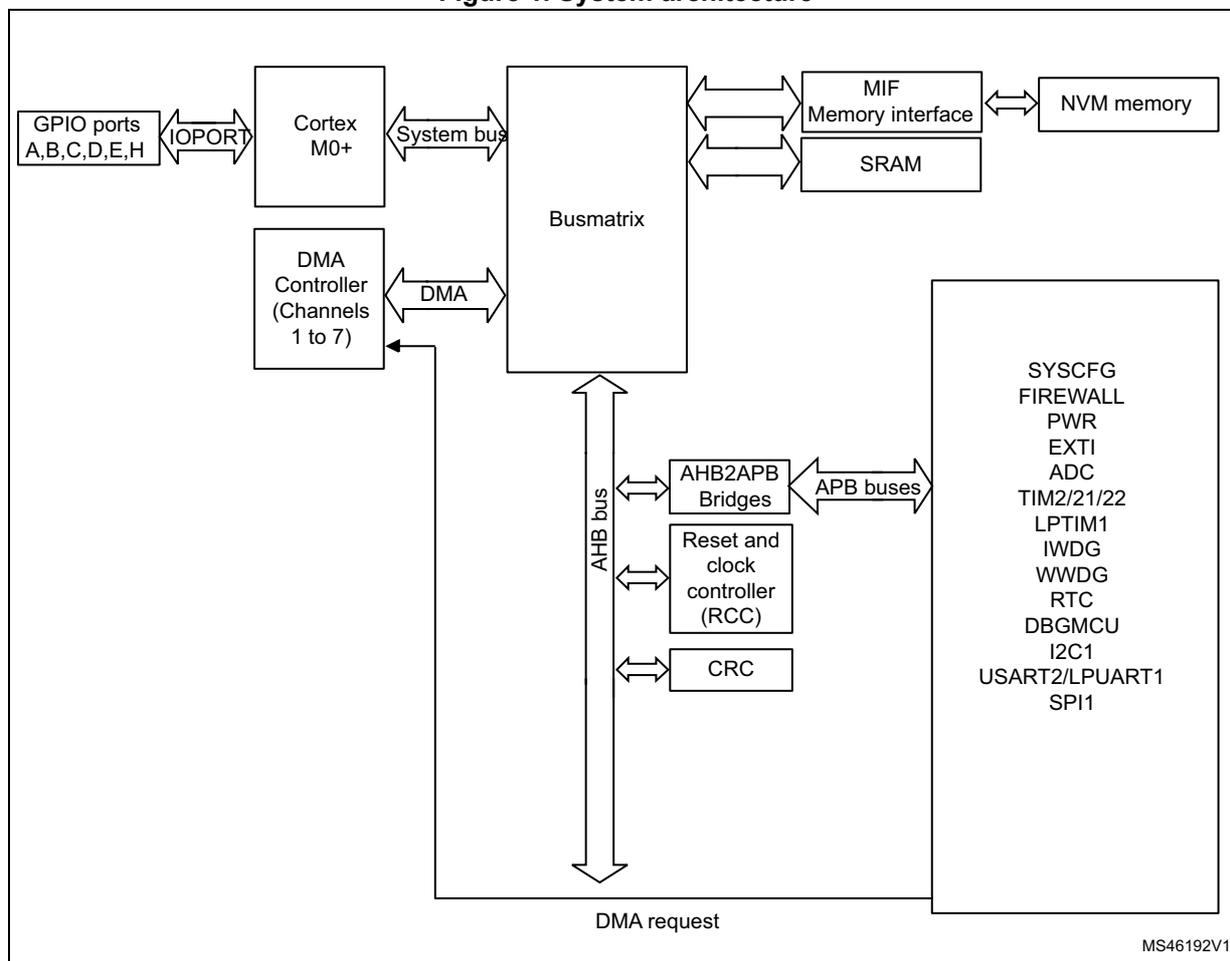
The diagram illustrates the system architecture of the STM32L010 microcontroller. At the center is the Busmatrix , which acts as a bridge between the system bus and the AHB bus. The Cortex M0+ core and the DMA Controller (Channels 1 to 7) are connected to the Busmatrix via the System bus and DMA respectively. The GPIO ports A,B,C,D,E,H are connected to the Cortex M0+ core via IOPORT . The Busmatrix is also connected to the MIF Memory interface and SRAM . The MIF Memory interface is connected to the NVM memory . The Busmatrix is connected to the AHB bus , which in turn connects to the Reset and clock controller (RCC) and the CRC . The AHB bus is also connected to the AHB2APB Bridges , which are connected to the APB buses . The APB buses are connected to a large block of peripherals including SYSCFG, FIREWALL, PWR, EXTI, ADC, TIM2/21/22, LPTIM1, IWDG, WWDG, RTC, DBGMCU, I2C1, USART2/LPUART1, and SPI1. A DMA request line is shown connecting the peripherals back to the DMA Controller. The diagram is labeled with the reference number MS46192V1 in the bottom right corner.
- 1. Refer to Table 1: STM32L010 memory density , to Table 2: Overview of features per category and to the device datasheets for the GPIO ports and peripherals available on your device.
2.1.1 S0: Cortex ® -bus
This bus connects the DCode/ICode bus of the Cortex ® -M0+ core to the BusMatrix. This bus is used by the core to fetch instructions, get data and access the AHB/APB resources.
2.1.2 S1: DMA-bus
This bus connects the AHB master interface of the DMA to the BusMatrix which manages the access of the different masters to Flash memory and data EEPROM, the SRAM and the AHB/APB peripherals.
2.1.3 BusMatrix
The BusMatrix manages the access arbitration between masters. The arbitration uses a Round Robin algorithm. The BusMatrix is composed of two masters (CPU, DMA) and three slaves (NVM interface, SRAM, AHB2APB1/2 bridges).
AHB/APB bridges
The AHB/APB bridge provide full synchronous connections between the AHB and the 2 APB buses. APB1 and APB2 operate at a maximum frequency of 32 MHz.
Refer to Section 2.2.2: Memory map and register boundary addresses on page 40 for the address mapping of the peripherals connected to this bridge.
After each device reset, all peripheral clocks are disabled (except for the SRAM and MIF). Before using a peripheral you have to enable its clock in the RCC_AHBENR, RCC_APB2ENR, RCC_APB1ENR or RCC_IOPENR register.
Note: When a 16- or 8-bit access is performed on an APB register, the access is transformed into a 32-bit access: the bridge duplicates the 16- or 8-bit data to feed the 32-bit vector.
2.2 Memory organization
2.2.1 Introduction
Program memory, data memory, registers and I/O ports are organized within the same linear 4-Gbyte address space.
The bytes are coded in memory in Little Endian format. The lowest numbered byte in a word is considered the word's least significant byte and the highest numbered byte the most significant.
The addressable memory space is divided into eight main blocks, of 512 Mbytes each.
2.2.2 Memory map and register boundary addresses
Figure 2. Memory map
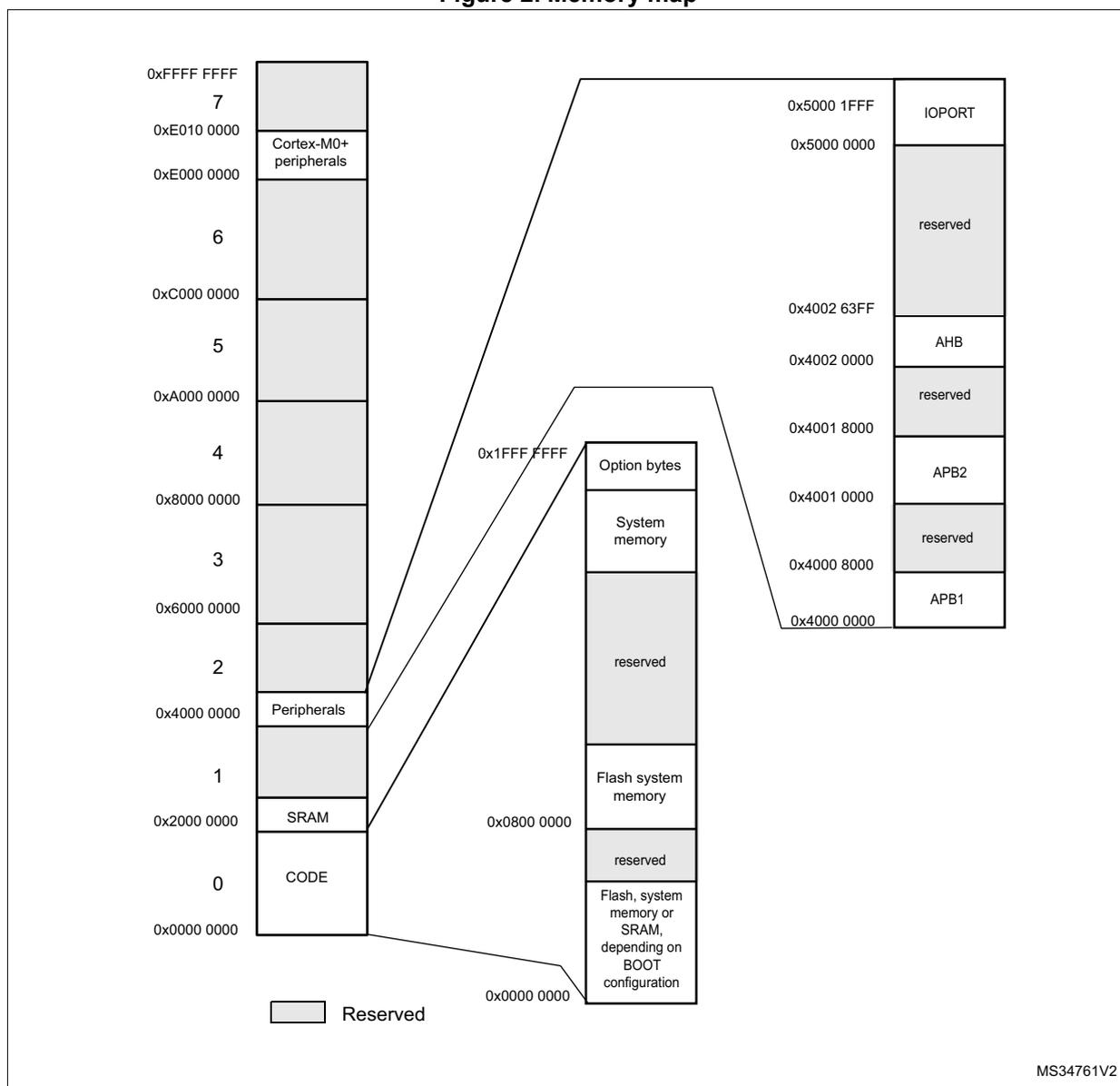
Memory map details:
- 0x0000 0000 to 0x2000 0000: CODE
- 0x2000 0000 to 0x4000 0000: SRAM
- 0x4000 0000 to 0x6000 0000: Peripherals
- 0x6000 0000 to 0x8000 0000: Reserved
- 0x8000 0000 to 0xA000 0000: Reserved
- 0xA000 0000 to 0xC000 0000: Reserved
- 0xC000 0000 to 0xE000 0000: Reserved
- 0xE000 0000 to 0xE010 0000: Cortex-M0+ peripherals
- 0xE010 0000 to 0xFFFF FFFF: Reserved
Zoomed-in view of 0x0000 0000 to 0x01FF FFFF:
- 0x0000 0000 to 0x0800 0000: Flash, system memory or SRAM, depending on BOOT configuration
- 0x0800 0000 to 0x1000 0000: reserved
- 0x1000 0000 to 0x1800 0000: Flash system memory
- 0x1800 0000 to 0x2000 0000: reserved
- 0x2000 0000 to 0x2800 0000: System memory
- 0x2800 0000 to 0x3000 0000: Option bytes
Peripheral region (0x4000 0000 to 0x5000 1FFF):
- 0x4000 0000 to 0x4000 8000: APB1
- 0x4000 8000 to 0x4001 0000: reserved
- 0x4001 0000 to 0x4001 8000: APB2
- 0x4001 8000 to 0x4002 0000: reserved
- 0x4002 0000 to 0x4002 63FF: AHB
- 0x4002 63FF to 0x5000 0000: reserved
- 0x5000 0000 to 0x5000 1FFF: IOPORT
Legend: Reserved
MS34761V2
All the memory map areas that are not allocated to on-chip memories and peripherals are considered “Reserved”. For the detailed mapping of available memory and register areas, refer to the following table.
The following table gives the boundary addresses of the peripherals available in the devices.
Table 3. STM32L010xx peripheral register boundary addresses (1)
| Bus | Boundary address | Size (bytes) | Peripheral | Peripheral register map |
|---|---|---|---|---|
| IOPORT | 0X5000 1C00 - 0X5000 1FFF | 1K | GPIOH | Section 8.4.12: GPIO register map |
| 0X5000 1400 - 0X5000 1BFF | 2 K | Reserved | - | |
| 0X5000 1000 - 0X5000 13FF | 1K | GPIOE | Section 8.4.12: GPIO register map | |
| 0X5000 0C00 - 0X5000 0FFF | 1K | GPIO D | Section 8.4.12: GPIO register map | |
| 0X5000 0800 - 0X5000 0BFF | 1K | GPIO C | Section 8.4.12: GPIO register map | |
| 0X5000 0400 - 0X5000 07FF | 1K | GPIOB | Section 8.4.12: GPIO register map | |
| 0X5000 0000 - 0X5000 03FF | 1K | GPIOA | Section 8.4.12: GPIO register map | |
| AHB | 0X4002 3400 - 0X4002 FFFF | 59 K | Reserved | - |
| 0X4002 3000 - 0X4002 33FF | 1 K | CRC | Section 4.4.6: CRC register map | |
| 0X4002 2400 - 0X4002 2FFF | 3 K | Reserved | - | |
| 0X4002 2000 - 0X4002 23FF | 1 K | FLASH | Section 3.7.11: Flash register map | |
| 0X4002 1400 - 0X4002 1FFF | 3 K | Reserved | - | |
| 0X4002 1000 - 0X4002 13FF | 1 K | RCC | Section 7.3.21: RCC register map | |
| 0X4002 0400 - 0X4002 0FFF | 3 K | Reserved | - | |
| 0X4002 0000 - 0X4002 03FF | 1 K | DMA1 | Section 10.6: DMA registers |
| Bus | Boundary address | Size (bytes) | Peripheral | Peripheral register map |
|---|---|---|---|---|
| APB2 | 0X4001 5C00 - 0X4001 FFFF | 42 K | Reserved | - |
| 0X4001 5800 - 0X4001 5BFF | 1 K | DBG | Section 24.10: DBG register map | |
| 0X4001 3400 - 0X4001 57FF | 9 K | Reserved | - | |
| 0X4001 3000 - 0X4001 33FF | 1 K | SPI1 | Section 23.6.8: SPI register map | |
| 0X4001 2800 - 0X4001 2FFF | 2 K | Reserved | - | |
| 0X4001 2400 - 0X4001 27FF | 1 K | ADC1 | Section 13.12: ADC register map | |
| 0X4001 2000 - 0X4001 23FF | 1 K | Reserved | - | |
| 0X4001 1C00 - 0X4001 1FFF | 1 K | Firewall | Section 5.4.8: Firewall register map | |
| 0X4001 18000 - 0X4001 1BFF | 4 K | Reserved | - | |
| 0X4001 1400 - 0X4001 17FF | 1 K | TIM22 | Section 15.4.16: TIM21/22 register map | |
| 0X4000 0C000 - 0X4001 13FF | 4 K | Reserved | - | |
| 0X4001 0800 - 0X4001 0BFF | 1 K | TIM21 | Section 15.4.16: TIM21/22 register map | |
| 0X4001 0400 - 0X4001 07FF | 1 K | EXTI | Section 12.5.7: EXTI register map | |
| 0X4001 0000 - 0X4001 03FF | 1 K | SYSCFG | Section 9.2.8: SYSCFG register map | |
| APB1 | 0X4000 8000 - 0X4000 FFFF | 32 K | Reserved | - |
| 0X4000 7C00 - 0X4000 7FFF | 1 K | LPTIM1 | Section 16.7.9: LPTIM register map | |
| 0X4000 7800 - 0X4000 7BFF | 1 K | Reserved | - | |
| 0X4000 7000 - 0X4000 73FF | 1 K | PWR | Section 6.4.3: PWR register map | |
| 0X4000 5800 - 0X4000 6FFF | 1 K | Reserved | - | |
| 0X4000 5400 - 0X4000 57FF | 1 K | I2C1 | Section 20.7: I2C registers | |
| 0X4000 4C00 - 0X4000 53FF | 2 K | Reserved | - | |
| 0X4000 4800 - 0X4000 4BFF | 1 K | LPUART1 | Section 22.7.10: LPUART register map | |
| 0X4000 4400 - 0X4000 47FF | 1 K | USART2 | Section 21.8.12: USART register map | |
| 0X4000 3400 - 0X4000 43FF | 4 K | Reserved | - | |
| 0X4000 3000 - 0X4000 33FF | 1 K | IWDG | Section 17.4.6: IWDG register map |
| Bus | Boundary address | Size (bytes) | Peripheral | Peripheral register map |
|---|---|---|---|---|
| APB1 | 0X4000 2C00 - 0X4000 2FFF | 1 K | WWDG | Section 18.5.4: WWDG register map |
| 0X4000 2800 - 0X4000 2BFF | 1 K | RTC + BKP_REG | Section 19.7.21: RTC register map | |
| 0X4000 0400 - 0X4000 07FF | 7 K | Reserved | - | |
| 0X4000 0000 - 0X4000 03FF | 1 K | TIMER2 | Section 14.5: TIMx register map | |
| SRAM | 0X2000 2000 - 0X3FFF FFFF | ~524 M | Reserved | - |
| 0X2000 0000 - 0X2000 4FFF | 20 K | SRAM | - | |
| NVM | 0X0800 0000 - 0X0801 FFFF | up to 128 K | Flash program memory | - |
| 0x0808 0000 - 0x0808 01FF | up to 512 | Data EEPROM | - | |
| 0x1FF0 0000 - 0x1FF0 1FFF | 8 K | System memory | - | |
| 0x1FF8 0020 - 0x1FF8 007F | 96 | Factory option bytes | - | |
| 0x1FF8 0000 - 0x1FF8 001F | 32 | User option bytes | - |
- 1. Refer to Table 1: STM32L010 memory density , to Table 2: Overview of features per category and to the device datasheets for the GPIO ports and peripherals available on your device. The memory area corresponding to unavailable GPIO ports or peripherals are reserved.
2.3 Embedded SRAM
STM32L010xx devices feature up to 20 Kbytes of static SRAM.
This RAM can be accessed as bytes, half-words (16 bits) or full words (32 bits). This memory can be addressed at maximum system clock frequency without wait state and thus by both CPU and DMA.
The SRAM start address is 0x2000 0000.
The CPU can access the SRAM from address 0x0000 0000 when physical remap is selected through boot pin or MEM_MODE (see Section 9.2.1: SYSCFG memory remap register (SYSCFG_CFGR1) ).
2.4 Boot configuration
In the STM32L010xx, three different boot modes can be selected through the BOOT0 pin and boot configuration bits in the User option byte, as shown in the following table.
Table 4. Boot modes (1)
| Boot mode selection | Boot mode | Aliasings | |
|---|---|---|---|
| BOOT1 pin | BOOT0 pin | ||
| X | 0 | Flash program memory | Flash program memory is selected as boot area |
| 0 | 1 | System memory | System memory is selected as boot area |
| 1 | 1 | Embedded SRAM | Embedded SRAM is selected as boot area |
1. BOOT1 value is the opposite of nBOOT1 option bit.
Table 5. Boot modes (1)
| Boot mode configuration | Aliasings | |||
|---|---|---|---|---|
| nBOOT1 bit | BOOT0 pin | nBOOT_SEL bit | nBOOT0 bit | |
| X | 0 | 0 | X | Flash program memory is selected as boot area |
| 1 | 1 | 0 | X | System memory is selected as boot area |
| 0 | 1 | 0 | X | Embedded SRAM is selected as boot area |
| X | X | 1 | 1 | Flash program memory is selected as boot area |
| 1 | X | 1 | 0 | System memory is selected as boot area |
| 0 | X | 1 | 0 | Embedded SRAM is selected as boot area |
1. Grayed options are available on category 1 devices only.
The boot mode configuration is latched on the 2nd rising edge of SYSCLK after reset. For category 1 devices, the value present on BOOT0 pin is latched on NRST rising edge. It is up to the user to set nBOOT1 and BOOT0 to select the required boot mode.
The boot mode configuration is also re-sampled when exiting from Standby mode, except for category 1 devices where BOOT0 pin is latched on NRST rising edge. Consequently the boot mode configuration must not be modified in Standby mode (except for category 1 devices). After this startup delay has elapsed, the CPU fetches the top-of-stack value from address 0x0000 0000, then starts code execution from the boot memory at 0x0000 0004.
Depending on the selected boot mode, Flash program memory, system memory or SRAM is accessible as follows:
- • Boot from Flash program memory: the Flash program memory is aliased in the boot memory space (0x0000 0000), but still accessible from its original memory space
(0x0800 0000). In other words, the Flash memory contents can be accessed starting from address 0x0000 0000 or 0x0800 0000.
- • Boot from system memory: the system memory is aliased in the boot memory space (0x0000 0000), but still accessible from its original memory space (0x1FF0 0000).
- • Boot from the embedded SRAM: the SRAM is aliased in the boot memory space (0x0000 0000), but it is still accessible from its original memory space (0x2000 0000).
BOOT0/GPIO pin sharing (category 1 devices only)
On category 1 devices, the BOOT0 pin is shared with a GPIO pin. The pin state is latched on NRST rising edge as BOOT0 state. The pin logic level can then be read as an input value on the shared GPIO pin. This pin feature specific input voltage characteristics (refer to the corresponding datasheets for details).
Empty check (category 1 devices only)
On category 1 devices, an internal empty check flag is implemented to allow easy programming of virgin devices by the bootloader. This flag is used when BOOT0 pin is configured to select Flash program memory as target boot area. When this flag is set, the device is considered as unprogrammed and the system memory (bootloader) is selected as boot area instead of the Flash program memory to allow the application to program the Flash memory.
The empty check flag is updated only when the option bytes are loaded: it is set when the content of address 0x0800 0000 is read as 0x0000 0000 and cleared otherwise. As a result, only a power-on reset or setting OBL_LAUNCH bit in FLASH_CR register can clear this flag after programming a virgin device to execute user code after system reset.
Note: If the device is programmed for the first time but the option bytes are not reloaded, the system memory will still be selected as boot area after system reset. In this case, the bootloader code switches the boot memory mapping to Flash program memory and performs a jump to the user code it hosts.
Physical remap
Once the boot pin and bit are selected, the application software can modify the memory accessible in the code area. This modification is performed by programming the MEM_MODE bits in the SYSCFG memory remap register (SYSCFG_CFGR1).
Embedded bootloader
The embedded bootloader is located in the System memory, programmed by ST during production. It is used to reprogram the Flash memory using one of the following serial interfaces:
- • For device categories 1, 2 and 3: USART2 or SPI1.
- • For device category 5: USART2, SPI1 or I2C1.