6. Embedded flash memory (FLASH)
6.1 Introduction
The flash memory interface manages accesses to the flash memory, maximizing throughput to the CPU, instruction cache and DMAs. It implements the flash memory erase and program operations as well as the read and write protection mechanisms. It also implements the security and privilege access control features.
6.2 FLASH main features
- • Up to 512 Kbytes of flash memory with dual bank architecture supporting read-while-write capability (RWW).
- • Flash memory read operations with two data width modes supported:
- – Single bank mode DBANK=0: read access of 128 bits
- – Dual bank mode DBANK=1: read access of 64 bits
- • Page erase, bank erase and mass erase (both banks).
- • Bank swapping: the address mapping of the user flash memory of each bank can be swapped.
- • Readout protection activated by option (RDP) byte.
- • Four write protection areas (two per bank when DBANK=1 and four for full memory when DBANK=0).
- • TrustZone support:
- – Two secure areas (1 per bank when DBANK=1, 2 for all memory when DBANK=0)
- – Two secure HDP (hide protection) areas part of the secure areas (one per bank when DBANK=1, two for all memory when DBANK=0).
- • Error code correction ECC: 8 bits per 64-bit double-word:
- – DBANK=1: 8 + 64 = 72 bits, two bits detection, one bit correction
- – DBANK=0: (8+64) + (8+64) = 144 bits, two bits detection, one bit correction per 64-bit double-word.
- • Option-byte loader.
- • Low-power mode.
- • Privileged and unprivileged support.
6.3 Flash memory functional description
6.3.1 Flash memory organization
The flash memory has the following main features:
- • Capacity up to 512 Kbytes, in single-bank mode (read width of 128 bits) or in dual-bank mode (read width of 64-bits).
- • Dual-bank mode when DBANK bit is set:
- – 256 Kbytes organized in two banks for main memory.
- – Page size of 2 Kbytes.
- – 72 bits wide data read (64 bits plus 8 ECC bits).
- – Bank and mass erase.
- • Single-bank mode when DBANK is reset:
- – 512 Kbytes organized in one single bank for main memory.
- – Page size of 4 Kbytes.
- – 144 bits wide data read (128 bits plus 2x 8 ECC bits).
- – Mass erase.
The flash memory is organized as follows:
- • A main memory block organized depending on the dual bank configuration bit:
- – When dual bank is enabled (DBANK bit set), the flash is divided in two banks of 256 Kbytes, and each bank is organized as follows:
The main memory block containing 128 pages of 2 Kbytes - – When dual bank is disabled (DBANK bit reset), the main memory block is organized as one single bank of 512 Kbytes as follows:
The main memory block containing 128 pages of 4 Kbytes.
- – When dual bank is enabled (DBANK bit set), the flash is divided in two banks of 256 Kbytes, and each bank is organized as follows:
- • An Information block containing:
- – 32 Kbytes for system memory. The area is reserved for use by STMicroelectronics and contains the bootloader that is used to reprogram the flash memory through one of the following interfaces: USART1, USART2, USART3, USB (DFU), I2C1, I2C2, I2C3, SPI1, SPI2, SPI3. It is programmed by STMicroelectronics when the device is manufactured, and protected against spurious write/erase operations. For further details, please refer to the application note STM32 microcontroller system memory boot mode (AN2606) available from www.st.com .
- – 10 Kbytes for root secure services (RSS).
- – 512 bytes OTP (one-time programmable) bytes for user data. The OTP data cannot be erased and can be written only once. If only one bit is at 0, the entire double word cannot be written anymore, even with the value 0x0000 0000 0000 0000.
- – 4 Kbytes of option bytes for user configuration. Unlike user flash memory and system memory, it is not mapped to any memory address and can be accessed only through the flash register interface.
The memory organization is based on a main area and an information block as shown in Table 30 , Table 31 , Table 32 , and Table 33 .
Table 30. Flash module - 256 KB dual bank organization (64 bits read width) (1)| Flash area | Flash memory address | Size | Name | |
|---|---|---|---|---|
| Main memory | Bank 1 | 0x0800 0000 - 0x0800 07FF | 2 Kbytes | Page 0 |
| 0x0800 0800 - 0x0800 0FFF | 2 Kbytes | Page 1 | ||
| - - - | - - - | - - - | ||
| 0x0801 F800 - 0x0801 FFFF | 2 Kbytes | Page 63 | ||
| Bank 2 | 0x0802 0000 - 0x0802 07FF | 2 Kbytes | Page 0 | |
| 0x0802 0800 - 0x0802 0FFF | 2 Kbytes | Page 1 | ||
| - - - | - - - | - - - | ||
| 0x0803 F800 - 0x0803 FFFF | 2 Kbytes | Page 63 | ||
| Non-secure Information block (2) | 0x0BF9 0000 - 0x0BF9 7FFF | 32 Kbytes | System memory | |
| 0x0BFA 0000 - 0x0BFA 01FF | 512 bytes | OTP area | ||
| Secure Information block (3) | 0x0FF8 0000 - 0x0FF8 1FFF | 8 Kbytes | RSS | |
| 0x0FF8 2000 - 0x0FF8 27FF | 2 Kbytes | RSS library | ||
- 1. The DB256K bit must be set to 1.
- 2. When the TrustZone is enabled (TZEN = 1), the non-secure information block is accessible only with a non-secure access. This means that in order to be able to access any address in this region, it should be configured as non-secure through the SAU. This region is also accessible when booting from RSS.
- 3. The secure information block is only available when TrustZone is active.
| Flash area | Flash memory address | Size | Name | |
|---|---|---|---|---|
| Main memory | Bank 1 | 0x0800 0000 - 0x0800 07FF | 2 Kbytes | Page 0 |
| 0x0800 0800 - 0x0800 0FFF | 2 Kbytes | Page 1 | ||
| - - - | - - - | - - - | ||
| 0x0803 F800 - 0x0803 FFFF | 2 Kbytes | Page 127 | ||
| Bank 2 | 0x08040000 - 0x0804 07FF | 2 Kbytes | Page 0 | |
| 0x0804 0800 - 0x0804 0FFF | 2 Kbytes | Page 1 | ||
| - - - | - - - | - - - | ||
| 0x0807 F800 - 0x0807 FFFF | 2 Kbytes | Page 127 | ||
| Non-secure Information block (1) | 0x0BF9 0000 - 0x0BF9 7FFF | 32 Kbytes | System memory | |
| 0x0BFA 0000 - 0x0BFA 01FF | 512 bytes | OTP area | ||
| Flash area | Flash memory address | Size | Name |
|---|---|---|---|
| Secure Information block (2) | 0x0FF8 0000 - 0x0FF8 1FFF | 8 Kbytes | RSS |
| 0x0FF8 2000 - 0x0FF8 27FF | 2 Kbytes | RSS library |
- 1. When the TrustZone is enabled (TZEN = 1), the non-secure information block is accessible only with a non-secure access. This means that in order to be able to access any address in this region, it should be configured as non-secure through the SAU. This region is also accessible when booting from RSS.
- 2. The secure information block is only available when TrustZone is active.
| Flash area | Flash memory address | Size | Name |
|---|---|---|---|
| Main memory | 0x0800 0000 - 0x0800 0FFF | 4 Kbytes | Page 0 |
| 0x0800 1000 - 0x0800 1FFF | 4 Kbytes | Page 1 | |
| - - - | - - - | - - - | |
| 0x0803 F000 - 0x0803 FFFF | 4 Kbytes | Page 63 | |
| Non-Secure Information block (2) | 0x0BF9 0000 - 0x0BF9 7FFF | 32 Kbytes | System memory |
| 0x0BFA 0000 - 0x0BFA 01FF | 512 bytes | OTP area | |
| Secure Information block (3) | 0x0FF9 0000 - 0x0FF9 1FFF | 8 Kbytes | RSS |
| 0x0FF9 2000 - 0x0FF9 27FF | 2 Kbytes | RSS library |
- 1. The DB256K bit must be set to 0.
- 2. When the TrustZone is enabled (TZEN = 1), the non-secure information block is accessible only with a non-secure access. This means that in order to be able to access any address in this region, it should be configured as non-secure through the SAU. This region is also accessible when booting from RSS.
- 3. The secure information block is only available when TrustZone is active.
| Flash area | Flash memory address | Size | Name |
|---|---|---|---|
| Main memory | 0x0800 0000 - 0x0800 0FFF | 4 Kbytes | Page 0 |
| 0x0800 1000 - 0x0800 1FFF | 4 Kbytes | Page 1 | |
| - - - | - - - | - - - | |
| 0x0807 F000 - 0x0807 FFFF | 4 Kbytes | Page 127 | |
| Non-Secure Information block (1) | 0x0BF9 0000 - 0x0BF9 7FFF | 32 Kbytes | System memory |
| 0x0BFA 0000 - 0x0BFA 01FF | 512 bytes | OTP area | |
| Secure Information block (2) | 0x0FF9 0000 - 0x0FF9 1FFF | 8 Kbytes | RSS |
| 0x0FF9 2000 - 0x0FF9 27FF | 2 Kbytes | RSS library |
- 1. When the TrustZone is enabled (TZEN = 1), the non-secure information block is accessible only with a non-secure access. This means that in order to be able to access any address in this region, it should be configured as non-secure through the SAU. This region is also accessible when booting from RSS.
- 2. The secure information block is only available when TrustZone is active.
6.3.2 Error code correction (ECC)
Dual bank mode (DBANK=1, 64-bits data width)
Data in flash memory are 72-bits words: 8 bits are added per double word (64 bits). The ECC mechanism supports:
- • One error detection and correction per 64 double words
- • Two errors detection
When one error is detected and corrected, the flag ECCC (ECC correction) is set in Flash ECC register (FLASH_ECCR) . If ECCCIE is set, an interrupt is generated.
When two errors are detected, a flag ECCD (ECC detection) is set in FLASH_ECCR register. In this case, a NMI is generated.
When an ECC error is detected, the address of the failing double word and its associated bank are saved in ADDR_ECC[17:0] and BK_ECC in the FLASH_ECCR register. ADDR_ECC[18] and ADDR_ECC[2:0] are always cleared.
When ECCC or ECCD is set, ADDR_ECC and BK_ECC are not updated if a new ECC error occurs. FLASH_ECCR is updated only when ECC flags are cleared.
Note: For a virgin data: 0xFF FFFF FFFF FFFF FFFF, one error is detected and corrected but two errors detection is not supported.
When an ECC error is reported, a new read at the failing address may not generate an ECC error if the data is still present in the current buffer, even if ECCC and ECCD are cleared.
Single bank mode (DBANK=0, 128-bits data width)
Data in flash memory are 144-bits words: 8 bits are added per each double word. The ECC mechanism supports:
- • One error detection and correction
- • Two errors detection per 64 double words
The user must first check the SYSF_ECC bit, and if it is set, the user must refer to the DBANK=1 programming model (because system flash is always on two banks). If the bit is not set, the user must refer to the following programming model:
Each double word (bits 63:0 and bits 127:64) has ECC.
When one error is detected in 64 LSB bits (bits 63:0) and corrected, a flag ECCC (ECC correction) is set in the FLASH_ECCR register.
When one error is detected in 64 MSB bits (bits 127:64) and corrected, a flag ECCC2 (ECC2 correction) is set in the FLASH_ECCR register.
If the ECCCIE is set, an interrupt is generated. The user has to read ECCC and ECCC2 to see which part of the 128-bits data has been corrected (either 63:0, 127:64 or both).
When two errors are detected in 64 LSB bits, a flag ECCD (ECC detection) is set in the FLASH_ECCR register.
When two errors are detected in 64 MSB bits (bits 127:64), a flag ECCD2 (ECC2 detection) is set in the FLASH_ECCR register.
In this case, a NMI is generated. The user has to read ECCD and ECCD2 to see which part of the 128-bits data has error detection (either 63:0, 127:64 or both).
When an ECC error is detected, the address of the failing the two times double word is saved into ADDR_ECC[18:0] in FLASH_ECCR. ADDR_ECC[18:0] contains an address of a two times double word.
The ADDR_ECC[3:0] are always cleared. BK_ECC is not used in this mode.
When ECCC/ECCC2 or ECCD/ECCD2 is/are set, if a new ECC error occurs, the ADDR_ECC is not updated. The FLASH_ECCR is updated only if the ECC flags (ECCC/ECCC2/ECCD/ECCD2) are cleared.
Note:
For a virgin data: 0xFF FFFF FFFF FFFF FFFF, one error is detected and corrected but two errors detection is not supported.
When an ECC error is reported, a new read at the failing address may not generate an ECC error if the data is still present in the current buffer, even if ECCC and ECCD are cleared.
6.3.3 Read access latency
To correctly read data from flash memory, the number of wait states (LATENCY) must be correctly programmed in the FLASH registers according to the frequency of the CPU clock (HCLK) and the internal voltage range of the device \( V_{CORE} \) . Refer to Section 8.2.5: Dynamic voltage scaling management . Table 34 shows the correspondence between wait states and CPU clock frequency.
Table 34. Number of wait states according to CPU clock (HCLK) frequency
| Wait states (WS) (Latency) | HCLK (MHz) | ||
|---|---|---|---|
| \( V_{CORE} \) Range 0 | \( V_{CORE} \) Range 1 | \( V_{CORE} \) Range 2 | |
| 0 WS (1 CPU cycles) | \( \leq 20 \) | \( \leq 20 \) | \( \leq 8 \) |
| 1 WS (2 CPU cycles) | \( \leq 40 \) | \( \leq 40 \) | \( \leq 16 \) |
| 2 WS (3 CPU cycles) | \( \leq 60 \) | \( \leq 60 \) | \( \leq 26 \) |
| 3 WS (4 CPU cycles) | \( \leq 80 \) | \( \leq 80 \) | - |
| 4 WS (5 CPU cycles) | \( \leq 100 \) | - | - |
| 5 WS (6 CPU cycles) | \( \leq 110 \) | - | - |
After reset, the CPU clock frequency is 4 MHz and 0 wait state (WS) is configured in the FLASH_ACR register.
When changing the CPU frequency, the following software sequences must be applied in order to tune the number of wait states needed to access the flash memory:
Increasing the CPU frequency:- 1. Program the new number of wait states to the LATENCY bits in Section 6.9: FLASH registers .
- 2. Check that the new number of wait states is taken into account to access the flash memory by reading the FLASH_ACR register.
- 3. Modify the CPU clock source by writing the SW bits in the RCC_CFGR register.
- 4. If needed, modify the CPU clock prescaler by writing the HPRE bits in RCC_CFGR.
- 5. Check that the new CPU clock source or/and the new CPU clock prescaler value is/are taken into account by reading the clock source status (SWS bits) or/and the AHB prescaler value (HPRE bits), respectively, in the RCC_CFGR register.
- 1. Modify the CPU clock source by writing the SW bits in the RCC_CFGR register.
- 2. If needed, modify the CPU clock prescaler by writing the HPRE bits in RCC_CFGR.
- 3. Check that the new CPU clock source or/and the new CPU clock prescaler value is/are taken into account by reading the clock source status (SWS bits) or/and the AHB prescaler value (HPRE bits), respectively, in the RCC_CFGR register.
- 4. Program the new number of wait states to the LATENCY bits in Section 6.9: FLASH registers .
- 5. Check that the new number of wait states is used to access the flash memory by reading the FLASH_ACR register.
When the external SMPS option is used, the flash must be programmed in low voltage read mode.
- • Voltage scaling range must be in range 2.
- • Unlock the LVEN bit by the following procedure:
- – Write LVEKEY1 = 0xF4F5F6F7 in the FLASH_LVEKEYR.
- – Write LVEKEY2 = 0x0A1B2C3D in the FLASH_LVEKEYR.
- • Set the LVEN bit in the FLASH_ACR register.
- • Check the LVEN bit is set.
- • Read back the LVEN bit the FLASH_ACR register
The embedded flash memory can be programmed using in-circuit programming or in-application programming.
The in-circuit programming (ICP) method is used to update the entire contents of the flash memory, using the JTAG, SWD protocol or the bootloader to load the user application into the microcontroller. ICP offers quick and efficient design iterations and eliminates unnecessary package handling or socketing of devices.
In contrast to the ICP method, in-application programming (IAP) can use any communication interface supported by the microcontroller (I/Os, USB, CAN, UART, I 2 C, SPI, etc.) to download programming data into memory. IAP allows the user to re-program the
flash memory while the application is running. Nevertheless, part of the application must have been previously programmed in the flash memory using ICP.
The contents of the flash memory are not guaranteed if a device reset occurs during a flash memory program or erase operation.
In dual bank mode, an on-going flash memory operation does not block the CPU as long as the CPU does not access the same flash memory bank. Code or data fetches are possible on one bank while a write/erase operation is performed to the other bank (refer to Section 6.3.9: Read-while-write (RWW) available only in dual-bank mode (DBANK = 1) ). The flash erase and programming is only possible in the voltage scaling range 0 and 1.
Note: At power-on reset or a system reset, the main regulator voltage range 2 is selected by default. Consequently, the voltage scaling range must be programmed to range 0 or range 1 via VOS[1:0] bits in the PWR_CR1 register prior to any flash erase and programming operation.
On the contrary, during a program/erase operation to the flash memory, any attempt to read the same flash memory bank stalls the bus. The read operation proceeds correctly once the program/erase operation has been completed.
The MCU supports Arm ® TrustZone ® which defines secure and non-secure areas in flash. All program and erase operations can be performed in secure mode through the secure registers or in non-secure mode through the non-secure registers. For more information, refer to Section 6.5: Flash TrustZone security and privilege protections .
Unlocking the secure/non-secure flash control register
After reset, write is not allowed in the secure/non-secure flash control register FLASH_NSCR/FLASH_SECCR to protect the flash memory against possible unwanted operations due, for example, to electric disturbances. The following sequence is used to unlock this register:
- 1. Write KEY1 = 0x45670123 in the Flash secure key register (FLASH_SECKEYR) or Flash non-secure key register (FLASH_NSKEYR) .
- 2. Write KEY2 = 0xCDEF89AB in the Flash secure key register (FLASH_SECKEYR) or Flash non-secure key register (FLASH_NSKEYR) .
Any wrong sequence locks up the FLASH_NSCR/FLASH_SECCR register until the next system reset. In the case of a wrong key sequence, a bus error is detected and a Hard Fault interrupt is generated.
The FLASH_NSCR and FLASH_SECCR registers can be locked again by software by setting the NSLOCK and SECLOCK bit in the FLASH_NSCR and FLASH_SECCR register respectively.
Note: The FLASH_NSCR and FLASH_SECCR registers cannot be written when the NSBSY or SECBSY bits are set. Any attempt to write to them with the NSBSY or SECBSY bit causes the AHB bus to stall until the NSBSY and SECBSY bits are cleared.
Flash secure and non-secure busy flags
The SECBSY and NSBSY flags are both set when a secure or non-secure flash operation is started:
- • Erase operation: setting the NSSTRT in the Flash non-secure control register (FLASH_NSCR) or setting the SECSTRT in the Flash secure control register (FLASH_SECCR) .
- • Write operation: setting the NSPG or SECPG bit in the FLASH_NSCR or FLASH_SECCR register respectively and writing a double-word in the flash memory.
- • Option bytes programming: setting the OPTSTRT in the FLASH_NSCR.
6.3.6 Flash main memory erase sequences
The flash memory erase operation can be performed at page level, bank level or on the whole flash memory (mass erase). Mass erase does not affect the information block (system flash, OTP and option bytes). The erase operation is either secure or non-secure.
Non-secure page erase
To erase a non-secure page, follow the procedure below:
- 1. Check that no flash memory operation is ongoing by checking the NSBSY bit in the Flash status register (FLASH_NSSR) .
- 2. Check and clear all non-secure error programming flags due to a previous programming. If not, NSPGSERR is set.
- 3. In dual-bank mode (DBANK option bit is set), set the NSPER bit and select the non-secure page to erase (NSPNB) with the associated bank (NSBKER) in the FLASH_NSCR. In single-bank mode (DBANK option bit is reset), set the NSPER bit and select the page to erase (NSPNB). The NSBKER bit in the FLASH_NSCR must be kept cleared.
- 4. Set the NSSTRT bit in the FLASH_NSCR register.
- 5. Wait for the NSBSY bit to be cleared in the FLASH_NSSR register.
Secure page erase
To erase a secure page, follow the procedure below:
- 1. Check that no flash memory operation is ongoing by checking the SECBSY bit in the Flash status register (FLASH_SECSR) .
- 2. Check and clear all secure error programming flags due to a previous programming. If not, SECPGSERR is set.
- 3. In dual-bank mode (DBANK option bit is set), set the SECPER bit and select the secure page to erase (SECPNB) with the associated bank (SECBKER) in the FLASH_SECCR. In single-bank mode (DBANK option bit is reset), set the SECPER bit and select the page to erase (SECPNB). The SECBKER bit in the FLASH_SECCR must be kept cleared.
- 4. Set the SECSTRT bit in the FLASH_SECR register.
- 5. Wait for the SECBSY bit to be cleared in the FLASH_SECSR register.
Note: If the page erase is part of write-protected area (by WRP), NSWRPERR or SECWRPERR is set and the page erase request is aborted.
Non-secure bank 1, bank 2 mass erase (available only in dual-bank mode when DBANK=1)To perform a non-secure bank mass erase, follow the procedure below:
- 1. Check that no flash memory operation is ongoing by checking the NSBSY bit in the FLASH_NSSR register.
- 2. Check and clear all non-secure error programming flags due to a previous programming. If not, NSPGSERR is set.
- 3. Set the NSMER1 bit or NSMER2 (depending on the bank) in the FLASH_NSCR register. Both banks can be selected in the same operation, in that case it corresponds to a mass erase.
- 4. Set the NSSTRT bit in the FLASH_NSCR register.
- 5. Wait for the NSBSY bit to be cleared in the FLASH_NSSR register.
- 6. The NSMER1 or NSMER2 bits can be cleared if no more non-secure bank erase is requested.
To perform a secure bank mass erase, follow the procedure below:
- 1. Check that no flash memory operation is ongoing by checking the SECBSY bit in the FLASH_SECSR register.
- 2. Check and clear all secure error programming flags due to a previous programming. If not, SECPGSERR is set.
- 3. Set the SECMER1 bit or SECMER2 (depending on the bank) in the FLASH_SECCR register. Both banks can be selected in the same operation, in that case it corresponds to a mass erase.
- 4. Set the SECSTRT bit in the FLASH_SECCR register.
- 5. Wait for the SECBSY bit to be cleared in the FLASH_SECSR register
- 6. The SECMER1 or SECMER2 bit can be cleared if no more secure bank erase is requested.
To perform a non-secure mass erase, follow the procedure below:
- 1. Check that no flash memory operation is ongoing by checking the NSBSY bit in the FLASH_NSSR register.
- 2. Check and clear all non-secure error programming flags due to a previous programming. If not, NSPGSERR is set.
- 3. Set the NSMER1 bit and NSMER2 bits in the FLASH_NSCR register.
- 4. Set the NSSTRT bit in the FLASH_NSCR register.
- 5. Wait for the NSBSY bit to be cleared in the FLASH_NSSR.
- 6. The NSMER1 and NSMER2 bit can be cleared if no more non-secure mass erase is requested.
Note: When DBANK=0, if only the NSMERA or the NSMERB bit is set, NSPGSERR is set and no erase operation is performed.
If the bank to erase or if one of the banks to erase contains a write-protected area (by WRP), NSWRPERR is set and the mass erase request is aborted (for both banks if both are selected).
Secure mass erase
To perform a secure mass erase, follow the procedure below:
- 1. Check that no flash memory operation is ongoing by checking the SECBY bit in the FLASH_SECSR register.
- 2. Check and clear all error programming flags due to a previous programming. If not, SECPGSERR is set.
- 3. Set the SECMER1 bit and SECMER2 bits in FLASH_SECCR register.
- 4. Set the SECTRT bit in the FLACH_SECR register.
- 5. Wait for the SECBY bit to be cleared in the FLASH_SECSR.
- 6. The SECMER1 and SECMER2 bit can be cleared if no more secure mass erase is requested.
Note: The internal oscillator HSI16 (16 MHz) is enabled automatically when SECSTRT bit is set, and disabled automatically when SECSTRT bit is cleared, except if the HSI16 is previously enabled with HSION in RCC_CR register.
When DBANK=0, if only the SECMERA or the SECMERB bit is set, SECPGSERR is set and no erase operation is performed.
If the bank to erase or if one of the banks to erase contains a write-protected area (by WRP), SECWRPERR is set and the mass erase request is aborted (for both banks if both are selected).
6.3.7 Flash main memory programming sequences
The flash memory is programmed 72 bits at a time (64 bits + 8 bits ECC).
Programming in a previously programmed address is not allowed except if the data to write is full zero, and any attempt sets the NSPROGERR or SECPROGERR flag in the flash.
It is only possible to program double word (2 x 32-bit data).
- • Any attempt to write byte or half-word sets NSSIZERR or SECSIZERR flag in the FLASH_NSSR or FLASH_SECSR register.
- • Any attempt to write a double word which is not aligned with a double word address sets NSPGAERR or SECPGAERR flag in the FLASH_NSSR or FLASH_SECSR register.
Non-secure programming
The flash memory programming sequence is as follows:
- 1. Check that no flash main memory operation is ongoing by checking the NSBSY bit in the FLASH_NSSR.
- 2. Check and clear all non-secure error programming flags due to a previous programming. If not, NSPGSERR is set.
- 3. Set the NSPG bit in the FLASH_NSCR register.
- 4. Perform the data write operation at the desired memory non-secure address, or in the OTP area. Only double word can be programmed.
- – Write a first word in an address aligned with double word
- – Write the second word in the same double-word.
- 5. Wait until the NSBSY bit is cleared in the FLASH_NSSR register.
- 6. Check that NSEOP flag is set in the FLASH_NSSR register (meaning that the programming operation has succeed), and clear it by software.
- 7. Clear the NSPG bit in the FLASH_NSSR register if there no more programming request anymore.
Secure programming
The flash memory programming sequence is as follows:
- 1. Check that no flash main memory operation is ongoing by checking the SECBSY bit in the FLASH_SECSR.
- 2. Check and clear all secure error programming flags due to a previous programming. If not, SECPGSERR is set.
- 3. Set the SECPG bit in the FLASH_SECCR register.
- 4. Perform the data write operation at the desired memory secure address. Only double word can be programmed.
- – Write a first word in an address aligned with double word
- – Write the second word in the same double-word.
- 5. Wait until the SECBSY bit is cleared in the FLASH_SECSR register.
- 6. Check that SECEOP flag is set in the FLASH_SECSR register (meaning that the programming operation has succeed), and clear it by software.
- 7. Clear the SECPG bit in the FLASH_SECSR register if there is no more programming request anymore.
Note: When the flash interface has received a good sequence (a double word), programming is automatically launched and SECCBSY/NSBSY bit is set. The internal oscillator HSI16 (16 MHz) is enabled automatically when SECPG/NSPG bit is set, and disabled automatically when SECPG/NSPG bit is cleared, except if the HSI16 is previously enabled with HSION in RCC_CR register.
If the user needs to program only one word, double word must be completed with the erase value 0xFFFF FFFF to launch automatically the programming.
ECC is calculated from the double word to program.
6.3.8 Flash errors flags
Flash programming errors
Several kind of errors can be detected during a secure and non-secure operations. In case of error, the flash operation (programming or erasing) is aborted. The secure errors flags are only set during a secure operation and non-secure flags are only set during a non-secure access.
- • SECPROGERR, NSPROGERR : secure /non-secure programming error.
It is set when the double word to program is pointing to an address:
- – Not previously erased
- – Already fully programmed to “0”
- – Already partially programmed (contains “0” and “1”) and the new value to program is not full zero.
- – For OTP programming, the SECPROGERR, NSPROGERR flag is set when the address is already partially programmed (contains “0” and “1”).
- • SECSIZERR, NSSIZERR : secure/non-secure size programming error.
Only a double word can be programmed and only 32-bit data can be written.
SECSIZERR or NSSIZERR flag is set if a byte or a half-word is written.
- • SECPGAERR, NSPGAERR : secure/non-secure alignment programming error.
It is set when the first word to be programmed is not aligned with a double word address, or the second word doesn't belong to the same double word address.
- • SECPGSERR : Secure programming sequence error.
SECPGSERR is set if one of the following conditions occurs during a secure erase or program operation:
- – A data is written when SECPG is cleared.
- – A program operation is requested during erase: SECPG is set while SECMER1 or SECMER2 or SECPER is set.
- – In the erase sequence: SECPG is set while SECSTRT is set
- – If SECSTRT is set with SECMER1 and SECMER2 and SECPER are cleared.
- – If secure page and mass erase are requested at the same time: SECSTRT and SECPER are set and SECMER1 or SECMER2 is set.
- – In single-bank mode ( DBANK=0 ), if SECSTRT is set and only SECMER1 or SECMER2 is set.
- – If SECPROGERR , SECSIZERR , SECPGAERR , SECWRPERR or SECPGSERR is already set due to a previous programming error.
- • NSPGSERR: non-secure programming sequence error.
NSPGSERR is set if one of the following conditions occurs during a non-secure erase or program operation:
- – A data is written when NSPG is cleared.
- – A program operation is during erase: NSPG is set while NSMER1 or NSMER2 or NSPER is set.
- – In the erase sequence: NSPG is set while NSSTRT is set.
- – If NSSTRT is set with NSMER1 and NSMER2 and NSPER are cleared.
- – If non-secure page and mass erase are requested at the same time: NSSTRT and NSPER are set and NSMER1 or NSMER2 is set.
- – In single-bank mode (DBANK=0), if NSSTRT is set and only NSMER1 or NSMER2 is set.
- – If NSPROGERR, NSSIZERR, NSPGAERR, NSWRPERR, NSPGSERR or OPTWERR is already set due to a previous programming error.
- – If NSSTRT is set by a secure access.
- – If NSSTRT and OPTSTRT are set at the same time.
- • SECWRPERR: secure write protection error.
SEWRPERR is set if one of the following conditions occurs:
- – A secure program or erase on a non-secure page or a write protected area (WRP).
- – A secure bank erase or mass erase when one page or more is protected by WRP or HDP area with access disabled.
- – Refer to Table 49 to Table 51 for all the conditions of SECWRPERR flag setting.
- • NSWRPERR: non-secure write protection error.
NSWRPERR is set if one of the following conditions occurs:
- – A non-secure program or erase in a non-secure write protected area (WRP) or in a secure area (Secure watermark-based, HDP, Secure block-based).
- – A non-secure bank erase or mass erase when one page or more is protected by WRP or a secure area (SECWM, HDP, SECBB).
- – Refer to Table 49 to Table 51 for all the conditions of NSWRPERR flag setting.
- • OPTWERR: option bytes write error.
OPTWERR is set if when user option bytes are modified with an invalid configuration. It set when attempt:
- – To program an invalid secure watermark-based area. Refer to Table 37: Secure watermark-based area
- – To set or unset TZEN option bit without being in correct RDP level (refer to Rules for modifying specific option bytes ).
- – To modify DBANK option bit while the flash is secure (watermak or block-based)
- – To set SWAP_BANK option bit while DBANK is cleared.
- – To modify SWAP_BANK option bit while BOOT_LOCK and TZEN are set.
- – To modify SECBOOTADD0 option bit while BOOT_LOCK is set.
- – To modify DB256 option bit while BOOT_LOCK and TZEN are set.
- – Attempt to modify the option bytes, except the SWAP_BANK option bit ,when the readout protection (RDP) is set to 2.
If an error occurs during a a secure or non-secure program or erase operation, one of the following programming error flags is set:
- – Non-secure programming error flags: NSPROGERR, NSSIZERR, NSPGAERR, NSPGSERR, OPTWRERR or NSWRPERR is set in the FLASH_NSSR register.
- – If the non-secure error interrupt enable bit NSERRIE is set in the Flash non-secure control register (FLASH_NSCR) , an interrupt is generated and the operation error flag NSOPERR is set in the FLASH_NSSR register.
- • Secure programming error flags: SECPROGERR, SECSIZERR, SECPGAERR, SECPGSERR or SECWRPERR is set in the FLASH_SECSR register.
- – If the secure error interrupt enable bit SECERRIE is set in the Flash secure control register (FLASH_SECCR) , an interrupt is generated and the operation error flag SECOPERR is set in the FLASH_SECSR register.
Note: If several successive errors are detected (for example, in case of DMA transfer to the flash memory), the error flags cannot be cleared until the end of the successive write requests.
6.3.9 Read-while-write (RWW) available only in dual-bank mode (DBANK = 1)
The dual-bank mode is available only when the DBANK option bit is reset, allowing read-while-write operations. This feature permits to perform a read operation from one bank while erase or program operation is performed to the other bank.
Note: Write-while-write operations are not allowed. As an example, It is not possible to perform an erase operation on one bank while programming the other one.
Read from bank 1 while page erasing in bank 2 (or vice versa)
While executing a program code from bank 1, it is possible to perform a page erase operation on bank 2 (and vice versa). Follow the procedure below:
- 1. Check that no flash memory operation is ongoing by checking the NSBSY or SECBSY bit in the FLASH_NSSR or FLASH_SECSR register (NSBSY, SECBSY are set when erase/program operation is on going in bank 1 or bank 2).
- 2. Set NSPER or SECPER bit, NSPSB or SECPSB to select the non-secure or secure page and NSBKER or SECBER to select the bank following the security state non-secure or secure.
- 3. Set the NSSTRT or SECSTRT bit in the FLASH_NSCR/FLASH_SECCR register.
- 4. Wait for the NSBSY or SECBSY bit to be cleared (or use the NSEOP or SECEOP interrupt).
Read from bank 1 while mass erasing bank 2 (or vice versa)
While executing a program code from bank 1, it is possible to perform a mass erase operation on bank 2 (and vice versa). Follow the procedure below:
- 1. Check that no flash memory operation is ongoing by checking the NSBSY/SECBSY bit in the FLASH_NSSR/FLASH_SECSR register (NSBSY, SECBSY are active when erase/program operation is on going in bank 1 or bank 2).
- 2. Non-secure bank erase, set the NSMER1 or NSMER2 in the FLASH_NSCR register. For secure bank erase, set the SECIMER1 or SECIMER2 in the FLASH_SECCR register.
- 3. Set the NSSTRT/SECSTRT bit in the FLASH_NSCR/FLASH_SECCR register.
- 4. Wait for the NSBSY or SECBSY bit to be cleared (or use the NSEOP or SECEOP interrupt).
Read from bank 1 while programming bank 2 (or vice versa)
While executing a program code from bank 1, it is possible to perform a program operation on the bank 2. (and vice versa). Follow the procedure below:
- 1. Check that no flash memory operation is ongoing by checking the NSBSY/SECBSY bit in the FLASH_NSSR/FLASH_SECSR register (NSBSY, SECBSY are active when erase/program operation is on going in bank 1 or bank 2).
- 2. Set the NSPG or SECPG bit in the FLASH_NSCR/FLASHSECCR register.
- 3. Perform the data write operations at the desired address memory inside the main memory block or OTP area.
- 4. Wait for the NSBSY or SECBSY bit to be cleared (or use the NSEOP or SECEOP interrupt).
Note: Due to Cortex M33 unified C-Bus, user software must ensure to not stall C-Bus with multiple consecutive writes. It is recommended to wait the NSBSY/SECBSY flag to be cleared before programming the next double word.
6.4 Flash memory option bytes
6.4.1 Option bytes description
The option bytes are configured by the end user depending on the application requirements. As a configuration example, the watchdog may be selected in hardware or software mode (refer to Section 6.4.2: Option bytes programming ). The user option bytes are accessible through the flash interface registers interface.
Table 35 describes the organization of all user option bytes available in the flash interface registers.
Table 35. User option byte organization mapping
| 31 | 30 | 29 | 28 | 27 | 26 | 25 | 24 | 23 | 22 | 21 | 20 | 19 | 18 | 17 | 16 | 15 | 14 | 13 | 12 | 11 | 10 | 9 | 8 | 7 | 6 | 5 | 4 | 3 | 2 | 1 | 0 | Register map |
|---|---|---|---|---|---|---|---|---|---|---|---|---|---|---|---|---|---|---|---|---|---|---|---|---|---|---|---|---|---|---|---|---|
| TZEN | Res. | Res. | PA15_PUPEN | nBOOT0 | nSWBOOT0 | SRAM2_RST | SRAM2_PE | Res. | DBANK | DB256K | SWAP_BANK | WWDG_SW | IMDG_STDBY | IMDG_STOP | IDWG_SW | Res. | nRST_SHDW | nRST_STDBY | nRST_STOP | Res. | BOR_LEV[2:0] | RDP | Section 6.9.12: Flash option register (FLASH_OPTR) | |||||||||
| NSBOOTADD0[24:0] | Res. | Res. | Res. | Res. | Res. | Res. | Section 6.9.13: Flash non-secure boot address 0 register (FLASH_NSBOOTADD0R) | |||||||||||||||||||||||||
| NSBOOTADD1[24:0] | Res. | Res. | Res. | Res. | Res. | Res. | Section 6.9.14: Flash non-secure boot address 1 register (FLASH_NSBOOTADD1R) | |||||||||||||||||||||||||
| SECBOOTADD0[24:0] | Res. | Res. | Res. | Res. | Res. | Res. | Section 6.9.15: Flash secure boot address 0 register (FLASH_SECBOOTADD0R) | |||||||||||||||||||||||||
| Res. | Res. | Res. | Res. | Res. | Res. | Res. | Res. | Res. | Res. | SECWM1_PEND[6:0] | Res. | Res. | Res. | Res. | Res. | Res. | Res. | Res. | Res. | Res. | Res. | Res. | Res. | Res. | Res. | Res. | Res. | Res. | Res. | Res. | Res. | Section 6.9.16: Flash bank 1 secure watermark1 register (FLASH_SECWM1R1) |
| HDP1EN | Res. | Res. | Res. | Res. | Res. | Res. | Res. | Res. | Res. | HDP1_PEND[6:0] | Res. | Res. | Res. | Res. | Res. | Res. | Res. | Res. | Res. | Res. | Res. | Res. | Res. | Res. | Res. | Res. | Res. | Res. | Res. | Res. | Res. | Section 6.9.17: Flash secure watermark1 register 2 (FLASH_SECWM1R2) |
| Res. | Res. | Res. | Res. | Res. | Res. | Res. | Res. | Res. | Res. | WRP1A_PEND[6:0] | Res. | Res. | Res. | Res. | Res. | Res. | Res. | Res. | Res. | Res. | Res. | Res. | Res. | Res. | Res. | Res. | Res. | Res. | Res. | Res. | Res. | Section 6.9.18: Flash WPR1 area A address register (FLASH_WRP1AR) |
| Res. | Res. | Res. | Res. | Res. | Res. | Res. | Res. | Res. | Res. | WRP1B_PEND[6:0] | Res. | Res. | Res. | Res. | Res. | Res. | Res. | Res. | Res. | Res. | Res. | Res. | Res. | Res. | Res. | Res. | Res. | Res. | Res. | Res. | Res. | Section 6.9.19: Flash WPR1 area B address register (FLASH_WRP1BR) |
| Res. | Res. | Res. | Res. | Res. | Res. | Res. | Res. | Res. | Res. | SECWM2_PEND[6:0] | Res. | Res. | Res. | Res. | Res. | Res. | Res. | Res. | Res. | Res. | Res. | Res. | Res. | Res. | Res. | Res. | Res. | Res. | Res. | Res. | Res. | Section 6.9.20: Flash secure watermark2 register (FLASH_SECWM2R1) |
| HDP2EN | Res. | Res. | Res. | Res. | Res. | Res. | Res. | Res. | Res. | HDP2_PEND[6:0] | Res. | Res. | Res. | Res. | Res. | Res. | Res. | Res. | Res. | Res. | Res. | Res. | Res. | Res. | Res. | Res. | Res. | Res. | Res. | Res. | Res. | Section 6.9.21: Flash secure watermark2 register 2 (FLASH_SECWM2R2) |
Table 35. User option byte organization mapping (continued)
| 31 | 30 | 29 | 28 | 27 | 26 | 25 | 24 | 23 | 22 | 21 | 20 | 19 | 18 | 17 | 16 | 15 | 14 | 13 | 12 | 11 | 10 | 9 | 8 | 7 | 6 | 5 | 4 | 3 | 2 | 1 | 0 | Register map |
|---|---|---|---|---|---|---|---|---|---|---|---|---|---|---|---|---|---|---|---|---|---|---|---|---|---|---|---|---|---|---|---|---|
| Res. | Res. | Res. | Res. | Res. | Res. | Res. | Res. | Res. | WRP2A_PEND[6:0] | Res. | Res. | Res. | Res. | Res. | Res. | Res. | Res. | Res. | Res. | Res. | Res. | Res. | Res. | Res. | WRP2A_PSTRT[6:0] | Res. | Res. | Res. | Res. | Res. | Section 6.9.22: Flash WPR2 area A address register (FLASH_WRP2AR) | |
| Res. | Res. | Res. | Res. | Res. | Res. | Res. | Res. | Res. | WRP2B_PEND[6:0] | Res. | Res. | Res. | Res. | Res. | Res. | Res. | Res. | Res. | Res. | Res. | Res. | Res. | Res. | Res. | WRP2B_PSTRT[6:0] | Res. | Res. | Res. | Res. | Res. | Section 6.9.23: Flash WPR2 area B address register (FLASH_WRP2BR) |
6.4.2 Option bytes programming
After reset, the options related bits in the FLASH_OPTR are write-protected. To run any operation on the option bytes page, the option lock bit OPTLOCK in the Flash non-secure control register (FLASH_NSCR) must be cleared. The following sequence is used to unlock this register:
- 1. Unlock the FLASH_NSCR with the NSLOCK clearing sequence (refer to Unlocking the secure/non-secure flash control register ).
- 2. Write OPTKEY1 = 0x08192A3B in the FLASH_OPTKEYR register.
- 3. Write OPTKEY2 = 0x4C5D6E7F in the FLASH_OPTKEYR register.
The user options can be protected against unwanted erase/program operations by setting the OPTLOCK bit by software.
Note: If NSLOCK is set by software, OPTLOCK is automatically set too.
Option bytes modification sequence
To modify the user options value, follow the procedure below:
- 1. Check that no flash memory operation is on going by checking the NSBSY bit in the FLASH_NSSR register.
- 2. Clear OPTLOCK option lock bit with the clearing sequence described above.
- 3. Write the desired options value in the options registers.
- 4. Set the options start bit OPTSTRT in the Flash non-secure control register (FLASH_NSCR) .
- 5. Wait for the NSBSY bit to be cleared.
- 6. Set the OBL_LAUNCH option bit to start option bytes loading.
Note: If the OPTWERR or NSPGSERR error bit is set, the old option byte values are kept.
Option byte loading
After the NSBSY bit is cleared, all new options are updated into the flash but they are not applied to the system. They affect the system when they are loaded. Option bytes loading (OBL) is performed in two cases:
- – When OBL_LAUNCH bit is set in the Flash non-secure control register (FLASH_NSCR) .
- – After a power reset (BOR reset or exit from Standby/Shutdown modes).
On system reset rising, internal option registers are copied into option registers. These registers are also used to modify the option bytes. If these registers are not modified by
user, they reflect the options states of the system. See Section 6.4.2: Option bytes programming for more details.
Activating dual-bank mode (switching from DBANK=0 to DBANK=1)
When switching from one flash mode to another (for example from single to dual bank) it is recommended to execute the code from the SRAM or use the bootloader. To avoid reading corrupted data from the flash when the memory organization is changed, any access (either CPU or DMAs) to flash memory should be avoided before reprogramming.
- • If any secure flash protection is enabled (watermark or block-based), all must be disabled.
- • Disable the instruction cache if it is enabled
- • Set the DBANK option bit and clear all the WRP write protection (follow user option modification and option bytes loader procedure).
- – Once OBL is done with DBANK=0, perform a mass erase.
- – Start a new programming of code in 64 bits mode with DBANK=1 memory mapping.
- – Set the new secure protection if needed.
The new software is ready to be run using the bank configuration.
De-activating dual-bank mode (switching from DBANK=1 to DBANK=0)
When switching from one flash mode to another (for example from single to dual bank) it is recommended to execute the code from the SRAM or use the bootloader. To avoid reading corrupted data from the flash when the memory organization is changed, any access (either CPU or DMAs) to flash memory should be avoided before reprogramming.
- • If any secure flash protection is enabled (watermark or block-based), all must be disabled.
- • Disable the instruction cache if it is enabled
- • Clear the DBANK option bit and all WRP write protection (follow user option modification and option bytes loader procedure).
- – Once OBL is done with DBANK=0, perform a mass erase.
- – Start a new programming of code in 128 bits mode with DBANK=0 memory mapping.
- – Set the new secure protection if needed.
The new software is ready to be run using the bank configuration.
Rules for modifying specific option bytes
Some of the option byte field must respect specific rules before being updated with new values. These option bytes, as well as the associated constraints, are described below:
- • TZEN option bit
- – TZEN can only be set on RDP level 0.
- – Deactivation of TZEN must be done at the same time as RDP regression to level 0 (from level 1 to level 0 or from level 0.5 to level 0).
- • BOOT_LOCK option bit
- – BOOT_LOCK can be set without any constraint.
- – It is not possible to deactivate the BOOT_LOCK option bit.
- • SWAP_BANK option bit
- – It is not possible to set the SWAP_BANK in single-bank mode (DBANK=0).
- – It can not be modified when BOOT_LOCK and TZEN option bit are set.
- • SECBOOTADD0 option bytes
- – It can not be modified when BOOT_LOCK option bit is set.
- • DB256K option bit
- – It is not possible to modify the DB256K when BOOT_LOCK and TZEN option bits are set.
- – In single-bank mode (DBANK=0).
- • DBANK option bit
- – It can only be modified when all secure protections are disabled (secure watermark or block-based area).
- • SECWMx_PSTRT[6:0], SECWMxPEND[6:0], HDPx_PEND[6:0], HDPxEN option bytes
- – It can only be modified when HDPxACCDIS bit is cleared. When it is set, options bytes listed in the table below are locked and can not be modified until next system reset. If the user options modification try to modify one of the those option bytes while HDPxACCDIS bit is set, the option bytes modification is discarded without error flag.
If the above user options modification tries to set or modify one of the listed option bytes without following their associated rules, the option bytes modification is discarded and the OPTWERR error flag is set.
Rules of RDP level regression
When TrustZone is active, in case of RDP level 0.5 or level 1, the RDP regression to level 0 or level 0.5 can only be done by the debug interface or by the system bootloader.
6.5 Flash TrustZone security and privilege protections
6.5.1 TrustZone security protection
The global TrustZone system security is activated by setting the TZEN option bit in the FLASH_OPTR register.
When the TrustZone is active (TZEN=1), additional security features are available:
- • Secure watermark-based user options bytes defining secure, HDP areas.
- • Secure or non-secure block-based areas can be configured on-the-fly after reset. This is a volatile secure area.
- • An additional RDP protection: RDP level 0.5.
- • Erase or program operation can be performed in secure or non-secure mode with associated configuration bit.
When the TrustZone is disabled (TZEN=0), the above features are deactivated and all secure registers are RAZ/WI.
All other option bytes not listed above, can be modified without any constraints.
Activating TrustZone security
On first TrustZone activation (TZEN is modified from 0 to 1), the secure watermark-based user options bytes are set to default secure state: All flash is secure, no HDP area. Refer to Table 36: Default secure option bytes after TZEN activation .
Table 36. Default secure option bytes after TZEN activation
| DBANK option bit | Secure watermark option bytes values after OBL when TZEN is activated (from 0 to 1) | Security attribute |
|---|---|---|
| 0 | SECWM1_PSTRT = 0 SECWM1_PEND = 0x7F SECWM2_PSTRT = 0x7F SECWM2_PEND = 0 | All flash memory is secure |
| 1 | SECWMx_PSTRT = 0 SECWMx_PEND = 0x7F | Bank 1 is fully secure Bank 2 is fully secure |
| 0/1 | HDPxEN = 0 HDPx_PEND = 0 | No secure HDP area |
Deactivating TrustZone security
Deactivation of TZEN (from 1 to 0) is only possible when the RDP is changing to level 0 (from level 1 to level 0 or from level 0.5 to level 0).
When the TrustZone is deactivated (TZEN is modified from 1 to 0) after option bytes loading, the following security features are deactivated:
- • Watermark-based secure area
- • Block-based secure area
- • RDP level 0.5
- • Secure interrupt
- • All secure registers are RAZ/WI.
6.5.2 Secure watermark-based area protection
When TrustZone security is active (TZEN=1), a part of the flash memory can be protected against non-secure read and write access. Up to two different non-volatile secure areas can be defined by option bytes and can be read or written by a secure access only:
- • In single-bank mode, two areas can be selected with a page granularity.
- • In dual-bank mode, one area per bank can be selected with a page granularity.
The secure areas are defined by a start page offset and end page offset using the SECWMx_PSTRT and SECWMx_PEND (x=1,2 for area 1 and area 2) option bytes. These offsets are defined in the Secure watermark registers address registers Flash bank 1 secure watermark1 register (FLASH_SECWM1R1) , Flash secure watermark2 register (FLASH_SECWM2R1) .
The SECWMx_PSTRT and SECWMx_PEND option bytes can only be modified by secure firmware when the HDPxACCDIS bit is reset.
If the HDPxACCDIS bit is set, the SECWMx_PSTRT and SECWMx_PEND cannot be modified until next system reset.
Table 37. Secure watermark-based area
| DBANK option bit | Secure watermark option bytes values (x = 1,2) | Secure watermark protection area |
|---|---|---|
| 0/1 | SECWMx_PSTRT > SECWMx_PEND | No secure area |
| 0/1 | SECWMx_PSTRT = SECWMx_PEND | One page defined by SECWMx_PSTRT is secure watermark-based protected |
| 0/1 | SECWMx_PSTRT < SECWMx_PEND | The area between SECWMx_PSTRT and SECWMx_PEND is secure watermark-based protected |
Caution: Switching a flash memory area from secure to non-secure does not erase its content. The user secure software must perform the needed operation to erase the secure area before switching an area to non-secure attribute whenever is needed. It is also recommended to flush the instruction cache.
6.5.3 Secure hide protection (HDP)
The secure HDP area is part of the flash watermark-based secure area. Access to the hide protection area can be denied by setting the HDPxACCDIS bit in FLASH_SECHDPCR register.
When the HDPxACCDIS bit is set, data read, write and instruction fetch on this hide protection area are denied. For example, software code in the secure flash hide protected area can be executed only once and deny any further access to this area until next system reset. The HDPxACCDIS bit can be only cleared by a system reset.
Up to two non-volatile secure hide protection (HDP) areas can be defined depending of the DBANK mode:
- • In single-bank mode, two HDP areas can be selected with a page granularity.
- • In dual-bank mode, one HDP area per bank can be selected with a page granularity
The secure HDP area is enabled by the HDPxEN (x=1,2 for area 1 and area 2). When the HDPxEN bit is reset, there is no HDP area. The HDPxEN bit can be set or reset by the secure firmware if the HDPx_ACCDIS bit is reset.
The secure HDP area size is defined by the end page offset using the HDPx_PEND option bytes while the start page offset is already defined by SECWMx_PSTRT option bytes. These offsets are defined in the Secure watermark registers address registers Flash bank 1 secure watermark1 register (FLASH_SECWM1R1) , Flash secure watermark1 register 2 (FLASH_SECWM1R2) , Flash secure watermark2 register (FLASH_SECWM2R1) , Flash secure watermark2 register 2 (FLASH_SECWM2R2) .
The HDPxEN and HDPx_PEND option bytes can only be modified by secure firmware when the HDPxACCDIS bit is reset.
If the HDPxACCDIS bit is set, the HDPxEN and HDPx_PEND cannot be modified until next system reset.
If an invalid secure HDP area is defined as described in Table 38: Secure, HDP protections summary , the OPTWERR flag error is set and option bytes modification is discarded.
Table 38. Secure, HDP protections summary
| Secure, HDP, watermark option bytes values (x = 1,2) | Protections area | |
|---|---|---|
| HDPxEN bit | Option bytes | |
| x | SECWMx_PSTRT > SECWMx_PEND | No secure area. |
| 0 | SECWMx_PSTRT <= SECWMx_PEND | No secure HDP area. Secure area bewteen SECWMx_STRT and SECWMx_PEND |
| 1 | SECWMx_STRT <= HDPx- _PEND <= SECWMx_PEND | The area between SECWMx_STRT and HDPx_PEND is secure HDP protected. – If SECWMx_STRT=HDPx_PEND, one page defined in HDPx_PEND is secure HDP protected. |
| Others | Invalid secure area. HDP area is defined outside the secure area. | |
6.5.4 Secure block-based area (SECBB) protection
Any page, non-secure through secure flash memory watermark option bytes, can be programmed on-the-fly as secure using the block-based configuration registers.
With SECBB, it is not possible to unsecure a secure page through secure watermark option bytes.
In dual-bank mode (DBANK=1):
- • FLASH_SECBB1Rx registers are used to configure the security attribute for pages in bank1
- • FLASH_SECBB2Rx registers are used to configure the security attribute for pages in bank2
In single-bank mode (DBANK=0):
- the FLASH_SECB1Rx registers are used to configure the security attribute for pages in all flash memory.
It is possible to temporary secure a non-secure watermark page by setting corresponding SECBB bit to 1. Setting SECBB bit to 1 on an already secure watermark page has no effect.
To modify a page block-based security attribution, it is recommended to:
- Check that no flash operation is ongoing on the related page.
- Add ISB instruction after modifying the page security attribute SECB1/2[i].
6.5.5 Forcing boot from a secure memory address
When TrustZone is enabled by setting the TZEN option bit, the boot space must be in secure area. The SECBOOTADD0[24:0] option bytes are used to select the boot secure memory address. To increase the security and establish a chain of trust, a unique boot entry option can be selected regardless the other boot options. This is done by setting the BOOT_LOCK option bit in the FLASH_SECBOOTADD0R register.
This bit can be set only by a secure access.
Caution: Once set, the BOOT_LOCK option bit cannot be cleared.
6.5.6 Flash security attribute state
The flash is secure when at least one secure area is defined either by watermark-based option bytes or block-based security registers.
It is possible to override the flash security state using the SECINV bit in the FLASH_SECCR register.
Table 39. Flash security state
| Secure Area | SECINV bit | Flash security state |
|---|---|---|
| None | 0 | Non secure |
| 1 | Secure | |
| Yes | 0 | Secure |
| 1 | Non secure |
- A non-secure access to a secure flash memory area is RAZ/WI and generates an illegal access event. An illegal access interrupt is generated if the FLASHIE illegal access interrupt is enabled in the GTZC_TZIC_IER2 register.
- A non-secure access to a secure flash register generates an illegal access event. An illegal access interrupt is generated if the FLASH_REGIE illegal access interrupt is enabled in the GTZC_TZIC_IER2 register.
6.5.7 Flash registers privileged and unprivileged modes
The flash registers can be read and written by privileged and unprivileged accesses depending on PRIV bit in FLASH_PRIVCFG register.
- • When the PRIV bit is reset, all flash registers could be read and written by both privileged or unprivileged access.
- • When the PRIV bit is set, all flash registers could be read and written by privileged access only. Unprivileged access to a privileged registers is RAZ/WI.
6.6 Secure system memory
6.6.1 Introduction
Secure system memory stores RSS (root secure services) firmware that is programmed by ST during STM32L552xx and STM32L562xx production. The RSS provides secure services to the bootloader and the user firmware. These services are described hereafter in this section.
The RSS services are only available after the user enables the microcontroller TrustZone® feature thanks to TZEN bitfield set to 1 within FLASH_OPTR option byte register.
At boot time, the RSS firmware enables and jumps to bootloader; the RSS provides services to secure user firmware at runtime.
6.6.2 RSS allocates resource to bootloader
When the microcontroller is configured in TrustZone® enabled (option byte register FLASH_OPTR bitfield TZEN set to 1), then the microcontroller must boot on a secure address after reset. According to boot configuration, the boot can be done either from a secure address programmed through SECBOOT0ADDR bitfield of FLASH_SECBOOTADD0R option byte register or from RSS. In this last case, RSS firmware is the first firmware running after boot.
The RSS is then responsible for the microcontroller bootloader resource allocation. The RSS allocates SRAM, system flash memory, peripherals (USART, I2C, SPI, ...), the respective Os and IRQs to non-secure. The bootloader uses these resources to enable communication ports as described in AN2606 – STM32 microcontroller system memory boot mode .
Once resource allocation is done, the RSS triggers a secure to non-secure transition jumping to the bootloader, that in turn enables all its communication ports. At this step, the user can connect to the microcontroller either using bootloader communication ports or debug ports (JTAG or SWD).
As a non-secure firmware, the bootloader never accesses to secure resources. However, in RDP level 0 only, the bootloader can access the secure option bytes.
For detailed boot modes, please refer to Section 3: Boot configuration .
Table 40 sums up user accesses via bootloader communications ports or JTAG according to RDP level value.
Table 40. User accesses via bootloader or JTAG
| RDP level | User access description | User access via | |
|---|---|---|---|
| Bootloader | JTAG | ||
| 0 | RWX access to non-secure user flash memory. | Yes | |
| RWX access to secure user flash memory. | No | Yes (secure debug only) | |
| RW access to flash memory secure option bytes | Yes | Yes | |
| RWX access SRAM1 | Yes | ||
| RWX access SRAM2 | No | Yes (secure debug only) | |
| 0.5 | RWX access to non-secure user flash memory. | Yes | |
| RWX access to secure user flash memory. | No | ||
| RW access to flash memory secure option bytes | No | ||
| RWX access SRAM1 | Yes | ||
| RWX access SRAM2 | No | ||
| 1 | RWX access to non-secure user flash memory. | No | |
| RWX access to secure user flash memory. | No | ||
| RW access to flash memory secure option bytes | No | ||
| RWX access SRAM1 | No | Yes | |
| RWX access SRAM2 | No | ||
| 2 | RWX access to non-secure user flash memory. | No (RSS does not jump to Bootloader) | |
| RWX access to secure user flash memory. | |||
| RW access to flash memory secure option bytes | |||
| RWX access SRAM1 | |||
| RWX access SRAM2 | |||
Non secure peripherals, IRQn and IOs allocated to non-secure for bootloader execution are described within Table 41 .
Table 41. Non-secure peripherals, IRQn and IOs for bootloader execution| HW resource type | Resource description |
|---|---|
| Peripherals | USART1, USART2, USART3 SPI1, SPI2, SPI3 I2C1, I2C2, I2C3, USBFS FDCAN1 ICACHE IWDG |
| IRQn | DMA1_Channel3_IRQn, DMA1_Channel5_IRQn, DMA2_Channel2_IRQn, USB_FS_IRQn |
| IO | USART1 : PA10, PA9 USART2 : PA3, PA2 USART3 : PC11, PC10 SPI1 : PA4, PA5, PA6, PA7 SPI2 : PB12, PB13, PB14, PB15 SPI3 : PB5, PG9, PG10, PG12 I2C1: PB6, PB7 I2C2: PB10, PB11 I2C3: PC0, PC1 USB: PA11, PA12 PDCAN: PB8, PB9 |
For IRQn and IO bootloader detailed usage, please refer to AN2606 – STM32 microcontroller system memory boot mode .
6.6.3 RSSLIB functions
The RSS provides runtime services thanks to RSS library. As other microcontroller peripherals features and mapping, the RSS library functions are exposed to user within the CMSIS device header file provided by the STM32CubeL5 firmware package. Please refer to UM2656 to get more details regarding STM32CubeL5 firmware package. RSS library functions are named RSSLIB functions hereafter.
The user firmware calls RSSLIB functions using RSSLIB_PFUNC C defined macro, that points to a location within non-secure system memory. Hence prior calling RSSLIB functions, the secure user firmware must define a non-secure region above this location within SAU of the Cortex ® -M33. This non-secure region starts from RSSLIB_SYS_FLASH_NS_PFUNC_START up to RSSLIB_SYS_FLASH_NS_PFUNC_END. These last addresses are provided within the CMSIS device header file. The user can set this non-secure region either by using the CMSIS system partition header file or by implementing its own code for SAU setup. The CMSIS system partition header file is part of the STM32CubeL5 firmware package.
Note: Some RSSLIB functions are tied to bootloader version (bootloader ID); before calling any RSSLIB function, the user must check within the dedicated section in this document, if it depends or not on a bootloader ID. If the RSSLIB function is dependent on bootloader ID,
the user must read this ID using BL_ID C defined macro from the CMSIS device header file (BL_ID is one-byte long value). Then, the user firmware must call the right function according to bootloader ID value.
RSSLIB functions are split between non-secure callable and secure callable function.
The RSS library functions are described within sections hereafter.
CloseExitHDP_BL90
Bootloader ID:
CloseExitHDP_BL90 function is compliant for bootloader ID 0x90.
Secure attribute:
Secure callable function.
Prototype:
uint32_t CloseExitHDP_BL90(uint32_t HdpArea, uint32_t VectorTableAddr)
Arguments:
- • HdpArea:
Input parameter, bitfield that identifies which HDP area to close. Values can be either: RSSLIB_HDP_AREA1_Msk, RSSLIB_HDP_AREA2_Msk or RSSLIB_HDP_AREA1_Msk | RSSLIB_HDP_AREA2_Msk. - • VectorTableAddr:
Input parameter, address of the next vector table to apply.
The vector table format is the one used by the Cortex®-M33 core.
Description:
User calls CloseExitHDP_BL90 to close flash HDP secure memory area and jump to the reset handler embedded within the vector table which address is passed as input parameter.
CloseExitHDP_BL90 sets the SP provided by the passed vector table, however it is up to the caller to first set the new vector table. Then it clears all general-purpose Cortex®-M33 registers (r0, r1, ...) before jumping to new vector table reset handler.
On successful execution, the function does not return and does not push LR onto the stack.
In case of failure (bad input parameter value), this function returns RSSLIB_ERROR.
Please refer to section Section 6.5.3: Secure hide protection (HDP) to get more details on flash memory HDP protection.
CloseExitHDP_BL91
Bootloader ID:
CloseExitHDP_BL91 function is compliant for bootloader ID 0x91 up to 0x9F.
Secure attribute:
Secure callable function.
Prototype:
uint32_t CloseExitHDP_BL91(uint32_t HdpArea, uint32_t VectorTableAddr)
Arguments:
- • HdpArea:
Input parameter, bitfield that identifies which HDP area to close. Values can be either: RSSLIB_HDP_AREA1_Msk, RSSLIB_HDP_AREA2_Msk or RSSLIB_HDP_AREA1_Msk | RSSLIB_HDP_AREA2_Msk. - • VectorTableAddr:
Input parameter, address of the next vector table to apply.
The vector table format is the one used by the Cortex ® -M33 core.
Description:
The user calls CloseExitHDP_BL91 to close flash HDP secure memory area and jump to the reset handler embedded within the vector table which address is passed as input parameter.
CloseExitHDP_BL91 sets the SP provided by the passed vector table, however it is up to the caller to first set the new vector table. Then it clears all general-purpose ACortex ® -M33 registers (r0, r1, ...) before jumping to new vector table reset handler.
On successful execution, the function does not return and does not push LR onto the stack.
In case of failure (bad input parameter value), this function returns RSSLIB_ERROR.
Please refer to section Section 6.5.3: Secure hide protection (HDP) to get more details on flash memory HDP protection.
6.7 FLASH memory protection
The flash interface implements different protection mechanisms:
- • Write protection (WRP)
- • Readout protection (RDP)
- • Secure protection when TrustZone is active
- – Up to two secure watermark-based non-volatile areas
- – Up to two secure block-based volatile areas
- – Up to two secure hide protection areas
6.7.1 Write protection (WRP)
The user area in flash memory can be protected against unwanted write operations.
Depending on the DBANK option bit configuration, it allows either to specify:
- • In single-bank mode (DBANK=0): four write-protected (WRP) areas can be defined in each bank, with page size (4 Kbytes) granularity.
- • In dual-bank mode (DBANK=1): two write-protected (WRP) areas can be defined in each bank, with page (2 Kbytes) granularity.
Each area is defined by a start page offset and an end page offset related to the physical flash bank base address. These offsets are defined in the WRP address registers: Flash WPR1 area A address register (FLASH_WRP1AR) , Flash WPR1 area B address register (FLASH_WRP1BR) , Flash WPR2 area A address register (FLASH_WRP2AR) , Flash WPR2 area B address register (FLASH_WRP2BR) .
Dual bank mode (DBANK=1)
The bank “x” WRP “y” area (x=1,2 and y=A,B) is defined from the address: bank “x” base address + [WRPxy_STRT x 0x800] (included) to the address: bank “x” base address + [(WRPxy_END+1) x 0x800] (excluded).
Single bank mode (DBANK=0)
The WRPx “y” area (x=1,2 and y=A,B) is defined from the address: base address + [WRPy_STRT x 0x1000] (included) to the address: base address + [(WRPy_END+1) x 0x1000] (excluded).
For example, to protect by WRP from the address 0x0806 2800 (included) to the address 0x0807 07FF (included):
- • If boot in flash is done in bank 1, FLASH_WRP1AR register must be programmed with:
- – WRP1A_STRT = 0xC5.
- – WRP1A_END = 0xE0.
- • If the two banks are swapped, the protection must apply to bank 2, and FLASH_WRP2AR register must be programmed with:
- – WRP2A_STRT = 0xC5.
- – WRP2A_END = 0xE0.
When WRP is active, it cannot be erased or programmed. Consequently, a software mass erase cannot be performed if one area is write-protected.
If an erase/program operation to a write-protected part of the flash memory is attempted, the secure or non-secure write protection error flag (NSWRPERR or SECWRPERR) is set in the FLASH_NSSR or FLASH_SECSR register. This flag is also set for any write access to:
- – System flash memory.
- – OTP area.
Note: When the memory readout protection level is selected (RDP level = 1), it is not possible to program or erase flash memory (secure or non-secure) if the CPU debug features are connected (JTAG or single wire) or boot code is being executed from RAM or system flash, even if WRP is not activated.
Note: To validate the WRP options, the option bytes must be reloaded through the OBL_LAUNCH bit in flash control register.
Note: When DBANK=0, it is the user's responsibility to make sure that no overlapping occurs on the WRP zone.
Table 42. WRP protection
| WRP registers values (x=1/2 y= A/B) | WRP protection area |
|---|---|
| WRPxy_STRT = WRPxy_END | Page WRPxy is protected |
| WRPxy_STRT > WRPxy_END | No WRP area. |
| WRPxy_STRT < WRPxy_END | The pages from WRPxy_STRT to WRPxy_END are protected |
6.7.2 Readout protection (RDP)
The readout protection is activated by setting the RDP option byte and then, by applying OBL launch or power-on reset to reload the new RDP option byte. The readout protection protects the flash main memory, the option bytes, the backup registers and the SRAMs.
Readout protection levels when Trustzone is disabled
There are three levels of readout protection from no protection (level 0) to maximum protection or no debug (level 2).
The flash memory is protected according to the RDP option byte value shown in the table below.
Table 43. Flash memory readout protection status (TZEN=0)
| RDP byte value | Readout protection level |
|---|---|
| 0xAA | Level 0 |
| Any value except 0xAA or 0xCC | Level 1 |
| 0xCC | Level 2 |
Level 0: no protection
Read, program and erase operations into the flash main memory area are possible. The option bytes, the SRAMs and the backup registers are also accessible by all operations.
Level 1: readout protection
- • User mode: code executing in user mode ( boot flash ) can access flash main memory, option bytes, SRAMs and backup registers with all operations (read, erase, program).
- • Debug, boot RAM and bootloader modes: in debug mode or when code is running from boot RAM or bootloader, the flash main memory, the backup registers and the SRAM2 are totally inaccessible. In Debug and boot RAM modes an intrusion is detected and a read or write access to the flash or backup SRAM generates a bus error and a hard fault interrupt. The on-the-fly decryption region (OTFDEC on OCTOSPI) is read as zero.
Level 2: no debug
- • The protection level 1 is guaranteed.
- • All debug features are disabled.
- • The boot from SRAM (boot RAM mode) and the boot from system memory (bootloader mode) are no longer available.
- • When booting from flash, all operations are allowed on the flash main memory. Read, erase and program accesses to flash memory and SRAMs from user code are allowed.
- • Option bytes cannot be programmed nor erased except the SWAP_BANK option bit. Thus, the level 2 cannot be removed: it is an irreversible operation. When attempting to modify the options bytes, the protection error flag OPTWERR is set in the FLASH_NSSR register and an interrupt can be generated.
Note: The debug feature is also disabled under reset.
Table 44. Access status versus protection level and execution modes when TZEN=0
| Area | RDP level | User execution (boot from flash) | Debug/ bootloader (1) | ||||
|---|---|---|---|---|---|---|---|
| Read | Write | Erase | Read | Write | Erase | ||
| Flash main memory | 1 | Yes | Yes | Yes | No | No | No (2) |
| 2 | Yes | Yes | Yes | NA | NA | NA | |
| System memory (3) | 1 | Yes | No | No | Yes | No | No |
| 2 | Yes | No | No | NA | NA | NA | |
| Option bytes (4) | 1 | Yes | Yes (2) | Yes | Yes | Yes (2) | Yes |
| 2 | Yes | No (5) | No | NA | NA | NA | |
| OTP | 1 | Yes | Yes (6) | NA | Yes | Yes (6) | NA |
| 2 | Yes | Yes (6) | NA | NA | NA | NA | |
| Backup registers | 1 | Yes | Yes | NA | No | No | NA (7) |
| 2 | Yes | Yes | NA | NA | NA | NA | |
| SRAM2 | 1 | Yes | Yes | NA | No | No | NA (8) |
| 2 | Yes | Yes | NA | NA | NA | NA | |
| OTFDEC regions (OCTOSPI) | 1 | Yes | Yes | Yes | No (9) | Yes | Yes |
| 2 | Yes | Yes | Yes | NA | NA | NA | |
1. When the protection level 2 is active, the debug port and the bootloader mode are disabled.
2. The flash main memory is erased when the RDP option byte regresses from level 1 to level 0.
3. The system memory is only read-accessible whatever the protection level (0, 1 or 2) and execution mode.
4. Option bytes are only accessible through the flash registers interface and OPSTRT bit.
5. SWAP_BANK option, bit can be modified.
6. OTP can only be written once.
7. The backup registers are erased when RDP changes from level 1 to level 0.
8. All SRAMs are erased when RDP changes from level 1 to level 0.
9. The OTFDEC keys are erased when the RDP option byte changes from level 1 to level 0.
Readout protection levels when Trustzone is enabled
There are four levels of readout protection from no protection (level 0) to maximum protection or no debug (level 2).
The flash memory is protected according to the RDP option byte value shown in the table below.
Table 45. Flash memory readout protection status (TZEN=1)
| RDP byte value | Readout protection level |
|---|---|
| 0xAA | Level 0 |
| 0x55 | Level 0.5 |
| Any value except 0xAA or 0x55 or 0xCC | Level 1 |
| 0xCC | Level 2 |
Level 0: no protection
Read, program and erase operations into the flash main memory area are possible. The option bytes, the SRAMs and the backup registers are also accessible by all operations. When booting from RSS, the debug access is disabled while executing RSS code.
Level 0.5: non-secure debug only
All read and write operations (if no write protection is set) from/to the non-secure flash memory are possible. The debug access to secure area is prohibited. Debug access to non-secure area remains possible.
- • User mode: code executing in user mode ( boot flash ) can access flash main memory, option bytes, SRAMs and backup registers with all operations (read, erase, program).
- • Non-secure debug mode: non-secure debug is possible when the CPU is in non-secure state. The secure flash memory, the secure backup registers and SRAMs area are inaccessible; the non-secure flash memory, the non-secure backup registers and the non-secure SRAMs area remain accessible for debug purpose.
- • RSS mode: when booting from RSS, the debug access is disabled while executing RSS code.
- • Boot RAM mode: boot from SRAM is not possible.
Level 1: readout protection
- • User mode: code executing in user mode ( boot flash ) can access flash main memory, option bytes, SRAMs and backup registers with all operations (read, erase, program).
- • Non-secure debug mode: non-secure debug is possible when the CPU is in non-secure state. However, an intrusion is detected in case of debug access: the flash main memory, the backup registers and the SRAM2 are totally inaccessible; any read or write access to these memories generates a bus error and a hard fault interrupt. The on-the-fly decryption region (OTFDEC on OCTOSPI) is read as zero.
- • RSS mode: when booting from RSS, the debug access is disabled while executing the RSS code.
- • Boot RAM mode: boot from SRAM is no longer possible.
Level 2: no debug
When the readout protection level 2 is set:
- • The protection level 1 is guaranteed.
- • All debug features are disabled.
- • The boot from SRAM (boot RAM mode) and the boot from system memory (bootloader mode) are no longer available.
- • Boot from RSS is possible.
- • When booting from flash or RSS, all operations are allowed on the flash main memory. Read, erase and program accesses to flash memory and SRAMs from user code are allowed.
- • Option bytes cannot be programmed nor erased except the SWAP_BANK option bit. Thus, the level 2 cannot be removed: it is an irreversible operation. When attempting to modify the options bytes, the protection error flag OPTWERR is set in the FLASH_NSSR register and an interrupt can be generated.
Note: The debug feature is also disabled under reset.
Table 46. Access status versus protection level and execution modes when TZEN=1
| Area | RDP level | User execution (boot from flash) | Debug/ bootloader (1) | ||||
|---|---|---|---|---|---|---|---|
| Read | Write | Erase | Read | Write | Erase | ||
| Flash main memory | 0.5 | Yes | Yes | Yes | Yes (2) | Yes (2) | Yes (2) |
| 1 | Yes | Yes | Yes | No | No | No (3) | |
| 2 | Yes | Yes | Yes | NA | NA | NA | |
| System memory (4) | 0.5 | Yes | No | No | Yes | No | No |
| 1 | Yes | No | No | Yes | No | No | |
| 2 | Yes | Yes | Yes | NA | NA | NA | |
| Option bytes (5) | 0.5 | Yes | Yes (3) | Yes | Yes | Yes (3) | Yes |
| 1 | Yes | Yes (3) | Yes | Yes | Yes (3) | Yes | |
| 2 | Yes | No (6) | No | NA | NA | NA | |
| OTP | 0.5 | Yes | Yes (7) | NA | Yes | Yes (7) | NA |
| 1 | Yes | Yes (7) | NA | Yes | Yes (7) | NA | |
| 2 | Yes | Yes (7) | NA | NA | NA | NA | |
| Backup registers | 0.5 | Yes | Yes | NA | Yes (2) | Yes (2) | NA (8) |
| 1 | Yes | Yes | NA | No | No | NA (8) | |
| 2 | Yes | Yes | NA | NA | NA | NA | |
| SRAM2 | 0.5 | Yes | Yes | NA | Yes (2) | Yes (2) | NA (9) |
| 1 | Yes | Yes | NA | No | No | NA (9) | |
| 2 | Yes | Yes | NA | NA | NA | NA | |
| Area | RDP level | User execution (boot from flash) | Debug/ bootloader (1) | ||||
|---|---|---|---|---|---|---|---|
| Read | Write | Erase | Read | Write | Erase | ||
| OTFDEC regions (OCTOSPI) | 0.5 | Yes | Yes | Yes | No (10) | Yes | Yes |
| 1 | Yes | Yes | Yes | No (10) | Yes | Yes | |
| 2 | Yes | Yes | Yes | NA | NA | NA | |
- 1. When the protection level 2 is active, the debug port and the bootloader mode are disabled.
- 2. Dependent on TrustZone security access rights.
- 3. The flash main memory is erased when the RDP option byte regresses from level 1 to level 0.
- 4. The system memory is only read-accessible whatever the protection level (0, 1 or 2) and execution mode.
- 5. Option bytes are only accessible through the flash registers interface and OPSTRT bit.
- 6. SWAP_BANK option bit can be modified.
- 7. All SRAMs are erased when RDP changes from level 1 to level 0.
- 8. The backup registers are erased when RDP changes from level 1 to level 0.
- 9. All SRAMs are erased when RDP changes from level 1 to level 0.
- 10. The OTFDEC keys are erased when the RDP option byte changes from level 1 to level 0.
Device life cycle managed by readout protection (RDP) transitions
It is easy to move from level 0 or level 0.5 to level 1 by changing the value of the RDP byte to any value (except 0xCC). By programming the 0xCC value in the RDP byte, it is possible to go to level 2 either directly from level 0 or from level 0.5 or level 1. Once in level 2, it is no longer possible to modify the readout protection level.
When the RDP is reprogrammed to the value 0xAA to move from level 0.5 or from level 1 to level 0, a mass erase of the flash main memory is performed. The backup registers, all SRAMs and the OTFDEC keys are also erased. The OTP area is not erased.
When the RDP is programmed to the value 0x55 to move from level 1 to level 0.5, a partial mass erase of flash main memory is performed. Only non-secure watermark-based areas are erased (even if it is defined as secure by block-based). The backup registers, the OTFDEC keys and all SRAMs are mass erased. The OTP area is not erased. The RDP level 0.5 and partial non-secure erase are only available when TrustZone is active.
When TrustZone is active, in case of RDP level 0.5 or level 1, the RDP regression to level 0 or level 0.5 can only be done by debug interface or by system bootloader.
Note: Full mass erase is performed only when level 1 or level 0.5 is active and level 0 requested. When the protection level is increased (0->0.5, 0->1, 0.5->1, 1->2, 0->2, 0.5->2) there is no mass erase.
To validate the protection level change, the option bytes must be reloaded through the OBL_LAUNCH bit in flash non-secure control register.
Note: Before launching a RDP regression, the software must invalidate the ICACHE and wait for the BUSYF bit to get cleared.
Figure 16. RDP level transition scheme when TrustZone is disabled (TZEN=0)
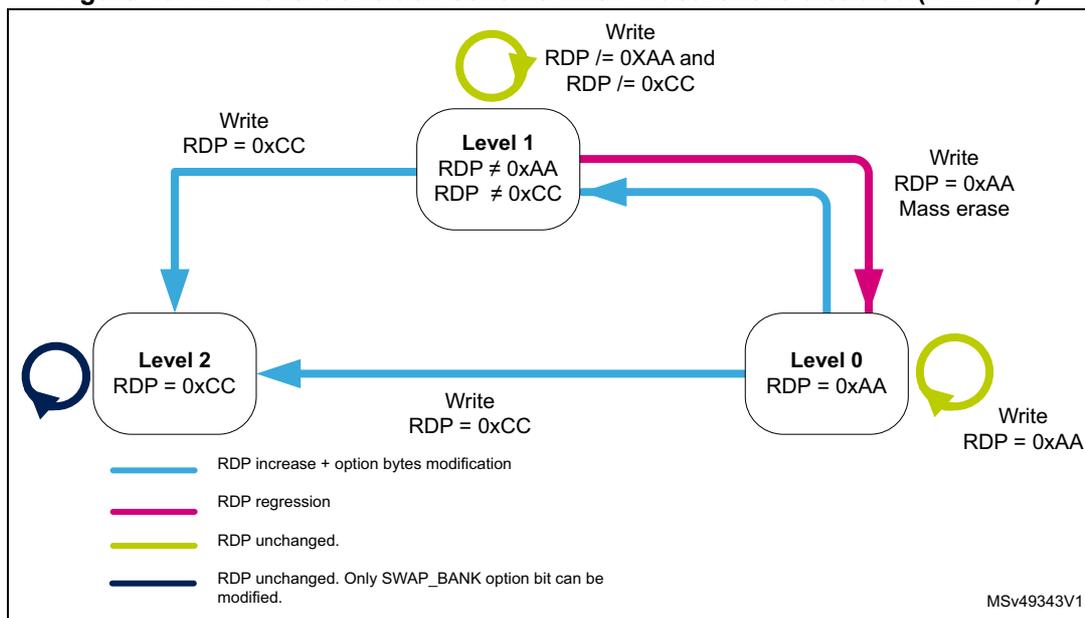
Figure 17. RDP level transition scheme when TrustZone is enabled (TZEN=1)
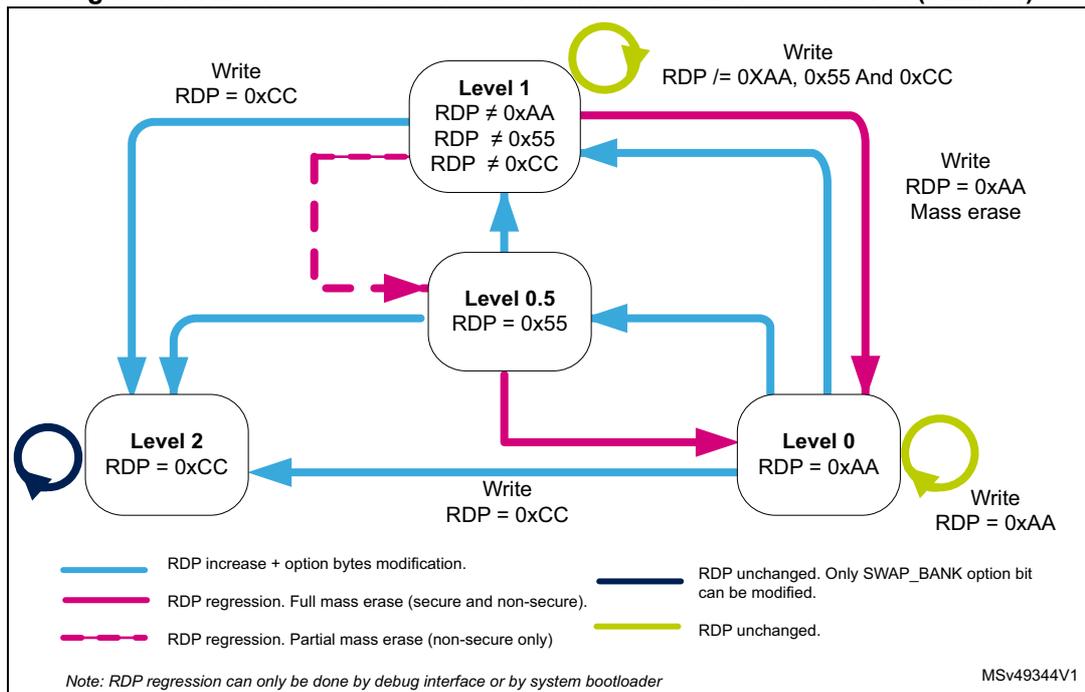
Summary of flash memory and flash registers access control
Table 47 to Table 49 summarize all the flash memory access versus RDP level, WPR and HDP protection when TrustZone is active and disabled.
Table 47. Flash access versus RDP level when TrustZone is active (TZEN=1)| Access type | RDP level-0, RDP level-0.5, RDP level-1 no intrusion (1) or RDP level-2 | RDP level-1 with intrusion (2) | |||
|---|---|---|---|---|---|
| Non-secure page | Secure page | Non-secure or secure page | |||
| HDP area (HDPxEN=1 and HDPx_ACCDIS= 1) | Others (3) | ||||
| Secure | Fetch | Bus error | RAZ | OK | Bus error |
| Read | RAZ, flash illegal access event | ||||
| Write | WI, SECWRPERR flag set, flash illegal access event | WI, SECWRPERR flag set | NO WRP: OK WRP pages: WI and SECWRPERR flag set | WI, SECWRPERR flag set | |
| Page erase | |||||
| Non-Secure | Fetch | OK | Bus error | Bus error | |
| Read | RAZ, flash illegal access event | ||||
| Write | NO WRP: OK WRP pages: WI and NSWRPERR flag set | WI, NSWRPERR flag set, flash illegal access event | WI, NSWRPERR flag set | ||
| Page erase | |||||
- Level 1 no intrusion = when booting from user flash and no debug access.
- Level 1 with intrusion = when debug access is detected.
- Others refers to other flash memory secure configuration than the one described for HDP protections. Example: flash secure HDP area enabled but ACCDIS=0.
| Access type | RDP level-0, RDP level-1 no intrusion (1) or RDP level-2 | RDP level-1 with intrusion (2) |
|---|---|---|
| Fetch | OK | Bus error |
| Read | ||
| Write | NO WRP: OK WRP pages: WI and NSWRPERR flag set | WI and NSWRPERR flag set |
| Erase |
- Level 1 no intrusion = when booting from user flash and no debug access.
- RDP Level 1 with intrusion = when booting from user flash and no debug access.
Table 49. Flash mass erase versus RDP level when TrustZone is active (TZEN = 1)
| Access type | RDP level-0, RDP level-0.5, RDP level-1 no intrusion (1) or RDP level-2 | RDP level-1 with intrusion (2) | ||||
|---|---|---|---|---|---|---|
| Non-secure flash | Secure flash | Mix non-secure and secure flash | Non-secure or secure flash | |||
| HDP area (HDPxEN=1 and HDPx_ACCDIS = 1) | Others (3) | |||||
| Secure | Bank or mass erase | WI, SECWRPERR flag set, flash illegal access event | WI, SECWRPERR flag set | NO WRP: OK WRP pages: WI and SECWRPERR flag set | WI, SECWRPERR flag set, flash illegal access event | WI, SECWRPERR flag set |
| Non-secure | Bank or mass erase | NO WRP: OK WRP pages: WI and NSWRPERR flag set | WI, NSWRPERR flag set, flash illegal access event | |||
- 1. RDP Level 1 no intrusion = when booting from user flash and no debug access.
- 2. RDP Level 1 with intrusion = when booting from user flash and debug access is detected.
- 3. Others refers to other flash secure configuration than the one described for HDP protections. Example: flash secure, HDP area enabled but HDPxACCDIS = 0.
| Access type | System memory (bootloader) | OTP | RSS | |
|---|---|---|---|---|
| Secure | Fetch | Bus error | RAZ | |
| Read | RAZ, and a flash illegal access event | |||
| Write | WI, SECWRPERR flag set, flash illegal access event | WI, SECWRPERR flag set | ||
| Non-secure (TZEN = 0 or TZEN = 1) | Fetch | OK | Bus error | Bus error |
| Read | OK | RAZ, flash illegal access event (2) | ||
| Write | WI and NSWRPERR flag set | OK if not virgin: WI, NSPROGERR flag set | WI, NSWRPERR, flash illegal access event (3) | |
- 1. Valid for all RDP levels.
- 2. Flash illegal access event is only generated when TZEN=1.
Table 51. Flash registers access
| Access type | Non-secure register | Secure register | ||||
|---|---|---|---|---|---|---|
| PRIV=1 | PRIV=0 | PRIV=1 | PRIV=0 | |||
| Fetch | Secure/ non-secure | Privileged/ unprivileged | Bus error | |||
| Read/ Write | Secure (1) | Privileged | OK | |||
| Unprivileged | RAZ/WI | OK | RAZ/WI | OK | ||
| Non-secure (2) | Privileged | OK | RAZ/WI and a flash register illegal access event (3) | |||
| Unprivileged | RAZ/WI | OK | ||||
- 1. Secure access is only valid when TrsutZone is active (TZEN=1).
- 2. Non-secure access are valid when TrsutZone is active or disabled.
- 3. Flash register illegal access event is only generated when TZEN=1.
6.8 FLASH interrupts
Table 52. Flash interrupt request
| Interrupt Vector | Interrupt event | Event flag | Event flag/interrupt clearing method | Interrupt enable control bit |
|---|---|---|---|---|
| FLASH_S | Secure end of operation | SECEOP (1) | Write SECEOP=1 | SECEOPIE |
| Secure operation error | SECOPERR (2) | Write SECOPERR=1 | SECERRIE | |
| Secure read error | SECRDERR | Write SECRDERR=1 | SECRDERRIE | |
| FLASH | Non-secure End of operation | NSEOP (3) | Write NSEOP=1 | NSEOPIE |
| Non-secure operation error | NSOPERR (4) | Write NSOPERR=1 | NSERRIE | |
| ECC correction | ECCC | Write ECCC=1 | ECCIE |
- 1. SECEOP or NSEOP are set only if SECEOPIE or is NSEOPIE is set.
- 2. SECOPERR is set only if SECERRIE is set.
- 3. SECEOP is set only if SECEOPIE is set.
- 4. NSOPERR is set only if NSERRIE is set.
6.9 FLASH registers
6.9.1 Flash access control register (FLASH_ACR)
This register is non-secure. It can be read and written by both secure and non-secure access. This register can be protected against non-privileged access when PRIV=1 in the FLASH_PRIVCFG register.
Address offset: 0x00
Reset value: 0x0000 0000
Access: no wait state, word, half-word and byte access
| 31 | 30 | 29 | 28 | 27 | 26 | 25 | 24 | 23 | 22 | 21 | 20 | 19 | 18 | 17 | 16 |
|---|---|---|---|---|---|---|---|---|---|---|---|---|---|---|---|
| Res. | Res. | Res. | Res. | Res. | Res. | Res. | Res. | Res. | Res. | Res. | Res. | Res. | Res. | Res. | Res. |
| 15 | 14 | 13 | 12 | 11 | 10 | 9 | 8 | 7 | 6 | 5 | 4 | 3 | 2 | 1 | 0 |
| LVEN | SLEEP_PD | RUN_PD | Res. | Res. | Res. | Res. | Res. | Res. | Res. | Res. | Res. | LATENCY[3:0] | |||
| rw | rw | rw | rw | rw | rw | rw | |||||||||
Bits 31:16 Reserved, must be kept at reset value.
Bit 15 LVEN : Flash low-voltage enable
This bit can only be written when it is unlocked by writing the FLASH_LVEKEYR register. When set, this bit enable the flash low voltage and bypass the voltage range selected by PWR. This bit must be set when using the external SMPS.
When this bit is cleared, it is locked again.
0: Flash low voltage is disabled. flash low voltage is managed by the power controller PWR.
1: Flash low voltage is enabled.
Bit 14 SLEEP_PD : Flash power-down mode during Sleep or Low-power sleep mode
This bit determines whether the flash memory is in power-down mode or Idle mode when the device is in Sleep or Low-power sleep mode.
0: Flash in Idle mode during Sleep and Low-power sleep modes
1: Flash in power-down mode during Sleep and Low-power sleep modes
Caution: The flash must not be put in power-down while a program or an erase operation is on-going.
Bit 13 RUN_PD : Flash power-down mode during Run or Low-power run mode
This bit is write-protected with FLASH_PDKEYR.
This bit determines whether the flash memory is in power-down mode or Idle mode when the device is in Run or Low-power run mode. The flash memory can be put in power-down mode only when the code is executed from RAM. The flash must not be accessed when RUN_PD is set.
0: Flash in Idle mode
1: Flash in Power-down mode
Caution: The flash must not be put in power-down while a program or an erase operation is on-going.
Bits 12:4 Reserved, must be kept at reset value.
Bits 3:0 LATENCY[3:0] : Latency
These bits represent the ratio of the SYSCLK (system clock) period to the flash access time.
0000: Zero wait state
0001: One wait state
0010: Two wait states
0011: Three wait states
0100: Four wait states
...1111: Fifteen wait states
6.9.2 Flash power-down key register (FLASH_PDKEYR)
This register is non-secure. It can be read and written by both secure and non-secure access.
This register can be protected against non-privileged access when PRIV=1 in the FLASH_PRIVCFG register.
Address offset: 0x04
Reset value: 0x0000 0000
Access: no wait state, word access

| 31 | 30 | 29 | 28 | 27 | 26 | 25 | 24 | 23 | 22 | 21 | 20 | 19 | 18 | 17 | 16 |
| PDKEYR[31:16] | |||||||||||||||
| w | w | w | w | w | w | w | w | w | w | w | w | w | w | w | w |
| 15 | 14 | 13 | 12 | 11 | 10 | 9 | 8 | 7 | 6 | 5 | 4 | 3 | 2 | 1 | 0 |
| PDKEYR[15:0] | |||||||||||||||
| w | w | w | w | w | w | w | w | w | w | w | w | w | w | w | w |
Bits 31:0 PDKEYR[31:0] : Power-down in Run mode flash key
The following values must be written consecutively to unlock the RUN_PD bit in FLASH_ACR:
PDKEY1: 0x0415 2637
PDKEY2: 0xFAFB FCFD
6.9.3 Flash non-secure key register (FLASH_NSKEYR)
This register is non-secure. It can be read and written by both secure and non-secure access.
This register can be protected against non-privileged access when PRIV=1 in the FLASH_PRIVCFG register.
Address offset: 0x08
Reset value: 0x0000 0000
Access: no wait state, word access

| 31 | 30 | 29 | 28 | 27 | 26 | 25 | 24 | 23 | 22 | 21 | 20 | 19 | 18 | 17 | 16 |
| NSKEYR[31:16] | |||||||||||||||
| w | w | w | w | w | w | w | w | w | w | w | w | w | w | w | w |
| 15 | 14 | 13 | 12 | 11 | 10 | 9 | 8 | 7 | 6 | 5 | 4 | 3 | 2 | 1 | 0 |
| NSKEYR[15:0] | |||||||||||||||
| w | w | w | w | w | w | w | w | w | w | w | w | w | w | w | w |
Bits 31:0 NSKEYR[31:0] : Flash non secure key
The following values must be written consecutively to unlock the FLASH_NSCR register allowing flash non-secure programming/erasing operations:
KEY1: 0x4567 0123
KEY2: 0xCDEF 89AB
6.9.4 Flash secure key register (FLASH_SECKEYR)
This register is secure. It can be read and written only by secure access. A non-secure read/write access is RAZ/WI.
This register can be protected against non-privileged access when PRIV=1 in the FLASH_PRIVCFG register.
Address offset: 0x0C
Reset value: 0x0000 0000
Access: no wait state, word access

| 31 | 30 | 29 | 28 | 27 | 26 | 25 | 24 | 23 | 22 | 21 | 20 | 19 | 18 | 17 | 16 |
| SECKEYR[31:16] | |||||||||||||||
| w | w | w | w | w | w | w | w | w | w | w | w | w | w | w | w |
| 15 | 14 | 13 | 12 | 11 | 10 | 9 | 8 | 7 | 6 | 5 | 4 | 3 | 2 | 1 | 0 |
| SECKEYR[15:0] | |||||||||||||||
| w | w | w | w | w | w | w | w | w | w | w | w | w | w | w | w |
Bits 31:0 SECKEYR[31:0] : Flash secure key
The following values must be written consecutively to unlock the FLASH_SECCR register allowing flash secure programming/erasing operations:
KEY1: 0x4567 0123
KEY2: 0xCDEF 89AB
6.9.5 Flash option key register (FLASH_OPTKEYR)
This register is non-secure. It can be read and written by both secure and non-secure access.
This register can be protected against non-privileged access when PRIV=1 in the FLASH_PRIVCFG register.
Address offset: 0x10
Reset value: 0x0000 0000
Access: no wait state, word access
| 31 | 30 | 29 | 28 | 27 | 26 | 25 | 24 | 23 | 22 | 21 | 20 | 19 | 18 | 17 | 16 |
| OPTKEYR[31:16] | |||||||||||||||
| w | w | w | w | w | w | w | w | w | w | w | w | w | w | w | w |
| 15 | 14 | 13 | 12 | 11 | 10 | 9 | 8 | 7 | 6 | 5 | 4 | 3 | 2 | 1 | 0 |
| OPTKEYR[15:0] | |||||||||||||||
| w | w | w | w | w | w | w | w | w | w | w | w | w | w | w | w |
Bits 31:0 OPTKEYR[31:0] : Option byte key
The following values must be written consecutively to unlock the FLASH_OPTR register allowing option byte programming/erasing operations:
KEY1: 0x0819 2A3B
KEY2: 0x4C5D 6E7F
6.9.6 Flash low voltage key register (FLASH_LVEKEYR)
This register is non-secure. It can be read and written by both secure and non-secure access.
This register can be protected against non-privileged access when PRIV=1 in the FLASH_PRIVCFG register.
Address offset: 0x14
Reset value: 0x0000 0000
Access: no wait state, word access
| 31 | 30 | 29 | 28 | 27 | 26 | 25 | 24 | 23 | 22 | 21 | 20 | 19 | 18 | 17 | 16 |
| LVEKEYR[31:16] | |||||||||||||||
| w | w | w | w | w | w | w | w | w | w | w | w | w | w | w | w |
| 15 | 14 | 13 | 12 | 11 | 10 | 9 | 8 | 7 | 6 | 5 | 4 | 3 | 2 | 1 | 0 |
| LVEKEYR[15:0] | |||||||||||||||
| w | w | w | w | w | w | w | w | w | w | w | w | w | w | w | w |
Bits 31:0 LVEKEYR[31:0] : Flash low voltage key
The following values must be written consecutively to unlock the LVEN bit in FLASH_ACR register:
LVEKEY1: 0xF4F5 F6F7h
LVEKEY2: 0xA1B 2C3D
6.9.7 Flash status register (FLASH_NSSR)
This register is non-secure. It can be read and written by both secure and non-secure access.
This register can be protected against non-privileged access when PRIV=1 in the FLASH_PRIVCFG register.
Address offset: 0x20
Reset value: 0x0000 0000
Access: no wait state, word, half-word and byte access
| 31 | 30 | 29 | 28 | 27 | 26 | 25 | 24 | 23 | 22 | 21 | 20 | 19 | 18 | 17 | 16 |
|---|---|---|---|---|---|---|---|---|---|---|---|---|---|---|---|
| Res. | Res. | Res. | Res. | Res. | Res. | Res. | Res. | Res. | Res. | Res. | Res. | Res. | Res. | Res. | NSBSY |
| 15 | 14 | 13 | 12 | 11 | 10 | 9 | 8 | 7 | 6 | 5 | 4 | 3 | 2 | 1 | 0 |
| Res. | Res. | OPTWERR | Res. | Res. | Res. | Res. | Res. | NSPGSERR | NSSIZER | NSPGAERR | NSWRPERR | NSPROGER | Res. | NSOPE | NSEOP |
| rc_w1 | rc_w1 | rc_w1 | rc_w1 | rc_w1 | rc_w1 | rc_w1 | rc_w1 |
Bits 31:17 Reserved, must be kept at reset value.
Bit 16 NSBSY : Busy
This indicates that a flash secure or non-secure operation is in progress. This is set on the beginning of a flash operation and reset when the operation finishes or when an error occurs.
Bit 15 Reserved, must be kept at reset value.
Bit 14 Reserved, must be kept at reset value.
Bit 13 OPTWERR : Option write error
Set by hardware when the options bytes are written with an invalid configuration.
Cleared by writing 1.
Refer to Section 6.3.8: Flash errors flags for full conditions of error flag setting.
Bits 12:8 Reserved, must be kept at reset value.
Bit 7 NSPGSERR : Non-secure programming sequence error
This bit is set by hardware when programming sequence is not correct. It is cleared by writing 1.
Refer to Section 6.3.8: Flash errors flags for full conditions of error flag setting.
Bit 6 NSSIZER : Non-secure size error
Set by hardware when the size of the access is a byte or half-word during a non-secure program sequence. Only double word programming is allowed (consequently: word access). Cleared by writing 1.
Bit 5 NSPGAERR : Non-secure programming alignment error
Set by hardware when the first word to be programmed is not aligned with a double word address, or the second word does not belong to the same double word address. Cleared by writing 1.
Bit 4 NSWRPERR : Non-secure write protection error
Set by hardware when an non-secure address to be erased/programmed belongs to a write-protected part (by WRP, HDP or RDP level 1) of the flash memory.
Cleared by writing 1.
Refer to Section 6.3.8: Flash errors flags for full conditions of error flag setting.
Bit 3 NSPROGERR : Non-secure programming error
Set by hardware when a non-secure double-word address to be programmed contains a value different from '0xFFFF FFFF' before programming, or when already fully programmed to '0x0000 0000'.
Cleared by writing 1.
Bit 2 Reserved, must be kept at reset value.
Bit 1 NSOPERR : Non-secure operation error
Set by hardware when a flash memory non-secure operation (program / erase) completes unsuccessfully.
This bit is set only if non-secure error interrupts are enabled (NSERRIE = 1).
Cleared by writing '1'.
Bit 0 NSEOP : Non-secure End of operation
Set by hardware when one or more flash memory non-secure operation (programming / erase) has been completed successfully.
This bit is set only if the non-secure end of operation interrupts are enabled (NSEOPIE = 1).
Cleared by writing 1.
6.9.8 Flash status register (FLASH_SECSR)
This register is secure. It can be read and written only by secure access. A non-secure read/write access is RAZ/WI.
This register can be protected against non-privileged access when PRIV=1 in the FLASH_PRIVCFG register.
Address offset: 0x24
Reset value: 0x0000 0000
Access: no wait state, word, half-word and byte access
| 31 | 30 | 29 | 28 | 27 | 26 | 25 | 24 | 23 | 22 | 21 | 20 | 19 | 18 | 17 | 16 |
|---|---|---|---|---|---|---|---|---|---|---|---|---|---|---|---|
| Res. | Res. | Res. | Res. | Res. | Res. | Res. | Res. | Res. | Res. | Res. | Res. | Res. | Res. | Res. | SECBSY |
| r | |||||||||||||||
| 15 | 14 | 13 | 12 | 11 | 10 | 9 | 8 | 7 | 6 | 5 | 4 | 3 | 2 | 1 | 0 |
| Res. | Res. | Res. | Res. | Res. | Res. | Res. | Res. | SECGSER R | SECSIZ ERR | SEC PG AERR | SEC W RPERR | SECP ROGE RR | Res. | SECOP ERR | SECEO P |
| rc_w1 | rc_w1 | rc_w1 | rc_w1 | rc_w1 | rc_w1 | rc_w1 |
Bits 31:17 Reserved, must be kept at reset value.
Bit 16 SECBSY : Busy
This indicates that a flash secure or non-secure operation is in progress. This is set on the beginning of a flash operation and reset when the operation finishes or when an error occurs.
Bit 15 Reserved, must be kept at reset value.
Bits 14:8 Reserved, must be kept at reset value.
Bit 7 SECPGSERR : Secure programming sequence error
Set by hardware when a NSSTRT bit is set by a secure access. Set also by hardware when SECPROGERR, SECSIZERR, SECPGAERR, SECWRPERR or SECPGSER is set due to a previous programming error.
Cleared by writing 1.
Refer to Section 6.3.8: Flash errors flags for full conditions of error flag setting.
Bit 6 SECSIZERR : Secure size error
Set by hardware when the size of the access is a byte or half-word during a secure program sequence. Only double word programming is allowed (consequently: word access).
Cleared by writing 1.
Bit 5 SECPGAERR : Secure programming alignment error
Set by hardware when the first word to be programmed is not aligned with a double word address, or the second word does not belong to the same double word address.
Cleared by writing 1.
Bit 4 SECWRPERR : Secure write protection error
Set by hardware when an secure address to be erased/programmed belongs to a write-protected part (by WRP, HDP or RDP level 1) of the flash memory.
Cleared by writing 1.
Refer to Section 6.3.8: Flash errors flags for full conditions of error flag setting.
Bit 3 SECPROGERR : Secure programming error
Set by hardware when a secure double-word address to be programmed contains a value different from '0xFFFF FFFF' before programming, or already fully programmed to '0x0000 0000'.
Cleared by writing 1.
Bit 2 Reserved, must be kept at reset value.
Bit 1 SECOPERR : Secure operation error
Set by hardware when a flash memory secure operation (program / erase) completes unsuccessfully.
This bit is set only if secure error interrupts are enabled (SECERRIE = 1).
Cleared by writing '1'.
Bit 0 SECEOP : Secure end of operation
Set by hardware when one or more flash memory secure operation (programming / erase) has been completed successfully.
This bit is set only if the secure end of operation interrupts are enabled (SECEOPIE = 1).
Cleared by writing 1.
6.9.9 Flash non-secure control register (FLASH_NSCR)
This register can only be written when the SECBSY, NSBSY or OBL_LAUNCH are reset. Otherwise, the write access is stalled till SECBSY and NSBSY are reset.
This register is non-secure. It can be read and written by both secure and non-secure access.
This register can be protected against non-privileged access when PRIV=1 in the FLASH_PRIVCFG register.
Address offset: 0x28
Reset value: 0xC000 0000
Access: no wait state when no flash memory operation is on going, word, half-word and byte access
| 31 | 30 | 29 | 28 | 27 | 26 | 25 | 24 | 23 | 22 | 21 | 20 | 19 | 18 | 17 | 16 |
|---|---|---|---|---|---|---|---|---|---|---|---|---|---|---|---|
| NSLOCK | OPTLOCK | Res. | Res. | OBL_LAUNCH | Res. | NSERRIE | NSEOP IE | Res. | Res. | Res. | Res. | Res. | Res. | OPTST RT | NSSTR T |
| rs | rs | rc_w1 | rw | rw | rs | rs |
| 15 | 14 | 13 | 12 | 11 | 10 | 9 | 8 | 7 | 6 | 5 | 4 | 3 | 2 | 1 | 0 |
|---|---|---|---|---|---|---|---|---|---|---|---|---|---|---|---|
| NSMER R2 | Res. | Res. | Res. | NSBKER | Res. | NSPNB[6:0] | NSMER 1 | NSPER T | NSPG | ||||||
| rw | rw | rw | rw | rw | rw | rw | rw | rw | rw | rw | rw | ||||
Bit 31 NSLOCK: FLASH_NSCR Lock
This bit is set only. When set, the FLASH_NSCR register is locked. It is cleared by hardware after detecting the unlock sequence in FLASH_NSKEYR register.
In case of an unsuccessful unlock operation, this bit remains set until the next system reset.
Bit 30 OPTLOCK: Options Lock
This bit is set only. When set, all bits concerning user option in FLASH_OPTCR register. This bit is cleared by hardware after detecting the unlock sequence. The NSLOCK bit must be cleared before doing the unlock sequence for OPTLOCK bit.
In case of an unsuccessful unlock operation, this bit remains set until the next reset.
Bits 29:28 Reserved, must be kept at reset value.
Bit 27 OBL_LAUNCH: Force the option byte loading
When set to 1, this bit forces the option byte reloading. This bit is cleared only when the option byte loading is complete. It cannot be written if OPTLOCK is set.
0: Option byte loading complete
1: Option byte loading requested
Bit 26 Reserved, must be kept at reset value.
Bit 25 NSERRIE: Non-secure error interrupt enable
This bit enables the interrupt generation when the NSOPERR bit in the FLASH_NSSR is set to 1.
0: NSOPERR error interrupt disabled
1: NSOPERR error interrupt enabled
Bit 24 NSEOPIE : Non-secure End of operation interrupt enable
This bit enables the interrupt generation when the NSEOP bit in the FLASH_NSSR is set to 1.
0: NSEOP Interrupt disabled
1: NSEOP Interrupt enabled
Bits 23:18 Reserved, must be kept at reset value.
Bit 17 OPTSTRT : Options modification start
This bit triggers an options operation when set. It can not be written if OPTLOCK bit is set.
This bit is set only by software, and is cleared when the NSBSY bit is cleared in FLASH_NSSR.
Bit 16 NSSTRT : Non-secure start
This bit triggers a non-secure erase operation when set. If NSMER1, NSMER2 and NSPER bits are reset and the NSSTRT bit is set, the NSPGERR is set. This condition should be forbidden.
This bit is set only by software, and is cleared when the NSBSY bit is cleared in FLASH_NSSR.
Bit 15 NSMER2 : Non-secure Bank 2 Mass erase
This bit triggers the bank 2 non-secure mass erase (all bank 2 user pages) when set.
Bits 14:12 Reserved, must be kept at reset value.
Bit 11 NSBKER : Non-secure page number MSB (bank selection)
This bit must be only set when DBANK=1.
0: Bank 1 is selected for non-secure page erase
1: Bank 2 is selected for non-secure page erase.
Bit 10 Reserved, must be kept at reset value.
Bits 9:3 NSPNB[6:0] : Non-secure page number selection
These bits select the page to erase:
00000000:page 0
00000001:page 1
...
11111111:page 127
Bit 2 NSMER1 : Non-secure bank 1 mass erase
This bit triggers the bank 1 non-secure mass erase (all bank 1 user pages) when set.
Bit 1 NSPER : Non-secure page erase
0: Non-secure page erase disabled
1: Non-secure page erase enabled
Bit 0 NSPG : Non-secure programming
0: Non-secure flash programming disabled
1: Non-secure flash programming enabled
6.9.10 Flash secure control register (FLASH_SECCR)
This register can only be written when the SECBSY, NSBSY or OBL_LAUNCH are reset. Otherwise, the write access stalls till SECBSY and NSBSY are reset.
This register is secure. It can be read and written only by secure access. A non-secure read/write access is RAZ/WI.
This register can be protected against non-privileged access when PRIV=1 in the FLASH_PRIVCFG register.
Address offset: 0x2C
Reset value: 0x8000 0000
Access: no wait state when no flash memory operation is on going, word, half-word and byte access
| 31 | 30 | 29 | 28 | 27 | 26 | 25 | 24 | 23 | 22 | 21 | 20 | 19 | 18 | 17 | 16 |
|---|---|---|---|---|---|---|---|---|---|---|---|---|---|---|---|
| SECL OCK | Res. | SECIN V | Res. | Res. | Res. | SECER RIE | SEC EO PIE | Res. | Res. | Res. | Res. | Res. | Res. | Res. | SECST RT |
| rs | rs | rw | rw | rw | |||||||||||
| 15 | 14 | 13 | 12 | 11 | 10 | 9 | 8 | 7 | 6 | 5 | 4 | 3 | 2 | 1 | 0 |
| SECME R2 | Res. | Res. | Res. | SECBKE R | Res. | SECPNB[6:0] | SECME R1 | SECPE R | SECPG | ||||||
| rw | rw | rw | rw | rw | rw | rw | rw | rw | rw | rw | rw | ||||
Bit 31 SECLOCK : FLASH_SECCR Lock
This bit is set only. When set, the FLASH_SECCR register is locked. It is cleared by hardware after detecting the unlock sequence in FLASH_SECKEYR register.
In case of an unsuccessful unlock operation, this bit remains set until the next system reset.
Bit 30 Reserved, must be kept at reset value.
Bit 29 SECINV : Flash security state invert
This bit inverts the flash security state
Bits 28:26 Reserved, must be kept at reset value.
Bit 25 SECERRIE : Secure error interrupt enable
This bit enables the interrupt generation when the SECOPERR bit in the FLASH_SECSR is set to 1.
0: SECOPERR error interrupt disabled
1: SECOPERR error interrupt enabled
Bit 24 SEC EOPIE : Secure End of operation interrupt enable
This bit enables the interrupt generation when the SECEOP bit in the FLASH_SECSR is set to 1.
0: SECEOP Interrupt disabled
1: SECEOP Interrupt enabled
Bits 23:17 Reserved, must be kept at reset value.
Bit 16 SECSTRT : Secure start
This bit triggers a non-secure erase operation when set. If SECMER1, SECMER2 and SECPE bits are reset and the SECSTRT bit is set, the SECPEERR is set. This condition should be forbidden.
This bit is set only by software, and is cleared when the SECBSY bit is cleared in FLASH_SECSR.
Bit 15 SECMER2 : Secure bank 2 mass erase
This bit triggers the bank 2 secure mass erase (all bank 2 user pages) when set.
Bits 14:12 Reserved, must be kept at reset value.
Bit 11 SECBKER : Secure page number MSB (bank selection)
This bit must be only set when DBANK=1.
0: Bank 1 is selected for secure page erase
1: Bank 2 is selected for secure page erase
When DBANK=0, this bit must be kept cleared.
Bit 10 Reserved, must be kept at reset value.
Bits 9:3 SECPNB[6:0] : Secure page number selection
These bits select the page to erase:
0000000:page 0
0000001:page 1
...
1111111:page 127
Bit 2 SECMER1 : Secure bank 1 mass erase
This bit triggers the bank 1 secure mass erase (all bank 1 user pages) when set.
Bit 1 SECPER : Secure page erase
0: Secure page erase disabled
1: Secure page erase enabled
Bit 0 SECPG : Non-secure programming
0: Secure flash programming disabled
1: Secure flash programming enabled
6.9.11 Flash ECC register (FLASH_ECCR)
This register is non-secure. It can be read and written by both secure and non-secure access.
This register can be protected against non-privileged access when PRIV=1 in the FLASH_PRIVCFGR register.
Address offset: 0x30
Reset value: 0x0000 0000
Access: no wait state when no flash memory operation is on going, word, half-word and byte access
| 31 | 30 | 29 | 28 | 27 | 26 | 25 | 24 | 23 | 22 | 21 | 20 | 19 | 18 | 17 | 16 |
|---|---|---|---|---|---|---|---|---|---|---|---|---|---|---|---|
| ECCD | ECCC | ECCD2 | ECCC2 | Res. | Res. | Res. | ECCIE | Res. | SYSF_ ECC | BK_EC C | Res. | Res. | ADDR_ECC[18:16] | ||
| rc_w1 | rc_w1 | rc_w1 | rc_w1 | rw | rw | rw | r | r | r | ||||||
| 15 | 14 | 13 | 12 | 11 | 10 | 9 | 8 | 7 | 6 | 5 | 4 | 3 | 2 | 1 | 0 |
| ADDR_ECC[15:0] | |||||||||||||||
| r | r | r | r | r | r | r | r | r | r | r | r | r | r | r | r |
DBANK=0
Set by hardware when two ECC errors have been detected (only if ECCC/ECCC2/ECCD/ECCD2 are previously cleared). When this bit is set, a NMI is generated.
Cleared by writing 1.
DBANK=1
Set by hardware when two ECC errors have been detected on 64-bits LSB (bits 63:0) (only if ECCC/ECCC2/ECCD/ECCD2 are previously cleared). When this bit is set, a NMI is generated.
Cleared by writing 1.
Bit 30 ECCC : ECC correctionSet by hardware when one ECC error has been detected and corrected. An interrupt is generated if ECCIE is set.
Cleared by writing 1.
Bit 29 ECCD2 : ECC2 detectionDBANK=0
Set by hardware when two ECC errors have been detected on 64-bits MSB (bits 127:64).
This bit is set (only if ECCC/ECCC2/ECCD/ECCD2 are previously cleared). When this bit is set, a NMI is generated.
Cleared by writing 1.
DBANK=1
Reserved, must be kept at reset value.
Bit 28 ECCC2 : ECC correctionDBANK=0
Set by hardware when one ECC error has been detected and corrected on 64-bits MSB (bits 127:64). This bit is set (only if ECCC/ECCC2/ECCD/ECCD2 are previously cleared). An interrupt is generated if ECCIE is set.
Cleared by writing 1.
DBANK=1
Reserved, must be kept at reset value.
Bits 27:25 Reserved, must be kept at reset value.
Bit 24 ECCIE : ECC correction interrupt enable0: ECCC interrupt disabled
1: ECCC interrupt enabled.
DBANK=0
This bit enables the interrupt generation when the ECCC or ECCC2 bits in the FLASH_ECCR register are set.
DBANK=1
This bit enables the interrupt generation when the ECCC bit in the FLASH_ECCR register is set.
Bit 23 Reserved, must be kept at reset value.
Bit 22 SYSF_ECC : System flash ECC failThis bit indicates that the ECC error correction or double ECC error detection is located in the system flash.
Bit 21 BK_ECC : ECC fail bank
DBANK=1
This bit indicates which bank is concerned by the ECC error correction or by the double ECC error detection.
0: bank 1
1: bank 2
DBANK=0
If SYSF_ECC is 1, it indicates which bank is concerned by the ECC error
If SYSF_ECC is 0, reserved, must be kept cleared.
Bits 20:19 Reserved, must be kept at reset value.
Bits 18:0 ADDR_ECC[18:0] : ECC fail address
This bit indicates which address is concerned by the ECC error correction or by the double ECC error detection.
6.9.12 Flash option register (FLASH_OPTR)
This register is non-secure. It can be read and written by both secure and non-secure access.
This register can be protected against non-privileged access when PRIV=1 in the FLASH_PRIVCFG register.
Address offset: 0x40
ST production value: 0x7FEFF8AA (Register bits 0 to 31 are loaded with values from flash memory at OBL)
Access: no wait state when no option bytes modification is on going; word, half-word and byte access.
| 31 | 30 | 29 | 28 | 27 | 26 | 25 | 24 | 23 | 22 | 21 | 20 | 19 | 18 | 17 | 16 |
|---|---|---|---|---|---|---|---|---|---|---|---|---|---|---|---|
| TZEN | Res. | Res. | PA15_PUPEN | nBOOT0 | nSWB_OOT0 | SRAM2_RST | SRAM2_PE | Res. | DBANK | DB256K | SWAP_BANK | WWDG_SW | IWDG_STDBY | IWDG_STOP | IWDG_SW |
| rw | rw | rw | rw | rw | rw | rw | rw | rw | rw | rw | rw | rw | |||
| 15 | 14 | 13 | 12 | 11 | 10 | 9 | 8 | 7 | 6 | 5 | 4 | 3 | 2 | 1 | 0 |
| Res. | nRST_SHDW | nRST_STDBY | nRST_STOP | Res. | BOR_LEV[2:0] | RDP[7:0] | |||||||||
| rw | rw | rw | rw | rw | rw | rw | rw | rw | rw | rw | rw | rw | rw | ||
Bit 31 TZEN : Global TrustZone security enable
0: Global TrustZone security disabled.
1: Global TrustZone security enabled.
Bits 30:29 Reserved, must be kept at reset value.
Bit 28 PA15_PUPEN : PA15 pull-up enable
0: USB power delivery dead-battery enabled/ TDI pull-up deactivated
1: USB power delivery dead-battery disabled/ TDI pull-up activated
Bit 27 nBOOT0 : nBOOT0 option bit
0: nBOOT0 = 0
1: nBOOT0 = 1
Bit 26 nSWBOOT0 : Software BOOT0
- 0: BOOT0 taken from the option bit nBOOT0
- 1: BOOT0 taken from PH3/BOOT0 pin
Bit 25 SRAM2_RST : SRAM2 erase when system reset
- 0: SRAM2 erased when a system reset occurs
- 1: SRAM2 is not erased when a system reset occurs
Bit 24 SRAM2_PE : SRAM2 parity check enable
- 0: SRAM2 parity check enable
- 1: SRAM2 parity check disable
Bit 23 Reserved, must be kept at reset value.
Bit 22 DBANK :
- 0: Single bank mode with 128 bits data read width
- 1: Dual bank mode with 64 bits data
- This bit can only be written when all protection (secure, HDP) are disabled.
Bit 21 DB256K : Dual-bank on 256 Kbytes flash memory devices
- 0: 256 Kbytes single flash: contiguous address in bank1
- 1: 256 Kbytes dual-bank flash with contiguous addresses.
Bit 20 SWAP_BANK : Swap banks
- It must be only used in dual-bank mode (DBANK=1). It can only be written when all the flash memory is non-secure. Otherwise the OPTWERR is set.
- 0: Bank 1 and bank 2 address are not swapped.
- 1: Bank 1 and bank 2 address are swapped.
Bit 19 WWDG_SW : Window watchdog selection
- 0: Hardware window watchdog
- 1: Software window watchdog
Bit 18 IWDG_STDBY : Independent watchdog counter freeze in Standby mode
- 0: Independent watchdog counter is frozen in Standby mode
- 1: Independent watchdog counter is running in Standby mode
Bit 17 IWDG_STOP : Independent watchdog counter freeze in Stop mode
- 0: Independent watchdog counter is frozen in Stop mode
- 1: Independent watchdog counter is running in Stop mode
Bit 16 IWDG_SW : Independent watchdog selection
- 0: Hardware independent watchdog
- 1: Software independent watchdog
Bit 15 Reserved, must be kept at reset value.
Bit 14 nRST_SHDW :
- 0: Reset generated when entering the Shutdown mode
- 1: No reset generated when entering the Shutdown mode
Bit 13 nRST_STDBY :
- 0: Reset generated when entering the Standby mode
- 1: No reset generated when entering the Standby mode
Bit 12 nRST_STOP :
- 0: Reset generated when entering the Stop mode
- 1: No reset generated when entering the Stop mode
Bit 11 Reserved, must be kept at reset value.
Bits 10:8 BOR_LEV[2:0] : BOR reset level
These bits contain the VDD supply level threshold that activates/releases the reset.
000: BOR Level 0. Reset level threshold is around 1.7 V
001: BOR Level 1. Reset level threshold is around 2.0 V
010: BOR Level 2. Reset level threshold is around 2.2 V
011: BOR Level 3. Reset level threshold is around 2.5 V
100: BOR Level 4. Reset level threshold is around 2.8 V
Bits 7:0 RDP[7:0] : Readout protection level
0xAA: Level 0, readout protection not active
0x55: Level 0.5, readout protection not active, only non-secure debug access is possible.
Only available when TrustZone is active (TZEN=1)
0xCC: Level 2, chip readout protection active
Others: Level 1, memories readout protection active
Note: Refer to Section : Level 1: readout protection for more details.
6.9.13 Flash non-secure boot address 0 register (FLASH_NSBOOTADD0R)
This register can not be written if OPTLOCK bit is set.
This register is non-secure. It can be read and written by both secure and non-secure access.
This register can be protected against non-privileged access when PRIV=1 in the FLASH_PRIVCFG register.
Address offset: 0x44
ST production value: 0x0800007F (The option bytes are loaded with values from the flash memory at reset release)
Access: no wait state when no option bytes modification is on going; word, half-word and byte access.

| 31 | 30 | 29 | 28 | 27 | 26 | 25 | 24 | 23 | 22 | 21 | 20 | 19 | 18 | 17 | 16 |
| NSBOOTADD0[24:9] | |||||||||||||||
| w | w | w | w | w | w | w | w | w | w | w | w | w | w | w | w |
| 15 | 14 | 13 | 12 | 11 | 10 | 9 | 8 | 7 | 6 | 5 | 4 | 3 | 2 | 1 | 0 |
| NSBOOTADD0[8:0] | Res. | Res. | Res. | Res. | Res. | Res. | |||||||||
| w | w | w | w | w | w | w | w | w | |||||||
Bits 31:7 NSBOOTADD0[24:0] : Non-secure Boot base address 0
The non-secure boot memory address can be programmed to any address in the valid address range with a granularity of 128 bytes.
The NSBOOTADD0[24:0] correspond to address [31:7]. The NSBOOTADD0 option bytes are selected following the Boot pin or nSWBOOT0 state.
Example:
NSBOOTADD0[24:0] = 0x0100000: Boot from non-secure flash (0x0800 0000)
NSBOOTADD0[24:0] = 0x017F200: Boot from system memory bootloader (0x0BF9 0000)
NSBOOTADD0[24:0] = 0x0040000: Boot from non-secure SRAM1 on S-Bus(0x2000 0000)
Bits 6:0 Reserved, must be kept at reset value.
6.9.14 Flash non-secure boot address 1 register (FLASH_NSBOOTADD1R)
This register can not be written if OPTLOCK bit is set.
This register is non-secure. It can be read and written by both secure and non-secure access.
This register can be protected against non-privileged access when PRIV=1 in the FLASH_PRIVCFG register.
Address offset: 0x48
ST production value: 0x0BF9007F (The option bytes are loaded with values from the flash memory at reset release)
Access: no wait state when no option bytes modification is on going; word, half-word and byte access.

| 31 | 30 | 29 | 28 | 27 | 26 | 25 | 24 | 23 | 22 | 21 | 20 | 19 | 18 | 17 | 16 |
| NSBOOTADD1[24:9] | |||||||||||||||
| w | w | w | w | w | w | w | w | w | w | w | w | w | w | w | w |
| 15 | 14 | 13 | 12 | 11 | 10 | 9 | 8 | 7 | 6 | 5 | 4 | 3 | 2 | 1 | 0 |
| NSBOOTADD1[8:0] | Res | Res | Res | Res | Res | Res | |||||||||
| w | w | w | w | w | w | w | w | w | |||||||
Bits 31:7 NSBOOTADD1[24:0] : Non-secure boot address 1
The non-secure boot memory address can be programmed to any address in the valid address range with a granularity of 128 bytes.
The NSBOOTADD1[24:0] correspond to address [31:7]. The NSBOOTADD0 option bytes are selected following the boot pin or nSWBOOT0 state.
Example:
NSBOOTADD1[24:0] = 0x0100000: Boot from non-secure flash (0x0800 0000)
NSBOOTADD1[24:0] = 0x017F200: Boot from system memory bootloader (0x0BF9 0000)
NSBOOTADD1[24:0] = 0x0040000: Boot from non-secure SRAM1 on S-Bus(0x2000 0000)
Bits 6:0 Reserved, must be kept at reset value.
6.9.15 Flash secure boot address 0 register (FLASH_SECBOOTADD0R)
This register can not be written if OPTLOCK bit is set.
This register is secure. It can be read and written only by secure access. A non-secure read/write access is RAZ/WI.
This register can be protected against non-privileged access when PRIV=1 in the FLASH_PRIVCFG register.
Address offset: 0x4C
ST production value: 0x0C00007C (The option bytes are loaded with values from the flash memory at reset release)
Access: no wait state when no option bytes modification is on going; word, half-word and byte access.
| 31 | 30 | 29 | 28 | 27 | 26 | 25 | 24 | 23 | 22 | 21 | 20 | 19 | 18 | 17 | 16 |
|---|---|---|---|---|---|---|---|---|---|---|---|---|---|---|---|
| SECBOOTADD0[24:9] | |||||||||||||||
| w | w | w | w | w | w | w | w | w | w | w | w | w | w | w | w |
| 15 | 14 | 13 | 12 | 11 | 10 | 9 | 8 | 7 | 6 | 5 | 4 | 3 | 2 | 1 | 0 |
| SECBOOTADD0[8:0] | Res. | Res. | Res. | Res. | BOOT_LOCK | ||||||||||
| w | w | w | w | w | w | w | w | w | rs | ||||||
Bits 31:7 SECBOOTADD0[24:0] : Secure boot base address 0
The secure boot memory address can be programmed to any address in the valid address range with a granularity of 128 bytes.
The SECBOOTADD0[24:0] correspond to address [31:7] The SECBOOTADD0 option bytes are selected following the boot pin or nSWBOOT0 state.
Example:
SECBOOTADD0[24:0] = 0x018 0000: Boot from secure flash (0x0C00 0000)
SECBOOTADD0[24:0] = 0x01F F000: Boot from RSS (0x0FF8 0000)
SECBOOTADD0[24:0] = 0x060 0000: Boot from secure SRAM1 on S-Bus (0x3000 0000)
Bits 6:1 Reserved, must be kept at reset value.
Bit 0 BOOT_LOCK : BOOT LOCK
When set, the boot is always forced to base address value programmed in SECBOOTADD0[24:0] option bytes whatever the boot selection option.
When set, it cannot be cleared.
6.9.16 Flash bank 1 secure watermark1 register (FLASH_SECWM1R1)
This register can not be written if OPTLOCK bit is set.
This register is secure. It can be read and written only by secure access. A non-secure read/write access is RAZ/WI.
This register can be protected against non-privileged access when PRIV=1 in the FLASH_PRIVCFGR register.
Address offset: 0x50
ST production value: 0xFFFFF80 (Register bits are loaded with values from flash memory at OBL. Reserved bits are read as “1”)
Access: no wait state when no option bytes modification is on going; word, half-word and byte access.
| 31 | 30 | 29 | 28 | 27 | 26 | 25 | 24 | 23 | 22 | 21 | 20 | 19 | 18 | 17 | 16 |
|---|---|---|---|---|---|---|---|---|---|---|---|---|---|---|---|
| Res. | Res. | Res. | Res. | Res. | Res. | Res. | Res. | Res. | SECWM1_PEND[6:0] | ||||||
| rw | rw | rw | rw | rw | rw | rw | |||||||||
| 15 | 14 | 13 | 12 | 11 | 10 | 9 | 8 | 7 | 6 | 5 | 4 | 3 | 2 | 1 | 0 |
| Res. | Res. | Res. | Res. | Res. | Res. | Res. | Res. | Res. | SECWM1_PSTR[6:0] | ||||||
| rw | rw | rw | rw | rw | rw | rw | |||||||||
Bits 31:23 Reserved, must be kept at reset value.
Bits 22:16 SECWM1_PEND[6:0] : End page of first secure area
DBANK=1
SECWM1_PEND contains the last page of the secure area in bank 1.
DBANK=0
SECWM1_PEND contains the last page of the first secure area for all memory.
Bits 15:7 Reserved, must be kept at reset value.
Bits 6:0 SECWM1_PSTRT[6:0] : Start page of first secure area
DBANK=1
SECWM1_PSTRT contains the first page of the secure area in bank 1.
DBANK=0
SECWM1_PSTRT contains the first page of the first secure area for all memory.
6.9.17 Flash secure watermark1 register 2 (FLASH_SECWM1R2)
This register can not be written if OPTLOCK bit is set.
This register is secure. It can be read and written only by secure access. A non-secure read/write access is RAZ/WI.
This register can be protected against non-privileged access when PRIV=1 in the FLASH_PRIVCFGR register.
Address offset: 0x54
ST production value: 0x7F807F80 (Register bits are loaded with values from flash memory at OBL)
Access: no wait state when no option bytes modification is on going; word, half-word and byte access
| 31 | 30 | 29 | 28 | 27 | 26 | 25 | 24 | 23 | 22 | 21 | 20 | 19 | 18 | 17 | 16 |
|---|---|---|---|---|---|---|---|---|---|---|---|---|---|---|---|
| HDP1E N | Res. | Res. | Res. | Res. | Res. | Res. | Res. | Res. | HDP1_PEND[6:0] | ||||||
| r/w | r/w | r/w | r/w | r/w | r/w | r/w | r/w | ||||||||
| 15 | 14 | 13 | 12 | 11 | 10 | 9 | 8 | 7 | 6 | 5 | 4 | 3 | 2 | 1 | 0 |
| Res. | Res. | Res. | Res. | Res. | Res. | Res. | Res. | Res. | Res. | Res. | Res. | Res. | Res. | Res. | Res. |
Bit 31 HDP1EN : Hide protection first area enable
0: No HDP area 1
1: HDP first area is enabled.
Bits 30:23 Reserved, must be kept at reset value.
Bits 22:16 HDP1_PEND[6:0] : End page of first hide protection area
DBANK=1
HDP1_PEND contains the last page of the HDP area in bank1.
DBANK=0
HDP1_PEND contains the last page of the first HDP area for all memory.
Bits 15:0 Reserved, must be kept at reset value.
6.9.18 Flash WPR1 area A address register (FLASH_WRP1AR)
This register can not be written if OPTLOCK bit is set.
This register is non-secure. It can be read and written by both secure and non-secure access.
This register can be protected against non-privileged access when PRIV=1 in the FLASH_PRIVCFG register.
Address offset: 0x58
ST production value: 0xFF80FFFF (Register bits are loaded with values from flash memory at OBL. Reserved bits are read as “1”)
Access: no wait state when no option bytes modification is on going; word, half-word and byte access

| 31 | 30 | 29 | 28 | 27 | 26 | 25 | 24 | 23 | 22 | 21 | 20 | 19 | 18 | 17 | 16 |
| Res. | Res. | Res. | Res. | Res. | Res. | Res. | Res. | Res. | WRP1A_PEND[6:0] | ||||||
| rw | rw | rw | rw | rw | rw | rw | |||||||||
| 15 | 14 | 13 | 12 | 11 | 10 | 9 | 8 | 7 | 6 | 5 | 4 | 3 | 2 | 1 | 0 |
| Res. | Res. | Res. | Res. | Res. | Res. | Res. | Res. | Res. | WRP1A_PSTRT[6:0] | ||||||
| rw | rw | rw | rw | rw | rw | rw | |||||||||
Bits 31:23 Reserved, must be kept at reset value.
Bits 22:16 WRP1A_PEND[6:0] : Bank 1 WPR first area “A” end page
DBANK=1
WRP1A_PEND contains the last page of the first WPR area in bank 1.
DBANK=0
WRP1A_PEND contains the last page of the first WPR area for all memory.
Bits 15:7 Reserved, must be kept at reset value.
Bits 6:0 WRP1A_PSTRT[6:0] : bank 1 WPR first area “A” start page
DBANK=1
WRP1A_PSTRT contains the first page of the first WPR area for bank1.
DBANK=0
WRP1A_PSTRT contains the first page of the first WPR area for all memory.
6.9.19 Flash WPR1 area B address register (FLASH_WRP1BR)
This register can not be written if OPTLOCK bit is set.
This register is non-secure. It can be read and written by both secure and non-secure access.
This register can be protected against non-privileged access when PRIV=1 in the FLASH_PRIVCFG register.
Address offset: 0x5C
ST production value: 0xFF80FFFF (Register bits are loaded with values from flash memory at OBL)
Access: no wait state when no option bytes modification is on going; word, half-word and byte access
| 31 | 30 | 29 | 28 | 27 | 26 | 25 | 24 | 23 | 22 | 21 | 20 | 19 | 18 | 17 | 16 |
|---|---|---|---|---|---|---|---|---|---|---|---|---|---|---|---|
| Res. | Res. | Res. | Res. | Res. | Res. | Res. | Res. | Res. | WRP1B_PEND[6:0] | ||||||
| rw | rw | rw | rw | rw | rw | rw | |||||||||
| 15 | 14 | 13 | 12 | 11 | 10 | 9 | 8 | 7 | 6 | 5 | 4 | 3 | 2 | 1 | 0 |
| Res. | Res. | Res. | Res. | Res. | Res. | Res. | Res. | Res. | WRP1B_PSTRT[6:0] | ||||||
| rw | rw | rw | rw | rw | rw | rw | |||||||||
Bits 31:23 Reserved, must be kept at reset value.
Bits 22:16 WRP1B_PEND[6:0] : Bank 1 WRP second area “B” end page
DBANK=1
WRP1B_PEND contains the last page of the second WRP area in bank1.
DBANK=0
WRP1B_PEND contains the last page of the second WRP area for all memory.
Bits 15:7 Reserved, must be kept at reset value.
Bits 6:0 WRP1B_PSTRT[6:0] : Bank 1 WRP second area “B” start page
DBANK=1
WRP1B_PSTRT contains the first page of the second WRP area for bank1.
DBANK=0
WRP1B_PSTRT contains the first page of the second WRP area for all memory.
6.9.20 Flash secure watermark2 register (FLASH_SECWM2R1)
This register can not be written if OPTLOCK bit is set.
This register is secure. It can be read and written only by secure access. A non-secure read/write access is RAZ/WI.
This register can be protected against non-privileged access when PRIV=1 in the FLASH_PRIVCFG register.
Address offset: 0x60
ST production value: 0xFFFFF80 (Register bits are loaded with values from flash memory at OBL)
Access: no wait state when no option bytes modification is on going; word, half-word and byte access
| 31 | 30 | 29 | 28 | 27 | 26 | 25 | 24 | 23 | 22 | 21 | 20 | 19 | 18 | 17 | 16 |
|---|---|---|---|---|---|---|---|---|---|---|---|---|---|---|---|
| Res. | Res. | Res. | Res. | Res. | Res. | Res. | Res. | Res. | SECWM2_PEND[6:0] | ||||||
| rw | rw | rw | rw | rw | rw | rw | |||||||||
| 15 | 14 | 13 | 12 | 11 | 10 | 9 | 8 | 7 | 6 | 5 | 4 | 3 | 2 | 1 | 0 |
| Res. | Res. | Res. | Res. | Res. | Res. | Res. | Res. | Res. | SECWM2_PSTR[6:0] | ||||||
| rw | rw | rw | rw | rw | rw | rw | |||||||||
Bits 31:23 Reserved, must be kept at reset value.
Bits 22:16 SECWM2_PEND[6:0] : End page of second secure area
DBANK=1
SECWM2_PEND contains the last page of the secure area in bank 2.
DBANK=0
SECWM2_PEND contains the last page of the second secure area for all memory.
Bits 15:7 Reserved, must be kept at reset value.
Bits 6:0 SECWM2_PSTR[6:0] : Start page of second secure area
DBANK=1
SECWM2_PSTR contains the first page of the secure area in bank 2.
DBANK=0
SECWM2_PSTR contains the first page of the second secure area for all memory.
6.9.21 Flash secure watermark2 register 2 (FLASH_SECWM2R2)
This register can not be written if OPTLOCK bit is set.
This register is secure. It can be read and written only by secure access. A non-secure read/write access is RAZ/WI.
This register can be protected against non-privileged access when PRIV=1 in the FLASH_PRIVCFG register.
Address offset: 0x64
ST production value: 0x7F807F80 (Register bits are loaded with values from flash memory at OBL)
Access: no wait state when no option bytes modification is on going; word, half-word and byte access
| 31 | 30 | 29 | 28 | 27 | 26 | 25 | 24 | 23 | 22 | 21 | 20 | 19 | 18 | 17 | 16 |
|---|---|---|---|---|---|---|---|---|---|---|---|---|---|---|---|
| HDP2E N | Res. | Res. | Res. | Res. | Res. | Res. | Res. | Res. | HDP2_PEND[6:0] | ||||||
| rw | rw | rw | rw | rw | rw | rw | rw | ||||||||
| 15 | 14 | 13 | 12 | 11 | 10 | 9 | 8 | 7 | 6 | 5 | 4 | 3 | 2 | 1 | 0 |
| Res | Res | Res | Res | Res | Res | Res | Res | Res | Res | Res | Res | Res | Res | Res | Res |
Bit 31 HDP2EN : Hide protection second area enable
0: No HDP area 2
1: HDP second area is enabled.
Bits 30:23 Reserved, must be kept at reset value.
Bits 22:16 HDP2_PEND[6:0] : End page of hide protection second area
DBANK=1
HDP2_PEND contains the last page of the HDP area in bank 2.
DBANK=0
HDP2_PEND contains the last page of the second HDP area for all memory.
Bits 15:0 Reserved, must be kept at reset value.
6.9.22 Flash WPR2 area A address register (FLASH_WRP2AR)
This register can not be written if OPTLOCK bit is set.
This register is non-secure. It can be read and written by both secure and non-secure access.
This register can be protected against non-privileged access when PRIV=1 in the FLASH_PRIVCFG register.
Address offset: 0x68
ST production value: 0xFF80FFFF (Register bits are loaded with values from flash memory at OBL)
Access: no wait state when no option bytes modification is on going; word, half-word and byte access
| 31 | 30 | 29 | 28 | 27 | 26 | 25 | 24 | 23 | 22 | 21 | 20 | 19 | 18 | 17 | 16 |
|---|---|---|---|---|---|---|---|---|---|---|---|---|---|---|---|
| Res. | Res. | Res. | Res. | Res. | Res. | Res. | Res. | Res. | WRP2A_PEND[6:0] | ||||||
| rw | rw | rw | rw | rw | rw | rw | |||||||||
| 15 | 14 | 13 | 12 | 11 | 10 | 9 | 8 | 7 | 6 | 5 | 4 | 3 | 2 | 1 | 0 |
| Res. | Res. | Res. | Res. | Res. | Res. | Res. | Res. | Res. | WRP2A_PSTRT[6:0] | ||||||
| rw | rw | rw | rw | rw | rw | rw | |||||||||
Bits 31:23 Reserved, must be kept at reset value.
Bits 22:16 WRP2A_PEND[6:0] : Bank 2 WPR first area “A” end page
DBANK=1
WRP2A_PEND contains the last page of the first WRP area in bank2.
DBANK=0
WRP2A_PEND contains the last page of the third WRP area for all memory.
Bits 15:7 Reserved, must be kept at reset value.
Bits 6:0 WRP2A_PSTRT[6:0] : Bank 2 WPR first area “A” start page
DBANK=1
WRP2A_PSTRT contains the first page of the first WRP area for bank2.
DBANK=0
WRP2A_PSTRT contains the first page of the third WRP area for all memory.
6.9.23 Flash WPR2 area B address register (FLASH_WRP2BR)
This register can not be written if OPTLOCK bit is set.
This register is non-secure. It can be read and written by both secure and non-secure access.
This register can be protected against non-privileged access when PRIV=1 in the FLASH_PRIVCFG register.
Address offset: 0x6C
ST production value: 0xFF80FFFF (Register bits are loaded with values from flash memory at OBL)
Access: no wait state when no option bytes modification is on going; word, half-word and byte access
| 31 | 30 | 29 | 28 | 27 | 26 | 25 | 24 | 23 | 22 | 21 | 20 | 19 | 18 | 17 | 16 |
|---|---|---|---|---|---|---|---|---|---|---|---|---|---|---|---|
| Res. | Res. | Res. | Res. | Res. | Res. | Res. | Res. | Res. | WRP2B_PEND[6:0] | ||||||
| rw | rw | rw | rw | rw | rw | rw | |||||||||
| 15 | 14 | 13 | 12 | 11 | 10 | 9 | 8 | 7 | 6 | 5 | 4 | 3 | 2 | 1 | 0 |
| Res. | Res. | Res. | Res. | Res. | Res. | Res. | Res. | Res. | WRP2B_PSTRT[6:0] | ||||||
| rw | rw | rw | rw | rw | rw | rw | |||||||||
Bits 31:23 Reserved, must be kept at reset value.
Bits 22:16 WRP2B_PEND[6:0] : Bank 2 WPR second area “B” end page
DBANK=1
WRP2B_PEND contains the last page of the second WRP area in bank 2.
DBANK=0
WRP2B_PEND contains the last page of the fourth WRP area for all memory.
Bits 15:7 Reserved, must be kept at reset value.
Bits 6:0 WRP2B_PSTRT[6:0] : Bank 2 WPR second area “B” start page
DBANK=1
WRP2B_PSTRT contains the first page of the second WRP area for bank 2.
DBANK=0
WRP2B_PSTRT contains the first page of the fourth WRP area for all memory.
6.9.24 FLASH secure block based bank 1 register (FLASH_SECB1Rx)
(where x=1..4)
This register is secure. It can be read and written only by secure access. A non-secure read/write access is RAZ/WI.
This register can be protected against non-privileged access when PRIV=1 in the FLASH_PRIVCFGR register.
Address offset: \( 0x80 + 4 \cdot (x - 1) \) , ( \( x=1..4 \) )
Reset value: 0x0000 0000
Access: no wait state when no option bytes modification is on going; word, half-word and byte access

| 31 | 30 | 29 | 28 | 27 | 26 | 25 | 24 | 23 | 22 | 21 | 20 | 19 | 18 | 17 | 16 |
| SECB1[31:16] | |||||||||||||||
| rw | rw | rw | rw | rw | rw | rw | rw | rw | rw | rw | rw | rw | rw | rw | rw |
| 15 | 14 | 13 | 12 | 11 | 10 | 9 | 8 | 7 | 6 | 5 | 4 | 3 | 2 | 1 | 0 |
| SECB1[15:0] | |||||||||||||||
| rw | rw | rw | rw | rw | rw | rw | rw | rw | rw | rw | rw | rw | rw | rw | rw |
Bits 31:0 SECB1[31:0] : page secure/non-secure attribution
This bit is used to set the page security attribution in bank 1 when dual bank mode or for the all memory in single bank mode.
DBANK=1
0: Page ( \( 32 \cdot x + y \) ) in bank 1 is non secure
1: Page ( \( 32 \cdot x + y \) ) in bank 1 is secure
DBANK=0
0: Page ( \( 32 \cdot x + y \) ) in all memory is non secure
1: Page ( \( 32 \cdot x + y \) ) in all memory is secure
6.9.25 FLASH secure block based bank 2 register (FLASH_SECB2Rx)
(where x=1..4)
This register is secure. It can be read and written only by secure access. A non-secure read/write access is RAZ/WI.
This register can be protected against non-privileged access when PRIV=1 in the FLASH_PRIVCFGR register.
Address offset: \( 0xA0 + 4 \cdot (x - 1) \) , ( \( x=1..4 \) )
Reset value: 0x0000 0000
Access: no wait state when no option bytes modification is on going; word, half-word and byte access

| 31 | 30 | 29 | 28 | 27 | 26 | 25 | 24 | 23 | 22 | 21 | 20 | 19 | 18 | 17 | 16 |
| SECB2[31:16] | |||||||||||||||
| rw | rw | rw | rw | rw | rw | rw | rw | rw | rw | rw | rw | rw | rw | rw | rw |
| 15 | 14 | 13 | 12 | 11 | 10 | 9 | 8 | 7 | 6 | 5 | 4 | 3 | 2 | 1 | 0 |
| SECB2[15:0] | |||||||||||||||
| rw | rw | rw | rw | rw | rw | rw | rw | rw | rw | rw | rw | rw | rw | rw | rw |
Bits 31:0 SECB2[31:0] : page secure/non-secure attribution
This bit is used to set the page security attribution in bank 2. This must be only used in dual bank mode. In single bank mode, writing this bit has no effect and written data is ignored.
DBANK=1
0:Page (32 * x+y) in bank 2 is non secure
1:Page (32 * x+y) i in bank 2 is secure
DBANK=0
Reserved, must be kept at reset value.
6.9.26 FLASH secure HDP control register (FLASH_SECHDPCR)
This register is secure. It can be read and written only by secure access. A non-secure read/write access is RAZ/WI.
This register can be protected against non-privileged access when PRIV=1 in the FLASH_PRIVCFGR register.
Address offset: 0xC0
Reset value: 0x0000 0000
Access: no wait state when no option bytes modification is on going; word, half-word and byte access
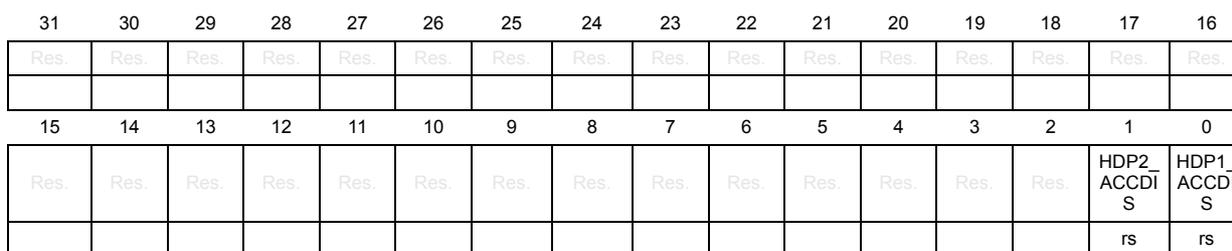
| 31 | 30 | 29 | 28 | 27 | 26 | 25 | 24 | 23 | 22 | 21 | 20 | 19 | 18 | 17 | 16 |
| Res. | Res. | Res. | Res. | Res. | Res. | Res. | Res. | Res. | Res. | Res. | Res. | Res. | Res. | Res. | Res. |
| 15 | 14 | 13 | 12 | 11 | 10 | 9 | 8 | 7 | 6 | 5 | 4 | 3 | 2 | 1 | 0 |
| Res. | Res. | Res. | Res. | Res. | Res. | Res. | Res. | Res. | Res. | Res. | Res. | Res. | Res. | HDP2_ ACCDI S | HDP1_ ACCDI S |
| rs | rs |
Bits 31:2 Reserved, must be kept at reset value.
Bit 1 HDP2_ACCDIS : HDP2 area access disable
When set, this bit is only cleared by a system reset
0:Access to HDP2 area is granted
1:Access to HDP2 area is denied and options bytes modification listed in Table 36: Default secure option bytes after TZEN activation are denied
Bit 0 HDP1_ACCDIS : HDP1 area access disable
When set, this bit is only cleared by a system reset
0:Access to HDP1 area is granted
1:Access to HDP1 area is denied and options bytes modification listed in Table 36: Default secure option bytes after TZEN activation are denied
6.9.27 FLASH privilege configuration register (FLASH_PRIVCFGR)
This register can be read by both privileged and unprivileged access.
When the system is secure (TZEN =1), this register can be read by secure and non-secure access. It is write-protected against non-secure write access when the flash is secure. A non-secure write access is ignored and generates an illegal access event.
Address offset: 0xC4
Reset value: 0x0000 0000
| 31 | 30 | 29 | 28 | 27 | 26 | 25 | 24 | 23 | 22 | 21 | 20 | 19 | 18 | 17 | 16 |
|---|---|---|---|---|---|---|---|---|---|---|---|---|---|---|---|
| Res. | Res. | Res. | Res. | Res. | Res. | Res. | Res. | Res. | Res. | Res. | Res. | Res. | Res. | Res. | Res. |
| 15 | 14 | 13 | 12 | 11 | 10 | 9 | 8 | 7 | 6 | 5 | 4 | 3 | 2 | 1 | 0 |
| Res. | Res. | Res. | Res. | Res. | Res. | Res. | Res. | Res. | Res. | Res. | Res. | Res. | Res. | Res. | PRIV |
| rw | |||||||||||||||
Bits 31:1 Reserved, must be kept at reset value.
Bit 0 PRIV : Privilege protectionThis bit can be read by both privileged or unprivileged, secure and non-secure access. When set, it can only be cleared by a privileged access.
0: All flash registers can be read and written by privileged or unprivileged access.
1: All flash registers can be read and written by privileged access only.
If the flash is not secure (no secure area defined), the PRIV bit can be written by a secure or non-secure privileged access.
If the flash is secure, the PRIV bit can be written only by a secure privileged access:
- – A non-secure write access is ignored and generates an illegal access event.
- – A secure unprivileged write access on PRIV bit is ignored
6.9.28 FLASH register map and reset values
Table 53. Flash interface - register map and reset values
| Offset | Register | 31 | 30 | 29 | 28 | 27 | 26 | 25 | 24 | 23 | 22 | 21 | 20 | 19 | 18 | 17 | 16 | 15 | 14 | 13 | 12 | 11 | 10 | 9 | 8 | 7 | 6 | 5 | 4 | 3 | 2 | 1 | 0 | ||
|---|---|---|---|---|---|---|---|---|---|---|---|---|---|---|---|---|---|---|---|---|---|---|---|---|---|---|---|---|---|---|---|---|---|---|---|
| 0x00 | FLASH_ACR | Res. | Res. | Res. | Res. | Res. | Res. | Res. | Res. | Res. | Res. | Res. | Res. | Res. | Res. | Res. | Res. | LVEN | SLEEP_PD | RUN_PD | Res. | Res. | Res. | Res. | Res. | Res. | Res. | Res. | Res. | LATENCY [3:0] | |||||
| Reset value | 0 | 0 | 0 | 0 0 0 0 | |||||||||||||||||||||||||||||||
| 0x04 | FLASH_PDKEYR | PDKEYR[31:0] | |||||||||||||||||||||||||||||||||
| Reset value | 0 0 0 0 0 0 0 0 0 0 0 0 0 0 0 0 0 0 0 0 0 0 0 0 0 0 0 0 0 0 0 0 | ||||||||||||||||||||||||||||||||||
| 0x08 | FLASH_NSKEYR | NSKEYR[31:0] | |||||||||||||||||||||||||||||||||
| Reset value | 0 0 0 0 0 0 0 0 0 0 0 0 0 0 0 0 0 0 0 0 0 0 0 0 0 0 0 0 0 0 0 0 | ||||||||||||||||||||||||||||||||||
| 0x0C | FLASH_SECKEYR | SECKEYR[31:0] | |||||||||||||||||||||||||||||||||
| Reset value | 0 0 0 0 0 0 0 0 0 0 0 0 0 0 0 0 0 0 0 0 0 0 0 0 0 0 0 0 0 0 0 0 | ||||||||||||||||||||||||||||||||||
| 0x10 | FLASH_OPTKEYR | OPTKEYR[31:0] | |||||||||||||||||||||||||||||||||
| Reset value | 0 0 0 0 0 0 0 0 0 0 0 0 0 0 0 0 0 0 0 0 0 0 0 0 0 0 0 0 0 0 0 0 | ||||||||||||||||||||||||||||||||||
| 0x14 | FLASH_LVEKEYR | LVEKEYR[31:0] | |||||||||||||||||||||||||||||||||
| Reset value | 0 0 0 0 0 0 0 0 0 0 0 0 0 0 0 0 0 0 0 0 0 0 0 0 0 0 0 0 0 0 0 0 | ||||||||||||||||||||||||||||||||||
| 0x20 | FLASH_NSSR | Res. | Res. | Res. | Res. | Res. | Res. | Res. | Res. | Res. | Res. | Res. | Res. | Res. | Res. | Res. | NSBSY | Res. | Res. | Res. | OPTWERR | Res. | Res. | Res. | Res. | Res. | Res. | NSPGSERR | NSSIZERR | NSPGAERR | NSWRPERR | NSPROGERR | Res. | NSOPERR | NSEOP |
| Reset value | 0 | 0 | 0 | 0 | 0 | 0 | 0 | 0 | 0 | ||||||||||||||||||||||||||
Table 53. Flash interface - register map and reset values (continued)
| Offset | Register | 31 | 30 | 29 | 28 | 27 | 26 | 25 | 24 | 23 | 22 | 21 | 20 | 19 | 18 | 17 | 16 | 15 | 14 | 13 | 12 | 11 | 10 | 9 | 8 | 7 | 6 | 5 | 4 | 3 | 2 | 1 | 0 | |
|---|---|---|---|---|---|---|---|---|---|---|---|---|---|---|---|---|---|---|---|---|---|---|---|---|---|---|---|---|---|---|---|---|---|---|
| 0x24 | FLASH_SECSR | Res | Res | Res | Res | Res | Res | Res | Res | Res | Res | Res | Res | Res | Res | Res | SECBY | Res | Res | Res | Res | Res | Res | Res | Res | Res | SECPGSENR | SECISZERR | SECPGAERR | SECWPRERR | SECPRORERR | Res | SECP0ERR | SEC0P |
| Reset value | 0 | 0 | 0 | 0 | 0 | 0 | 0 | 0 | ||||||||||||||||||||||||||
| 0x28 | FLASH_NSCR | NSLOCK | OPTLOCK | Res | Res | OBL_LAUNCH | Res | NSERRIE | NSE0PIE | Res | Res | Res | Res | Res | Res | OPTSTRT | NSSTRT | NSMER2 | Res | Res | Res | NSBKER | Res | NSPNB[6:0] | NSMER1 | NSPER | NSPG | NSPG | NSPG | NSPG | ||||
| Reset value | 1 | 1 | 0 | 0 | 0 | 0 | 0 | 0 | 0 | 0 | 0 | 0 | 0 | 0 | 0 | |||||||||||||||||||
| 0x2C | FLASH_SECCR | SECLOCK | Res | SECINV | Res | Res | Res | SECERRIE | SECE0PIE | Res | Res | Res | Res | Res | Res | SECSTRT | SECMER2 | Res | Res | Res | Res | SECBKER | SECPNB[7:0] | SECMER1 | SECPER | SECPG | SECPG | SECPG | SECPG | |||||
| Reset value | 1 | 0 | 0 | 0 | 0 | 0 | 0 | 0 | 0 | 0 | 0 | 0 | 0 | |||||||||||||||||||||
| 0x30 | FLASH_ECCR | ECCD | ECCC | ECCD2 | ECCC2 | Res | Res | Res | ECCIE | Res | SYSF_ECC | BK_ECC | ADDR_ECC[20:0] | |||||||||||||||||||||
| Reset value | 0 | 0 | 0 | 0 | 0 | 0 | 0 | 0 | 0 | 0 | 0 | 0 | 0 | 0 | 0 | 0 | 0 | 0 | 0 | 0 | 0 | 0 | 0 | 0 | 0 | 0 | 0 | |||||||
| 0x40 | FLASH_OPTR | TZEN | Res | Res | PA15_PUPEN | nBOOT0 | nSWBOOT0 | SRAM2_RST | SRAM2_PE | Res | DBANK | DB256K | SWAP_BANK | WWDG_SW | IWDG_STDBY | IWDG_STOP | IWDG_SW | Res | nRST_SHDW | nRST_STDBY | nRST_STOP | Res | BOR_LEV[2:0] | RDP[7:0] | BOOT_LOCK | BOOT_LOCK | ||||||||
| ST production value | 0 | 1 | 1 | 1 | 1 | 1 | 1 | 1 | 0 | 1 | 1 | 1 | 1 | 1 | 1 | 1 | 0 | 0 | ||||||||||||||||
| 0x44 | FLASH_NSBOOTADD0R | NSBOOTADD0[24:0] | ||||||||||||||||||||||||||||||||
| ST production value | 0 | 0 | 0 | 0 | 1 | 0 | 0 | 0 | 0 | 0 | 0 | 0 | 0 | 0 | 0 | 0 | 0 | 0 | 0 | 0 | 0 | 0 | 0 | 0 | 0 | 0 | 0 | 0 | 0 | 0 | 0 | 0 | ||
| 0x48 | FLASH_NSBOOTADD1R | NSBOOTADD1[24:0] | ||||||||||||||||||||||||||||||||
| ST production value | 0 | 0 | 0 | 0 | 1 | 0 | 1 | 1 | 1 | 1 | 1 | 1 | 1 | 0 | 0 | 1 | 0 | 0 | 0 | 0 | 0 | 0 | 0 | 0 | 0 | 0 | 0 | 0 | 0 | 0 | 0 | 0 | ||
| 0x4C | FLASH_SECBOOTADD0R | SECBOOTADD0[24:0] | ||||||||||||||||||||||||||||||||
| ST production value | 0 | 0 | 0 | 0 | 1 | 1 | 0 | 0 | 0 | 0 | 0 | 0 | 0 | 0 | 0 | 0 | 0 | 0 | 0 | 0 | 0 | 0 | 0 | 0 | 0 | 0 | 0 | 0 | 0 | 0 | 0 | 0 | ||
| 0x50 | FLASH_SECWM1R1 | Res | Res | Res | Res | Res | Res | Res | Res | Res | SECWM1_PEND[6:0] | Res | Res | Res | Res | Res | Res | Res | Res | Res | Res | SECWM1_PSTR[6:0] | ||||||||||||
| ST production value | 1 | 1 | 1 | 1 | 1 | 1 | 1 | 1 | 1 | |||||||||||||||||||||||||
| 0x54 | FLASH_SECWM1R2 | HDP1EN | Res | Res | Res | Res | Res | Res | Res | Res | HDP1_PEND[6:0] | Res | Res | Res | Res | Res | Res | Res | Res | Res | Res | WRP1A_PSTR[6:0] | ||||||||||||
| ST production value | 1 | 0 | 0 | 0 | 0 | 0 | 0 | 0 | 0 | 0 | 0 | |||||||||||||||||||||||
| 0x58 | FLASH_WRP1AR | Res | Res | Res | Res | Res | Res | Res | Res | Res | WRP1A_PEND[6:0] | Res | Res | Res | Res | Res | Res | Res | Res | Res | Res | |||||||||||||
| ST production value | 0 | 0 | 0 | 0 | 0 | 0 | 0 | 0 | 0 | 0 | 1 | 1 | 1 | 1 | 1 | 1 | ||||||||||||||||||
Table 53. Flash interface - register map and reset values (continued)
| Offset | Register | 31 | 30 | 29 | 28 | 27 | 26 | 25 | 24 | 23 | 22 | 21 | 20 | 19 | 18 | 17 | 16 | 15 | 14 | 13 | 12 | 11 | 10 | 9 | 8 | 7 | 6 | 5 | 4 | 3 | 2 | 1 | 0 |
|---|---|---|---|---|---|---|---|---|---|---|---|---|---|---|---|---|---|---|---|---|---|---|---|---|---|---|---|---|---|---|---|---|---|
| 0x5C | FLASH_WRP1BR | Res | Res | Res | Res | Res | Res | Res | Res | Res | WRP1B_PEND[6:0] | WRP1B_PSTR[6:0] | |||||||||||||||||||||
| ST production value | 0 | 0 | 0 | 0 | 0 | 0 | 0 | 1 | 1 | 1 | 1 | 1 | |||||||||||||||||||||
| 0x60 | FLASH_SECWM2R1 | Res | Res | Res | Res | Res | Res | Res | Res | Res | SECWM2_PEND[6:0] | SECWM2_PSTR[6:0] | |||||||||||||||||||||
| ST production value | 1 | 1 | 1 | 1 | 1 | 1 | 1 | 0 | 0 | 0 | 0 | 0 | |||||||||||||||||||||
| 0x64 | FLASH_SECWM2R2 | HDP2EN | Res | Res | Res | Res | Res | Res | Res | Res | HDP2_PEND[6:0] | ||||||||||||||||||||||
| ST production value | 1 | 0 | 0 | 0 | 0 | 0 | 0 | 0 | |||||||||||||||||||||||||
| 0x68 | FLASH_WRP2AR | Res | Res | Res | Res | Res | Res | Res | Res | Res | WRP2A_PEND[6:0] | WRP2A_PSTR[6:0] | |||||||||||||||||||||
| ST production value | 0 | 0 | 0 | 0 | 0 | 0 | 0 | 1 | 1 | 1 | 1 | ||||||||||||||||||||||
| 0x6C | FLASH_WRP2BR | Res | Res | Res | Res | Res | Res | Res | Res | Res | WRP2B_PEND[6:0] | WRP2B_PSTR[6:0] | |||||||||||||||||||||
| ST production value | 0 | 0 | 0 | 0 | 0 | 0 | 0 | 1 | 1 | 1 | 1 | ||||||||||||||||||||||
| 0x80 + 4*(x - 1), (x=1..4) | FLASH_SECB1Rx | SECB1[y] | |||||||||||||||||||||||||||||||
| Reset value | 0 | 0 | 0 | 0 | 0 | 0 | 0 | 0 | 0 | 0 | 0 | 0 | 0 | 0 | 0 | 0 | 0 | 0 | 0 | 0 | 0 | 0 | 0 | 0 | 0 | 0 | 0 | 0 | 0 | 0 | 0 | 0 | |
| 0xA0 + 4*(x - 1), (x=1..4) | FLASH_SECB2Rx | SECB2[y] | |||||||||||||||||||||||||||||||
| Reset value | 0 | 0 | 0 | 0 | 0 | 0 | 0 | 0 | 0 | 0 | 0 | 0 | 0 | 0 | 0 | 0 | 0 | 0 | 0 | 0 | 0 | 0 | 0 | 0 | 0 | 0 | 0 | 0 | 0 | 0 | 0 | 0 | |
| 0xC0 | FLASH_SECHDPCR | Res | Res | Res | Res | Res | Res | Res | Res | Res | Res | Res | Res | Res | Res | Res | Res | Res | Res | Res | Res | Res | Res | Res | Res | Res | Res | Res | Res | Res | Res | Res | Res |
| Reset value | 0 | ||||||||||||||||||||||||||||||||
| 0xC4 | FLASH_PRIVCFGR | Res | Res | Res | Res | Res | Res | Res | Res | Res | Res | Res | Res | Res | Res | Res | Res | Res | Res | Res | Res | Res | Res | Res | Res | Res | Res | Res | Res | Res | Res | Res | Res |
| Reset value | 0 | ||||||||||||||||||||||||||||||||