4. System security
4.1 Introduction
The STM32L552xx and STM32L562xx have been designed with a comprehensive set of security features, some of which being based on standard Arm TrustZone technology. These security features should simplify the process of evaluating IoT devices against security standards. They also significantly reduce the cost and complexity of software development for OEMs and third party developers by facilitating the re-use, improving the interoperability, and minimizing the API fragmentation.
This section explains the different security features available on the STM32L552xx and STM32L562xx devices.
4.2 Key security features
- • Resource isolation using Armv8-M mainline security extension of Cortex-M33, extended to securable I/Os, memories and peripherals
- • Secure firmware installation (SFI) with device unique cryptographic key pair
- – Leveraging the on-chip immutable bootloader that supports the download of image through USART, USB, I2C, SPI, FDCAN and JTAG
- • Enabled for secure boot thanks to unique boot entry feature and hide protect area (HDP) mechanism.
- • Secure storage, featuring:
- – Non-volatile on-chip secure storage, protected with secure & HDP areas
- – Battery-powered volatile secure storage, automatically erased in case of tamper
- – Write-only key registers in AES engine
- – STM32L552xx and STM32L562xx Unique ID (96 bits)
- • General purpose cryptographic acceleration (AES and PKA only in STM32L562xx)
- – AES 256-bit engine, supporting ECB, CBC, CTR, GCM and CCM chaining modes
- – HASH processor, supporting MD5/SHA-1 checksums and SHA-2 secure hash
- – Public key accelerator (PKA) for RSA/DH (up to 3136 bits) and ECC (up to 640 bits)
- – True random number generator (RNG), NIST SP800-90B pre-certified
- • On-the-fly decryption of encrypted image stored on external flash memory connected through OCTOSPI (STM32L562xx only)
- – Almost-zero latency with standard NOR flash memories
- – Can be used to encrypt the image using device unique secret keys
- – Automatic key erase in case of tamper
- • Flexible lifecycle scheme with readout protection (RDP), including support for product decommissioning (auto-erase)
- – Debug protection, depending on the readout protection level
- • Protected firmware distribution scheme, using TrustZone ® , on-the-fly decryption and RDP level 0.5
- • Active tamper and protection against temperature, voltage and frequency attacks
- – 3 active inputs, 1 active output tamper pin available in all power modes
4.3 Secure install
Secure firmware install (SFI) is an immutable secure service embedded by STMicroelectronics in STM32L552xx and STM32L562xx devices. It allows secure and counted installation of OEM firmware in untrusted production environment (such as OEM contract manufacturer).
The confidentiality of the installed images written either in internal flash memory or encrypted in external flash memory is also protected, using AES.
The SFI native service leverages the following hardware security features:
- • Secure boot (see Section 4.4 )
- • Resource isolation using TrustZone ® (see Section 4.6 )
- • Temporal isolation using hide protection (see Section 4.7.1 )
- • Secure execution (see Section 4.8 )
- • Secure storage, with associated cryptographic engines (see Section 4.9 and Section 4.10 )
Further information can be found in application note Overview secure firmware install (SFI) (AN4992).
4.4 Secure boot
4.4.1 Introduction
Secure boot is an immutable code that is always executed after a system reset. As a root of trust, this code checks the STM32L552xx and STM32L562xx static protections and activates available STM32L552xx and STM32L562xx runtime protections, reducing the risk that invalid or malicious code runs on the platform. As root of trust, secure boot also checks integrity and authenticity of the next level firmware before executing it.
The actual functions of secure boot depend on availability of TrustZone features, and the firmware stored in the device. However it would typically initializes secure storage, and install on-the-fly decryption keys in OTFDEC to be able to use encrypted firmware stored in external flash memory.
The STM32L552xx and STM32L562xx Trusted Firmware-M (TFM) application, supported by the STM32 ecosystem, provides a root of trust solution including secure boot functions. For more information, refer to user manual Getting started with STM32CubeL5 TFM application (UM2671).
In the STM32L552xx and STM32L562xx devices, the secure boot takes benefit of hardware security features such as:
- • Resource isolation using TrustZone (see Section 4.6 )
- • Temporal isolation using hide protection (see Section 4.7.1 )
- • Secure execution (see Section 4.8 )
- • Secure install and update (see Section 4.3 and Section 4.5 )
- • Secure storage, with associated cryptographic engines if available (see Section 4.9 and Section 4.10 )
This section describes the features specifically designed for secure boot.
4.4.2 Unique boot entry and BOOT_LOCK
When TrustZone is activated (TZEN=1) and BOOT_LOCK secure option bit is cleared the application selects a boot entry point located either in system flash memory (see Section 4.4.3 ) or in secure user flash memory, at the address defined by SECBOOTADD0 option bytes.
When TrustZone is activated (TZEN=1) and BOOT_LOCK secure option bit is set the device unique boot entry is the secure address defined by SECBOOTADD0 option bytes. These option bytes cannot be modified by the application anymore.
Note: As long as it is cleared, the BOOT_LOCK option byte can be set without any constraint. But once set the BOOT_LOCK option bit cannot be cleared.
For more information on STM32L552xx and STM32L562xx boot mechanisms, refer to Section 3: Boot configuration .
4.4.3 Immutable root of trust in system flash memory
The first usage of the immutable root of trust code stored in STM32L552xx and STM32L562xx system flash memory is to perform secure firmware install (SFI), allowing secure and counted installation of OEM firmware in untrusted production environment (such as OEM contract manufacturer). See Section 4.4.2 for more details.
STMicroelectronics immutable code also includes secure runtime services that can be called at runtime when secure application sets the SYSCFG_RSSCMR register to a non-null value before triggering a system reset. This runtime feature is deactivated when BOOT_LOCK secure option bit is set.
4.5 Secure update
Secure firmware update is a secure service that runs after a secure boot. Its actual functions depend on availability of TrustZone features, and the firmware stored in the device.
The STM32L552xx and STM32L562xx Trusted Firmware-M (TFM) application, supported by the STM32 ecosystem, allows the update of the microcontroller built-in program with new firmware versions, adding new features and correcting potential issues. The update process is performed in a secure way to prevent unauthorized updates and access to confidential on-device data.
A firmware update can be done either on a single firmware image including both secure and non-secure parts, or on the secure (respectively non-secure) part of the firmware image, independently.
In the STM32L552xx and STM32L562xx devices, the secure update application leverages the same hardware security as the firmware install described in Section 4.3 .
For more information, refer to user manual Getting started with STM32CubeL5 TFM application (UM2671).
4.6 Resource isolation using TrustZone
4.6.1 Introduction
In the STM32L552xx and STM32L562xx devices, the hardware and software resources can be partitioned so that they exist either in the secure world or in the non-secure world, as shown on Figure 3.
Note: The initial partitioning of the platform is under the responsibility of the secure firmware executed after reset of the device.
Thanks to this resource isolation technology, the secure world can be used to protect critical code against intentional or unintentional tampering from the more exposed code running in the non-secure world.
Note: Typically secure code is small and rarely modified, while non-secure code is more exposed, and prone to firmware updates.
Figure 3. Secure/non-secure partitioning using TrustZone® technology
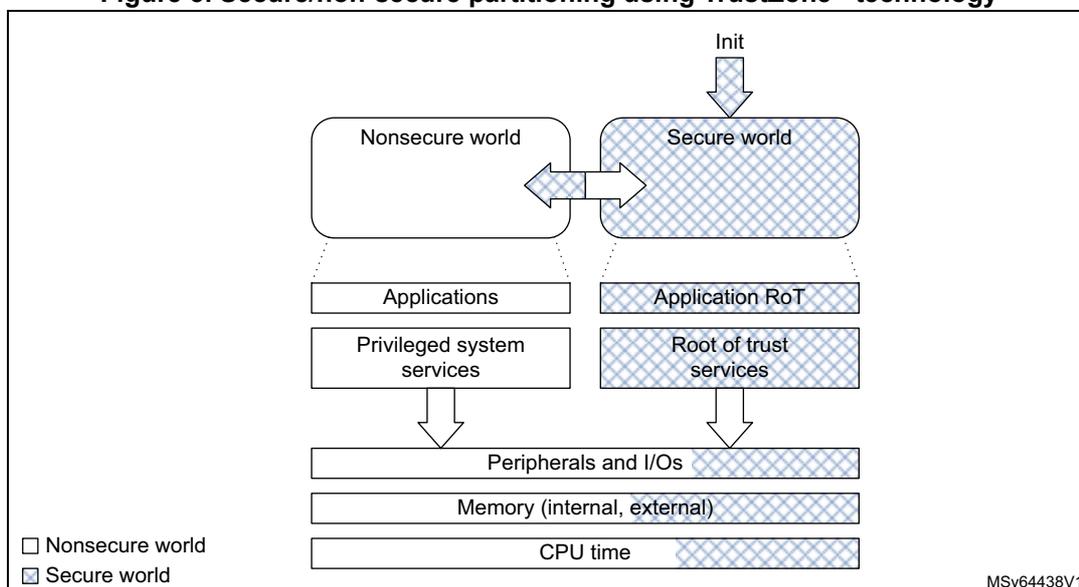
The diagram illustrates the secure/non-secure partitioning using TrustZone technology. It shows two worlds: Nonsecure world and Secure world. The Nonsecure world contains Applications and Privileged system services. The Secure world contains Application RoT and Root of trust services. Both worlds share Peripherals and I/Os, Memory (internal, external), and CPU time. The Secure world is initialized by an 'Init' block. A legend indicates that white boxes represent the Nonsecure world and hatched boxes represent the Secure world.
MSV64438V1
4.6.2 TrustZone security architecture
Armv8-M TrustZone technology is a comprehensive hardware architecture that proposes to developers a comprehensive, holistic protection across the entire processor and system. In this device, TrustZone hardware features include:
- • the Armv8-M mainline security extension of Cortex-M33, enabling a new processor secure state, with its associated secure interrupts
- • the dynamic allocation of memory and peripherals to TrustZone using eight security attribution unit (SAU) regions of Cortex-M33
- • a global TrustZone framework (GTZC), extending TrustZone protection against transactions coming from other masters in the system than the Cortex®-M33.
- • TrustZone-aware embedded flash memory and peripherals
Note: TrustZone security is activated by the TZEN option bit in the FLASH_OPTR register
Each of the elements above are described in the following subsections.
4.6.3 Armv8-M security extension of Cortex-M33
The Arm security extension of the Cortex-M33 is an evolution, not a revolution. It is using the programmer's model you find in earlier Cortex® M subfamilies like Cortex-M4. Indeed, Armv8-M is architecturally similar to Armv7-M, using the same 32-bit architecture, the same memory mapped resources protected with an MPU, and it also uses the Nested Vectored Interrupt Controller (NVIC).
Armv8-M TrustZone implementation in STM32L552xx and STM32L562xx is composed of the following features:
- • A new processor state, with almost no additional code/cycle overhead as opposed to Armv8-A TrustZone that uses a dedicated exception routine for triggering a secure/non-secure world change
- • Two memory map views of a shared 4 Gbytes address space
- • A low interrupt latency for both secure and non-secure domains. It also includes a new interrupt configuration for security grouping and priority setting.
- • Separated exception vector tables for the secure and non-secure exceptions
- • Micro-coded context preservation
- • Banking of specific registers across secure/non-secure states, including stack pointers with stack-limit checkers
- • Banking of following Cortex-M33 programmable components (two separate units for secure and non-secure):
- – SysTick timer
- – MPU configuration registers (eight MPU regions in secure, eight in non-secure)
- – Some of the system control block (SCB) registers
- • New system exception (SecureFault) for handling of security violations
- • Configurable debug support, as defined in Section 4.12
For more information, refer to Cortex-M33 programming manual (PM0264).
4.6.4 Memory and peripheral allocation using IDAU/SAU
Security attributes
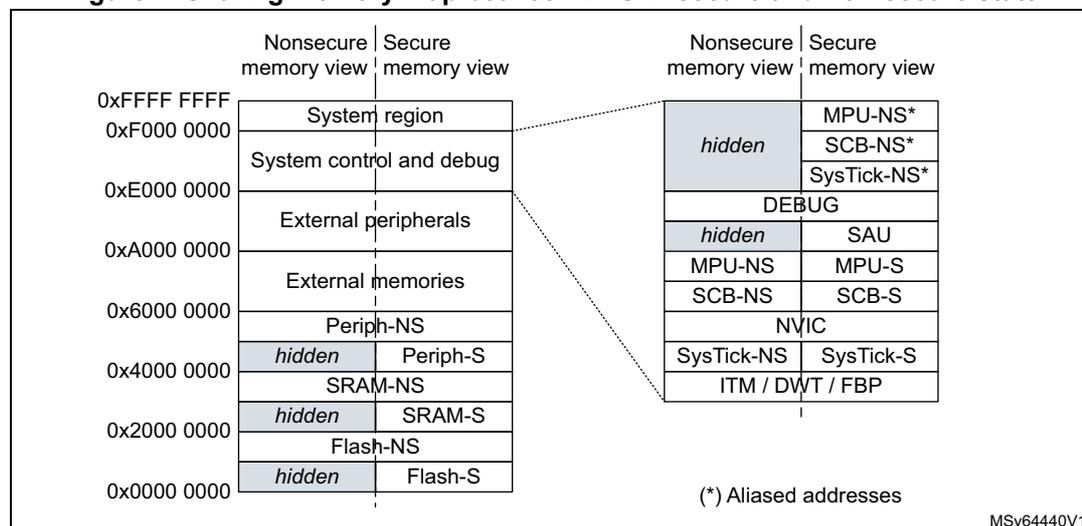
As illustrated on Figure 4 , Armv8-M non-secure memory view is similar to Armv7-M (that can be found in Cortex M4), with the difference that secure memory is hidden. The secure
memory view shows flash memory, SRAM and peripherals that are only accessible while the Cortex processor executes in Secure state.
The figure below shows the 32-bit address space viewed after SAU has been configured by the secure code.
Figure 4. Sharing memory map between CPU in secure and non-secure state
| Address | Nonsecure memory view | Secure memory view |
|---|---|---|
| 0xFFFF FFFF | System region | |
| 0xF000 0000 | System control and debug | |
| 0xE000 0000 | External peripherals | |
| 0xA000 0000 | External memories | |
| 0x6000 0000 | Periph-NS | Periph-S |
| 0x4000 0000 | hidden | SRAM-NS |
| 0x2000 0000 | hidden | SRAM-S |
| 0x0000 0000 | hidden | Flash-NS |
| hidden | Flash-S | |
| Nonsecure memory view | Secure memory view |
|---|---|
| hidden | MPU-NS* |
| SCB-NS* | |
| SysTick-NS* | |
| DEBUG | |
| hidden | SAU |
| MPU-NS | MPU-S |
| SCB-NS | SCB-S |
| NVIC | |
| SysTick-NS | SysTick-S |
| ITM / DWT / FBP | |
(*) Aliased addresses
MSv64440V1
The Cortex processor state (and associated rights) depends on the security attribute assigned to the memory region where it is executing. More specifically:
- • A processor in a non-secure state only executes from non-secure (NS) program memory, while a processor in a secure state only executes from secure (S) program memory.
- • While running in secure state the processor can access data from both S and NS memories. Running in non-secure state the CPU is limited to non-secure memories.
In order to manage transitions to secure world, developers must create non-secure callable (NSC) regions that contain valid entry points to the secure libraries. The first instruction in these entry points must be the new secure gate (SG) instruction, used by non-secure code to call a secure function. It is illustrated on Figure 5 .
Figure 5. Secure world transition and memory partitioning
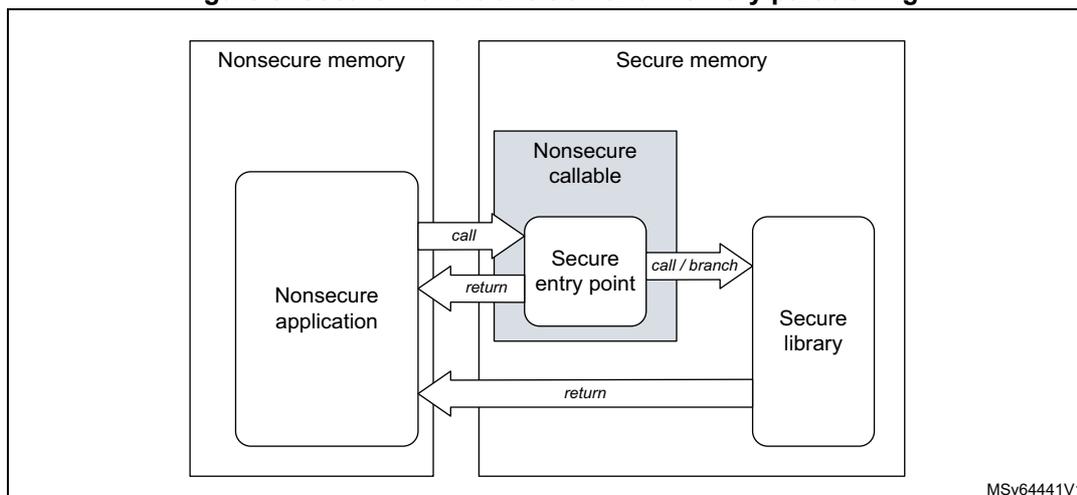
The diagram illustrates the memory partitioning and secure world transitions. On the left, 'Nonsecure memory' contains a 'Nonsecure application'. On the right, 'Secure memory' contains a 'Nonsecure callable' block, which includes a 'Secure entry point', and a 'Secure library'. Arrows show the flow: 'call' from the application to the entry point, 'return' from the entry point back to the application, 'call / branch' from the entry point to the library, and 'return' from the library back to the application.
MSv64441V1
Programming security attributes
In Cortex-M33 the static implementation defined attribution unit (IDAU) works in conjunction with the programmable security attribution unit (SAU) to assign a specific security attribute (S, NS or NSC) to a specific address, as shown on Table 9 .
Table 9. Configuring security attributes with IDAU and SAU
| IDAU security attribution | SAU security attribution (1) | Final security attribution |
|---|---|---|
| Non-secure | Secure | Secure |
| Secure-NSC | Secure-NSC | |
| Non-secure | Non-secure | |
| Secure-NSC | Secure | Secure |
| Non-secure | Secure-NSC |
1. Defined regions are aligned to 32-byte boundaries.
The SAU can only be configured by the Cortex-M33 in the secure privileged state. When rustZone is enabled, the SAU defaults all addresses as secure (S). A secure boot application can then program SAU to create NSC or NS regions, as shown in Table 9 .
The SAU/IDAU settings are applicable to only the Cortex-M33. The other masters like DMA are not affected by those policies.
For more information on memory security attribution using IDAU/SAU on STM32L552xx and STM32L562xx, refer to the application note AN5347.
4.6.5 Memory and peripheral allocation using GTZC
Global TrustZone framework architecture
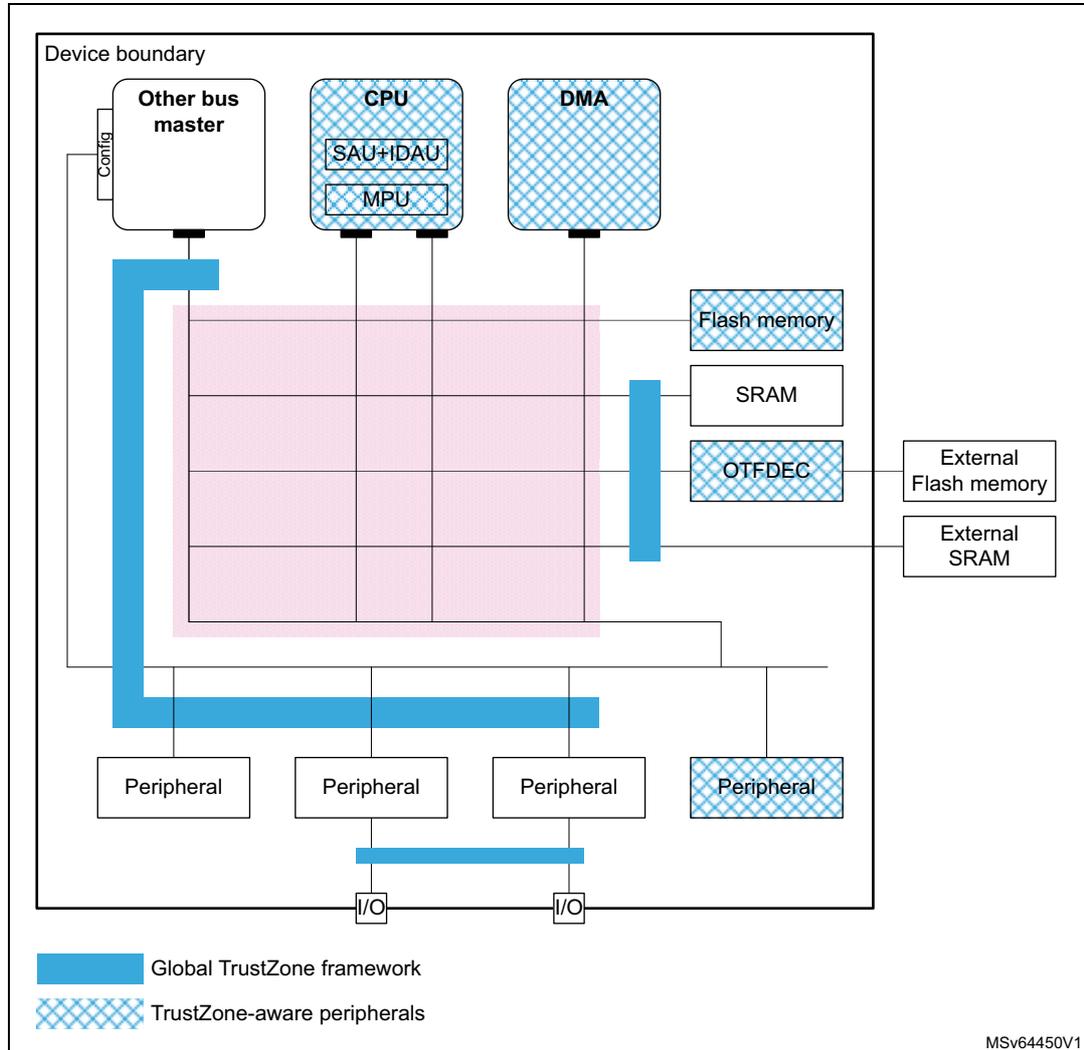
On top of Armv8-M TrustZone security extension in Cortex-M33, the STM32L552xx and STM32L562xx devices come with complementary security features that reinforce in a flexible way the isolation between the secure and the non-secure worlds. Unlike the
SAU/IDAU, the GTZC can protect legacy memories and peripherals against non-secure transactions coming from other masters than the Cortex-M33.
Figure 6. Global TrustZone framework and TrustZone awareness
Securing peripherals with TZSC
When the TrustZone security is active, a peripheral is either securable through global TrustZone controller (GTZC) or is natively TrustZone-aware, as shown in Figure 6. More specifically:
- • A securable peripheral or memory is protected by an AHB/APB firewall gate that is controlled by the TrustZone security controller (TZSC)
- • A TrustZone-aware peripheral or memory is connected directly to AHB or APB interconnect, implementing a specific TrustZone behavior such as a subset of secure registers or a secure memory area.
When a securable peripheral is made secure-only with GTZC, if this peripheral is master on the interconnect it automatically issues secure transactions. SDMMC is an example of securable master. TrustZone-aware AHB masters like Cortex-M33 or DMAs drive secure signal in the AHB interconnect according to their security mode, independently to the GTZC.
Note: Like with TrustZone, a peripheral can be made privileged-only with TZSC. In this case, if this peripheral is master on the interconnect, it automatically issues privileged transactions
Securing memories with TZSC and MPCBB
The TZSC block in GTZC provides the capability to manage the security for all securable external memories (including SRAM devices), programming the MPCWM instances as defined in Table 10 .
Table 10. MPCWMx instances
| Memory | MPC instance | Type of filtering | Number of regions | Default security | On-the-fly decryption (1) |
|---|---|---|---|---|---|
| OCTOSPI | MPCWM1 | Non secure region (watermarks) | 2 | Secure (2) | yes |
| FMC_NOR bank | MPCWM2 | 2 | no | ||
| FMC_NAND bank | MPCWM3 | 1 | no |
1. Using OTDEC peripheral.
2. Assuming TrustZone ® is activated on the device, non-secure otherwise.
The MPCBB instances in GTZC provide the capability to configure the security of embedded SRAM blocks, as defined in the table below.
Table 11. MPCBBx instances
| Memory | MPC instance | Type of filtering | Memory size (Kbytes) | Block size (Bytes) | Number of blocks | Default security |
|---|---|---|---|---|---|---|
| SRAM1 | MPCBB1 | Block based, managing security and privilege | 192 | 256 (1) | 768 | secure (2) |
| SRAM2 | MPCBB2 | 64 | 256 |
1. Blocks are grouped in superblocks of 32 consecutive blocks, to manage configuration locking.
2. Assuming TrustZone is activated on the device, non-secure otherwise.
Applying GTZC configurations
The TZSC and MPCBB blocks can be used in one of the following ways:
- • statically programmed during secure boot, locked and not changed afterwards
- • dynamically re-programmed using specific application code or real-time kernel
When dynamic option is selected and the configuration is not locked:
- • MPCBB secure blocks or MPCWM non-secure regions size can be changed by secure software.
- • Secure (respectively privilege) state of each peripheral can be changed writing to GTZC_TZSC_SECCFRGx (respectively GTZC_TZSC_PRIVCFGRx) registers.
Securing peripherals with TZSC
The TZSC block in GTZC provides the capability to manage the security and the privilege for all securable peripherals. The list of those peripherals can be found in Section 5: Global TrustZone ® controller (GTZC) .
Note: When TrustZone is deactivated, resource isolation hardware GTZC can still be used to isolate peripherals to privileged code only. When TrustZone is activated, peripherals are set as non-secure and non-privilege after reset.
TrustZone-aware peripheral list
STM32L552xx and STM32L562xx devices include the following TrustZone-aware peripherals. The way illegal accesses to those peripherals are monitored through TZIC registers is described in Section 5: Global TrustZone® controller (GTZC) .
- • GPIOA to GPIOH
- • MPCBB1 (SRAM1) and MPCBB2 (SRAM2)
- • TZIC and TZSC (GTZC blocks)
- • OTFDEC, writable only in secure if TZEN=1
- • EXTI
- • Flash memory
- • RCC and PWR
- • DMA1, DMA2 and DMAMUX
- • SYSCFG registers
- • RTC and TAMP
For more details, refer to Section 4.6.6 .
TrustZone illegal access controller (TZIC)
The TZIC block in GTZC gathers all illegal access events originated from sources either protected by GTZC or TrustZone-aware, generating one global secure interrupt towards the NVIC.
TZIC is available only when the system is TrustZone enabled (TZEN = 1). All accesses to TZIC registers must be secured.
For each illegal event source, a status flag and a clear bit exist. Each illegal event can be masked, not generating an interrupt toward the NVIC.
Note: By default, all events are masked.
4.6.6 Managing security in TrustZone-aware peripherals
This section gives more details on the way security is implemented in the TrustZone-aware peripherals listed on Section 4.6.5 .
Embedded flash
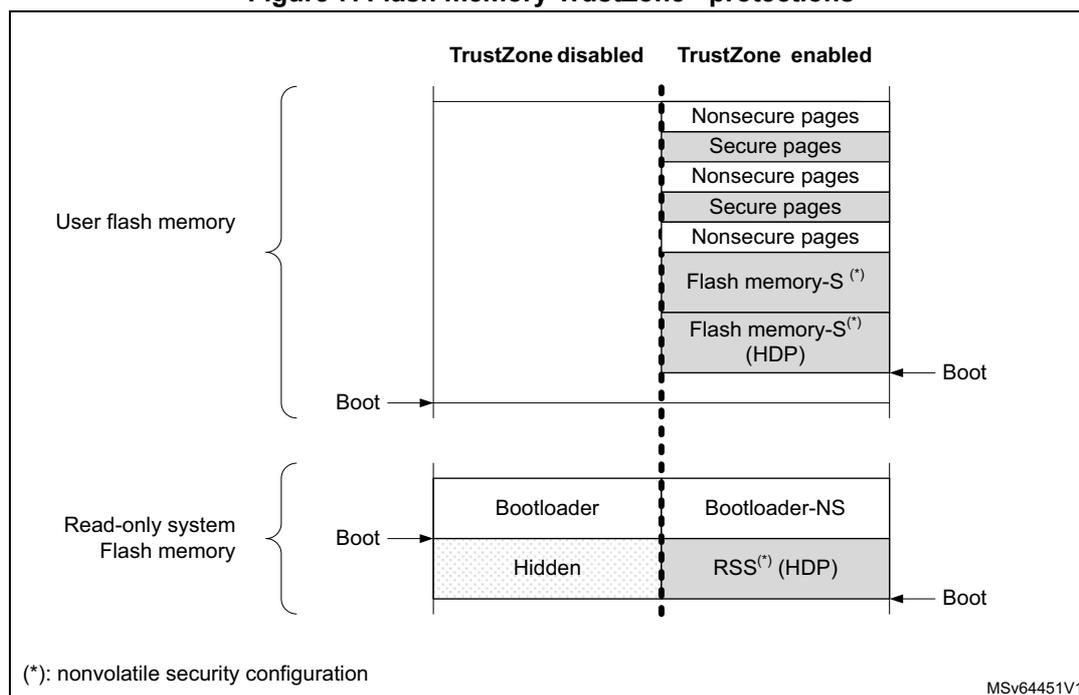
When the TrustZone security is enabled through option bytes (TZEN = 1), the whole flash memory is secure after reset and the following protections, shown on Figure 7, are available to the application:
- • Non-volatile user secure areas, defined with non-volatile secure user option bytes
- – Watermark-based secure only area (x2 in dual bank configuration)
- – Secure hide protection (HDP) area, stickily hidden after boot (x2 in dual bank configuration)
- • Volatile user secure pages, defined with volatile secure registers (lost after reset)
- – Any page set as non-secure (example: outside watermark-based secure only area), can be set as secure on-the-fly using the block-based configuration registers
Note: All areas aligned on flash memory page granularity.
Flash memory area can be configured as secure while they are tagged as non-secure in Cortex-M33 IDAU/SAU. In this case non-secure accesses by the CPU to the flash memory is denied.
Erase or program operation can be performed in secure or non-secure mode with associated configuration bits.
Figure 7. Flash memory TrustZone ® protections
The diagram shows the memory layout for User flash memory and Read-only system Flash memory when TrustZone is disabled versus when it is enabled.
| Memory Type | TrustZone disabled | TrustZone enabled |
|---|---|---|
| User flash memory | [All Non-secure] | Nonsecure pages Secure pages Nonsecure pages Secure pages Nonsecure pages Flash memory-S(*) Flash memory-S(*) (HDP) |
| Read-only system Flash memory | Bootloader Hidden | Bootloader-NS RSS(*) (HDP) |
(*): nonvolatile security configuration
MSV64451V1
As shown above, when TrustZone is activated (TZEN = 1), the application code can use the HDP area that is part of the flash watermark-based secure area. Indeed, when application sets HDPxACCDIS bit, data read, write and instruction fetch on this hide protection area are denied until next system reset. For example, the software code in the secure flash hide protected area can be executed only once, with any further access to this area denied until
next system reset. Additionally, any flash memory page belonging to an active HDP area cannot be erased anymore.
When TrustZone is disabled (TZEN = 0), the volatile/non-volatile secure areas features are deactivated and all secure registers are RAZ/WI.
See Section 6: Embedded flash memory (FLASH) for details.
On-the-fly encryption/decryption (OTFDEC)
When the TrustZone security is activated (TZEN = 1), the OTFDEC peripheral can only be initialized by secure applications. Each of the four encrypted regions, once the configuration is confirmed, can be write-locked until next power-on-reset.
Note: Any application (secure or non-secure) can verify the initialization context of each OTFDEC region (including CRC of the keys), by reading the peripheral registers.
Key registers in OTFDEC are write-only.
See Section 4.10.3 for more details on this cryptographic engine.
DMA and DMAMUX
When a DMA channel is defined as secure (SECM = 1 in DMA_CCRx registers), the source and destination transfers can be independently set as secure or non-secure by a secure application using SSEC and DSEC bits in DMA_CCRx registers.
Table 13 summarizes these security options available in each DMA channel.
Note: Secure (resp. non-secure) DMA channel and associated DMAMUX is programmed by a secure (resp. secure or non-secure) application.
This feature is not available when TrustZone is disabled.
Table 12. DMA channel use (security) (1)
| - | Secure DMA channel (SECM = 1) | Non-secure DMA channel (SECM = 0) | ||
|---|---|---|---|---|
| Secure source | Non-secure source | Secure source | Non-secure source | |
| Secure destination | OK | OK (2) | Transfer blocked | |
| Non-secure destination | OK (3) | OK (4) | Transfer blocked | OK |
1. When a transfer is blocked, the transfer completes but the corresponding writes are ignored, and reads return zeros. Also an illegal access event to TZIC is automatically triggered by the memory/peripheral used as source or destination.
2. If the source is a memory the transfer is only possible if SSEC = 0, otherwise the transfer is blocked.
3. If the destination is a memory the transfer is only possible if DSEC = 0, otherwise the transfer is blocked.
4. If the transfer is memory-to-memory, the transfer is only possible if SSEC = 0 and DSEC = 0, otherwise the transfer is blocked.
Similarly, when a DMA channel is defined as privileged (PRIV = 1 in DMA_CCRx register), special rules apply when accessing privileged/unprivileged source or destination. These rules are summarized on the table below.
Note: A privileged (resp. unprivileged) DMA channel and associated DMAMUX is programmed by a privileged (resp. privileged or unprivileged) application.
Table 13. DMA channel usage (privilege) (1)
| - | Privileged DMA channel (PRIV = 1) | Non-privileged DMA channel (PRIV = 0) | ||
|---|---|---|---|---|
| Privileged source | Non-privileged source | Privileged source | Non-privileged source | |
| Privileged destination | OK | OK | Transfer blocked | |
| Non-privileged destination | OK | OK | Transfer blocked | OK |
1. When a transfer is blocked, the transfer completes but the corresponding writes are ignored, and reads return zeros.
Note: When a DMA transfer error occurs during a DMA read or write access, the faulty channel x is automatically disabled, and TEIFx bit is set in DMA_ISR register.
See Section 14: Direct memory access controller (DMA) and Section 15: DMA request multiplexer (DMAMUX) for details.
Power control (PWR)
When the TrustZone security is activated (TZEN = 1), the selected PWR registers can be secured through the PWR_SECCFGR register, protecting the following PWR features:
- • Low-power mode setup
- • Wake-up (WKUP) pins definition
- • Voltage detection and monitoring
- • VBAT mode setup
Other PWR configuration bits becomes secure:
- • When the system clock selection is secure in RCC: the voltage scaling (VOS) configuration becomes secure.
- • When a GPIO is configured as secure: its corresponding bit for pull-up/pull-down configuration in Standby mode becomes secure.
- • When the TrustZone-aware RTC is configured as secure: the backup domain write protection bit (DBP) becomes secure.
- • When the USB Type-C ® /USB power delivery interface (UCPD) is configured as secure in TZSC: UCPD bits in PWR become secure.
See Section 8: Power control (PWR) for details.
Secure clock and reset (RCC)
When the TrustZone security is activated (TZEN = 1) and security is enabled in the RCC, the bits controlling the peripheral clocks and resets becomes TrustZone-aware:
- • If the peripheral is securable the peripheral clock and reset bits become secure if the peripheral is programmed as secure in the TZSC.
- • If the peripheral is TrustZone-aware, the peripheral clock and reset bits become secure as soon as at least one function is configured as secured inside the peripheral.
When a peripheral is defined as secure in the RCC, the bits enable, reset, and LPE become secure, and in some case the selection of clock source as well. The RCC can also secure the system clock, the system configuration, the system multiplex and the reset flag.
Note: Refer to Table 10 and Table 11 in Section 4.6.5 for the list of securable and TrustZone-aware peripherals.
See Section 9: Reset and clock control (RCC) for details.
Real time clock (RTC)
Like all TrustZone-aware peripherals, a non-secure read/write access to a secured RTC register is RAZ/WI. It also generates an illegal access event that triggers a secure illegal access interrupt if the RTC illegal access event is enabled in the TZIC peripheral.
After a backup domain power-on reset, all RTC registers can be read or written in both secure and non-secure modes. Secure boot code can then change this security setup, making registers Alarm A, alarm B, wakeup Timer and timestamp secure or not as needed, using RTC_SMCR register.
Note: The RTC security configuration is not affected by a system reset.
See Section 41: Real-time clock (RTC) for details.
Tamper and backup registers (TAMP)
Like all TrustZone-aware peripherals, a non-secure read/write access to a secured TAMP register is RAZ/WI. It also generates an illegal access event that triggers a secure illegal access interrupt if the TAMP illegal access event is enabled in the TZIC peripheral.
After a backup domain power-on reset, all TAMP registers can be read or written in both secure and non-secure modes. Secure boot code can change this security setup, making some registers secure or not as needed, using TAMP_SMCR register. More specifically:
- • When TAMPDPROT=0 in the TAMP_SMCR register
- – Writing the TAMP registers is possible only in secure mode. Backup registers have their own write protection (see below).
- – Reading the TAMP registers (with the exception of TAMP_SMCR, TAMP_PRIVCR and TAMP_MISR) returns zero if the access is non-secure. Backup registers have their own read protection (see below).
- • Backup registers in TAMP have three protection zones configured in BKPRWDPROT[7:0] and BKPWDPROT[7:0] registers:
- – Protection zone 1 is read non-secure, write non-secure
- – Protection zone 2 is read non-secure, write secure
- – Protection zone 3 is read secure, write secure
Note: The TAMP security configuration is not affected by a system reset.
See Section 42: Tamper and backup registers (TAMP) for details.
General-purpose I/Os (GPIO)
When TrustZone security is activated (TZEN = 1), each I/O pin of GPIO port can be individually configured as secure through the GPIOx_SECCFGR registers. Only secure application can write to GPIOx_SECCFGR registers. After boot, each I/O pin of GPIO is set as secure.
When an I/O pin is configured as secure, its corresponding configuration bits for alternate function (AF), mode selection (MODE) and I/O data are RAZ/WI in case of non-secure access.
When digital alternate function is used (input/output mode), in order to protect the data transiting from/to the I/O managed by a secure peripheral, the STM32L552xx and STM32L562xx add a secure alternate function gate on the path between the peripheral and its allocated I/Os:
- • If the peripheral is secure, the I/O pin must also be secure to allow input/output of data
- • If the peripheral is not secure, the connection is allowed regardless of the I/O pin state.
TrustZone-aware logic around GPIO ports used as alternate function is summarized in the table below.
Table 14. Secure alternate function between peripherals and allocated I/Os
| Security configuration | Alternate function logic | Comment | ||
|---|---|---|---|---|
| Peripheral | Allocated I/O pin | Input | Output | |
| Secure | Secure | I/O data | Peripheral data | - |
| Non-secure | Out of reset configuration | |||
| Secure | Non-secure | Zero | Zero | - |
| Non-secure | I/O data | Peripheral data | ||
When analog function with analog switch is used, the connection to the peripherals described in the table below is blocked by hardware when the peripheral is non-secure and the I/O is secure.
Table 15. Summary of the I/Os that cannot be connected to a non-secure peripheral when secure
| Peripheral | Analog function (1) | Output | Input |
|---|---|---|---|
| ADCx (x= 1, 2) | ADC12_INy (y= 1 to 16) | - | X |
| OPAMPx (x= 1, 2) | OPAMPx_VINy (x= 1, 2; y= 1, 2) | - | X |
| COMPx (x= 1, 2) | COMPx_INy (x= 1, 2; y= 1, 2) | - | X |
1. To find the I/O corresponding to the signal/function on the package, refer to the product datasheet.
Finally, regarding GPIO and security, Table 16 summarizes the list of I/Os that do not have a hardware protection linked to TrustZone. More specifically the listed signals (input and/or outputs) are not blocked when the I/O is set as secure and the associated peripheral is non-secure.
For example, when secure application sets PA4 as secure to be used as LPTIM2_OUT, if the DAC peripheral is non-secure it can be programmed to output data to PA4, potentially causing malfunction to the secure application.
Similarly, when secure application sets PA0 as secure to be used as UART4_TX, if the TAMP peripheral is non-secure it can be programmed to capture the USART input traffic through the TAMP_IN signal.
Hence it is important that for each case described in Table 16 secure application decides if a potential effect on data integrity or confidentiality is critical or not. For example, if the USART situation described above is not acceptable (data transiting on secure USART is confidential) then the secure application should configure the TAMP peripheral as secure even if it is not used by the secure application.
Note: How to make a peripheral secure is summarized on the last column.
Table 16. Summary of the I/Os that can be secured and connected to a non-secure peripheral
| Peripheral | Signal (1) | Output | Input | How to set the peripheral or function as secure |
|---|---|---|---|---|
| DAC | DAC1_OUTx (x=1, 2) | X | - | Set DAC1SEC bit in GTZC_TZSC_SECCFGR1 |
| PVD | PVD_IN | - | X | - |
| UCPD1 | UCPD1_CCx (x=1,2) | X | X | Set UCPD1SEC bit in GTZC_TZSC_SECCFGR1. |
| UCPD1_DBx (x=1,2) | - | X | ||
| TSC | TSC_G1_IOy (y= 1 to 3) | - | X | Set TSCSEC bit in GTZC_TZSC_SECCFGR2. |
| TSC_G2_IOy (y= 1 to 4) | - | X | ||
| TSC_G3_IOy (y= 2 to 4) | - | X | ||
| TSC_Gx_IOy (x=4 to 8, y=1 to 4) | - | X | ||
| TAMP | TAMP_INx (x= 1 to 8) | - | X | Set TAMPDPROT bit in TAMP_SMCR register. |
| TAMP_OUTy (x= 1 to 8) | X | - | ||
| RTC | RTC_OUTx (x=1,2) | X | - | Set DECPROT bit in RTC_SMCR register. |
| RTC_REFIN | - | X | ||
| RTC_TS | - | X | Set TSDPROT bit in RTC_SMCR register. | |
| PWR | WKUPx (x=1 to 5) | - | X | Set WUPxSEC bit in PWR_SECCFGR register. |
| RCC | LSCO | X | - | Set LSESEC bit in RCC_SECCFGR register. |
| EXTI | EXTIx (x=0 to 15) | - | X | Set SEC bit in EXTI_SECCFGR register. |
1. To find the I/O corresponding to the signal/function on the package, refer to the product datasheet.
For more detailed information on the topic refer to Section 11: General-purpose I/Os (GPIO) .
Extended interrupts and event controller (EXTI)
When the TrustZone security is activated (TZEN = 1), the EXTI is able to protect event register bits from being modified by non-secure accesses. The protection can individually be activated per input event via the register bits in EXTI_SECCFGR registers. At EXTI level, the protection consists in preventing unauthorized write access to:
- • the change of settings for the secure configurable events,
- • the change of masking for the secure input events,
- • the clearing of pending status for the secure input events.
The security configuration in registers EXTI_SECCFGR can be globally locked after reset in EXTI_LOCKR register.
See Section 17: Extended interrupts and event controller (EXTI) for details.
System configuration controller (SYSCFG)
Like all TrustZone-aware peripherals, a non-secure read/write access to a secured SYSCFG register is RAZ/WI. Such access also generates an illegal access event that triggers a secure illegal access interrupt if the SYSCFG illegal access event is not masked in the TZIC.
See Section 12: System configuration controller (SYSCFG) for details.
4.6.7 Activating TrustZone security
TrustZone is disabled by default in all STM32L552xx and STM32L562xx devices. It can be activated by setting the TZEN option bit in FLASH_OPTR when RDP level = 0. Once TZEN has changed from 0 to 1 the default security state after reset is always the following:
- • CPU subsystem
- – Cortex-M33 exits reset in secure state, hence the boot address must point toward a secure memory area
- – All interrupt sources are secure (in NVIC)
- – The memory mapped viewed by the CPU through IDAU/SAU is fully secure
- • Embedded flash memory
- – Flash memory non-volatile secure areas are defined with non-volatile registers SECWMxR (where x = 1 or 2).
- – Volatile block-based security attributions of the flash memory are non-secure.
- • Embedded SRAM memories
- – All SRAMs are secure, as defined in GTZC/MPCBB (see Section 4.6.5 ). Secure boot code can change this security setup, making blocks secure or not as needed.
- • External memories
- – All memory devices connected to FSMC and OCTOSPIs are secure, as defined in GTZC/MPCWM (see Section 4.6.5 ). Secure boot code can change this security setup, making components secure or not as needed.
- • All GPIOs are secure.
- • All DMA channels are non-secure.
- • Backup registers are non-secure.
- • About peripherals and GTZC
- – Securable peripherals are non-secure and unprivileged.
- – TrustZone-aware peripherals are non-secure, with their secure configuration registers being secure.
- – All illegal access interrupts in GTZC/TZIC are disabled.
Note: Refer to Table 10 and Table 11 in Section 4.6.5 for the list of securable and TrustZone-aware peripherals.
4.6.8 De-activating TrustZone security
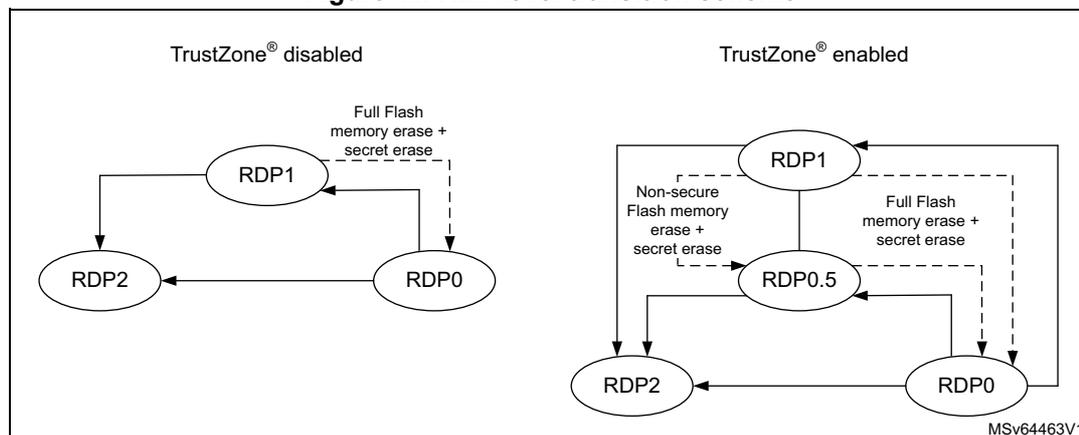
Once TrustZone is activated on the device it can only be deactivated during an RDP regression to level 0 (example: RDP change from 1 to 0, or from 0.5 to 0).
Note: Such RDP regression triggers the erase of embedded memories (SRAM2, FLASH), and the reset of all peripherals, including the on-the-fly decryption and all the crypto engines.
After the TrustZone deactivation, most features mentioned in Section 4.6 are no more available. More specifically:
- • Non-volatile secure area of embedded flash memory is deactivated, including the HDP area
- • NVIC only manages non-secure interrupts
- • All secure registers in TrustZone-aware peripherals are RAZ/WI.
Note: When TrustZone is disabled GTZC can still be used to configure the privilege access to securable peripherals.
For more information, refer to application AN5347.
4.7 Other resource isolations
These are hardware mechanisms offering an additional level of isolation on top of TrustZone technology.
4.7.1 Temporal isolation using secure hide protection (HDP)
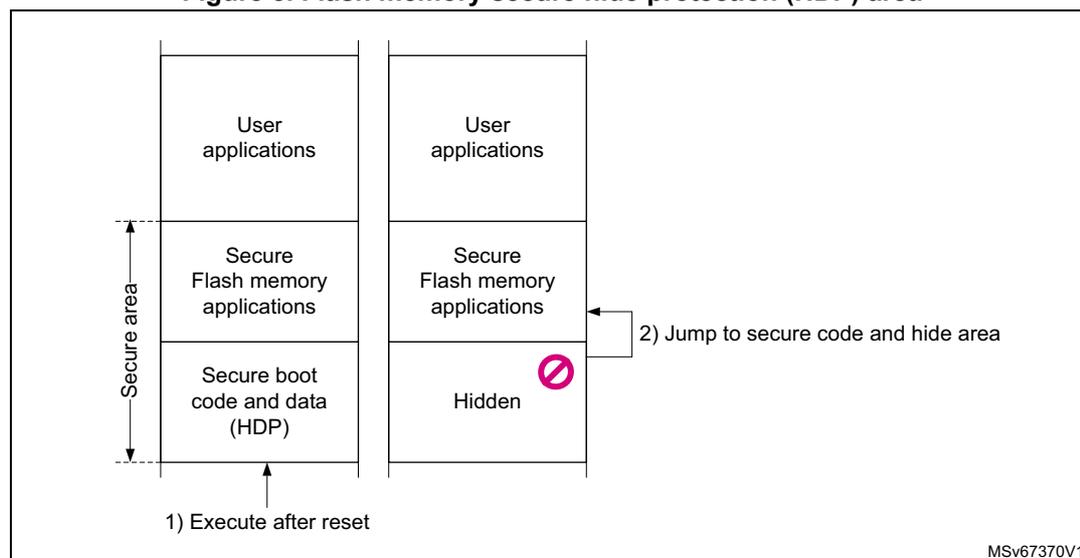
The STM32L552xx and STM32L562xx embedded flash memory allows to define one hide protection (HDP) area per watermarked-secure area of each bank. The code executed in HDP area, with its related data and keys, can be hidden after boot until the next system reset. Hide protection principle is pictured on Figure 8 .
The number of HDP area, and its granularity, depends on the DBANK mode:
- • in single-bank mode (DBANK=0) two HDP area can be defined, with the granularity of a 4-Kbyte page.
- • in dual-bank mode (DBANK=1) one HDP area per bank can be defined, with the granularity of a 2-Kbyte page.
When HDPxEN and HDPxACCDIS bits are set, data read, write and instruction fetch on the area defined by SECWMx_STRT and HDPx_PEND are denied until next device reset.
Figure 8. Flash memory secure hide protection (HDP) area
Note: Bank erase aborts when it contains a write-protected area (WRP or HDP area).
HDP area can be resized by secure application if the area is not hidden and if RDP level is different than 2.
4.8 Secure execution
4.8.1 Introduction
Through a mix of special software and hardware features, STM32L552xx and STM32L562xx devices ensure the correct operation of their functions against abnormal situations caused by programmer errors, software attacks through network access or local attempt for tampering code execution.
This section describes the hardware features specifically designed for secure execution.
4.8.2 Memory protection unit (MPU)
The Cortex-M in STM32L552xx and STM32L562xx devices includes a memory protection unit (MPU) that can restrict the read and write accesses to memory regions (including regions mapped to peripherals), based on one or more of the following parameters
- • Cortex-M operating mode (privileged, unprivileged)
- • Data/instruction fetch
The memory map and the programming of the non-secure and secure MPUs split memory into regions (up to eight per MPU). Secure MPU is only available when TrustZone is activated.
4.8.3 Embedded flash memory write protection
The embedded flash memory write protection (WRP) prevents illegals or unwanted write/erase to special sections of the embedded flash memory user area (system area is permanently write protected).
Write protected area is defined through the option bytes, writing the start and end addresses. More specifically, in STM32L552xx and STM32L562xx:
- • In single-bank mode (DBANK = 0) four write-protected areas can be defined, with the granularity of a 4-Kbyte page.
- • In dual-bank mode (DBANK = 1) two write-protected areas can be defined in each bank, with the granularity of a 2-Kbyte page.
WRP areas can be modified through option byte changes while RDP level is less than 2.
Note: Bank erase aborts when it contains a write-protected area (WRP or HDP area)
4.8.4 Tamper detection and response
Principle
STM32L552xx and STM32L562xx devices include active protection of critical security assets against temperature, voltage and frequency attacks. More specifically, it features:
- • erasure of device secrets upon tamper detection
- • improved guarantee of safe execution for the CPU and its associated security peripherals, including:
- – out-of-range voltage (example: \( V_{BAT} \) , \( V_{DDA} \) ), temperature and clocking (LSE) detection
- – security watchdog IWDG clocked by the internal oscillator LSI
- – possible selection of internal oscillator HSI as system clock
- • power supply protection
- – RTC/TAMP domain powered automatically with VDD or VBAT
See Section 42: Tamper and backup registers (TAMP) for details.
Tamper detection sources
The device features three active tamper inputs (TAMP_IN1,2,3) associated to one active output tamper pin (TAMP_OUT2), available in all power modes (including VBAT mode).
The device also has a number of internal tamper sources, as described in Table 17 .
Note: Timestamps are automatically generated when a tamper event occurs.
Table 17. Internal tampers in TAMP
| Tamper input | NOER bit | Tamper source |
|---|---|---|
| itamp1 | TAMP_CR3[0] | \( V_{DD} \) upper voltage threshold monitoring |
| itamp2 | TAMP_CR3[1] | Temperature monitoring |
| itamp3 | TAMP_CR3[2] | LSE monitoring |
| itamp4 | - | not used |
| itamp5 | TAMP_CR3[4] | RTC calendar overflow (rtc_calovf) |
| itamp6 | - | not used |
| itamp7 | - | not applicable |
| itamp8 | TAMP_CR3[7] | Monotonic counter overflow (generated internally) |
Response to tampers
Each source of tamper in the device can be configured to trigger the following events:
- • Generate an interrupt, capable of waking up the device from Stop and Standby modes (see TAMPxMSK bits in TAMP_CR2 register)
- • Generate a hardware trigger for the low-power timers
- • Erase of device secrets if corresponding TAMPxNOER bit is cleared in TAMP_CR2 register (for tamper pins) or TAMP_CR3 register (for internal tamper). These erasable secrets are:
- – Symmetric keys stored in backup registers (x32), in AES, HASH and in OTFDEC (encrypted flash memory regions are read as zero)
- – Asymmetric keys stored in PKA SRAM
- – Other secrets stored in SRAM2 and CPU instruction cache memory
Note:
Device secrets erase are also triggered by setting the BKERASE bit in the TAMP_CR2 register, or by performing an RDP regression as defined in
Section 4.11.1
.
Device secrets are not reset by system reset or when the device wakes up from Standby mode.
Tamper detection and low power modes
The effect of low power modes on tamper detection are summarized in the table below.
Table 18. Effect of low-power modes on TAMP
| Mode | Description |
|---|---|
| Sleep | No effect on tamper detection features. TAMP interrupts cause the device to exit the Sleep mode. |
| Stop | No effect on tamper detection features, except for level detection with filtering and active tamper modes which remain active only when the clock source is LSE or LSI. Tamper events cause the device to exit the Stop mode. |
| Standby | No effect on tamper detection features, except for level detection with filtering and active tamper modes which remain active only when the clock source is LSE or LSI. Tamper events cause the device to exit the Standby mode. |
| Shutdown | No effect on tamper detection features, except for level detection with filtering and active tamper modes which remain active only when the clock source is LSE. Tamper events cause the device to exit the Shutdown mode. |
4.9 Secure storage
4.9.1 Introduction
A critical feature of any security system is how root keys are stored, protected, and provisioned. Such keys are typically used for loading a boot image, or handling of critical user data.
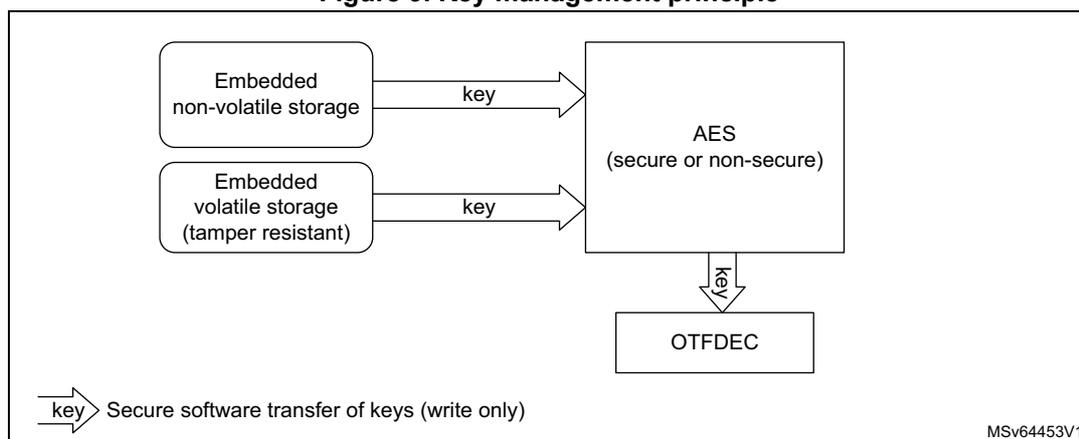
Figure 9 shows how key management service application can use the AES engine for example to compute external image decryption keys. Embedded non-volatile key can be stored in the secure HDP area (see Section 4.7.1 ), while volatile key storage consists in the battery-powered, tamper-protected SRAM or registers in TrustZone-aware TAMP peripheral.
Details on tamper protection is found in Section 4.8.4 , while TrustZone features of TAMP is briefly described in Section 4.6.6 .
Figure 9. Key management principle
graph LR
    subgraph Storage
        A[Embedded non-volatile storage] -- key --> AES
        B[Embedded volatile storage
(tamper resistant)] -- key --> AES
    end
    AES[AES
(secure or non-secure)] -- key --> OTFDEC[OTFDEC]
    style Storage fill:none,stroke:none
    style AES fill:none,stroke:none
    style OTFDEC fill:none,stroke:none
Secure software transfer of keys (write only)
MSV64453V1
4.9.2 Unique ID
The STM32L552xx and STM32L562xx store a 96-bit ID that is unique to each device. It is stored at the address 0x0BFA 0590 .
Application services can use this unique identity key to identify the product in the cloud network, or make it difficult for counterfeit devices or clones to inject untrusted data into the network.
4.10 Crypto engines
4.10.1 Introduction
STM32L552xx and STM32L562xx devices implement state-of-the-art cryptographic algorithms featuring key sizes and computing protection as recommended by national security agencies such as NIST for the U.S.A, BSI for Germany or ANSSI for France. Those algorithms are used to support privacy, authentication, integrity, entropy and identity attestation.
The crypto engines embedded in STM32 reduces weaknesses on the implementation of critical cryptographic functions, preventing for example the use of weak cryptographic algorithms and key sizes. They also enable lower processing times and lower power consumption when performing cryptographic operations, offloading those computations from Cortex-M33. This is especially true for asymmetric cryptography.
For product certification purpose, ST can provides certified device information on how these security functions are implemented and validated.
For more information on crypto engine processing times, refer to their respective sections in the reference manual.
4.10.2 Crypto engines features
Table 19 lists the accelerated cryptographic operations available in the STM32L552xx and STM32L562xx devices.
Note: Additional operations can be added using firmware.
Public key accelerator can accelerate asymmetric crypto operations (like key pair generation, ECC scalar multiplication, point on curve check). See Section 32: Public key accelerator (PKA) for details.
Table 19. Accelerated cryptographic operations
| Operations | Algorithm | Specification | Key lengths (in bit) | Modes |
|---|---|---|---|---|
| Get entropy | RNG | NIST SP800-90B (1) | N/A | N/A |
| Encryption, decryption | AES | FIPS PUB 197 NIST SP800-38A | 128, 256 | ECB, CBC, CTR |
| Authenticated encryption or decryption | NIST SP800-38C NIST SP800-38D | 128, 256 | GCM, CCM | |
| Cipher-based message authentication code | NIST SP800-38D | 128, 256 | GMAC | |
| Checksum | MD5 | IETF RFC 1321 | N/A | Digest 128-bit |
| SHA-1 | FIPS PUB 180-4 | Digest 160-bit | ||
| Cryptographic hash | SHA-2 | SHA-224, SHA-256 | ||
| Keyed-hashing for message authentication | HMAC | FIPS PUB 198-1 IETF RFC 2104 | short, long (>64 bytes) | - |
| Encryption/decryption key-pair generation | RSA | IETF RFC 8017 NIST SP800-56B | up to 3136 | RSAES-OAEP |
| Signature with hashing Signature verification | RSA | IETF RFC 8017 FIPS PUB 186-4 | up to 3136 | PKCS1-v1_5, PSS |
| ECDSA | ANSI X9.62 IETF RFC 7027 FIPS PUB 186-4 | up to 640 | Nist: P-256, P-384, P-521, ... Brainpool: P256r1/t1, P384r1/t1, P512r1/t1, ... SEC2: secp256k1 OSCCA SM2 | |
| Key agreement | ECDH | ANSI X9.42 | ||
1. Certifiable using STMicroelectronics reviewed documents.
4.10.3 On-the-fly decryption engine (OTFDEC)
OTFDEC TrustZone-aware peripheral proposes on-the-fly decryption of encrypted images stored on external flash memory, connected through OCTOSPI peripheral. This decryption process introduces almost no additional cycle overhead when standard NOR flash memory is used. OTFDEC can also be used to encrypt flash memory images on the device, for example to encrypt with a device unique secret key.
When a tamper event is confirmed in TAMP peripheral, all OTFDEC keys are erased and encrypted regions read as zero until OTFDEC is properly initialized again.
Typical usage of OTFDEC can be found in Section 4.13.2 . For more details on the programming of the peripheral please refer to Section 31: On-the-fly decryption engine (OTFDEC) .
4.11 Product lifecycle
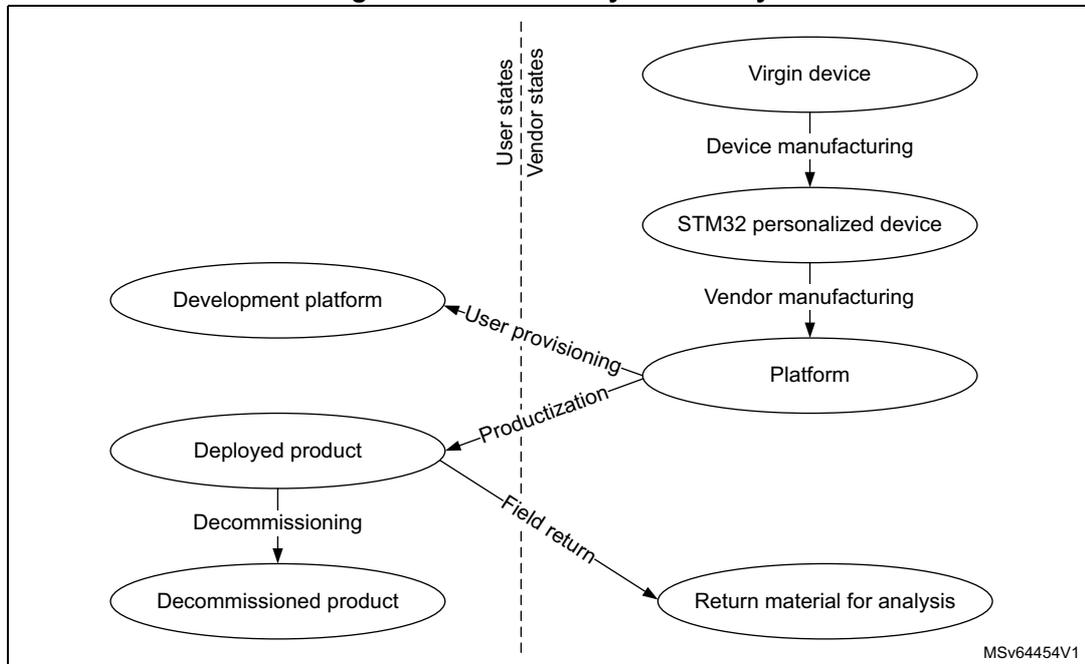
A typical IoT device lifecycle is summarized in Figure 10 . For each step, STM32L552xx and STM32L562xx devices propose secure lifecycle management mechanisms embedded in the hardware.
Figure 10. Device lifecycle security
The diagram illustrates the device lifecycle security flow, divided into two columns by a vertical dashed line: User states (left) and Vendor states (right).
- Vendor states (Right Column):
- Starts with Virgin device (oval).
- Transition: Device manufacturing (arrow down) to STM32 personalized device (oval).
- Transition: Vendor manufacturing (arrow down) to Platform (oval).
- Transitions between columns:
- From Platform (Vendor state) to Development platform (User state): User provisioning (arrow up-left).
- From Platform (Vendor state) to Deployed product (User state): Productization (arrow down-left).
- User states (Left Column):
- Development platform (oval).
- Deployed product (oval).
- Transition: Decommissioning (arrow down) to Decommissioned product (oval).
- From Deployed product (User state) to Return material for analysis (Vendor state): Field return (arrow down-right).
MSv64454V1
More details on the various phases and associated transitions, found either at the vendor or end user premises, are summarized in the table below.
Table 20. Main product lifecycle transitions
| Transitions | Description |
|---|---|
| Device manufacturing | STMicroelectronics creates new STM32 devices, always checking for manufacturing defects. During this process STM32 is provisioned with ROM firmware, secure firmware install (SFI) unique key pair, and a public ID. |
| Vendor manufacturing | One (or more) vendor is responsible for the platform assembly, initialization, and provisioning before delivery to the end user. This end user can use the final product (“productization” transition) or he/she can use the platform for software development (“user provisioning” transition). |
| Productization | The end user gets a product ready for use. All security functions of the platform are enabled, the debugging/testing features are restricted/disabled, and unique boot entry to immutable code is enforced. |
| User provisioning | Platform vendor prepares an individual platform for development, not to be connected to a production cloud network. |
| Field return or decommissioning | Those are one way transitions, with devices kept in user premises or returned to the manufacturer. In both cases all data including user data are destroyed, therefore the device loses the ability to operate securely (e.g. connecting to a managed IoT network). |
The features described hereafter contribute to securing the device lifecycle.
4.11.1 Lifecycle management with readout protection (RDP)
The readout protection mechanism (full hardware feature) controls the access to the STM32L552xx and STM32L562xx debug, test and provisioned secrets, as summarized in the table below. The supported transitions, summarized on Figure 11 , can be requested (when available) through the debug interface or via the system bootloader.
Table 21. Typical product lifecycle phases
| RDP protection level | Debug | Comments | |
|---|---|---|---|
| Level 0 | Device is open | Secure (1) and non-secure | Boot address must target a secure area when TrustZone is enabled (secure SRAM, secure flash memory, RSS in system flash memory). |
| Level 0.5 (2) | Device is partially closed (closed-secure) | Non-secure only | Boot address must target a secure area when TrustZone is enabled (secure user or system flash memory). boot on SRAM is not permitted. Access to non-secure flash memory is allowed when debug is connected. |
| Level 1 | Device memories are protected | Non-secure only (conditioned) | Boot address must target the secure user flash memory. Accesses to non-secure flash memory, encrypted flash memory (3) , SRAM2 and backup registers are not allowed when debug is connected. |
| Level 2 | Device is closed | None (JTAG fuse) | Boot address must target the user flash memory (secure if TZEN = 1). Option bytes are read-only, hence RDP level 2 cannot be changed. |
- 1. Debug is not available when executing RSS code.
- 2. Only applicable when TrustZone security is activated in the product.
- 3. External flash memory area decrypted on-the-fly with OTFDEC peripheral.
Figure 11. RDP level transition scheme
graph LR
    subgraph TrustZone_disabled [TrustZone® disabled]
        RDP0_0((RDP0)) --> RDP1_0((RDP1))
        RDP1_0 --> RDP2_0((RDP2))
        RDP0_0 --> RDP2_0
    end
    subgraph TrustZone_enabled [TrustZone® enabled]
        RDP0_1((RDP0)) --> RDP1_1((RDP1))
        RDP1_1 --> RDP0_5((RDP0.5))
        RDP0_5 --> RDP2_1((RDP2))
        RDP0_1 --> RDP2_1
        RDP1_1 -.->|Non-secure Flash memory erase + secret erase| RDP0_5
        RDP1_1 -.->|Full Flash memory erase + secret erase| RDP2_1
        RDP0_1 -.->|Full Flash memory erase + secret erase| RDP2_1
    end
As shown on Figure 11 , the user flash memory is automatically erased, either partially or in totality, during a RDP regression. During the transition from RDP1 to RDP0.5 only non-secure embedded flash memory is erased, keeping functional for example the secure boot and the secure firmware update. In all regressions OTP area in flash memory is kept, and
device secrets are erased, hence no secrets shall be stored in OTP as they are revealed after a regression to RDP0. Those secrets, erased as response to tamper, are defined in Section 4.8.4: Tamper detection and response .
Note: Enabling TrustZone using option byte TZEN is only possible when RDP level is 0.
For more details on RDP, refer to Section 6: Embedded flash memory (FLASH) .
4.11.2 Recommended option byte settings
Most of the time, the user threat model focuses mainly on software attacks, in this case, it may be sufficient to keep the RDP level 1 as device protection.
For a more aggressive threat model, where user may fear physical attacks on the STM32 device, it is recommended to optimize the level of security by setting the RDP level 2. The recommended settings are detailed below:
If TrustZone is disabled (TZEN = 0) it is recommended to set the following option bytes:
- • RDP = level 2
- • non-secure boot address option bytes set in user flash memory
If TrustZone is enabled (TZEN = 1) it is recommended to set the following option bytes:
- • RDP = level 2
- • Boot_lock = 1
- • secure boot address option bytes set in user flash memory
4.12 Access controlled debug
The device restricts access to embedded debug features, in order to guarantee the confidentiality of customer assets against unauthorized usage of debug and trace features.
4.12.1 Debug protection with readout protection (RDP)
As described in Section 4.11.1 the hardware readout protection (RDP) mechanism automatically controls the accesses to the device debug and tests. The protection of these debug features are defined in the table below.
Table 22. Debug protection with RDP
| RDP protection level | Debug features protection | |
|---|---|---|
| Level 0 | Device is open | Any debug (1) |
| Level 0.5 (2) | Device is partially closed | Secure debug is no more available |
| Level 1 | Device memories are protected | Non-secure debug can no longer debug code & data stored in embedded flash memory, encrypted external flash memory (3) , SRAM2 and backup registers |
| Level 2 | Device is closed | JTAG is physically deactivated |
1. Including ST engineering test modes, used for field returns.
2. Only applicable when TrustZone security is activated in the product.
3. External flash memory area decrypted on-the-fly with OTFDEC peripheral.
4.13 Software intellectual property protection and collaborative development
Thanks to software intellectual property protection and collaborative model the STM32L552xx and STM32L562xx devices allow to integrate and implement with third-party libraries innovative solutions.
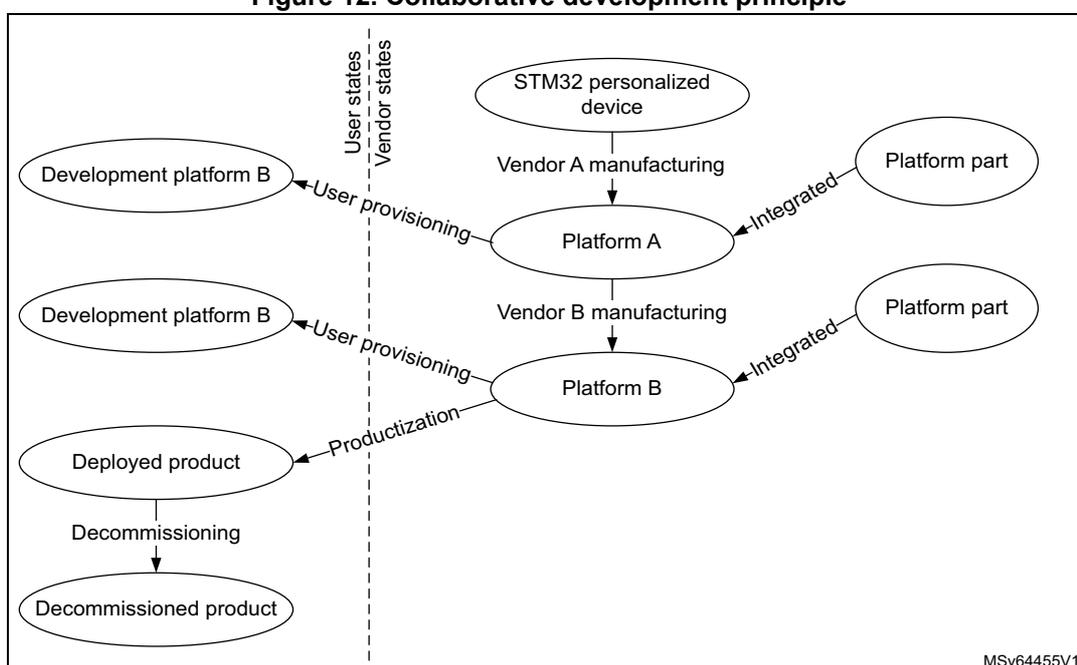
Collaborative development is summarized on Figure 12 . Starting from a personalized device sold by STMicroelectronics, a vendor A can integrate a portion of hardware and software on a platform A, that can then be used by a vendor B that will do the same before deploying a final product to the end users.
Note: Each platform vendor can provision individual platforms for development, not to be connected to a production cloud network (“Development Platform X”).
Figure 12. Collaborative development principle
graph TD; subgraph Vendor_states; A1([STM32 personalized device]) -- "Vendor A manufacturing" --> A2([Platform A]); A2 -- "Vendor B manufacturing" --> B2([Platform B]); P1([Platform part]) -- "Integrated" --> A2; P2([Platform part]) -- "Integrated" --> B2; end; subgraph User_states; B2 -- "User provisioning" --> B1([Development platform B]); B1 -- "Productionization" --> D1([Deployed product]); D1 -- "Decommissioning" --> D2([Decommissioned product]); end;
The features described hereafter contribute to securing the software intellectual property within such a collaborative development.
4.13.1 Software intellectual property protection with readout protection (RDP)
As described in Section 4.11.1 the hardware readout protection (RDP) mechanism automatically controls the accesses to secrets provisioned in the device. The protection of these secrets are defined in Table 23 .
Table 23. Software intellectual property protection with RDP| RDP protection level | Secrets protection | |
|---|---|---|
| Level 0 | Device is open | No special protections. |
| Level 0.5 (1) | Device is partially closed | All peripherals and memories mapped as secure during secure boot cannot be dumped, debugged or traced |
| Level 1 | Device memories are protected | Data and code stored in embedded flash memory, encrypted external flash memory (2) , SRAM2 and backup registers are no more accessible via debugger. |
| Level 2 | Device is closed | All data and code stored in the device or encrypted in external flash memory cannot be dumped clear-text, debugged or traced. |
1. Only applicable when TrustZone security is activated in the product.
2. External flash memory area decrypted on-the-fly with OTFDEC peripheral.
4.13.2 Software intellectual property protection with OTFDEC
As described in Section 4.10.3 , the OTFDEC peripheral associated with the OCTOSPI is able to decrypt on-the-fly encrypted images stored in external SPI flash memory devices.
Thanks to this feature STM32L562xx devices allow the installation of intellectual properties:
- • over the air, with the image already encrypted with a key provisioned in the device, or
- • through a provisioning host located in a trusted or an non-trusted environment/facility.
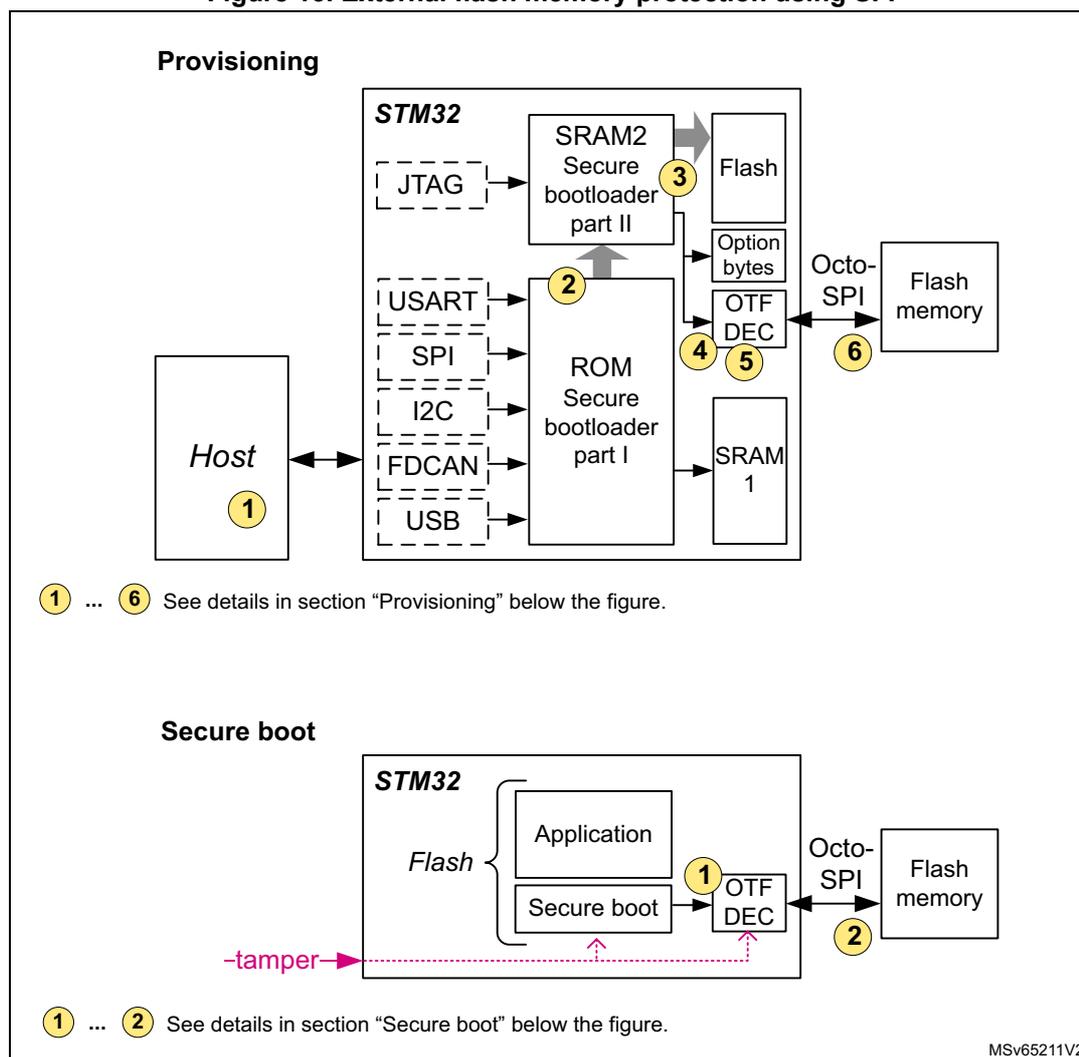
Figure 13 illustrates this last case with the provisioning, in a non-trusted environment, of software intellectual properties both in embedded flash memory and in external SPI flash memory (encrypted).
Note: Since OTFDEC is using AES in counter mode (CTR) to achieve the lowest possible latency, each time the content of one encrypted region is changed the corresponding cryptographic context (key or initialization vector) must be changed. This constraint makes OTFDEC suitable to decrypt read-only data or code, stored in external NOR flash memory.
Figure 13. External flash memory protection using SFI
1 ... 6 See details in section “Provisioning” below the figure.
1 ... 2 See details in section “Secure boot” below the figure.
MSv65211V2
Provisioning
Assuming the device is virgin, the first step is to provision both flash memories, as detailed below:
- 1. User creates an SFI image, composed of:
- – Encrypted internal firmware and data (including external flash memory drivers)
- – Encrypted external firmware and data AES key (up to 4)
- – Encrypted external firmware and data image
- 2. The secure bootloader stored in system memory loads the second part of the secure-bootloader in SRAM2 through the supported communication ports (USART, SPI, I2C, FDCAN, USB and JTAG). This second part runs in secure SRAM2 and is responsible for executing the SFI process, applying the SFI protocol thanks to the commands received through the above mentioned supported communication ports.
- 3. Internal flash memory is programmed with decrypted option bytes, internal firmware and data, and external firmware and data AES key(s). Alternatively, device unique external firmware AES keys could be used instead of such global keys.
- 4. OTFDEC is properly initialized with encrypted region(s) information, including the corresponding external firmware and data AES key.
- 5. Running the SFI process, chunks of encrypted external firmware and data image are decrypted in the device, then re-encrypted in OTFDEC.
- 6. After chunk OTFDEC re-encryption, user external flash memory programmer is responsible for programming those last encrypted chunks to external SPI flash memories through OCTOSPI peripheral.
Secure boot
After provisioning, each time the device initializes on trusted firmware, the following actions are required:
- 1. Secure boot firmware executes, programming the external firmware and data AES key(s) to OTFDEC write-only key registers, along with the other needed information.
- 2. Application reads or executes the encrypted external firmware and data through OCTOSPI memory mapped mode, unless a tamper event is detected. In this case all OTFDEC keys are erased and encrypted regions read as zero until OTFDEC is properly initialized again.
For more information on above secure firmware install (SFI) solutions for STM32L552xx and STM32L562xx devices, refer to AN4992 on STMicroelectronics website.
4.13.3 Other software intellectual property protections
STM32L552xx and STM32L562xx devices additional protections to software intellectual property is:
- • Invasive attacks such as physical tampering or perturbation are countered by detection then decommissioning of the device before the detected attack succeeds.