23. Window watchdog (WWDG)
23.1 WWDG introduction
The window watchdog is used to detect the occurrence of a software fault, usually generated by external interference or by unforeseen logical conditions, which causes the application program to abandon its normal sequence. The watchdog circuit generates an MCU reset on expiry of a programmed time period, unless the program refreshes the contents of the downcounter before the T6 bit becomes cleared. An MCU reset is also generated if the 7-bit downcounter value (in the control register) is refreshed before the downcounter has reached the window register value. This implies that the counter must be refreshed in a limited window.
23.2 WWDG main features
- • Programmable free-running downcounter
- • Conditional reset
- – Reset (if watchdog activated) when the downcounter value becomes less than 0x40
- – Reset (if watchdog activated) if the downcounter is reloaded outside the window (see Figure 223 )
- • Early wakeup interrupt (EWI): triggered (if enabled and the watchdog activated) when the downcounter is equal to 0x40.
23.3 WWDG functional description
If the watchdog is activated (the WDGA bit is set in the WWDG_CR register) and when the 7-bit downcounter (T[6:0] bits) rolls over from 0x40 to 0x3F (T6 becomes cleared), it initiates a reset. If the software reloads the counter while the counter is greater than the value stored in the window register, then a reset is generated.
Figure 222. Watchdog block diagram
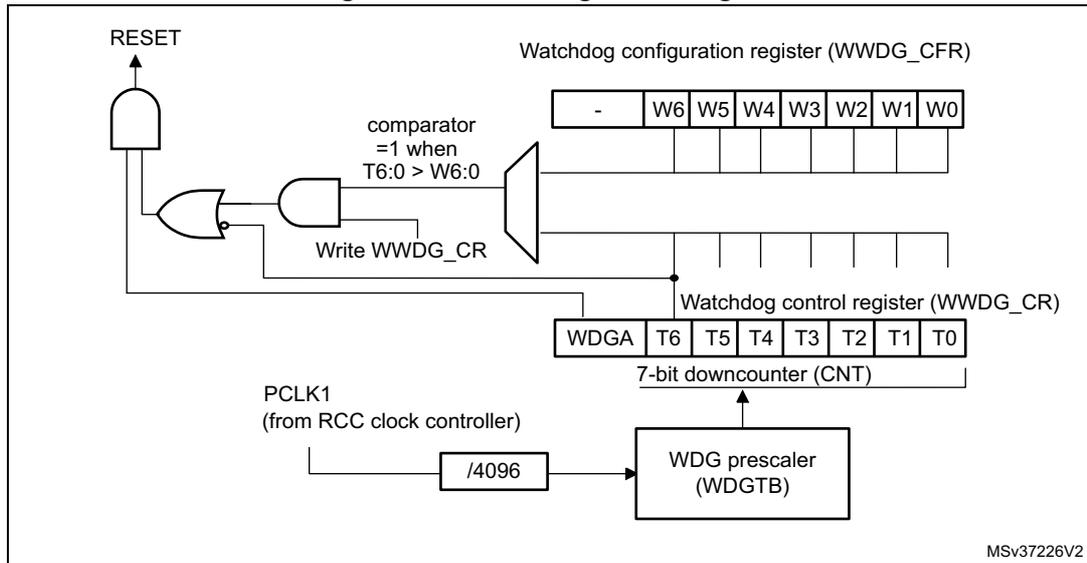
The diagram illustrates the internal architecture of the Window Watchdog (WWDG). At the top, the Watchdog configuration register (WWDG_CFR) is shown with bits W6 through W0 . Below it, the Watchdog control register (WWDG_CR) contains bits WDGA , T6 , T5 , T4 , T3 , T2 , T1 , and T0 . A 7-bit downcounter (CNT) is connected to the T6:T0 bits. The counter is clocked by PCLK1 (from the RCC clock controller) through a /4096 divider and a WDG prescaler (WDGTB) . A comparator block compares the counter value (T6:0) with the window register value (W6:0); its output is 1 when \( T6:0 > W6:0 \) . This comparator output and the WDGA bit are inputs to an AND gate. The output of the AND gate is inverted by an OR gate (configured as an inverter) to generate the RESET signal.
The application program must write in the WWDG_CR register at regular intervals during normal operation to prevent an MCU reset. This operation must occur only when the counter value is lower than the window register value. The value to be stored in the WWDG_CR register must be between 0xFF and 0xC0.
Enabling the watchdog
The watchdog is always disabled after a reset. It is enabled by setting the WDGA bit in the WWDG_CR register, then it cannot be disabled again except by a reset.
Controlling the downcounter
This downcounter is free-running, counting down even if the watchdog is disabled. When the watchdog is enabled, the T6 bit must be set to prevent generating an immediate reset.
The T[5:0] bits contain the number of increments which represents the time delay before the watchdog produces a reset. The timing varies between a minimum and a maximum value due to the unknown status of the prescaler when writing to the WWDG_CR register (see Figure 223 ). The Configuration register (WWDG_CFR) contains the high limit of the window: To prevent a reset, the downcounter must be reloaded when its value is lower than the window register value and greater than 0x3F. Figure 223 describes the window watchdog process.
Note: The T6 bit can be used to generate a software reset (the WDGA bit is set and the T6 bit is cleared).
Advanced watchdog interrupt feature
The Early Wakeup Interrupt (EWI) can be used if specific safety operations or data logging must be performed before the actual reset is generated. The EWI interrupt is enabled by setting the EWI bit in the WWDG_CFR register. When the downcounter reaches the value 0x40, an EWI interrupt is generated and the corresponding interrupt service routine (ISR) can be used to trigger specific actions (such as communications or data logging), before resetting the device.
In some applications, the EWI interrupt can be used to manage a software system check and/or system recovery/graceful degradation, without generating a WWDG reset. In this case, the corresponding interrupt service routine (ISR) should reload the WWDG counter to avoid the WWDG reset, then trigger the required actions.
The EWI interrupt is cleared by writing '0' to the EWIF bit in the WWDG_SR register.
Note: When the EWI interrupt cannot be served, e.g. due to a system lock in a higher priority task, the WWDG reset will eventually be generated.
23.4 How to program the watchdog timeout
The formula in Figure 223 must be used to calculate the WWDG timeout.
Warning: When writing to the WWDG_CR register, always write 1 in the T6 bit to avoid generating an immediate reset.
Figure 223. Window watchdog timing diagram
![Figure 223. Window watchdog timing diagram. The diagram shows three waveforms over time. The top waveform is the T[6:0] CNT downcounter, which starts at 0x3F and decreases linearly. The middle waveform is the W[6:0] window register, which is a constant value. The bottom waveform is the RESET signal, which is high until the counter reaches 0x3F, at which point it goes low. The time axis is divided into two regions: 'Refresh not allowed' (from the start until the counter reaches the window value) and 'Refresh allowed' (from the window value until the counter reaches 0x3F). The T6 bit is shown as a high signal throughout the diagram. The diagram is labeled ai17101c.](/RM0430-STM32F413-423/e1306d1a50e49dff013697798d0088e9_img.jpg)
The formula to calculate the timeout value is given by:
where:
\( t_{\text{WWDG}} \) : WWDG timeout
\( t_{\text{PCLK1}} \) : APB1 clock period measured in ms
4096: value corresponding to internal divider.
As an example, let us assume APB1 frequency is equal to 24 MHz, WDGTB[1:0] is set to 3 and T[5:0] is set to 63:
Refer to the datasheets for the minimum and maximum values of the \( t_{\text{WWDG}} \) .
23.5 Debug mode
When the microcontroller enters debug mode (Cortex ® -M4 with FPU core halted), the WWDG counter either continues to work normally or stops, depending on DBG_WWDG_STOP configuration bit in DBGMCU module. For more details, refer to Section 34.16.4: Debug MCU APB1 freeze register (DBGMCU_APB1_FZ) .
23.6 WWDG registers
Refer to Section 1.2 on page 52 for a list of abbreviations used in register descriptions.
The peripheral registers have to be accessed by half-words (16 bits) or words (32 bits).
23.6.1 Control register (WWDG_CR)
Address offset: 0x00
Reset value: 0x0000 007F
| 31 | 30 | 29 | 28 | 27 | 26 | 25 | 24 | 23 | 22 | 21 | 20 | 19 | 18 | 17 | 16 |
|---|---|---|---|---|---|---|---|---|---|---|---|---|---|---|---|
| Res. | Res. | Res. | Res. | Res. | Res. | Res. | Res. | Res. | Res. | Res. | Res. | Res. | Res. | Res. | Res. |
| 15 | 14 | 13 | 12 | 11 | 10 | 9 | 8 | 7 | 6:0 | ||||||
| Res. | Res. | Res. | Res. | Res. | Res. | Res. | Res. | WDGA | T[6:0] | ||||||
| rs | rw | ||||||||||||||
Bits 31:8 Reserved, must be kept at reset value.
Bit 7 WDGA : Activation bit
This bit is set by software and only cleared by hardware after a reset. When WDGA = 1, the watchdog can generate a reset.
0: Watchdog disabled
1: Watchdog enabled
Bits 6:0 T[6:0] : 7-bit counter (MSB to LSB)
These bits contain the value of the watchdog counter. It is decremented every \( (4096 \times 2^{\text{WDGTB}[1:0]}) \) PCLK1 cycles. A reset is produced when it rolls over from 0x40 to 0x3F (T6 becomes cleared).
23.6.2 Configuration register (WWDG_CFR)
Address offset: 0x04
Reset value: 0x0000 007F
| 31 | 30 | 29 | 28 | 27 | 26 | 25 | 24 | 23 | 22 | 21 | 20 | 19 | 18 | 17 | 16 |
|---|---|---|---|---|---|---|---|---|---|---|---|---|---|---|---|
| Res. | Res. | Res. | Res. | Res. | Res. | Res. | Res. | Res. | Res. | Res. | Res. | Res. | Res. | Res. | Res. |
| 15 | 14 | 13 | 12 | 11 | 10 | 9 | 8 | 7 | 6 | 5 | 4 | 3 | 2 | 1 | 0 |
| Res. | Res. | Res. | Res. | Res. | Res. | EWI | WDGTB[1:0] | W[6:0] | |||||||
| rs | rw | rw | |||||||||||||
Bits 31:10 Reserved, must be kept at reset value.
Bit 9 EWI : Early wakeup interrupt
When set, an interrupt occurs whenever the counter reaches the value 0x40. This interrupt is only cleared by hardware after a reset.
Bits 8:7 WDGTB[1:0] : Timer base
The time base of the prescaler can be modified as follows:
00: CK Counter Clock (PCLK1 div 4096) div 1
01: CK Counter Clock (PCLK1 div 4096) div 2
10: CK Counter Clock (PCLK1 div 4096) div 4
11: CK Counter Clock (PCLK1 div 4096) div 8
Bits 6:0 W[6:0] : 7-bit window value
These bits contain the window value to be compared to the downcounter.
23.6.3 Status register (WWDG_SR)
Address offset: 0x08
Reset value: 0x0000 0000
| 31 | 30 | 29 | 28 | 27 | 26 | 25 | 24 | 23 | 22 | 21 | 20 | 19 | 18 | 17 | 16 |
|---|---|---|---|---|---|---|---|---|---|---|---|---|---|---|---|
| Res. | Res. | Res. | Res. | Res. | Res. | Res. | Res. | Res. | Res. | Res. | Res. | Res. | Res. | Res. | Res. |
| 15 | 14 | 13 | 12 | 11 | 10 | 9 | 8 | 7 | 6 | 5 | 4 | 3 | 2 | 1 | 0 |
| Res. | Res. | Res. | Res. | Res. | Res. | Res. | Res. | Res. | Res. | Res. | Res. | Res. | Res. | Res. | EWIF |
| rc_w0 |
Bits 31:1 Reserved, must be kept at reset value.
Bit 0 EWIF : Early wakeup interrupt flag
This bit is set by hardware when the counter has reached the value 0x40. It must be cleared by software by writing '0'. A write of '1' has no effect. This bit is also set if the interrupt is not enabled.
23.6.4 WWDG register map
The following table gives the WWDG register map and reset values.
Table 124. WWDG register map and reset values
| Offset | Register | 31 | 30 | 29 | 28 | 27 | 26 | 25 | 24 | 23 | 22 | 21 | 20 | 19 | 18 | 17 | 16 | 15 | 14 | 13 | 12 | 11 | 10 | 9 | 8 | 7 | 6 | 5 | 4 | 3 | 2 | 1 | 0 |
|---|---|---|---|---|---|---|---|---|---|---|---|---|---|---|---|---|---|---|---|---|---|---|---|---|---|---|---|---|---|---|---|---|---|
| 0x00 | WWDG_CR | Res. | Res. | Res. | Res. | Res. | Res. | Res. | Res. | Res. | Res. | Res. | Res. | Res. | Res. | Res. | Res. | Res. | Res. | Res. | Res. | Res. | Res. | Res. | Res. | WDGA | T[6:0] | ||||||
| Reset value | 0 | 1 | 1 | 1 | 1 | 1 | 1 | 1 | |||||||||||||||||||||||||
| 0x04 | WWDG_CFR | Res. | Res. | Res. | Res. | Res. | Res. | Res. | Res. | Res. | Res. | Res. | Res. | Res. | Res. | Res. | Res. | Res. | Res. | Res. | Res. | Res. | Res. | EWI | WDGTB1 | WDGTB0 | W[6:0] | ||||||
| Reset value | 0 | 0 | 0 | 1 | 1 | 1 | 1 | 1 | 1 | ||||||||||||||||||||||||
| 0x08 | WWDG_SR | Res. | Res. | Res. | Res. | Res. | Res. | Res. | Res. | Res. | Res. | Res. | Res. | Res. | Res. | Res. | Res. | Res. | Res. | Res. | Res. | Res. | Res. | Res. | Res. | Res. | Res. | Res. | Res. | Res. | Res. | Res. | EWIF |
| Reset value | 0 | ||||||||||||||||||||||||||||||||
Refer to Section 2.2 on page 57 for the register boundary addresses.