9. Chrom-ART Accelerator controller (DMA2D)
9.1 DMA2D introduction
The Chrom-ART Accelerator (DMA2D) is a specialized DMA dedicated to image manipulation. It can perform the following operations:
- • fill a part or the whole of a destination image with a specific color
- • copy a part or the whole of a source image into a part or the whole of a destination image
- • copy a part or the whole of a source image into a part or the whole of a destination image with a pixel format conversion
- • blend a part and/or two complete source images with different pixel format and copy the result into a part or the whole of a destination image with a different color format
All the classical color coding schemes are supported from 4-bit up to 32-bit per pixel with indexed or direct color mode. The DMA2D has its own dedicated memories for CLUTs (color look-up tables).
9.2 DMA2D main features
The main DMA2D features are:
- • Single AHB master bus architecture
- • AHB slave programming interface supporting 8/16/32-bit accesses (except for CLUT accesses which are 32-bit)
- • User programmable working area size
- • User programmable offset for sources and destination areas
- • User programmable sources and destination addresses on the whole memory space
- • Up to 2 sources with blending operation
- • Alpha value can be modified (source value, fixed value or modulated value)
- • User programmable source and destination color format
- • Up to 11 color formats supported from 4-bit up to 32-bit per pixel with indirect or direct color coding
- • 2 internal memories for CLUT storage in indirect color mode
- • Automatic CLUT loading or CLUT programming via the CPU
- • User programmable CLUT size
- • Internal timer to control AHB bandwidth
- • 4 operating modes: register-to-memory, memory-to-memory, memory-to-memory with pixel format conversion, and memory-to-memory with pixel format conversion and blending
- • Area filling with a fixed color
- • Copy from an area to another
- • Copy with pixel format conversion between source and destination images
- • Copy from two sources with independent color format and blending
- • Abort and suspend of DMA2D operations
- • Watermark interrupt on a user programmable destination line
- • Interrupt generation on bus error or access conflict
- • Interrupt generation on process completion
9.3 DMA2D functional description
9.3.1 DMA2D block diagram
The DMA2D controller performs direct memory transfer. As an AHB master, it can take the control of the AHB bus matrix to initiate AHB transactions.
The DMA2D can operate in the following modes:
- • Register-to-memory
- • Memory-to-memory
- • Memory-to-memory with pixel format conversion
- • Memory-to-memory with pixel format conversion and blending
The AHB slave port is used to program the DMA2D controller.
The block diagram of the DMA2D is shown in the figure below.
Figure 29. DMA2D block diagram
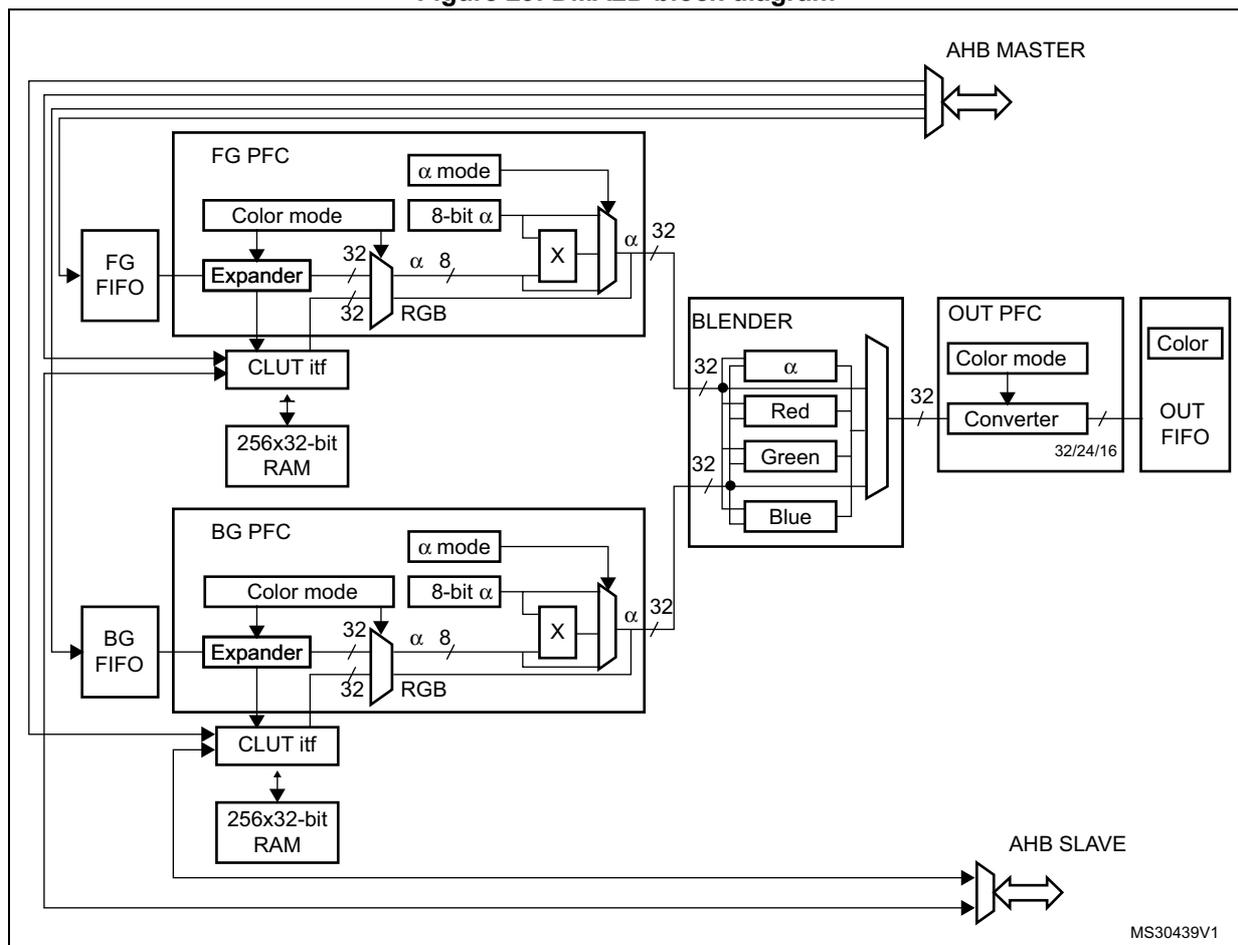
The block diagram illustrates the internal architecture of the DMA2D controller. At the top, an 'AHB MASTER' interface connects to the internal bus. Below it, the 'FG PFC' (Foreground Pixel Format Conversion) block contains an 'Expander' that takes 32-bit RGB input and produces 32-bit output with an 8-bit alpha channel. It also features 'Color mode' and 'α mode' settings, and an 'α' multiplier. A 'FG FIFO' feeds into the expander. The output of the expander goes to a 'CLUT itf' (Color Look-Up Table interface), which is connected to a '256x32-bit RAM'. Below the foreground path, the 'BG PFC' (Background Pixel Format Conversion) block has a similar structure with its own 'Expander', 'Color mode', 'α mode', and 'α' multiplier. A 'BG FIFO' feeds into this expander. Its output also goes to a 'CLUT itf' connected to another '256x32-bit RAM'. Both CLUT interfaces feed into a 'BLENDER' block, which takes 'α', 'Red', 'Green', and 'Blue' inputs and produces a 32-bit output. This output goes to an 'OUT PFC' (Output Pixel Format Conversion) block containing a 'Converter' with 'Color mode' settings. The converter's output goes to an 'OUT FIFO'. At the bottom, an 'AHB SLAVE' interface is shown. The diagram is labeled 'MS30439V1' in the bottom right corner.
9.3.2 DMA2D control
The DMA2D controller is configured through the DMA2D control register (DMA2D_CR).
The user application can perform the following operations:
- • Select the operating mode.
- • Enable/disable the DMA2D interrupt.
- • Start/suspend/abort ongoing data transfers.
9.3.3 DMA2D foreground and background FIFOs
The DMA2D foreground (FG) FIFO and background (BG) FIFO fetch the input data to be copied and/or processed.
These FIFOs fetch the pixels according to the color format defined in their respective pixel format converter (PFC). They are programmed through a set of control registers:
- • DMA2D foreground memory address register (DMA2D_FGMAR)
- • DMA2D foreground offset register (DMA2D_FGOR)
- • DMA2D background memory address register (DMA2D_BGMAR)
- • DMA2D background offset register (DMA2D_BGBOR)
- • DMA2D number of lines register (number of lines and pixel per lines) (DMA2D_NLR)
When the DMA2D operates in register-to-memory mode, none of the FIFOs is activated.
When the DMA2D operates in memory-to-memory mode (no pixel format conversion nor blending operation), only the FG FIFO is activated and acts as a buffer.
When the DMA2D operates in memory-to-memory operation with pixel format conversion (no blending operation), the BG FIFO is not activated.
9.3.4 DMA2D foreground and background pixel format converter (PFC)
DMA2D foreground pixel format converter (PFC) and background pixel format converter perform the pixel format conversion to generate a 32-bit per pixel value. The PFC can also modify the alpha channel.
The first stage of the converter converts the color format. The original color format of the foreground pixel and background pixels are configured through the CM[3:0] bits of the DMA2D_FGPFCCR and DMA2D_BGPFCR, respectively.
The supported input formats are given in the table below.
Table 37. Supported color mode in input
| CM[3:0] | Color mode |
|---|---|
| 0000 | ARGB8888 |
| 0001 | RGB888 |
| 0010 | RGB565 |
| 0011 | ARGB1555 |
| 0100 | ARGB4444 |
| 0101 | L8 |
| CM[3:0] | Color mode |
|---|---|
| 0110 | AL44 |
| 0111 | AL88 |
| 1000 | L4 |
| 1001 | A8 |
| 1010 | A4 |
The color format is coded as follows:
- Alpha value field: transparency
0xFF value corresponds to an opaque pixel and 0x00 to a transparent one. - R field for Red
- G field for Green
- B field for Blue
- L field: luminance
This field is the index to a CLUT to retrieve the three/four RGB/ARGB components.
If the original format is direct color mode (ARGB/RGB), the extension to 8 bits per channel is performed by copying the MSBs into the LSBs. This ensures a perfect linearity of the conversion.
If the original format is indirect color mode (L/AL), a CLUT is required and each pixel format converter is associated with a 256 entry 32-bit CLUT.
If the original format does not include an alpha channel, the alpha value is automatically set to 0xFF (opaque).
For the specific alpha mode A4 and A8, no color information is stored nor indexed. The color to be used for the image generation is fixed and is defined in the DMA2D_FGCOLR for foreground pixels and in the DMA2D_BGCOLR register for background pixels.
The order of the fields in the system memory is defined in the table below.
Table 38. Data order in memory| Color Mode | @ + 3 | @ + 2 | @ + 1 | @ + 0 |
|---|---|---|---|---|
| ARGB8888 | A 0 [7:0] | R 0 [7:0] | G 0 [7:0] | B 0 [7:0] |
| RGB888 | B 1 [7:0] | R 0 [7:0] | G 0 [7:0] | B 0 [7:0] |
| G 2 [7:0] | B 2 [7:0] | R 1 [7:0] | G 1 [7:0] | |
| R 3 [7:0] | G 3 [7:0] | B 3 [7:0] | R 2 [7:0] | |
| RGB565 | R 1 [4:0]G 1 [5:3] | G 1 [2:0]B 1 [4:0] | R 0 [4:0]G 0 [5:3] | G 0 [2:0]B 0 [4:0] |
| ARGB1555 | A 1 [0]R 1 [4:0]G 1 [4:3] | G 1 [2:0]B 1 [4:0] | A 0 [0]R 0 [4:0]G 0 [4:3] | G 0 [2:0]B 0 [4:0] |
| ARGB4444 | A 1 [3:0]R 1 [3:0] | G 1 [3:0]B 1 [3:0] | A 0 [3:0]R 0 [3:0] | G 0 [3:0]B 0 [3:0] |
| L8 | L 3 [7:0] | L 2 [7:0] | L 1 [7:0] | L 0 [7:0] |
| AL44 | A 3 [3:0]L 3 [3:0] | A 2 [3:0]L 2 [3:0] | A 1 [3:0]L 1 [3:0] | A 0 [3:0]L 0 [3:0] |
| AL88 | A 1 [7:0] | L 1 [7:0] | A 0 [7:0] | L 0 [7:0] |
| L4 | L 7 [3:0]L 6 [3:0] | L 5 [3:0]L 4 [3:0] | L 3 [3:0]L 2 [3:0] | L 1 [3:0]L 0 [3:0] |
| A8 | A 3 [7:0] | A 2 [7:0] | A 1 [7:0] | A 0 [7:0] |
| A4 | A 7 [3:0]A 6 [3:0] | A 5 [3:0]A 4 [3:0] | A 3 [3:0]A 2 [3:0] | A 1 [3:0]A 0 [3:0] |
The 24-bit RGB888 aligned on 32 bits is supported through the ARGB8888 mode.
Once the 32-bit value is generated, the alpha channel can be modified according to AM[1:0] in DMA2D_FGPFCCR/DMA2D_BGPFCCR registers as shown in the table below.
The alpha channel can be:
- • kept as it is (no modification)
- • replaced by the ALPHA[7:0] value of DMA2D_FGPFCCR/DMA2D_BGPFCCR
- • replaced by the original alpha value multiplied by the ALPHA[7:0] value of DMA2D_FGPFCCR/DMA2D_BGPFCCR divided by 255.
| AM[1:0] | Alpha mode |
|---|---|
| 00 | No modification |
| 01 | Replaced by value in DMA2D_xxPFCCR |
| 10 | Replaced by original value multiplied by the value in DMA2D_xxPFCCR / 255 |
| 11 | Reserved |
Note: To support the alternate format, the incoming alpha value can be inverted setting AI in DMA2D_FGPFCCR/DMA2D_BGPFCCR registers. This applies also to the Alpha value stored in the DMA2D_FGPFCCR/DMA2D_BGPFCCR and in the CLUT.
The R and B fields can also be swapped setting RBS in DMA2D_FGPFCCR/DMA2D_BGPFCCR registers. This applies also to the RGB order used in the CLUT and in the DMA2D_FGCOLR/DMA2D_BGCOLR registers.
9.3.5 DMA2D foreground and background CLUT interface
The CLUT interface manages the CLUT memory access and the automatic loading of the CLUT.
Three access types are possible:
- • CLUT read by the PFC during pixel format conversion operation
- • CLUT accessed through the AHB slave port when the CPU is reading or writing data into the CLUT
- • CLUT written through the AHB master port when an automatic loading of the CLUT is performed
The CLUT memory loading can be done in two different ways:
- • Automatic loading
The following sequence must be followed to load the CLUT:
- a) Program the CLUT address in DMA2D_FGCMAR (foreground CLUT) or DMA2D_BGCMAR (background CLUT).
- b) Program the CLUT size with CS[7:0] in DMA2D_FGPFCCR (foreground CLUT) or DMA2D_BGPFCCR (background CLUT).
- c) Set the START bit in DMA2D_FGPFCCR (foreground CLUT) or DMA2D_BGPFCCR (background CLUT) to start the transfer. During this automatic loading process, the CLUT is not accessible by the CPU. If a conflict occurs, a CLUT access error interrupt is raised assuming CAEIE = 1 in DMA2D_CR.
- • Manual loading
The application has to program the CLUT manually through the DMA2D AHB slave port to which the local CLUT memory is mapped. The foreground CLUT (FGCLUT) is located at address offset 0x0400 and the background CLUT (BGCLUT) at address offset 0x0800.
The CLUT format is 24 or 32 bits. It is configured through the CCM bit in DMA2D_FGPFCCR (foreground CLUT) or DMA2D_BGPFCCR (background CLUT) as shown in the table below.
Table 40. Supported CLUT color mode
| CCM | CLUT color mode |
|---|---|
| 0 | 32-bit ARGB8888 |
| 1 | 24-bit RGB888 |
The way the CLUT data are organized in the system memory is specified in the table below.
Table 41. CLUT data order in system memory
| CLUT color mode | @ + 3 | @ + 2 | @ + 1 | @ + 0 |
|---|---|---|---|---|
| ARGB8888 | A 0 [7:0] | R 0 [7:0] | G 0 [7:0] | B 0 [7:0] |
| RGB888 | B 1 [7:0] | R 0 [7:0] | G 0 [7:0] | B 0 [7:0] |
| G 2 [7:0] | B 2 [7:0] | R 1 [7:0] | G 1 [7:0] | |
| R 3 [7:0] | G 3 [7:0] | B 3 [7:0] | R 2 [7:0] |
9.3.6 DMA2D blender
The DMA2D blender blends the source pixels by pair to compute the resulting pixel.
The blending is performed according to the following equation:
Division is rounded to the nearest lower integer
No configuration register is required by the blender. The blender use depends on the DMA2D operating mode defined by MODE[1:0] in DMA2D_CR.
9.3.7 DMA2D output PFC
The output PFC performs the pixel format conversion from 32 bits to the output format defined by CM[2:0] in DMA2D_OPFCCR.
The supported output formats are given in the table below.
Table 42. Supported color mode in output
| CM[2:0] | Color mode |
|---|---|
| 000 | ARGB8888 |
| 001 | RGB888 |
| 010 | RGB565 |
| 011 | ARGB1555 |
| 100 | ARGB4444 |
Note: To support the alternate format, the calculated alpha value is inverted setting AI bit in DMA2D_OPFCCR. This applies also to the alpha value used in DMA2D_OCOLR. The R and B fields can also be swapped setting RBS in DMA2D_OPFCCR. This applies also to the RGB order used in DMA2D_OCOLR.
9.3.8 DMA2D output FIFO
The output FIFO programs the pixels according to the color format defined in the output PFC.
The destination area is defined through a set of control registers:
- • DMA2D output memory address register (DMA2D_OMAR)
- • DMA2D output offset register (DMA2D_OOR)
- • DMA2D number of lines register (number of lines and pixel per lines) (DMA2D_NLR)
If the DMA2D operates in register-to-memory mode, the configured output rectangle is filled by the color specified in DMA2D_OCOLR which contains a fixed 32-, 24-, or 16-bit value. The format is selected by CM[2:0] in DMA2D_OPFCCR.
The data are stored into the memory in the order defined in the table below.
Table 43. Data order in memory
| Color mode | @ + 3 | @ + 2 | @ + 1 | @ + 0 |
|---|---|---|---|---|
| ARGB8888 | A 0 [7:0] | R 0 [7:0] | G 0 [7:0] | B 0 [7:0] |
| RGB888 | B 1 [7:0] | R 0 [7:0] | G 0 [7:0] | B 0 [7:0] |
| G 2 [7:0] | B 2 [7:0] | R 1 [7:0] | G 1 [7:0] | |
| R 3 [7:0] | G 3 [7:0] | B 3 [7:0] | R 2 [7:0] | |
| RGB565 | R 1 [4:0]G 1 [5:3] | G 1 [2:0]B 1 [4:0] | R 0 [4:0]G 0 [5:3] | G 0 [2:0]B 0 [4:0] |
| ARGB1555 | A 1 [0]R 1 [4:0]G 1 [4:3] | G 1 [2:0]B 1 [4:0] | A 0 [0]R 0 [4:0]G 0 [4:3] | G 0 [2:0]B 0 [4:0] |
| ARGB4444 | A 1 [3:0]R 1 [3:0] | G 1 [3:0]B 1 [3:0] | A 0 [3:0]R 0 [3:0] | G 0 [3:0]B 0 [3:0] |
The RGB888 aligned on 32 bits is supported through the ARGB8888 mode.
9.3.9 DMA2D AHB master port timer
An 8-bit timer is embedded into the AHB master port to provide an optional limitation of the bandwidth on the crossbar.
This timer is clocked by the AHB clock and counts a dead time between two consecutive accesses. This limits the bandwidth availability.
The timer enabling and the dead time value are configured through the AHB master port timer configuration register (DMA2D_AMPTCR).
9.3.10 DMA2D transactions
DMA2D transactions consist of a sequence of a given number of data transfers. The number of data and the width can be programmed by software.
Each DMA2D data transfer is composed of up to four steps:
- 1. Data loading from the memory location pointed by DMA2D_FGMAR and pixel format conversion as defined in DMA2D_FGCR
- 2. Data loading from a memory location pointed by DMA2D_BGMAR and pixel format conversion as defined in DMA2D_BGCR
- 3. Blending of all retrieved pixels according to the alpha channels resulting of the PFC operation on alpha values
- 4. Pixel format conversion of the resulting pixels according to DMA2D_OCR and programming of the data to the memory location addressed through DMA2D_OMAR
9.3.11 DMA2D configuration
Both source and destination data transfers can target peripherals and memories in the whole 4 Gbyte memory area, at addresses ranging between 0x0000 0000 and 0xFFFF FFFF.
The DMA2D can operate in any of the following modes selected through MODE[1:0] in DMA2D_CR:
- • Register-to-memory
- • Memory-to-memory
- • Memory-to-memory with PFC
- • Memory-to-memory with PFC and blending
Register-to-memory
The register-to-memory mode is used to fill a user defined area with a predefined color.
The color format is set in DMA2D_OPFCCR.
The DMA2D does not perform any data fetching from any source. It just writes the color defined in DMA2D_OCOLR to the area located at the address pointed by DMA2D_OMAR, and defined in DMA2D_NLR and DMA2D_OOR.
Memory-to-memory
In memory-to-memory mode, the DMA2D does not perform any graphical data transformation. The foreground input FIFO acts as a buffer and the data are transferred from the source memory location defined in DMA2D_FGMAR to the destination memory location pointed by DMA2D_OMAR.
The color mode programmed by CM[3:0] in DMA2D_FGPFCCR defines the number of bits per pixel for both input and output.
The size of the area to be transferred is defined by DMA2D_NLR and DMA2D_FGOR for the source, and by DMA2D_NLR and DMA2D_OOR for the destination.
Memory-to-memory with PFC
In this mode, the DMA2D performs a pixel format conversion of the source data and stores them in the destination memory location.
The size of the areas to be transferred are defined by DMA2D_NLR and DMA2D_FGOR for the source, and by DMA2D_NLR and DMA2D_OOR for the destination.
Data are fetched from the location defined in DMA2D_FGMAR and processed by the foreground PFC. The original pixel format is configured through DMA2D_FGPFCCR.
If the original pixel format is direct color mode, then the color channels are all expanded to 8 bits.
If the pixel format is indirect color mode, the associated CLUT has to be loaded into the CLUT memory.
The CLUT loading can be done automatically by following the sequence below:
- 1. Set the CLUT address into DMA2D_FGCMAR.
- 2. Set the CLUT size with CS[7:0] bits in DMA2D_FGPFCCR.
- 3. Set the CLUT format (24 or 32 bits) with CCM in DMA2D_FGPFCCR.
- 4. Start the CLUT loading by setting START in DMA2D_FGPFCCR.
Once the CLUT loading is complete, the CTCIF flag in DMA2D_IFR is raised, and an interrupt is generated if CTCIE = 1 in DMA2D_CR. The automatic CLUT loading process can not work in parallel with classical DMA2D transfers.
The CLUT can also be filled by the CPU or by any other master through the APB port. The access to the CLUT is not possible when a DMA2D transfer is ongoing and uses the CLUT (indirect color format).
In parallel to the color conversion process, the alpha value is added or changed depending on the value programmed in DMA2D_FGPFCCR. If the original image does not have an alpha channel, a default alpha value of 0xFF is automatically added to obtain a fully opaque pixel. The alpha value is modified according to AM[1:0] in DMA2D_FGPFCCR:
- • It can be unchanged.
- • It can be replaced by the value defined by ALPHA[7:0] in DMA2D_FGPFCCR.
- • It can be replaced by the original value multiplied by ALPHA[7:0] divided by 255.
The resulting 32-bit data are encoded by the OUT PFC into the format specified by CM[2:0] in DMA2D_OPFCCR. The output pixel format cannot be the indirect mode since no CLUT generation process is supported.
The processed data are written into the destination memory location pointed by DMA2D_OMAR.
Memory-to-memory with PFC and blending
In this mode, two sources are fetched in the foreground and background FIFOs from the memory locations defined by DMA2D_FGMAR and DMA2D_BGMAR.
The two pixel format converters have to be configured as described in the memory-to-memory mode. Their configurations can be different as each pixel format converter is independent and has its own CLUT memory.
Once each pixel has been converted into 32 bits by its respective PFC, all pixels are blended according to the equation below:
Division are rounded to the nearest lower integer
The resulting 32-bit pixel value is encoded by the output PFC according to the specified output format, and the data are written into the destination memory location pointed by DMA2D_OMAR.
Configuration error detection
The DMA2D checks that the configuration is correct before any transfer. The configuration error interrupt flag is set by hardware when a wrong configuration is detected when a new transfer/automatic loading starts. An interrupt is then generated if CEIE = 1 in DMA2D_CR.
The wrong configurations that can be detected are listed below:
- • Foreground CLUT automatic loading: MA bits in DMA2D_FGCMAR are not aligned with CCM in DMA2D_FGPFCCR.
- • Background CLUT automatic loading: MA bits in DMA2D_BGCMAR are not aligned with CCM in DMA2D_BGPFCCR.
- • Memory transfer (except in register-to-memory mode): MA bits in DMA2D_FGMAR are not aligned with CM in DMA2D_FGPFCCR.
- • Memory transfer (except in register-to-memory mode): CM bits in DMA2D_FGPFCCR are invalid
- • Memory transfer (except in register-to-memory mode and except in memory-to-memory mode with blending and fixed color FG): PL bits in DMA2D_NLR are odd while CM in DMA2D_FGPFCCR is A4 or L4.
- • Memory transfer (except in register-to-memory mode): LO bits in DMA2D_FGOR are odd while CM in DMA2D_FGPFCCR is A4 or L4.
- • Memory transfer (only in blending mode): MA bits in DMA2D_BGMAR are not aligned with CM in DMA2D_BGPFCCR.
- • Memory transfer: (only in blending mode): CM bits in DMA2D_BGPFCCR are invalid
- • Memory transfer (only in blending mode): PL bits in DMA2D_NLR odd while CM in DMA2D_BGPFCCR is A4 or L4.
- • Memory transfer (only in blending mode): LO bits in DMA2D_BGOR are odd while CM in DMA2D_BGPFCCR is A4 or L4.
- • Memory transfer (except in memory-to-memory mode): MA bits in DMA2D_OMAR are not aligned with CM bits in DMA2D_OPFCCR.
- • Memory transfer (except in memory to memory mode): CM bits in DMA2D_OPFCCR are invalid.
- • Memory transfer: NL = 0x0 in DMA2D_NLR
- • Memory transfer: PL = 0x0 in DMA2D_NLR
9.3.12 DMA2D transfer control (start, suspend, abort and completion)
Once the DMA2D is configured, the transfer can be launched by setting START in DMA2D_CR. Once the transfer is completed, START is automatically reset and TCIF flag in DMA2D_ISR is raised. An interrupt can be generated if TCIE is set in DMA2D_CR.
The user application can suspend the DMA2D at any time by setting SUSP in DMA2D_CR. The transaction can then be aborted by setting ABORT in DMA2D_CR, or can be restarted by resetting SUSP in DMA2D_CR.
The user application can abort at any time an ongoing transaction by setting ABORT in DMA2D_CR. In this case, the TCIF flag is not raised.
Automatic CLUT transfers can also be aborted or suspended by using ABORT or SUSP in DMA2D_CR.
9.3.13 Watermark
A watermark can be programmed to generate an interrupt when the last pixel of a given line has been written to the destination memory area.
The line number is defined by LW[15:0] in DMA2D_LWR.
When the last pixel of this line has been transferred, the TWIF flag in DMA2D_ISR is raised, and an interrupt is generated if TWIE is set in DMA2D_CR.
9.3.14 Error management
Two kind of errors can be triggered:
- • AHB master port errors signaled by TEIF in DMA2D_ISR
- • conflicts caused by a CLUT access (CPU trying to access the CLUT while a CLUT loading or a DMA2D transfer is ongoing) signaled by CAEIF in DMA2D_ISR.
Both flags are associated to their own interrupt enable flag in DMA2D_CR to generate an interrupt if need be (TEIE and CAEIE).
9.3.15 AHB dead time
To limit the AHB bandwidth use, a dead time between two consecutive AHB accesses can be programmed.
This feature can be enabled by setting EN in DMA2D_AMTCR.
The dead time value is stored into DT[7:0] in DMA2D_AMTCR. This value represents the guaranteed minimum number of cycles between two consecutive transactions on the AHB bus.
The update of the dead time value while the DMA2D runs is taken into account for the next AHB transfer.
9.4 DMA2D interrupts
An interrupt can be generated on the following events:
- • Configuration error
- • CLUT transfer complete
- • CLUT access error
- • Transfer watermark reached
- • Transfer complete
- • Transfer error
Separate interrupt enable bits are available for flexibility.
Table 44. DMA2D interrupt requests
| Interrupt event | Event flag | Enable control bit |
|---|---|---|
| Configuration error | CEIF | CEIE |
| CLUT transfer complete | CTCIF | CTCIE |
| CLUT access error | CAEIF | CAEIE |
| Transfer watermark | TWF | TWIE |
| Transfer complete | TCIF | TCIE |
| Transfer error | TEIF | TEIE |
9.5 DMA2D registers
9.5.1 DMA2D control register (DMA2D_CR)
Address offset: 0x000
Reset value: 0x0000 0000
| 31 | 30 | 29 | 28 | 27 | 26 | 25 | 24 | 23 | 22 | 21 | 20 | 19 | 18 | 17 | 16 |
|---|---|---|---|---|---|---|---|---|---|---|---|---|---|---|---|
| Res. | Res. | Res. | Res. | Res. | Res. | Res. | Res. | Res. | Res. | Res. | Res. | Res. | Res. | MODE[1:0] | |
| rw | rw | ||||||||||||||
| 15 | 14 | 13 | 12 | 11 | 10 | 9 | 8 | 7 | 6 | 5 | 4 | 3 | 2 | 1 | 0 |
| Res. | Res. | CEIE | CTCIE | CAEIE | TWIE | TCIE | TEIE | Res. | Res. | Res. | Res. | Res. | ABORT | SUSP | START |
| rw | rw | rw | rw | rw | rw | rs | rw | rs | |||||||
Bits 31:18 Reserved, must be kept at reset value.
Bits 17:16 MODE[1:0] : DMA2D mode
These bits are set and cleared by software. They cannot be modified while a transfer is ongoing.
00: Memory-to-memory (FG fetch only)
01: Memory-to-memory with PFC (FG fetch only with FG PFC active)
10: Memory-to-memory with blending (FG and BG fetch with PFC and blending)
11: Register-to-memory (no FG nor BG, only output stage active)
Bits 15:14 Reserved, must be kept at reset value.
Bit 13 CEIE : Configuration error interrupt enable
This bit is set and cleared by software.
0: CE interrupt disabled
1: CE interrupt enabled
Bit 12 CTCIE : CLUT transfer complete interrupt enable
This bit is set and cleared by software.
0: CTC interrupt disabled
1: CTC interrupt enabled
Bit 11 CAEIE : CLUT access error interrupt enable
This bit is set and cleared by software.
0: CAE interrupt disabled
1: CAE interrupt enabled
Bit 10 TWIE : Transfer watermark interrupt enable
This bit is set and cleared by software.
0: TW interrupt disabled
1: TW interrupt enabled
Bit 9 TCIE : Transfer complete interrupt enable
This bit is set and cleared by software.
0: TC interrupt disabled
1: TC interrupt enabled
Bit 8 TEIE : Transfer error interrupt enable
This bit is set and cleared by software.
0: TE interrupt disabled
1: TE interrupt enabled
Bits 7:3 Reserved, must be kept at reset value.
Bit 2 ABORT : Abort
This bit can be used to abort the current transfer. This bit is set by software and is automatically reset by hardware when the START bit is reset.
0: No transfer abort requested
1: Transfer abort requested
Bit 1 SUSP : Suspend
This bit can be used to suspend the current transfer. This bit is set and reset by software. It is automatically reset by hardware when the START bit is reset.
0: Transfer not suspended
1: Transfer suspended
Bit 0 START : Start
This bit can be used to launch the DMA2D according to the parameters loaded in the various configuration registers. This bit is automatically reset by the following events:
- - at the end of the transfer
- - when the data transfer is aborted by the user application (setting ABORT in DMA2D_CR)
- - when a data transfer error occurs
- - when the data transfer has not started due to a configuration error or another transfer operation already ongoing (automatic CLUT loading).
9.5.2 DMA2D interrupt status register (DMA2D_ISR)
Address offset: 0x004
Reset value: 0x0000 0000
| 31 | 30 | 29 | 28 | 27 | 26 | 25 | 24 | 23 | 22 | 21 | 20 | 19 | 18 | 17 | 16 |
|---|---|---|---|---|---|---|---|---|---|---|---|---|---|---|---|
| Res. | Res. | Res. | Res. | Res. | Res. | Res. | Res. | Res. | Res. | Res. | Res. | Res. | Res. | Res. | Res. |
| 15 | 14 | 13 | 12 | 11 | 10 | 9 | 8 | 7 | 6 | 5 | 4 | 3 | 2 | 1 | 0 |
| Res. | Res. | Res. | Res. | Res. | Res. | Res. | Res. | Res. | Res. | CEIF | CTCIF | CAEIF | TWIF | TCIF | TEIF |
| r | r | r | r | r | r |
Bits 31:6 Reserved, must be kept at reset value.
Bit 5 CEIF : Configuration error interrupt flag
This bit is set when START in DMA2D_CR, DMA2DFGPFCCR or DMA2D_BGPFCCR is set and a wrong configuration has been programmed.
Bit 4 CTCIF : CLUT transfer complete interrupt flag
This bit is set when the CLUT copy from a system memory area to the internal DMA2D memory is complete.
Bit 3 CAEIF : CLUT access error interrupt flag
This bit is set when the CPU accesses the CLUT while the CLUT is being automatically copied from a system memory to the internal DMA2D.
Bit 2 TWIF : Transfer watermark interrupt flag
This bit is set when the last pixel of the watermarked line has been transferred.
Bit 1 TCIF : Transfer complete interrupt flag
This bit is set when a DMA2D transfer operation is complete (data transfer only).
Bit 0 TEIF : Transfer error interrupt flag
This bit is set when an error occurs during a DMA transfer (data transfer or automatic CLUT loading).
9.5.3 DMA2D interrupt flag clear register (DMA2D_IFCR)
Address offset: 0x008
Reset value: 0x0000 0000
| 31 | 30 | 29 | 28 | 27 | 26 | 25 | 24 | 23 | 22 | 21 | 20 | 19 | 18 | 17 | 16 |
|---|---|---|---|---|---|---|---|---|---|---|---|---|---|---|---|
| Res. | Res. | Res. | Res. | Res. | Res. | Res. | Res. | Res. | Res. | Res. | Res. | Res. | Res. | Res. | Res. |
| 15 | 14 | 13 | 12 | 11 | 10 | 9 | 8 | 7 | 6 | 5 | 4 | 3 | 2 | 1 | 0 |
| Res. | Res. | Res. | Res. | Res. | Res. | Res. | Res. | Res. | Res. | CCEIF | CCTCIF | CAECIF | CTWIF | CTCIF | CTEIF |
| rc_w1 | rc_w1 | rc_w1 | rc_w1 | rc_w1 | rc_w1 |
Bits 31:6 Reserved, must be kept at reset value.
Bit 5 CCEIF : Clear configuration error interrupt flag
Programming this bit to 1 clears CEIF in DMA2D_ISR.
Bit 4 CCTCIF : Clear CLUT transfer complete interrupt flag
Programming this bit to 1 clears CTCIF in DMA2D_ISR.
Bit 3 CAECIF : Clear CLUT access error interrupt flag
Programming this bit to 1 clears CAEIF in DMA2D_ISR.
Bit 2 CTWIF : Clear transfer watermark interrupt flag
Programming this bit to 1 clears TWIF in DMA2D_ISR.
Bit 1 CTCIF : Clear transfer complete interrupt flag
Programming this bit to 1 clears TCIF in DMA2D_ISR.
Bit 0 CTEIF : Clear Transfer error interrupt flag
Programming this bit to 1 clears TEIF in DMA2D_ISR.
9.5.4 DMA2D foreground memory address register (DMA2D_FGMAR)
Address offset: 0x00C
Reset value: 0x0000 0000

| 31 | 30 | 29 | 28 | 27 | 26 | 25 | 24 | 23 | 22 | 21 | 20 | 19 | 18 | 17 | 16 |
| MA[31:16] | |||||||||||||||
| rw | rw | rw | rw | rw | rw | rw | rw | rw | rw | rw | rw | rw | rw | rw | rw |
| 15 | 14 | 13 | 12 | 11 | 10 | 9 | 8 | 7 | 6 | 5 | 4 | 3 | 2 | 1 | 0 |
| MA[15:0] | |||||||||||||||
| rw | rw | rw | rw | rw | rw | rw | rw | rw | rw | rw | rw | rw | rw | rw | rw |
Bits 31:0 MA[31:0] : Memory address
This field contains the address of the data used for the foreground image. This register can only be written when data transfers are disabled. Once the data transfer has started, this register is read-only.
The address alignment must match the image format selected: for example, a 32-bit per pixel format must be 32-bit aligned, a 16-bit per pixel format must be 16-bit aligned and a 4-bit per pixel format must be 8-bit aligned.
9.5.5 DMA2D foreground offset register (DMA2D_FGOR)
Address offset: 0x010
Reset value: 0x0000 0000

| 31 | 30 | 29 | 28 | 27 | 26 | 25 | 24 | 23 | 22 | 21 | 20 | 19 | 18 | 17 | 16 |
| Res. | Res. | Res. | Res. | Res. | Res. | Res. | Res. | Res. | Res. | Res. | Res. | Res. | Res. | Res. | Res. |
| 15 | 14 | 13 | 12 | 11 | 10 | 9 | 8 | 7 | 6 | 5 | 4 | 3 | 2 | 1 | 0 |
| Res. | Res. | LO[13:0] | |||||||||||||
| rw | rw | rw | rw | rw | rw | rw | rw | rw | rw | rw | rw | rw | rw | ||
Bits 31:14 Reserved, must be kept at reset value.
Bits 13:0 LO[13:0] : Line offset
Line offset used for the foreground expressed in pixel. This value is used to generate the address. It is added at the end of each line to determine the starting address of the next line. These bits can only be written when data transfers are disabled. Once a data transfer has started, they become read-only.
If the image format is 4-bit per pixel, the line offset must be even.
9.5.6 DMA2D background memory address register (DMA2D_BGMAR)
Address offset: 0x014
Reset value: 0x0000 0000
| 31 | 30 | 29 | 28 | 27 | 26 | 25 | 24 | 23 | 22 | 21 | 20 | 19 | 18 | 17 | 16 |
|---|---|---|---|---|---|---|---|---|---|---|---|---|---|---|---|
| MA[31:16] | |||||||||||||||
| rw | rw | rw | rw | rw | rw | rw | rw | rw | rw | rw | rw | rw | rw | rw | rw |
| 15 | 14 | 13 | 12 | 11 | 10 | 9 | 8 | 7 | 6 | 5 | 4 | 3 | 2 | 1 | 0 |
| MA[15:0] | |||||||||||||||
| rw | rw | rw | rw | rw | rw | rw | rw | rw | rw | rw | rw | rw | rw | rw | rw |
Bits 31:0 MA[31:0] : Memory address
This field contains the address of the data used for the background image. This register can only be written when data transfers are disabled. Once a data transfer has started, this register is read-only.
The address alignment must match the image format selected e.g. a 32-bit per pixel format must be 32-bit aligned, a 16-bit per pixel format must be 16-bit aligned and a 4-bit per pixel format must be 8-bit aligned.
9.5.7 DMA2D background offset register (DMA2D_BGOR)
Address offset: 0x018
Reset value: 0x0000 0000
| 31 | 30 | 29 | 28 | 27 | 26 | 25 | 24 | 23 | 22 | 21 | 20 | 19 | 18 | 17 | 16 |
|---|---|---|---|---|---|---|---|---|---|---|---|---|---|---|---|
| Res. | Res. | Res. | Res. | Res. | Res. | Res. | Res. | Res. | Res. | Res. | Res. | Res. | Res. | Res. | Res. |
| 15 | 14 | 13 | 12 | 11 | 10 | 9 | 8 | 7 | 6 | 5 | 4 | 3 | 2 | 1 | 0 |
| Res. | Res. | LO[13:0] | |||||||||||||
| rw | rw | rw | rw | rw | rw | rw | rw | rw | rw | rw | rw | rw | rw | ||
Bits 31:14 Reserved, must be kept at reset value.
Bits 13:0 LO[13:0] : Line offset
This field contains the line offset used for the background image (expressed in pixel).
This value is used for the address generation. It is added at the end of each line to determine the starting address of the next line.
These bits can only be written when data transfers are disabled. Once data transfer has started, they become read-only.
If the image format is 4-bit per pixel, the line offset must be even.
9.5.8 DMA2D foreground PFC control register (DMA2D_FGPFCCR)
Address offset: 0x01C
Reset value: 0x0000 0000
| 31 | 30 | 29 | 28 | 27 | 26 | 25 | 24 | 23 | 22 | 21 | 20 | 19 | 18 | 17 | 16 |
|---|---|---|---|---|---|---|---|---|---|---|---|---|---|---|---|
| ALPHA[7:0] | Res. | Res. | RBS | AI | Res. | Res. | AM[1:0] | ||||||||
| rw | rw | rw | rw | rw | rw | rw | rw | rw | rw | rw | rw | ||||
| 15 | 14 | 13 | 12 | 11 | 10 | 9 | 8 | 7 | 6 | 5 | 4 | 3 | 2 | 1 | 0 |
| CS[7:0] | Res. | Res. | START | CCM | CM[3:0] | ||||||||||
| rw | rw | rw | rw | rw | rw | rw | rw | rs | rw | rw | rw | rw | rw | ||
Bits 31:24 ALPHA[7:0] : Alpha value
These bits define a fixed alpha channel value which can replace the original alpha value or be multiplied by the original alpha value according to the alpha mode selected through the AM[1:0] bits.
These bits can only be written when data transfers are disabled. Once a transfer has started, they become read-only.
Bits 23:22 Reserved, must be kept at reset value.
Bit 21 RBS : Red Blue swap
This bit is used to swap the R and B to support BGR or ABGR color formats. Once the transfer has started, this bit is read-only.
0: Regular mode (RGB or ARGB)
1: Swap mode (BGR or ABGR)
Bit 20 AI : Alpha Inverted
This bit inverts the alpha value. Once the transfer has started, this bit is read-only.
0: Regular alpha
1: Inverted alpha
Bits 19:18 Reserved, must be kept at reset value.
Bits 17:16 AM[1:0] : Alpha mode
These bits select the alpha channel value to be used for the foreground image. They can only be written when the transfer is disabled. Once the transfer has started, they become read-only.
00: No modification of the foreground image alpha channel value
01: Replace original foreground image alpha channel value by ALPHA[7:0]
10: Replace original foreground image alpha channel value by ALPHA[7:0] multiplied with original alpha channel value
Other: Reserved
Bits 15:8 CS[7:0] : CLUT size
These bits define the size of the CLUT used for the foreground image. Once the CLUT transfer has started, this field is read-only.
The number of CLUT entries is equal to CS[7:0] + 1.
Bits 7:6 Reserved, must be kept at reset value.
Bit 5 START : Start
This bit can be set to start the automatic loading of the CLUT. It is automatically reset:
- - at the end of the transfer
- - when the transfer is aborted by the user application by setting ABORT in DMA2D_CR
- - when a transfer error occurs
- - when the transfer has not started due to a configuration error or another transfer operation already ongoing (data transfer or automatic background CLUT transfer)
Bit 4 CCM : CLUT color mode
This bit defines the color format of the CLUT. It can only be written when the transfer is disabled. Once the CLUT transfer has started, this bit is read-only.
- 0: ARGB8888
- 1: RGB888
- Other: Reserved
Bits 3:0 CM[3:0] : Color mode
These bits defines the color format of the foreground image. They can only be written when data transfers are disabled. Once the transfer has started, they are read-only.
- 0000: ARGB8888
- 0001: RGB888
- 0010: RGB565
- 0011: ARGB1555
- 0100: ARGB4444
- 0101: L8
- 0110: AL44
- 0111: AL88
- 1000: L4
- 1001: A8
- 1010: A4
- Other: Reserved
9.5.9 DMA2D foreground color register (DMA2D_FGCOLR)
Address offset: 0x020
Reset value: 0x0000 0000
| 31 | 30 | 29 | 28 | 27 | 26 | 25 | 24 | 23 | 22 | 21 | 20 | 19 | 18 | 17 | 16 |
|---|---|---|---|---|---|---|---|---|---|---|---|---|---|---|---|
| Res. | Res. | Res. | Res. | Res. | Res. | Res. | Res. | RED[7:0] | |||||||
| rw | rw | rw | rw | rw | rw | rw | rw | ||||||||
| 15 | 14 | 13 | 12 | 11 | 10 | 9 | 8 | 7 | 6 | 5 | 4 | 3 | 2 | 1 | 0 |
| GREEN[7:0] | BLUE[7:0] | ||||||||||||||
| rw | rw | rw | rw | rw | rw | rw | rw | rw | rw | rw | rw | rw | rw | rw | rw |
Bits 31:24 Reserved, must be kept at reset value.
Bits 23:16 RED[7:0] : Red value
These bits define the Red value for the A4 or A8 mode of the foreground image. They can only be written when data transfers are disabled. Once the transfer has started, they are read-only.
Bits 15:8 GREEN[7:0] : Green value
These bits defines the Green value for the A4 or A8 mode of the foreground image. They can only be written when data transfers are disabled. Once the transfer has started, They are read-only.
Bits 7:0 BLUE[7:0] : Blue value
These bits defines the Blue value for the A4 or A8 mode of the foreground image. They can only be written when data transfers are disabled. Once the transfer has started, They are read-only.
9.5.10 DMA2D background PFC control register (DMA2D_BGPFCR)
Address offset: 0x024
Reset value: 0x0000 0000
| 31 | 30 | 29 | 28 | 27 | 26 | 25 | 24 | 23 | 22 | 21 | 20 | 19 | 18 | 17 | 16 |
|---|---|---|---|---|---|---|---|---|---|---|---|---|---|---|---|
| ALPHA[7:0] | Res. | Res. | RBS | AI | Res. | Res. | AM[1:0] | ||||||||
| rw | rw | rw | rw | rw | rw | rw | rw | rw | rw | rw | rw | ||||
| 15 | 14 | 13 | 12 | 11 | 10 | 9 | 8 | 7 | 6 | 5 | 4 | 3 | 2 | 1 | 0 |
| CS[7:0] | Res. | Res. | START | CCM | CM[3:0] | ||||||||||
| rw | rw | rw | rw | rw | rw | rw | rw | rs | rw | rw | rw | rw | rw | ||
Bits 31:24 ALPHA[7:0] : Alpha value
These bits define a fixed alpha channel value which can replace the original alpha value or be multiplied with the original alpha value according to the alpha mode selected with AM[1:0]. These bits can only be written when data transfers are disabled. Once the transfer has started, they are read-only.
Bits 23:22 Reserved, must be kept at reset value.
Bit 21 RBS : Red Blue swap
This bit is used to swap the R and B to support BGR or ABGR color formats. Once the transfer has started, this bit is read-only.
0: Regular mode (RGB or ARGB)
1: Swap mode (BGR or ABGR)
Bit 20 AI : Alpha inverted
This bit inverts the alpha value. Once the transfer has started, this bit is read-only.
0: Regular alpha
1: Inverted alpha
Bits 19:18 Reserved, must be kept at reset value.
Bits 17:16 AM[1:0] : Alpha mode
These bits define which alpha channel value to be used for the background image. They can only be written when data transfers are disabled. Once the transfer has started, they are read-only.
00: No modification of the foreground image alpha channel value
01: Replace original background image alpha channel value by ALPHA[7:0]
10: Replace original background image alpha channel value by ALPHA[7:0] multiplied with original alpha channel value
Other: Reserved
Bits 15:8 CS[7:0] : CLUT size
These bits define the size of the CLUT used for the BG. Once the CLUT transfer has started, this field is read-only.
The number of CLUT entries is equal to CS[7:0] + 1.
Bits 7:6 Reserved, must be kept at reset value.
Bit 5 START : Start
This bit is set to start the automatic loading of the CLUT. This bit is automatically reset:
- - at the end of the transfer
- - when the transfer is aborted by the user application by setting ABORT in DMA2D_CR
- - when a transfer error occurs
- - when the transfer has not started due to a configuration error or another transfer operation already ongoing (data transfer or automatic foreground CLUT transfer).
Bit 4 CCM : CLUT color mode
These bits define the color format of the CLUT. This register can only be written when the transfer is disabled. Once the CLUT transfer has started, this bit is read-only.
0: ARGB8888
1: RGB888
Other: Reserved
Bits 3:0 CM[3:0] : Color mode
These bits define the color format of the foreground image. These bits can only be written when data transfers are disabled. Once the transfer has started, they are read-only.
0000: ARGB8888
0001: RGB888
0010: RGB565
0011: ARGB1555
0100: ARGB4444
0101: L8
0110: AL44
0111: AL88
1000: L4
1001: A8
1010: A4
Other: Reserved
9.5.11 DMA2D background color register (DMA2D_BGCOLR)
Address offset: 0x028
Reset value: 0x0000 0000
| 31 | 30 | 29 | 28 | 27 | 26 | 25 | 24 | 23 | 22 | 21 | 20 | 19 | 18 | 17 | 16 |
|---|---|---|---|---|---|---|---|---|---|---|---|---|---|---|---|
| Res. | Res. | Res. | Res. | Res. | Res. | Res. | Res. | RED[7:0] | |||||||
| rw | rw | rw | rw | rw | rw | rw | rw | ||||||||
| 15 | 14 | 13 | 12 | 11 | 10 | 9 | 8 | 7 | 6 | 5 | 4 | 3 | 2 | 1 | 0 |
| GREEN[7:0] | BLUE[7:0] | ||||||||||||||
| rw | rw | rw | rw | rw | rw | rw | rw | rw | rw | rw | rw | rw | rw | rw | rw |
Bits 31:24 Reserved, must be kept at reset value.
Bits 23:16 RED[7:0] : Red value
These bits define the Red value for the A4 or A8 mode of the background. These bits can only be written when data transfers are disabled. Once the transfer has started, they are read-only.
Bits 15:8 GREEN[7:0] : Green value
These bits define the green value for the A4 or A8 mode of the background. These bits can only be written when data transfers are disabled. Once the transfer has started, they are read-only.
Bits 7:0 BLUE[7:0] : Blue value
These bits define the blue value for the A4 or A8 mode of the background. These bits can only be written when data transfers are disabled. Once the transfer has started, they are read-only.
9.5.12 DMA2D foreground CLUT memory address register (DMA2D_FGCMAR)
Address offset: 0x02C
Reset value: 0x0000 0000
| 31 | 30 | 29 | 28 | 27 | 26 | 25 | 24 | 23 | 22 | 21 | 20 | 19 | 18 | 17 | 16 |
|---|---|---|---|---|---|---|---|---|---|---|---|---|---|---|---|
| MA[31:16] | |||||||||||||||
| rw | rw | rw | rw | rw | rw | rw | rw | rw | rw | rw | rw | rw | rw | rw | rw |
| 15 | 14 | 13 | 12 | 11 | 10 | 9 | 8 | 7 | 6 | 5 | 4 | 3 | 2 | 1 | 0 |
| MA[15:0] | |||||||||||||||
| rw | rw | rw | rw | rw | rw | rw | rw | rw | rw | rw | rw | rw | rw | rw | rw |
Bits 31:0 MA[31:0] : Memory address
This field contains the address of the data used for the CLUT address dedicated to the foreground image. This register can only be written when no transfer is ongoing. Once the CLUT transfer has started, this register is read-only.
If the foreground CLUT format is 32-bit, the address must be 32-bit aligned.
9.5.13 DMA2D background CLUT memory address register (DMA2D_BGCMAR)
Address offset: 0x030
Reset value: 0x0000 0000
| 31 | 30 | 29 | 28 | 27 | 26 | 25 | 24 | 23 | 22 | 21 | 20 | 19 | 18 | 17 | 16 |
|---|---|---|---|---|---|---|---|---|---|---|---|---|---|---|---|
| MA[31:16] | |||||||||||||||
| rw | rw | rw | rw | rw | rw | rw | rw | rw | rw | rw | rw | rw | rw | rw | rw |
| 15 | 14 | 13 | 12 | 11 | 10 | 9 | 8 | 7 | 6 | 5 | 4 | 3 | 2 | 1 | 0 |
| MA[15:0] | |||||||||||||||
| rw | rw | rw | rw | rw | rw | rw | rw | rw | rw | rw | rw | rw | rw | rw | rw |
Bits 31:0 MA[31:0] : Memory address
This field contains the address of the data used for the CLUT address dedicated to the background image. This register can only be written when no transfer is ongoing. Once the CLUT transfer has started, this register is read-only.
If the background CLUT format is 32-bit, the address must be 32-bit aligned.
9.5.14 DMA2D output PFC control register (DMA2D_OPFCCR)
Address offset: 0x034
Reset value: 0x0000 0000
| 31 | 30 | 29 | 28 | 27 | 26 | 25 | 24 | 23 | 22 | 21 | 20 | 19 | 18 | 17 | 16 |
|---|---|---|---|---|---|---|---|---|---|---|---|---|---|---|---|
| Res. | Res. | Res. | Res. | Res. | Res. | Res. | Res. | Res. | Res. | RBS | AI | Res. | Res. | Res. | Res. |
| rw | rw | ||||||||||||||
| 15 | 14 | 13 | 12 | 11 | 10 | 9 | 8 | 7 | 6 | 5 | 4 | 3 | 2 | 1 | 0 |
| Res. | Res. | Res. | Res. | Res. | Res. | Res. | Res. | Res. | Res. | Res. | Res. | Res. | CM[2:0] | ||
| rw | rw | rw | |||||||||||||
Bits 31:22 Reserved, must be kept at reset value.
Bit 21 RBS : Red Blue swap
This bit is used to swap the R and B to support BGR or ABGR color formats. Once the transfer has started, this bit is read-only.
0: Regular mode (RGB or ARGB)
1: Swap mode (BGR or ABGR)
Bit 20 AI : Alpha Inverted
This bit inverts the alpha value. Once the transfer has started, this bit is read-only.
0: Regular alpha
1: Inverted alpha
Bits 19:3 Reserved, must be kept at reset value.
Bits 2:0 CM[2:0] : Color mode
These bits define the color format of the output image. These bits can only be written when data transfers are disabled. Once the transfer has started, they are read-only.
000: ARGB8888
001: RGB888
010: RGB565
011: ARGB1555
100: ARGB4444
Other: Reserved
9.5.15 DMA2D output color register (DMA2D_OCOLR)
Address offset: 0x038
Reset value: 0x0000 0000
The same register is used to show the color values, with different formats depending on the color mode.
This register can only be written when transfers are disabled. Once the CLUT transfer started, this register is read-only.
ARGB8888 or RGB888 color mode
| 31 | 30 | 29 | 28 | 27 | 26 | 25 | 24 | 23 | 22 | 21 | 20 | 19 | 18 | 17 | 16 |
|---|---|---|---|---|---|---|---|---|---|---|---|---|---|---|---|
| ALPHA[7:0] | RED[7:0] | ||||||||||||||
| rw | rw | rw | rw | rw | rw | rw | rw | rw | rw | rw | rw | rw | rw | rw | rw |
| 15 | 14 | 13 | 12 | 11 | 10 | 9 | 8 | 7 | 6 | 5 | 4 | 3 | 2 | 1 | 0 |
| GREEN[7:0] | BLUE[7:0] | ||||||||||||||
| rw | rw | rw | rw | rw | rw | rw | rw | rw | rw | rw | rw | rw | rw | rw | rw |
Bits 31:24 ALPHA[7:0] : Alpha channel value of the output color in ARGB8888 mode (otherwise reserved)
Bits 23:16 RED[7:0] : Red value of the output image in ARGB8888 or RGB888 mode
Bits 15:8 GREEN[7:0] : Green value of the output image in ARGB8888 or RGB888
Bits 7:0 BLUE[7:0] : Blue value of the output image in ARGB8888 or RGB888
9.5.16 DMA2D output color register [alternate] (DMA2D_OCOLR)
Address offset: 0x038
Reset value: 0x0000 0000
The same register is used to show the color values, with different formats depending on the color mode.
This register can only be written when transfers are disabled. Once the CLUT transfer started, this register is read-only.
RGB565 color mode
| 31 | 30 | 29 | 28 | 27 | 26 | 25 | 24 | 23 | 22 | 21 | 20 | 19 | 18 | 17 | 16 |
|---|---|---|---|---|---|---|---|---|---|---|---|---|---|---|---|
| Res. | Res. | Res. | Res. | Res. | Res. | Res. | Res. | Res. | Res. | Res. | Res. | Res. | Res. | Res. | Res. |
| 15 | 14 | 13 | 12 | 11 | 10 | 9 | 8 | 7 | 6 | 5 | 4 | 3 | 2 | 1 | 0 |
| RED[4:0] | GREEN[5:0] | BLUE[4:0] | |||||||||||||
| rw | rw | rw | rw | rw | rw | rw | rw | rw | rw | rw | rw | rw | rw | rw | rw |
Bits 31:16 Reserved, must be kept at reset value.
Bits 15:11 RED[4:0] : Red value of the output image in RGB565 mode
Bits 10:5 GREEN[5:0] : Green value of the output image in RGB565 mode
Bits 4:0 BLUE[4:0] : Blue value of the output image in RGB565 mode
9.5.17 DMA2D output color register [alternate] (DMA2D_OCOLR)
Address offset: 0x038
Reset value: 0x0000 0000
The same register is used to show the color values, with different formats depending on the color mode.
This register can only be written when transfers are disabled. Once the CLUT transfer started, this register is read-only.
ARGB1555 color mode
| 31 | 30 | 29 | 28 | 27 | 26 | 25 | 24 | 23 | 22 | 21 | 20 | 19 | 18 | 17 | 16 |
|---|---|---|---|---|---|---|---|---|---|---|---|---|---|---|---|
| Res. | Res. | Res. | Res. | Res. | Res. | Res. | Res. | Res. | Res. | Res. | Res. | Res. | Res. | Res. | Res. |
| 15 | 14 | 13 | 12 | 11 | 10 | 9 | 8 | 7 | 6 | 5 | 4 | 3 | 2 | 1 | 0 |
| A | RED[4:0] | GREEN[4:0] | BLUE[4:0] | ||||||||||||
| rw | rw | rw | rw | rw | rw | rw | rw | rw | rw | rw | rw | rw | rw | rw | rw |
Bits 31:16 Reserved, must be kept at reset value.
Bit 15 A : Alpha channel value of the output color in ARGB1555 mode
Bits 14:10 RED[4:0] : Red value of the output image in ARGB1555 mode
Bits 9:5 GREEN[4:0] : Green value of the output image in ARGB1555 mode
Bits 4:0 BLUE[4:0] : Blue value of the output image in ARGB1555 mode
9.5.18 DMA2D output color register [alternate] (DMA2D_OCOLR)
Address offset: 0x038
Reset value: 0x0000 0000
The same register is used to show the color values, with different formats depending on the color mode.
This register can only be written when transfers are disabled. Once the CLUT transfer started, this register is read-only.
ARGB4444 color mode
| 31 | 30 | 29 | 28 | 27 | 26 | 25 | 24 | 23 | 22 | 21 | 20 | 19 | 18 | 17 | 16 |
|---|---|---|---|---|---|---|---|---|---|---|---|---|---|---|---|
| Res. | Res. | Res. | Res. | Res. | Res. | Res. | Res. | Res. | Res. | Res. | Res. | Res. | Res. | Res. | Res. |
| 15 | 14 | 13 | 12 | 11 | 10 | 9 | 8 | 7 | 6 | 5 | 4 | 3 | 2 | 1 | 0 |
| ALPHA[3:0] | RED[3:0] | GREEN[3:0] | BLUE[3:0] | ||||||||||||
| rw | rw | rw | rw | rw | rw | rw | rw | rw | rw | rw | rw | rw | rw | rw | rw |
Bits 31:16 Reserved, must be kept at reset value.
Bits 15:12 ALPHA[3:0] : Alpha channel of the output color value in ARGB4444
Bits 11:8 RED[3:0] : Red value of the output image in ARGB4444 mode
Bits 7:4 GREEN[3:0] : Green value of the output image in ARGB4444 mode
Bits 3:0 BLUE[3:0] : Blue value of the output image in ARGB4444 mode
9.5.19 DMA2D output memory address register (DMA2D_OMAR)
Address offset: 0x003C
Reset value: 0x0000 0000
| 31 | 30 | 29 | 28 | 27 | 26 | 25 | 24 | 23 | 22 | 21 | 20 | 19 | 18 | 17 | 16 |
|---|---|---|---|---|---|---|---|---|---|---|---|---|---|---|---|
| MA[31:16] | |||||||||||||||
| rw | rw | rw | rw | rw | rw | rw | rw | rw | rw | rw | rw | rw | rw | rw | rw |
| 15 | 14 | 13 | 12 | 11 | 10 | 9 | 8 | 7 | 6 | 5 | 4 | 3 | 2 | 1 | 0 |
| MA[15:0] | |||||||||||||||
| rw | rw | rw | rw | rw | rw | rw | rw | rw | rw | rw | rw | rw | rw | rw | rw |
Bits 31:0 MA[31:0] : Memory Address
This field contains the address of the data used for the output FIFO. These bits can only be written when data transfers are disabled. Once the transfer has started, they are read-only.
The address alignment must match the image format selected e.g. a 32-bit per pixel format must be 32-bit aligned and a 16-bit per pixel format must be 16-bit aligned.
9.5.20 DMA2D output offset register (DMA2D_OOR)
Address offset: 0x040
Reset value: 0x0000 0000
| 31 | 30 | 29 | 28 | 27 | 26 | 25 | 24 | 23 | 22 | 21 | 20 | 19 | 18 | 17 | 16 |
|---|---|---|---|---|---|---|---|---|---|---|---|---|---|---|---|
| Res. | Res. | Res. | Res. | Res. | Res. | Res. | Res. | Res. | Res. | Res. | Res. | Res. | Res. | Res. | Res. |
| 15 | 14 | 13 | 12 | 11 | 10 | 9 | 8 | 7 | 6 | 5 | 4 | 3 | 2 | 1 | 0 |
| Res. | Res. | LO[13:0] | |||||||||||||
| rw | rw | rw | rw | rw | rw | rw | rw | rw | rw | rw | rw | rw | rw | ||
Bits 31:14 Reserved, must be kept at reset value.
Bits 13:0 LO[13:0] : Line offset
This field contains the line offset used for the output (expressed in pixels). This value is used for the address generation. It is added at the end of each line to determine the starting address of the next line. These bits can only be written when data transfers are disabled.
Once the transfer has started, they are read-only.
9.5.21 DMA2D number of line register (DMA2D_NLR)
Address offset: 0x044
Reset value: 0x0000 0000
| 31 | 30 | 29 | 28 | 27 | 26 | 25 | 24 | 23 | 22 | 21 | 20 | 19 | 18 | 17 | 16 |
|---|---|---|---|---|---|---|---|---|---|---|---|---|---|---|---|
| Res. | Res. | PL[13:0] | |||||||||||||
| rw | rw | rw | rw | rw | rw | rw | rw | rw | rw | rw | rw | rw | rw | ||
| 15 | 14 | 13 | 12 | 11 | 10 | 9 | 8 | 7 | 6 | 5 | 4 | 3 | 2 | 1 | 0 |
| NL[15:0] | |||||||||||||||
| rw | rw | rw | rw | rw | rw | rw | rw | rw | rw | rw | rw | rw | rw | rw | rw |
Bits 31:30 Reserved, must be kept at reset value.
Bits 29:16 PL[13:0] : Pixel per lines
Number of pixels per lines of the area to be transferred. These bits can only be written when data transfers are disabled. Once the transfer has started, they are read-only.
If any of the input image format is 4-bit per pixel, pixel per lines must be even.
Bits 15:0 NL[15:0] : Number of lines
Number of lines of the area to be transferred. These bits can only be written when data transfers are disabled. Once the transfer has started, they are read-only.
9.5.22 DMA2D line watermark register (DMA2D_LWR)
Address offset: 0x048
Reset value: 0x0000 0000
| 31 | 30 | 29 | 28 | 27 | 26 | 25 | 24 | 23 | 22 | 21 | 20 | 19 | 18 | 17 | 16 |
|---|---|---|---|---|---|---|---|---|---|---|---|---|---|---|---|
| Res. | Res. | Res. | Res. | Res. | Res. | Res. | Res. | Res. | Res. | Res. | Res. | Res. | Res. | Res. | Res. |
| 15 | 14 | 13 | 12 | 11 | 10 | 9 | 8 | 7 | 6 | 5 | 4 | 3 | 2 | 1 | 0 |
| LW[15:0] | |||||||||||||||
| rw | rw | rw | rw | rw | rw | rw | rw | rw | rw | rw | rw | rw | rw | rw | rw |
Bits 31:16 Reserved, must be kept at reset value.
Bits 15:0 LW[15:0] : Line watermark
These bits allow the configuration of the line watermark for interrupt generation.
An interrupt is raised when the last pixel of the watermarked line has been transferred.
These bits can only be written when data transfers are disabled. Once the transfer has started, they are read-only.
9.5.23 DMA2D AHB master timer configuration register (DMA2D_AMTCR)
Address offset: 0x04C
Reset value: 0x0000 0000
| 31 | 30 | 29 | 28 | 27 | 26 | 25 | 24 | 23 | 22 | 21 | 20 | 19 | 18 | 17 | 16 |
|---|---|---|---|---|---|---|---|---|---|---|---|---|---|---|---|
| Res. | Res. | Res. | Res. | Res. | Res. | Res. | Res. | Res. | Res. | Res. | Res. | Res. | Res. | Res. | Res. |
| 15 | 14 | 13 | 12 | 11 | 10 | 9 | 8 | 7 | 6 | 5 | 4 | 3 | 2 | 1 | 0 |
| DT[7:0] | Res. | Res. | Res. | Res. | Res. | Res. | Res. | EN | |||||||
| rw | rw | rw | rw | rw | rw | rw | rw | rw | |||||||
Bits 31:16 Reserved, must be kept at reset value.
Bits 15:8 DT[7:0] : Dead time
Dead time value in the AHB clock cycle inserted between two consecutive accesses on the AHB master port. These bits represent the minimum guaranteed number of cycles between two consecutive AHB accesses.
Bits 7:1 Reserved, must be kept at reset value.
Bit 0 EN : Enable
Enables the dead time functionality.
9.5.24 DMA2D foreground CLUT (DMA2D_FGCLUTx)
Address offset: 0x400 + 0x4 * x, (x = 0 to 255)
Reset value: 0xXXXX XXXX
| 31 | 30 | 29 | 28 | 27 | 26 | 25 | 24 | 23 | 22 | 21 | 20 | 19 | 18 | 17 | 16 |
|---|---|---|---|---|---|---|---|---|---|---|---|---|---|---|---|
| ALPHA[7:0] | RED[7:0] | ||||||||||||||
| rw | rw | rw | rw | rw | rw | rw | rw | rw | rw | rw | rw | rw | rw | rw | rw |
| 15 | 14 | 13 | 12 | 11 | 10 | 9 | 8 | 7 | 6 | 5 | 4 | 3 | 2 | 1 | 0 |
| GREEN[7:0] | BLUE[7:0] | ||||||||||||||
| rw | rw | rw | rw | rw | rw | rw | rw | rw | rw | rw | rw | rw | rw | rw | rw |
Bits 31:24 ALPHA[7:0] : Alpha
Alpha value for index {x} for the foreground
Bits 23:16 RED[7:0] : Red
Red value for index {x} for the foreground
Bits 15:8 GREEN[7:0] : Green
Green value for index {x} for the foreground
Bits 7:0 BLUE[7:0] : Blue
Blue value for index {x} for the foreground
9.5.25 DMA2D background CLUT (DMA2D_BGCLUTx)
Address offset: 0x800 + 0x4 * x, (x = 0 to 255)
Reset value: 0xXXXX XXXX
| 31 | 30 | 29 | 28 | 27 | 26 | 25 | 24 | 23 | 22 | 21 | 20 | 19 | 18 | 17 | 16 |
|---|---|---|---|---|---|---|---|---|---|---|---|---|---|---|---|
| ALPHA[7:0] | RED[7:0] | ||||||||||||||
| rw | rw | rw | rw | rw | rw | rw | rw | rw | rw | rw | rw | rw | rw | rw | rw |
| 15 | 14 | 13 | 12 | 11 | 10 | 9 | 8 | 7 | 6 | 5 | 4 | 3 | 2 | 1 | 0 |
| GREEN[7:0] | BLUE[7:0] | ||||||||||||||
| rw | rw | rw | rw | rw | rw | rw | rw | rw | rw | rw | rw | rw | rw | rw | rw |
Bits 31:24 ALPHA[7:0] : Alpha
Alpha value for index {x} for the background
Bits 23:16 RED[7:0] : Red
Red value for index {x} for the background
Bits 15:8 GREEN[7:0] : Green
Green value for index {x} for the background
Bits 7:0 BLUE[7:0] : Blue
Blue value for index {x} for the background
9.5.26 DMA2D register map
Table 45. DMA2D register map and reset values
| Offset | Register name | 31 | 30 | 29 | 28 | 27 | 26 | 25 | 24 | 23 | 22 | 21 | 20 | 19 | 18 | 17 | 16 | 15 | 14 | 13 | 12 | 11 | 10 | 9 | 8 | 7 | 6 | 5 | 4 | 3 | 2 | 1 | 0 |
|---|---|---|---|---|---|---|---|---|---|---|---|---|---|---|---|---|---|---|---|---|---|---|---|---|---|---|---|---|---|---|---|---|---|
| 0x000 | DMA2D_CR | Res. | Res. | Res. | Res. | Res. | Res. | Res. | Res. | Res. | Res. | Res. | Res. | Res. | Res. | MODE[1:0] | Res. | Res. | CEIE | CTCIE | CAEIE | TWIE | TCIE | TEIE | Res. | Res. | Res. | Res. | Res. | ABORT | SUSP | START | |
| Reset value | 0 | 0 | 0 | 0 | 0 | 0 | 0 | 0 | 0 | 0 | 0 | ||||||||||||||||||||||
| 0x004 | DMA2D_ISR | Res. | Res. | Res. | Res. | Res. | Res. | Res. | Res. | Res. | Res. | Res. | Res. | Res. | Res. | Res. | Res. | Res. | Res. | Res. | Res. | Res. | Res. | Res. | Res. | Res. | Res. | CEIF | CTCIF | CAEIF | TWIF | TCIF | TEIF |
| Reset value | 0 | 0 | 0 | 0 | 0 | 0 | |||||||||||||||||||||||||||
| 0x008 | DMA2D_IFCR | Res. | Res. | Res. | Res. | Res. | Res. | Res. | Res. | Res. | Res. | Res. | Res. | Res. | Res. | Res. | Res. | Res. | Res. | Res. | Res. | Res. | Res. | Res. | Res. | Res. | Res. | CCEIF | CCTCIF | CAECIF | CTWIF | CTCIF | CTEIF |
| Reset value | 0 | 0 | 0 | 0 | 0 | 0 | |||||||||||||||||||||||||||
| 0x00C | DMA2D_FGMAR | MA[31:0] | |||||||||||||||||||||||||||||||
| Reset value | 0 | 0 | 0 | 0 | 0 | 0 | 0 | 0 | 0 | 0 | 0 | 0 | 0 | 0 | 0 | 0 | 0 | 0 | 0 | 0 | 0 | 0 | 0 | 0 | 0 | 0 | 0 | 0 | 0 | 0 | 0 | 0 | |
| 0x010 | DMA2D_FGOR | Res. | Res. | Res. | Res. | Res. | Res. | Res. | Res. | Res. | Res. | Res. | Res. | Res. | Res. | Res. | Res. | Res. | Res. | LO[13:0] | |||||||||||||
| Reset value | 0 | 0 | 0 | 0 | 0 | 0 | 0 | 0 | 0 | 0 | 0 | 0 | 0 | 0 | |||||||||||||||||||
| 0x014 | DMA2D_BGMAR | MA[31:0] | |||||||||||||||||||||||||||||||
| Reset value | 0 | 0 | 0 | 0 | 0 | 0 | 0 | 0 | 0 | 0 | 0 | 0 | 0 | 0 | 0 | 0 | 0 | 0 | 0 | 0 | 0 | 0 | 0 | 0 | 0 | 0 | 0 | 0 | 0 | 0 | 0 | 0 | |
| 0x018 | DMA2D_BGOR | Res. | Res. | Res. | Res. | Res. | Res. | Res. | Res. | Res. | Res. | Res. | Res. | Res. | Res. | Res. | Res. | Res. | Res. | LO[13:0] | |||||||||||||
| Reset value | 0 | 0 | 0 | 0 | 0 | 0 | 0 | 0 | 0 | 0 | 0 | 0 | 0 | 0 | |||||||||||||||||||
| 0x01C | DMA2D_FGPFCCR | ALPHA[7:0] | Res. | Res. | RBS | AI | Res. | Res. | AM[1:0] | CS[7:0] | Res. | Res. | START | CCM | CM[3:0] | ||||||||||||||||||
| Reset value | 0 | 0 | 0 | 0 | 0 | 0 | 0 | 0 | 0 | 0 | 0 | 0 | 0 | 0 | 0 | 0 | 0 | 0 | 0 | 0 | 0 | 0 | 0 | 0 | 0 | 0 | |||||||
Table 45. DMA2D register map and reset values (continued)
| Offset | Register name | 31 | 30 | 29 | 28 | 27 | 26 | 25 | 24 | 23 | 22 | 21 | 20 | 19 | 18 | 17 | 16 | 15 | 14 | 13 | 12 | 11 | 10 | 9 | 8 | 7 | 6 | 5 | 4 | 3 | 2 | 1 | 0 | |
|---|---|---|---|---|---|---|---|---|---|---|---|---|---|---|---|---|---|---|---|---|---|---|---|---|---|---|---|---|---|---|---|---|---|---|
| 0x020 | DMA2D_FGCOLR | Res. | RED[7:0] | GREEN[7:0] | BLUE[7:0] | |||||||||||||||||||||||||||||
| Reset value | 0 | 0 | 0 | 0 | 0 | 0 | 0 | 0 | 0 | 0 | 0 | 0 | 0 | 0 | 0 | 0 | 0 | 0 | 0 | 0 | 0 | 0 | 0 | 0 | ||||||||||
| 0x024 | DMA2D_BGPFCR | ALPHA[7:0] | Res. | Res. | RBS | AI | Res. | Res. | AM [1:0] | CS[7:0] | Res. | Res. | START | COM | CM[3:0] | |||||||||||||||||||
| Reset value | 0 | 0 | 0 | 0 | 0 | 0 | 0 | 0 | 0 | 0 | 0 | 0 | 0 | 0 | 0 | 0 | 0 | 0 | 0 | 0 | 0 | 0 | 0 | 0 | 0 | 0 | ||||||||
| 0x028 | DMA2D_BGCOLR | Res. | RED[7:0] | GREEN[7:0] | BLUE[7:0] | |||||||||||||||||||||||||||||
| Reset value | 0 | 0 | 0 | 0 | 0 | 0 | 0 | 0 | 0 | 0 | 0 | 0 | 0 | 0 | 0 | 0 | 0 | 0 | 0 | 0 | 0 | 0 | 0 | |||||||||||
| 0x02C | DMA2D_FGCMAR | MA[31:0] | ||||||||||||||||||||||||||||||||
| Reset value | 0 | 0 | 0 | 0 | 0 | 0 | 0 | 0 | 0 | 0 | 0 | 0 | 0 | 0 | 0 | 0 | 0 | 0 | 0 | 0 | 0 | 0 | 0 | 0 | 0 | 0 | 0 | 0 | 0 | 0 | 0 | 0 | ||
| 0x030 | DMA2D_BGCMAR | MA[31:0] | ||||||||||||||||||||||||||||||||
| Reset value | 0 | 0 | 0 | 0 | 0 | 0 | 0 | 0 | 0 | 0 | 0 | 0 | 0 | 0 | 0 | 0 | 0 | 0 | 0 | 0 | 0 | 0 | 0 | 0 | 0 | 0 | 0 | 0 | 0 | 0 | 0 | 0 | ||
| 0x034 | DMA2D_OPFCR | Res. | Res. | Res. | Res. | Res. | Res. | Res. | Res. | Res. | Res. | RBS | AI | Res. | Res. | Res. | Res. | Res. | Res. | Res. | Res. | Res. | Res. | Res. | Res. | Res. | Res. | Res. | Res. | Res. | Res. | Res. | CM[2:0] | |
| Reset value | 0 | 0 | 0 | |||||||||||||||||||||||||||||||
| 0x038 | DMA2D_OCOLR ARGB8888 or RGB888 color mode | ALPHA[7:0] | RED[7:0] | GREEN[7:0] | BLUE[7:0] | |||||||||||||||||||||||||||||
| Reset value | 0 | 0 | 0 | 0 | 0 | 0 | 0 | 0 | 0 | 0 | 0 | 0 | 0 | 0 | 0 | 0 | 0 | 0 | 0 | 0 | 0 | 0 | 0 | 0 | 0 | 0 | 0 | 0 | 0 | 0 | 0 | 0 | ||
| 0x038 | DMA2D_OCOLR RGB565 color mode | Res. | Res. | Res. | Res. | Res. | Res. | Res. | Res. | Res. | Res. | Res. | Res. | Res. | Res. | Res. | Res. | RED[4:0] | GREEN[6:0] | BLUE[4:0] | ||||||||||||||
| Reset value | 0 | 0 | 0 | 0 | 0 | 0 | 0 | 0 | 0 | 0 | 0 | 0 | 0 | 0 | 0 | |||||||||||||||||||
| 0x038 | DMA2D_OCOLR ARGB1555 color mode | Res. | Res. | Res. | Res. | Res. | Res. | Res. | Res. | Res. | Res. | Res. | Res. | Res. | Res. | Res. | Res. | A | RED[4:0] | GREEN[4:0] | BLUE[4:0] | |||||||||||||
| Reset value | 0 | 0 | 0 | 0 | 0 | 0 | 0 | 0 | 0 | 0 | 0 | 0 | 0 | 0 | 0 | |||||||||||||||||||
| 0x038 | DMA2D_OCOLR ARGB4444 color mode | Res. | Res. | Res. | Res. | Res. | Res. | Res. | Res. | Res. | Res. | Res. | Res. | Res. | Res. | Res. | Res. | ALPHA[3:0] | RED[3:0] | GREEN[3:0] | BLUE[3:0] | |||||||||||||
| Reset value | 0 | 0 | 0 | 0 | 0 | 0 | 0 | 0 | 0 | 0 | 0 | 0 | 0 | 0 | 0 | |||||||||||||||||||
| 0x03C | DMA2D_OMAR | MA[31:0] | ||||||||||||||||||||||||||||||||
| Reset value | 0 | 0 | 0 | 0 | 0 | 0 | 0 | 0 | 0 | 0 | 0 | 0 | 0 | 0 | 0 | 0 | 0 | 0 | 0 | 0 | 0 | 0 | 0 | 0 | 0 | 0 | 0 | 0 | 0 | 0 | 0 | 0 | ||
| 0x040 | DMA2D_OOR | Res. | Res. | Res. | Res. | Res. | Res. | Res. | Res. | Res. | Res. | Res. | Res. | Res. | Res. | Res. | Res. | LO[13:0] | ||||||||||||||||
| Reset value | 0 | 0 | 0 | 0 | 0 | 0 | 0 | 0 | 0 | 0 | 0 | 0 | 0 | 0 | 0 | |||||||||||||||||||
| 0x044 | DMA2D_NLR | Res. | Res. | PL[13:0] | NL[15:0] | |||||||||||||||||||||||||||||
| Reset value | 0 | 0 | 0 | 0 | 0 | 0 | 0 | 0 | 0 | 0 | 0 | 0 | 0 | 0 | 0 | 0 | 0 | 0 | 0 | 0 | 0 | 0 | 0 | 0 | 0 | 0 | 0 | 0 | 0 | 0 | ||||
| 0x048 | DMA2D_LWR | Res. | Res. | LW[15:0] | ||||||||||||||||||||||||||||||
| Reset value | ||||||||||||||||||||||||||||||||||
| 0x04C | DMA2D_AMTCR | Res. | Res. | DT[7:0] | EN | |||||||||||||||||||||||||||||
| Reset value | 0 | |||||||||||||||||||||||||||||||||
| 0x050- 0x3FC | Reserved | Reserved | ||||||||||||||||||||||||||||||||
| 0x400 + 0x4 * x, (x=0 to 255) | DMA2D_FGCLUTx | ALPHA[7:0] | RED[7:0] | GREEN[7:0] | BLUE[7:0] | |||||||||||||||||||||||||||||
| Reset value | X | X | X | X | X | X | X | X | X | X | X | X | X | X | X | X | X | X | X | X | X | X | X | X | X | X | X | X | X | X | X | X | ||
| 0x800 + 0x4 * x, (x=0 to 255) | DMA2D_BGCLUTx | ALPHA[7:0] | RED[7:0] | GREEN[7:0] | BLUE[7:0] | |||||||||||||||||||||||||||||
| Reset value | X | X | X | X | X | X | X | X | X | X | X | X | X | X | X | X | X | X | X | X | X | X | X | X | X | X | X | X | X | X | X | X | ||