25. Universal synchronous receiver transmitter (USART) /universal asynchronous receiver transmitter (UART)
25.1 USART introduction
The universal synchronous asynchronous receiver transmitter (USART) offers a flexible means of full-duplex data exchange with external equipment requiring an industry standard NRZ asynchronous serial data format. The USART offers a very wide range of baud rates using a fractional baud rate generator.
It supports synchronous one-way communication and half-duplex single wire communication. It also supports the LIN (local interconnection network), Smartcard Protocol and IrDA (infrared data association) SIR ENDEC specifications, and modem operations (CTS/RTS). It allows multiprocessor communication.
High speed data communication is possible by using the DMA for multibuffer configuration.
25.2 USART main features
- • Full duplex, asynchronous communications
- • NRZ standard format (Mark/Space)
- • Configurable oversampling method by 16 or by 8 to give flexibility between speed and clock tolerance
- • Fractional baud rate generator systems
- – Common programmable transmit and receive baud rate (refer to the datasheets for the value of the baud rate at the maximum APB frequency).
- • Programmable data word length (8 or 9 bits)
- • Configurable stop bits - support for 1 or 2 stop bits
- • LIN Master Synchronous Break send capability and LIN slave break detection capability
- – 13-bit break generation and 10/11 bit break detection when USART is hardware configured for LIN
- • Transmitter clock output for synchronous transmission
- • IrDA SIR encoder decoder
- – Support for 3/16 bit duration for normal mode
- • Smartcard emulation capability
- – The Smartcard interface supports the asynchronous protocol Smartcards as defined in the ISO 7816-3 standards
- – 0.5, 1.5 stop bits for Smartcard operation
- • Single-wire half-duplex communication
- • Configurable multibuffer communication using DMA (direct memory access)
- – Buffering of received/transmitted bytes in reserved SRAM using centralized DMA
- • Separate enable bits for transmitter and receiver
- • Transfer detection flags:
- – Receive buffer full
- – Transmit buffer empty
- – End of transmission flags
- • Parity control:
- – Transmits parity bit
- – Checks parity of received data byte
- • Four error detection flags:
- – Overrun error
- – Noise detection
- – Frame error
- – Parity error
- • Ten interrupt sources with flags:
- – CTS changes
- – LIN break detection
- – Transmit data register empty
- – Transmission complete
- – Receive data register full
- – Idle line received
- – Overrun error
- – Framing error
- – Noise error
- – Parity error
- • Multiprocessor communication - enter into mute mode if address match does not occur
- • Wake up from mute mode (by idle line detection or address mark detection)
- • Two receiver wake-up modes: Address bit (MSB, 9 th bit), Idle line
25.3 USART implementation
This section describes the full set of features implemented in USART1. Refer to Table 137: USART features for the differences between USART instances.
Table 137. USART features
| USART modes/features (1) | USART1, USART2, USART3, USART6 |
|---|---|
| Hardware flow control for modem (2) | X |
| Continuous communication using DMA | X |
| Multiprocessor communication | X |
| Synchronous mode (2) | X |
| Smartcard mode | X |
| Single-wire half-duplex communication | X |
| IrDA SIR ENDEC block | X |
| LIN mode | X |
| USART data length | 8 or 9 bits |
1. X = supported.
2. This feature may be available or not depending on the package. Refer to the product datasheet for more information.
25.4 USART functional description
The interface is externally connected to another device by three pins (see Figure 245 ). Any USART bidirectional communication requires a minimum of two pins: Receive Data In (RX) and Transmit Data Out (TX):
RX: Receive Data Input is the serial data input. Oversampling techniques are used for data recovery by discriminating between valid incoming data and noise.
TX: Transmit Data Output. When the transmitter is disabled, the output pin returns to its I/O port configuration. When the transmitter is enabled and nothing is to be transmitted, the TX pin is at high level. In single-wire and smartcard modes, this I/O is used to transmit and receive the data (at USART level, data are then received on SW_RX).
Through these pins, serial data is transmitted and received in normal USART mode as frames comprising:
- • An Idle Line prior to transmission or reception
- • A start bit
- • A data word (8 or 9 bits) least significant bit first
- • 0.5, 1, 1.5, 2 Stop bits indicating that the frame is complete
- • This interface uses a fractional baud rate generator - with a 12-bit mantissa and 4-bit fraction
- • A status register (USART_SR)
- • Data Register (USART_DR)
- • A baud rate register (USART_BRR) - 12-bit mantissa and 4-bit fraction.
- • A Guardtime Register (USART_GTPR) in case of smartcard mode.
Refer to Section 25.6: USART registers for the definition of each bit.
The following pin is required to interface in synchronous mode:
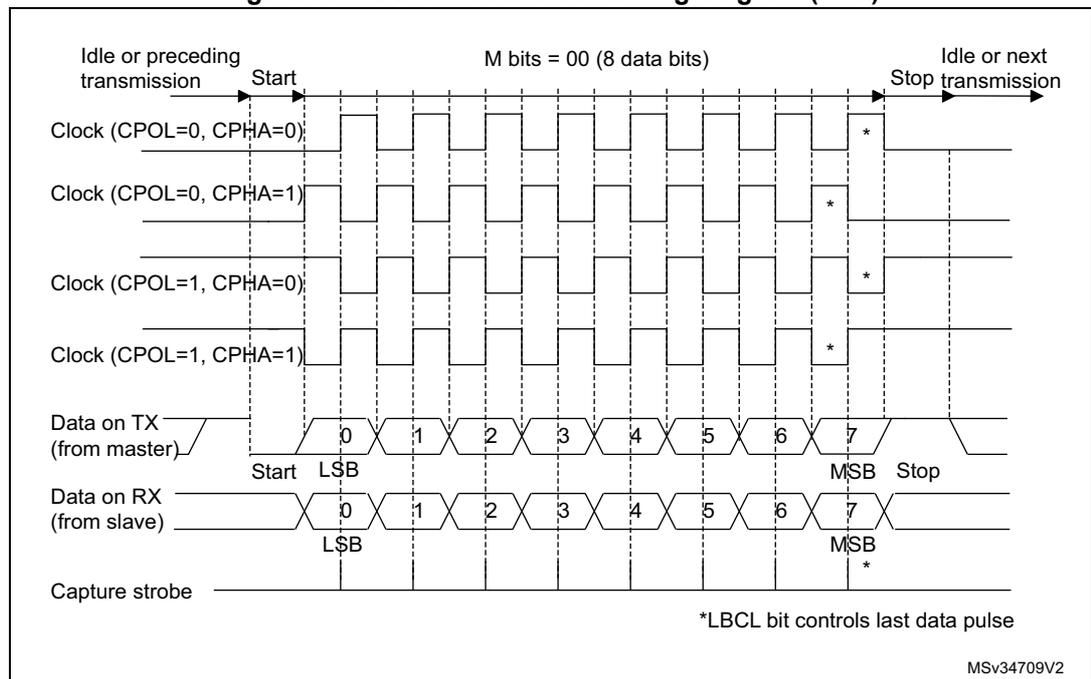
- • SCLK: Transmitter clock output. This pin outputs the transmitter data clock for synchronous transmission corresponding to SPI master mode (no clock pulses on start bit and stop bit, and a software option to send a clock pulse on the last data bit). In parallel data can be received synchronously on RX. This can be used to control peripherals that have shift registers (e.g. LCD drivers). The clock phase and polarity are software programmable. In smartcard mode, SCLK can provide the clock to the smartcard.
The following pins are required in Hardware flow control mode:
- • nCTS: Clear To Send blocks the data transmission at the end of the current transfer when high
- • nRTS: Request to send indicates that the USART is ready to receive a data (when low).
Figure 245. USART block diagram
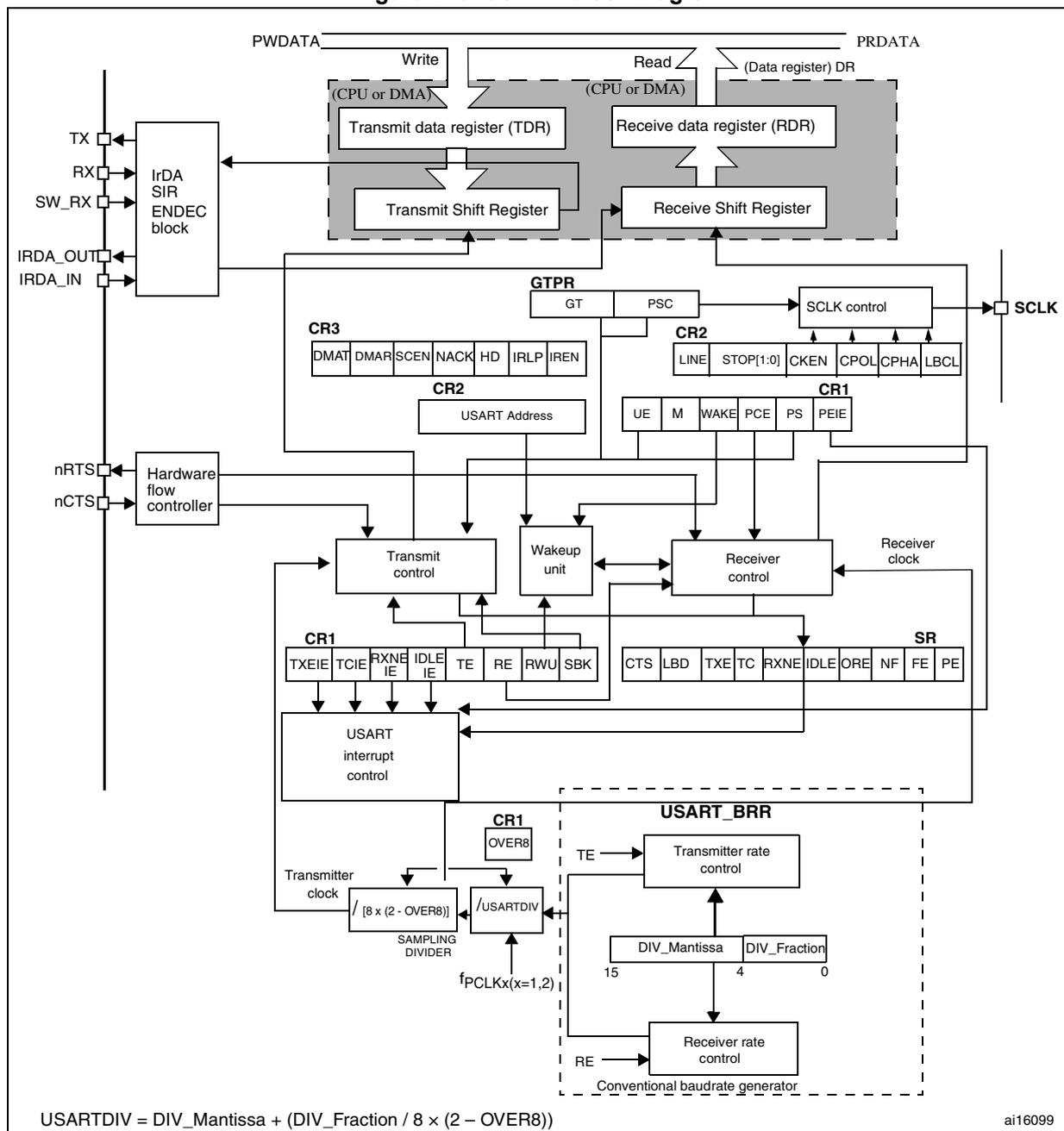
The diagram illustrates the internal architecture of the USART. At the top, the Transmit data register (TDR) and Receive data register (RDR) are shown, interfaced with a CPU or DMA via PWDATA (Write) and PRDATA (Read) buses. Data is written to the TDR and read from the RDR. Below these are the Transmit Shift Register and Receive Shift Register . An IrDA SIR ENDEC block handles IRDA signals (TX, RX, SW_RX, IRDA_OUT, IRDA_IN). A Hardware flow controller manages nRTS and nCTS pins. Control is provided by CR1 , CR2 , and CR3 registers, along with the GTPR register. The USART interrupt control block generates interrupts based on status flags in the SR register. The USART_BRR block contains the Transmitter rate control and Receiver rate control , which are configured by DIV_Mantissa and DIV_Fraction . A SAMPLING DIVIDER is also present. The SCLK control block generates the SCLK signal.
Control Register bit fields as shown in the diagram:
- GTPR: GT, PSC
- CR3: DMAT, DMAR, SCEN, NACK, HD, IRLP, IREN
- CR2: LINE, STOP[1:0], CKEN, CPOL, CPHA, LBCL
- CR2 (USART Address): USART Address
- CR1 (Control bits): UE, M, WAKE, PCE, PS, PEIE
- CR1 (Interrupt/Enable bits): TXEIE, TCIE, RXNE IE, IDLE IE, TE, RE, RWU, SBK
- SR (Status Register): CTS, LBD, TXE, TC, RXNE, IDLE, ORE, NF, FE, PE
- USART_BRR: DIV_Mantissa [15:4], DIV_Fraction [3:0]
Transmitter clock divider: \( \frac{f_{PCLKx}(x=1,2)}{[8 \times (2 - OVER8)]} \)
USARTDIV calculation: \( USARTDIV = DIV\_Mantissa + (DIV\_Fraction / 8 \times (2 - OVER8)) \)
ai16099
25.4.1 USART character description
Word length may be selected as being either 8 or 9 bits by programming the M bit in the USART_CR1 register (see Figure 246 ).
The TX pin is in low state during the start bit. It is in high state during the stop bit.
An Idle character is interpreted as an entire frame of “1’s followed by the start bit of the next frame that contains data (The number of “1” ‘s will include the number of stop bits).
A Break character is interpreted on receiving “0’s for a frame period. At the end of the break frame the transmitter inserts either 1 or 2 stop bits (logic “1” bit) to acknowledge the start bit.
Transmission and reception are driven by a common baud rate generator, the clock for each is generated when the enable bit is set respectively for the transmitter and receiver.
The details of each block is given below.
Figure 246. Word length programming
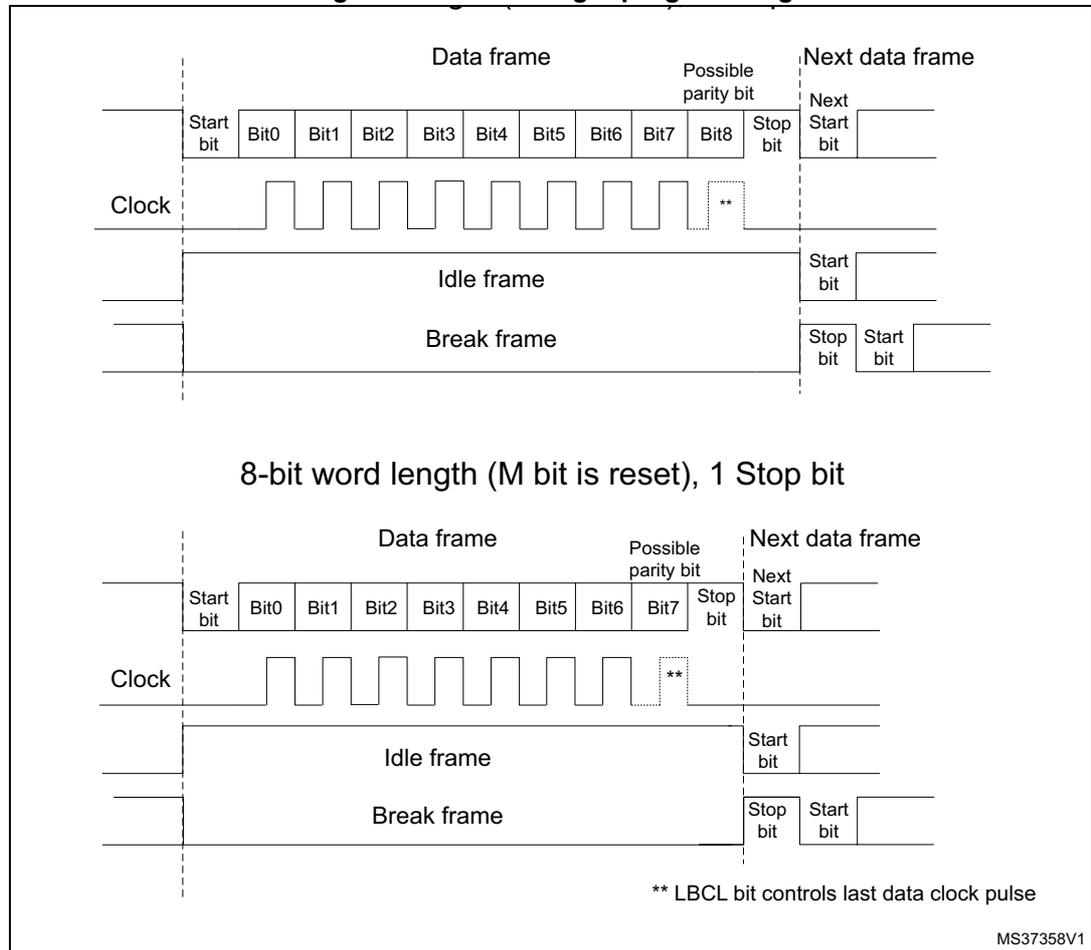
9-bit word length (M bit is set), 1 Stop bit
The diagram shows a 'Data frame' consisting of a 'Start bit', 9 data bits (Bit0 to Bit8), a 'Possible parity bit', and a 'Stop bit'. Below this, an 'Idle frame' is shown as a continuous high state, and a 'Break frame' as a continuous low state. The 'Next data frame' begins with its own 'Start bit'. A 'Clock' signal is shown as a series of pulses. A note '**' indicates that the LBCL bit controls the last data clock pulse.
8-bit word length (M bit is reset), 1 Stop bit
This diagram is similar to the first one but for an 8-bit word length. The 'Data frame' consists of a 'Start bit', 8 data bits (Bit0 to Bit7), a 'Possible parity bit', and a 'Stop bit'. The 'Idle frame', 'Break frame', and 'Next data frame' sequences are also shown. The 'Clock' signal and the note about the LBCL bit are consistent with the first diagram.
** LBCL bit controls last data clock pulse
MS37358V1
25.4.2 Transmitter
The transmitter can send data words of either 8 or 9 bits depending on the M bit status. When the transmit enable bit (TE) is set, the data in the transmit shift register is output on the TX pin and the corresponding clock pulses are output on the SCLK pin.
Character transmission
During an USART transmission, data shifts out least significant bit first on the TX pin. In this mode, the USART_DR register consists of a buffer (TDR) between the internal bus and the transmit shift register (see Figure 245 ).
Every character is preceded by a start bit that is a logic level low for one bit period. The character is terminated by a configurable number of stop bits.
The following stop bits are supported by USART: 0.5, 1, 1.5 and 2 stop bits.
Note: The TE bit should not be reset during transmission of data. Resetting the TE bit during the transmission will corrupt the data on the TX pin as the baud rate counters will get frozen. The current data being transmitted will be lost. An idle frame will be sent after the TE bit is enabled.
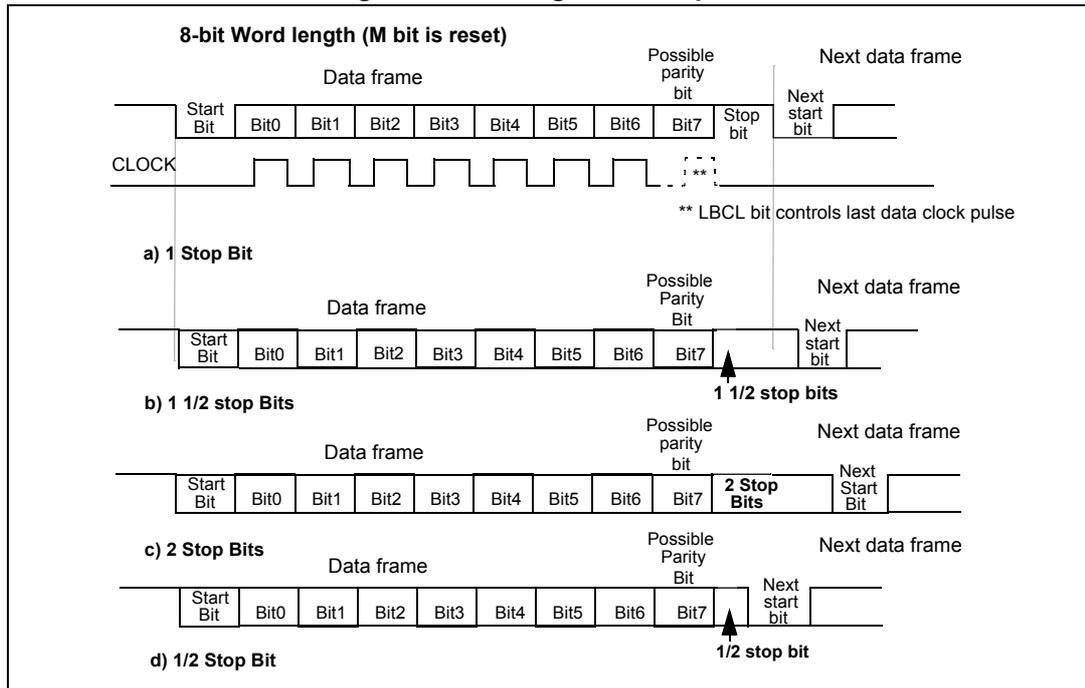
Configurable stop bits
The number of stop bits to be transmitted with every character can be programmed in Control register 2, bits 13,12.
- • 1 stop bit: This is the default value of number of stop bits.
- • 2 Stop bits: This will be supported by normal USART, single-wire and modem modes.
- • 0.5 stop bit: To be used when receiving data in smartcard mode.
- • 1.5 stop bits: To be used when transmitting and receiving data in smartcard mode.
An idle frame transmission will include the stop bits.
A break transmission will be 10 low bits followed by the configured number of stop bits (when m = 0) and 11 low bits followed by the configured number of stop bits (when m = 1). It is not possible to transmit long breaks (break of length greater than 10/11 low bits).
Figure 247. Configurable stop bits
Procedure:
- 1. Enable the USART by writing the UE bit in USART_CR1 register to 1.
- 2. Program the M bit in USART_CR1 to define the word length.
- 3. Program the number of stop bits in USART_CR2.
- 4. Select DMA enable (DMAT) in USART_CR3 if Multi buffer Communication is to take place. Configure the DMA register as explained in multibuffer communication.
- 5. Select the desired baud rate using the USART_BRR register.
- 6. Set the TE bit in USART_CR1 to send an idle frame as first transmission.
- 7. Write the data to send in the USART_DR register (this clears the TXE bit). Repeat this for each data to be transmitted in case of single buffer.
- 8. After writing the last data into the USART_DR register, wait until TC=1. This indicates that the transmission of the last frame is complete. This is required for instance when the USART is disabled or enters the Halt mode to avoid corrupting the last transmission.
Single byte communication
Clearing the TXE bit is always performed by a write to the data register.
The TXE bit is set by hardware and it indicates:
- • The data has been moved from TDR to the shift register and the data transmission has started.
- • The TDR register is empty.
- • The next data can be written in the USART_DR register without overwriting the previous data.
This flag generates an interrupt if the TXEIE bit is set.
When a transmission is taking place, a write instruction to the USART_DR register stores the data in the TDR register and which is copied in the shift register at the end of the current transmission.
When no transmission is taking place, a write instruction to the USART_DR register places the data directly in the shift register, the data transmission starts, and the TXE bit is immediately set.
If a frame is transmitted (after the stop bit) and the TXE bit is set, the TC bit goes high. An interrupt is generated if the TCIE bit is set in the USART_CR1 register.
After writing the last data into the USART_DR register, it is mandatory to wait for TC=1 before disabling the USART or causing the microcontroller to enter the low-power mode (see Figure 248: TC/TXE behavior when transmitting ).
The TC bit is cleared by the following software sequence:
- 1. A read from the USART_SR register
- 2. A write to the USART_DR register
Note: The TC bit can also be cleared by writing a '0' to it. This clearing sequence is recommended only for Multibuffer communication.
Figure 248. TC/TXE behavior when transmitting
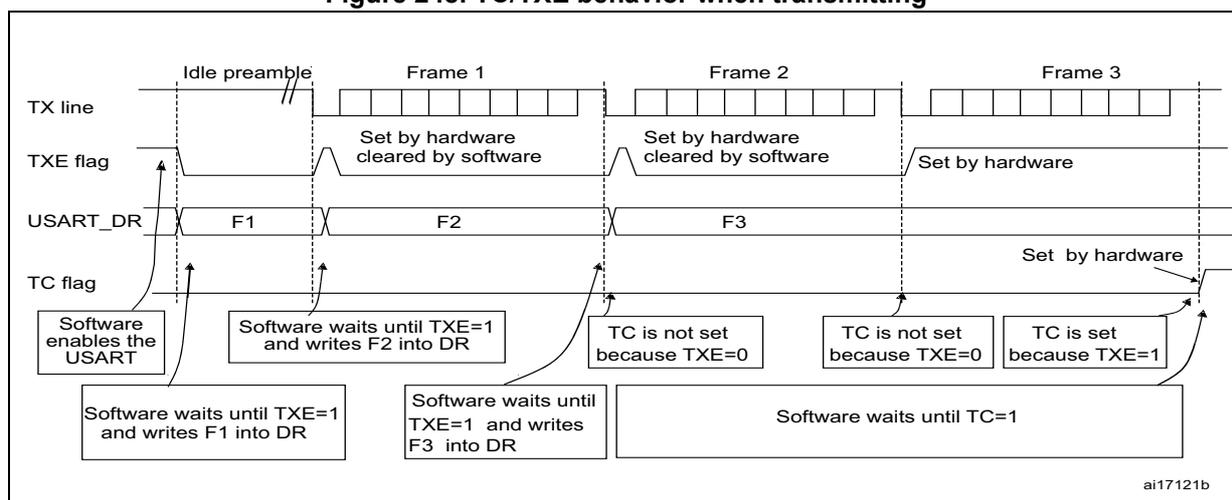
The diagram illustrates the sequence of events for transmitting three frames (F1, F2, F3) over a TX line.
1.
Idle preamble:
The TX line is high. The TXE flag is initially set.
2.
Frame 1:
Software enables the USART and waits until TXE=1, then writes F1 into the USART_DR register. The TXE flag is set by hardware and cleared by software. The TC flag is set by hardware.
3.
Frame 2:
Software waits until TXE=1 and writes F2 into the DR register. The TXE flag is set by hardware and cleared by software. The TC flag is not set because TXE=0.
4.
Frame 3:
Software waits until TXE=1 and writes F3 into the DR register. The TXE flag is set by hardware. The TC flag is not set because TXE=0.
5.
Completion:
After the stop bit of Frame 3, the TXE flag is cleared. The TC flag is set by hardware because TXE=1. Software waits until TC=1.
The diagram also shows the USART_DR register contents (F1, F2, F3) and the state of the TC flag (Set by hardware).
Break characters
Setting the SBK bit transmits a break character. The break frame length depends on the M bit (see Figure 246 ).
If the SBK bit is set to '1' a break character is sent on the TX line after completing the current character transmission. This bit is reset by hardware when the break character is completed (during the stop bit of the break character). The USART inserts a logic 1 bit at the end of the last break frame to guarantee the recognition of the start bit of the next frame.
Note: If the software resets the SBK bit before the commencement of break transmission, the break character will not be transmitted. For two consecutive breaks, the SBK bit should be set after the stop bit of the previous break.
Idle characters
Setting the TE bit drives the USART to send an idle frame before the first data frame.
25.4.3 Receiver
The USART can receive data words of either 8 or 9 bits depending on the M bit in the USART_CR1 register.
Start bit detection
The start bit detection sequence is the same when oversampling by 16 or by 8.
In the USART, the start bit is detected when a specific sequence of samples is recognized. This sequence is: 1 1 1 0 X 0 X 0 X 0 0 0 0.
Figure 249. Start bit detection when oversampling by 16 or 8
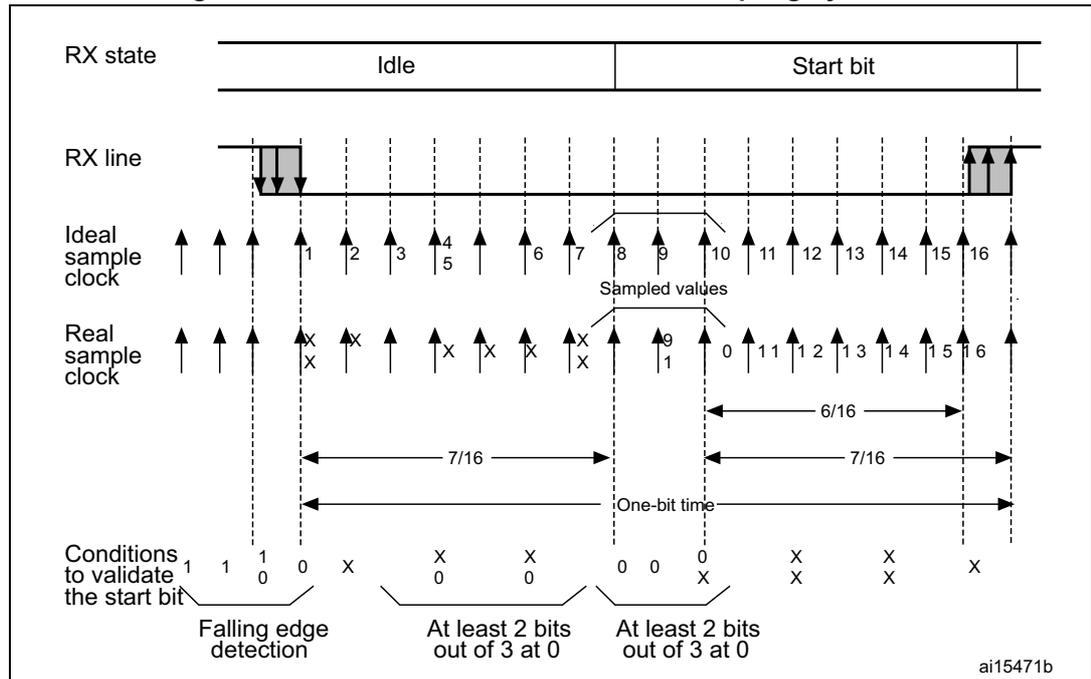
Note: If the sequence is not complete, the start bit detection aborts and the receiver returns to the idle state (no flag is set) where it waits for a falling edge.
The start bit is confirmed (RXNE flag set, interrupt generated if RXNEIE=1) if the 3 sampled bits are at 0 (first sampling on the 3rd, 5th and 7th bits finds the 3 bits at 0 and second sampling on the 8th, 9th and 10th bits also finds the 3 bits at 0).
The start bit is validated (RXNE flag set, interrupt generated if RXNEIE=1) but the NE noise flag is set if, for both samplings, at least 2 out of the 3 sampled bits are at 0 (sampling on the 3rd, 5th and 7th bits and sampling on the 8th, 9th and 10th bits). If this condition is not met, the start detection aborts and the receiver returns to the idle state (no flag is set).
If, for one of the samplings (sampling on the 3rd, 5th and 7th bits or sampling on the 8th, 9th and 10th bits), 2 out of the 3 bits are found at 0, the start bit is validated but the NE noise flag bit is set.
Character reception
During an USART reception, data shifts in least significant bit first through the RX pin. In this mode, the USART_DR register consists of a buffer (RDR) between the internal bus and the received shift register.
Procedure:
- 1. Enable the USART by writing the UE bit in USART_CR1 register to 1.
- 2. Program the M bit in USART_CR1 to define the word length.
- 3. Program the number of stop bits in USART_CR2.
- 4. Select DMA enable (DMAR) in USART_CR3 if multibuffer communication is to take place. Configure the DMA register as explained in multibuffer communication. STEP 3
- 5. Select the desired baud rate using the baud rate register USART_BRR
- 6. Set the RE bit USART_CR1. This enables the receiver that begins searching for a start bit.
When a character is received
- • The RXNE bit is set. It indicates that the content of the shift register is transferred to the RDR. In other words, data has been received and can be read (as well as its associated error flags).
- • An interrupt is generated if the RXNEIE bit is set.
- • The error flags can be set if a frame error, noise or an overrun error has been detected during reception.
- • In multibuffer, RXNE is set after every byte received and is cleared by the DMA read to the Data Register.
- • In single buffer mode, clearing the RXNE bit is performed by a software read to the USART_DR register. The RXNE flag can also be cleared by writing a zero to it. The RXNE bit must be cleared before the end of the reception of the next character to avoid an overrun error.
Note: The RE bit should not be reset while receiving data. If the RE bit is disabled during reception, the reception of the current byte will be aborted.
Break character
When a break character is received, the USART handles it as a framing error.
Idle character
When an idle frame is detected, there is the same procedure as a data received character plus an interrupt if the IDLEIE bit is set.
Overrun error
An overrun error occurs when a character is received when RXNE has not been reset. Data can not be transferred from the shift register to the RDR register until the RXNE bit is cleared.
The RXNE flag is set after every byte received. An overrun error occurs if RXNE flag is set when the next data is received or the previous DMA request has not been serviced. When an overrun error occurs:
- • The ORE bit is set.
- • The RDR content will not be lost. The previous data is available when a read to USART_DR is performed.
- • The shift register will be overwritten. After that point, any data received during overrun is lost.
- • An interrupt is generated if either the RXNEIE bit is set or both the EIE and DMAR bits are set.
- • The ORE bit is reset by a read to the USART_SR register followed by a USART_DR register read operation.
Note: The ORE bit, when set, indicates that at least 1 data has been lost. There are two possibilities:
- • if RXNE=1, then the last valid data is stored in the receive register RDR and can be read,
- • if RXNE=0, then it means that the last valid data has already been read and thus there is nothing to be read in the RDR. This case can occur when the last valid data is read in the RDR at the same time as the new (and lost) data is received. It may also occur when the new data is received during the reading sequence (between the USART_SR register read access and the USART_DR read access).
Selecting the proper oversampling method
The receiver implements different user-configurable oversampling techniques (except in synchronous mode) for data recovery by discriminating between valid incoming data and noise.
The oversampling method can be selected by programming the OVER8 bit in the USART_CR1 register and can be either 16 or 8 times the baud rate clock ( Figure 250 and Figure 251 ).
Depending on the application:
- • select oversampling by 8 (OVER8=1) to achieve higher speed (up to \( f_{PCLK}/8 \) ). In this case the maximum receiver tolerance to clock deviation is reduced (refer to Section 25.4.5: USART receiver tolerance to clock deviation )
- • select oversampling by 16 (OVER8=0) to increase the tolerance of the receiver to clock deviations. In this case, the maximum speed is limited to maximum \( f_{PCLK}/16 \)
Programming the ONEBIT bit in the USART_CR3 register selects the method used to evaluate the logic level. There are two options:
- • the majority vote of the three samples in the center of the received bit. In this case, when the 3 samples used for the majority vote are not equal, the NF bit is set
- • a single sample in the center of the received bit
Depending on the application:
- – select the three samples' majority vote method (ONEBIT=0) when operating in a noisy environment and reject the data when a noise is detected (refer to Figure 138 ) because this indicates that a glitch occurred during the sampling.
- – select the single sample method (ONEBIT=1) when the line is noise-free to increase the receiver tolerance to clock deviations (see Section 25.4.5: USART receiver tolerance to clock deviation ). In this case the NF bit will never be set.
When noise is detected in a frame:
- • The NF bit is set at the rising edge of the RXNE bit.
- • The invalid data is transferred from the Shift register to the USART_DR register.
- • No interrupt is generated in case of single byte communication. However this bit rises at the same time as the RXNE bit that itself generates an interrupt. In case of multibuffer communication an interrupt will be issued if the EIE bit is set in the USART_CR3 register.
The NF bit is reset by a USART_SR register read operation followed by a USART_DR register read operation.
Note: Oversampling by 8 is not available in the Smartcard, IrDA and LIN modes. In those modes, the OVER8 bit is forced to '0 by hardware.
Figure 250. Data sampling when oversampling by 16
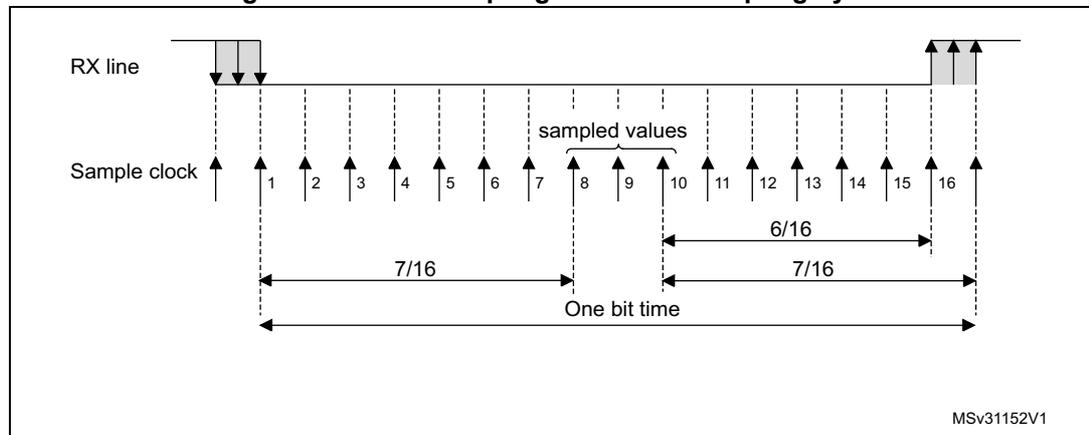
Figure 251. Data sampling when oversampling by 8
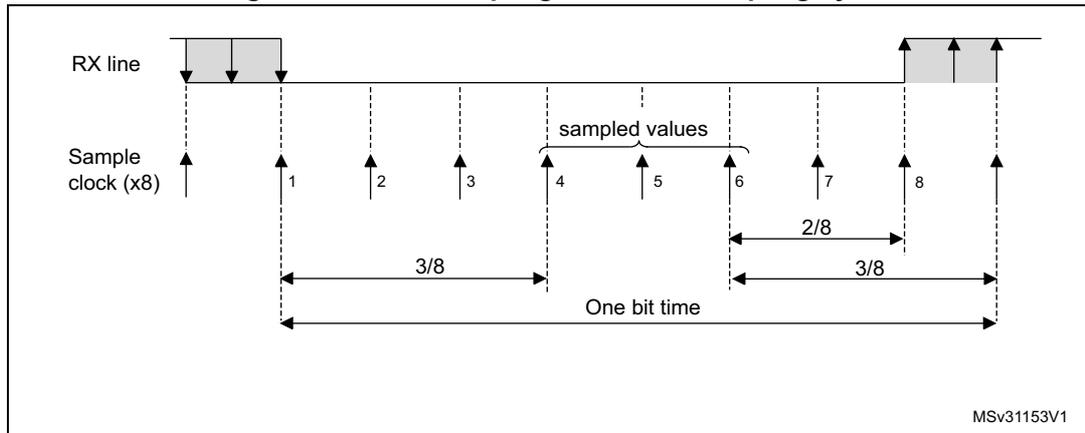
Table 138. Noise detection from sampled data
| Sampled value | NE status | Received bit value |
|---|---|---|
| 000 | 0 | 0 |
| 001 | 1 | 0 |
| 010 | 1 | 0 |
| 011 | 1 | 1 |
| 100 | 1 | 0 |
| 101 | 1 | 1 |
| 110 | 1 | 1 |
| 111 | 0 | 1 |
Framing error
A framing error is detected when:
The stop bit is not recognized on reception at the expected time, following either a de-synchronization or excessive noise.
When the framing error is detected:
- • The FE bit is set by hardware
- • The invalid data is transferred from the Shift register to the USART_DR register.
- • No interrupt is generated in case of single byte communication. However this bit rises at the same time as the RXNE bit that itself generates an interrupt. In case of multibuffer communication an interrupt will be issued if the EIE bit is set in the USART_CR3 register.
The FE bit is reset by a USART_SR register read operation followed by a USART_DR register read operation.
Configurable stop bits during reception
The number of stop bits to be received can be configured through the control bits of Control Register 2 - it can be either 1 or 2 in normal mode and 0.5 or 1.5 in smartcard mode.
- 1. 0.5 stop bit (reception in smartcard mode) : No sampling is done for 0.5 stop bit. As a consequence, no framing error and no break frame can be detected when 0.5 stop bit is selected.
- 2. 1 stop bit : Sampling for 1 stop Bit is done on the 8 th , 9 th and 10 th samples.
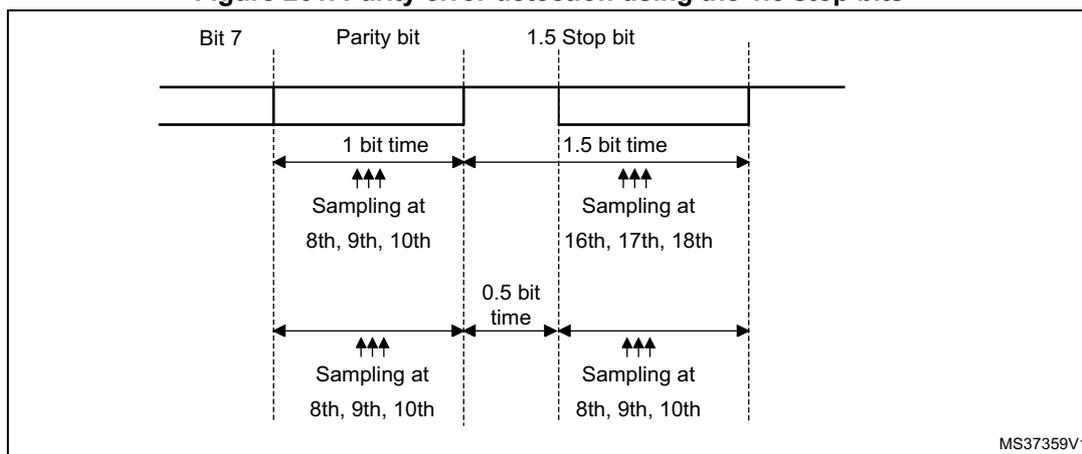
- 3. 1.5 stop bits (smartcard mode) : When transmitting in smartcard mode, the device must check that the data is correctly sent. Thus the receiver block must be enabled (RE =1 in the USART_CR1 register) and the stop bit is checked to test if the smartcard has detected a parity error. In the event of a parity error, the smartcard forces the data signal low during the sampling - NACK signal-, which is flagged as a framing error. Then, the FE flag is set with the RXNE at the end of the 1.5 stop bit. Sampling for 1.5 stop bits is done on the 16 th , 17 th and 18 th samples (1 baud clock period after the beginning of the stop bit). The 1.5 stop bit can be decomposed into two parts: one 0.5 baud clock period during which nothing happens, followed by 1 normal stop bit period during which sampling occurs halfway through. Refer to Section 25.4.11 for more details.
- 4. 2 stop bits : Sampling for 2 stop bits is done on the 8 th , 9 th and 10 th samples of the first stop bit. If a framing error is detected during the first stop bit the framing error flag will be set. The second stop bit is not checked for framing error. The RXNE flag will be set at the end of the first stop bit.
25.4.4 Fractional baud rate generation
The baud rate for the receiver and transmitter (Rx and Tx) are both set to the same value as programmed in the Mantissa and Fraction values of USARTDIV.
Equation 1: Baud rate for standard USART (SPI mode included)
Equation 2: Baud rate in Smartcard, LIN and IrDA modes
USARTDIV is an unsigned fixed point number that is coded on the USART_BRR register.
- • When OVER8=0, the fractional part is coded on 4 bits and programmed by the DIV_fraction[3:0] bits in the USART_BRR register
- • When OVER8=1, the fractional part is coded on 3 bits and programmed by the DIV_fraction[2:0] bits in the USART_BRR register, and bit DIV_fraction[3] must be kept cleared.
Note: The baud counters are updated to the new value in the baud registers after a write operation to USART_BRR. Hence the baud rate register value should not be changed during communication.
How to derive USARTDIV from USART_BRR register values when OVER8=0
Example 1:
If DIV_Mantissa = 0d27 and DIV_Fraction = 0d12 (USART_BRR = 0x1BC), then
Mantissa (USARTDIV) = 0d27
Fraction (USARTDIV) = 12/16 = 0d0.75
Therefore USARTDIV = 0d27.75
Example 2:
To program USARTDIV = 0d25.62
This leads to:
\( DIV\_Fraction = 16 * 0d0.62 = 0d9.92 \)
The nearest real number is 0d10 = 0xA
\( DIV\_Mantissa = \text{mantissa}(0d25.620) = 0d25 = 0x19 \)
Then, USART_BRR = 0x19A hence USARTDIV = 0d25.625
Example 3:
To program USARTDIV = 0d50.99
This leads to:
\( DIV\_Fraction = 16 * 0d0.99 = 0d15.84 \)
The nearest real number is 0d16 = 0x10 => overflow of DIV_frac[3:0] => carry must be added up to the mantissa
\( DIV\_Mantissa = \text{mantissa}(0d50.990 + \text{carry}) = 0d51 = 0x33 \)
Then, USART_BRR = 0x330 hence USARTDIV = 0d51.000
How to derive USARTDIV from USART_BRR register values when OVER8=1
Example 1:
If \( DIV\_Mantissa = 0x27 \) and \( DIV\_Fraction[2:0] = 0d6 \) (USART_BRR = 0x1B6), then
\( \text{Mantissa (USARTDIV)} = 0d27 \)
Fraction (USARTDIV) = 6/8 = 0d0.75
Therefore USARTDIV = 0d27.75
Example 2:
To program USARTDIV = 0d25.62
This leads to:
\( DIV\_Fraction = 8 * 0d0.62 = 0d4.96 \)
The nearest real number is 0d5 = 0x5
\( DIV\_Mantissa = \text{mantissa}(0d25.620) = 0d25 = 0x19 \)
Then, USART_BRR = 0x195 => USARTDIV = 0d25.625
Example 3:
To program USARTDIV = 0d50.99
This leads to:
\( DIV\_Fraction = 8 * 0d0.99 = 0d7.92 \)
The nearest real number is 0d8 = 0x8 => overflow of the DIV_frac[2:0] => carry must be added up to the mantissa
\( \text{DIV\_Mantissa} = \text{mantissa} (0d50.990 + \text{carry}) = 0d51 = 0x33 \)
Then, \( \text{USART\_BRR} = 0x0330 \Rightarrow \text{USARTDIV} = 0d51.000 \)
Table 139. Error calculation for programmed baud rates at \( f_{\text{PCLK}} = 8 \text{ MHz} \) or \( f_{\text{PCLK}} = 12 \text{ MHz} \) , oversampling by 16 (1)
| Oversampling by 16 (OVER8=0) | |||||||
|---|---|---|---|---|---|---|---|
| Baud rate | \( f_{\text{PCLK}} = 8 \text{ MHz} \) | \( f_{\text{PCLK}} = 12 \text{ MHz} \) | |||||
| S.No | Desired | Actual | Value programmed in the baud rate register | % Error = (Calculated - Desired) B.rate / Desired B.rate | Actual | Value programmed in the baud rate register | % Error |
| 1 | 1.2 KBps | 1.2 KBps | 416.6875 | 0 | 1.2 KBps | 625 | 0 |
| 2 | 2.4 KBps | 2.4 KBps | 208.3125 | 0.01 | 2.4 KBps | 312.5 | 0 |
| 3 | 9.6 KBps | 9.604 KBps | 52.0625 | 0.04 | 9.6 KBps | 78.125 | 0 |
| 4 | 19.2 KBps | 19.185 KBps | 26.0625 | 0.08 | 19.2 KBps | 39.0625 | 0 |
| 5 | 38.4 KBps | 38.462 KBps | 13 | 0.16 | 38.339 KBps | 19.5625 | 0.16 |
| 6 | 57.6 KBps | 57.554 KBps | 8.6875 | 0.08 | 57.692 KBps | 13 | 0.16 |
| 7 | 115.2 KBps | 115.942 KBps | 4.3125 | 0.64 | 115.385 KBps | 6.5 | 0.16 |
| 8 | 230.4 KBps | 228.571 KBps | 2.1875 | 0.79 | 230.769 KBps | 3.25 | 0.16 |
| 9 | 460.8 KBps | 470.588 KBps | 1.0625 | 2.12 | 461.538 KBps | 1.625 | 0.16 |
1. The lower the CPU clock the lower the accuracy for a particular baud rate. The upper limit of the achievable baud rate can be fixed with these data.
Table 140. Error calculation for programmed baud rates at \( f_{\text{PCLK}} = 8 \text{ MHz} \) or \( f_{\text{PCLK}} = 12 \text{ MHz} \) , oversampling by 8 (1)
| Oversampling by 8 (OVER8 = 1) | |||||||
|---|---|---|---|---|---|---|---|
| Baud rate | \( f_{\text{PCLK}} = 8 \text{ MHz} \) | \( f_{\text{PCLK}} = 12 \text{ MHz} \) | |||||
| S.No | Desired | Actual | Value programmed in the baud rate register | % Error = (Calculated - Desired) B.rate / Desired B.rate | Actual | Value programmed in the baud rate register | % Error |
| 1 | 1.2 KBps | 1.2 KBps | 833.375 | 0 | 1.2 KBps | 1250 | 0 |
| 2 | 2.4 KBps | 2.4 KBps | 416.625 | 0.01 | 2.4 KBps | 625 | 0 |
| 3 | 9.6 KBps | 9.604 KBps | 104.125 | 0.04 | 9.6 KBps | 156.25 | 0 |
| 4 | 19.2 KBps | 19.185 KBps | 52.125 | 0.08 | 19.2 KBps | 78.125 | 0 |
| 5 | 38.4 KBps | 38.462 KBps | 26 | 0.16 | 38.339 KBps | 39.125 | 0.16 |
Table 140. Error calculation for programmed baud rates at \( f_{PCLK} = 8 \) MHz or \( f_{PCLK} = 12 \) MHz, oversampling by 8 (1) (continued)
| Oversampling by 8 (OVER8 = 1) | |||||||
|---|---|---|---|---|---|---|---|
| Baud rate | \( f_{PCLK} = 8 \) MHz | \( f_{PCLK} = 12 \) MHz | |||||
| S.No | Desired | Actual | Value programmed in the baud rate register | % Error = (Calculated - Desired) B.rate / Desired B.rate | Actual | Value programmed in the baud rate register | % Error |
| 6 | 57.6 KBps | 57.554 KBps | 17.375 | 0.08 | 57.692 KBps | 26 | 0.16 |
| 7 | 115.2 KBps | 115.942 KBps | 8.625 | 0.64 | 115.385 KBps | 13 | 0.16 |
| 8 | 230.4 KBps | 228.571 KBps | 4.375 | 0.79 | 230.769 KBps | 6.5 | 0.16 |
| 9 | 460.8 KBps | 470.588 KBps | 2.125 | 2.12 | 461.538 KBps | 3.25 | 0.16 |
| 10 | 921.6 KBps | 888.889 KBps | 1.125 | 3.55 | 923.077 KBps | 1.625 | 0.16 |
1. The lower the CPU clock the lower the accuracy for a particular baud rate. The upper limit of the achievable baud rate can be fixed with these data.
Table 141. Error calculation for programmed baud rates at \( f_{PCLK} = 16 \) MHz or \( f_{PCLK} = 24 \) MHz, oversampling by 16 (1)
| Oversampling by 16 (OVER8 = 0) | |||||||
|---|---|---|---|---|---|---|---|
| Baud rate | \( f_{PCLK} = 16 \) MHz | \( f_{PCLK} = 24 \) MHz | |||||
| S.No | Desired | Actual | Value programmed in the baud rate register | % Error = (Calculated - Desired) B.rate / Desired B.rate | Actual | Value programmed in the baud rate register | % Error |
| 1 | 1.2 KBps | 1.2 KBps | 833.3125 | 0 | 1.2 | 1250 | 0 |
| 2 | 2.4 KBps | 2.4 KBps | 416.6875 | 0 | 2.4 | 625 | 0 |
| 3 | 9.6 KBps | 9.598 KBps | 104.1875 | 0.02 | 9.6 | 156.25 | 0 |
| 4 | 19.2 KBps | 19.208 KBps | 52.0625 | 0.04 | 19.2 | 78.125 | 0 |
| 5 | 38.4 KBps | 38.369 KBps | 26.0625 | 0.08 | 38.4 | 39.0625 | 0 |
| 6 | 57.6 KBps | 57.554 KBps | 17.375 | 0.08 | 57.554 | 26.0625 | 0.08 |
| 7 | 115.2 KBps | 115.108 KBps | 8.6875 | 0.08 | 115.385 | 13 | 0.16 |
| 8 | 230.4 KBps | 231.884 KBps | 4.3125 | 0.64 | 230.769 | 6.5 | 0.16 |
| 9 | 460.8 KBps | 457.143 KBps | 2.1875 | 0.79 | 461.538 | 3.25 | 0.16 |
| 10 | 921.6 KBps | 941.176 KBps | 1.0625 | 2.12 | 923.077 | 1.625 | 0.16 |
1. The lower the CPU clock the lower the accuracy for a particular baud rate. The upper limit of the achievable baud rate can be fixed with these data.
Table 142. Error calculation for programmed baud rates at \( f_{PCLK} = 16 \) MHz or \( f_{PCLK} = 24 \) MHz, oversampling by 8 (1)| Oversampling by 8 (OVER8=1) | |||||||
|---|---|---|---|---|---|---|---|
| Baud rate | \( f_{PCLK} = 16 \) MHz | \( f_{PCLK} = 24 \) MHz | |||||
| S.No | Desired | Actual | Value programmed in the baud rate register | % Error = (Calculated - Desired) B.rate / Desired B.rate | Actual | Value programmed in the baud rate register | % Error |
| 1 | 1.2 KBps | 1.2 KBps | 1666.625 | 0 | 1.2 KBps | 2500 | 0 |
| 2 | 2.4 KBps | 2.4 KBps | 833.375 | 0 | 2.4 KBps | 1250 | 0 |
| 3 | 9.6 KBps | 9.598 KBps | 208.375 | 0.02 | 9.6 KBps | 312.5 | 0 |
| 4 | 19.2 KBps | 19.208 KBps | 104.125 | 0.04 | 19.2 KBps | 156.25 | 0 |
| 5 | 38.4 KBps | 38.369 KBps | 52.125 | 0.08 | 38.4 KBps | 78.125 | 0 |
| 6 | 57.6 KBps | 57.554 KBps | 34.75 | 0.08 | 57.554 KBps | 52.125 | 0.08 |
| 7 | 115.2 KBps | 115.108 KBps | 17.375 | 0.08 | 115.385 KBps | 26 | 0.16 |
| 8 | 230.4 KBps | 231.884 KBps | 8.625 | 0.64 | 230.769 KBps | 13 | 0.16 |
| 9 | 460.8 KBps | 457.143 KBps | 4.375 | 0.79 | 461.538 KBps | 6.5 | 0.16 |
| 10 | 921.6 KBps | 941.176 KBps | 2.125 | 2.12 | 923.077 KBps | 3.25 | 0.16 |
| 11 | 2 MBps | 2000 KBps | 1 | 0 | 2000 KBps | 1.5 | 0 |
| 12 | 3 MBps | NA | NA | NA | 3000 KBps | 1 | 0 |
1. The lower the CPU clock the lower the accuracy for a particular baud rate. The upper limit of the achievable baud rate can be fixed with these data.
Table 143. Error calculation for programmed baud rates at \( f_{PCLK} = 8 \) MHz or \( f_{PCLK} = 16 \) MHz, oversampling by 16 (1)| Oversampling by 16 (OVER8=0) | |||||||
|---|---|---|---|---|---|---|---|
| Baud rate | \( f_{PCLK} = 8 \) MHz | \( f_{PCLK} = 16 \) MHz | |||||
| S.No | Desired | Actual | Value programmed in the baud rate register | % Error = (Calculated - Desired) B.Rate / Desired B.Rate | Actual | Value programmed in the baud rate register | % Error |
| 1 | 2.4 KBps | 2.400 KBps | 208.3125 | 0.00% | 2.400 KBps | 416.6875 | 0.00% |
| 2 | 9.6 KBps | 9.604 KBps | 52.0625 | 0.04% | 9.598 KBps | 104.1875 | 0.02% |
| 3 | 19.2 KBps | 19.185 KBps | 26.0625 | 0.08% | 19.208 KBps | 52.0625 | 0.04% |
| 4 | 57.6 KBps | 57.554 KBps | 8.6875 | 0.08% | 57.554 KBps | 17.3750 | 0.08% |
| 5 | 115.2 KBps | 115.942 KBps | 4.3125 | 0.64% | 115.108 KBps | 8.6875 | 0.08% |
| 6 | 230.4 KBps | 228.571 KBps | 2.1875 | 0.79% | 231.884 KBps | 4.3125 | 0.64% |
| 7 | 460.8 KBps | 470.588 KBps | 1.0625 | 2.12% | 457.143 KBps | 2.1875 | 0.79% |
Table 143. Error calculation for programmed baud rates at \( f_{PCLK} = 8 \) MHz or \( f_{PCLK} = 16 \) MHz, oversampling by 16 (1) (continued)
| Oversampling by 16 (OVER8=0) | |||||||
|---|---|---|---|---|---|---|---|
| Baud rate | \( f_{PCLK} = 8 \) MHz | \( f_{PCLK} = 16 \) MHz | |||||
| S.No | Desired | Actual | Value programmed in the baud rate register | % Error = (Calculated - Desired)B.Rate /Desired B.Rate | Actual | Value programmed in the baud rate register | % Error |
| 8 | 896 KBps | NA | NA | NA | 888.889 KBps | 1.1250 | 0.79% |
| 9 | 921.6 KBps | NA | NA | NA | 941.176 KBps | 1.0625 | 2.12% |
1. The lower the CPU clock the lower the accuracy for a particular baud rate. The upper limit of the achievable baud rate can be fixed with these data.
Table 144. Error calculation for programmed baud rates at \( f_{PCLK} = 8 \) MHz or \( f_{PCLK} = 16 \) MHz, oversampling by 8 (1)
| Oversampling by 8 (OVER8=1) | |||||||
|---|---|---|---|---|---|---|---|
| Baud rate | \( f_{PCLK} = 8 \) MHz | \( f_{PCLK} = 16 \) MHz | |||||
| S.No | Desired | Actual | Value programmed in the baud rate register | % Error = (Calculated - Desired)B.Rate /Desired B.Rate | Actual | Value programmed in the baud rate register | % Error |
| 1 | 2.4 KBps | 2.400 KBps | 416.625 | 0.01% | 2.400 KBps | 833.375 | 0.00% |
| 2 | 9.6 KBps | 9.604 KBps | 104.125 | 0.04% | 9.598 KBps | 208.375 | 0.02% |
| 3 | 19.2 KBps | 19.185 KBps | 52.125 | 0.08% | 19.208 KBps | 104.125 | 0.04% |
| 4 | 57.6 KBps | 57.557 KBps | 17.375 | 0.08% | 57.554 KBps | 34.750 | 0.08% |
| 5 | 115.2 KBps | 115.942 KBps | 8.625 | 0.64% | 115.108 KBps | 17.375 | 0.08% |
| 6 | 230.4 KBps | 228.571 KBps | 4.375 | 0.79% | 231.884 KBps | 8.625 | 0.64% |
| 7 | 460.8 KBps | 470.588 KBps | 2.125 | 2.12% | 457.143 KBps | 4.375 | 0.79% |
| 8 | 896 KBps | 888.889 KBps | 1.125 | 0.79% | 888.889 KBps | 2.250 | 0.79% |
| 9 | 921.6 KBps | 888.889 KBps | 1.125 | 3.55% | 941.176 KBps | 2.125 | 2.12% |
| 10 | 1.792 MBps | NA | NA | NA | 1.7777 MBps | 1.125 | 0.79% |
| 11 | 1.8432 MBps | NA | NA | NA | 1.7777 MBps | 1.125 | 3.55% |
1. The lower the CPU clock the lower the accuracy for a particular baud rate. The upper limit of the achievable baud rate can be fixed with these data.
Table 145. Error calculation for programmed baud rates at \( f_{PCLK} = 30 \) MHz or \( f_{PCLK} = 60 \) MHz, oversampling by 16 (1)(2)
| Oversampling by 16 (OVER8=0) | |||||||
|---|---|---|---|---|---|---|---|
| Baud rate | \( f_{PCLK} = 30 \) MHz | \( f_{PCLK} = 60 \) MHz | |||||
| S.No | Desired | Actual | Value programmed in the baud rate register | % Error = (Calculated - Desired)B.Rate /Desired B.Rate | Actual | Value programmed in the baud rate register | % Error |
| 1 | 2.4 KBps | 2.400 KBps | 781.2500 | 0.00% | 2.400 KBps | 1562.5000 | 0.00% |
| 2 | 9.6 KBps | 9.600 KBps | 195.3125 | 0.00% | 9.600 KBps | 390.6250 | 0.00% |
| 3 | 19.2 KBps | 19.194 KBps | 97.6875 | 0.03% | 19.200 KBps | 195.3125 | 0.00% |
| 4 | 57.6 KBps | 57.582 KBps | 32.5625 | 0.03% | 57.582 KBps | 65.1250 | 0.03% |
| 5 | 115.2 KBps | 115.385 KBps | 16.2500 | 0.16% | 115.163 KBps | 32.5625 | 0.03% |
| 6 | 230.4 KBps | 230.769 KBps | 8.1250 | 0.16% | 230.769 KBps | 16.2500 | 0.16% |
| 7 | 460.8 KBps | 461.538 KBps | 4.0625 | 0.16% | 461.538 KBps | 8.1250 | 0.16% |
| 8 | 896 KBps | 909.091 KBps | 2.0625 | 1.46% | 895.522 KBps | 4.1875 | 0.05% |
| 9 | 921.6 KBps | 909.091 KBps | 2.0625 | 1.36% | 923.077 KBps | 4.0625 | 0.16% |
| 10 | 1.792 MBps | 1.1764 MBps | 1.0625 | 1.52% | 1.8182 MBps | 2.0625 | 1.36% |
| 11 | 1.8432 MBps | 1.8750 MBps | 1.0000 | 1.73% | 1.8182 MBps | 2.0625 | 1.52% |
| 12 | 3.584 MBps | NA | NA | NA | 3.2594 MBps | 1.0625 | 1.52% |
| 13 | 3.6864 MBps | NA | NA | NA | 3.7500 MBps | 1.0000 | 1.73% |
- 1. The lower the CPU clock the lower the accuracy for a particular baud rate. The upper limit of the achievable baud rate can be fixed with these data.
- 2. Only USART1 and USART6 are clocked with PCLK2. Other USARTs are clocked with PCLK1. Refer to the device datasheets for the maximum values for PCLK1 and PCLK2.
Table 146. Error calculation for programmed baud rates at \( f_{PCLK} = 30 \) MHz or \( f_{PCLK} = 60 \) MHz, oversampling by 8 (1) (2)
| Oversampling by 8 (OVER8=1) | |||||||
|---|---|---|---|---|---|---|---|
| Baud rate | \( f_{PCLK} = 30 \) MHz | \( f_{PCLK} = 60 \) MHz | |||||
| S.No | Desired | Actual | Value programmed in the baud rate register | % Error = (Calculated - Desired)B.Rate /Desired B.Rate | Actual | Value programmed in the baud rate register | % Error |
| 1 | 2.4 KBps | 2.400 KBps | 1562.5000 | 0.00% | 2.400 KBps | 3125.0000 | 0.00% |
| 2 | 9.6 KBps | 9.600 KBps | 390.6250 | 0.00% | 9.600 KBps | 781.2500 | 0.00% |
| 3 | 19.2 KBps | 19.194 KBps | 195.3750 | 0.03% | 19.200 KBps | 390.6250 | 0.00% |
| 4 | 57.6 KBps | 57.582 KBps | 65.1250 | 0.16% | 57.582 KBps | 130.2500 | 0.03% |
| 5 | 115.2 KBps | 115.385 KBps | 32.5000 | 0.16% | 115.163 KBps | 65.1250 | 0.03% |
| 6 | 230.4 KBps | 230.769 KBps | 16.2500 | 0.16% | 230.769 KBps | 32.5000 | 0.16% |
| Oversampling by 8 (OVER8=1) | |||||||
|---|---|---|---|---|---|---|---|
| Baud rate | \( f_{PCLK} = 30 \) MHz | \( f_{PCLK} = 60 \) MHz | |||||
| S.No | Desired | Actual | Value programmed in the baud rate register | % Error = (Calculated - Desired)B.Rate /Desired B.Rate | Actual | Value programmed in the baud rate register | % Error |
| 7 | 460.8 KBps | 461.538 KBps | 8.1250 | 0.16% | 461.538 KBps | 16.2500 | 0.16% |
| 8 | 896 KBps | 909.091 KBps | 4.1250 | 1.46% | 895.522 KBps | 8.3750 | 0.05% |
| 9 | 921.6 KBps | 909.091 KBps | 4.1250 | 1.36% | 923.077 KBps | 8.1250 | 0.16% |
| 10 | 1.792 MBps | 1.7647 MBps | 2.1250 | 1.52% | 1.8182 MBps | 4.1250 | 1.46% |
| 11 | 1.8432 MBps | 1.8750 MBps | 2.0000 | 1.73% | 1.8182 MBps | 4.1250 | 1.36% |
| 12 | 3.584 MBps | 3.7500 MBps | 1.0000 | 4.63% | 3.5294 MBps | 2.1250 | 1.52% |
| 13 | 3.6864 MBps | 3.7500 MBps | 1.0000 | 1.73% | 3.7500 MBps | 2.0000 | 1.73% |
| 14 | 7.168 MBps | NA | NA | NA | 7.5000 MBps | 1.0000 | 4.63% |
| 15 | 7.3728 MBps | NA | NA | NA | 7.5000 MBps | 1.0000 | 1.73% |
- 1. The lower the CPU clock the lower the accuracy for a particular baud rate. The upper limit of the achievable baud rate can be fixed with these data.
- 2. Only USART1 and USART6 are clocked with PCLK2. Other USARTs are clocked with PCLK1. Refer to the device datasheets for the maximum values for PCLK1 and PCLK2.
| Oversampling by 16 (OVER8=0) | |||||||
|---|---|---|---|---|---|---|---|
| Baud rate | \( f_{PCLK} = 42 \) MHz | \( f_{PCLK} = 84 \) MHz | |||||
| S.No | Desired | Actual | Value programmed in the baud rate register | % Error = (Calculated - Desired)B.Rate /Desired B.Rate | Actual | Value programmed in the baud rate register | % Error |
| 1 | 1.2 KBps | 1.2 KBps | 2187.5 | 0 | 1.2 KBps | 4375 | 0 |
| 2 | 2.4 KBps | 2.4 KBps | 1093.75 | 0 | 2.4 KBps | 2187.5 | 0 |
| 3 | 9.6 KBps | 9.6 KBps | 273.4375 | 0 | 9.6 KBps | 546.875 | 0 |
| 4 | 19.2 KBps | 19.195 KBps | 136.75 | 0.02 | 19.2 KBps | 273.4375 | 0 |
| 5 | 38.4 KBps | 38.391 KBps | 68.375 | 0.02 | 38.391 KBps | 136.75 | 0.02 |
| 6 | 57.6 KBps | 57.613 KBps | 45.5625 | 0.02 | 57.613 KBps | 91.125 | 0.02 |
| 7 | 115.2 KBps | 115.068 KBps | 22.8125 | 0.11 | 115.226 KBps | 45.5625 | 0.02 |
| 8 | 230.4 KBps | 230.769 KBps | 11.375 | 0.16 | 230.137 KBps | 22.8125 | 0.11 |
| 9 | 460.8 KBps | 461.538 KBps | 5.6875 | 0.16 | 461.538 KBps | 11.375 | 0.16 |
Table 147. Error calculation for programmed baud rates at \( f_{PCLK} = 42 \) MHz or \( f_{PCLK} = 84 \) Hz, oversampling by 16 (1)(2) (continued)
| Oversampling by 16 (OVER8=0) | |||||||
|---|---|---|---|---|---|---|---|
| Baud rate | \( f_{PCLK} = 42 \) MHz | \( f_{PCLK} = 84 \) MHz | |||||
| S.No | Desired | Actual | Value programmed in the baud rate register | % Error = (Calculated - Desired)B.Rate /Desired B.Rate | Actual | Value programmed in the baud rate register | % Error |
| 10 | 921.6 KBps | 913.043 KBps | 2.875 | 0.93 | 923.076 KBps | 5.6875 | 0.93 |
| 11 | 1.792 MBps | 1.826 MBps | 1.4375 | 1.9 | 1.787 MBps | 2.9375 | 0.27 |
| 12 | 1.8432 MBps | 1.826 MBps | 1.4375 | 0.93 | 1.826 MBps | 2.875 | 0.93 |
| 13 | 3.584 MBps | NA | NA | NA | 3.652 MBps | 1.4375 | 1.9 |
| 14 | 3.6864 MBps | NA | NA | NA | 3.652 MBps | 1.4375 | 0.93 |
- 1. The lower the CPU clock the lower the accuracy for a particular baud rate. The upper limit of the achievable baud rate can be fixed with these data.
- 2. Only USART1 and USART6 are clocked with PCLK2. Other USARTs are clocked with PCLK1. Refer to the device datasheets for the maximum values for PCLK1 and PCLK2.
Table 148. Error calculation for programmed baud rates at \( f_{PCLK} = 42 \) MHz or \( f_{PCLK} = 84 \) MHz, oversampling by 8 (1)(2)
| Oversampling by 8 (OVER8=1) | |||||||
|---|---|---|---|---|---|---|---|
| Baud rate | \( f_{PCLK} = 42 \) MHz | \( f_{PCLK} = 84 \) MHz | |||||
| S.No | Desired | Actual | Value programmed in the baud rate register | % Error = (Calculated - Desired)B.Rate /Desired B.Rate | Actual | Value programmed in the baud rate register | % Error |
| 1 | 1.2 KBps | 1.2 KBps | 4375 | 0 | 1.2 KBps | 8750 | 0 |
| 2 | 2.4 KBps | 2.4 KBps | 2187.5 | 0 | 2.4 KBps | 4375 | 0 |
| 3 | 9.6 KBps | 9.6 KBps | 546.875 | 0 | 9.6 KBps | 1093.75 | 0 |
| 4 | 19.2 KBps | 19.195 KBps | 273.5 | 0.02 | 19.2 KBps | 546.875 | 0 |
| 5 | 38.4 KBps | 38.391 KBps | 136.75 | 0.02 | 38.391 KBps | 273.5 | 0.02 |
| 6 | 57.6 KBps | 57.613 KBps | 91.125 | 0.02 | 57.613 KBps | 182.25 | 0.02 |
| 7 | 115.2 KBps | 115.068 KBps | 45.625 | 0.11 | 115.226 KBps | 91.125 | 0.02 |
| 8 | 230.4 KBps | 230.769 KBps | 22.75 | 0.11 | 230.137 KBps | 45.625 | 0.11 |
| 9 | 460.8 KBps | 461.538 KBps | 11.375 | 0.16 | 461.538 KBps | 22.75 | 0.16 |
| 10 | 921.6 KBps | 913.043 KBps | 5.75 | 0.93 | 923.076 KBps | 11.375 | 0.93 |
| 11 | 1.792 MBps | 1.826 MBps | 2.875 | 1.9 | 1.787 MBps | 5.875 | 0.27 |
| 12 | 1.8432 MBps | 1.826 MBps | 2.875 | 0.93 | 1.826 MBps | 5.75 | 0.93 |
| 13 | 3.584 MBps | 3.5 MBps | 1.5 | 2.34 | 3.652 MBps | 2.875 | 1.9 |
| 14 | 3.6864 MBps | 3.82 MBps | 1.375 | 3.57 | 3.652 MBps | 2.875 | 0.93 |
| Oversampling by 8 (OVER8=1) | |||||||
|---|---|---|---|---|---|---|---|
| Baud rate | \( f_{PCLK} = 42 \) MHz | \( f_{PCLK} = 84 \) MHz | |||||
| S.No | Desired | Actual | Value programmed in the baud rate register | % Error = (Calculated - Desired)B.Rate /Desired B.Rate | Actual | Value programmed in the baud rate register | % Error |
| 15 | 7.168 MBps | NA | NA | NA | 7 MBps | 1.5 | 2.34 |
| 16 | 7.3728 MBps | NA | NA | NA | 7.636 MBps | 1.375 | 3.57 |
| 18 | 9 MBps | NA | NA | NA | 9.333 MBps | 1.125 | 3.7 |
| 20 | 10.5 MBps | NA | NA | NA | 10.5 MBps | 1 | 0 |
- 1. The lower the CPU clock the lower the accuracy for a particular baud rate. The upper limit of the achievable baud rate can be fixed with these data.
- 2. Only USART1 and USART6 are clocked with PCLK2. Other USARTs are clocked with PCLK1. Refer to the device datasheets for the maximum values for PCLK1 and PCLK2.
| Oversampling by 16 (OVER16=1) | |||||||
|---|---|---|---|---|---|---|---|
| Baud rate | \( f_{PCLK} = 100 \) MHz | \( f_{PCLK} = 50 \) MHz | |||||
| S.No | Desired | Actual | Value programmed in the baud rate register | % Error = (Calculated - Desired)B.Rate /Desired B.Rate | Actual | Value programmed in the baud rate register | % Error |
| 1 | 9.600 KBps | 9.601 KBps | 651 | 0.006 | 9.601 KBps | 325.5 | 0.006 |
| 2 | 19.200 KBps | 19.201 KBps | 325 | 0.006 | 19.201 KBps | 162.75 | 0.006 |
| 3 | 38.400 KBps | 38.402 KBps | 162.75 | 0.006 | 38.402 KBps | 81.375 | 0.006 |
| 4 | 57.600 KBps | 57.603 KBps | 108.5 | 0.006 | 57.603 KBps | 54.25 | 0.006 |
| 5 | 115.200 KBps | 115.207 KBps | 54.25 | 0.006 | 115.207 KBps | 27.125 | 0.006 |
| 6 | 230.400 KBps | 230.414 KBps | 27.125 | 0.006 | 230.414 KBps | 13.5625 | 0.006 |
| 7 | 460.800 KBps | 460.829 KBps | 13.5625 | 0.006 | 462.962 KBps | 6.75 | 0.47 |
| 8 | 921.600 KBps | 925.925 KBps | 6.75 | 0.470 | 925.925 KBps | 3.375 | 0.47 |
| 9 | 3.125 MBps | 3.125 MBps | 2 | 0 | 3.125 MBps | 1 | 0 |
| 10 | 4.000 MBps | 4.000 MBps | 1.5625 | 0 | NA | NA | NA |
| 11 | 6.250 MBps | 6.250 MBps | 1 | 0 | NA | NA | NA |
- 1. The lower the CPU clock the lower the accuracy for a particular baud rate. The upper limit of the achievable baud rate can be fixed with these data.
- 2. Only USART1 and USART6 are clocked with PCLK2. Other USARTs are clocked with PCLK1. Refer to the device datasheets for the maximum values for PCLK1 and PCLK2.
Table 150. Error calculation for programmed baud rates at \( f_{PCLK} = 100 \) MHz or \( f_{PCLK} = 50 \) MHz, oversampling by 8 (1)(2)
| Oversampling by 8 (OVER8=1) | |||||||
|---|---|---|---|---|---|---|---|
| Baud rate | \( f_{PCLK} = 100 \) MHz | \( f_{PCLK} = 50 \) MHz | |||||
| S.No | Desired | Actual | Value programmed in the baud rate register | % Error = (Calculated - Desired)B.Rate /Desired B.Rate | Actual | Value programmed in the baud rate register | % Error |
| 1 | 9.600 KBps | 9.601 KBps | 1302 | 0.006 | 9.601 KBps | 651 | 0.006 |
| 2 | 19.200 KBps | 19.201 KBps | 651 | 0.006 | 19.201 KBps | 325.5 | 0.006 |
| 3 | 38.400 KBps | 38.402 KBps | 325.5 | 0.006 | 38.402 KBps | 162.75 | 0.006 |
| 4 | 57.600 KBps | 57.603 KBps | 217 | 0.006 | 57.603 KBps | 108.5 | 0.006 |
| 5 | 115.200 KBps | 115.207 KBps | 108.5 | 0.006 | 115.207 KBps | 54.25 | 0.006 |
| 6 | 230.400 KBps | 230.414 KBps | 54.25 | 0.006 | 230.414 KBps | 27.125 | 0.006 |
| 7 | 460.800 KBps | 460.829 KBps | 27.125 | 0.006 | 462.962 KBps | 13.5 | 0.470 |
| 8 | 921.600 KBps | 925.925 KBps | 13.5 | 0.470 | 925.925 KBps | 6.75 | 0.470 |
| 9 | 4.000 MBps | 4 MBps | 3.125 | 0.000 | 4.167 MBps | 1.5 | 4.170 |
| 10 | 6.250 MBps | 6.25 MBps | 2 | 0.000 | 6.250 MBps | 1 | 0.000 |
| 11 | 12.500 MBps | 12.500 MBps | 1 | 0.000 | NA | NA | NA |
- 1. The lower the CPU clock the lower the accuracy for a particular baud rate. The upper limit of the achievable baud rate can be fixed with these data.
- 2. Only USART1 and USART6 are clocked with PCLK2. Other USARTs are clocked with PCLK1. Refer to the device datasheets for the maximum values for PCLK1 and PCLK2.
25.4.5 USART receiver tolerance to clock deviation
The USART asynchronous receiver works correctly only if the total clock system deviation is smaller than the USART receiver tolerance. The causes that contribute to the total deviation are:
- • DTRA: Deviation due to the transmitter error (also includes the deviation of the transmitter local oscillator)
- • DQUANT: Error due to the baud rate quantization of the receiver
- • DREC: Deviation of the receiver local oscillator
- • DTCL: Deviation due to the transmission line (generally due to the transceivers that can introduce an asymmetry between the low-to-high transition timing and the high-to-low transition timing)
The USART receiver tolerance to properly receive data is equal to the maximum tolerated deviation and depends on the following choices:
- • 10- or 11-bit character length defined by the M bit in the USART_CR1 register
- • oversampling by 8 or 16 defined by the OVER8 bit in the USART_CR1 register
- • use of fractional baud rate or not
- • use of 1 bit or 3 bits to sample the data, depending on the value of the ONEBIT bit in the USART_CR3 register
Table 151. USART receiver tolerance when DIV fraction is 0
| M bit | OVER8 bit = 0 | OVER8 bit = 1 | ||
|---|---|---|---|---|
| ONEBIT=0 | ONEBIT=1 | ONEBIT=0 | ONEBIT=1 | |
| 0 | 3.75% | 4.375% | 2.50% | 3.75% |
| 1 | 3.41% | 3.97% | 2.27% | 3.41% |
Table 152. USART receiver tolerance when DIV_Fraction is different from 0
| M bit | OVER8 bit = 0 | OVER8 bit = 1 | ||
|---|---|---|---|---|
| ONEBIT=0 | ONEBIT=1 | ONEBIT=0 | ONEBIT=1 | |
| 0 | 3.33% | 3.88% | 2% | 3% |
| 1 | 3.03% | 3.53% | 1.82% | 2.73% |
Note: The figures specified in Table 151 and Table 152 may slightly differ in the special case when the received frames contain some Idle frames of exactly 10-bit times when M=0 (11-bit times when M=1).
25.4.6 Multiprocessor communication
There is a possibility of performing multiprocessor communication with the USART (several USARTs connected in a network). For instance one of the USARTs can be the master, its TX output is connected to the RX input of the other USART. The others are slaves, their respective TX outputs are logically ANDed together and connected to the RX input of the master.
In multiprocessor configurations it is often desirable that only the intended message recipient should actively receive the full message contents, thus reducing redundant USART service overhead for all non addressed receivers.
The non addressed devices may be placed in mute mode by means of the muting function. In mute mode:
- • None of the reception status bits can be set.
- • All the receive interrupts are inhibited.
- • The RWU bit in USART_CR1 register is set to 1. RWU can be controlled automatically by hardware or written by the software under certain conditions.
The USART can enter or exit from mute mode using one of two methods, depending on the WAKE bit in the USART_CR1 register:
- • Idle Line detection if the WAKE bit is reset,
- • Address Mark detection if the WAKE bit is set.
Idle line detection (WAKE=0)
The USART enters mute mode when the RWU bit is written to 1.
It wakes up when an Idle frame is detected. Then the RWU bit is cleared by hardware but the IDLE bit is not set in the USART_SR register. RWU can also be written to 0 by software.
An example of mute mode behavior using Idle line detection is given in Figure 252 .
Figure 252. Mute mode using Idle line detection
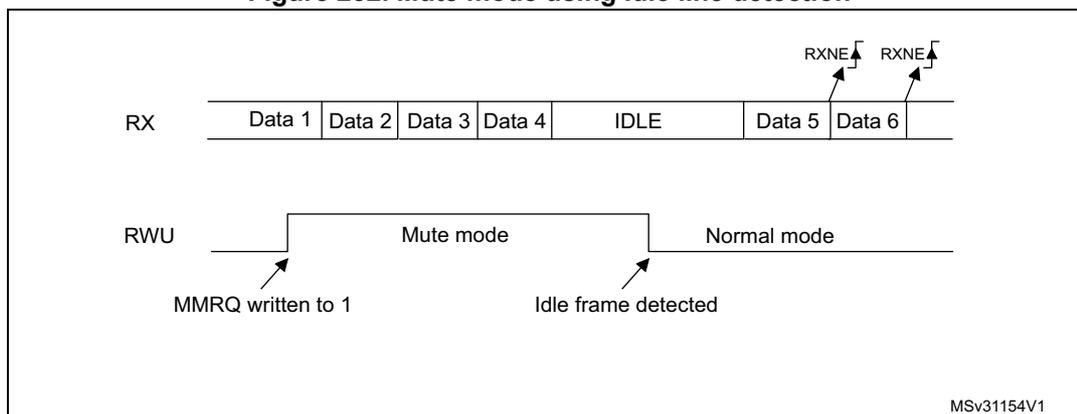
The diagram illustrates the behavior of the USART in mute mode using Idle line detection. The RX line shows a sequence of bytes: Data 1, Data 2, Data 3, Data 4, followed by an IDLE state, then Data 5, and Data 6. The RWU line is initially low. When 'MMRQ written to 1' occurs, the RWU line goes high, entering 'Mute mode'. Upon detection of the 'Idle frame detected', the RWU line returns to low, entering 'Normal mode'. RXNE flags are shown as pulses above Data 5 and Data 6.
MSv31154V1
Address mark detection (WAKE=1)
In this mode, bytes are recognized as addresses if their MSB is a '1' else they are considered as data. In an address byte, the address of the targeted receiver is put on the 4 LSB. This 4-bit word is compared by the receiver with its own address that is programmed in the ADD bits in the USART_CR2 register.
The USART enters mute mode when an address character is received that does not match its programmed address. In this case, the RWU bit is set by hardware. The RXNE flag is not set for this address byte and no interrupt nor DMA request is issued as the USART would have entered mute mode.
It exits from mute mode when an address character is received that matches the programmed address. Then the RWU bit is cleared and subsequent bytes are received normally. The RXNE bit is set for the address character since the RWU bit has been cleared.
The RWU bit can be written to as 0 or 1 when the receiver buffer contains no data (RXNE=0 in the USART_SR register). Otherwise the write attempt is ignored.
An example of mute mode behavior using address mark detection is given in Figure 253 .
Figure 253. Mute mode using address mark detection
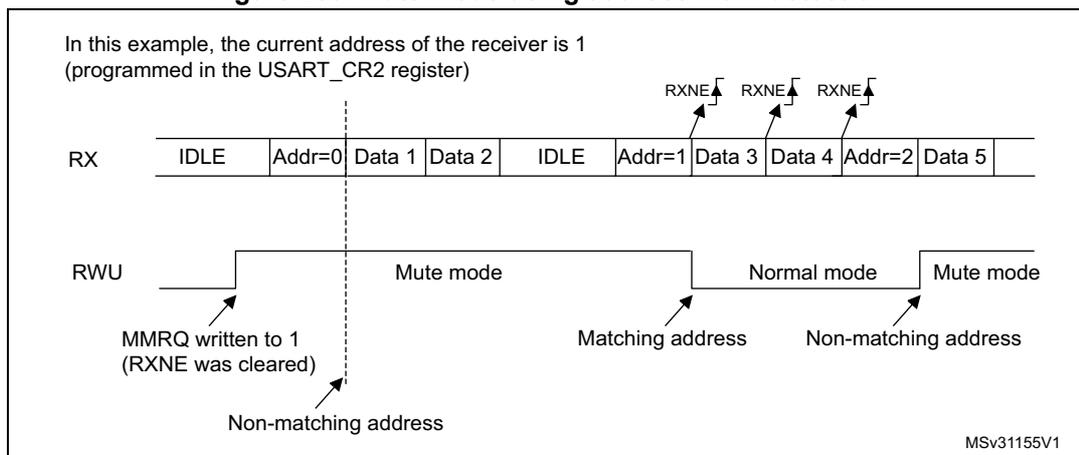
In this example, the current address of the receiver is 1 (programmed in the USART_CR2 register)
The diagram shows the RX line with the following sequence: IDLE, Addr=0, Data 1, Data 2, IDLE, Addr=1, Data 3, Data 4, Addr=2, Data 5. The RWU line shows transitions between Mute mode and Normal mode. Annotations include RXNE flags, MMREQ written to 1 (RXNE was cleared), Non-matching address, Matching address, and Normal mode. The diagram is labeled MSv31155V1.
25.4.7 Parity control
Parity control (generation of parity bit in transmission and parity checking in reception) can be enabled by setting the PCE bit in the USART_CR1 register. Depending on the frame length defined by the M bit, the possible USART frame formats are as listed in Table 153 .
Table 153. Frame formats
| M bit | PCE bit | USART frame (1) |
|---|---|---|
| 0 | 0 | | SB | 8 bit data | STB | |
| 0 | 1 | | SB | 7-bit data | PB | STB | |
| 1 | 0 | | SB | 9-bit data | STB | |
| 1 | 1 | | SB | 8-bit data PB | STB | |
1. Legends: SB: start bit, STB: stop bit, PB: parity bit.
Even parity
The parity bit is calculated to obtain an even number of “1s” inside the frame made of the 7 or 8 LSB bits (depending on whether M is equal to 0 or 1) and the parity bit.
E.g.: data=00110101; 4 bits set => parity bit will be 0 if even parity is selected (PS bit in USART_CR1 = 0).
Odd parity
The parity bit is calculated to obtain an odd number of “1s” inside the frame made of the 7 or 8 LSB bits (depending on whether M is equal to 0 or 1) and the parity bit.
E.g.: data=00110101; 4 bits set => parity bit will be 1 if odd parity is selected (PS bit in USART_CR1 = 1).
Parity checking in reception
If the parity check fails, the PE flag is set in the USART_SR register and an interrupt is generated if PEIE is set in the USART_CR1 register. The PE flag is cleared by a software
sequence (a read from the status register followed by a read or write access to the USART_DR data register).
Note: In case of wake-up by an address mark: the MSB bit of the data is taken into account to identify an address but not the parity bit. And the receiver does not check the parity of the address data (PE is not set in case of a parity error).
Parity generation in transmission
If the PCE bit is set in USART_CR1, then the MSB bit of the data written in the data register is transmitted but is changed by the parity bit (even number of “1s” if even parity is selected (PS=0) or an odd number of “1s” if odd parity is selected (PS=1)).
Note: The software routine that manages the transmission can activate the software sequence that clears the PE flag (a read from the status register followed by a read or write access to the data register). When operating in half-duplex mode, depending on the software, this can cause the PE flag to be unexpectedly cleared.
25.4.8 LIN (local interconnection network) mode
The LIN mode is selected by setting the LINEN bit in the USART_CR2 register. In LIN mode, the following bits must be kept cleared:
- • STOP[1:0] and CLKEN in the USART_CR2 register
- • SCEN, HDSEL and IREN in the USART_CR3 register.
LIN transmission
The same procedure explained in Section 25.4.2 has to be applied for LIN Master transmission than for normal USART transmission with the following differences:
- • Clear the M bit to configure 8-bit word length.
- • Set the LINEN bit to enter LIN mode. In this case, setting the SBK bit sends 13 '0 bits as a break character. Then a bit of value '1 is sent to allow the next start detection.
LIN reception
A break detection circuit is implemented on the USART interface. The detection is totally independent from the normal USART receiver. A break can be detected whenever it occurs, during Idle state or during a frame.
When the receiver is enabled (RE=1 in USART_CR1), the circuit looks at the RX input for a start signal. The method for detecting start bits is the same when searching break characters or data. After a start bit has been detected, the circuit samples the next bits exactly like for the data (on the 8th, 9th and 10th samples). If 10 (when the LBDL = 0 in USART_CR2) or 11 (when LBDL=1 in USART_CR2) consecutive bits are detected as '0, and are followed by a delimiter character, the LBD flag is set in USART_SR. If the LBDIE bit=1, an interrupt is generated. Before validating the break, the delimiter is checked for as it signifies that the RX line has returned to a high level.
If a '1 is sampled before the 10 or 11 have occurred, the break detection circuit cancels the current detection and searches for a start bit again.
If the LIN mode is disabled (LINEN=0), the receiver continues working as normal USART, without taking into account the break detection.
If the LIN mode is enabled (LINEN=1), as soon as a framing error occurs (i.e. stop bit detected at '0, which will be the case for any break frame), the receiver stops until the break
detection circuit receives either a '1, if the break word was not complete, or a delimiter character if a break has been detected.
The behavior of the break detector state machine and the break flag is shown in Figure 254 .
Examples of break frames are given on Figure 255 , where we suppose that LBDL=1 (11-bit break length), and M=0 (8-bit data).
Figure 254. Break detection in LIN mode (11-bit break length - LBDL bit is set)
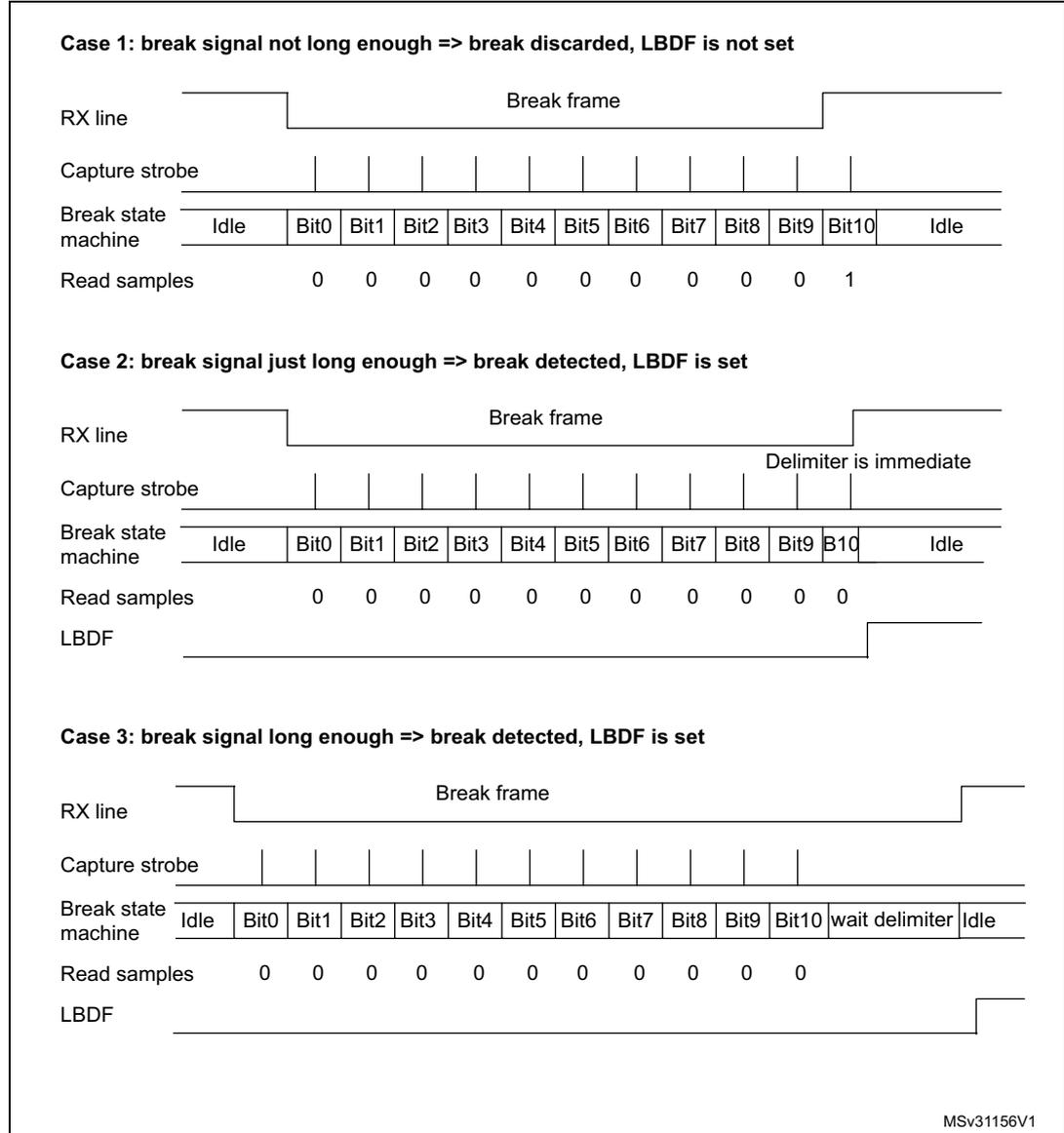
Case 1: break signal not long enough => break discarded, LBDF is not set
| RX line | Break frame | ||||||||||||
| Capture strobe | |||||||||||||
| Break state machine | Idle | Bit0 | Bit1 | Bit2 | Bit3 | Bit4 | Bit5 | Bit6 | Bit7 | Bit8 | Bit9 | Bit10 | Idle |
| Read samples | 0 | 0 | 0 | 0 | 0 | 0 | 0 | 0 | 0 | 0 | 1 | ||
Case 2: break signal just long enough => break detected, LBDF is set
| RX line | Break frame | ||||||||||||
| Capture strobe | |||||||||||||
| Break state machine | Idle | Bit0 | Bit1 | Bit2 | Bit3 | Bit4 | Bit5 | Bit6 | Bit7 | Bit8 | Bit9 | Bit10 | Idle |
| Read samples | 0 | 0 | 0 | 0 | 0 | 0 | 0 | 0 | 0 | 0 | 0 | ||
| LBDF | Delimeter is immediate | ||||||||||||
Case 3: break signal long enough => break detected, LBDF is set
| RX line | Break frame | |||||||||||||
| Capture strobe | ||||||||||||||
| Break state machine | Idle | Bit0 | Bit1 | Bit2 | Bit3 | Bit4 | Bit5 | Bit6 | Bit7 | Bit8 | Bit9 | Bit10 | wait delimiter | Idle |
| Read samples | 0 | 0 | 0 | 0 | 0 | 0 | 0 | 0 | 0 | 0 | 0 | |||
| LBDF | ||||||||||||||
MSv31156V1
Figure 255. Break detection in LIN mode vs. Framing error detection
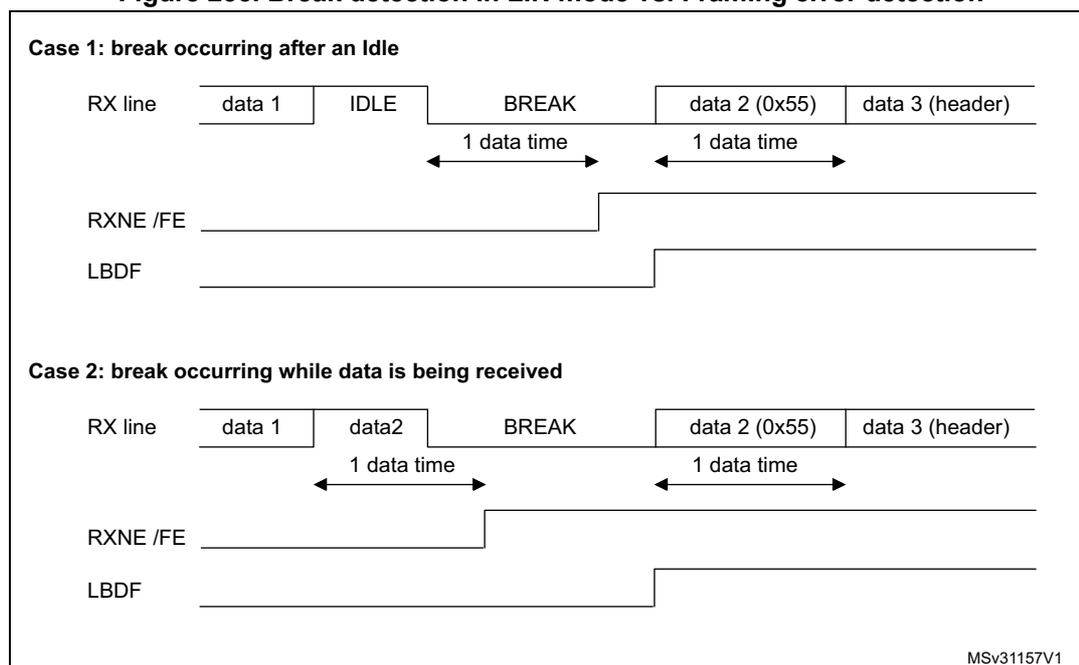
Case 1: break occurring after an Idle
The diagram shows the RX line transitioning from IDLE to BREAK. The RXNE/FE flag is set when the break duration exceeds 1 data time. The LBDF flag is set when the break duration exceeds 1 data time.
Case 2: break occurring while data is being received
The diagram shows the RX line transitioning from data2 to BREAK. The RXNE/FE flag is set when the break duration exceeds 1 data time. The LBDF flag is set when the break duration exceeds 1 data time.
MSv31157V1
25.4.9 USART synchronous mode
The synchronous mode is selected by writing the CLKEN bit in the USART_CR2 register to 1. In synchronous mode, the following bits must be kept cleared:
- • LINEN bit in the USART_CR2 register,
- • SCEN, HDSEL and IREN bits in the USART_CR3 register.
The USART allows the user to control a bidirectional synchronous serial communications in master mode. The SCLK pin is the output of the USART transmitter clock. No clock pulses are sent to the SCLK pin during start bit and stop bit. Depending on the state of the LBCL bit in the USART_CR2 register clock pulses will or will not be generated during the last valid data bit (address mark). The CPOL bit in the USART_CR2 register allows the user to select the clock polarity, and the CPHA bit in the USART_CR2 register allows the user to select the phase of the external clock (see Figure 256 , Figure 257 and Figure 258 ).
During the Idle state, preamble and send break, the external SCLK clock is not activated.
In synchronous mode the USART transmitter works exactly like in asynchronous mode. But as SCLK is synchronized with TX (according to CPOL and CPHA), the data on TX is synchronous.
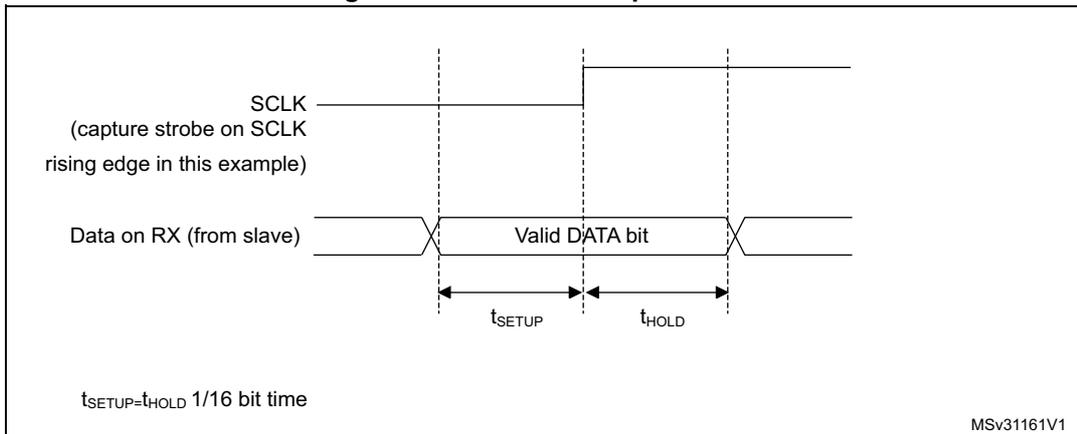
In this mode the USART receiver works in a different manner compared to the asynchronous mode. If RE=1, the data is sampled on SCLK (rising or falling edge, depending on CPOL and CPHA), without any oversampling. A setup and a hold time (that depends on the baud rate: 1/16 bit time) must be respected.
Note: The SCLK pin works in conjunction with the TX pin. Thus, the clock is provided only if the transmitter is enabled (TE=1) and a data is being transmitted (the data register USART_DR
has been written). This means that it is not possible to receive a synchronous data without transmitting data.
The LBCL, CPOL and CPHA bits have to be selected when both the transmitter and the receiver are disabled (TE=RE=0) to ensure that the clock pulses function correctly. These bits should not be changed while the transmitter or the receiver is enabled.
It is advised that TE and RE are set in the same instruction in order to minimize the setup and the hold time of the receiver.
The USART supports master mode only: it cannot receive or send data related to an input clock (SCLK is always an output).
Figure 256. USART example of synchronous transmission
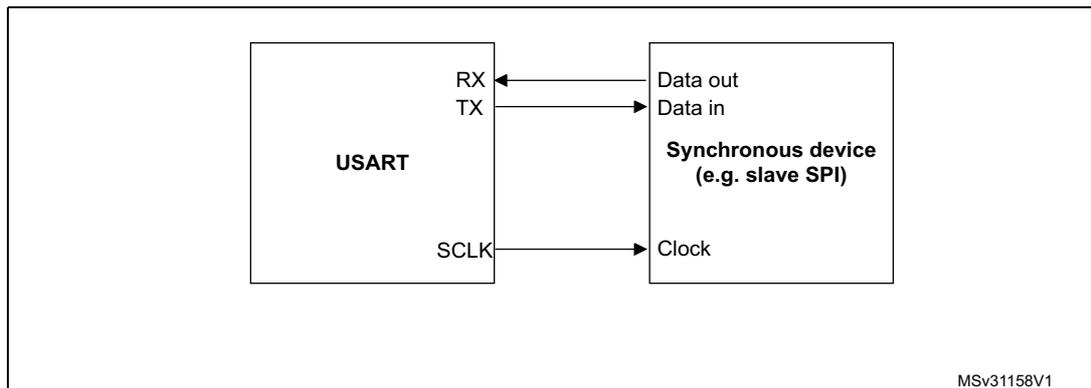
MSv31158V1
Figure 257. USART data clock timing diagram (M=0)
MSv34709V2
*LBCL bit controls last data pulse
Figure 258. USART data clock timing diagram (M=1)
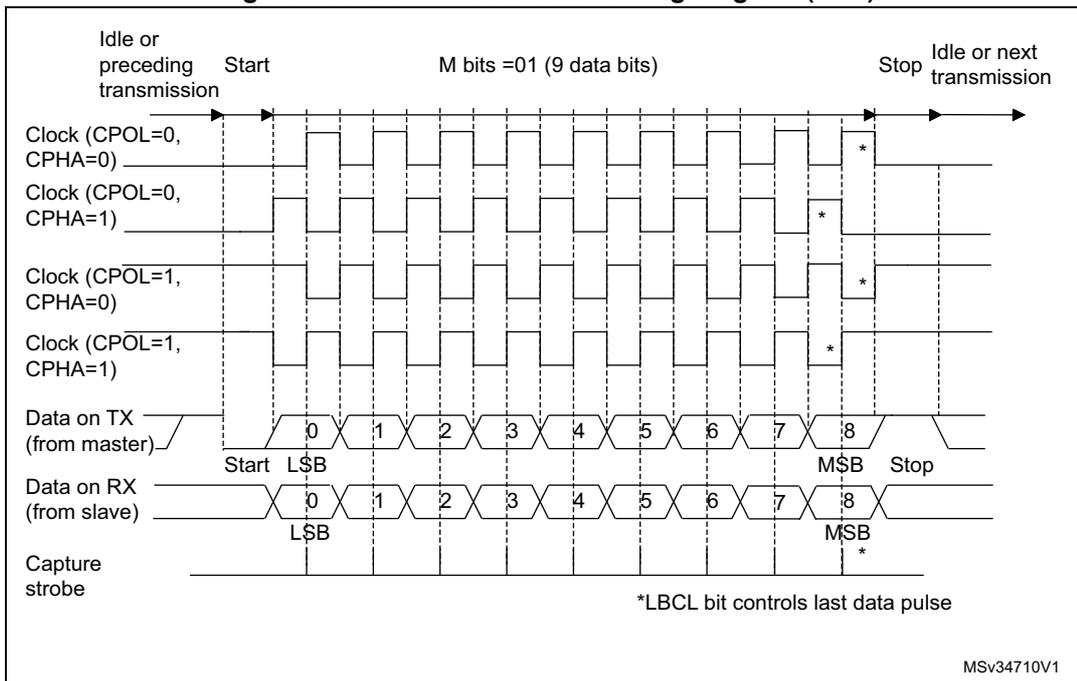
Figure 259. RX data setup/hold time
Note: The function of SCLK is different in smartcard mode. Refer to the smartcard mode chapter for more details.
25.4.10 Single-wire half-duplex communication
The single-wire half-duplex mode is selected by setting the HDSEL bit in the USART_CR3 register. In this mode, the following bits must be kept cleared:
- • LINEN and CLKEN bits in the USART_CR2 register,
- • SCEN and IREN bits in the USART_CR3 register.
The USART can be configured to follow a single-wire half-duplex protocol where the TX and RX lines are internally connected. The selection between half- and full-duplex communication is made with a control bit 'HALF DUPLEX SEL' (HDSEL in USART_CR3).
As soon as HDSEL is written to 1:
- • the TX and RX lines are internally connected
- • the RX pin is no longer used
- • the TX pin is always released when no data is transmitted. Thus, it acts as a standard I/O in idle or in reception. It means that the I/O must be configured so that TX is configured as floating input (or output high open-drain) when not driven by the USART.
Apart from this, the communications are similar to what is done in normal USART mode. The conflicts on the line must be managed by the software (by the use of a centralized arbiter, for instance). In particular, the transmission is never blocked by hardware and continue to occur as soon as a data is written in the data register while the TE bit is set.
25.4.11 Smartcard
The smartcard mode is selected by setting the SCEN bit in the USART_CR3 register. In smartcard mode, the following bits must be kept cleared:
- • LINEN bit in the USART_CR2 register,
- • HDSEL and IREN bits in the USART_CR3 register.
Moreover, the CLKEN bit may be set in order to provide a clock to the smartcard.
The Smartcard interface is designed to support asynchronous protocol Smartcards as defined in the ISO 7816-3 standard. The USART should be configured as:
- • 8 bits plus parity: where M=1 and PCE=1 in the USART_CR1 register
- • 1.5 stop bits when transmitting and receiving: where STOP=11 in the USART_CR2 register.
Note: It is also possible to choose 0.5 stop bit for receiving but it is recommended to use 1.5 stop bits for both transmitting and receiving to avoid switching between the two configurations.
Figure 260 shows examples of what can be seen on the data line with and without parity error.
Figure 260. ISO 7816-3 asynchronous protocol
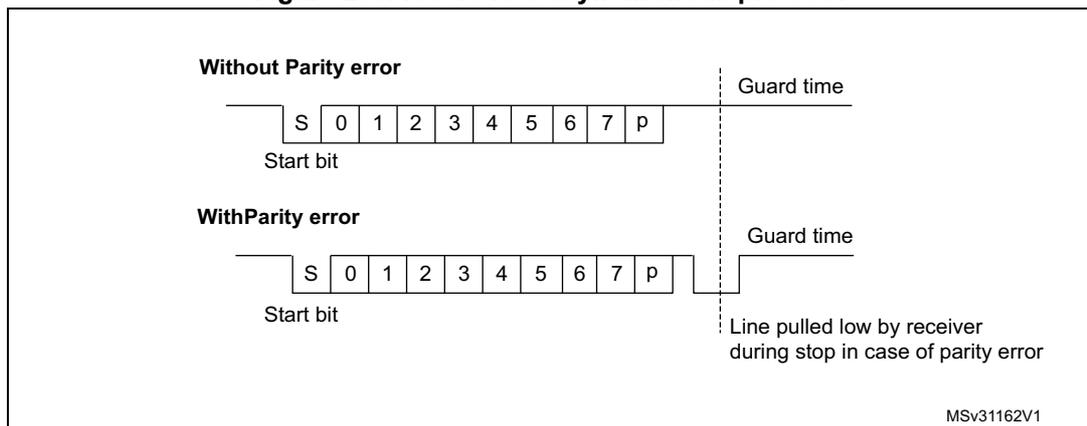
The diagram illustrates two timing scenarios for the ISO 7816-3 asynchronous protocol. Both show a sequence of bits: a Start bit (S), 8 data bits (0-7), and a parity bit (p). A vertical dashed line separates the parity bit from the 'Guard time'.
- Without Parity error: The signal returns to the idle state after the parity bit, and the guard time begins.
- With Parity error: The signal is pulled low by the receiver during the stop bit period (the time following the parity bit), indicating a parity error. The guard time begins after the signal returns to the idle state.
MSv31162V1
When connected to a Smartcard, the TX output of the USART drives a bidirectional line that is also driven by the Smartcard. The TX pin must be configured as open-drain.
Smartcard is a single wire half duplex communication protocol.
- • Transmission of data from the transmit shift register is guaranteed to be delayed by a minimum of 1/2 baud clock. In normal operation a full transmit shift register will start
shifting on the next baud clock edge. In smartcard mode this transmission is further delayed by a guaranteed 1/2 baud clock.
- • If a parity error is detected during reception of a frame programmed with a 0.5 or 1.5 stop bit period, the transmit line is pulled low for a baud clock period after the completion of the receive frame. This is to indicate to the Smartcard that the data transmitted to USART has not been correctly received. This NACK signal (pulling transmit line low for 1 baud clock) will cause a framing error on the transmitter side (configured with 1.5 stop bits). The application can handle re-sending of data according to the protocol. A parity error is 'NACK'ed by the receiver if the NACK control bit is set, otherwise a NACK is not transmitted.
- • The assertion of the TC flag can be delayed by programming the Guard Time register. In normal operation, TC is asserted when the transmit shift register is empty and no further transmit requests are outstanding. In smartcard mode an empty transmit shift register triggers the guard time counter to count up to the programmed value in the Guard Time register. TC is forced low during this time. When the guard time counter reaches the programmed value TC is asserted high.
- • The de-assertion of TC flag is unaffected by smartcard mode.
- • If a framing error is detected on the transmitter end (due to a NACK from the receiver), the NACK will not be detected as a start bit by the receive block of the transmitter. According to the ISO protocol, the duration of the received NACK can be 1 or 2 baud clock periods.
- • On the receiver side, if a parity error is detected and a NACK is transmitted the receiver will not detect the NACK as a start bit.
Note: A break character is not significant in smartcard mode. A 0x00 data with a framing error will be treated as data and not as a break.
No Idle frame is transmitted when toggling the TE bit. The Idle frame (as defined for the other configurations) is not defined by the ISO protocol.
Figure 261 details how the NACK signal is sampled by the USART. In this example the USART is transmitting a data and is configured with 1.5 stop bits. The receiver part of the USART is enabled in order to check the integrity of the data and the NACK signal.
Figure 261. Parity error detection using the 1.5 stop bits
The USART can provide a clock to the smartcard through the SCLK output. In smartcard mode, SCLK is not associated to the communication but is simply derived from the internal peripheral input clock through a 5-bit prescaler. The division ratio is configured in the
prescaler register USART_GTPR. SCLK frequency can be programmed from \( f_{CK}/2 \) to \( f_{CK}/62 \) , where \( f_{CK} \) is the peripheral input clock.
25.4.12 IrDA SIR ENDEC block
The IrDA mode is selected by setting the IREN bit in the USART_CR3 register. In IrDA mode, the following bits must be kept cleared:
- • LINEN, STOP and CLKEN bits in the USART_CR2 register,
- • SCEN and HDSEL bits in the USART_CR3 register.
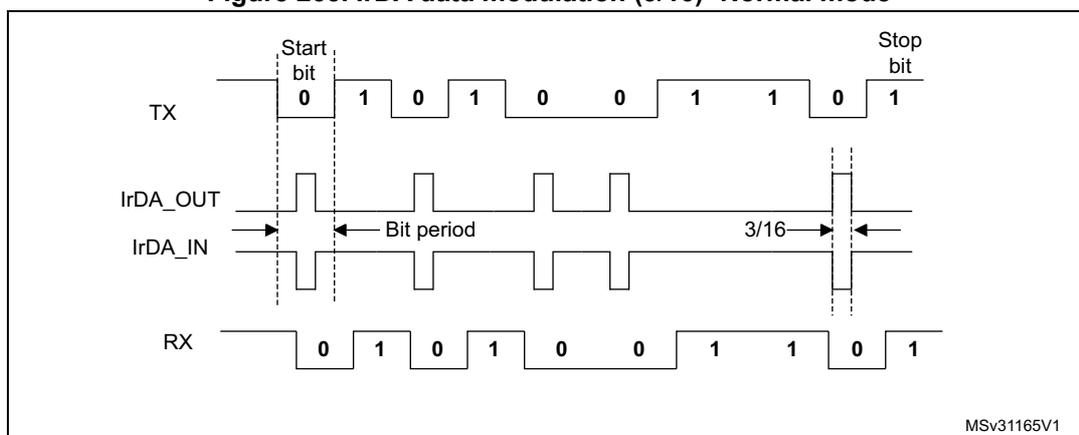
The IrDA SIR physical layer specifies use of a Return to Zero, Inverted (RZI) modulation scheme that represents logic 0 as an infrared light pulse (see Figure 262 ).
The SIR Transmit encoder modulates the Non Return to Zero (NRZ) transmit bit stream output from USART. The output pulse stream is transmitted to an external output driver and infrared LED. USART supports only bit rates up to 115.2Kbps for the SIR ENDEC. In normal mode the transmitted pulse width is specified as 3/16 of a bit period.
The SIR receive decoder demodulates the return-to-zero bit stream from the infrared detector and outputs the received NRZ serial bit stream to USART. The decoder input is normally HIGH (marking state) in the Idle state. The transmit encoder output has the opposite polarity to the decoder input. A start bit is detected when the decoder input is low.
- • IrDA is a half duplex communication protocol. If the Transmitter is busy (i.e. the USART is sending data to the IrDA encoder), any data on the IrDA receive line will be ignored by the IrDA decoder and if the Receiver is busy (USART is receiving decoded data from the USART), data on the TX from the USART to IrDA will not be encoded by IrDA. While receiving data, transmission should be avoided as the data to be transmitted could be corrupted.
- • A '0' is transmitted as a high pulse and a '1' is transmitted as a '0'. The width of the pulse is specified as 3/16th of the selected bit period in normal mode (see Figure 263 ).
- • The SIR decoder converts the IrDA compliant receive signal into a bit stream for USART.
- • The SIR receive logic interprets a high state as a logic one and low pulses as logic zeros.
- • The transmit encoder output has the opposite polarity to the decoder input. The SIR output is in low state when Idle.
- • The IrDA specification requires the acceptance of pulses greater than 1.41 us. The acceptable pulse width is programmable. Glitch detection logic on the receiver end filters out pulses of width less than 2 PSC periods (PSC is the prescaler value programmed in the IrDA low-power Baud Register, USART_GTPR). Pulses of width less than 1 PSC period are always rejected, but those of width greater than one and less than two periods may be accepted or rejected, those greater than 2 periods will be accepted as a pulse. The IrDA encoder/decoder doesn't work when PSC=0.
- • The receiver can communicate with a low-power transmitter.
- • In IrDA mode, the STOP bits in the USART_CR2 register must be configured to "1 stop bit".
IrDA low-power mode
Transmitter:
In low-power mode the pulse width is not maintained at 3/16 of the bit period. Instead, the width of the pulse is 3 times the low-power baud rate that can be a minimum of 1.42 MHz. Generally this value is 1.8432 MHz ( \( 1.42 \text{ MHz} < \text{PSC} < 2.12 \text{ MHz} \) ). A low-power mode programmable divisor divides the system clock to achieve this value.
Receiver:
Receiving in low-power mode is similar to receiving in normal mode. For glitch detection the USART should discard pulses of duration shorter than \( 1/\text{PSC} \) . A valid low is accepted only if its duration is greater than 2 periods of the IrDA low-power Baud clock (PSC value in USART_GTPR).
Note: A pulse of width less than two and greater than one PSC period(s) may or may not be rejected.
The receiver set up time should be managed by software. The IrDA physical layer specification specifies a minimum of 10 ms delay between transmission and reception (IrDA is a half duplex protocol).
Figure 262. IrDA SIR ENDEC- block diagram
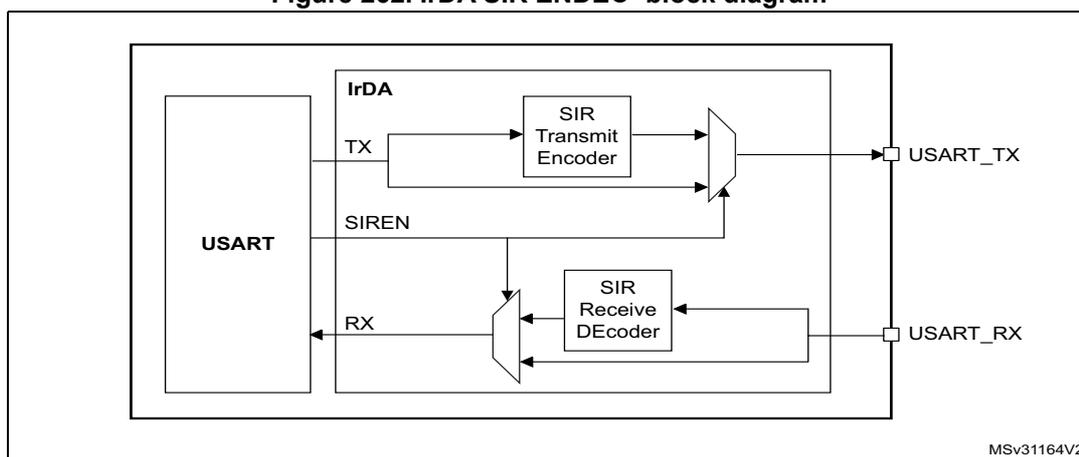
Figure 263. IrDA data modulation (3/16) -Normal mode
25.4.13 Continuous communication using DMA
The USART is capable of continuous communication using the DMA. The DMA requests for Rx buffer and Tx buffer are generated independently.
Transmission using DMA
DMA mode can be enabled for transmission by setting DMAT bit in the USART_CR3 register. Data is loaded from a SRAM area configured using the DMA peripheral (refer to the DMA specification) to the USART_DR register whenever the TXE bit is set. To map a DMA channel for USART transmission, use the following procedure (x denotes the channel number):
- 1. Write the USART_DR register address in the DMA control register to configure it as the destination of the transfer. The data will be moved to this address from memory after each TXE event.
- 2. Write the memory address in the DMA control register to configure it as the source of the transfer. The data will be loaded into the USART_DR register from this memory area after each TXE event.
- 3. Configure the total number of bytes to be transferred to the DMA control register.
- 4. Configure the channel priority in the DMA register
- 5. Configure DMA interrupt generation after half/ full transfer as required by the application.
- 6. Clear the TC bit in the SR register by writing 0 to it.
- 7. Activate the channel in the DMA register.
When the number of data transfers programmed in the DMA Controller is reached, the DMA controller generates an interrupt on the DMA channel interrupt vector.
In transmission mode, once the DMA has written all the data to be transmitted (the TCIF flag is set in the DMA_ISR register), the TC flag can be monitored to make sure that the USART communication is complete. This is required to avoid corrupting the last transmission before disabling the USART or entering the Stop mode. The software must wait until TC=1. The TC flag remains cleared during all data transfers and it is set by hardware at the last frame end of transmission.
Figure 264. Transmission using DMA
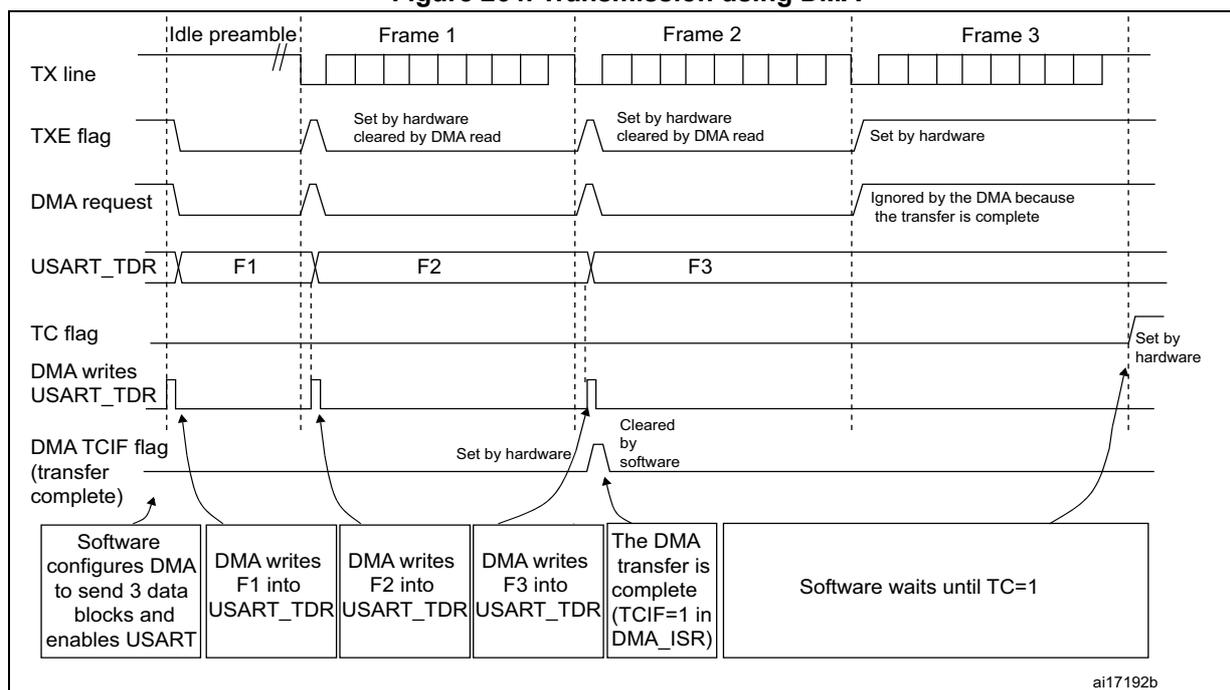
The diagram illustrates the timing and control signals for USART transmission using DMA across three frames (Frame 1, Frame 2, Frame 3) following an idle preamble.
- TX line: Shows the idle preamble followed by the transmission of Frame 1, Frame 2, and Frame 3.
- TXE flag: Set by hardware when the USART_TDR is empty and cleared by DMA read. It is set for the start of each frame and cleared as data is written.
- DMA request: Generated when the TXE flag is set. It is ignored by the DMA because the transfer is complete after the third frame.
- USART_TDR: Shows the data blocks F1, F2, and F3 being written into the register.
- TC flag: Set by hardware when the entire frame has been transmitted.
- DMA writes USART_TDR: Shows the software configuring DMA to send 3 data blocks and enabling USART. Subsequent writes of F1, F2, and F3 into USART_TDR trigger the DMA transfer.
- DMA TCIF flag (transfer complete): Set by hardware when the DMA transfer is complete (TCIF=1 in DMA_ISR). It is cleared by software. The software then waits until TC=1.
Sequence of events:
- Software configures DMA to send 3 data blocks and enables USART.
- DMA writes F1 into USART_TDR.
- DMA writes F2 into USART_TDR.
- DMA writes F3 into USART_TDR.
- The DMA transfer is complete (TCIF=1 in DMA_ISR).
- Software waits until TC=1.
ai17192b
Reception using DMA
DMA mode can be enabled for reception by setting the DMAR bit in USART_CR3 register. Data is loaded from the USART_DR register to a SRAM area configured using the DMA peripheral (refer to the DMA specification) whenever a data byte is received. To map a DMA channel for USART reception, use the following procedure:
- 1. Write the USART_DR register address in the DMA control register to configure it as the source of the transfer. The data will be moved from this address to the memory after each RXNE event.
- 2. Write the memory address in the DMA control register to configure it as the destination of the transfer. The data will be loaded from USART_DR to this memory area after each RXNE event.
- 3. Configure the total number of bytes to be transferred in the DMA control register.
- 4. Configure the channel priority in the DMA control register
- 5. Configure interrupt generation after half/ full transfer as required by the application.
- 6. Activate the channel in the DMA control register.
When the number of data transfers programmed in the DMA Controller is reached, the DMA controller generates an interrupt on the DMA channel interrupt vector. The DMAR bit should be cleared by software in the USART_CR3 register during the interrupt subroutine.
Figure 265. Reception using DMA
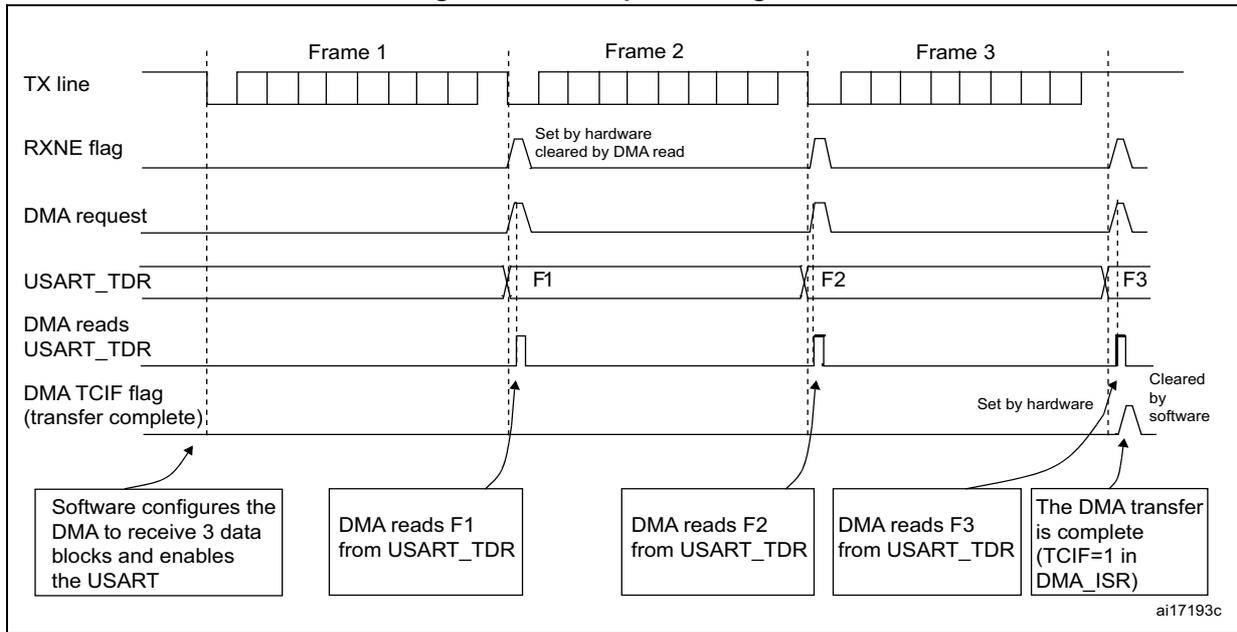
The diagram illustrates the sequence of events for receiving three frames using DMA.
1.
Software configures the DMA to receive 3 data blocks and enables the USART
.
2.
Frame 1
is received on the TX line. The
RXNE flag
is set by hardware and cleared by the DMA read. A
DMA request
is generated. The data byte
F1
is read from
USART_TDR
by the DMA.
3.
Frame 2
is received. Similar to Frame 1, the
RXNE flag
is set and cleared, a
DMA request
is generated, and the data byte
F2
is read from
USART_TDR
.
4.
Frame 3
is received. The
RXNE flag
is set and cleared, a
DMA request
is generated, and the data byte
F3
is read from
USART_TDR
.
5. After the third byte is read, the
DMA TCIF flag (transfer complete)
is set by hardware and cleared by software. A callout indicates:
The DMA transfer is complete (TCIF=1 in DMA_ISR)
.
The diagram is labeled with 'ai17193c' in the bottom right corner.
Error flagging and interrupt generation in multibuffer communication
In case of multibuffer communication if any error occurs during the transaction the error flag will be asserted after the current byte. An interrupt will be generated if the interrupt enable flag is set. For framing error, overrun error and noise flag that are asserted with RXNE in case of single byte reception, there will be separate error flag interrupt enable bit (EIE bit in the USART_CR3 register), which if set will issue an interrupt after the current byte with either of these errors.
25.4.14 Hardware flow control
It is possible to control the serial data flow between 2 devices by using the nCTS input and the nRTS output. The Figure 266 shows how to connect 2 devices in this mode:
Figure 266. Hardware flow control between 2 USARTs
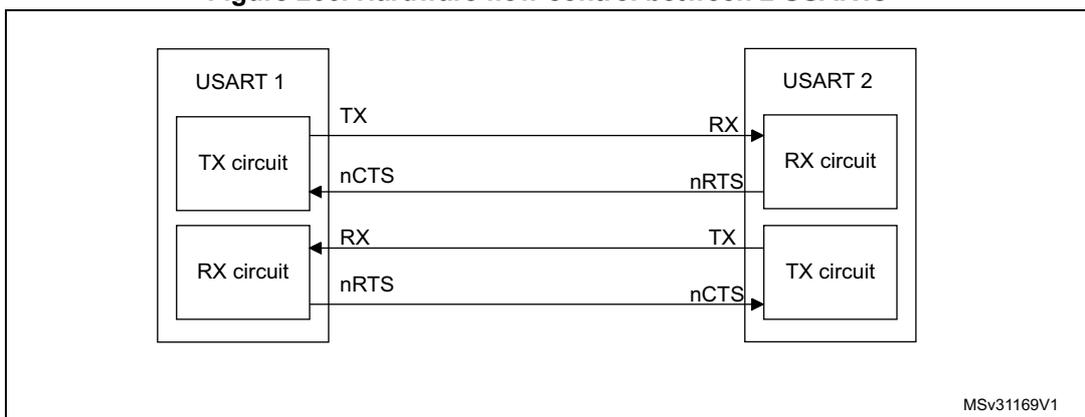
The diagram shows two USART blocks,
USART 1
and
USART 2
.
-
USART 1
contains a
TX circuit
and an
RX circuit
.
-
USART 2
contains an
RX circuit
and a
TX circuit
.
Connections:
- The
TX
output of
USART 1
is connected to the
RX
input of
USART 2
.
- The
nCTS
input of
USART 1
is connected to the
nRTS
output of
USART 2
.
- The
RX
output of
USART 1
is connected to the
TX
input of
USART 2
.
- The
nRTS
output of
USART 1
is connected to the
nCTS
input of
USART 2
.
The diagram is labeled with 'MSv31169V1' in the bottom right corner.
RTS and CTS flow control can be enabled independently by writing respectively RTSE and CTSE bits to 1 (in the USART_CR3 register).
RTS flow control
If the RTS flow control is enabled (RTSE=1), then nRTS is asserted (tied low) as long as the USART receiver is ready to receive a new data. When the receive register is full, nRTS is deasserted, indicating that the transmission is expected to stop at the end of the current frame. Figure 267 shows an example of communication with RTS flow control enabled.
Figure 267. RTS flow control
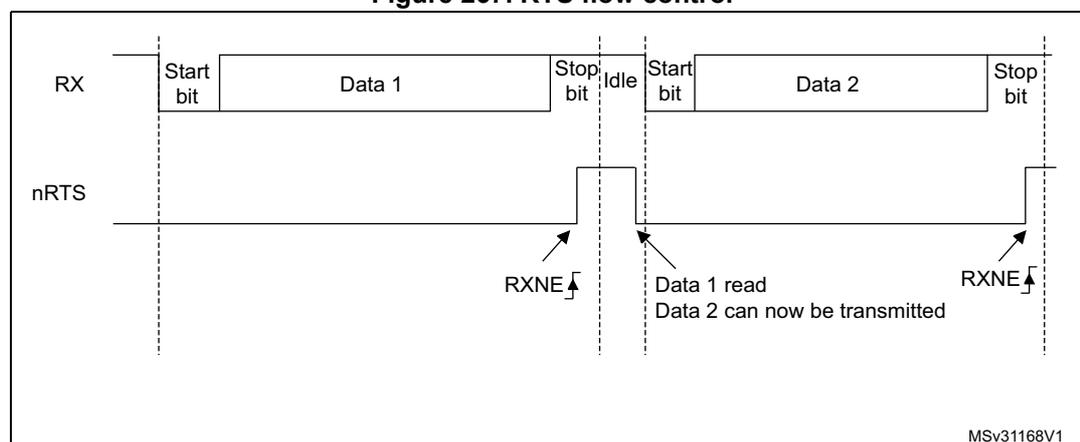
The diagram illustrates the relationship between the receive (RX) signal and the RTS flow control signal (nRTS) during two data frame transmissions. The RX signal shows two frames: 'Start bit', 'Data 1', 'Stop bit', 'Idle', 'Start bit', 'Data 2', 'Stop bit'. The nRTS signal is initially low (asserted). It remains low until the 'Stop bit' of the first frame is received, at which point it briefly pulses high (deasserted) and then returns low. A label 'RXNE' with a rising edge arrow points to this first pulse. When the 'Stop bit' of the second frame is received, the nRTS signal pulses high again. A label 'RXNE' with a rising edge arrow points to this second pulse. Between the two pulses, a label indicates 'Data 1 read' and 'Data 2 can now be transmitted'. The diagram is labeled 'MSv31168V1' in the bottom right corner.
CTS flow control
If the CTS flow control is enabled (CTSE=1), then the transmitter checks the nCTS input before transmitting the next frame. If nCTS is asserted (tied low), then the next data is transmitted (assuming that a data is to be transmitted, in other words, if TXE=0), else the transmission does not occur. When nCTS is deasserted during a transmission, the current transmission is completed before the transmitter stops.
When CTSE=1, the CTSIF status bit is automatically set by hardware as soon as the nCTS input toggles. It indicates when the receiver becomes ready or not ready for communication. An interrupt is generated if the CTSIE bit in the USART_CR3 register is set. The figure below shows an example of communication with CTS flow control enabled.
Figure 268. CTS flow control
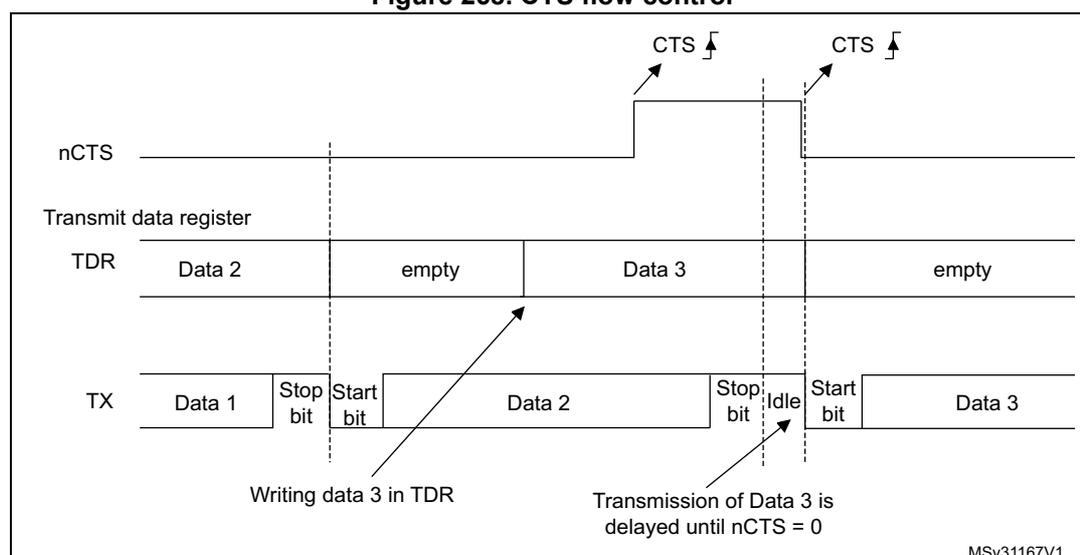
The diagram illustrates the relationship between the Clear to Send (nCTS) signal, the Transmit Data Register (TDR), and the transmit (TX) signal. The nCTS signal is initially low. When 'Data 2' is written to the TDR, the TX signal begins transmitting 'Data 1' followed by a 'Stop bit'. Once 'Data 2' is transmitted, the TDR becomes 'empty'. At this point, 'Data 3' is written to the TDR. The nCTS signal pulses high (deasserted) at this moment. The TX signal transmits 'Data 2' followed by a 'Stop bit' and then an 'Idle' state. When the nCTS signal returns low (asserted), the TX signal begins transmitting 'Data 3'. The TDR becomes 'empty' again after 'Data 3' is transmitted. Labels indicate 'Writing data 3 in TDR' and 'Transmission of Data 3 is delayed until nCTS = 0'. The diagram is labeled 'MSv31167V1' in the bottom right corner.
Note: Special behavior of break frames: when the CTS flow is enabled, the transmitter does not check the nCTS input state to send a break.
25.5 USART interrupts
Table 154. USART interrupt requests
| Interrupt event | Event flag | Enable control bit |
|---|---|---|
| Transmit Data Register Empty | TXE | TXEIE |
| CTS flag | CTS | CTSIE |
| Transmission Complete | TC | TCIE |
| Received Data Ready to be Read | RXNE | RXNEIE |
| Overrun Error Detected | ORE | |
| Idle Line Detected | IDLE | IDLEIE |
| Parity Error | PE | PEIE |
| Break Flag | LBD | LBDIE |
| Noise Flag, Overrun error and Framing Error in multibuffer communication | NF or ORE or FE | EIE |
The USART interrupt events are connected to the same interrupt vector (see Figure 269 ).
- • During transmission: Transmission Complete, Clear to Send or Transmit Data Register empty interrupt.
- • While receiving: Idle Line detection, Overrun error, Receive Data register not empty, Parity error, LIN break detection, Noise Flag (only in multi buffer communication) and Framing Error (only in multi buffer communication).
These events generate an interrupt if the corresponding Enable Control Bit is set.
Figure 269. USART interrupt mapping diagram
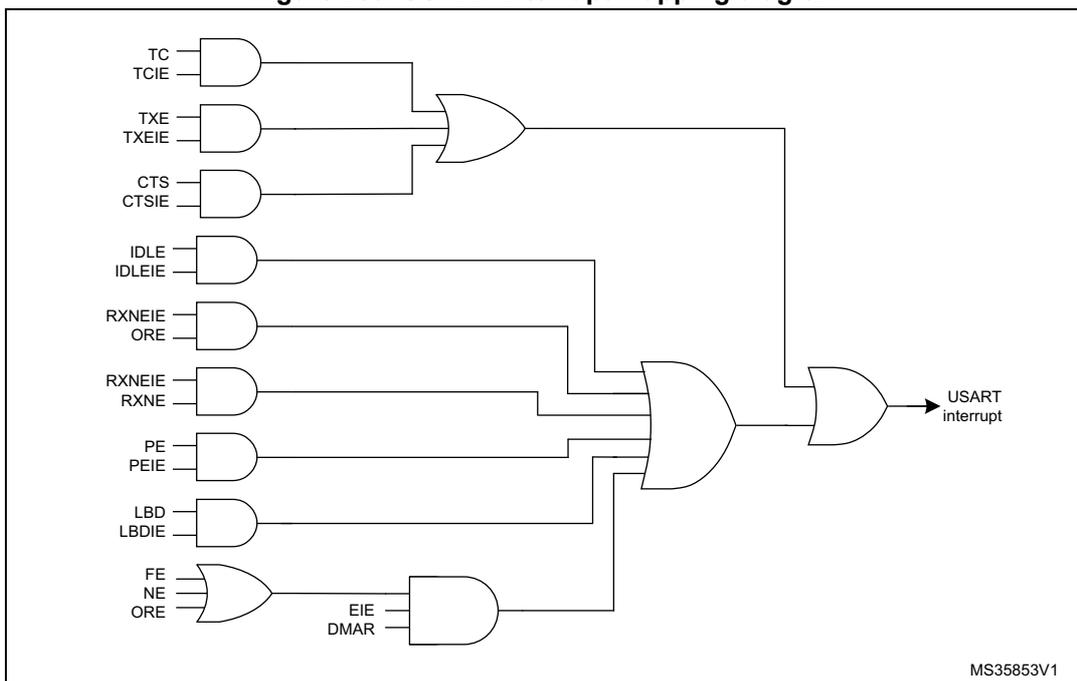
The diagram illustrates the logic for generating a USART interrupt. It consists of several AND gates and two OR gates. The first OR gate takes inputs from three AND gates: (TC & TCIE), (TXE & TXEIE), and (CTS & CTSIE). The second OR gate takes inputs from the first OR gate, an AND gate for (IDLE & IDLEIE), an AND gate for (RXNEIE & ORE), an AND gate for (RXNEIE & RXNE), an AND gate for (PE & PEIE), an AND gate for (LBD & LBDIE), and an AND gate for (EIE & DMAR). The final output of the second OR gate is labeled 'USART interrupt'. A small note 'MS35853V1' is present in the bottom right corner.
25.6 USART registers
Refer to Section 1.2 on page 45 for a list of abbreviations used in register descriptions.
The peripheral registers have to be accessed by words (32 bits).
25.6.1 Status register (USART_SR)
Address offset: 0x00
Reset value: 0x00C0 0000
| 31 | 30 | 29 | 28 | 27 | 26 | 25 | 24 | 23 | 22 | 21 | 20 | 19 | 18 | 17 | 16 |
|---|---|---|---|---|---|---|---|---|---|---|---|---|---|---|---|
| Res. | Res. | Res. | Res. | Res. | Res. | Res. | Res. | Res. | Res. | Res. | Res. | Res. | Res. | Res. | Res. |
| 15 | 14 | 13 | 12 | 11 | 10 | 9 | 8 | 7 | 6 | 5 | 4 | 3 | 2 | 1 | 0 |
| Res. | Res. | Res. | Res. | Res. | Res. | CTS | LBD | TXE | TC | RXNE | IDLE | ORE | NF | FE | PE |
| rc_w0 | rc_w0 | r | rc_w0 | rc_w0 | r | r | r | r | r |
Bits 31:10 Reserved, must be kept at reset value
Bit 9 CTS: CTS flag
This bit is set by hardware when the nCTS input toggles, if the CTSE bit is set. It is cleared by software (by writing it to 0). An interrupt is generated if CTSIE=1 in the USART_CR3 register.
0: No change occurred on the nCTS status line
1: A change occurred on the nCTS status line
Note: This bit is not available for UART4 & UART5.
Bit 8 LBD: LIN break detection flag
This bit is set by hardware when the LIN break is detected. It is cleared by software (by writing it to 0). An interrupt is generated if LBDIE = 1 in the USART_CR2 register.
0: LIN Break not detected
1: LIN break detected
Note: An interrupt is generated when LBD=1 if LBDIE=1
Bit 7 TXE: Transmit data register empty
This bit is set by hardware when the content of the TDR register has been transferred into the shift register. An interrupt is generated if the TXEIE bit =1 in the USART_CR1 register. It is cleared by a write to the USART_DR register.
0: Data is not transferred to the shift register
1: Data is transferred to the shift register)
Note: This bit is used during single buffer transmission.
Bit 6 TC: Transmission complete
This bit is set by hardware if the transmission of a frame containing data is complete and if TXE is set. An interrupt is generated if TCIE=1 in the USART_CR1 register. It is cleared by a software sequence (a read from the USART_SR register followed by a write to the USART_DR register). The TC bit can also be cleared by writing a '0' to it. This clearing sequence is recommended only for multibuffer communication.
0: Transmission is not complete
1: Transmission is complete
Bit 5 RXNE: Read data register not empty
This bit is set by hardware when the content of the RDR shift register has been transferred to the USART_DR register. An interrupt is generated if RXNEIE=1 in the USART_CR1 register. It is cleared by a read to the USART_DR register. The RXNE flag can also be cleared by writing a zero to it. This clearing sequence is recommended only for multibuffer communication.
0: Data is not received
1: Received data is ready to be read.
Bit 4 IDLE: IDLE line detected
This bit is set by hardware when an Idle Line is detected. An interrupt is generated if the IDLEIE=1 in the USART_CR1 register. It is cleared by a software sequence (an read to the USART_SR register followed by a read to the USART_DR register).
0: No Idle Line is detected
1: Idle Line is detected
Note: The IDLE bit will not be set again until the RXNE bit has been set itself (i.e. a new idle line occurs).
Bit 3 ORE: Overrun errorThis bit is set by hardware when the word currently being received in the shift register is ready to be transferred into the RDR register while RXNE=1. An interrupt is generated if RXNEIE=1 in the USART_CR1 register. It is cleared by a software sequence (an read to the USART_SR register followed by a read to the USART_DR register).
0: No Overrun error
1: Overrun error is detected
Note: When this bit is set, the RDR register content will not be lost but the shift register will be overwritten. An interrupt is generated on ORE flag in case of Multi Buffer communication if the EIE bit is set.
Bit 2 NF: Noise detected flagThis bit is set by hardware when noise is detected on a received frame. It is cleared by a software sequence (an read to the USART_SR register followed by a read to the USART_DR register).
0: No noise is detected
1: Noise is detected
Note: This bit does not generate interrupt as it appears at the same time as the RXNE bit that itself generates an interrupting interrupt is generated on NF flag in case of Multi Buffer communication if the EIE bit is set.
Note: When the line is noise-free, the NF flag can be disabled by programming the ONEBIT bit to 1 to increase the USART tolerance to deviations (Refer to Section 25.4.5: USART receiver tolerance to clock deviation on page 771 ).
Bit 1 FE: Framing errorThis bit is set by hardware when a de-synchronization, excessive noise or a break character is detected. It is cleared by a software sequence (an read to the USART_SR register followed by a read to the USART_DR register).
0: No Framing error is detected
1: Framing error or break character is detected
Note: This bit does not generate interrupt as it appears at the same time as the RXNE bit that itself generates an interrupt. If the word currently being transferred causes both frame error and overrun error, it will be transferred and only the ORE bit will be set.
An interrupt is generated on FE flag in case of Multi Buffer communication if the EIE bit is set.
Bit 0 PE: Parity errorThis bit is set by hardware when a parity error occurs in receiver mode. It is cleared by a software sequence (a read from the status register followed by a read or write access to the USART_DR data register). The software must wait for the RXNE flag to be set before clearing the PE bit.
An interrupt is generated if PEIE = 1 in the USART_CR1 register.
0: No parity error
1: Parity error
25.6.2 Data register (USART_DR)
Address offset: 0x04
Reset value: 0x0000 0000
| 31 | 30 | 29 | 28 | 27 | 26 | 25 | 24 | 23 | 22 | 21 | 20 | 19 | 18 | 17 | 16 |
|---|---|---|---|---|---|---|---|---|---|---|---|---|---|---|---|
| Res. | Res. | Res. | Res. | Res. | Res. | Res. | Res. | Res. | Res. | Res. | Res. | Res. | Res. | Res. | Res. |
| 15 | 14 | 13 | 12 | 11 | 10 | 9 | 8 | 7 | 6 | 5 | 4 | 3 | 2 | 1 | 0 |
| Res. | Res. | Res. | Res. | Res. | Res. | Res. | DR[8:0] | ||||||||
| rw | rw | rw | rw | rw | rw | rw | rw | rw | |||||||
Bits 31:9 Reserved, must be kept at reset value
Bits 8:0 DR[8:0] : Data value
Contains the Received or Transmitted data character, depending on whether it is read from or written to.
The Data register performs a double function (read and write) since it is composed of two registers, one for transmission (TDR) and one for reception (RDR)
The TDR register provides the parallel interface between the internal bus and the output shift register ( Figure 245 ).
The RDR register provides the parallel interface between the input shift register and the internal bus.
When transmitting with the parity enabled (PCE bit set to 1 in the USART_CR1 register), the value written in the MSB (bit 7 or bit 8 depending on the data length) has no effect because it is replaced by the parity.
When receiving with the parity enabled, the value read in the MSB bit is the received parity bit.
25.6.3 Baud rate register (USART_BRR)
Note: The baud counters stop counting if the TE or RE bits are disabled respectively.
Address offset: 0x08
Reset value: 0x0000 0000
| 31 | 30 | 29 | 28 | 27 | 26 | 25 | 24 | 23 | 22 | 21 | 20 | 19 | 18 | 17 | 16 |
|---|---|---|---|---|---|---|---|---|---|---|---|---|---|---|---|
| Res. | Res. | Res. | Res. | Res. | Res. | Res. | Res. | Res. | Res. | Res. | Res. | Res. | Res. | Res. | Res. |
| 15 | 14 | 13 | 12 | 11 | 10 | 9 | 8 | 7 | 6 | 5 | 4 | 3 | 2 | 1 | 0 |
| rw | rw | rw | rw | rw | rw | rw | rw | rw | rw | rw | rw | rw | rw | rw | rw |
| DIV_Mantissa[11:0] | DIV_Fraction[3:0] | ||||||||||||||
Bits 31:16 Reserved, must be kept at reset value
Bits 15:4 DIV_Mantissa[11:0] : mantissa of USARTDIV
These 12 bits define the mantissa of the USART Divider (USARTDIV)
Bits 3:0 DIV_Fraction[3:0] : fraction of USARTDIV
These 4 bits define the fraction of the USART Divider (USARTDIV). When OVER8=1, the DIV_Fraction3 bit is not considered and must be kept cleared.
25.6.4 Control register 1 (USART_CR1)
Address offset: 0x0C
Reset value: 0x0000 0000
| 31 | 30 | 29 | 28 | 27 | 26 | 25 | 24 | 23 | 22 | 21 | 20 | 19 | 18 | 17 | 16 |
|---|---|---|---|---|---|---|---|---|---|---|---|---|---|---|---|
| Res. | Res. | Res. | Res. | Res. | Res. | Res. | Res. | Res. | Res. | Res. | Res. | Res. | Res. | Res. | Res. |
| 15 | 14 | 13 | 12 | 11 | 10 | 9 | 8 | 7 | 6 | 5 | 4 | 3 | 2 | 1 | 0 |
| OVER8 | Res. | UE | M | WAKE | PCE | PS | PEIE | TXEIE | TCIE | RXNEIE | IDLEIE | TE | RE | RWU | SBK |
| rw | rw | rw | rw | rw | rw | rw | rw | rw | rw | rw | rw | rw | rw | rw |
Bits 31:16 Reserved, must be kept at reset value
Bit 15 OVER8 : Oversampling mode0: oversampling by 16
1: oversampling by 8
Note: Oversampling by 8 is not available in the Smartcard, IrDA and LIN modes: when SCEN=1, IREN=1 or LINEN=1 then OVER8 is forced to '0' by hardware.
Bit 14 Reserved, must be kept at reset value
Bit 13 UE : USART enableWhen this bit is cleared the USART prescalers and outputs are stopped and the end of the current
byte transfer in order to reduce power consumption. This bit is set and cleared by software.
0: USART prescaler and outputs disabled
1: USART enabled
Bit 12 M : Word lengthThis bit determines the word length. It is set or cleared by software.
0: 1 Start bit, 8 Data bits, n Stop bit
1: 1 Start bit, 9 Data bits, n Stop bit
Note: The M bit must not be modified during a data transfer (both transmission and reception)
Bit 11 WAKE : Wake-up methodThis bit determines the USART wake-up method, it is set or cleared by software.
0: Idle Line
1: Address Mark
Bit 10 PCE : Parity control enableThis bit selects the hardware parity control (generation and detection). When the parity control is enabled, the computed parity is inserted at the MSB position (9th bit if M=1; 8th bit if M=0) and parity is checked on the received data. This bit is set and cleared by software. Once it is set, PCE is active after the current byte (in reception and in transmission).
0: Parity control disabled
1: Parity control enabled
Bit 9 PS : Parity selectionThis bit selects the odd or even parity when the parity generation/detection is enabled (PCE bit set). It is set and cleared by software. The parity will be selected after the current byte.
0: Even parity
1: Odd parity
Bit 8 PEIE : PE interrupt enable
This bit is set and cleared by software.
0: Interrupt is inhibited
1: An USART interrupt is generated whenever PE=1 in the USART_SR register
Bit 7 TXEIE : TXE interrupt enable
This bit is set and cleared by software.
0: Interrupt is inhibited
1: An USART interrupt is generated whenever TXE=1 in the USART_SR register
Bit 6 TCIE : Transmission complete interrupt enable
This bit is set and cleared by software.
0: Interrupt is inhibited
1: An USART interrupt is generated whenever TC=1 in the USART_SR register
Bit 5 RXNEIE : RXNE interrupt enable
This bit is set and cleared by software.
0: Interrupt is inhibited
1: An USART interrupt is generated whenever ORE=1 or RXNE=1 in the USART_SR register
Bit 4 IDLEIE : IDLE interrupt enable
This bit is set and cleared by software.
0: Interrupt is inhibited
1: An USART interrupt is generated whenever IDLE=1 in the USART_SR register
Bit 3 TE : Transmitter enable
This bit enables the transmitter. It is set and cleared by software.
0: Transmitter is disabled
1: Transmitter is enabled
Note: 1: During transmission, a “0” pulse on the TE bit (“0” followed by “1”) sends a preamble (idle line) after the current word, except in smartcard mode.
2: When TE is set there is a 1 bit-time delay before the transmission starts.
Bit 2 RE : Receiver enable
This bit enables the receiver. It is set and cleared by software.
0: Receiver is disabled
1: Receiver is enabled and begins searching for a start bit
Bit 1 RWU : Receiver wake-up
This bit determines if the USART is in mute mode or not. It is set and cleared by software and can be cleared by hardware when a wake-up sequence is recognized.
0: Receiver in active mode
1: Receiver in mute mode
Note: 1: Before selecting mute mode (by setting the RWU bit) the USART must first receive a data byte, otherwise it cannot function in mute mode with wake-up by Idle line detection.
2: In Address Mark Detection wake-up configuration (WAKE bit=1) the RWU bit cannot be modified by software while the RXNE bit is set.
Bit 0 SBK : Send break
This bit set is used to send break characters. It can be set and cleared by software. It should be set by software, and will be reset by hardware during the stop bit of break.
0: No break character is transmitted
1: Break character will be transmitted
25.6.5 Control register 2 (USART_CR2)
Address offset: 0x10
Reset value: 0x0000 0000
| 31 | 30 | 29 | 28 | 27 | 26 | 25 | 24 | 23 | 22 | 21 | 20 | 19 | 18 | 17 | 16 |
|---|---|---|---|---|---|---|---|---|---|---|---|---|---|---|---|
| Res. | Res. | Res. | Res. | Res. | Res. | Res. | Res. | Res. | Res. | Res. | Res. | Res. | Res. | Res. | Res. |
| 15 | 14 | 13 | 12 | 11 | 10 | 9 | 8 | 7 | 6 | 5 | 4 | 3 | 2 | 1 | 0 |
| Res. | LINEN | STOP[1:0] | CLKEN | CPOL | CPHA | LBCL | Res. | LBDIE | LBDL | Res. | ADD[3:0] | ||||
| rw | rw | rw | rw | rw | rw | rw | rw | rw | rw | rw | rw | rw | |||
Bits 31:15 Reserved, must be kept at reset value
Bit 14 LINEN : LIN mode enable
This bit is set and cleared by software.
0: LIN mode disabled
1: LIN mode enabled
The LIN mode enables the capability to send LIN Synch Breaks (13 low bits) using the SBK bit in the USART_CR1 register, and to detect LIN Sync breaks.
Bits 13:12 STOP : STOP bits
These bits are used for programming the stop bits.
00: 1 Stop bit
01: 0.5 Stop bit
10: 2 Stop bits
11: 1.5 Stop bit
Note: The 0.5 Stop bit and 1.5 Stop bit are not available for UART4 & UART5.
Bit 11 CLKEN : Clock enable
This bit allows the user to enable the SCLK pin.
0: SCLK pin disabled
1: SCLK pin enabled
This bit is not available for UART4 & UART5.
Bit 10 CPOL : Clock polarity
This bit allows the user to select the polarity of the clock output on the SCLK pin in synchronous mode. It works in conjunction with the CPHA bit to produce the desired clock/data relationship
0: Steady low value on SCLK pin outside transmission window.
1: Steady high value on SCLK pin outside transmission window.
This bit is not available for UART4 & UART5.
Bit 9 CPHA : Clock phase
This bit allows the user to select the phase of the clock output on the SCLK pin in synchronous mode. It works in conjunction with the CPOL bit to produce the desired clock/data relationship (see figures 257 to 258)
0: The first clock transition is the first data capture edge
1: The second clock transition is the first data capture edge
Note: This bit is not available for UART4 & UART5.
Bit 8 LBCL : Last bit clock pulse
This bit allows the user to select whether the clock pulse associated with the last data bit transmitted (MSB) has to be output on the SCLK pin in synchronous mode.
0: The clock pulse of the last data bit is not output to the SCLK pin
1: The clock pulse of the last data bit is output to the SCLK pin
Note: 1: The last bit is the 8th or 9th data bit transmitted depending on the 8 or 9 bit format selected by the M bit in the USART_CR1 register.
2: This bit is not available for UART4 & UART5.
Bit 7 Reserved, must be kept at reset value
Bit 6 LBDIE : LIN break detection interrupt enable
Break interrupt mask (break detection using break delimiter).
0: Interrupt is inhibited
1: An interrupt is generated whenever LBD=1 in the USART_SR register
Bit 5 LBDL : lin break detection length
This bit is for selection between 11 bit or 10 bit break detection.
0: 10-bit break detection
1: 11-bit break detection
Bit 4 Reserved, must be kept at reset value
Bits 3:0 ADD[3:0] : Address of the USART node
This bit-field gives the address of the USART node.
This is used in multiprocessor communication during mute mode, for wake up with address mark detection.
Note: These 3 bits (CPOL, CPHA, LBCL) should not be written while the transmitter is enabled.
25.6.6 Control register 3 (USART_CR3)
Address offset: 0x14
Reset value: 0x0000 0000
| 31 | 30 | 29 | 28 | 27 | 26 | 25 | 24 | 23 | 22 | 21 | 20 | 19 | 18 | 17 | 16 |
|---|---|---|---|---|---|---|---|---|---|---|---|---|---|---|---|
| Res. | Res. | Res. | Res. | Res. | Res. | Res. | Res. | Res. | Res. | Res. | Res. | Res. | Res. | Res. | Res. |
| 15 | 14 | 13 | 12 | 11 | 10 | 9 | 8 | 7 | 6 | 5 | 4 | 3 | 2 | 1 | 0 |
| Res. | Res. | Res. | Res. | ONEBIT | CTSIE | CTSE | RTSE | DMAT | DMAR | SCEN | NACK | HDSEL | IRLP | IREN | EIE |
| rw | rw | rw | rw | rw | rw | rw | rw | rw | rw | rw | rw |
Bits 31:12 Reserved, must be kept at reset value
Bit 11 ONEBIT : One sample bit method enable
This bit allows the user to select the sample method. When the one sample bit method is selected the noise detection flag (NF) is disabled.
0: Three sample bit method
1: One sample bit method
Bit 10 CTSIE : CTS interrupt enable
0: Interrupt is inhibited
1: An interrupt is generated whenever CTS=1 in the USART_SR register
Note: This bit is not available for UART4 & UART5.
Bit 9 CTSE: CTS enable0: CTS hardware flow control disabled
1: CTS mode enabled, data is only transmitted when the nCTS input is asserted (tied to 0).
If the nCTS input is deasserted while a data is being transmitted, then the transmission is completed before stopping. If a data is written into the data register while nCTS is deasserted, the transmission is postponed until nCTS is asserted.
Note: This bit is not available for UART4 & UART5.
Bit 8 RTSE: RTS enable0: RTS hardware flow control disabled
1: RTS interrupt enabled, data is only requested when there is space in the receive buffer. The transmission of data is expected to cease after the current character has been transmitted. The nRTS output is asserted (tied to 0) when a data can be received.
Note: This bit is not available for UART4 & UART5.
Bit 7 DMAT: DMA enable transmitterThis bit is set/reset by software
1: DMA mode is enabled for transmission.
0: DMA mode is disabled for transmission.
Bit 6 DMAR: DMA enable receiverThis bit is set/reset by software
1: DMA mode is enabled for reception
0: DMA mode is disabled for reception
Bit 5 SCEN: Smartcard mode enableThis bit is used for enabling smartcard mode.
0: Smartcard mode disabled
1: Smartcard mode enabled
Note: This bit is not available for UART4 & UART5.
Bit 4 NACK: Smartcard NACK enable0: NACK transmission in case of parity error is disabled
1: NACK transmission during parity error is enabled
Note: This bit is not available for UART4 & UART5.
Bit 3 HDSEL: Half-duplex selectionSelection of single-wire half-duplex mode
0: Half-duplex mode is not selected
1: Half-duplex mode is selected
Bit 2 IRLP: IrDA low-powerThis bit is used for selecting between normal and low-power IrDA modes
0: Normal mode
1: Low-power mode
Bit 1 IREN: IrDA mode enableThis bit is set and cleared by software.
0: IrDA disabled
1: IrDA enabled
Bit 0 EIE : Error interrupt enable
Error Interrupt Enable Bit is required to enable interrupt generation in case of a framing error, overrun error or noise flag (FE=1 or ORE=1 or NF=1 in the USART_SR register) in case of Multi Buffer Communication (DMAR=1 in the USART_CR3 register).
0: Interrupt is inhibited
1: An interrupt is generated whenever DMAR=1 in the USART_CR3 register and FE=1 or ORE=1 or NF=1 in the USART_SR register.
25.6.7 Guard time and prescaler register (USART_GTPR)
Address offset: 0x18
Reset value: 0x0000 0000
| 31 | 30 | 29 | 28 | 27 | 26 | 25 | 24 | 23 | 22 | 21 | 20 | 19 | 18 | 17 | 16 |
|---|---|---|---|---|---|---|---|---|---|---|---|---|---|---|---|
| Res. | Res. | Res. | Res. | Res. | Res. | Res. | Res. | Res. | Res. | Res. | Res. | Res. | Res. | Res. | Res. |
| 15 | 14 | 13 | 12 | 11 | 10 | 9 | 8 | 7 | 6 | 5 | 4 | 3 | 2 | 1 | 0 |
| GT[7:0] | PSC[7:0] | ||||||||||||||
| rw | rw | rw | rw | rw | rw | rw | rw | rw | rw | rw | rw | rw | rw | rw | rw |
Bits 31:16 Reserved, must be kept at reset value
Bits 15:8 GT[7:0] : Guard time value
This bit-field gives the Guard time value in terms of number of baud clocks.
This is used in smartcard mode. The Transmission Complete flag is set after this guard time value.
Note: This bit is not available for UART4 & UART5.
Bits 7:0 PSC[7:0] : Prescaler value
– In IrDA Low-power mode:
PSC[7:0] = IrDA Low-Power Baud Rate
Used for programming the prescaler for dividing the system clock to achieve the low-power frequency:
The source clock is divided by the value given in the register (8 significant bits):
00000000: Reserved - do not program this value
00000001: divides the source clock by 1
00000010: divides the source clock by 2
...
– In normal IrDA mode: PSC must be set to 00000001.
– In smartcard mode:
PSC[4:0] : Prescaler value
Used for programming the prescaler for dividing the system clock to provide the smartcard clock.
The value given in the register (5 significant bits) is multiplied by 2 to give the division factor of the source clock frequency:
00000: Reserved - do not program this value
00001: divides the source clock by 2
00010: divides the source clock by 4
00011: divides the source clock by 6
...
Note: 1: Bits [7:5] have no effect if smartcard mode is used.
2: This bit is not available for UART4 & UART5.
25.6.8 USART register map
The table below gives the USART register map and reset values.
Table 155. USART register map and reset values
| Offset | Register | 31 | 30 | 29 | 28 | 27 | 26 | 25 | 24 | 23 | 22 | 21 | 20 | 19 | 18 | 17 | 16 | 15 | 14 | 13 | 12 | 11 | 10 | 9 | 8 | 7 | 6 | 5 | 4 | 3 | 2 | 1 | 0 |
|---|---|---|---|---|---|---|---|---|---|---|---|---|---|---|---|---|---|---|---|---|---|---|---|---|---|---|---|---|---|---|---|---|---|
| 0x00 | USART_SR | Res | Res | Res | Res | Res | Res | Res | Res | Res | Res | Res | Res | Res | Res | Res | Res | Res | Res | Res | Res | Res | Res | CTS | LBD | TXE | TC | RXNE | IDLE | ORE | NF | FE | PE |
| Reset value | 0 | 0 | 1 | 1 | 0 | 0 | 0 | 0 | 0 | 0 | |||||||||||||||||||||||
| 0x04 | USART_DR | Res | Res | Res | Res | Res | Res | Res | Res | Res | Res | Res | Res | Res | Res | Res | Res | Res | Res | Res | Res | Res | Res | DR[8:0] | |||||||||
| Reset value | 0 | 0 | 0 | 0 | 0 | 0 | 0 | 0 | 0 | 0 | |||||||||||||||||||||||
| 0x08 | USART_BRR | Res | Res | Res | Res | Res | Res | Res | Res | Res | Res | Res | Res | Res | Res | Res | Res | DIV_Mantissa[15:4] | DIV_Fraction [3:0] | ||||||||||||||
| Reset value | 0 | 0 | 0 | 0 | 0 | 0 | 0 | 0 | 0 | 0 | 0 | 0 | 0 | 0 | 0 | ||||||||||||||||||
| 0x0C | USART_CR1 | Res | Res | Res | Res | Res | Res | Res | Res | Res | Res | Res | Res | Res | Res | Res | Res | OVER8 | UE | M | WAKE | PCE | PS | PEIE | TXEIE | TCIE | RXNEIE | IDLEIE | TE | RE | RWU | SBK | |
| Reset value | 0 | 0 | 0 | 0 | 0 | 0 | 0 | 0 | 0 | 0 | 0 | 0 | 0 | 0 | 0 | ||||||||||||||||||
| 0x10 | USART_CR2 | Res | Res | Res | Res | Res | Res | Res | Res | Res | Res | Res | Res | Res | Res | Res | Res | LINEN | STOP [1:0] | CLKEN | CPOL | CPHA | LBCL | Res | Res | LBDIE | LBDL | Res | ADD[3:0] | ||||
| Reset value | 0 | 0 | 0 | 0 | 0 | 0 | 0 | 0 | 0 | 0 | 0 | 0 | 0 | 0 | 0 | ||||||||||||||||||
| 0x14 | USART_CR3 | Res | Res | Res | Res | Res | Res | Res | Res | Res | Res | Res | Res | Res | Res | Res | Res | Res | Res | Res | ONEBI | CTSIE | CTSE | RTSE | DMAT | DMAR | SCEN | NACK | HDSEL | IRLP | IREN | EIE | |
| Reset value | 0 | 0 | 0 | 0 | 0 | 0 | 0 | 0 | 0 | 0 | 0 | 0 | |||||||||||||||||||||
| 0x18 | USART_GTPR | Res | Res | Res | Res | Res | Res | Res | Res | Res | Res | Res | Res | Res | Res | Res | Res | GT[7:0] | PSC[7:0] | ||||||||||||||
| Reset value | 0 | 0 | 0 | 0 | 0 | 0 | 0 | 0 | 0 | 0 | 0 | 0 | 0 | 0 | 0 | ||||||||||||||||||
Refer to Section 2.2 on page 49 for the register boundary addresses.