46. Watchdog overview
The devices feature four embedded watchdog blocks which offer a combination of high safety, timing accuracy and flexibility. Option bytes allow adapting the behavior of the watchdogs to the user application.
46.1 Watchdog main features
- • Two independent watchdogs (IWDG1/2), each dedicated to a CPU
- • Two window watchdogs (WWDG1/2), each dedicated to a CPU
- • Each CPU can receive an interrupt if the other CPU has been reset due to a window watchdog timeout.
- • Each CPU can receive the early interrupt of its dedicated window watchdog.
- • Watchdog functions can be configured through option bytes.
46.2 Watchdog brief functional description
IWDG1 and WWDG1 are dedicated to CPU1, while IWDG2 and WWDG2 are dedicated to CPU2.
Both watchdog peripherals (Independent and Window) allow detecting and resolving malfunctions due to software or hardware failures.
The window watchdogs (WWDG1/2) clocks are derived from the APB clocks and have a configurable time window that can be programmed to detect abnormally late or early application behavior. The WWDGs are best suited for monitoring software execution.
Each WWDG provides a reset and an early interrupt signal.
As shown in Figure 575 , the early wakeup interrupt output (wwdg1_ewit) of WWDG1 is connected to CPU1 interrupt controller.
The WWDG1 reset signal output (wwdg1_out_rst) is input to the reset and clock controller (RCC), and generates either a CPU1 reset or a system reset according to the value of WW1RSC bit in RCC_GRC register. In both cases, the wwdg1_out_rst also resets the WWDG1 block.
In addition, the wwdg1_out_rst signal is connected to CPU2 interrupt controller via the EXTI block. This function allows each core to be interrupted when the other core has a failure due to a window watchdog reset.
WWDG2 connection is completely symmetrical compared to WWDG1 connection.
Note: The WWDG1 and WWDG2 are hard-wired to be used by CPU1 and CPU2, respectively. There is no register protection. As a result it is not recommended that CPU1 uses WWDG2, and CPU2, WWDG1.
Refer to Section 47: System window watchdog (WWDG) for a detailed description of WWDG blocks.
The independent watchdogs (IWDG1/2) are clocked by the low-speed clock (LSI) and thus stay active even if the main clock fails. They are consequently best suited for applications
which require the watchdog to run totally independently of the main application. The IWDGs are ideal solutions to recover from unexpected software or hardware failures.
Refer to Section 48: Independent watchdog (IWDG) for a detailed description of IWDG blocks.
Note: Like WWDG blocks, IWDG1 block is designed to work with CPU1, and IWDG2 with CPU2.
Figure 575. Watchdog high-level block diagram
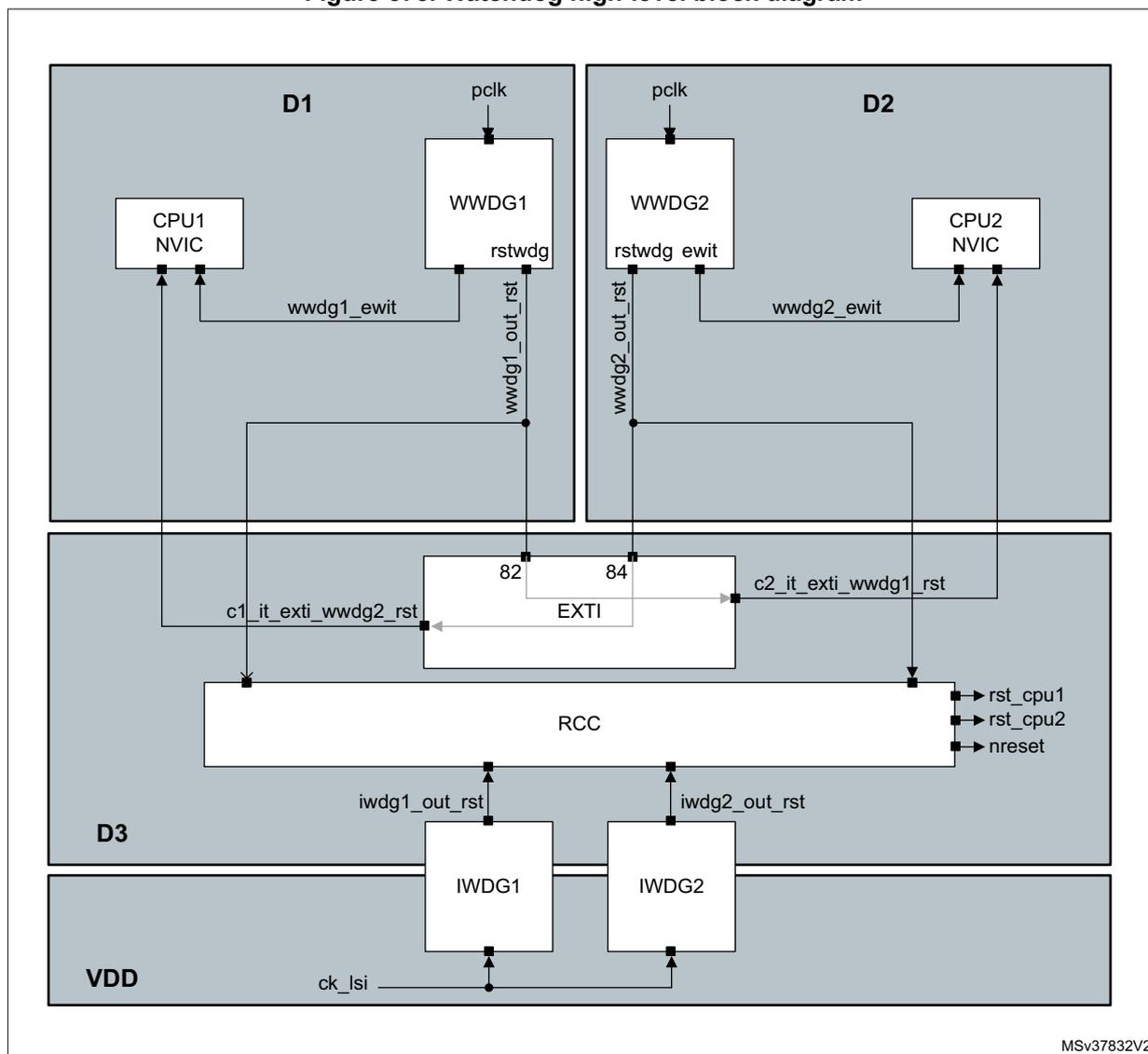
The diagram illustrates the high-level architecture of the watchdog system. It is divided into three main functional areas: D1 (CPU1 domain), D2 (CPU2 domain), and D3 (System domain).
- D1 (CPU1 domain):
Contains CPU1 NVIC and WWDG1. WWDG1 receives a
pclkinput and sendsrstwdgandwwdg1_out_rstsignals. CPU1 NVIC receiveswwdg1_ewitfrom WWDG1. - D2 (CPU2 domain):
Contains CPU2 NVIC and WWDG2. WWDG2 receives a
pclkinput and sendsrstwdg,ewit, andwwdg2_out_rstsignals. CPU2 NVIC receiveswwdg2_ewitfrom WWDG2. - D3 (System domain):
Contains the RCC (Reset and Clock Control) block, IWDG1, IWDG2, and an EXTI (External Interrupt) block. The EXTI block has two inputs labeled 82 and 84. Input 82 receives
c1_it_exti_wwdg2_rstfrom the RCC. Input 84 receivesc2_it_exti_wwdg1_rstfrom the RCC. The RCC block receivesrst_cpu1,rst_cpu2, andnresetsignals. It also receivesiwdg1_out_rstfrom IWDG1 andiwdg2_out_rstfrom IWDG2. The IWDG blocks receiveck_lsifrom the VDD supply.
Connections between domains: The
wwdg1_out_rst
signal from WWDG1 in D1 connects to the
c1_it_exti_wwdg2_rst
input of the EXTI block in D3. The
wwdg2_out_rst
signal from WWDG2 in D2 connects to the
c2_it_exti_wwdg1_rst
input of the EXTI block in D3. The EXTI block then connects to the RCC block in D3.
MSV37832V2
46.2.1 Enabling the watchdog clock
Enabling WWDOG1/2 clock
Each core can enable the window watchdog clocks via the RCC block. Setting the WWDOG1EN bit in RCC_C1_D1APB1ENR register enables WWDOG1 block clock, while setting WWDOG2EN bit in RCC_C2_D2APB1ENR register enables WWDOG2 block clock.
The software cannot stop WWDOG1 and WWDOG2 down-counting by setting WWDOG1EN and WWDOG2EN bit to '0', respectively.
CPU1 can also enable the WWDOG1 block via the RCC_D1APB1ENR register, while CPU2 cannot program the WWDOG1EN bit through this register.
Similarly, CPU2 can also enable the WWDOG2 block via the RCC_D2APB1ENR register, while CPU1 cannot program the WWDOG2EN bit through this register.
Enabling IWDG1/2 clock
The independent watchdogs do not need their clock to be enabled by the RCC block. IWDG1 is implicitly allocated to CPU1, and IWDG2 to CPU2. An option byte allows IWDG1 and IWDG2 to be automatically enabled after a system reset. Refer to Section 48.3: IWDG functional description for additional information.
46.2.2 Window watchdog reset scope
The reset scope of the window watchdogs can be controlled via WW1RSC and WW2RSC bits in the RCC_GRC register (see Section 9.7.36: RCC global control register (RCC_GCR) ).
After a system reset, WW[2:1]RSC bits are set to '0', meaning that the reset scope of the WWDOG1/2 is by default limited to CPU1 and CPU2.
When the WW1RSC bit is set to '1', the WWDOG1 will generate a system reset if a timeout occurs. The software cannot set the WW1RSC bit back to '0' once it has been set to '1'. A similar description applies to WW2RSC bit with respect to WWDOG2 block.
46.2.3 Watchdog behavior versus CPU state
A WWDOG block is frozen when the corresponding CPU enters CSTOP mode. When the domain goes in DSTANDBY, the WWDOG block located into this domain is reset.
IWDG blocks remain always enabled once enabled. Two option bytes allow freezing IWDG down-counting:
- • IWDG_FZ_STOP option byte allows freezing WWDOG1/2 down-counting when the CPU1/CPU2 is entering CSTOP mode or deeper low-power mode (DxSTOP, DxSTANDBY or product Standby mode).
- • IWDG_FZ_STANDBY option byte allows freezing WWDOG1/2 down-counting only when the product enters Standby mode.
Refer to Section 4.4: FLASH option bytes for a detailed description of the option bytes.