2. System and memory overview
2.1 System architecture
The main system consists of 32-bit multilayer AHB bus matrix that interconnects:
- • Five masters:
- – Cortex ® -M4 with FPU core I-bus
- – Cortex ® -M4 with FPU core D-bus
- – Cortex ® -M4 with FPU core S-bus
- – DMA1
- – DMA2
- • Seven slaves:
- – Internal Flash memory on the ICode bus
- – Internal Flash memory on DCode bus
- – Internal SRAM1
- – Internal SRAM2
- – AHB1 peripherals including AHB to APB bridges and APB peripherals (connected to APB1 and APB2)
- – AHB2 peripherals
- – The external memory controller (QUADSPI)
The bus matrix provides access from a master to a slave, enabling concurrent access and efficient operation even when several high-speed peripherals work simultaneously. This architecture is shown in Figure 1 :
Figure 1. System architecture
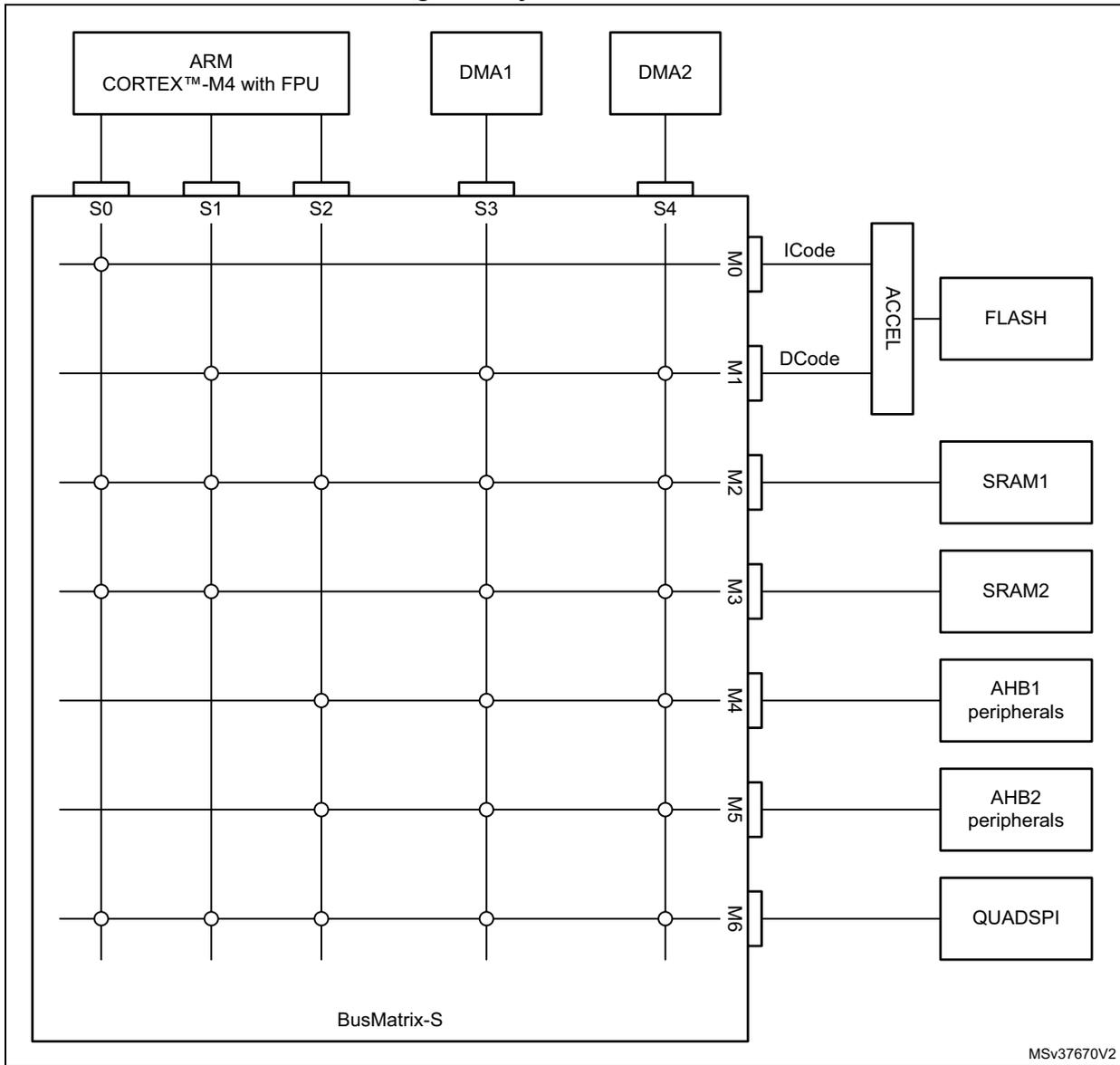
The diagram illustrates the system architecture centered around a BusMatrix-S. At the top, three master blocks are shown: ARM CORTEX™-M4 with FPU, DMA1, and DMA2. The ARM core is connected to slave ports S0, S1, and S2. DMA1 is connected to S3, and DMA2 is connected to S4. The BusMatrix-S is a grid with 5 columns (S0-S4) and 7 rows (M0-M6). Master ports M0 through M6 are located on the right side of the matrix. M0 is labeled ICode and connects to an ACCEL block, which in turn connects to a FLASH block. M1 is labeled DCode and also connects to the ACCEL block. M2 connects to SRAM1. M3 connects to SRAM2. M4 connects to AHB1 peripherals. M5 connects to AHB2 peripherals. M6 connects to QUADSPI. Connection points are indicated by dots at the intersections of the horizontal and vertical lines within the matrix. The label 'BusMatrix-S' is at the bottom left of the matrix box, and 'MSv37670V2' is at the bottom right.
2.1.1 S0: I-bus
This bus connects the instruction bus of the Cortex®-M4 core to the BusMatrix. This bus is used by the core to fetch instructions. The targets of this bus are the internal Flash memory, SRAM1, SRAM2 and external memories through QUADSPI.
2.1.2 S1: D-bus
This bus connects the data bus of the Cortex®-M4 core to the BusMatrix. This bus is used by the core for literal load and debug access. The targets of this bus are the internal Flash memory, SRAM1, SRAM2 and external memories through QUADSPI.
2.1.3 S2: S-bus
This bus connects the system bus of the Cortex ® -M4 core to the BusMatrix. This bus is used by the core to access data located in a peripheral or SRAM area. The targets of this bus are the SRAM1, the AHB1 peripherals including the APB1 and APB2 peripherals, the AHB2 peripherals and the external memories through the QUADSPI.
2.1.4 S3, S4: DMA-bus
This bus connects the AHB master interface of the DMA to the BusMatrix. The targets of this bus are the SRAM1 and SRAM2, the AHB1 peripherals including the APB1 and APB2 peripherals, the AHB2 peripherals and the external memories through the QUADSPI.
2.1.5 BusMatrix
The BusMatrix manages the access arbitration between masters. The arbitration uses a Round Robin algorithm. The BusMatrix is composedof five masters (CPU AHB, system bus, DCode bus, ICode bus, DMA1 and DMA2 bus) and seven slaves (FLASH, SRAM1, SRAM2, AHB1 (including APB1 and APB2), AHB2 and QUADSPI).
AHB/APB bridges
The two AHB/APB bridges provide full synchronous connections between the AHB and the two APB buses, allowing flexible selection of the peripheral frequency.
Refer to Section 2.2.2: Memory map and register boundary addresses on page 71 for the address mapping of the peripherals connected to this bridge.
After each device reset, all peripheral clocks are disabled (except for the SRAM1/2 and Flash memory interface). Before using a peripheral you have to enable its clock in the RCC_AHBxENR and the RCC_APBxENR registers.
Note: When a 16- or 8-bit access is performed on an APB register, the access is transformed into a 32-bit access: the bridge duplicates the 16- or 8-bit data to feed the 32-bit vector.
2.2 Memory organization
2.2.1 Introduction
Program memory, data memory, registers and I/O ports are organized within the same linear 4-Gbyte address space.
The bytes are coded in memory in Little Endian format. The lowest numbered byte in a word is considered the word's least significant byte and the highest numbered byte the most significant.
The addressable memory space is divided into eight main blocks, of 512 Mbytes each.
2.2.2 Memory map and register boundary addresses
Figure 2. Memory map
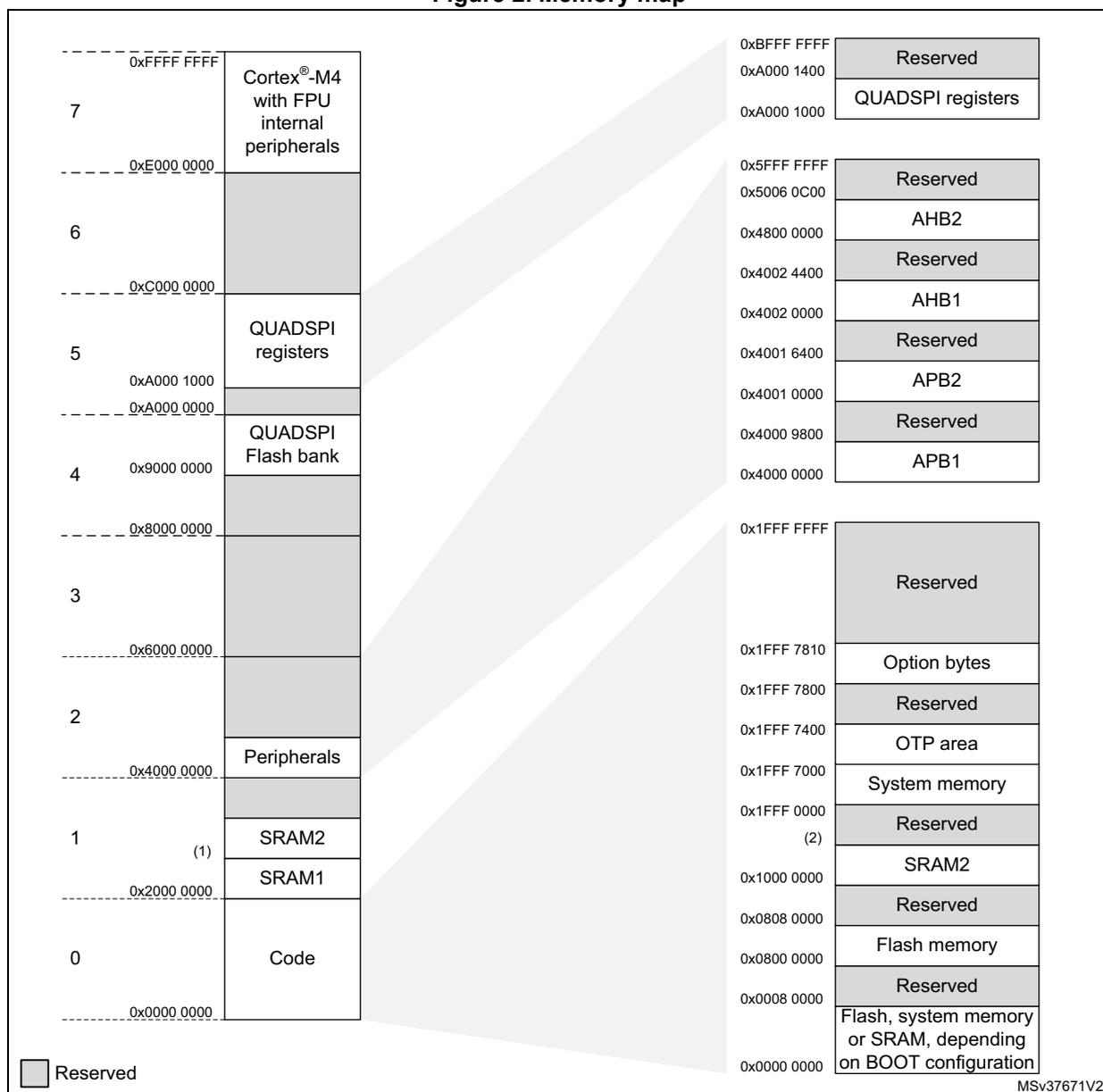
| Region | Start Address | End Address | Memory Region |
|---|---|---|---|
| 7 | 0x0000 0000 | 0xFFFF FFFF | Cortex®-M4 with FPU internal peripherals |
| 6 | 0x0000 0000 | 0x0000 0000 | Reserved |
| 5 | 0x0000 0000 | 0x0000 0000 | QUADSPI registers |
| 4 | 0x9000 0000 | 0x8000 0000 | QUADSPI Flash bank |
| 3 | 0x0000 0000 | 0x0000 0000 | Reserved |
| 2 | 0x0000 0000 | 0x0000 0000 | Reserved |
| 1 | 0x0000 0000 | 0x0000 0000 | Peripherals |
| 0 | 0x0000 0000 | 0x0000 0000 | Code |
| Start Address | End Address | Memory Region |
|---|---|---|
| 0xBFFF FFFF | 0xA000 1400 | Reserved |
| 0xA000 1400 | 0xA000 1000 | QUADSPI registers |
| 0x5FFF FFFF | 0x5006 0C00 | Reserved |
| 0x5006 0C00 | 0x4800 0000 | AHB2 |
| 0x4800 0000 | 0x4002 4400 | Reserved |
| 0x4002 4400 | 0x4002 0000 | AHB1 |
| 0x4002 0000 | 0x4001 6400 | Reserved |
| 0x4001 6400 | 0x4001 0000 | APB2 |
| 0x4001 0000 | 0x4000 9800 | Reserved |
| 0x4000 9800 | 0x4000 0000 | APB1 |
| 0x1FFF FFFF | 0x1FFF 7810 | Reserved |
| 0x1FFF 7810 | 0x1FFF 7800 | Option bytes |
| 0x1FFF 7800 | 0x1FFF 7400 | Reserved |
| 0x1FFF 7400 | 0x1FFF 7000 | OTP area |
| 0x1FFF 7000 | 0x1FFF 0000 | System memory |
| 0x1FFF 0000 | 0x1000 0000 | Reserved |
| 0x1000 0000 | 0x0808 0000 | SRAM2 |
| 0x0808 0000 | 0x0800 0000 | Reserved |
| 0x0800 0000 | 0x0008 0000 | Flash memory |
| 0x0008 0000 | 0x0000 0000 | Reserved |
| 0x0000 0000 | 0x0000 0000 | Flash, system memory or SRAM, depending on BOOT configuration |
Legend: Reserved
MSv37671V2
- 1. 0x2000 8000 for STM32L41xxx and STM32L42xxx devices
0x2000 C000 for STM32L43xxx and STM32L44xxx devices
0x2002 0000 for STM32L45xxx and STM32L46xxx devices - 2. 0x1000 2000 for STM32L41xxx and STM32L42xxx devices
0x1000 4000 for STM32L43xxx and STM32L44xxx devices
0x1000 8000 for STM32L45xxx and STM32L46xxx devices
It is forbidden to access the QUADSPI flash bank area before having properly configured and enabled the QUADSPI peripheral.
All the memory map areas that are not allocated to on-chip memories and peripherals are considered “Reserved”. For the detailed mapping of available memory and register areas, refer to the following table.
The following table gives the boundary addresses of the peripherals available in the devices.
Table 2. STM32L41xxx/42xxx/43xxx/44xxx/45xxx/46xxx memory map and peripheral register boundary addresses
| Bus | Boundary address | Size (bytes) | Peripheral | Peripheral register map |
|---|---|---|---|---|
| AHB2 | 0x5006 0800 - 0x5006 0BFF | 1 KB | RNG | Section 24.7.4: RNG register map |
| 0x5006 0400 - 0x5006 07FF | 1 KB | Reserved | - | |
| 0x5006 0000 - 0x5006 03FF | 1 KB | AES (1) | Section 25.7.18: AES register map | |
| 0x5004 0400 - 0x5005 FFFF | 127 KB | Reserved | - | |
| 0x5004 0000 - 0x5004 03FF | 1 KB | ADC | Section 16.9: ADC register map on page 488 | |
| 0x5000 0000 - 0x5003 FFFF | 16 KB | Reserved | - | |
| 0x4800 2000 - 0x4FFF FFFF | ~127 MB | Reserved | - | |
| 0x4800 1C00 - 0x4800 1FFF | 1 KB | GPIOH | Section 8.5.12: GPIO register map | |
| 0x4800 1400 - 0x4800 1BFF | 2 KB | Reserved | - | |
| 0x4800 1000 - 0x4800 13FF | 1 KB | GPIOE (2) (3) | Section 8.5.12: GPIO register map | |
| 0x4800 0C00 - 0x4800 0FFF | 1 KB | GPIOD (2) | Section 8.5.12: GPIO register map | |
| 0x4800 0800 - 0x4800 0BFF | 1 KB | GPIOC | Section 8.5.12: GPIO register map | |
| 0x4800 0400 - 0x4800 07FF | 1 KB | GPIOB | Section 8.5.12: GPIO register map | |
| 0x4800 0000 - 0x4800 03FF | 1 KB | GPIOA | Section 8.5.12: GPIO register map | |
| 0x4002 4400 - 0x47FF FFFF | ~127 MB | Reserved | - | |
| AHB1 | 0x4002 4000 - 0x4002 43FF | 1 KB | TSC | Section 23.6.11: TSC register map |
| 0x4002 3400 - 0x4002 3FFF | 1 KB | Reserved | - | |
| 0x4002 3000 - 0x4002 33FF | 1 KB | CRC | Section 14.4.6: CRC register map | |
| 0x4002 2400 - 0x4002 2FFF | 3 KB | Reserved | - | |
| 0x4002 2000 - 0x4002 23FF | 1 KB | FLASH registers | Section 3.7.13: FLASH register map | |
| 0x4002 1400 - 0x4002 1FFF | 3 KB | Reserved | - | |
| 0x4002 1000 - 0x4002 13FF | 1 KB | RCC | Section 6.4.32: RCC register map | |
| 0x4002 0800 - 0x4002 0FFF | 2 KB | Reserved | - | |
| 0x4002 0400 - 0x4002 07FF | 1 KB | DMA2 | Section 11.6.8: DMA register map | |
| 0x4002 0000 - 0x4002 03FF | 1 KB | DMA1 | Section 11.6.8: DMA register map | |
| APB2 | 0x4001 6400 - 0x4001 FFFF | 39 KB | Reserved | - |
| 0x4001 6000 - 0x4001 63FF | 1 KB | DFSDM1 (3) | Section 21.8.16: DFSDM register map | |
| 0x4001 5800 - 0x4001 5FFF | 2 KB | Reserved | - |
Table 2. STM32L41xxx/42xxx/43xxx/44xxx/45xxx/46xxx memory map and peripheral register boundary addresses (continued)
| Bus | Boundary address | Size (bytes) | Peripheral | Peripheral register map |
|---|---|---|---|---|
| APB2 | 0x4001 5400 - 0x4001 57FF | 1 KB | SAI1 (3) | Section 42.6.17: SAI register map |
| 0x4001 4400 - 0x4000 53FF | 2 KB | Reserved | - | |
| 0x4001 4400 - 0x4001 47FF | 1 KB | TIM16 | Section 28.7.19: TIM16 register map | |
| 0x4001 4000 - 0x4001 43FF | 1 KB | TIM15 | Section 28.6.21: TIM15 register map | |
| 0x4001 3C00 - 0x4001 3FFF | 1 KB | Reserved | - | |
| 0x4001 3800 - 0x4001 3BFF | 1 KB | USART1 | Section 39.8.12: USART register map | |
| 0x4001 3400 - 0x4001 37FF | 1 KB | Reserved | - | |
| 0x4001 3000 - 0x4001 33FF | 1 KB | SPI1 | Section 41.6.8: SPI register map | |
| 0x4001 2C00 - 0x4001 2FFF | 1 KB | TIM1 | Section 26.4.29: TIM1 register map | |
| 0x4001 2800 - 0x4001 2BFF | 1 KB | SDMMC (2) (3) | Section 44.8.16: SDMMC register map | |
| 0x4001 2000 - 0x4001 27FF | 2 KB | Reserved | - | |
| 0x4001 1C00 - 0x4001 1FFF | 1 KB | FIREWALL | Section 4.4.8: Firewall register map | |
| 0x4001 0800 - 0x4001 1BFF | 5 KB | Reserved | - | |
| 0x4001 0400 - 0x4001 07FF | 1 KB | EXTI | Section 13.5.13: EXTI register map | |
| 0x4001 0200 - 0x4001 03FF | 1 KB | COMP | Section 19.6.3: COMP register map | |
| 0x4001 0030 - 0x4001 01FF | VREFBUF (3) | Section 18.3.3: VREFBUF register map | ||
| 0x4001 0000 - 0x4001 002F | SYSCFG | Section 9.2.11: SYSCFG register map | ||
| APB1 | 0x4000 9800 - 0x4000 FFFF | 26 KB | Reserved | - |
| 0x4000 9400 - 0x4000 97FF | 1 KB | LPTIM2 | Section 30.7.11: LPTIM register map | |
| 0x4000 8C00 - 0x4000 93FF | 2 KB | Reserved | - | |
| 0x4000 8800 - 0x4000 8BFF | 1 KB | SWPMI1 (4) | Section 43.6.10: SWPMI register map and reset value table | |
| 0x4000 8400 - 0x4000 87FF | 1 KB | I2C4 (5) | Section 38.9.12: I2C register map | |
| 0x4000 8000 - 0x4000 83FF | 1 KB | LPUART1 | Section 40.7.10: LPUART register map | |
| 0x4000 7C00 - 0x4000 7FFF | 1 KB | LPTIM1 | Section 30.7.11: LPTIM register map | |
| 0x4000 7800 - 0x4000 7BFF | 1 KB | OPAMP | Section 20.5.4: OPAMP register map | |
| 0x4000 7400 - 0x4000 77FF | 1 KB | DAC1 (3) | Section 17.7.21: DAC register map | |
| 0x4000 7000 - 0x4000 73FF | 1 KB | PWR | Section 5.4.20: PWR register map and reset value table | |
| 0x4000 6C00 - 0x4000 6FFF | 1 KB | USB SRAM (6) | Section 46.6.3: USB register map | |
| 0x4000 6800 - 0x4000 6BFF | 1 KB | USB FS (6) | ||
| 0x4000 6400 - 0x4000 67FF | 1 KB | CAN1 (3) | Section 45.9: CAN registers | |
| 0x4000 6000 - 0x4000 63FF | 1 KB | CRS | Section 7.7.5: CRS register map | |
| 0x4000 5C00 - 0x4000 5FFF | 1 KB | I2C3 | Section 38.9.12: I2C register map | |
| 0x4000 5800 - 0x4000 5BFF | 1 KB | I2C2 | Section 38.9.12: I2C register map |
Table 2. STM32L41xxx/42xxx/43xxx/44xxx/45xxx/46xxx memory map and peripheral register boundary addresses (continued)
| Bus | Boundary address | Size (bytes) | Peripheral | Peripheral register map |
|---|---|---|---|---|
| APB1 | 0x4000 5400 - 0x4000 57FF | 1 KB | I2C1 | Section 38.9.12: I2C register map |
| 0x4000 5000 - 0x4000 53FF | 1 KB | Reserved | - | |
| 0x4000 4C00 - 0x4000 4FFF | 1 KB | UART4 (5) | Section 39.8.12: USART register map | |
| 0x4000 4800 - 0x4000 4BFF | 1 KB | USART3 | Section 39.8.12: USART register map | |
| 0x4000 4400 - 0x4000 47FF | 1 KB | USART2 | Section 39.8.12: USART register map | |
| 0x4000 4000 - 0x4000 43FF | 1 KB | Reserved | - | |
| 0x4000 3C00 - 0x4000 3FFF | 1 KB | SPI3 (3) | Section 41.6.8: SPI register map | |
| 0x4000 3800 - 0x4000 3BFF | 1 KB | SPI2 | Section 41.6.8: SPI register map | |
| 0x4000 3400 - 0x4000 37FF | 1 KB | TAMP (3) | Section 36.6.9: TAMP register map | |
| 0x4000 3000 - 0x4000 33FF | 1 KB | IWDG | Section 33.4.6: IWDG register map | |
| 0x4000 2C00 - 0x4000 2FFF | 1 KB | WWDG | Section 34.5.4: WWDG register map | |
| 0x4000 2800 - 0x4000 2BFF | 1 KB | RTC | Section 37.6.21: RTC register map | |
| 0x4000 2400 - 0x4000 27FF | 1 KB | LCD (7) | Section 22.6.8: LCD register map | |
| 0x4000 1800 - 0x4000 2400 | 3 KB | Reserved | - | |
| 0x4000 1400 - 0x4000 17FF | 1 KB | TIM7 (3) (8) | Section 29.4.9: TIMx register map | |
| 0x4000 1000 - 0x4000 13FF | 1 KB | TIM6 | Section 29.4.9: TIMx register map | |
| 0x4000 0800 - 0x4000 0FFF | 2 KB | Reserved | - | |
| 0x4000 0400 - 0x4000 07FF | 1 KB | TIM3 (5) | Section 27.4.24: TIMx register map | |
| 0x4000 0000 - 0x4000 03FF | 1 KB | TIM2 | Section 27.4.24: TIMx register map |
- 1. Available on STM32L44xxx and STM32L46xxx devices only.
- 2. Not available on STM32L42xxx, STM32L432xx and STM32L442xx devices.
- 3. Not available on STM32L41xxx and STM32L42xxx devices.
- 4. Available on STM32L43xxx and STM32L44xxx devices only.
- 5. Available on STM32L45xxx and STM32L46xxx devices only.
- 6. Available on STM32L4x2xx and STM32L4x3xx devices only.
- 7. Available on STM32L4x3xx devices only.
- 8. Not available on STM32L45xxx and STM32L46xxx devices.
2.3 Bit banding
The Cortex ® -M4 memory map includes two bit-band regions. These regions map each word in an alias region of memory to a bit in a bit-band region of memory. Writing to a word in the alias region has the same effect as a read-modify-write operation on the targeted bit in the bit-band region.
In the STM32L41xxx/42xxx/43xxx/44xxx/45xxx/46xxx devices both the peripheral registers and the SRAM1 are mapped to a bit-band region, so that single bit-band write and read operations are allowed. The operations are only available for Cortex ® -M4 accesses, and not from other bus masters (for example, DMA).
A mapping formula shows how to reference each word in the alias region to a corresponding bit in the bit-band region. The mapping formula is:
where:
- – bit_word_addr is the address of the word in the alias memory region that maps to the targeted bit
- – bit_band_base is the starting address of the alias region
- – byte_offset is the number of the byte in the bit-band region that contains the targeted bit
- – bit_number is the bit position (0-7) of the targeted bit
Example
The following example shows how to map bit 2 of the byte located at SRAM1 address 0x20000300 to the alias region:
Writing to address 0x22006008 has the same effect as a read-modify-write operation on bit 2 of the byte at SRAM1 address 0x20000300.
Reading address 0x22006008 returns the value (0x01 or 0x00) of bit 2 of the byte at SRAM1 address 0x20000300 (0x01: bit set; 0x00: bit reset).
For more information on bit-banding, refer to the Cortex®-M4 programming manual (see Related documents on page 1 ).
2.4 Embedded SRAM
The STM32L41xxx/42xxx/43xxx/44xxx/45xxx/46xxx devices feature up to 196 Kbytes SRAM:
- • Up to 128 Kbytes SRAM1
- • Up to 32 Kbyte SRAM2.
These SRAM can be accessed as bytes, half-words (16 bits) or full words (32 bits). These memories can be addressed at maximum system clock frequency without wait state and thus by both CPU and DMA.
The CPU can access the SRAM1 through the system bus or through the ICode/DCode buses when boot from SRAM1 is selected or when physical remap is selected ( Section 9.2.1: SYSCFG memory remap register (SYSCFG_MEMRMP) in the SYSCFG controller). To get the maximum performance on SRAM1 execution, a physical remap must be selected (boot or software selection).
Execution can be performed from CCM SRAM with maximum performance without any remap thanks to access through the ICode bus.
2.4.1 SRAM2 parity check
The user can enable the SRAM2 parity check using the option bit SRAM2_PE in the user option byte (refer to Section 3.4.1: Option bytes description ).
The data bus width is 36 bits because 4 bits are available for parity check (1 bit per byte) to increase memory robustness, as required, for instance, by Class B or SIL norms.
The parity bits are computed and stored when writing into the SRAM2. Then, they are automatically checked when reading. If one bit fails, an NMI is generated. The same error can also be linked to the BRK_IN Break input of TIM1/TIM15/TIM16, with the SPL control bit in the SYSCFG configuration register 2 (SYSCFG_CFGR2) . The SRAM2 parity error flag (SPF) is available in the SYSCFG configuration register 2 (SYSCFG_CFGR2) .
Note: When enabling the RAM parity check, it is advised to initialize by software the whole RAM memory at the beginning of the code, to avoid getting parity errors when reading noninitialized locations.
2.4.2 SRAM2 Write protection
The SRAM2 can be write protected with a page granularity of 1 Kbyte.
Table 3. SRAM2 organization
| Page number | Start address | End address |
|---|---|---|
| Page 0 | 0x1000 0000 | 0x1000 03FF |
| Page 1 | 0x1000 0400 | 0x1000 07FF |
| Page 2 | 0x1000 0800 | 0x1000 0BFF |
| Page 3 | 0x1000 0C00 | 0x1000 0FFF |
| Page 4 | 0x1000 1000 | 0x1000 13FF |
| Page 5 | 0x1000 1400 | 0x1000 17FF |
| Page 6 | 0x1000 1800 | 0x1000 1BFF |
| Page 7 | 0x1000 1C00 | 0x1000 1FFF |
Table 4. SRAM2 organization
(continuation for STM32L43x/44x/45x/46x devices only)
| Page number | Start address | End address |
|---|---|---|
| Page 8 | 0x1000 2000 | 0x1000 23FF |
| Page 9 | 0x1000 2400 | 0x1000 27FF |
| Page 10 | 0x1000 2800 | 0x1000 2BFF |
| Page 11 | 0x1000 2C00 | 0x1000 2FFF |
| Page 12 | 0x1000 3000 | 0x1000 33FF |
| Page 13 | 0x1000 3400 | 0x1000 37FF |
| Page 14 | 0x1000 3800 | 0x1000 3BFF |
| Page 15 | 0x1000 3C00 | 0x1000 3FFF |
Table 5. SRAM2 organization
(continuation for STM32L45x and STM32L46x devices only)
| Page number | Start address | End address |
|---|---|---|
| Page 16 | 0x1000 4000 | 0x1000 43FF |
| Page 17 | 0x1000 4400 | 0x1000 47FF |
| Page 18 | 0x1000 4800 | 0x1000 4BFF |
| Page 19 | 0x1000 4C00 | 0x1000 4FFF |
| Page 20 | 0x1000 5000 | 0x1000 53FF |
| Page 21 | 0x1000 5400 | 0x1000 57FF |
| Page 22 | 0x1000 5800 | 0x1000 5BFF |
| Page 23 | 0x1000 5C00 | 0x1000 5FFF |
| Page 24 | 0x1000 6000 | 0x1000 63FF |
| Page 25 | 0x1000 6400 | 0x1000 67FF |
| Page 26 | 0x1000 6800 | 0x1000 6BFF |
| Page 27 | 0x1000 6C00 | 0x1000 6FFF |
| Page 28 | 0x1000 7000 | 0x1000 73FF |
| Page 29 | 0x1000 7400 | 0x1000 77FF |
| Page 30 | 0x1000 7800 | 0x1000 7BFF |
| Page 31 | 0x1000 7C00 | 0x1000 7FFF |
The write protection can be enabled in SYSCFG SRAM2 write protection register (SYSCFG_SWPR) in the SYSCFG block. This is a register with write '1' once mechanism, which means by writing '1' on a bit it will set up the write protection for that page of SRAM and it can be removed/cleared by a system reset only.
2.4.3 SRAM2 Read protection
The SRAM2 is protected with the Read protection (RDP). Refer to Section 3.5.1: Read protection (RDP) for more details.
2.4.4 SRAM2 Erase
The SRAM2 can be erased with a system reset using the option bit SRAM2_RST in the user option byte (refer to Section 3.4.1: Option bytes description ).
The SRAM2 erase can also be requested by software by setting the bit SRAM2ER in the SYSCFG SRAM2 control and status register (SYSCFG_SCSR) .
2.5 Flash memory overview
The flash memory is composed of two distinct physical areas:
- • The main flash memory block. It contains the application program and user data if necessary.
- • The information block. It is composed of three parts:
- – Option bytes for hardware and memory protection user configuration.
- – System memory that contains the ST proprietary code.
- – OTP (one-time programmable) area
The flash interface implements instruction access and data access based on the AHB protocol. It also implements the logic necessary to carry out the flash memory operations (program/erase) controlled through the flash registers. Refer to Section 3: Embedded Flash memory (FLASH) for more details.
2.6 Boot configuration
In the STM32L41xxx/42xxx/43xxx/44xxx/45xxx/46xxx, three different boot modes can be selected through the BOOT0 pin or the nBOOT0 bit into the FLASH_OPTR register (if the nSWBOOT0 bit is cleared into the FLASH_OPTR register), and nBOOT1 bit in the FLASH_OPTR register, as shown in the following table.
Table 6. Boot modes
| nBOOT1 FLASH_OPTR[23] | nBOOT0 FLASH_OPTR[27] | BOOT0 pin PH3 | nSWBOOT0 FLASH_OPTR[26] | Main Flash empty (1) | Boot Memory Space Alias |
|---|---|---|---|---|---|
| X | X | 0 | 1 | 0 | Main Flash memory is selected as boot area |
| X | X | 0 | 1 | 1 | System memory is selected as boot area |
| X | 1 | X | 0 | X | Main Flash memory is selected as boot area |
| 0 | X | 1 | 1 | X | Embedded SRAM1 is selected as boot area |
| 0 | 0 | X | 0 | X | Embedded SRAM1 is selected as boot area |
| 1 | X | 1 | 1 | X | System memory is selected as boot area |
| 1 | 0 | X | 0 | X | System memory is selected as boot area |
- 1. A flash empty check mechanism is implemented to force the boot from system flash if the first flash memory location is not programmed (0xFFFF FFFF) and if the boot selection was configured to boot from the main flash.
The values on both BOOT0 (coming from the pin or the option bit) and nBOOT1 bit are latched upon reset release. It is up to the user to set nBOOT1 and BOOT0 to select the required boot mode.
The BOOT0 pin or user option bit (depending on the nSWBOOT0 bit value in the FLASH_OPTR register), and nBOOT1 bit are also resampled when exiting from Standby mode. Consequently, they must be kept in the required Boot mode configuration in Standby mode. After this startup delay has elapsed, the CPU fetches the top-of-stack value from address 0x0000 0000, then starts code execution from the boot memory at 0x0000 0004.
Depending on the selected boot mode, main flash memory, system memory or SRAM1 is accessible as follows:
- • Boot from main flash memory: the main flash memory is aliased in the boot memory space (0x0000 0000), but still accessible from its original memory space (0x0800 0000). In other words, the flash memory contents can be accessed starting from address 0x0000 0000 or 0x0800 0000.
- • Boot from system memory: the system memory is aliased in the boot memory space (0x0000 0000), but still accessible from its original memory space (0x1FFF 0000).
- • Boot from the embedded SRAM1: the SRAM1 is aliased in the boot memory space (0x0000 0000), but it is still accessible from its original memory space (0x2000 0000).
PH3/BOOT0 GPIO is configured in:
- • Input mode during the complete reset phase if the option bit nSWBOOT0 is set into the FLASH_OPTR register and then switches automatically in analog mode after reset is released (BOOT0 pin).
- • Input mode from the reset phase to the completion of the option byte loading if the bit nSWBOOT0 is cleared into the FLASH_OPTR register (BOOT0 value coming from the option bit). It then switches automatically to the analog mode even if the reset phase is not complete.
Note: When the device boots from SRAM, in the application initialization code, you have to relocate the vector table in SRAM using the NVIC exception table and the offset register.
Empty check
The internal empty check flag (the EMPTY bit of the flash access control register (FLASH_ACR)) is implemented to allow easy programming of virgin devices by the bootloader. This flag is used when the BOOT0 pin is defining Main flash memory as the target bootloader) is selected instead of the Main flash as a boot area to allow user to program the flash memory. Therefore, some of the GPIOs will be reconfigured from the high-Z state. Refer to the document STM32 microcontroller system memory boot mode (AN2606) for more details concerning the bootloader and GPIO configuration in system memory boot mode. It is possible to disable this feature by configuring the option bytes to force boot from the main flash memory (nSWBOOT0 = 0, nBOOT0 = 1).
This flag is updated only during the loading of option bytes: it is set when the content of the address 0x0800 0000 is read as 0xFFFF FFFF, otherwise it is cleared. It means a power reset or setting of OBL_LAUNCH bit in the FLASH_CR register is needed to clear this flag after programming of a virgin device to execute user code after system reset. The EMPTY bit can also be directly written by software.
Physical remap
Once the boot mode is selected, the application software can modify the memory accessible in the code area (in this way the code can be executed through the ICode bus in
place of the system bus). This modification is performed by programming the SYSCFG memory remap register (SYSCFG_MEMRMP) in the SYSCFG controller.
The following memories can thus be remapped:
- • Main flash memory
- • System memory
- • Embedded SRAM1
- • QUADSPI memory
Table 7. Memory mapping vs. Boot mode/Physical remap
| Addresses | Boot/Remap in main Flash memory | Boot/Remap in embedded SRAM1 | Boot/Remap in System memory | Remap in QUAD-SPI |
|---|---|---|---|---|
| 0x2000 0000 - 0x2001 7FFFF (1) | SRAM1 | SRAM1 | SRAM1 | SRAM1 |
| 0x1FFF 0000 - 0x1FFF FFFF | System memory/OTP/Options bytes | System memory/OTP/Options bytes | System memory/OTP/Options bytes | System memory/OTP/Options bytes |
| 0x1008 0000 (1) - 0x1FFE FFFF | Reserved | Reserved | Reserved | Reserved |
| 0x1000 0000 - 0x1007 FFFF (1) | SRAM2 | SRAM2 | SRAM2 | SRAM2 |
| 0x0808 0000 (1) - 0x0FFF FFFF | Reserved | Reserved | Reserved | Reserved |
| 0x0800 0000 - 0x0807 FFFF (1) | Flash memory | Flash memory | Flash memory | Flash memory |
| 0x0400 0000 - 0x07FF FFFF | Reserved | Reserved | Reserved | QUADSPI bank (128 MB) Aliased |
| 0x0010 0000 - 0x03FF FFFF | Reserved | Reserved | Reserved | QUADSPI bank (128 MB) Aliased |
| 0x0000 0000 - 0x000F FFFF (2) (3) | Flash Aliased | SRAM1 Aliased | System memory Aliased | QUADSPI bank (128 MB) Aliased |
1. Address depends on the memory size available on a given device.
2. When the QUADSPI is remapped at address 0x0000 0000, only 128 MB are remapped. In remap mode, the CPU can access the external memory via ICode bus instead of the system bus that boosts up the performance.
3. Even when aliased in the boot memory space, the related memory is still accessible at its original memory space.
Embedded bootloader
The embedded bootloader is located in the system memory, programmed by ST during production. Refer to AN2606 STM32 microcontroller system memory boot mode.