33. Secure digital input/output interface (SDIO)
33.1 SDIO main features
The SD/SDIO MMC card host interface (SDIO) provides an interface between the APB2 peripheral bus and MultiMediaCards (MMCs), SD memory cards and SDIO cards.
The MultiMediaCard system specifications are available through the MultiMediaCard Association website, published by the MMCA technical committee.
SD memory card and SD I/O card system specifications are available through the SD card Association website.
The SDIO features include the following:
- • Full compliance with MultiMediaCard System Specification Version 4.2 . Card support for three different databus modes: 1-bit (default), 4-bit and 8-bit
- • Full compatibility with previous versions of MultiMediaCards (forward compatibility)
- • Full compliance with SD Memory Card Specifications Version 2.0
- • Full compliance with SD I/O Card Specification Version 2.0 : card support for two different databus modes: 1-bit (default) and 4-bit
- • Data transfer up to 50 MHz for the 8 bit mode
- • Data and command output enable signals to control external bidirectional drivers.
- Note:
- 1 The SDIO does not have an SPI-compatible communication mode.
- 2 The SD memory card protocol is a superset of the MultiMediaCard protocol as defined in the MultiMediaCard system specification V2.11. Several commands required for SD memory devices are not supported by either SD I/O-only cards or the I/O portion of combo cards. Some of these commands have no use in SD I/O devices, such as erase commands, and thus are not supported in the SDIO protocol. In addition, several commands are different between SD memory cards and SD I/O cards and thus are not supported in the SDIO protocol. For details refer to SD I/O card Specification Version 1.0.
The MultiMediaCard/SD bus connects cards to the controller.
The current version of the SDIO supports only one SD/SDIO/MMC4.2 card at any one time and a stack of MMC4.1 or previous.
33.2 SDIO bus topology
Communication over the bus is based on command and data transfers.
The basic transaction on the MultiMediaCard/SD/SD I/O bus is the command/response transaction. These types of bus transaction transfer their information directly within the command or response structure. In addition, some operations have a data token.
Data transfers to/from SD/SDIO memory cards are done in data blocks. Data transfers to/from MMC are done data blocks or streams.
Figure 397. “No response” and “no data” operations
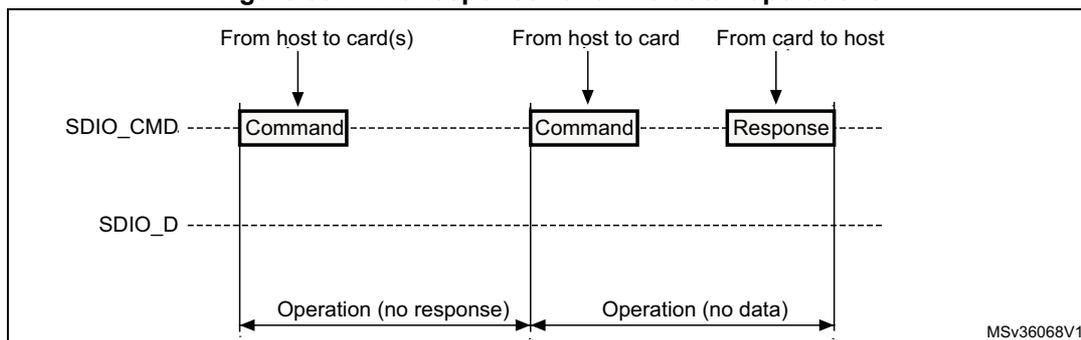
Figure 397 illustrates two SDIO operations. The first operation, labeled 'Operation (no response)', shows a 'Command' being sent from the host to card(s) on the SDIO_CMD line, but no 'Response' is received. The second operation, labeled 'Operation (no data)', shows a 'Command' being sent from the host to a card on the SDIO_CMD line, but no data is received on the SDIO_D line. The diagram includes labels for 'From host to card(s)', 'From host to card', and 'From card to host'.
Figure 398. (Multiple) block read operation
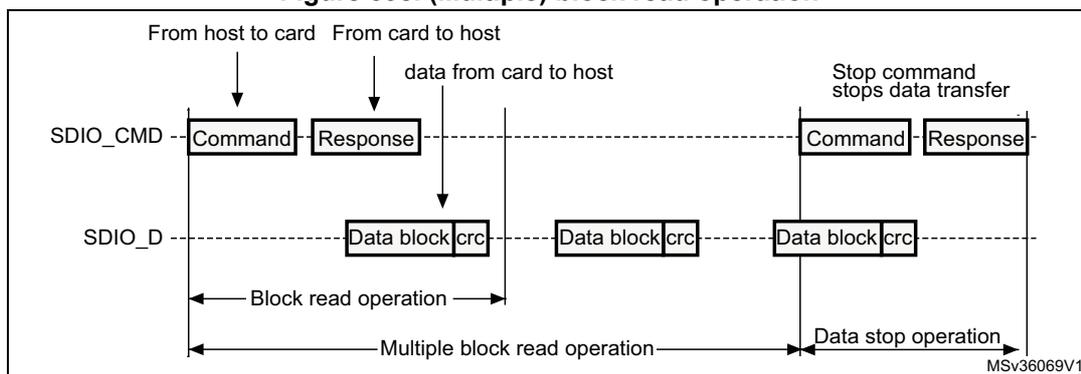
Figure 398 illustrates a (Multiple) block read operation. It shows a 'Block read operation' where a 'Command' is sent from the host to the card, and a 'Response' is received. This is followed by a 'Multiple block read operation' where multiple 'Data block | crc' are transferred from the card to the host. Finally, a 'Data stop operation' is initiated by sending a 'Stop command' from the host to the card, which stops data transfer. The diagram includes labels for 'From host to card', 'From card to host', and 'data from card to host'.
Figure 399. (Multiple) block write operation
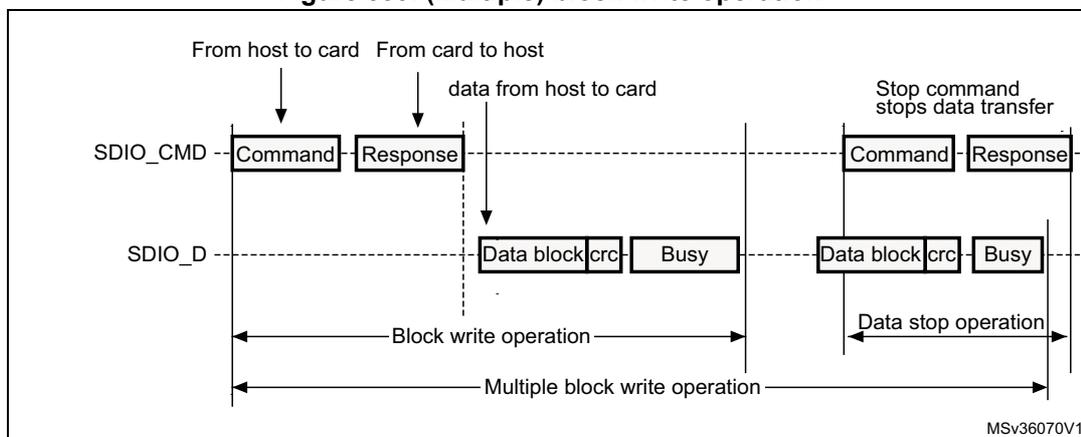
Figure 399 illustrates a (Multiple) block write operation. It shows a 'Block write operation' where a 'Command' is sent from the host to the card, and a 'Response' is received. This is followed by a 'Multiple block write operation' where 'Data block | crc' are transferred from the host to the card, followed by a 'Busy' signal. Finally, a 'Data stop operation' is initiated by sending a 'Stop command' from the host to the card, which stops data transfer. The diagram includes labels for 'From host to card', 'From card to host', and 'data from host to card'.
Note: The SDIO will not send any data as long as the Busy signal is asserted (SDIO_D0 pulled low).
Figure 400. Sequential read operation
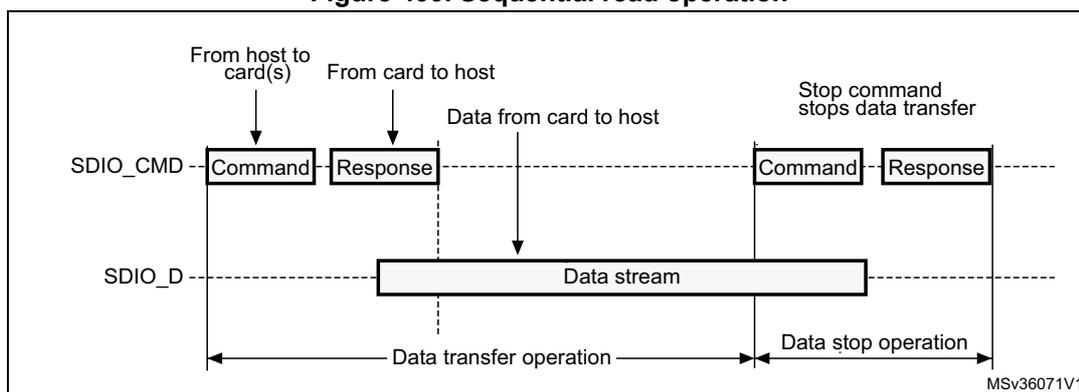
This sequence diagram illustrates a sequential read operation on the SDIO interface. The diagram shows two horizontal timelines for the host and the card(s). The host sends a 'Command' on the SDIO_CMD line to the card(s). The card(s) respond with a 'Response' on the SDIO_CMD line. Following the response, a 'Data stream' is transferred from the card(s) to the host on the SDIO_D line. This data transfer phase is labeled 'Data transfer operation'. After the data transfer, the host sends another 'Command' on the SDIO_CMD line, which is followed by a 'Response' from the card(s). This second command is a 'Stop command' that stops the data transfer. The period following the stop command is labeled 'Data stop operation'. The diagram is labeled MSV36071V1.
Figure 401. Sequential write operation
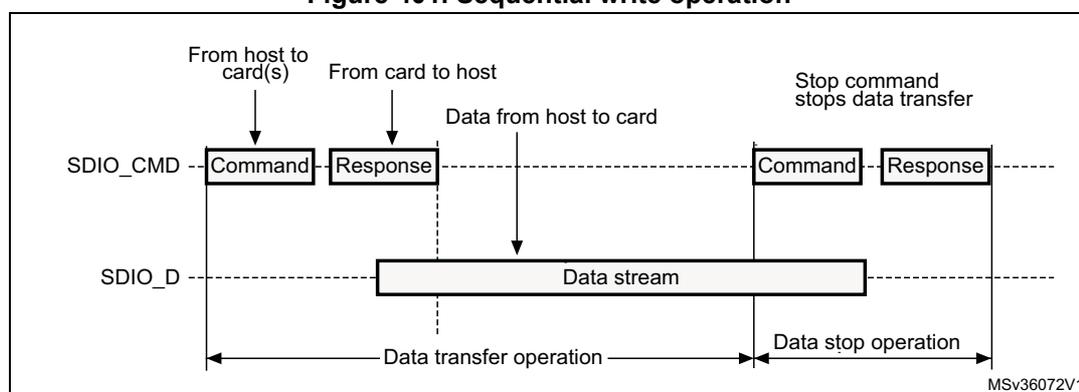
This sequence diagram illustrates a sequential write operation on the SDIO interface. The diagram shows two horizontal timelines for the host and the card(s). The host sends a 'Command' on the SDIO_CMD line to the card(s). The card(s) respond with a 'Response' on the SDIO_CMD line. Following the response, a 'Data stream' is transferred from the host to the card(s) on the SDIO_D line. This data transfer phase is labeled 'Data transfer operation'. After the data transfer, the host sends another 'Command' on the SDIO_CMD line, which is followed by a 'Response' from the card(s). This second command is a 'Stop command' that stops the data transfer. The period following the stop command is labeled 'Data stop operation'. The diagram is labeled MSV36072V1.
33.3 SDIO functional description
The SDIO consists of two parts:
- • The SDIO adapter block provides all functions specific to the MMC/SD/SD I/O card such as the clock generation unit, command and data transfer.
- • The APB2 interface accesses the SDIO adapter registers, and generates interrupt and DMA request signals.
Figure 402. SDIO block diagram
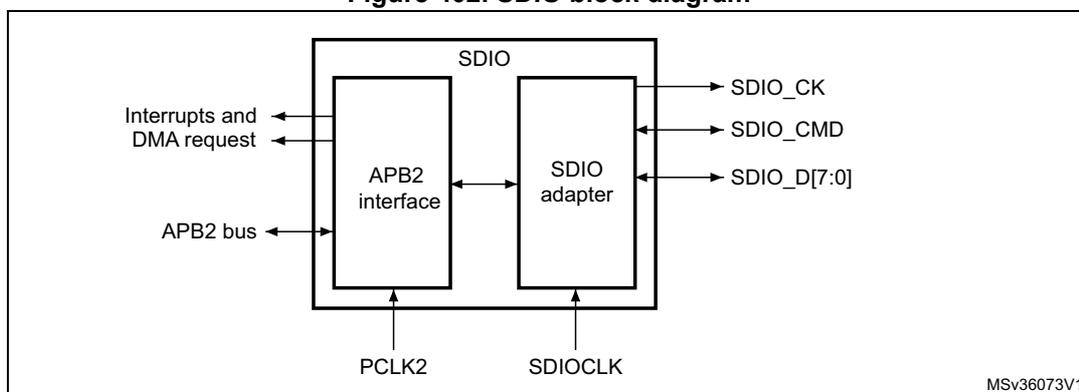
This block diagram shows the internal structure of the SDIO. The SDIO block contains two main components: the 'APB2 interface' and the 'SDIO adapter'. The APB2 interface is connected to the 'APB2 bus' and generates 'Interrupts and DMA request' signals. It has a bidirectional connection with the SDIO adapter. The SDIO adapter is connected to the external pins: 'SDIO_CK' (clock), 'SDIO_CMD' (command), and 'SDIO_D[7:0]' (data bus). The SDIO adapter also receives 'PCLK2' (processor clock) and 'SDIOCLK' (SDIO clock) signals. The diagram is labeled MSV36073V1.
By default SDIO_D0 is used for data transfer. After initialization, the host can change the databus width.
If a MultiMediaCard is connected to the bus, SDIO_D0, SDIO_D[3:0] or SDIO_D[7:0] can be used for data transfer. MMC V3.31 or previous, supports only 1 bit of data so only SDIO_D0 can be used.
If an SD or SD I/O card is connected to the bus, data transfer can be configured by the host to use SDIO_D0 or SDIO_D[3:0]. All data lines are operating in push-pull mode.
SDIO_CMD has two operational modes:
- • Open-drain for initialization (only for MMCV3.31 or previous)
- • Push-pull for command transfer (SD/SD I/O card MMC4.2 use push-pull drivers also for initialization)
SDIO_CK is the clock to the card: one bit is transferred on both command and data lines with each clock cycle.
The SDIO uses two clock signals:
- • SDIO adapter clock SDIOCLK = 50 MHz)
- • APB2 bus clock (PCLK2)
PCLK2 and SDIO_CK clock frequencies must respect the following condition:
The signals shown in Table 217 are used on the MultiMediaCard/SD/SD I/O card bus.
Table 217. SDIO I/O definitions
| Pin | Direction | Description |
|---|---|---|
| SDIO_CK | Output | MultiMediaCard/SD/SDIO card clock. This pin is the clock from host to card. |
| SDIO_CMD | Bidirectional | MultiMediaCard/SD/SDIO card command. This pin is the bidirectional command/response signal. |
| SDIO_D[7:0] | Bidirectional | MultiMediaCard/SD/SDIO card data. These pins are the bidirectional databus. |
33.3.1 SDIO adapter
Figure 403 shows a simplified block diagram of an SDIO adapter.
![Simplified block diagram of an SDIO adapter. The diagram shows an 'SDIO adapter' block containing five subunits: 'Adapter registers', 'FIFO', 'Control unit', 'Command path', and 'Data path'. The 'Adapter registers' and 'FIFO' are connected to an 'APB2 interface' and receive 'PCLK2' clock. The 'Control unit', 'Command path', and 'Data path' receive 'SDIOCLK' clock. The 'Control unit' outputs 'SDIO_CK' and is connected to the 'Command path' and 'Data path'. The 'Command path' outputs 'SDIO_CMD' and is connected to the 'Data path'. The 'Data path' outputs 'SDIO_D[7:0]'. All three output signals ('SDIO_CK', 'SDIO_CMD', 'SDIO_D[7:0]') are connected to a 'Card bus'.](/RM0386-STM32F469-479/30db4996e0c678b6bf477cc5515a84d8_img.jpg)
Figure 403. SDIO adapter
The SDIO adapter is a multimedia/secure digital memory card bus master that provides an interface to a multimedia card stack or to a secure digital memory card. It consists of five subunits:
- • Adapter register block
- • Control unit
- • Command path
- • Data path
- • Data FIFO
Note: The adapter registers and FIFO use the APB2 bus clock domain (PCLK2). The control unit, command path and data path use the SDIO adapter clock domain (SDIOCLK).
Adapter register block
The adapter register block contains all system registers. This block also generates the signals that clear the static flags in the multimedia card. The clear signals are generated when 1 is written into the corresponding bit location in the SDIO Clear register.
Control unit
The control unit contains the power management functions and the clock divider for the memory card clock.
There are three power phases:
- • power-off
- • power-up
- • power-on
Figure 404. Control unit
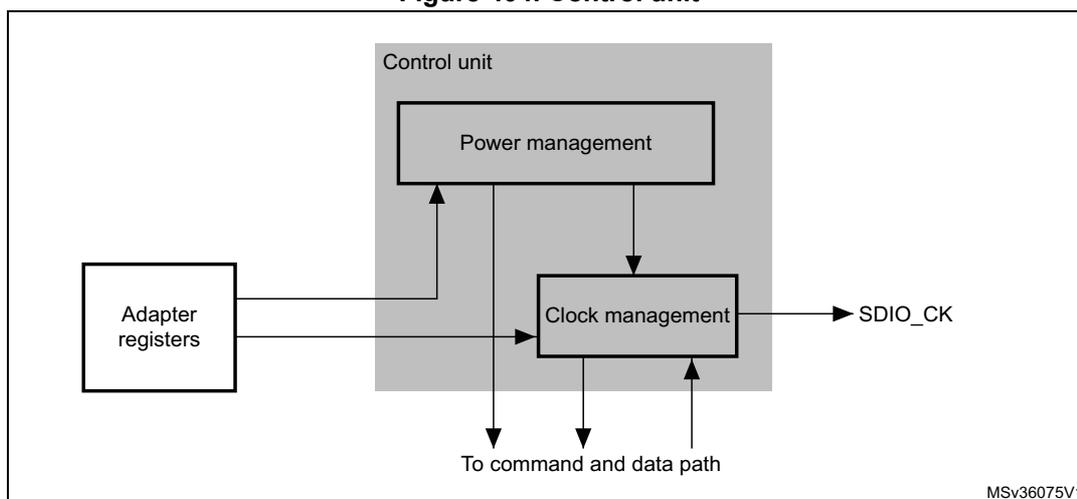
The control unit is illustrated in Figure 404. It consists of a power management subunit and a clock management subunit.
The power management subunit disables the card bus output signals during the power-off and power-up phases.
The clock management subunit generates and controls the SDIO_CK signal. The SDIO_CK output can use either the clock divide or the clock bypass mode. The clock output is inactive:
- • after reset
- • during the power-off or power-up phases
- • if the power saving mode is enabled and the card bus is in the Idle state (eight clock periods after both the command and data path subunits enter the Idle phase)
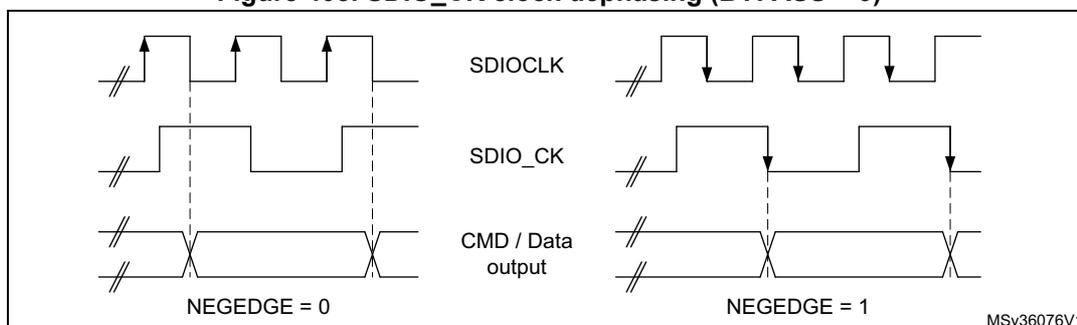
The clock management subunit controls SDIO_CK dephasing. When not in bypass mode the SDIO command and data output are generated on the SDIOCLK falling edge succeeding the rising edge of SDIO_CK. (SDIO_CK rising edge occurs on SDIOCLK rising edge) when SDIO_CLKCR[13] bit is reset (NEGEDGE = 0). When SDIO_CLKCR[13] bit is set (NEGEDGE = 1) SDIO command and data changed on the SDIO_CK falling edge.
When SDIO_CLKCR[10] is set (BYPASS = 1), SDIO_CK rising edge occurs on SDIOCLK rising edge. The data and the command change on SDIOCLK falling edge whatever NEGEDGE value.
The data and command responses are latched using SDIO_CK rising edge.
Figure 405. SDIO_CK clock dephasing (BYPASS = 0)
Command path
The command path unit sends commands to and receives responses from the cards.
Figure 406. SDIO adapter command path
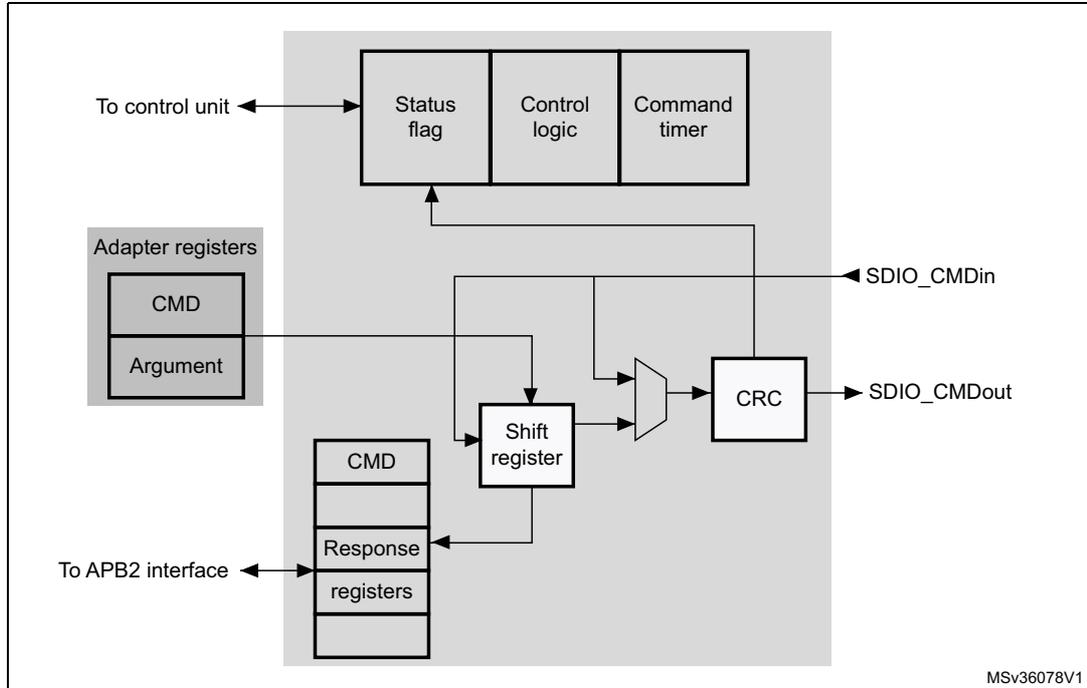
The diagram illustrates the internal architecture of the SDIO adapter's command path. At the top, a block contains 'Status flag', 'Control logic', and 'Command timer', which is connected to a 'To control unit'. Below this, 'Adapter registers' (containing 'CMD' and 'Argument') feed into a 'Shift register'. The 'Shift register' is connected to a 'CRC' block and a 'To APB2 interface' block (containing 'CMD', 'Response', and 'registers'). The 'CRC' block outputs to 'SDIO_CMDout'. The 'Shift register' also receives input from 'SDIO_CMDin' and sends data to the 'To APB2 interface' block. The 'To APB2 interface' block is connected to the 'Status flag' block. The diagram is labeled 'MSv36078V1' in the bottom right corner.
- • Command path state machine (CPSM)
- – When the command register is written to and the enable bit is set, command transfer starts. When the command has been sent, the command path state machine (CPSM) sets the status flags and enters the Idle state if a response is not required. If a response is required, it waits for the response (see Figure 407 on page 1170 ). When the response is received, the received CRC code and the internally generated code are compared, and the appropriate status flags are set.
Figure 407. Command path state machine (SDIO)
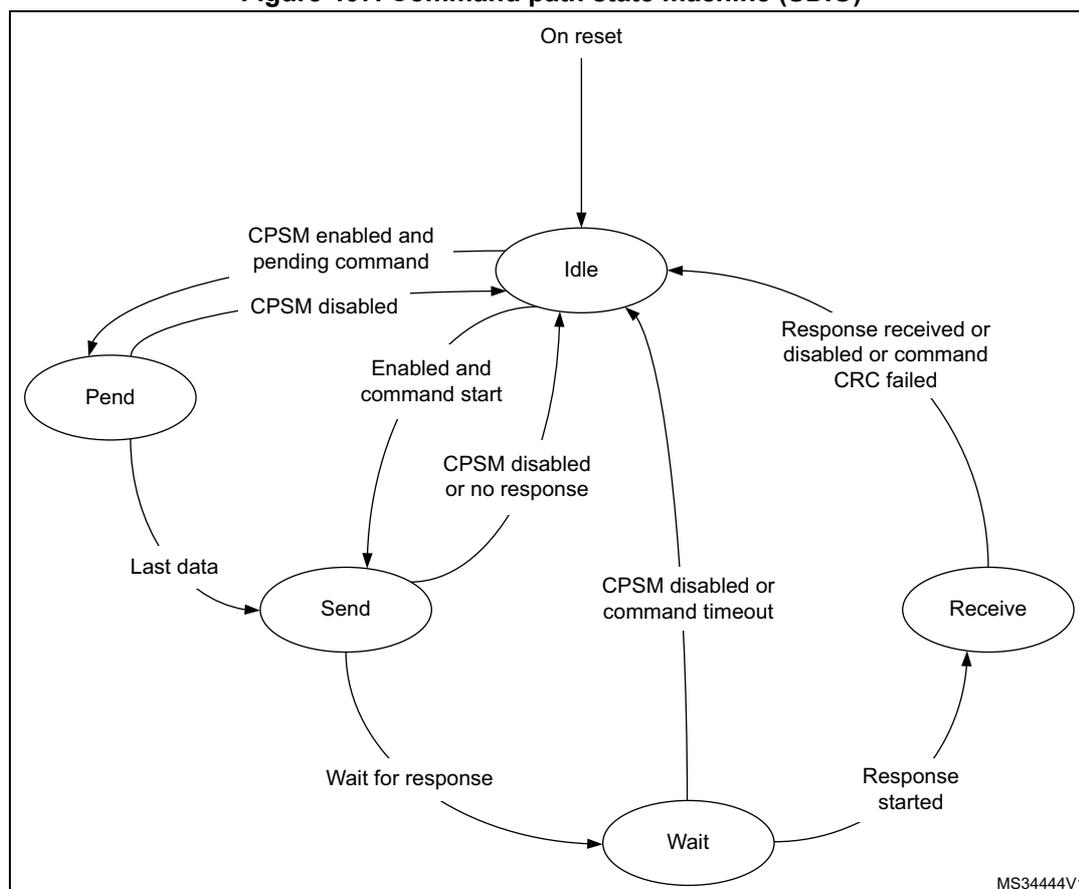
stateDiagram-v2
    [*] --> Idle : On reset
    Idle --> Pend : CPSM enabled and pending command
    Idle --> Send : Enabled and command start
    Pend --> Idle : CPSM disabled
    Pend --> Send : Last data
    Send --> Idle : CPSM disabled or no response
    Send --> Wait : Wait for response
    Wait --> Idle : CPSM disabled or command timeout
    Wait --> Receive : Response started
    Receive --> Idle : Response received or disabled or command CRC failed
When the Wait state is entered, the command timer starts running. If the timeout is reached before the CPSM moves to the Receive state, the timeout flag is set and the Idle state is entered.
Note: The command timeout has a fixed value of 64 SDIO_CK clock periods.
If the interrupt bit is set in the command register, the timer is disabled and the CPSM waits for an interrupt request from one of the cards. If a pending bit is set in the command register, the CPSM enters the Pend state, and waits for a CmdPend signal from the data path subunit. When CmdPend is detected, the CPSM moves to the Send state. This enables the data counter to trigger the stop command transmission.
Note: The CPSM remains in the Idle state for at least eight SDIO_CK periods to meet the \( N_{CC} \) and \( N_{RC} \) timing constraints. \( N_{CC} \) is the minimum delay between two host commands, and \( N_{RC} \) is the minimum delay between the host command and the card response.
Figure 408. SDIO command transfer
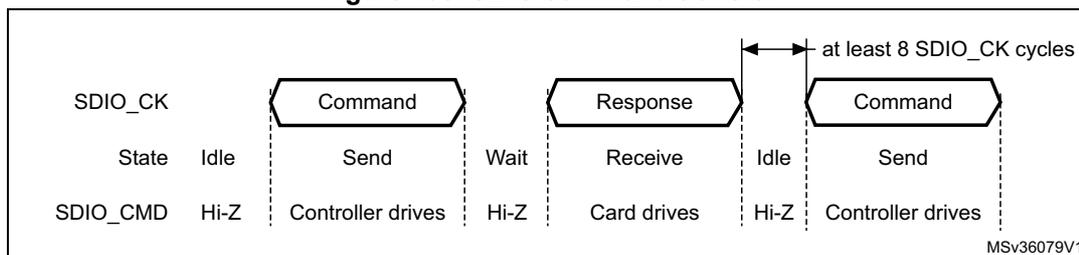
- • Command format
- – Command: a command is a token that starts an operation. Command are sent from the host either to a single card (addressed command) or to all connected cards (broadcast command are available for MMC V3.31 or previous). Commands are transferred serially on the CMD line. All commands have a fixed length of 48 bits. The general format for a command token for MultiMediaCards, SD-Memory cards and SDIO-Cards is shown in Table 218 .
The command path operates in a half-duplex mode, so that commands and responses can either be sent or received. If the CPSM is not in the Send state, the SDIO_CMD output is in the Hi-Z state, as shown in Figure 408 on page 1171 . Data on SDIO_CMD are synchronous with the rising edge of SDIO_CK. Table 218 shows the command format.
Table 218. Command format
| Bit position | Width | Value | Description |
|---|---|---|---|
| 47 | 1 | 0 | Start bit |
| 46 | 1 | 1 | Transmission bit |
| [45:40] | 6 | - | Command index |
| [39:8] | 32 | - | Argument |
| [7:1] | 7 | - | CRC7 |
| 0 | 1 | 1 | End bit |
- – Response: a response is a token that is sent from an addressed card (or synchronously from all connected cards for MMC V3.31 or previous), to the host as an answer to a previously received command. Responses are transferred serially on the CMD line.
The SDIO supports two response types. Both use CRC error checking:
- • 48 bit short response
- • 136 bit long response
Note: If the response does not contain a CRC (CMD1 response), the device driver must ignore the CRC failed status.
Table 219. Short response format| Bit position | Width | Value | Description |
|---|---|---|---|
| 47 | 1 | 0 | Start bit |
| 46 | 1 | 0 | Transmission bit |
| [45:40] | 6 | - | Command index |
| [39:8] | 32 | - | Argument |
| [7:1] | 7 | - | CRC7(or 1111111) |
| 0 | 1 | 1 | End bit |
| Bit position | Width | Value | Description |
|---|---|---|---|
| 135 | 1 | 0 | Start bit |
| 134 | 1 | 0 | Transmission bit |
| [133:128] | 6 | 111111 | Reserved |
| [127:1] | 127 | - | CID or CSD (including internal CRC7) |
| 0 | 1 | 1 | End bit |
The command register contains the command index (six bits sent to a card) and the command type. These determine whether the command requires a response, and whether the response is 48 or 136 bits long (see Section 33.8.4 on page 1207 ). The command path implements the status flags shown in Table 221 :
Table 221. Command path status flags| Flag | Description |
|---|---|
| CMDREND | Set if response CRC is OK. |
| CCRCFAIL | Set if response CRC fails. |
| CMDSENT | Set when command (that does not require response) is sent |
| CTIMEOUT | Response timeout. |
| CMDACT | Command transfer in progress. |
The CRC generator calculates the CRC checksum for all bits before the CRC code. This includes the start bit, transmitter bit, command index, and command argument (or card status). The CRC checksum is calculated for the first 120 bits of CID or CSD for the long response format. Note that the start bit, transmitter bit and the six reserved bits are not used in the CRC calculation.
The CRC checksum is a 7-bit value:
Data path
The data path subunit transfers data to and from cards. Figure 409 shows a block diagram of the data path.
Figure 409. Data path
![Figure 409. Data path block diagram. The diagram shows a 'Data path' block containing 'Status flag', 'Control logic', and 'Data timer'. Below it, a 'Data FIFO' contains 'Transmit' and 'Receive' sub-blocks. A 'Shift register' is connected to the 'Transmit' and 'Receive' blocks. A 'CRC' block is connected to the 'Shift register' and has an output labeled 'SDIO_Dout[7:0]'. An input labeled 'SDIO_Din[7:0]' is connected to the 'CRC' block. The 'Data path' block is connected to a 'To control unit' block. The diagram is labeled MSV36080V1.](/RM0386-STM32F469-479/0635a3f4ae003b6818e1c93b900b3eb8_img.jpg)
The card databus width can be programmed using the clock control register. If the 4-bit wide bus mode is enabled, data is transferred at four bits per clock cycle over all four data signals (SDIO_D[3:0]). If the 8-bit wide bus mode is enabled, data is transferred at eight bits per clock cycle over all eight data signals (SDIO_D[7:0]). If the wide bus mode is not enabled, only one bit per clock cycle is transferred over SDIO_D0.
Depending on the transfer direction (send or receive), the data path state machine (DPSM) moves to the Wait_S or Wait_R state when it is enabled:
- • Send: the DPSM moves to the Wait_S state. If there is data in the transmit FIFO, the DPSM moves to the Send state, and the data path subunit starts sending data to a card.
- • Receive: the DPSM moves to the Wait_R state and waits for a start bit. When it receives a start bit, the DPSM moves to the Receive state, and the data path subunit starts receiving data from a card.
Data path state machine (DPSM)
The DPSM operates at SDIO_CK frequency. Data on the card bus signals is synchronous to the rising edge of SDIO_CK. The DPSM has six states, as shown in Figure 410: Data path state machine (DPSM) .
Figure 410. Data path state machine (DPSM)
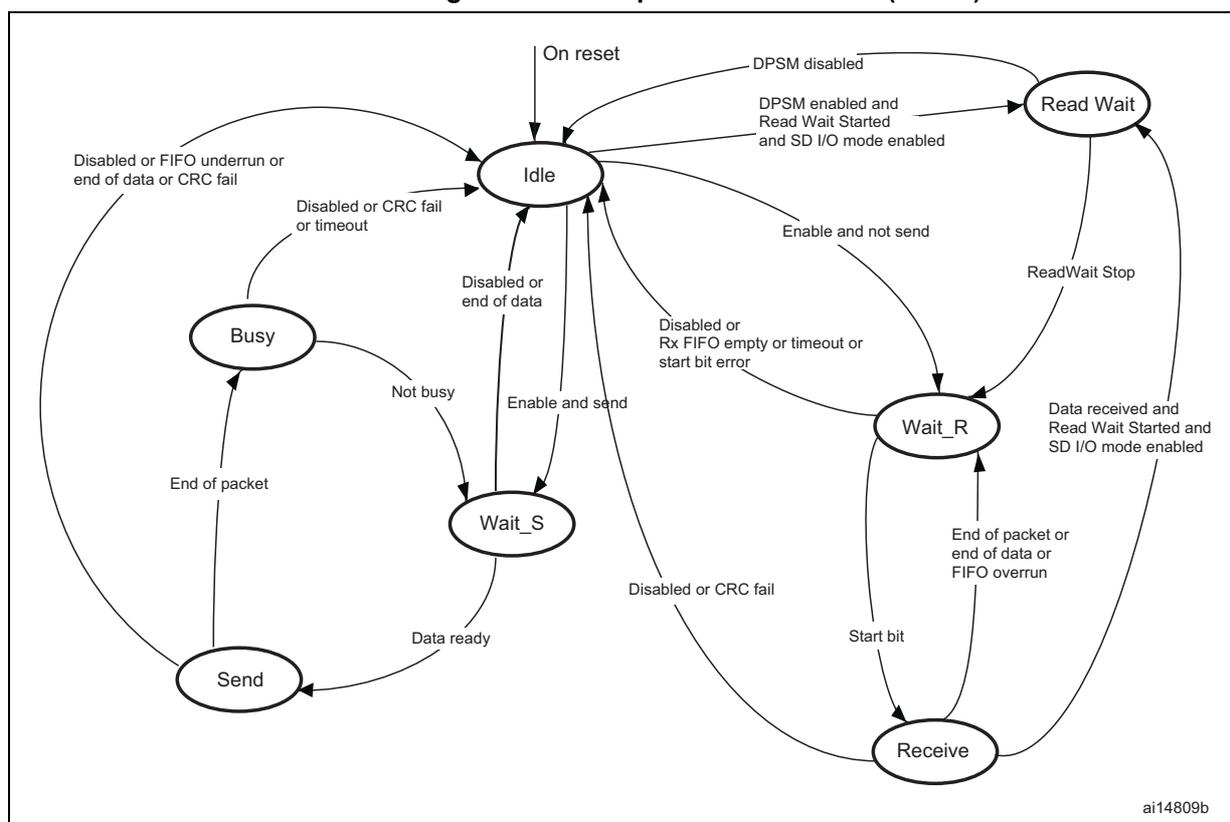
stateDiagram-v2
    [*] --> Idle : On reset
    Idle --> Idle : Disabled or FIFO underrun or end of data or CRC fail
    Idle --> Idle : Disabled or CRC fail or timeout
    Idle --> Idle : Disabled or end of data
    Idle --> Read Wait : DPSM disabled
    Idle --> Read Wait : DPSM enabled and Read Wait Started and SD I/O mode enabled
    Idle --> Wait_S : Enable and send
    Idle --> Wait_R : Enable and not send
    Idle --> Receive : Disabled or Rx FIFO empty or timeout or start bit error
    Busy --> Idle : End of packet
    Busy --> Idle : Disabled or CRC fail or timeout
    Busy --> Wait_S : Not busy
    Wait_S --> Idle : Data ready
    Wait_S --> Send : Data ready
    Send --> Idle : End of packet
    Send --> Wait_R : Data ready
    Receive --> Idle : Disabled or CRC fail
    Receive --> Wait_R : Start bit
    Receive --> Wait_R : End of packet or end of data or FIFO overrun
    Read Wait --> Idle : ReadWait Stop
    Read Wait --> Wait_R : Data received and Read Wait Started and SD I/O mode enabled
- • Idle: the data path is inactive, and the SDIO_D[7:0] outputs are in Hi-Z. When the data control register is written and the enable bit is set, the DPSM loads the data counter with a new value and, depending on the data direction bit, moves to either the Wait_S or the Wait_R state.
- • Wait_R: if the data counter equals zero, the DPSM moves to the Idle state when the receive FIFO is empty. If the data counter is not zero, the DPSM waits for a start bit on SDIO_D. The DPSM moves to the Receive state if it receives a start bit before a timeout, and loads the data block counter. If it reaches a timeout before it detects a start bit, it moves to the Idle state and sets the timeout status flag.
- • Receive: serial data received from a card is packed in bytes and written to the data FIFO. Depending on the transfer mode bit in the data control register, the data transfer mode can be either block or stream:
- – In block mode, when the data block counter reaches zero, the DPSM waits until it receives the CRC code. If the received code matches the internally generated CRC code, the DPSM moves to the Wait_R state. If not, the CRC fail status flag is set and the DPSM moves to the Idle state.
- – In stream mode, the DPSM receives data while the data counter is not zero. When the counter is zero, the remaining data in the shift register is written to the data FIFO, and the DPSM moves to the Wait_R state.
- • Wait_S: the DPSM moves to the Idle state if the data counter is zero. If not, it waits until the data FIFO empty flag is deasserted, and moves to the Send state.
Note: The DPSM remains in the Wait_S state for at least two clock periods to meet the \( N_{WR} \) timing requirements, where \( N_{WR} \) is the number of clock cycles between the reception of the card response and the start of the data transfer from the host.
- • Send: the DPSM starts sending data to a card. Depending on the transfer mode bit in the data control register, the data transfer mode can be either block or stream:
- – In block mode, when the data block counter reaches zero, the DPSM sends an internally generated CRC code and end bit, and moves to the Busy state.
- – In stream mode, the DPSM sends data to a card while the enable bit is high and the data counter is not zero. It then moves to the Idle state.
If a FIFO underrun error occurs, the DPSM sets the FIFO error flag and moves to the Idle state.
- • Busy: the DPSM waits for the CRC status flag:
- – If it does not receive a positive CRC status, it moves to the Idle state and sets the CRC fail status flag.
- – If it receives a positive CRC status, it moves to the Wait_S state if SDIO_D0 is not low (the card is not busy).
If a timeout occurs while the DPSM is in the Busy state, it sets the data timeout flag and moves to the Idle state.
The data timer is enabled when the DPSM is in the Wait_R or Busy state, and generates the data timeout error:
- – When transmitting data, the timeout occurs if the DPSM stays in the Busy state for longer than the programmed timeout period
- – When receiving data, the timeout occurs if the end of the data is not true, and if the DPSM stays in the Wait_R state for longer than the programmed timeout period.
- • Data: data can be transferred from the card to the host or vice versa. Data is transferred via the data lines. They are stored in a FIFO of 32 words, each word is 32 bits wide.
Table 222. Data token format
| Description | Start bit | Data | CRC16 | End bit |
|---|---|---|---|---|
| Block Data | 0 | - | yes | 1 |
| Stream Data | 0 | - | no | 1 |
DPSM Flags
The status of the data path subunit transfer is reported by several status flags
Table 223. DPSM flags
| Flag | Description |
|---|---|
| DBCKEND | Set to high when data block send/receive CRC check is passed. In SDIO multibyte transfer mode this flag is set at the end of the transfer (a multibyte transfer is considered as a single block transfer by the host). |
| DATAEND | Set to high when SDIO_DCOUNT register decrements and reaches 0. DATAEND indicates the end of a transfer on SDIO data line. |
| DTIMEOUT | Set to high when data timeout period is reached. When data timer reaches zero while DPSM is in Wait_R or Busy state, timeout is set. DTIMEOUT can be set after DATAEND if DPSM remains in busy state for longer than the programmed period. |
| DCRCFAIL | Set to high when data block send/receive CRC check fails. |
Data FIFO
The data FIFO (first-in-first-out) subunit is a data buffer with a transmit and receive unit.
The FIFO contains a 32-bit wide, 32-word deep data buffer, and transmit and receive logic. Because the data FIFO operates in the APB2 clock domain (PCLK2), all signals from the subunits in the SDIO clock domain (SDIOCLK) are resynchronized.
Depending on the TXACT and RXACT flags, the FIFO can be disabled, transmit enabled, or receive enabled. TXACT and RXACT are driven by the data path subunit and are mutually exclusive:
- – The transmit FIFO refers to the transmit logic and data buffer when TXACT is asserted
- – The receive FIFO refers to the receive logic and data buffer when RXACT is asserted
- • Transmit FIFO:
Data can be written to the transmit FIFO through the APB2 interface when the SDIO is enabled for transmission.
The transmit FIFO is accessible via 32 sequential addresses. The transmit FIFO contains a data output register that holds the data word pointed to by the read pointer. When the data path subunit has loaded its shift register, it increments the read pointer and drives new data out.
If the transmit FIFO is disabled, all status flags are deasserted. The data path subunit asserts TXACT when it transmits data.
Table 224. Transmit FIFO status flags
| Flag | Description |
|---|---|
| TXFIFOE | Set to high when the transmit FIFO does not contain valid data. |
| TXFIFOH | Set to high when 8 or more transmit FIFO words are empty. This flag can be used as a DMA request. |
| TXDAVL | Set to high when the transmit FIFO contains valid data. This flag is the inverse of the TXFIFOE flag. |
| TXUNDERR | Set to high when an underrun error occurs. This flag is cleared by writing to the SDIO Clear register. Note: In case of TXUNDERR, and DMA is used to fill SDIO FIFO, user software should disable DMA stream, and then write DMAEN bit in SDIO_DCTRL with '0' (to disable DMA request generation). |
- • Receive FIFO
When the data path subunit receives a word of data, it drives the data on the write databus. The write pointer is incremented after the write operation completes. On the read side, the contents of the FIFO word pointed to by the current value of the read pointer is driven onto the read databus. If the receive FIFO is disabled, all status flags are deasserted, and the read and write pointers are reset. The data path subunit asserts RXACT when it receives data. Table 225 lists the receive FIFO status flags. The receive FIFO is accessible via 32 sequential addresses.
Table 225. Receive FIFO status flags
| Flag | Description |
|---|---|
| RXFIFOE | Set to high when the receive FIFO does not contain valid data. |
| RXFIFOH | Set to high when 8 or more receive FIFO words contain valid data. This flag can be used as a DMA request. |
| RXDAVL | Set to high when the receive FIFO is not empty. This flag is the inverse of the RXFIFOE flag. |
| RXOVERR | Set to high when an overrun error occurs. This flag is cleared by writing to the SDIO Clear register. Note: In case of RXOVERR, and DMA is used to read SDIO FIFO, user software should disable DMA stream, and then write DMAEN bit in SDIO_DCTRL with '0' (to disable DMA request generation). |
33.3.2 SDIO APB2 interface
The APB2 interface generates the interrupt and DMA requests, and accesses the SDIO adapter registers and the data FIFO. It consists of a data path, register decoder, and interrupt/DMA logic.
SDIO interrupts
The interrupt logic generates an interrupt request signal that is asserted when at least one of the selected status flags is high. A mask register is provided to allow selection of the conditions that will generate an interrupt. A status flag generates the interrupt request if a corresponding mask flag is set.
SDIO/DMA interface
SDIO APB interface controls all subunit to perform transfers between the host and card
Example of read procedure using DMA
Send CMD17 (READ_BLOCK) as follows:
- a) Program the SDIO data length register (SDIO data timer register should be already programmed before the card identification process)
- b) Program DMA channel (refer to DMA configuration for SDIO controller )
- c) Program the SDIO data control register: DTEN with '1' (SDIO card host enabled to send data); DTDIR with '1' (from card to controller); DTMODE with '0' (block data transfer); DMAEN with '1' (DMA enabled); DBLOCKSIZE with 0x9 (512 bytes). Other fields are don't care.
- d) Program the SDIO argument register with the address location of the card from where data is to be transferred
- e) Program the SDIO command register: CmdIndex with 17(READ_BLOCK); WaitResp with '1' (SDIO card host waits for a response); CPSMEN with '1' (SDIO card host enabled to send a command). Other fields are at their reset value.
- f) Wait for SDIO_STA[6] = CMDREND interrupt, (CMDREND is set if there is no error on command path).
- g) Wait for SDIO_STA[10] = DBCKEND, (DBCKEND is set in case of no errors until the CRC check is passed)
- h) Wait until the FIFO is empty, when FIFO is empty the SDIO_STA[5] = RXOVERR value has to be checked to guarantee that read succeeded
Note: When FIFO overrun error occurs with last 1-4 bytes, it may happen that RXOVERR flag is set 2 APB clock cycles after DATAEND flag is set. To guarantee success of read operation RXOVERR must be checked after FIFO is empty.
Example of write procedure using DMA
Send CMD24 (WRITE_BLOCK) as follows:
- Program the SDIO data length register (SDIO data timer register should be already programmed before the card identification process)
- Program DMA channel (refer to DMA configuration for SDIO controller )
- Program the SDIO argument register with the address location of the card from where data is to be transferred
- Program the SDIO command register: CmdIndex with 24(WRITE_BLOCK); WaitResp with '1' (SDIO card host waits for a response); CPSMEN with '1' (SDIO card host enabled to send a command). Other fields are at their reset value.
- Wait for SDIO_STA[6] = CMDREND interrupt, then Program the SDIO data control register: DTEN with '1' (SDIO card host enabled to send data); DTDIR with '0' (from controller to card); DTMODE with '0' (block data transfer); DMAEN with '1' (DMA enabled); DBLOCKSIZE with 0x9 (512 bytes). Other fields are don't care.
- Wait for SDIO_STA[10] = DBCKEND, (DBCKEND is set in case of no errors)
DMA configuration for SDIO controller
- Enable DMA2 controller and clear any pending interrupts.
- Program the DMA2_Stream3 (or DMA2_Stream6) Channel4 source address register with the memory location base address and DMA2_Stream3 (or DMA2_Stream6) Channel4 destination address register with the SDIO_FIFO register address.
- Program DMA2_Stream3 (or DMA2_Stream6) Channel4 control register (memory increment, not peripheral increment, peripheral and source width is word size).
- Program DMA2_Stream3 (or DMA2_Stream6) Channel4 to select the peripheral as flow controller (set PFCTRL bit in DMA_S3CR (or DMA_S6CR) configuration register).
- Configure the incremental burst transfer to 4 beats (at least from peripheral side) in DMA2_Stream3 (or DMA2_Stream6) Channel4.
- Enable DMA2_Stream3 (or DMA2_Stream6) Channel4
Note: SDIO host allows only to use the DMA in peripheral flow controller mode. DMA stream used to serve SDIO must be configured in peripheral flow controller mode
SDIO generates only DMA burst requests to DMA controller. DMA must be configured in incremental burst mode on peripheral side.
33.4 Card functional description
33.4.1 Card identification mode
While in card identification mode the host resets all cards, validates the operation voltage range, identifies cards and sets a relative card address (RCA) for each card on the bus. All data communications in the card identification mode use the command line (CMD) only.
33.4.2 Card reset
The GO_IDLE_STATE command (CMD0) is the software reset command and it puts the MultiMediaCard and SD memory in the Idle state. The IO_RW_DIRECT command (CMD52) resets the SD I/O card. After power-up or CMD0, all cards output bus drivers are in the high-impedance state and the cards are initialized with a default relative card address (RCA=0x0001) and with a default driver stage register setting (lowest speed, highest driving current capability).
33.4.3 Operating voltage range validation
All cards can communicate with the SDIO card host using any operating voltage within the specification range. The supported minimum and maximum \( V_{DD} \) values are defined in the operation conditions register (OCR) on the card.
Cards that store the card identification number (CID) and card specific data (CSD) in the payload memory are able to communicate this information only under data-transfer \( V_{DD} \) conditions. When the SDIO card host module and the card have incompatible \( V_{DD} \) ranges, the card is not able to complete the identification cycle and cannot send CSD data. For this purpose, the special commands, SEND_OP_COND (CMD1), SD_APP_OP_COND (ACMD41 for SD Memory), and IO_SEND_OP_COND (CMD5 for SD I/O), are designed to provide a mechanism to identify and reject cards that do not match the \( V_{DD} \) range desired by the SDIO card host. The SDIO card host sends the required \( V_{DD} \) voltage window as the operand of these commands. Cards that cannot perform data transfer in the specified range disconnect from the bus and go to the inactive state.
By using these commands without including the voltage range as the operand, the SDIO card host can query each card and determine the common voltage range before placing out-of-range cards in the inactive state. This query is used when the SDIO card host is able to select a common voltage range or when the user requires notification that cards are not usable.
33.4.4 Card identification process
The card identification process differs for MultiMediaCards and SD cards. For MultiMediaCard cards, the identification process starts at clock rate \( F_{od} \) . The SDIO_CMD line output drivers are open-drain and allow parallel card operation during this process. The registration process is accomplished as follows:
- 1. The bus is activated.
- 2. The SDIO card host broadcasts SEND_OP_COND (CMD1) to receive operation conditions.
- 3. The response is the wired AND operation of the operation condition registers from all cards.
- 4. Incompatible cards are placed in the inactive state.
- 5. The SDIO card host broadcasts ALL_SEND_CID (CMD2) to all active cards.
- 6. The active cards simultaneously send their CID numbers serially. Cards with outgoing CID bits that do not match the bits on the command line stop transmitting and must wait for the next identification cycle. One card successfully transmits a full CID to the SDIO card host and enters the Identification state.
- 7. The SDIO card host issues SET_RELATIVE_ADDR (CMD3) to that card. This new address is called the relative card address (RCA); it is shorter than the CID and
addresses the card. The assigned card changes to the Standby state, it does not react to further identification cycles, and its output switches from open-drain to push-pull.
- 8. The SDIO card host repeats steps 5 through 7 until it receives a timeout condition.
For the SD card, the identification process starts at clock rate \( F_{od} \) , and the SDIO_CMD line output drives are push-pull drivers instead of open-drain. The registration process is accomplished as follows:
- 1. The bus is activated.
- 2. The SDIO card host broadcasts SD_APP_OP_COND (ACMD41).
- 3. The cards respond with the contents of their operation condition registers.
- 4. The incompatible cards are placed in the inactive state.
- 5. The SDIO card host broadcasts ALL_SEND_CID (CMD2) to all active cards.
- 6. The cards send back their unique card identification numbers (CIDs) and enter the Identification state.
- 7. The SDIO card host issues SET_RELATIVE_ADDR (CMD3) to an active card with an address. This new address is called the relative card address (RCA); it is shorter than the CID and addresses the card. The assigned card changes to the Standby state. The SDIO card host can reissue this command to change the RCA. The RCA of the card is the last assigned value.
- 8. The SDIO card host repeats steps 5 through 7 with all active cards.
For the SD I/O card, the registration process is accomplished as follows:
- 1. The bus is activated.
- 2. The SDIO card host sends IO_SEND_OP_COND (CMD5).
- 3. The cards respond with the contents of their operation condition registers.
- 4. The incompatible cards are set to the inactive state.
- 5. The SDIO card host issues SET_RELATIVE_ADDR (CMD3) to an active card with an address. This new address is called the relative card address (RCA); it is shorter than the CID and addresses the card. The assigned card changes to the Standby state. The SDIO card host can reissue this command to change the RCA. The RCA of the card is the last assigned value.
33.4.5 Block write
During block write (CMD24 - 27) one or more blocks of data are transferred from the host to the card with a CRC appended to the end of each block by the host. A card supporting block write is always able to accept a block of data defined by WRITE_BL_LEN. If the CRC fails, the card indicates the failure on the SDIO_D line and the transferred data are discarded and not written, and all further transmitted blocks (in multiple block write mode) are ignored.
If the host uses partial blocks whose accumulated length is not block aligned and, block misalignment is not allowed (CSD parameter WRITE_BLK_MISALIGN is not set), the card will detect the block misalignment error before the beginning of the first misaligned block. (ADDRESS_ERROR error bit is set in the status register). The write operation will also be aborted if the host tries to write over a write-protected area. In this case, however, the card will set the WP_VIOLATION bit.
Programming of the CID and CSD registers does not require a previous block length setting. The transferred data is also CRC protected. If a part of the CSD or CID register is stored in ROM, then this unchangeable part must match the corresponding part of the receive buffer. If this match fails, then the card reports an error and does not change any register contents.
Some cards may require long and unpredictable times to write a block of data. After receiving a block of data and completing the CRC check, the card begins writing and holds the SDIO_D line low if its write buffer is full and unable to accept new data from a new WRITE_BLOCK command. The host may poll the status of the card with a SEND_STATUS command (CMD13) at any time, and the card will respond with its status. The READY_FOR_DATA status bit indicates whether the card can accept new data or whether the write process is still in progress. The host may deselect the card by issuing CMD7 (to select a different card), which will place the card in the Disconnect state and release the SDIO_D line(s) without interrupting the write operation. When reselecting the card, it will reactivate busy indication by pulling SDIO_D to low if programming is still in progress and the write buffer is unavailable.
33.4.6 Block read
In Block read mode the basic unit of data transfer is a block whose maximum size is defined in the CSD (READ_BL_LEN). If READ_BL_PARTIAL is set, smaller blocks whose start and end addresses are entirely contained within one physical block (as defined by READ_BL_LEN) may also be transmitted. A CRC is appended to the end of each block, ensuring data transfer integrity. CMD17 (READ_SINGLE_BLOCK) initiates a block read and after completing the transfer, the card returns to the Transfer state.
CMD18 (READ_MULTIPLE_BLOCK) starts a transfer of several consecutive blocks.
The host can abort reading at any time, within a multiple block operation, regardless of its type. Transaction abort is done by sending the stop transmission command.
If the card detects an error (for example, out of range, address misalignment or internal error) during a multiple block read operation (both types) it stops the data transmission and remains in the data state. The host must then abort the operation by sending the stop transmission command. The read error is reported in the response to the stop transmission command.
If the host sends a stop transmission command after the card transmits the last block of a multiple block operation with a predefined number of blocks, it is responded to as an illegal command, since the card is no longer in the data state. If the host uses partial blocks whose accumulated length is not block-aligned and block misalignment is not allowed, the card detects a block misalignment error condition at the beginning of the first misaligned block (ADDRESS_ERROR error bit is set in the status register).
33.4.7 Stream access, stream write and stream read (MultiMediaCard only)
In stream mode, data is transferred in bytes and no CRC is appended at the end of each block.
Stream write (MultiMediaCard only)
WRITE_DAT_UNTIL_STOP (CMD20) starts the data transfer from the SDIO card host to the card, beginning at the specified address and continuing until the SDIO card host issues a stop command. When partial blocks are allowed (CSD parameter WRITE_BL_PARTIAL is set), the data stream can start and stop at any address within the card address space, otherwise it can only start and stop at block boundaries. Because the amount of data to be transferred is not determined in advance, a CRC cannot be used. When the end of the memory range is reached while sending data and no stop command is sent by the SDIO card host, any additional transferred data are discarded.
The maximum clock frequency for a stream write operation is given by the following equation fields of the card-specific data register:
- • Maximumspeed = maximum write frequency
- • TRANSPEED = maximum data transfer rate
- • writeblalen = maximum write data block length
- • NSAC = data read access time 2 in CLK cycles
- • TAAC = data read access time 1
- • R2WFACTOR = write speed factor
If the host attempts to use a higher frequency, the card may not be able to process the data and stop programming, set the OVERRUN error bit in the status register, and while ignoring all further data transfer, wait (in the receive data state) for a stop command. The write operation is also aborted if the host tries to write over a write-protected area. In this case, however, the card sets the WP_VIOLATION bit.
Stream read (MultiMediaCard only)
READ_DAT_UNTIL_STOP (CMD11) controls a stream-oriented data transfer.
This command instructs the card to send its data, starting at a specified address, until the SDIO card host sends STOP_TRANSMISSION (CMD12). The stop command has an execution delay due to the serial command transmission and the data transfer stops after the end bit of the stop command. When the end of the memory range is reached while sending data and no stop command is sent by the SDIO card host, any subsequent data sent are considered undefined.
The maximum clock frequency for a stream read operation is given by the following equation and uses fields of the card specific data register.
- • Maximumspeed = maximum read frequency
- • TRANSPEED = maximum data transfer rate
- • readblalen = maximum read data block length
- • writeblalen = maximum write data block length
- • NSAC = data read access time 2 in CLK cycles
- • TAAC = data read access time 1
- • R2WFACTOR = write speed factor
If the host attempts to use a higher frequency, the card is not able to sustain data transfer. If this happens, the card sets the UNDERRUN error bit in the status register, aborts the transmission and waits in the data state for a stop command.
33.4.8 Erase: group erase and sector erase
The erasable unit of the MultiMediaCard is the erase group. The erase group is measured in write blocks, which are the basic writable units of the card. The size of the erase group is a card-specific parameter and defined in the CSD.
The host can erase a contiguous range of Erase Groups. Starting the erase process is a three-step sequence.
First the host defines the start address of the range using the ERASE_GROUP_START (CMD35) command, next it defines the last address of the range using the ERASE_GROUP_END (CMD36) command and, finally, it starts the erase process by issuing the ERASE (CMD38) command. The address field in the erase commands is an Erase Group address in byte units. The card ignores all LSBs below the Erase Group size, effectively rounding the address down to the Erase Group boundary.
If an erase command is received out of sequence, the card sets the ERASE_SEQ_ERROR bit in the status register and resets the whole sequence.
If an out-of-sequence (neither of the erase commands, except SEND_STATUS) command received, the card sets the ERASE_RESET status bit in the status register, resets the erase sequence and executes the last command.
If the erase range includes write protected blocks, they are left intact and only nonprotected blocks are erased. The WP_ERASE_SKIP status bit in the status register is set.
The card indicates that an erase is in progress by holding SDIO_D low. The actual erase time may be quite long, and the host may issue CMD7 to deselect the card.
33.4.9 Wide bus selection or deselection
Wide bus (4-bit bus width) operation mode is selected or deselected using SET_BUS_WIDTH (ACMD6). The default bus width after power-up or GO_IDLE_STATE (CMD0) is 1 bit. SET_BUS_WIDTH (ACMD6) is only valid in a transfer state, which means that the bus width can be changed only after a card is selected by SELECT/DESELECT_CARD (CMD7).
33.4.10 Protection management
Three write protection methods for the cards are supported in the SDIO card host module:
- 1. internal card write protection (card responsibility)
- 2. mechanical write protection switch (SDIO card host module responsibility only)
- 3. password-protected card lock operation
Internal card write protection
Card data can be protected against write and erase. By setting the permanent or temporary write-protect bits in the CSD, the entire card can be permanently write-protected by the manufacturer or content provider. For cards that support write protection of groups of sectors by setting the WP_GRP_ENABLE bit in the CSD, portions of the data can be protected, and the write protection can be changed by the application. The write protection is in units of WP_GRP_SIZE sectors as specified in the CSD. The SET_WRITE_PROT and CLR_WRITE_PROT commands control the protection of the addressed group. The SEND_WRITE_PROT command is similar to a single block read command. The card sends a data block containing 32 write protection bits (representing 32 write protect groups starting
at the specified address) followed by 16 CRC bits. The address field in the write protect commands is a group address in byte units.
The card ignores all LSBs below the group size.
Mechanical write protect switch
A mechanical sliding tab on the side of the card allows the user to set or clear the write protection on a card. When the sliding tab is positioned with the window open, the card is write-protected, and when the window is closed, the card contents can be changed. A matched switch on the socket side indicates to the SDIO card host module that the card is write-protected. The SDIO card host module is responsible for protecting the card. The position of the write protect switch is unknown to the internal circuitry of the card.
Password protect
The password protection feature enables the SDIO card host module to lock and unlock a card with a password. The password is stored in the 128-bit PWD register and its size is set in the 8-bit PWD_LEN register. These registers are nonvolatile so that a power cycle does not erase them. Locked cards respond to and execute certain commands. This means that the SDIO card host module is allowed to reset, initialize, select, and query for status, however it is not allowed to access data on the card. When the password is set (as indicated by a nonzero value of PWD_LEN), the card is locked automatically after power-up. As with the CSD and CID register write commands, the lock/unlock commands are available in the transfer state only. In this state, the command does not include an address argument and the card must be selected before using it. The card lock/unlock commands have the structure and bus transaction types of a regular single-block write command. The transferred data block includes all of the required information for the command (the password setting mode, the PWD itself, and card lock/unlock). The command data block size is defined by the SDIO card host module before it sends the card lock/unlock command, and has the structure shown in Table 239 .
The bit settings are as follows:
- • ERASE: setting it forces an erase operation. All other bits must be zero, and only the command byte is sent
- • LOCK_UNLOCK: setting it locks the card. LOCK_UNLOCK can be set simultaneously with SET_PWD, however not with CLR_PWD
- • CLR_PWD: setting it clears the password data
- • SET_PWD: setting it saves the password data to memory
- • PWD_LEN: it defines the length of the password in bytes
- • PWD: the password (new or currently used, depending on the command)
The following sections list the command sequences to set/reset a password, lock/unlock the card, and force an erase.
Setting the password
- 1. Select a card (SELECT/DESELECT_CARD, CMD7), if none is already selected.
- 2. Define the block length (SET_BLOCKLEN, CMD16) to send, given by the 8-bit card lock/unlock mode, the 8-bit PWD_LEN, and the number of bytes of the new password.
When a password replacement is done, the block size must take into account that both the old and the new passwords are sent with the command.
- 3. Send LOCK/UNLOCK (CMD42) with the appropriate data block size on the data line including the 16-bit CRC. The data block indicates the mode (SET_PWD = 1), the length (PWD_LEN), and the password (PWD) itself. When a password replacement is done, the length value (PWD_LEN) includes the length of both passwords, the old and the new one, and the PWD field includes the old password (currently used) followed by the new password.
- 4. When the password is matched, the new password and its size are saved into the PWD and PWD_LEN fields, respectively. When the old password sent does not correspond (in size and/or content) to the expected password, the LOCK_UNLOCK_FAILED error bit is set in the card status register, and the password is not changed.
The password length field (PWD_LEN) indicates whether a password is currently set. When this field is nonzero, there is a password set and the card locks itself after power-up. It is possible to lock the card immediately in the current power session by setting the LOCK_UNLOCK bit (while setting the password) or sending an additional command for card locking.
Resetting the password
- 1. Select a card (SELECT/DESELECT_CARD, CMD7), if none is already selected.
- 2. Define the block length (SET_BLOCKLEN, CMD16) to send, given by the 8-bit card lock/unlock mode, the 8-bit PWD_LEN, and the number of bytes in the currently used password.
- 3. Send LOCK/UNLOCK (CMD42) with the appropriate data block size on the data line including the 16-bit CRC. The data block indicates the mode (CLR_PWD = 1), the length (PWD_LEN) and the password (PWD) itself. The LOCK_UNLOCK bit is ignored.
- 4. When the password is matched, the PWD field is cleared and PWD_LEN is set to 0. When the password sent does not correspond (in size and/or content) to the expected password, the LOCK_UNLOCK_FAILED error bit is set in the card status register, and the password is not changed.
Locking a card
- 1. Select a card (SELECT/DESELECT_CARD, CMD7), if none is already selected.
- 2. Define the block length (SET_BLOCKLEN, CMD16) to send, given by the 8-bit card lock/unlock mode (byte 0 in Table 239 ), the 8-bit PWD_LEN, and the number of bytes of the current password.
- 3. Send LOCK/UNLOCK (CMD42) with the appropriate data block size on the data line including the 16-bit CRC. The data block indicates the mode (LOCK_UNLOCK = 1), the length (PWD_LEN), and the password (PWD) itself.
- 4. When the password is matched, the card is locked and the CARD_IS_LOCKED status bit is set in the card status register. When the password sent does not correspond (in size and/or content) to the expected password, the LOCK_UNLOCK_FAILED error bit is set in the card status register, and the lock fails.
It is possible to set the password and to lock the card in the same sequence. In this case, the SDIO card host module performs all the required steps for setting the password (see Setting the password on page 1185 ), however it is necessary to set the LOCK_UNLOCK bit in Step 3 when the new password command is sent.
When the password is previously set (PWD_LEN is not 0), the card is locked automatically after power on reset. An attempt to lock a locked card or to lock a card that does not have a password fails and the LOCK_UNLOCK_FAILED error bit is set in the card status register.
Unlocking the card
- 1. Select a card (SELECT/DESELECT_CARD, CMD7), if none is already selected.
- 2. Define the block length (SET_BLOCKLEN, CMD16) to send, given by the 8-bit cardlock/unlock mode (byte 0 in Table 239 ), the 8-bit PWD_LEN, and the number of bytes of the current password.
- 3. Send LOCK/UNLOCK (CMD42) with the appropriate data block size on the data line including the 16-bit CRC. The data block indicates the mode (LOCK_UNLOCK = 0), the length (PWD_LEN), and the password (PWD) itself.
- 4. When the password is matched, the card is unlocked and the CARD_IS_LOCKED status bit is cleared in the card status register. When the password sent is not correct in size and/or content and does not correspond to the expected password, the LOCK_UNLOCK_FAILED error bit is set in the card status register, and the card remains locked.
The unlocking function is only valid for the current power session. When the PWD field is not clear, the card is locked automatically on the next power-up.
An attempt to unlock an unlocked card fails and the LOCK_UNLOCK_FAILED error bit is set in the card status register.
Forcing erase
If the user has forgotten the password (PWD content), it is possible to access the card after clearing all the data on the card. This forced erase operation erases all card data and all password data.
- 1. Select a card (SELECT/DESELECT_CARD, CMD7), if none is already selected.
- 2. Set the block length (SET_BLOCKLEN, CMD16) to 1 byte. Only the 8-bit card lock/unlock byte (byte 0 in Table 239 ) is sent.
- 3. Send LOCK/UNLOCK (CMD42) with the appropriate data byte on the data line including the 16-bit CRC. The data block indicates the mode (ERASE = 1). All other bits must be zero.
- 4. When the ERASE bit is the only bit set in the data field, all card contents are erased, including the PWD and PWD_LEN fields, and the card is no longer locked. When any other bits are set, the LOCK_UNLOCK_FAILED error bit is set in the card status register and the card retains all of its data, and remains locked.
An attempt to use a force erase on an unlocked card fails and the LOCK_UNLOCK_FAILED error bit is set in the card status register.
33.4.11 Card status register
The response format R1 contains a 32-bit field named card status. This field is intended to transmit the card status information (which may be stored in a local status register) to the host. If not specified otherwise, the status entries are always related to the previously issued command.
Table 226 defines the different entries of the status. The type and clear condition fields in the table are abbreviated as follows:
Type:
- • E: error bit
- • S: status bit
- • R: detected and set for the actual command response
- • X: detected and set during command execution. The SDIO card host must poll the card by issuing the status command to read these bits.
Clear condition:
- • A: according to the card current state
- • B: always related to the previous command. Reception of a valid command clears it (with a delay of one command)
- • C: clear by read
Table 226. Card status
| Bits | Identifier | Type | Value | Description | Clear condition |
|---|---|---|---|---|---|
| 31 | ADDRESS_OUT_OF_RANGE | E R X | '0'= no error '1'= error | The command address argument was out of the allowed range for this card. A multiple block or stream read/write operation is (although started in a valid address) attempting to read or write beyond the card capacity. | C |
| 30 | ADDRESS_MISALIGN | - | '0'= no error '1'= error | The commands address argument (in accordance with the currently set block length) positions the first data block misaligned to the card physical blocks. A multiple block read/write operation (although started with a valid address/block-length combination) is attempting to read or write a data block which is not aligned with the physical blocks of the card. | C |
| 29 | BLOCK_LEN_ERROR | - | '0'= no error '1'= error | Either the argument of a SET_BLOCKLEN command exceeds the maximum value allowed for the card, or the previously defined block length is illegal for the current command (e.g. the host issues a write command, the current block length is smaller than the maximum allowed value for the card and it is not allowed to write partial blocks) | C |
Table 226. Card status (continued)
| Bits | Identifier | Type | Value | Description | Clear condition |
|---|---|---|---|---|---|
| 28 | ERASE_SEQ_ERROR | - | '0'= no error '1'= error | An error in the sequence of erase commands occurred. | C |
| 27 | ERASE_PARAM | E X | '0'= no error '1'= error | An invalid selection of erase groups for erase occurred. | C |
| 26 | WP_VIOLATION | E X | '0'= no error '1'= error | Attempt to program a write-protected block. | C |
| 25 | CARD_IS_LOCKED | S R | '0'= card unlocked '1'= card locked | When set, signals that the card is locked by the host | A |
| 24 | LOCK_UNLOCK_FAILED | E X | '0'= no error '1'= error | Set when a sequence or password error has been detected in lock/unlock card command | C |
| 23 | COM_CRC_ERROR | E R | '0'= no error '1'= error | The CRC check of the previous command failed. | B |
| 22 | ILLEGAL_COMMAND | E R | '0'= no error '1'= error | Command not legal for the card state | B |
| 21 | CARD_ECC_FAILED | E X | '0'= success '1'= failure | Card internal ECC was applied but failed to correct the data. | C |
| 20 | CC_ERROR | E R | '0'= no error '1'= error | (Undefined by the standard) A card error occurred, which is not related to the host command. | C |
| 19 | ERROR | E X | '0'= no error '1'= error | (Undefined by the standard) A generic card error related to the (and detected during) execution of the last host command (e.g. read or write failures). | C |
| 18 | Reserved | ||||
| 17 | Reserved | ||||
| 16 | CID/CSD_OVERWRITE | E X | '0'= no error '1'= error | Can be either of the following errors: – The CID register has already been written and cannot be overwritten – The read-only section of the CSD does not match the card contents – An attempt to reverse the copy (set as original) or permanent WP (unprotected) bits was made | C |
| 15 | WP_ERASE_SKIP | E X | '0'= not protected '1'= protected | Set when only partial address space was erased due to existing write | C |
| 14 | CARD_ECC_DISABLED | S X | '0'= enabled '1'= disabled | The command has been executed without using the internal ECC. | A |
Table 226. Card status (continued)
| Bits | Identifier | Type | Value | Description | Clear condition |
|---|---|---|---|---|---|
| 13 | ERASE_RESET | - | '0'= cleared '1'= set | An erase sequence was cleared before executing because an out of erase sequence command was received (commands other than CMD35, CMD36, CMD38 or CMD13) | C |
| 12:9 | CURRENT_STATE | S R | 0 = Idle 1 = Ready 2 = Ident 3 = Stby 4 = Tran 5 = Data 6 = Rcv 7 = Prg 8 = Dis 9 = Btst 10-15 = reserved | The state of the card when receiving the command. If the command execution causes a state change, it will be visible to the host in the response on the next command. The four bits are interpreted as a binary number between 0 and 15. | B |
| 8 | READY_FOR_DATA | S R | '0'= not ready '1'= ready | Corresponds to buffer empty signalling on the bus | - |
| 7 | SWITCH_ERROR | E X | '0'= no error '1'= switch error | If set, the card did not switch to the expected mode as requested by the SWITCH command | B |
| 6 | Reserved | ||||
| 5 | APP_CMD | S R | '0' = Disabled '1' = Enabled | The card will expect ACMD, or an indication that the command has been interpreted as ACMD | C |
| 4 | Reserved for SD I/O Card | ||||
| 3 | AKE_SEQ_ERROR | E R | '0'= no error '1'= error | Error in the sequence of the authentication process | C |
| 2 | Reserved for application specific commands | ||||
| 1 | Reserved for manufacturer test mode | ||||
| 0 | |||||
33.4.12 SD status register
The SD status contains status bits that are related to the SD memory card proprietary features and may be used for future application-specific usage. The size of the SD Status is one data block of 512 bits. The contents of this register are transmitted to the SDIO card host if ACMD13 is sent (CMD55 followed with CMD13). ACMD13 can be sent to a card in transfer state only (card is selected).
Table 227 defines the different entries of the SD status register. The type and clear condition fields in the table are abbreviated as follows:
Type:
- • E: error bit
- • S: status bit
- • R: detected and set for the actual command response
- • X: detected and set during command execution. The SDIO card Host must poll the card by issuing the status command to read these bits
Clear condition:
- • A: according to the card current state
- • B: always related to the previous command. Reception of a valid command clears it (with a delay of one command)
- • C: clear by read
Table 227. SD status
| Bits | Identifier | Type | Value | Description | Clear condition |
|---|---|---|---|---|---|
| 511: 510 | DAT_BUS_WIDTH | S R | '00'= 1 (default) '01'= reserved '10'= 4 bit width '11'= reserved | Shows the currently defined databus width that was defined by SET_BUS_WIDTH command | A |
| 509 | SECURED_MODE | S R | '0'= Not in the mode '1'= In Secured Mode | Card is in Secured Mode of operation (refer to the “SD Security Specification”). | A |
| 508: 496 | Reserved | ||||
| 495: 480 | SD_CARD_TYPE | S R | '00xxh'= SD Memory Cards as defined in Physical Spec Ver1.01-2.00 ('x'= don't care). The following cards are currently defined: '0000'= Regular SD RD/WR Card. '0001'= SD ROM Card | In the future, the 8 LSBs will be used to define different variations of an SD memory card (each bit will define different SD types). The 8 MSBs will be used to define SD Cards that do not comply with current SD physical layer specification. | A |
| 479: 448 | SIZE_OF_PROTECTED ED_AREA | S R | Size of protected area (See below) | (See below) | A |
| 447: 440 | SPEED_CLASS | S R | Speed Class of the card (See below) | (See below) | A |
Table 227. SD status (continued)
| Bits | Identifier | Type | Value | Description | Clear condition |
|---|---|---|---|---|---|
| 439: 432 | PERFORMANCE_MOVE | S R | Performance of move indicated by 1 [MB/s] step. (See below) | (See below) | A |
| 431:428 | AU_SIZE | S R | Size of AU (See below) | (See below) | A |
| 427:424 | Reserved | ||||
| 423:408 | ERASE_SIZE | S R | Number of AUs to be erased at a time | (See below) | A |
| 407:402 | ERASE_TIMEOUT | S R | Timeout value for erasing areas specified by UNIT_OF_ERASE_AU | (See below) | A |
| 401:400 | ERASE_OFFSET | S R | Fixed offset value added to erase time. | (See below) | A |
| 399:312 | Reserved | ||||
| 311:0 | Reserved for Manufacturer | ||||
SIZE_OF_PROTECTED_AREA
Setting this field differs between standard- and high-capacity cards. In the case of a standard-capacity card, the capacity of protected area is calculated as follows:
SIZE_OF_PROTECTED_AREA is specified by the unit in MULT*BLOCK_LEN.
In the case of a high-capacity card, the capacity of protected area is specified in this field:
SIZE_OF_PROTECTED_AREA is specified by the unit in bytes.
SPEED_CLASS
This 8-bit field indicates the speed class and the value can be calculated by \( P_W/2 \) (where \( P_W \) is the write performance).
Table 228. Speed class code field
| SPEED_CLASS | Value definition |
|---|---|
| 00h | Class 0 |
| 01h | Class 2 |
| 02h | Class 4 |
| 03h | Class 6 |
| 04h – FFh | Reserved |
PERFORMANCE_MOVE
This 8-bit field indicates Pm (performance move) and the value can be set by 1 [MB/sec] steps. If the card does not move used RUs (recording units), Pm should be considered as infinity. Setting the field to FFh means infinity.
Table 229. Performance move field
| PERFORMANCE_MOVE | Value definition |
|---|---|
| 00h | Not defined |
| 01h | 1 [MB/sec] |
| 02h | 02h 2 [MB/sec] |
| ----- | ----- |
| FEh | 254 [MB/sec] |
| FFh | Infinity |
AU_SIZE
This 4-bit field indicates the AU size and the value can be selected in the power of 2 base from 16 KB.
Table 230. AU_SIZE field
| AU_SIZE | Value definition |
|---|---|
| 00h | Not defined |
| 01h | 16 KB |
| 02h | 32 KB |
| 03h | 64 KB |
| 04h | 128 KB |
| 05h | 256 KB |
| 06h | 512 KB |
| 07h | 1 MB |
| 08h | 2 MB |
| 09h | 4 MB |
| Ah – Fh | Reserved |
The maximum AU size, which depends on the card capacity, is defined in Table 231 . The card can be set to any AU size between RU size and maximum AU size.
Table 231. Maximum AU size
| Capacity | 16 MB-64 MB | 128 MB-256 MB | 512 MB | 1 GB-32 GB |
|---|---|---|---|---|
| Maximum AU Size | 512 KB | 1 MB | 2 MB | 4 MB |
ERASE_SIZE
This 16-bit field indicates \( N_{\text{ERASE}} \) . When \( N_{\text{ERASE}} \) numbers of AUs are erased, the timeout value is specified by \( \text{ERASE\_TIMEOUT} \) (Refer to ERASE_TIMEOUT ). The host should determine the proper number of AUs to be erased in one operation so that the host can show the progress of the erase operation. If this field is set to 0, the erase timeout calculation is not supported.
Table 232. Erase size field
| ERASE_SIZE | Value definition |
|---|---|
| 0000h | Erase timeout calculation is not supported. |
| 0001h | 1 AU |
| 0002h | 2 AU |
| 0003h | 3 AU |
| ----- | ----- |
| FFFFh | 65535 AU |
ERASE_TIMEOUT
This 6-bit field indicates \( T_{\text{ERASE}} \) and the value indicates the erase timeout from offset when multiple AUs are being erased as specified by \( \text{ERASE\_SIZE} \) . The range of \( \text{ERASE\_TIMEOUT} \) can be defined as up to 63 seconds and the card manufacturer can choose any combination of \( \text{ERASE\_SIZE} \) and \( \text{ERASE\_TIMEOUT} \) depending on the implementation. Determining \( \text{ERASE\_TIMEOUT} \) determines the \( \text{ERASE\_SIZE} \) .
Table 233. Erase timeout field
| ERASE_TIMEOUT | Value definition |
|---|---|
| 00 | Erase timeout calculation is not supported. |
| 01 | 1 [sec] |
| 02 | 2 [sec] |
| 03 | 3 [sec] |
| ----- | ----- |
| 63 | 63 [sec] |
ERASE_OFFSET
This 2-bit field indicates \( T_{\text{OFFSET}} \) and one of four values can be selected. This field is meaningless if the \( \text{ERASE\_SIZE} \) and \( \text{ERASE\_TIMEOUT} \) fields are set to 0.
Table 234. Erase offset field
| ERASE_OFFSET | Value definition |
|---|---|
| 0h | 0 [sec] |
| 1h | 1 [sec] |
Table 234. Erase offset field (continued)
| ERASE_OFFSET | Value definition |
|---|---|
| 2h | 2 [sec] |
| 3h | 3 [sec] |
33.4.13 SD I/O mode
SD I/O interrupts
To allow the SD I/O card to interrupt the MultiMediaCard/SD module, an interrupt function is available on a pin on the SD interface. Pin 8, used as SDIO_D1 when operating in the 4-bit SD mode, signals the cards interrupt to the MultiMediaCard/SD module. The use of the interrupt is optional for each card or function within a card. The SD I/O interrupt is level-sensitive, which means that the interrupt line must be held active (low) until it is either recognized and acted upon by the MultiMediaCard/SD module or deasserted due to the end of the interrupt period. After the MultiMediaCard/SD module has serviced the interrupt, the interrupt status bit is cleared via an I/O write to the appropriate bit in the SD I/O card's internal registers. The interrupt output of all SD I/O cards is active low and the application must provide pull-up resistors externally on all data lines (SDIO_D[3:0]). The MultiMediaCard/SD module samples the level of pin 8 (SDIO_D/IRQ) into the interrupt detector only during the interrupt period. At all other times, the MultiMediaCard/SD module ignores this value.
The interrupt period is applicable for both memory and I/O operations. The definition of the interrupt period for operations with single blocks is different from the definition for multiple-block data transfers.
SD I/O suspend and resume
Within a multifunction SD I/O or a card with both I/O and memory functions, there are multiple devices (I/O and memory) that share access to the MMC/SD bus. To share access to the MMC/SD module among multiple devices, SD I/O and combo cards optionally implement the concept of suspend/resume. When a card supports suspend/resume, the MMC/SD module can temporarily halt a data transfer operation to one function or memory (suspend) to free the bus for a higher-priority transfer to a different function or memory. After this higher-priority transfer is complete, the original transfer is resumed (restarted) where it left off. Support of suspend/resume is optional on a per-card basis. To perform the suspend/resume operation on the MMC/SD bus, the MMC/SD module performs the following steps:
- 1. Determines the function currently using the SDIO_D [3:0] line(s)
- 2. Requests the lower-priority or slower transaction to suspend
- 3. Waits for the transaction suspension to complete
- 4. Begins the higher-priority transaction
- 5. Waits for the completion of the higher priority transaction
- 6. Restores the suspended transaction
SD I/O ReadWait
The optional ReadWait (RW) operation is defined only for the SD 1-bit and 4-bit modes. The ReadWait operation allows the MMC/SD module to signal a card that it is reading multiple
registers (IO_RW_EXTENDED, CMD53) to temporarily stall the data transfer while allowing the MMC/SD module to send commands to any function within the SD I/O device. To determine when a card supports the ReadWait protocol, the MMC/SD module must test capability bits in the internal card registers. The timing for ReadWait is based on the interrupt period.
33.4.14 Commands and responses
Application-specific and general commands
The SDIO card host module system is designed to provide a standard interface for a variety of applications types. In this environment, there is a need for specific customer/application features. To implement these features, two types of generic commands are defined in the standard: application-specific commands (ACMD) and general commands (GEN_CMD).
When the card receives the APP_CMD (CMD55) command, the card expects the next command to be an application-specific command. ACMDs have the same structure as regular MultiMediaCard commands and can have the same CMD number. The card recognizes it as ACMD because it appears after APP_CMD (CMD55). When the command immediately following the APP_CMD (CMD55) is not a defined application-specific command, the standard command is used. For example, when the card has a definition for SD_STATUS (ACMD13), and receives CMD13 immediately following APP_CMD (CMD55), this is interpreted as SD_STATUS (ACMD13). However, when the card receives CMD7 immediately following APP_CMD (CMD55) and the card does not have a definition for ACMD7, this is interpreted as the standard (SELECT/DESELECT_CARD) CMD7.
To use one of the manufacturer-specific ACMDs the SD card Host must perform the following steps:
- 1. Send APP_CMD (CMD55)
The card responds to the MultiMediaCard/SD module, indicating that the APP_CMD bit is set and an ACMD is now expected. - 2. Send the required ACMD
The card responds to the MultiMediaCard/SD module, indicating that the APP_CMD bit is set and that the accepted command is interpreted as an ACMD. When a nonACMD is sent, it is handled by the card as a normal MultiMediaCard command and the APP_CMD bit in the card status register stays clear.
When an invalid command is sent (neither ACMD nor CMD) it is handled as a standard MultiMediaCard illegal command error.
The bus transaction for a GEN_CMD is the same as the single-block read or write commands (WRITE_BLOCK, CMD24 or READ_SINGLE_BLOCK, CMD17). In this case, the argument denotes the direction of the data transfer rather than the address, and the data block has vendor-specific format and meaning.
The card must be selected (in transfer state) before sending GEN_CMD (CMD56). The data block size is defined by SET_BLOCKLEN (CMD16). The response to GEN_CMD (CMD56) is in R1b format.
Command types
Both application-specific and general commands are divided into the four following types:
- • broadcast command (BC) : sent to all cards; no responses returned.
- • broadcast command with response (BCR) : sent to all cards; responses received from all cards simultaneously.
- • addressed (point-to-point) command (AC) : sent to the card that is selected; does not include a data transfer on the SDIO_D line(s).
- • addressed (point-to-point) data transfer command (ADTC) : sent to the card that is selected; includes a data transfer on the SDIO_D line(s).
Command formats
See Table 218 on page 1171 for command formats.
Commands for the MultiMediaCard/SD module
Table 235. Block-oriented write commands
| CMD index | Type | Argument | Response format | Abbreviation | Description |
|---|---|---|---|---|---|
| CMD23 | ac | [31:16] set to 0 [15:0] number of blocks | R1 | SET_BLOCK_COUNT | Defines the number of blocks which are going to be transferred in the multiple-block read or write command that follows. |
| CMD24 | adtc | [31:0] data address | R1 | WRITE_BLOCK | Writes a block of the size selected by the SET_BLOCKLEN command. |
| CMD25 | adtc | [31:0] data address | R1 | WRITE_MULTIPLE_BLOCK | Continuously writes blocks of data until a STOP_TRANSMISSION follows or the requested number of blocks has been received. |
| CMD26 | adtc | [31:0] stuff bits | R1 | PROGRAM_CID | Programming of the card identification register. This command must be issued only once per card. The card contains hardware to prevent this operation after the first programming. Normally this command is reserved for manufacturer. |
| CMD27 | adtc | [31:0] stuff bits | R1 | PROGRAM_CSD | Programming of the programmable bits of the CSD. |
Table 236. Block-oriented write protection commands
| CMD index | Type | Argument | Response format | Abbreviation | Description |
|---|---|---|---|---|---|
| CMD28 | ac | [31:0] data address | R1b | SET_WRITE_PROT | If the card has write protection features, this command sets the write protection bit of the addressed group. The properties of write protection are coded in the card-specific data (WP_GRP_SIZE). |
| CMD29 | ac | [31:0] data address | R1b | CLR_WRITE_PROT | If the card provides write protection features, this command clears the write protection bit of the addressed group. |
| CMD30 | adtc | [31:0] write protect data address | R1 | SEND_WRITE_PROT | If the card provides write protection features, this command asks the card to send the status of the write protection bits. |
| CMD31 | Reserved | ||||
Table 237. Erase commands
| CMD index | Type | Argument | Response format | Abbreviation | Description |
|---|---|---|---|---|---|
| CMD32 ... CMD34 | Reserved. These command indexes cannot be used in order to maintain backward compatibility with older versions of the MultiMediaCard. | ||||
| CMD35 | ac | [31:0] data address | R1 | ERASE_GROUP_START | Sets the address of the first erase group within a range to be selected for erase. |
| CMD36 | ac | [31:0] data address | R1 | ERASE_GROUP_END | Sets the address of the last erase group within a continuous range to be selected for erase. |
| CMD37 | Reserved. This command index cannot be used in order to maintain backward compatibility with older versions of the MultiMediaCards | ||||
| CMD38 | ac | [31:0] stuff bits | R1 | ERASE | Erases all previously selected write blocks. |
Table 238. I/O mode commands
| CMD index | Type | Argument | Response format | Abbreviation | Description |
|---|---|---|---|---|---|
| CMD39 | ac | [31:16] RCA [15:15] register write flag [14:8] register address [7:0] register data | R4 | FAST_IO | Used to write and read 8-bit (register) data fields. The command addresses a card and a register and provides the data for writing if the write flag is set. The R4 response contains data read from the addressed register. This command accesses application-dependent registers that are not defined in the MultiMediaCard standard. |
Table 238. I/O mode commands (continued)
| CMD index | Type | Argument | Response format | Abbreviation | Description |
|---|---|---|---|---|---|
| CMD40 | bcr | [31:0] stuff bits | R5 | GO_IRQ_STATE | Places the system in the interrupt mode. |
| CMD41 | Reserved | ||||
Table 239. Lock card
| CMD index | Type | Argument | Response format | Abbreviation | Description |
|---|---|---|---|---|---|
| CMD42 | adtc | [31:0] stuff bits | R1b | LOCK_UNLOCK | Sets/resets the password or locks/unlocks the card. The size of the data block is set by the SET_BLOCK_LEN command. |
| CMD43 ... CMD54 | Reserved | ||||
Table 240. Application-specific commands
| CMD index | Type | Argument | Response format | Abbreviation | Description |
|---|---|---|---|---|---|
| CMD55 | ac | [31:16] RCA [15:0] stuff bits | R1 | APP_CMD | Indicates to the card that the next command bits is an application specific command rather than a standard command |
| CMD56 | adtc | [31:1] stuff bits [0]: RD/WR | - | - | Used either to transfer a data block to the card or to get a data block from the card for general purpose/application-specific commands. The size of the data block shall be set by the SET_BLOCK_LEN command. |
| CMD57 ... CMD59 | Reserved. | ||||
| CMD60 ... CMD63 | Reserved for manufacturer. | ||||
33.5 Response formats
All responses are sent via the SDIO command line SDIO_CMD. The response transmission always starts with the left bit of the bit string corresponding to the response code word. The code length depends on the response type.
A response always starts with a start bit (always 0), followed by the bit indicating the direction of transmission (card = 0). A value denoted by x in the tables below indicates a variable entry. All responses, except for the R3 response type, are protected by a CRC. Every command code word is terminated by the end bit (always 1).
There are five types of responses. Their formats are defined as follows:
33.5.1 R1 (normal response command)
Code length = 48 bits. The 45:40 bits indicate the index of the command to be responded to, this value being interpreted as a binary-coded number (between 0 and 63). The status of the card is coded in 32 bits.
Table 241. R1 response
| Bit position | Width (bits) | Value | Description |
|---|---|---|---|
| 47 | 1 | 0 | Start bit |
| 46 | 1 | 0 | Transmission bit |
| [45:40] | 6 | X | Command index |
| [39:8] | 32 | X | Card status |
| [7:1] | 7 | X | CRC7 |
| 0 | 1 | 1 | End bit |
33.5.2 R1b
It is identical to R1 with an optional busy signal transmitted on the data line. The card may become busy after receiving these commands based on its state prior to the command reception.
33.5.3 R2 (CID, CSD register)
Code length = 136 bits. The contents of the CID register are sent as a response to the CMD2 and CMD10 commands. The contents of the CSD register are sent as a response to CMD9. Only the bits [127...1] of the CID and CSD are transferred, the reserved bit [0] of these registers is replaced by the end bit of the response. The card indicates that an erase is in progress by holding SDIO_D0 low. The actual erase time may be quite long, and the host may issue CMD7 to deselect the card.
Table 242. R2 response
| Bit position | Width (bits) | Value | Description |
|---|---|---|---|
| 135 | 1 | 0 | Start bit |
| 134 | 1 | 0 | Transmission bit |
| [133:128] | 6 | '111111' | Command index |
| [127:1] | 127 | X | Card status |
| 0 | 1 | 1 | End bit |
33.5.4 R3 (OCR register)
Code length: 48 bits. The contents of the OCR register are sent as a response to CMD1. The level coding is as follows: restricted voltage windows = low, card busy = low.
Table 243. R3 response
| Bit position | Width (bits) | Value | Description |
|---|---|---|---|
| 47 | 1 | 0 | Start bit |
| 46 | 1 | 0 | Transmission bit |
| [45:40] | 6 | '111111' | Reserved |
| [39:8] | 32 | X | OCR register |
| [7:1] | 7 | '1111111' | Reserved |
| 0 | 1 | 1 | End bit |
33.5.5 R4 (Fast I/O)
Code length: 48 bits. The argument field contains the RCA of the addressed card, the register address to be read out or written to, and its content.
Table 244. R4 response
| Bit position | Width (bits) | Value | Description | |
|---|---|---|---|---|
| 47 | 1 | 0 | Start bit | |
| 46 | 1 | 0 | Transmission bit | |
| [45:40] | 6 | '100111' | CMD39 | |
| [39:8] Argument field | [31:16] | 16 | X | RCA |
| [15:8] | 8 | X | register address | |
| [7:0] | 8 | X | read register contents | |
| [7:1] | 7 | X | CRC7 | |
| 0 | 1 | 1 | End bit |
33.5.6 R4b
For SD I/O only: an SDIO card receiving the CMD5 will respond with a unique SDIO response R4b. The format is:
Table 245. R4b response
| Bit position | Width (bits) | Value | Description |
|---|---|---|---|
| 47 | 1 | 0 | Start bit |
| 46 | 1 | 0 | Transmission bit |
| [45:40] | 6 | X | Reserved |
Table 245. R4b response (continued)
| Bit position | Width (bits) | Value | Description | |
|---|---|---|---|---|
| [39:8] Argument field | 39 | 16 | X | Card is ready |
| [38:36] | 3 | X | Number of I/O functions | |
| 35 | 1 | X | Present memory | |
| [34:32] | 3 | X | Stuff bits | |
| [31:8] | 24 | X | I/O ORC | |
| [7:1] | 7 | X | Reserved | |
| 0 | 1 | 1 | End bit | |
Once an SD I/O card has received a CMD5, the I/O portion of that card is enabled to respond normally to all further commands. This I/O enable of the function within the I/O card will remain set until a reset, power cycle or CMD52 with write to I/O reset is received by the card. Note that an SD memory-only card may respond to a CMD5. The proper response for a memory-only card would be Present memory = 1 and Number of I/O functions = 0. A memory-only card built to meet the SD Memory Card specification version 1.0 would detect the CMD5 as an illegal command and not respond. The I/O aware host will send CMD5. If the card responds with response R4, the host determines the card's configuration based on the data contained within the R4 response.
33.5.7 R5 (interrupt request)
Only for MultiMediaCard. Code length: 48 bits. If the response is generated by the host, the RCA field in the argument will be 0x0.
Table 246. R5 response
| Bit position | Width (bits) | Value | Description | |
|---|---|---|---|---|
| 47 | 1 | 0 | Start bit | |
| 46 | 1 | 0 | Transmission bit | |
| [45:40] | 6 | '101000' | CMD40 | |
| [39:8] Argument field | [31:16] | 16 | X | RCA [31:16] of winning card or of the host |
| [15:0] | 16 | X | Not defined. May be used for IRQ data | |
| [7:1] | 7 | X | CRC7 | |
| 0 | 1 | 1 | End bit | |
33.5.8 R6
Only for SD I/O. The normal response to CMD3 by a memory device. It is shown in Table 247 .
Table 247. R6 response
| Bit position | Width (bits) | Value | Description | |
|---|---|---|---|---|
| 47 | 1 | 0 | Start bit | |
| 46 | 1 | 0 | Transmission bit | |
| [45:40] | 6 | '101000' | CMD40 | |
| [39:8] Argument field | [31:16] | 16 | X | RCA [31:16] of winning card or of the host |
| [15:0] | 16 | X | Not defined. May be used for IRQ data | |
| [7:1] | 7 | X | CRC7 | |
| 0 | 1 | 1 | End bit | |
The card [23:8] status bits are changed when CMD3 is sent to an I/O-only card. In this case, the 16 bits of response are the SD I/O-only values:
- • Bit [15] COM_CRC_ERROR
- • Bit [14] ILLEGAL_COMMAND
- • Bit [13] ERROR
- • Bits [12:0] Reserved
33.6 SDIO I/O card-specific operations
The following features are SD I/O-specific operations:
- • SDIO read wait operation by SDIO_D2 signalling
- • SDIO read wait operation by stopping the clock
- • SDIO suspend/resume operation (write and read suspend)
- • SDIO interrupts
The SDIO supports these operations only if the SDIO_DCTRL[11] bit is set, except for read suspend that does not need specific hardware implementation.
33.6.1 SDIO I/O read wait operation by SDIO_D2 signalling
It is possible to start the readwait interval before the first block is received: when the data path is enabled (SDIO_DCTRL[0] bit set), the SDIO-specific operation is enabled (SDIO_DCTRL[11] bit set), read wait starts (SDIO_DCTRL[10] = 0 and SDIO_DCTRL[8] = 1) and data direction is from card to SDIO (SDIO_DCTRL[1] = 1), the DPSM directly moves from Idle to Readwait. In Readwait the DPSM drives SDIO_D2 to 0 after 2 SDIO_CK clock cycles. In this state, when you set the RWSTOP bit (SDIO_DCTRL[9]), the DPSM remains in Wait for two more SDIO_CK clock cycles to drive SDIO_D2 to 1 for one clock cycle (in accordance with SDIO specification). The DPSM then starts waiting again until it receives data from the card. The DPSM will not start a readwait interval while receiving a block even if read wait start is set: the readwait interval will start after the CRC is received. The RWSTOP bit has to be cleared to start a new read wait operation. During the readwait interval, the SDIO can detect SDIO interrupts on SDIO_D1.
33.6.2 SDIO read wait operation by stopping SDIO_CK
If the SDIO card does not support the previous read wait method, the SDIO can perform a read wait by stopping SDIO_CK (SDIO_DCTRL is set just like in the method presented in Section 33.6.1 , but SDIO_DCTRL[10] =1): DSPM stops the clock two SDIO_CK cycles after the end bit of the current received block and starts the clock again after the read wait start bit is set.
As SDIO_CK is stopped, any command can be issued to the card. During a read/wait interval, the SDIO can detect SDIO interrupts on SDIO_D1.
33.6.3 SDIO suspend/resume operation
While sending data to the card, the SDIO can suspend the write operation. the SDIO_CMD[11] bit is set and indicates to the CPSM that the current command is a suspend command. The CPSM analyzes the response and when the ACK is received from the card (suspend accepted), it acknowledges the DPSM that goes Idle after receiving the CRC token of the current block.
The hardware does not save the number of the remaining block to be sent to complete the suspended operation (resume).
The write operation can be suspended by software, just by disabling the DPSM (SDIO_DCTRL[0] =0) when the ACK of the suspend command is received from the card. The DPSM enters then the Idle state.
To suspend a read: the DPSM waits in the Wait_r state as the function to be suspended sends a complete packet just before stopping the data transaction. The application continues reading RxFIFO until the FIFO is empty, and the DPSM goes Idle automatically.
33.6.4 SDIO interrupts
SDIO interrupts are detected on the SDIO_D1 line once the SDIO_DCTRL[11] bit is set.
When SDIO interrupt is detected, SDIO_STA[22] (SDIOIT) bit is set. This static bit can be cleared with clear bit SDIO_ICR[22] (SDIOITC). An interrupt can be generated when SDIOIT status bit is set. Separated interrupt enable SDIO_MASK[22] bit (SDIOITE) is available to enable and disable interrupt request.
When SD card interrupt occurs (SDIO_STA[22] bit set), host software follows below steps to handle it.
- 1. Disable SDIOIT interrupt signaling by clearing SDIOITE bit (SDIO_MASK[22] = '0'),
- 2. Serve card interrupt request, and clear the source of interrupt on the SD card,
- 3. Clear SDIOIT bit by writing '1' to SDIOITC bit (SDIO_ICR[22] = '1'),
- 4. Enable SDIOIT interrupt signaling by writing '1' to SDIOITE bit (SDIO_MASK[22] = '1').
Steps 2 to 4 can be executed out of the SDIO interrupt service routine.
33.7 HW flow control
The HW flow control functionality is used to avoid FIFO underrun (TX mode) and overrun (RX mode) errors.
The behavior is to stop SDIO_CK and freeze SDIO state machines. The data transfer is stalled while the FIFO is unable to transmit or receive data. Only state machines clocked by
SDIOCLK are frozen, the APB2 interface is still alive. The FIFO can thus be filled or emptied even if flow control is activated.
To enable HW flow control, the SDIO_CLKCR[14] register bit must be set to 1. After reset Flow Control is disabled.
33.8 SDIO registers
The device communicates to the system via 32-bit-wide control registers accessible via APB2.
33.8.1 SDIO power control register (SDIO_POWER)
Address offset: 0x00
Reset value: 0x0000 0000
| 31 | 30 | 29 | 28 | 27 | 26 | 25 | 24 | 23 | 22 | 21 | 20 | 19 | 18 | 17 | 16 |
|---|---|---|---|---|---|---|---|---|---|---|---|---|---|---|---|
| Res. | Res. | Res. | Res. | Res. | Res. | Res. | Res. | Res. | Res. | Res. | Res. | Res. | Res. | Res. | Res. |
| 15 | 14 | 13 | 12 | 11 | 10 | 9 | 8 | 7 | 6 | 5 | 4 | 3 | 2 | 1 | 0 |
| Res. | Res. | Res. | Res. | Res. | Res. | Res. | Res. | Res. | Res. | Res. | Res. | Res. | Res. | PWRCTRL | |
| rw | rw | ||||||||||||||
Bits 31:2 Reserved, must be kept at reset value.
[1:0] PWRCTRL : Power supply control bits.
These bits are used to define the current functional state of the card clock:
- 00: Power-off: the clock to card is stopped.
- 01: Reserved
- 10: Reserved power-up
- 11: Power-on: the card is clocked.
Note: At least seven PCLK2 clock periods are needed between two write accesses to this register.
Note: After a data write, data cannot be written to this register for three SDIOCLK clock periods plus two PCLK2 clock periods.
33.8.2 SDIO clock control register (SDIO_CLKCR)
Address offset: 0x04
Reset value: 0x0000 0000
The SDIO_CLKCR register controls the SDIO_CK output clock.
| 31 | 30 | 29 | 28 | 27 | 26 | 25 | 24 | 23 | 22 | 21 | 20 | 19 | 18 | 17 | 16 |
|---|---|---|---|---|---|---|---|---|---|---|---|---|---|---|---|
| Res. | Res. | Res. | Res. | Res. | Res. | Res. | Res. | Res. | Res. | Res. | Res. | Res. | Res. | Res. | Res. |
| 15 | 14 | 13 | 12 | 11 | 10 | 9 | 8 | 7 | 6 | 5 | 4 | 3 | 2 | 1 | 0 |
| Res. | HWFC_EN | NEGE_DGE | WIDBUS | BYPASS | PWRSAV | CLKEN | CLKDIV | ||||||||
| rw | rw | rw | rw | rw | rw | rw | rw | rw | rw | rw | rw | rw | rw | rw | |
Bits 31:15 Reserved, must be kept at reset value.
Bit 14 HWFC_EN : HW Flow Control enable
0b: HW Flow Control is disabled
1b: HW Flow Control is enabled
When HW Flow Control is enabled, the meaning of the TXFIFOE and RXFIFOE interrupt signals, see SDIO Status register definition in Section 33.8.11 .
Bit 13 NEGEDGE : SDIO_CK dephasing selection bit
0b: Command and Data changed on the SDIOCLK falling edge succeeding the rising edge of SDIO_CK. (SDIO_CK rising edge occurs on SDIOCLK rising edge).
1b: Command and Data changed on the SDIO_CK falling edge.
When BYPASS is active, the data and the command change on SDIOCLK falling edge whatever NEGEDGE value.
Bits 12:11 WIDBUS : Wide bus mode enable bit
00: Default bus mode: SDIO_D0 used
01: 4-wide bus mode: SDIO_D[3:0] used
10: 8-wide bus mode: SDIO_D[7:0] used
Bit 10 BYPASS : Clock divider bypass enable bit
0: Disable bypass: SDIOCLK is divided according to the CLKDIV value before driving the SDIO_CK output signal.
1: Enable bypass: SDIOCLK directly drives the SDIO_CK output signal.
Bit 9 PWRSV : Power saving configuration bit
For power saving, the SDIO_CK clock output can be disabled when the bus is idle by setting PWRSV:
0: SDIO_CK clock is always enabled
1: SDIO_CK is only enabled when the bus is active
Bit 8 CLKEN : Clock enable bit
0: SDIO_CK is disabled
1: SDIO_CK is enabled
Bits 7:0 CLKDIV : Clock divide factor
This field defines the divide factor between the input clock (SDIOCLK) and the output clock (SDIO_CK): \( SDIO\_CK\ frequency = SDIOCLK / [CLKDIV + 2] \) .
Note: Only even values of CLKDIV are supported (in order to have a duty cycle of 50%).
- Note:
- 1 While the SD/SDIO card or MultiMediaCard is in identification mode, the SDIO_CK frequency must be less than 400 kHz.
- 2 The clock frequency can be changed to the maximum card bus frequency when relative card addresses are assigned to all cards.
- 3 After a data write, data cannot be written to this register for three SDIOCLK clock periods plus two PCLK2 clock periods. SDIO_CK can also be stopped during the read wait interval for SD I/O cards: in this case the SDIO_CLKCR register does not control SDIO_CK.
33.8.3 SDIO argument register (SDIO_ARG)
Address offset: 0x08
Reset value: 0x0000 0000
The SDIO_ARG register contains a 32-bit command argument, which is sent to a card as part of a command message.
| 31 | 30 | 29 | 28 | 27 | 26 | 25 | 24 | 23 | 22 | 21 | 20 | 19 | 18 | 17 | 16 |
|---|---|---|---|---|---|---|---|---|---|---|---|---|---|---|---|
| CMDARG[31:16] | |||||||||||||||
| rw | rw | rw | rw | rw | rw | rw | rw | rw | rw | rw | rw | rw | rw | rw | rw |
| 15 | 14 | 13 | 12 | 11 | 10 | 9 | 8 | 7 | 6 | 5 | 4 | 3 | 2 | 1 | 0 |
| CMDARG[15:0] | |||||||||||||||
| rw | rw | rw | rw | rw | rw | rw | rw | rw | rw | rw | rw | rw | rw | rw | rw |
Bits 31:0 CMDARG : Command argument
Command argument sent to a card as part of a command message. If a command contains an argument, it must be loaded into this register before writing a command to the command register.
33.8.4 SDIO command register (SDIO_CMD)
Address offset: 0x0C
Reset value: 0x0000 0000
The SDIO_CMD register contains the command index and command type bits. The command index is sent to a card as part of a command message. The command type bits control the command path state machine (CPSM).
| 31 | 30 | 29 | 28 | 27 | 26 | 25 | 24 | 23 | 22 | 21 | 20 | 19 | 18 | 17 | 16 |
|---|---|---|---|---|---|---|---|---|---|---|---|---|---|---|---|
| Res. | Res. | Res. | Res. | Res. | Res. | Res. | Res. | Res. | Res. | Res. | Res. | Res. | Res. | Res. | Res. |
| 15 | 14 | 13 | 12 | 11 | 10 | 9 | 8 | 7 | 6 | 5 | 4 | 3 | 2 | 1 | 0 |
| Res. | Res. | Res. | Res. | SDIO Suspend | CPSM EN | WAIT PEND | WAIT INT | WAITRESP | CMDINDEX | ||||||
| rw | rw | rw | rw | rw | rw | rw | rw | rw | rw | rw | rw | ||||
Bits 31:12 Reserved, must be kept at reset value.
Bit 11 SDIOSuspend : SD I/O suspend command
If this bit is set, the command to be sent is a suspend command (to be used only with SDIO card).
Bit 10 CPSMEN : Command path state machine (CPSM) Enable bit
If this bit is set, the CPSM is enabled.
Bit 9 WAITPEND : CPSM Waits for ends of data transfer (CmdPend internal signal).
If this bit is set, the CPSM waits for the end of data transfer before it starts sending a command. This feature is available only with Stream data transfer mode SDIO_DCTRL[2] = 1.
Bit 8 WAITINT : CPSM waits for interrupt request
If this bit is set, the CPSM disables command timeout and waits for an interrupt request.
Bits 7:6 WAITRESP : Wait for response bits
They are used to configure whether the CPSM is to wait for a response, and if yes, which kind of response.
00: No response, expect CMDSENT flag
01: Short response, expect CMDREND or CCRCFAIL flag
10: No response, expect CMDSENT flag
11: Long response, expect CMDREND or CCRCFAIL flag
Bits 5:0 CMDINDEX : Command index
The command index is sent to the card as part of a command message.
- Note:
- 1 After a data write, data cannot be written to this register for three SDIOCLK clock periods plus two PCLK2 clock periods.
- 2 MultiMediaCards can send two kinds of response: short responses, 48 bits long, or long responses, 136 bits long. SD card and SD I/O card can send only short responses, the argument can vary according to the type of response: the software will distinguish the type of response according to the sent command.
33.8.5 SDIO command response register (SDIO_RESPCMD)
Address offset: 0x10
Reset value: 0x0000 0000
The SDIO_RESPCMD register contains the command index field of the last command response received. If the command response transmission does not contain the command index field (long or OCR response), the RESPCMD field is unknown, although it must contain 111111b (the value of the reserved field from the response).
| 31 | 30 | 29 | 28 | 27 | 26 | 25 | 24 | 23 | 22 | 21 | 20 | 19 | 18 | 17 | 16 |
|---|---|---|---|---|---|---|---|---|---|---|---|---|---|---|---|
| Res. | Res. | Res. | Res. | Res. | Res. | Res. | Res. | Res. | Res. | Res. | Res. | Res. | Res. | Res. | Res. |
| 15 | 14 | 13 | 12 | 11 | 10 | 9 | 8 | 7 | 6 | 5 | 4 | 3 | 2 | 1 | 0 |
| Res. | Res. | Res. | Res. | Res. | Res. | Res. | Res. | Res. | Res. | RESPCMD | |||||
| r | r | r | r | r | r | ||||||||||
Bits 31:6 Reserved, must be kept at reset value.
Bits 5:0 RESPCMD : Response command index
Read-only bit field. Contains the command index of the last command response received.
33.8.6 SDIO response 1..4 register (SDIO_RESPx)
Address offset: (0x10 + (4 × x)); x = 1..4
Reset value: 0x0000 0000
The SDIO_RESP1/2/3/4 registers contain the status of a card, which is part of the received response.

| 31 | 30 | 29 | 28 | 27 | 26 | 25 | 24 | 23 | 22 | 21 | 20 | 19 | 18 | 17 | 16 |
| CARDSTATUSx[31:16] | |||||||||||||||
| r | r | r | r | r | r | r | r | r | r | r | r | r | r | r | r |
| 15 | 14 | 13 | 12 | 11 | 10 | 9 | 8 | 7 | 6 | 5 | 4 | 3 | 2 | 1 | 0 |
| CARDSTATUSx[15:0] | |||||||||||||||
| r | r | r | r | r | r | r | r | r | r | r | r | r | r | r | r |
Bits 31:0 CARDSTATUSx : see Table 248 .
The Card Status size is 32 or 127 bits, depending on the response type.
Table 248. Response type and SDIO_RESPx registers
| Register | Short response | Long response |
|---|---|---|
| SDIO_RESP1 | Card Status[31:0] | Card Status [127:96] |
| SDIO_RESP2 | Unused | Card Status [95:64] |
| SDIO_RESP3 | Unused | Card Status [63:32] |
| SDIO_RESP4 | Unused | Card Status [31:1]0b |
The most significant bit of the card status is received first. The SDIO_RESP4 register LSB is always 0b.
33.8.7 SDIO data timer register (SDIO_DTIMER)
Address offset: 0x24
Reset value: 0x0000 0000
The SDIO_DTIMER register contains the data timeout period, in card bus clock periods.
A counter loads the value from the SDIO_DTIMER register, and starts decrementing when the data path state machine (DPSM) enters the Wait_R or Busy state. If the timer reaches 0 while the DPSM is in either of these states, the timeout status flag is set.

| 31 | 30 | 29 | 28 | 27 | 26 | 25 | 24 | 23 | 22 | 21 | 20 | 19 | 18 | 17 | 16 |
| DATETIME[31:16] | |||||||||||||||
| rw | rw | rw | rw | rw | rw | rw | rw | rw | rw | rw | rw | rw | rw | rw | rw |
| 15 | 14 | 13 | 12 | 11 | 10 | 9 | 8 | 7 | 6 | 5 | 4 | 3 | 2 | 1 | 0 |
| DATETIME[15:0] | |||||||||||||||
| rw | rw | rw | rw | rw | rw | rw | rw | rw | rw | rw | rw | rw | rw | rw | rw |
Bits 31:0 DATETIME : Data timeout period
Data timeout period expressed in card bus clock periods.
Note: A data transfer must be written to the data timer register and the data length register before being written to the data control register.
33.8.8 SDIO data length register (SDIO_DLEN)
Address offset: 0x28
Reset value: 0x0000 0000
The SDIO_DLEN register contains the number of data bytes to be transferred. The value is loaded into the data counter when data transfer starts.

| 31 | 30 | 29 | 28 | 27 | 26 | 25 | 24 | 23 | 22 | 21 | 20 | 19 | 18 | 17 | 16 |
| Res. | Res. | Res. | Res. | Res. | Res. | Res. | DATALENGTH[24:16] | ||||||||
| rw | rw | rw | rw | rw | rw | rw | rw | rw | |||||||
| 15 | 14 | 13 | 12 | 11 | 10 | 9 | 8 | 7 | 6 | 5 | 4 | 3 | 2 | 1 | 0 |
| DATALENGTH[15:0] | |||||||||||||||
| rw | rw | rw | rw | rw | rw | rw | rw | rw | rw | rw | rw | rw | rw | rw | rw |
Bits 31:25 Reserved, must be kept at reset value.
Bits 24:0 DATALENGTH : Data length value
Number of data bytes to be transferred.
Note: For a block data transfer, the value in the data length register must be a multiple of the block size (see SDMMC_DCTRL). Before being written to the data control register a timeout must be written to the data timer register and the data length register.
In case of IO_RW_EXTENDED (CMD53):
- If the Stream or SDIO multibyte data transfer is selected the value in the data length register must be between 1 and 512.
- If the Block data transfer is selected the value in the data length register must be between 1*Data block size and 512*Data block size.
33.8.9 SDIO data control register (SDIO_DCTRL)
Address offset: 0x2C
Reset value: 0x0000 0000
The SDIO_DCTRL register control the data path state machine (DPSM).

| 31 | 30 | 29 | 28 | 27 | 26 | 25 | 24 | 23 | 22 | 21 | 20 | 19 | 18 | 17 | 16 |
| Res. | Res. | Res. | Res. | Res. | Res. | Res. | Res. | Res. | Res. | Res. | Res. | Res. | Res. | Res. | Res. |
| 15 | 14 | 13 | 12 | 11 | 10 | 9 | 8 | 7 | 6 | 5 | 4 | 3 | 2 | 1 | 0 |
| Res. | Res. | Res. | Res. | SDIO EN | RW MOD | RW STOP | RW START | DBLOCKSIZE | DMA EN | DT MODE | DTDIR | DTEN | |||
| rw | rw | rw | rw | rw | rw | rw | rw | rw | rw | rw | rw | ||||
Bits 31:12 Reserved, must be kept at reset value.
Bit 11 SDIOEN : SD I/O enable functions
If this bit is set, the DPSM performs an SD I/O-card-specific operation.
Bit 10 RWMOD : Read wait mode
0: Read Wait control stopping SDIO_D2
1: Read Wait control using SDIO_CK
Bit 9 RWSTOP : Read wait stop
0: Read wait in progress if RWSTART bit is set
1: Enable for read wait stop if RWSTART bit is set
Bit 8 RWSTART : Read wait start
If this bit is set, read wait operation starts.
Bits 7:4 DBLOCKSIZE : Data block size
Define the data block length when the block data transfer mode is selected:
0000: (0 decimal) block length =
\(
2^0 = 1
\)
byte
0001: (1 decimal) block length =
\(
2^1 = 2
\)
bytes
0010: (2 decimal) block length =
\(
2^2 = 4
\)
bytes
0011: (3 decimal) block length =
\(
2^3 = 8
\)
bytes
0100: (4 decimal) block length =
\(
2^4 = 16
\)
bytes
0101: (5 decimal) block length =
\(
2^5 = 32
\)
bytes
0110: (6 decimal) block length =
\(
2^6 = 64
\)
bytes
0111: (7 decimal) block length =
\(
2^7 = 128
\)
bytes
1000: (8 decimal) block length =
\(
2^8 = 256
\)
bytes
1001: (9 decimal) block length =
\(
2^9 = 512
\)
bytes
1010: (10 decimal) block length =
\(
2^{10} = 1024
\)
bytes
1011: (11 decimal) block length =
\(
2^{11} = 2048
\)
bytes
1100: (12 decimal) block length =
\(
2^{12} = 4096
\)
bytes
1101: (13 decimal) block length =
\(
2^{13} = 8192
\)
bytes
1110: (14 decimal) block length =
\(
2^{14} = 16384
\)
bytes
1111: (15 decimal) reserved
Bit 3 DMAEN : DMA enable bit
0: DMA disabled.
1: DMA enabled.
Bit 2 DTMODE : Data transfer mode selection 1: Stream or SDIO multibyte data transfer.
0: Block data transfer
1: Stream or SDIO multibyte data transfer
Bit 1 DTDIR : Data transfer direction selection
0: From controller to card.
1: From card to controller.
[0] DTEN : Data transfer enabled bit
Data transfer starts if 1b is written to the DTEN bit. Depending on the direction bit, DTDIR, the DPSM moves to the Wait_S, Wait_R state or Readwait if RW Start is set immediately at the beginning of the transfer. It is not necessary to clear the enable bit after the end of a data transfer but the SDIO_DCTRL must be updated to enable a new data transfer
Note: After a data write, data cannot be written to this register for three SDIOCLK (48 MHz) clock periods plus two PCLK2 clock periods.
The meaning of the DTMODE bit changes according to the value of the SDIOEN bit. When SDIOEN=0 and DTMODE=1, the MultiMediaCard stream mode is enabled, and when SDIOEN=1 and DTMODE=1, the peripheral enables an SDIO multibyte transfer.
33.8.10 SDIO data counter register (SDIO_DCOUNT)
Address offset: 0x30
Reset value: 0x0000 0000
The SDIO_DCOUNT register loads the value from the data length register (see SDIO_DLEN) when the DPSM moves from the Idle state to the Wait_R or Wait_S state. As data is transferred, the counter decrements the value until it reaches 0. The DPSM then moves to the Idle state and the data status end flag, DATAEND, is set.
| 31 | 30 | 29 | 28 | 27 | 26 | 25 | 24 | 23 | 22 | 21 | 20 | 19 | 18 | 17 | 16 |
|---|---|---|---|---|---|---|---|---|---|---|---|---|---|---|---|
| Res. | Res. | Res. | Res. | Res. | Res. | Res. | DATACOUNT[24:16] | ||||||||
| r | r | r | r | r | r | r | r | r | |||||||
| 15 | 14 | 13 | 12 | 11 | 10 | 9 | 8 | 7 | 6 | 5 | 4 | 3 | 2 | 1 | 0 |
| DATACOUNT[15:0] | |||||||||||||||
| r | r | r | r | r | r | r | r | r | r | r | r | r | r | r | r |
Bits 31:25 Reserved, must be kept at reset value.
Bits 24:0 DATACOUNT : Data count value
When this bit is read, the number of remaining data bytes to be transferred is returned. Write has no effect.
Note: This register should be read only when the data transfer is complete.
33.8.11 SDIO status register (SDIO_STA)
Address offset: 0x34
Reset value: 0x0000 0000
The SDIO_STA register is a read-only register. It contains two types of flag:
- Static flags (bits [23:22,10:0]): these bits remain asserted until they are cleared by writing to the SDIO Interrupt Clear register (see SDIO_ICR)
- Dynamic flags (bits [21:11]): these bits change state depending on the state of the underlying logic (for example, FIFO full and empty flags are asserted and deasserted as data while written to the FIFO)
| 31 | 30 | 29 | 28 | 27 | 26 | 25 | 24 | 23 | 22 | 21 | 20 | 19 | 18 | 17 | 16 |
|---|---|---|---|---|---|---|---|---|---|---|---|---|---|---|---|
| Res. | Res. | Res. | Res. | Res. | Res. | Res. | Res. | Res. | SDIOIT | RXD AVL | TXD AVL | RX FIFOE | TX FIFOE | RX FIFOF | TX FIFOF |
| r | r | r | r | r | r | r | |||||||||
| 15 | 14 | 13 | 12 | 11 | 10 | 9 | 8 | 7 | 6 | 5 | 4 | 3 | 2 | 1 | 0 |
| RX FIFO HF | TX FIFO HE | RXACT | TXACT | CMD ACT | DBCK END | Res. | DATA END | CMDS ENT | CMDS END | RX OVERR | TXUND ERR | DTIME OUT | CTIME OUT | DCRC FAIL | CCRC FAIL |
| r | r | r | r | r | r | r | r | r | r | r | r | r | r | r |
Bits 31:23 Reserved, must be kept at reset value.
Bit 22 SDIOIT : SDIO interrupt received
Bit 21 RXDAVL : Data available in receive FIFO
- Bit 20 TXDAVL : Data available in transmit FIFO
- Bit 19 RXFIFOE : Receive FIFO empty
- Bit 18
TXFIFOE
: Transmit FIFO empty
When HW Flow Control is enabled, TXFIFOE signals becomes activated when the FIFO contains 2 words. - Bit 17
RXFIFOE
: Receive FIFO full
When HW Flow Control is enabled, RXFIFOE signals becomes activated 2 words before the FIFO is full. - Bit 16 TXFIFOE : Transmit FIFO full
- Bit 15 RXFIFOHF : Receive FIFO half full: there are at least 8 words in the FIFO
- Bit 14 TXFIFOHF : Transmit FIFO half empty: at least 8 words can be written into the FIFO
- Bit 13 RXACT : Data receive in progress
- Bit 12 TXACT : Data transmit in progress
- Bit 11 CMDACT : Command transfer in progress
- Bit 10 DBCKEND : Data block sent/received (CRC check passed)
- Bit 9 Reserved, must be kept at reset value.
- Bit 8 DATAEND : Data end (data counter, SDIDCOUNT, is zero)
- Bit 7 CMDSENT : Command sent (no response required)
- Bit 6 CMDREND : Command response received (CRC check passed)
- Bit 5
RXOVERERR
: Received FIFO overrun error
Note: If DMA is used to read SDIO FIFO (DMAEN bit is set in SDIO_DCTRL register), user software should disable DMA stream, and then write with '0' (to disable DMA request generation). - Bit 4
TXUNDERR
: Transmit FIFO underrun error
Note: If DMA is used to fill SDIO FIFO (DMAEN bit is set in SDIO_DCTRL register), user software should disable DMA stream, and then write DMAEN with '0' (to disable DMA request generation). - Bit 3 DTIMEOUT : Data timeout
- Bit 2
CTIMEOUT
: Command response timeout
The Command TimeOut period has a fixed value of 64 SDIO_CK clock periods. - Bit 1 DCRCFAIL : Data block sent/received (CRC check failed)
- Bit 0 CCRCFAIL : Command response received (CRC check failed)
33.8.12 SDIO interrupt clear register (SDIO_ICR)
Address offset: 0x38
Reset value: 0x0000 0000
The SDIO_ICR register is a write-only register. Writing a bit with 1b clears the corresponding bit in the SDIO_STA Status register.
| 31 | 30 | 29 | 28 | 27 | 26 | 25 | 24 | 23 | 22 | 21 | 20 | 19 | 18 | 17 | 16 |
|---|---|---|---|---|---|---|---|---|---|---|---|---|---|---|---|
| Res. | Res. | Res. | Res. | Res. | Res. | Res. | Res. | Res. | SDIO ITC | Res. | Res. | Res. | Res. | Res. | Res. |
| rw | |||||||||||||||
| 15 | 14 | 13 | 12 | 11 | 10 | 9 | 8 | 7 | 6 | 5 | 4 | 3 | 2 | 1 | 0 |
| Res. | Res. | Res. | Res. | Res. | DBCK ENDC | Res. | DATA ENDC | CMD SENTC | CMD REND C | RX OVERR C | TX UNDERR C | DTIME OUTC | CTIME OUTC | DCRC FAILC | CCRC FAILC |
| rw | rw | rw | rw | rw | rw | rw | rw | rw | rw |
Bits 31:23 Reserved, must be kept at reset value.
Bit 22 SDIOITC : SDIOIT flag clear bit
Set by software to clear the SDIOIT flag.
0: SDIOIT not cleared
1: SDIOIT cleared
Bits 21:11 Reserved, must be kept at reset value.
Bit 10 DBCKENDC : DBCKEND flag clear bit
Set by software to clear the DBCKEND flag.
0: DBCKEND not cleared
1: DBCKEND cleared
Bit 9 Reserved, must be kept at reset value.
Bit 8 DATAENDC : DATAEND flag clear bit
Set by software to clear the DATAEND flag.
0: DATAEND not cleared
1: DATAEND cleared
Bit 7 CMDSENTC : CMDSENT flag clear bit
Set by software to clear the CMDSENT flag.
0: CMDSENT not cleared
1: CMDSENT cleared
Bit 6 CMDRENDC : CMDREND flag clear bit
Set by software to clear the CMDREND flag.
0: CMDREND not cleared
1: CMDREND cleared
Bit 5 RXOVERRC : RXOVERR flag clear bit
Set by software to clear the RXOVERR flag.
0: RXOVERR not cleared
1: RXOVERR cleared
Bit 4 TXUNDERRC : TXUNDERR flag clear bit
Set by software to clear TXUNDERR flag.
0: TXUNDERR not cleared
1: TXUNDERR cleared
Bit 3 DTIMEOUTC : DTIMEOUT flag clear bit
Set by software to clear the DTIMEOUT flag.
0: DTIMEOUT not cleared
1: DTIMEOUT cleared
Bit 2 CTIMEOUTC : CTIMEOUT flag clear bit
Set by software to clear the CTIMEOUT flag.
0: CTIMEOUT not cleared
1: CTIMEOUT cleared
Bit 1 DCRCFAILC : DCRFAIL flag clear bit
Set by software to clear the DCRFAIL flag.
0: DCRFAIL not cleared
1: DCRFAIL cleared
Bit 0 CCRCFAILC : CCRCFAIL flag clear bit
Set by software to clear the CCRCFAIL flag.
0: CCRCFAIL not cleared
1: CCRCFAIL cleared
33.8.13 SDIO mask register (SDIO_MASK)
Address offset: 0x3C
Reset value: 0x0000 0000
The interrupt mask register determines which status flags generate an interrupt request by setting the corresponding bit to 1b.
| 31 | 30 | 29 | 28 | 27 | 26 | 25 | 24 | 23 | 22 | 21 | 20 | 19 | 18 | 17 | 16 |
|---|---|---|---|---|---|---|---|---|---|---|---|---|---|---|---|
| Res. | Res. | Res. | Res. | Res. | Res. | Res. | Res. | Res. | SDIO ITIE | RXD AVLIE | TXD AVLIE | RX FIFO EIE | TX FIFO EIE | RX FIFO FIE | TX FIFO FIE |
| rw | rw | rw | rw | rw | rw | rw |
| 15 | 14 | 13 | 12 | 11 | 10 | 9 | 8 | 7 | 6 | 5 | 4 | 3 | 2 | 1 | 0 |
|---|---|---|---|---|---|---|---|---|---|---|---|---|---|---|---|
| RX FIFO HFIE | TX FIFO HEIE | RX ACTIE | TX ACTIE | CMD ACTIE | DBCK ENDIE | Res. | DATA ENDIE | CMD SENT IE | CMD REND IE | RX OVERR IE | TX UNDERR IE | DTIME OUTIE | CTIME OUTIE | DCRC FAILIE | CCRC FAILIE |
| rw | rw | rw | rw | rw | rw | rw | rw | rw | rw | rw | rw | rw | rw | rw |
Bits 31:23 Reserved, must be kept at reset value.
Bit 22 SDIOITIE : SDIO mode interrupt received interrupt enable
Set and cleared by software to enable/disable the interrupt generated when receiving the SDIO mode interrupt.
0: SDIO Mode Interrupt Received interrupt disabled
1: SDIO Mode Interrupt Received interrupt enabled
Bit 21 RXDVLIE : Data available in Rx FIFO interrupt enable
Set and cleared by software to enable/disable the interrupt generated by the presence of data available in Rx FIFO.
0: Data available in Rx FIFO interrupt disabled
1: Data available in Rx FIFO interrupt enabled
Bit 20 TXDVLIE : Data available in Tx FIFO interrupt enable
Set and cleared by software to enable/disable the interrupt generated by the presence of data available in Tx FIFO.
0: Data available in Tx FIFO interrupt disabled
1: Data available in Tx FIFO interrupt enabled
- Bit 19
RXFIFOEIE
: Rx FIFO empty interrupt enable
Set and cleared by software to enable/disable interrupt caused by Rx FIFO empty.
0: Rx FIFO empty interrupt disabled
1: Rx FIFO empty interrupt enabled - Bit 18
TXFIFOEIE
: Tx FIFO empty interrupt enable
Set and cleared by software to enable/disable interrupt caused by Tx FIFO empty.
0: Tx FIFO empty interrupt disabled
1: Tx FIFO empty interrupt enabled - Bit 17
RXFIFOFIE
: Rx FIFO full interrupt enable
Set and cleared by software to enable/disable interrupt caused by Rx FIFO full.
0: Rx FIFO full interrupt disabled
1: Rx FIFO full interrupt enabled - Bit 16
TXFIFOFIE
: Tx FIFO full interrupt enable
Set and cleared by software to enable/disable interrupt caused by Tx FIFO full.
0: Tx FIFO full interrupt disabled
1: Tx FIFO full interrupt enabled - Bit 15
RXFIFOHFIE
: Rx FIFO half full interrupt enable
Set and cleared by software to enable/disable interrupt caused by Rx FIFO half full.
0: Rx FIFO half full interrupt disabled
1: Rx FIFO half full interrupt enabled - Bit 14
TXFIFOHEIE
: Tx FIFO half empty interrupt enable
Set and cleared by software to enable/disable interrupt caused by Tx FIFO half empty.
0: Tx FIFO half empty interrupt disabled
1: Tx FIFO half empty interrupt enabled - Bit 13
RXACTIE
: Data receive acting interrupt enable
Set and cleared by software to enable/disable interrupt caused by data being received (data receive acting).
0: Data receive acting interrupt disabled
1: Data receive acting interrupt enabled - Bit 12
TXACTIE
: Data transmit acting interrupt enable
Set and cleared by software to enable/disable interrupt caused by data being transferred (data transmit acting).
0: Data transmit acting interrupt disabled
1: Data transmit acting interrupt enabled - Bit 11
CMDACTIE
: Command acting interrupt enable
Set and cleared by software to enable/disable interrupt caused by a command being transferred (command acting).
0: Command acting interrupt disabled
1: Command acting interrupt enabled - Bit 10
DBCKENDIE
: Data block end interrupt enable
Set and cleared by software to enable/disable interrupt caused by data block end.
0: Data block end interrupt disabled
1: Data block end interrupt enabled - Bit 9 Reserved, must be kept at reset value.
- Bit 8
DATAENDIE
: Data end interrupt enable
Set and cleared by software to enable/disable interrupt caused by data end.
0: Data end interrupt disabled
1: Data end interrupt enabled - Bit 7
CMDSENTIE
: Command sent interrupt enable
Set and cleared by software to enable/disable interrupt caused by sending command.
0: Command sent interrupt disabled
1: Command sent interrupt enabled - Bit 6
CMDRENDIE
: Command response received interrupt enable
Set and cleared by software to enable/disable interrupt caused by receiving command response.
0: Command response received interrupt disabled
1: command Response Received interrupt enabled - Bit 5
RXOVERRIE
: Rx FIFO overrun error interrupt enable
Set and cleared by software to enable/disable interrupt caused by Rx FIFO overrun error.
0: Rx FIFO overrun error interrupt disabled
1: Rx FIFO overrun error interrupt enabled - Bit 4
TXUNDERRIE
: Tx FIFO underrun error interrupt enable
Set and cleared by software to enable/disable interrupt caused by Tx FIFO underrun error.
0: Tx FIFO underrun error interrupt disabled
1: Tx FIFO underrun error interrupt enabled - Bit 3
DTIMEOUTIE
: Data timeout interrupt enable
Set and cleared by software to enable/disable interrupt caused by data timeout.
0: Data timeout interrupt disabled
1: Data timeout interrupt enabled - Bit 2
CTIMEOUTIE
: Command timeout interrupt enable
Set and cleared by software to enable/disable interrupt caused by command timeout.
0: Command timeout interrupt disabled
1: Command timeout interrupt enabled - Bit 1
DCRCFAILIE
: Data CRC fail interrupt enable
Set and cleared by software to enable/disable interrupt caused by data CRC failure.
0: Data CRC fail interrupt disabled
1: Data CRC fail interrupt enabled - Bit 0
CCRCFAILIE
: Command CRC fail interrupt enable
Set and cleared by software to enable/disable interrupt caused by command CRC failure.
0: Command CRC fail interrupt disabled
1: Command CRC fail interrupt enabled
33.8.14 SDIO FIFO counter register (SDIO_FIFOCNT)
Address offset: 0x48
Reset value: 0x0000 0000
The SDIO_FIFOCNT register contains the remaining number of words to be written to or read from the FIFO. The FIFO counter loads the value from the data length register (see SDIO_DLEN) when the data transfer enable bit, DTEN, is set in the data control register (SDIO_DCTRL register) and the DPSM is at the Idle state. If the data length is not word-aligned (multiple of 4), the remaining 1 to 3 bytes are regarded as a word.

| 31 | 30 | 29 | 28 | 27 | 26 | 25 | 24 | 23 | 22 | 21 | 20 | 19 | 18 | 17 | 16 |
| Res | Res | Res | Res | Res | Res | Res | Res | FIFOCOUNT[23:16] | |||||||
| r | r | r | r | r | r | r | r | ||||||||
| 15 | 14 | 13 | 12 | 11 | 10 | 9 | 8 | 7 | 6 | 5 | 4 | 3 | 2 | 1 | 0 |
| FIFOCOUNT[15:0] | |||||||||||||||
| r | r | r | r | r | r | r | r | r | r | r | r | r | r | r | r |
Bits 31:24 Reserved, must be kept at reset value.
Bits 23:0 FIFOCOUNT : Remaining number of words to be written to or read from the FIFO.
33.8.15 SDIO data FIFO register (SDIO_FIFO)
Address offset: 0x80
Reset value: 0x0000 0000
The receive and transmit FIFOs can be read or written as 32-bit wide registers. The FIFOs contain 32 entries on 32 sequential addresses. This allows the CPU to use its load and store multiple operands to read from/write to the FIFO.

| 31 | 30 | 29 | 28 | 27 | 26 | 25 | 24 | 23 | 22 | 21 | 20 | 19 | 18 | 17 | 16 |
| FIFOData[31:16] | |||||||||||||||
| rw | rw | rw | rw | rw | rw | rw | rw | rw | rw | rw | rw | rw | rw | rw | rw |
| 15 | 14 | 13 | 12 | 11 | 10 | 9 | 8 | 7 | 6 | 5 | 4 | 3 | 2 | 1 | 0 |
| FIFOData[15:0] | |||||||||||||||
| rw | rw | rw | rw | rw | rw | rw | rw | rw | rw | rw | rw | rw | rw | rw | rw |
bits 31:0 FIFOData : Receive and transmit FIFO data
The FIFO data occupies 32 entries of 32-bit words, from address:
SDIO base + 0x080 to SDIO base + 0xFC.
33.8.16 SDIO register map
The following table summarizes the SDIO registers.
Table 249. SDIO register map
| Offset | Register | 31 | 30 | 29 | 28 | 27 | 26 | 25 | 24 | 23 | 22 | 21 | 20 | 19 | 18 | 17 | 16 | 15 | 14 | 13 | 12 | 11 | 10 | 9 | 8 | 7 | 6 | 5 | 4 | 3 | 2 | 1 | 0 |
|---|---|---|---|---|---|---|---|---|---|---|---|---|---|---|---|---|---|---|---|---|---|---|---|---|---|---|---|---|---|---|---|---|---|
| 0x00 | SDIO_POWER | Res. | Res. | Res. | Res. | Res. | Res. | Res. | Res. | Res. | Res. | Res. | Res. | Res. | Res. | Res. | Res. | Res. | Res. | Res. | Res. | Res. | Res. | Res. | Res. | Res. | Res. | Res. | Res. | Res. | Res. | Res. | PWRCTRL |
| Reset value | 0 | 0 | |||||||||||||||||||||||||||||||
| 0x04 | SDIO_CLKCR | Res. | Res. | Res. | Res. | Res. | Res. | Res. | Res. | Res. | Res. | Res. | Res. | Res. | Res. | Res. | Res. | Res. | HWFC_EN | NEGEDGE | WIDBUS | BYPASS | PWRSV | CLKEN | CLKDIV | ||||||||
| Reset value | 0 | 0 | 0 | 0 | 0 | 0 | |||||||||||||||||||||||||||
| 0x08 | SDIO_ARG | CMDARG | |||||||||||||||||||||||||||||||
| Reset value | 0 | 0 | 0 | 0 | 0 | 0 | 0 | 0 | 0 | 0 | 0 | 0 | 0 | 0 | 0 | 0 | 0 | 0 | 0 | 0 | 0 | 0 | 0 | 0 | 0 | 0 | 0 | 0 | 0 | 0 | 0 | 0 | |
| 0x0C | SDIO_CMD | Res. | Res. | Res. | Res. | Res. | Res. | Res. | Res. | Res. | Res. | Res. | Res. | Res. | Res. | Res. | Res. | Res. | Res. | Res. | Res. | SDIOSuspend | CPSMEN | WAITPEND | WAITINT | WAITRESP | CMDINDEX | ||||||
| Reset value | 0 | 0 | 0 | 0 | 0 | ||||||||||||||||||||||||||||
| 0x10 | SDIO_RESPCMD | Res. | Res. | Res. | Res. | Res. | Res. | Res. | Res. | Res. | Res. | Res. | Res. | Res. | Res. | Res. | Res. | Res. | Res. | Res. | Res. | Res. | Res. | Res. | Res. | Res. | RESPCMD | ||||||
| Reset value | |||||||||||||||||||||||||||||||||
| 0x14 | SDIO_RESP1 | CARDSTATUS1 | |||||||||||||||||||||||||||||||
| Reset value | 0 | 0 | 0 | 0 | 0 | 0 | 0 | 0 | 0 | 0 | 0 | 0 | 0 | 0 | 0 | 0 | 0 | 0 | 0 | 0 | 0 | 0 | 0 | 0 | 0 | 0 | 0 | 0 | 0 | 0 | 0 | 0 | |
| 0x18 | SDIO_RESP2 | CARDSTATUS2 | |||||||||||||||||||||||||||||||
| Reset value | 0 | 0 | 0 | 0 | 0 | 0 | 0 | 0 | 0 | 0 | 0 | 0 | 0 | 0 | 0 | 0 | 0 | 0 | 0 | 0 | 0 | 0 | 0 | 0 | 0 | 0 | 0 | 0 | 0 | 0 | 0 | 0 | |
| 0x1C | SDIO_RESP3 | CARDSTATUS3 | |||||||||||||||||||||||||||||||
| Reset value | 0 | 0 | 0 | 0 | 0 | 0 | 0 | 0 | 0 | 0 | 0 | 0 | 0 | 0 | 0 | 0 | 0 | 0 | 0 | 0 | 0 | 0 | 0 | 0 | 0 | 0 | 0 | 0 | 0 | 0 | 0 | 0 | |
| 0x20 | SDIO_RESP4 | CARDSTATUS4 | |||||||||||||||||||||||||||||||
| Reset value | 0 | 0 | 0 | 0 | 0 | 0 | 0 | 0 | 0 | 0 | 0 | 0 | 0 | 0 | 0 | 0 | 0 | 0 | 0 | 0 | 0 | 0 | 0 | 0 | 0 | 0 | 0 | 0 | 0 | 0 | 0 | 0 | |
| 0x24 | SDIO_DTIMER | DATETIME | |||||||||||||||||||||||||||||||
| Reset value | 0 | 0 | 0 | 0 | 0 | 0 | 0 | 0 | 0 | 0 | 0 | 0 | 0 | 0 | 0 | 0 | 0 | 0 | 0 | 0 | 0 | 0 | 0 | 0 | 0 | 0 | 0 | 0 | 0 | 0 | 0 | 0 | |
| 0x28 | SDIO_DLEN | Res. | Res. | Res. | Res. | Res. | Res. | Res. | DATALENGTH | ||||||||||||||||||||||||
| Reset value | |||||||||||||||||||||||||||||||||
| 0x2C | SDIO_DCTRL | Res. | Res. | Res. | Res. | Res. | Res. | Res. | Res. | Res. | Res. | Res. | Res. | Res. | Res. | Res. | Res. | Res. | Res. | Res. | SDIOEN | RWMOD | RWSTOP | RWSTART | DBLOCKSIZE | DMAEN | DTMODE | DTDIR | DTEN | ||||
| Reset value | 0 | 0 | 0 | 0 | 0 | 0 | 0 | 0 | |||||||||||||||||||||||||
Table 249. SDIO register map (continued)
| Offset | Register | 31 | 30 | 29 | 28 | 27 | 26 | 25 | 24 | 23 | 22 | 21 | 20 | 19 | 18 | 17 | 16 | 15 | 14 | 13 | 12 | 11 | 10 | 9 | 8 | 7 | 6 | 5 | 4 | 3 | 2 | 1 | 0 |
|---|---|---|---|---|---|---|---|---|---|---|---|---|---|---|---|---|---|---|---|---|---|---|---|---|---|---|---|---|---|---|---|---|---|
| 0x30 | SDIO_DCOUNT | DATACOUNT | |||||||||||||||||||||||||||||||
| Reset value | Res | Res | Res | Res | Res | Res | Res | 0 | 0 | 0 | 0 | 0 | 0 | 0 | 0 | 0 | 0 | 0 | 0 | 0 | 0 | 0 | 0 | 0 | 0 | 0 | 0 | 0 | 0 | 0 | 0 | 0 | |
| 0x34 | SDIO_STA | Res | Res | Res | Res | Res | Res | Res | Res | Res | SDIOIT | RXDAVL | TXDAVL | RXFIFOE | TXFIFOE | RXFIFOF | TXFIFOF | RXFIFOHF | TXFIFOHE | RXACT | TXACT | CMDACT | DBCKEND | Res | DATAEND | CMDSENT | CMDREND | RXOVERERR | TXUNDERR | DTIMEOUT | CTIMEOUT | DCRCFAIL | CCRCFAIL |
| Reset value | 0 | 0 | 0 | 0 | 0 | 0 | 0 | 0 | 0 | 0 | 0 | 0 | 0 | 0 | 0 | 0 | 0 | 0 | 0 | 0 | 0 | ||||||||||||
| 0x38 | SDIO_ICR | Res | Res | Res | Res | Res | Res | Res | Res | Res | SDIOITC | Res | Res | Res | Res | Res | Res | Res | Res | Res | Res | Res | DBCKENDC | Res | DATAENDC | CMDSENTC | CMDRENC | RXOVERERRC | TXUNDERRC | DTIMEOUTC | CTIMEOUTC | DCRCFAILC | CCRCFAILC |
| Reset value | 0 | 0 | 0 | 0 | 0 | 0 | 0 | 0 | 0 | 0 | 0 | ||||||||||||||||||||||
| 0x3C | SDIO_MASK | Res | Res | Res | Res | Res | Res | Res | Res | Res | SDIOITIE | RXDAVLIE | TXDAVLIE | RXFIFOEIE | TXFIFOEIE | RXFIFOFIE | TXFIFOFIE | RXFIFOHFIE | TXFIFOHEIE | RXACTIE | TXACTIE | CMDACTIE | DBCKENDIE | Res | DATAENDIE | CMDSENTIE | CMDRENDIE | RXOVERERRIE | TXUNDERRIE | DTIMEOUTIE | CTIMEOUTIE | DCRCFAILIE | CCRCFAILIE |
| Reset value | 0 | 0 | 0 | 0 | 0 | 0 | 0 | 0 | 0 | 0 | 0 | 0 | 0 | 0 | 0 | 0 | 0 | 0 | 0 | 0 | 0 | ||||||||||||
| 0x48 | SDIO_FIFOCNT | FIFOCOUNT | |||||||||||||||||||||||||||||||
| Reset value | Res | Res | Res | Res | Res | Res | Res | 0 | 0 | 0 | 0 | 0 | 0 | 0 | 0 | 0 | 0 | 0 | 0 | 0 | 0 | 0 | 0 | 0 | 0 | 0 | 0 | 0 | 0 | 0 | 0 | 0 | |
| 0x80 | SDIO_FIFO | FIFOData | |||||||||||||||||||||||||||||||
| Reset value | 0 | 0 | 0 | 0 | 0 | 0 | 0 | 0 | 0 | 0 | 0 | 0 | 0 | 0 | 0 | 0 | 0 | 0 | 0 | 0 | 0 | 0 | 0 | 0 | 0 | 0 | 0 | 0 | 0 | 0 | 0 | 0 | |