2. System and memory overview
2.1 System architecture
The main system consists of 32-bit multilayer AHB bus matrix that interconnects:
- • Ten masters:
- – Cortex ® -M4 core I-bus, D-bus and S-bus
- – DMA1 memory bus
- – DMA2 memory bus
- – DMA2 peripheral bus
- – Ethernet DMA bus
- – USB OTG HS DMA bus
- – LCD Controller DMA-bus
- – DMA2D (Chrom-Art Accelerator ™ ) memory bus
- • Eight slaves:
- – Internal Flash memory ICode bus
- – Internal Flash memory DCode bus
- – Main internal SRAM1 (160 KB)
- – Auxiliary internal SRAM2 (32 KB)
- – Auxiliary internal SRAM3 (128 KB)
- – AHB1peripherals including AHB to APB bridges and APB peripherals
- – AHB2 peripherals
- – FMC
- – QUADSPI
The bus matrix provides access from a master to a slave, enabling concurrent access and efficient operation even when several high-speed peripherals work simultaneously. The 64-Kbyte CCM (core coupled memory) data RAM is not part of the bus matrix and can be accessed only through the CPU. This architecture is shown in Figure 1 .
Figure 1. System architecture
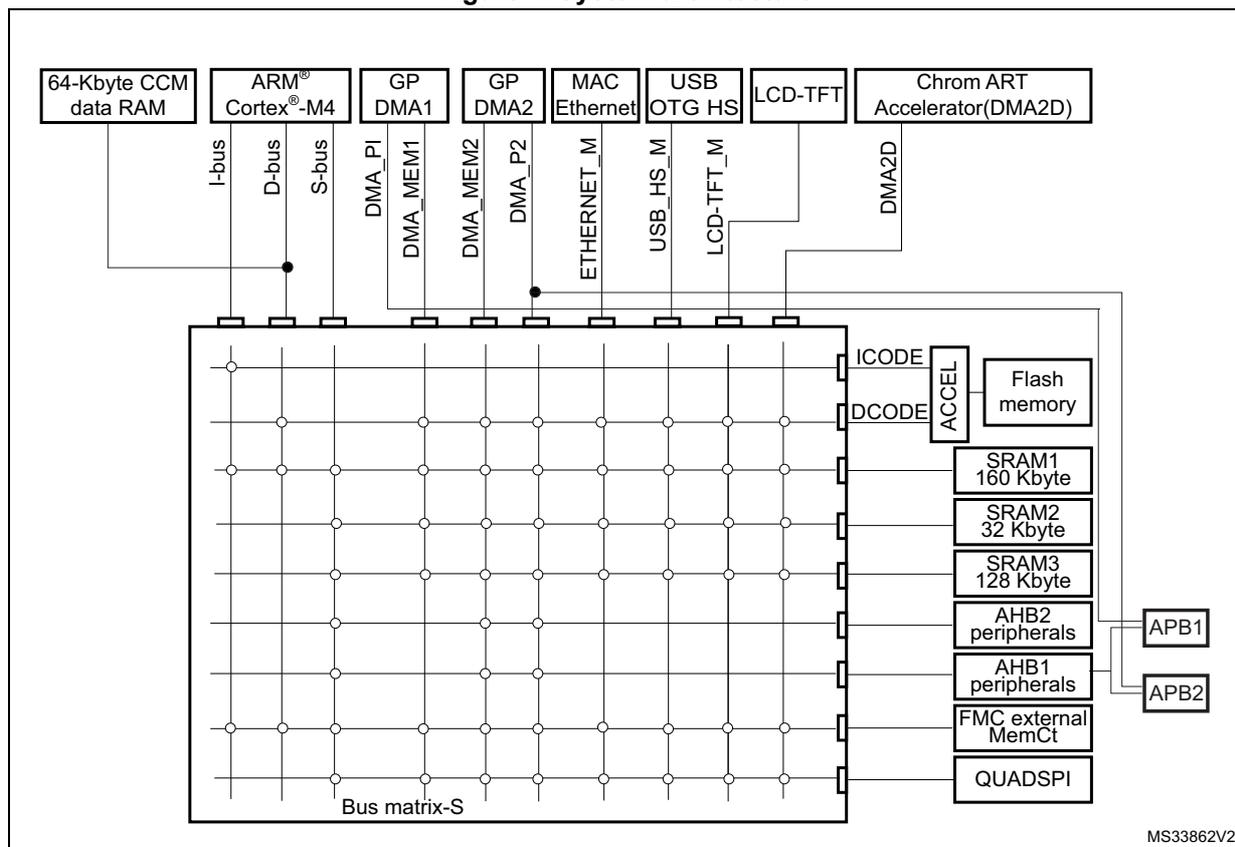
The diagram illustrates the system architecture of the RM0386 microcontroller. At the top, several functional blocks are shown: 64-Kbyte CCM data RAM, ARM Cortex-M4 core, GP DMA1, GP DMA2, MAC Ethernet, USB OTG HS, LCD-TFT, and Chrom ART Accelerator(DMA2D). These are connected to a central 'Bus matrix-S'. The Cortex-M4 core is connected to the matrix via I-bus, D-bus, and S-bus. The CCM data RAM is connected to the D-bus. DMA1 and DMA2 are connected via DMA_MEM1, DMA_P1, DMA_MEM2, and DMA_P2. MAC Ethernet, USB OTG HS, and LCD-TFT are connected via ETHERNET_M, USB_HS_M, and LCD-TFT_M. The Chrom ART Accelerator is connected via DMA2D. The Bus matrix-S is connected to a vertical stack of memory and peripheral blocks: Flash memory (via ICODE and DCODE), SRAM1 (160 Kbyte), SRAM2 (32 Kbyte), SRAM3 (128 Kbyte), AHB2 peripherals, AHB1 peripherals, FMC external MemCt, and QUADSPI. The AHB1 and AHB2 peripherals are connected to APB1 and APB2 buses. The diagram is labeled 'Bus matrix-S' at the bottom and 'MS33862V2' at the bottom right.
2.1.1 I-bus
This bus connects the Instruction bus of the Cortex ® -M4 core to the BusMatrix. This bus is used by the core to fetch instructions. The target of this bus is a memory containing code (internal Flash memory/SRAM or external memories through the FMC).
2.1.2 D-bus
This bus connects the databus of the Cortex ® -M4 to the 64-Kbyte CCM data RAM to the BusMatrix. This bus is used by the core for literal load and debug access. The target of this bus is a memory containing code or data (internal Flash memory or external memories through the FMC).
2.1.3 S-bus
This bus connects the system bus of the Cortex ® -M4 core to a BusMatrix. This bus is used to access data located in a peripheral or in SRAM. Instructions may also be fetch on this bus (less efficient than ICode). The targets of this bus are the internal SRAM, SRAM2 and SRAM3, the AHB1 peripherals including the APB peripherals, the AHB2 peripherals and the external memories through the FMC.
2.1.4 DMA memory bus
This bus connects the DMA memory bus master interface to the BusMatrix. It is used by the DMA to perform transfer to/from memories. The targets of this bus are data memories: internal SRAMs (SRAM1, SRAM2 and SRAM3) and external memories through the FMC.
2.1.5 DMA peripheral bus
This bus connects the DMA peripheral master bus interface to the BusMatrix. This bus is used by the DMA to access AHB peripherals or to perform memory-to-memory transfers. The targets of this bus are the AHB and APB peripherals plus data memories: internal SRAMs (SRAM1, SRAM2 and SRAM3) and external memories through the FMC.
2.1.6 Ethernet DMA bus
This bus connects the Ethernet DMA master interface to the BusMatrix. This bus is used by the Ethernet DMA to load/store data to a memory. The targets of this bus are data memories: internal SRAMs (SRAM1, SRAM2, SRAM3), internal Flash memory, and external memories through the FMC.
2.1.7 USB OTG HS DMA bus
This bus connects the USB OTG HS DMA master interface to the BusMatrix. This bus is used by the USB OTG DMA to load/store data to a memory. The targets of this bus are data memories: internal SRAMs (SRAM1, SRAM2, SRAM3), internal Flash memory, and external memories through the FMC.
2.1.8 LCD-TFT controller DMA bus
This bus connects the LCD controller DMA master interface to the BusMatrix. It is used by the LCD-TFT DMA to load/store data to a memory. The targets of this bus are data memories: internal SRAMs (SRAM1, SRAM2, SRAM3), external memories through FMC, and internal Flash memory.
2.1.9 DMA2D bus
This bus connects the DMA2D master interface to the BusMatrix. This bus is used by the DMA2D graphic Accelerator to load/store data to a memory. The targets of this bus are data memories: internal SRAMs (SRAM1, SRAM2, SRAM3), external memories through FMC, and internal Flash memory.
2.1.10 BusMatrix
The BusMatrix manages the access arbitration between masters. The arbitration uses a round-robin algorithm.
2.1.11 AHB/APB bridges (APB)
The two AHB/APB bridges, APB1 and APB2, provide full synchronous connections between the AHB and the two APB buses, allowing flexible selection of the peripheral frequency.
Refer to the device datasheets for more details on APB1 and APB2 maximum frequencies, and to Section 2.3.2 for the address mapping of AHB and APB peripherals.
After each device reset, all peripheral clocks are disabled (except for the SRAM and Flash memory interface). Before using a peripheral you have to enable its clock in the RCC_AHBxENR or RCC_APBxENR register.
Note: When a 16- or an 8-bit access is performed on an APB register, the access is transformed into a 32-bit access: the bridge duplicates the 16- or 8-bit data to feed the 32-bit vector.
2.2 Memory organization
2.2.1 Introduction
Program memory, data memory, registers and I/O ports are organized within the same linear 4-Gbyte address space.
The bytes are coded in memory in Little Endian format. The lowest numbered byte in a word is considered the word's least significant byte and the highest numbered byte the most significant.
The addressable memory space is divided into eight main blocks, of 512 Mbytes each.
2.2.2 Memory map and register boundary addresses
Figure 2. Memory map
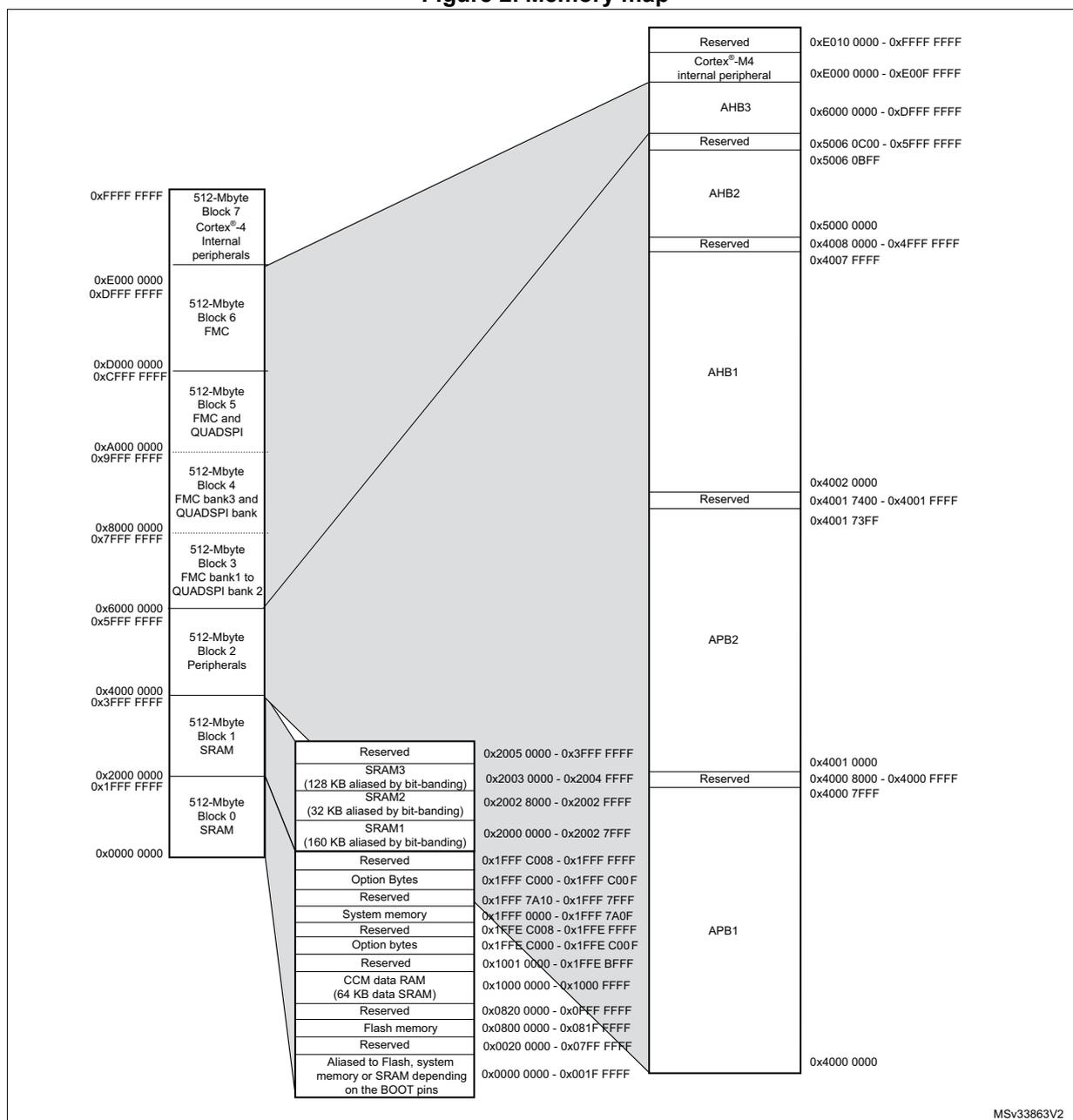
| Address Range | Memory Block | Sub-Block / Bus | Sub-Block Address Range |
|---|---|---|---|
| 0xFFFF FFFF | 512-Mbyte Block 7 Cortex ® -M4 Internal peripherals | Reserved | 0xE010 0000 - 0xFFFF FFFF |
| 0xE000 0000 | Cortex ® -M4 internal peripheral | 0xE000 0000 - 0xE00F FFFF | |
| 0xDFFF FFFF | 512-Mbyte Block 6 FMC | AHB3 | 0x6000 0000 - 0xDFFF FFFF |
| 0xD000 0000 | 512-Mbyte Block 5 FMC and QUADSPI | Reserved | 0x5006 0C00 - 0x5FFF FFFF |
| 0xCFFF FFFF | AHB2 | 0x5000 0000 - 0x5006 0BFF | |
| 0xA000 0000 | 512-Mbyte Block 4 FMC bank3 and QUADSPI bank | Reserved | 0x4008 0000 - 0x4FFF FFFF |
| 0x9FFF FFFF | AHB1 | 0x4002 0000 - 0x4007 FFFF | |
| 0x8000 0000 | 512-Mbyte Block 3 FMC bank1 to QUADSPI bank 2 | Reserved | 0x4001 7400 - 0x4001 FFFF |
| 0x7FFF FFFF | APB2 | 0x4001 0000 - 0x4001 73FF | |
| 0x6000 0000 | 512-Mbyte Block 2 Peripherals | Reserved | 0x4000 8000 - 0x4000 FFFF |
| 0x5FFF FFFF | APB1 | 0x4000 0000 - 0x4000 7FFF | |
| 0x4000 0000 | 512-Mbyte Block 1 SRAM | Reserved | 0x2005 0000 - 0x3FFF FFFF |
| 0x3FFF FFFF | SRAM3 (128 KB aliased by bit-banding) | 0x2003 0000 - 0x2004 FFFF | |
| 0x2000 0000 | 512-Mbyte Block 0 SRAM | SRAM2 (32 KB aliased by bit-banding) | 0x2002 8000 - 0x2002 FFFF |
| 0x1FFF FFFF | SRAM1 (160 KB aliased by bit-banding) | 0x2000 0000 - 0x2002 7FFF | |
| Reserved | 0x1FFF C008 - 0x1FFF FFFF | ||
| Option Bytes | 0x1FFF C000 - 0x1FFF C00F | ||
| Reserved | 0x1FFF 7A10 - 0x1FFF 7FFF | ||
| System memory | 0x1FFF 0000 - 0x1FFF 7A0F | ||
| Reserved | 0x1FFE C008 - 0x1FFE FFFF | ||
| Option bytes | 0x1FFE C000 - 0x1FFE C00F | ||
| Reserved | 0x1001 0000 - 0x1FFE BFFF | ||
| CCM data RAM (64 KB data SRAM) | 0x1000 0000 - 0x1000 FFFF | ||
| Reserved | 0x0820 0000 - 0x0FFF FFFF | ||
| Flash memory | 0x0800 0000 - 0x081F FFFF | ||
| Reserved | 0x0020 0000 - 0x07FF FFFF | ||
| 0x0000 0000 | Aliased to Flash, system memory or SRAM depending on the BOOT pins | 0x0000 0000 - 0x001F FFFF |
All the memory map areas that are not allocated to on-chip memories and peripherals are considered “Reserved”. For the detailed mapping of available memory and register areas, refer to the following table.
The following table gives the boundary addresses of the peripherals available in the devices.
Table 1. STM32F469xx and STM32F479xx register boundary addresses
| Boundary address | Peripheral | Bus | Register map |
|---|---|---|---|
| 0xA000 0000 - 0xA000 0FFF | FMC control register | AHB3 | Section 12.8.6: FMC register map on page 368 |
| 0xA000 1000 - 0xA000 1FFF | QUADSPI control register | Section 13.5.14: QUADSPI register map on page 397 | |
| 0x5006 0800 - 0x5006 0BFF | RNG | AHB2 | Section 19.7.4: RNG register map on page 647 |
| 0x5006 0400 - 0x5006 07FF | HASH | Section 21.6.8: HASH register map on page 733 | |
| 0x5006 0000 - 0x5006 03FF | CRYP | Section 20.7.21: CRYP register map on page 711 | |
| 0x5005 0000 - 0x5005 03FF | DCMI | Section 16.5.12: DCMI register map on page 488 | |
| 0x5000 0000 - 0x5003 FFFF | USB OTG FS | Section 35.15.64: OTG_FS/OTG_HS register map on page 1379 |
Table 1. STM32F469xx and STM32F479xx register boundary addresses (continued)
| Boundary address | Peripheral | Bus | Register map |
|---|---|---|---|
| 0x4004 0000 - 0x4007 FFFF | USB OTG HS | AHB1 | Section 35.15.64: OTG_FS/OTG_HS register map on page 1379 |
| 0x4002 B000 - 0x4002 BBFF | Chrom-ART (DMA2D) | Section 10.5.26: DMA2D register map on page 282 | |
| 0x4002 9000 - 0x4002 93FF | ETHERNET MAC | Section 36.8.5: Ethernet register maps on page 1574 | |
| 0x4002 8C00 - 0x4002 8FFF | |||
| 0x4002 8800 - 0x4002 8BFF | |||
| 0x4002 8400 - 0x4002 87FF | |||
| 0x4002 8000 - 0x4002 83FF | DMA2 | Section 9.5.11: DMA register map on page 251 | |
| 0x4002 6400 - 0x4002 67FF | |||
| 0x4002 6000 - 0x4002 63FF | DMA1 | - | |
| 0x4002 4000 - 0x4002 4FFF | BKPSRAM | ||
| 0x4002 3C00 - 0x4002 3FFF | Flash interface register | Section 3.7: Flash interface registers on page 96 | |
| 0x4002 3800 - 0x4002 3BFF | RCC | Section 6.3.26: RCC register map on page 193 | |
| 0x4002 3000 - 0x4002 33FF | CRC | Section 4.4.4: CRC register map on page 108 | |
| 0x4002 2800 - 0x4002 2BFF | GPIOK | Section 7.4.11: GPIO register map on page 217 | |
| 0x4002 2400 - 0x4002 27FF | GPIOJ | ||
| 0x4002 2000 - 0x4002 23FF | GPIOI | Section 7.4.11: GPIO register map on page 217 | |
| 0x4002 1C00 - 0x4002 1FFF | GPIOH | ||
| 0x4002 1800 - 0x4002 1BFF | GPIOG | ||
| 0x4002 1400 - 0x4002 17FF | GPIOF | ||
| 0x4002 1000 - 0x4002 13FF | GPIOE | ||
| 0x4002 0C00 - 0x4002 0FFF | GPIO_D | ||
| 0x4002 0800 - 0x4002 0BFF | GPIOC | ||
| 0x4002 0400 - 0x4002 07FF | GPIOB | ||
| 0x4002 0000 - 0x4002 03FF | GPIOA | ||
Table 1. STM32F469xx and STM32F479xx register boundary addresses (continued)
| Boundary address | Peripheral | Bus | Register map |
|---|---|---|---|
| 0x4000 7C00 - 0x4000 7FFF | UART8 | APB1 | Section 30.6.8: USART register map on page 1061 |
| 0x4000 7800 - 0x4000 7BFF | UART7 | ||
| 0x4000 7400 - 0x4000 77FF | DAC | Section 15.5.15: DAC register map on page 466 | |
| 0x4000 7000 - 0x4000 73FF | PWR | Section 5.7: PWR register map on page 135 | |
| 0x4000 6800 - 0x4000 6BFF | CAN2 | Section 34.9.5: bxCAN register map on page 1262 | |
| 0x4000 6400 - 0x4000 67FF | CAN1 | ||
| 0x4000 5C00 - 0x4000 5FFF | I2C3 | Section 29.6.11: I2C register map on page 1009 | |
| 0x4000 5800 - 0x4000 5BFF | I2C2 | ||
| 0x4000 5400 - 0x4000 57FF | I2C1 | ||
| 0x4000 5000 - 0x4000 53FF | UART5 | Section 30.6.8: USART register map on page 1061 | |
| 0x4000 4C00 - 0x4000 4FFF | UART4 | ||
| 0x4000 4800 - 0x4000 4BFF | USART3 | ||
| 0x4000 4400 - 0x4000 47FF | USART2 | Section 31.7.10: SPI register map on page 1111 | |
| 0x4000 4000 - 0x4000 43FF | I2S3ext | ||
| 0x4000 3C00 - 0x4000 3FFF | SPI3 / I2S3 | ||
| 0x4000 3800 - 0x4000 3BFF | SPI2 / I2S2 | ||
| 0x4000 3400 - 0x4000 37FF | I2S2ext | ||
| 0x4000 3000 - 0x4000 33FF | IWDG | Section 26.4.5: IWDG register map on page 931 | |
| 0x4000 2C00 - 0x4000 2FFF | WWDG | Section 27.6.4: WWDG register map on page 938 | |
| 0x4000 2800 - 0x4000 2BFF | RTC & BKP registers | Section 28.6.21: RTC register map on page 976 | |
| 0x4000 2000 - 0x4000 23FF | TIM14 | Section 24.5.12: TIM10/11/13/14 register map on page 912 | |
| 0x4000 1C00 - 0x4000 1FFF | TIM13 | ||
| 0x4000 1800 - 0x4000 1BFF | TIM12 | Section 24.4.13: TIM9/12 register map on page 901 | |
| 0x4000 1400 - 0x4000 17FF | TIM7 | Section 25.4.9: TIM6&TIM7 register map on page 925 | |
| 0x4000 1000 - 0x4000 13FF | TIM6 | ||
| 0x4000 0C00 - 0x4000 0FFF | TIM5 | Section 23.4.21: TIMx register map on page 865 | |
| 0x4000 0800 - 0x4000 0BFF | TIM4 | ||
| 0x4000 0400 - 0x4000 07FF | TIM3 | ||
| 0x4000 0000 - 0x4000 03FF | TIM2 |
2.3 Bit banding
The Cortex ® -M4 memory map includes two bit-band regions. These regions map each word in an alias region of memory to a bit in a bit-band region of memory. Writing to a word in the alias region has the same effect as a read-modify-write operation on the targeted bit in the bit-band region.
In the STM32F469xx and STM32F479xx devices both the peripheral registers and the SRAM are mapped to a bit-band region, so that single bit-band write and read operations are allowed. The operations are only available for Cortex®-M4 accesses, and not from other bus masters (e.g. DMA).
A mapping formula shows how to reference each word in the alias region to a corresponding bit in the bit-band region. The mapping formula is:
where:
- – bit_word_addr is the address of the word in the alias memory region that maps to the targeted bit
- – bit_band_base is the starting address of the alias region
- – byte_offset is the number of the byte in the bit-band region that contains the targeted bit
- – bit_number is the bit position (0-7) of the targeted bit
Example
The following example shows how to map bit 2 of the byte located at SRAM address 0x20000300 to the alias region:
Writing to address 0x22006008 has the same effect as a read-modify-write operation on bit 2 of the byte at SRAM address 0x20000300.
Reading address 0x22006008 returns the value (0x01 or 0x00) of bit 2 of the byte at SRAM address 0x20000300 (0x01: bit set; 0x00: bit reset).
For more information on bit-banding, refer to the Cortex®-M4 programming manual.
2.3.1 Embedded SRAM
The devices feature 4 Kbytes of backup SRAM (see Section 5.1.4: Battery backup domain ) plus 384 Kbytes of system SRAM.
The embedded SRAM can be accessed as bytes, half-words (16 bits) or full words (32 bits). Read and write operations are performed at CPU speed with 0 wait state. The embedded SRAM is divided into up to three blocks:
- • SRAM1 and SRAM2 mapped at address 0x2000 0000 and accessible by all AHB masters.
- • SRAM3 mapped at address 0x2003 0000 and accessible by all AHB masters.
- • CCM (core coupled memory) mapped at address 0x1000 0000 and accessible only by the CPU through the D-bus.
The AHB masters support concurrent SRAM accesses (from the Ethernet or the USB OTG HS): for instance, the Ethernet MAC can read/write from/to SRAM2 while the CPU is reading/writing from/to SRAM1 or SRAM3.
The CPU can access the SRAM, SRAM2, and SRAM3 through the System Bus or through the I-Code/D-Code buses when boot from SRAM is selected or when physical remap is selected ( Section 8.2.1: SYSCFG memory remap register (SYSCFG_MEMRMP) in the SYSCFG controller). To get the max performance on SRAM execution, physical remap should be selected (boot or software selection).
2.3.2 Flash memory overview
The Flash memory interface manages CPU AHB I-Code and D-Code accesses to the Flash memory. It implements the erase and program Flash memory operations and the read and write protection mechanisms. It accelerates code execution with a system of instruction prefetch and cache lines.
The Flash memory is organized as follows:
- • A main memory block divided into sectors.
- • System memory from which the device boots in System memory boot mode
- • 512 OTP (one-time programmable) bytes for user data.
- • Option bytes to configure read and write protection, BOR level, watchdog software/hardware and reset when the device is in Standby or Stop mode.
Refer to Section 3: Embedded flash memory (FLASH) for more details.
2.4 Boot configuration
Due to its fixed memory map, the code area starts from address 0x0000 0000 (accessed through the ICode/DCode buses) while the data area (SRAM) starts from address 0x2000 0000 (accessed through the system bus). The Cortex ® -M4 CPU always fetches the reset vector on the ICode bus, which implies to have the boot area available only in the code area (typically, Flash memory). STM32F4xx microcontrollers implement a special mechanism to be able to boot from other memories (like the internal SRAM).
Three different boot modes can be selected through the BOOT[1:0] pins as shown in the following table.
Table 2. Boot modes
| Boot mode selection pins | Boot mode | Aliasings | |
|---|---|---|---|
| BOOT1 | BOOT0 | ||
| x | 0 | Main Flash memory | Main Flash memory is selected as the boot area |
| 0 | 1 | System memory | System memory is selected as the boot area |
| 1 | 1 | Embedded SRAM | Embedded SRAM is selected as the boot area |
The values on the BOOT pins are latched on the fourth rising edge of SYSCLK after a reset. It is up to the user to set the BOOT1 and BOOT0 pins after reset to select the required boot mode.
BOOT0 is a dedicated pin while BOOT1 is shared with a GPIO pin. Once BOOT1 has been sampled, the corresponding GPIO pin is free and can be used for other purposes.
The BOOT pins are also resampled when the device exits the Standby mode. Consequently, they must be kept in the required Boot mode configuration when the device is in the Standby mode. After this startup delay is over, the CPU fetches the top-of-stack value from address 0x0000 0000, then starts code execution from the boot memory starting from 0x0000 0004.
Note: When the device boots from SRAM, in the application initialization code, relocate the vector table in SRAM using the NVIC exception table and the offset register.
When booting from the main Flash memory, the application software can either boot from bank 1 or from bank 2. By default, boot from bank 1 is selected.
To select boot from Flash memory bank 2, set the BFB2 bit in the user option bytes. When this bit is set and the boot pins are in the boot from main Flash memory configuration, the device boots from system memory, and the boot loader jumps to execute the user application programmed in Flash memory bank 2. For further details, refer to AN2606.
Note: When booting from bank 2, in the applications initialization code, relocate the vector table to bank 2 base address. (0x0808 0000) using the NVIC exception table and offset register.
Embedded bootloader
The embedded bootloader mode is used to reprogram the Flash memory using one of the following serial interfaces:
- • USART1 (PA9/PA10)
- • USART3 (PB10/11 and PC10/11)
- • CAN2 (PB5/13)
- • USB OTG FS (PA11/12) in Device mode (DFU: device firmware upgrade).
The USART peripherals operate at the internal 16 MHz oscillator (HSI) frequency, while the CAN and USB OTG FS require an external clock (HSE) multiple of 1 MHz (ranging from 4 to 26 MHz).
The embedded bootloader code is located in system memory. It is programmed by ST during production. For additional information, refer to application note AN2606.
Physical remap
Once the boot pins are selected, the application software can modify the memory accessible in the code area (in this way the code can be executed through the ICode bus in place of the System bus). This modification is performed by programming the SYSCFG memory remap register (SYSCFG_MEMRMP) in the SYSCFG controller.
The following memories can thus be remapped:
- • Main Flash memory
- • System memory
- • Embedded SRAM1 (112 KB)
- • FMC bank 1 (NOR/PSRAM 1 and 2)
- • FMC SDRAM bank 1
Table 3. Memory mapping versus Boot mode/physical remap
| Addresses | Boot/remap | Remap in FMC | ||
|---|---|---|---|---|
| Main flash memory | Embedded SRAM | System memory | ||
| 0x2003 0000 - 0x2004 FFFF | SRAM3 (128 KB) | |||
| 0x2002 8000 - 0x2002 FFFF | SRAM2 (32 KB) | |||
| 0x2000 0000 - 0x2002 7FFF | SRAM1 (160 KB) | |||
| 0x1FFF 0000 - 0x1FFF 7A0F | System memory | |||
| 0x0820 0000 - 0x0FFF FFFF | Reserved | |||
| Addresses | Boot/remap | Remap in FMC | ||
|---|---|---|---|---|
| Main flash memory | Embedded SRAM | System memory | ||
| 0x0800 0000 - 0x081F FFFF | Flash memory | |||
| 0x0400 0000 - 0x07FF FFFF | Reserved | FMC bank 1 NOR/PSRAM 2 (128 MB aliased) | ||
| 0x0000 0000 (1)(2) | Flash memory(2 MB) | SRAM1 (160 KB) | System memory (30 KB) | FMC bank 1 NOR/PSRAM 1 (aliased) or FMC SDRAM bank 1 (128 MB aliased) |
- 1. When the FMC is remapped at address 0x0000 0000, only the first two regions of bank 1 memory controller (bank 1 NOR/PSRAM 1 and NOR/PSRAM 2) or SDRAM bank 1 can be remapped. In remap mode, the CPU can access the external memory via ICode bus instead of System bus which boosts up the performance.
- 2. Even when aliased in the boot memory space, the related memory is still accessible at its original memory space.