3. Embedded Flash memory (FLASH)
3.1 Introduction
The Flash memory interface manages Cortex®-M7 AXI and TCM accesses to the Flash memory. It implements the erase and program Flash memory operations and the read and write protection mechanisms.
The Flash memory interface accelerates code execution with a system of instruction prefetch and cache lines on ITCM interface (ART Accelerator™).
3.2 Flash main features
- • Flash memory read operations
- • Flash memory program/erase operations
- • Read / write protections
- • 64 cache lines of 256 bits on ITCM interface (ART Accelerator™)
- • Prefetch on TCM instruction code
Figure 3 shows the Flash memory interface connection inside the system architecture.
Figure 3. Flash memory interface connection inside system architecture (STM32F75xxx and STM32F74xxx)
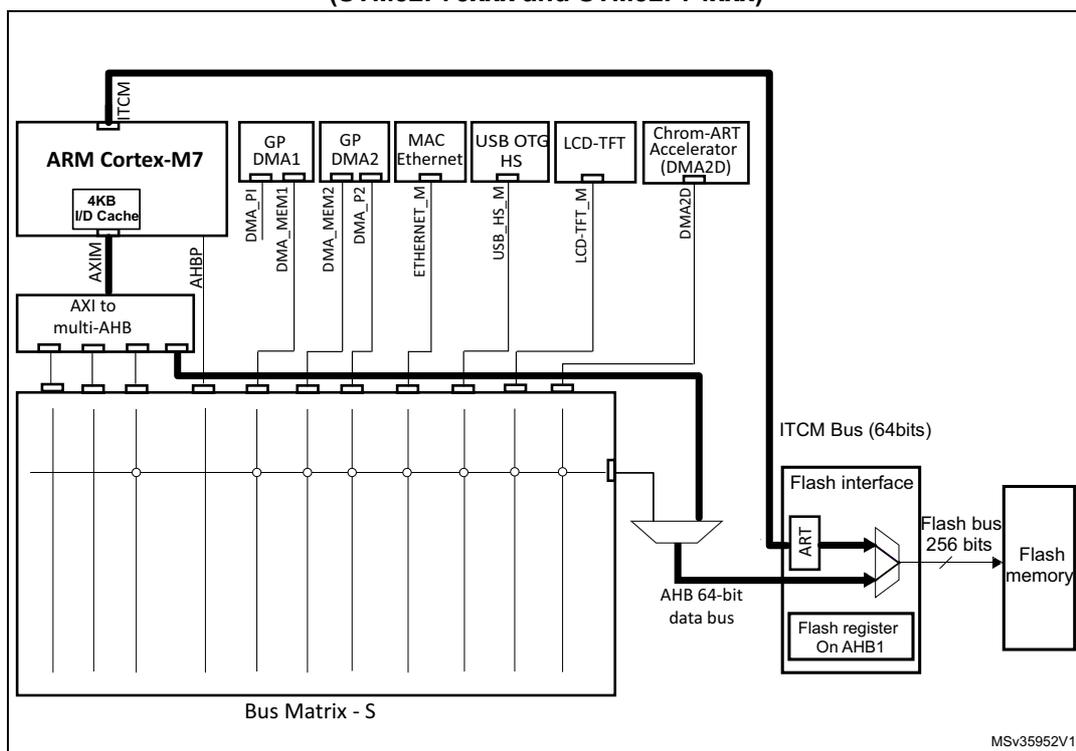
The diagram illustrates the system architecture for STM32F75xxx and STM32F74xxx microcontrollers. At the top, the ARM Cortex-M7 core is shown with its 4KB I/D Cache. It is connected to an AXI to multi-AHB bridge, which in turn connects to a Bus Matrix - S. The Bus Matrix - S is connected to various peripherals: GP DMA1, GP DMA2, MAC Ethernet, USB OTG HS, LCD-TFT, and Chrom-ART Accelerator (DMA2D). The Flash memory interface is also connected to the Bus Matrix - S. The interface includes an ART (ART Accelerator) and a Flash register on AHB1. The ART is connected to the ITCM Bus (64bits) and the AHB 64-bit data bus. The Flash register is connected to the AHB 64-bit data bus. The Flash memory is connected to the Flash bus (256 bits), which is connected to the Flash interface.
3.3 Flash functional description
3.3.1 Flash memory organization
The Flash memory has the following main features:
- • Capacity up to 1 Mbyte on STM32F756xx and STM32F74xx devices and 64 Kbytes on STM32F750xx devices
- • 256 bits wide data read
- • Byte, half-word, word and double word write
- • Sector and mass erase
The Flash memory is organized as follows:
- • On STM32F756xx and STM32F74xx devices, a main memory block divided into 4 sectors of 32 Kbytes, 1 sector of 128 Kbytes and 3 sectors of 256 Kbytes
- • On STM32F750xx devices, a main memory block divided into 2 sectors of 32 Kbytes.
- • Information blocks containing:
- – System memory from which the device boots in System memory boot mode
- – 1024 OTP (one-time programmable) for user data
- – The OTP area contains 16 additional bytes used to lock the corresponding OTP data block.
- – Option bytes to configure read and write protection, BOR level, software/hardware watchdog, boot memory base address and reset when the device is in Standby or Stop mode.
The embedded flash has three main interfaces:
- • 64-bits ITCM interface:
- – It is connected to the ITCM bus of Cortex-M7 and used for instruction execution and data read access.
- – Write accesses are not supported on ITCM interface
- – Supports a unified 64 cache lines of 256 bits (ART accelerator)
- • 64-bits AHB interface:
- – It is connected to the AXI bus of Cortex-M7 through the AHB bus matrix and used for code execution, read and write accesses.
- – DMAs and peripherals DMAs data transfer on Flash are done through the AHB interface whatever the addressed flash interface TCM or AHB.
- • 32-bits AHB register interface:
- – It is used for control and status register accesses.
The main memory and information block organization are shown in Table 3 .
Table 3. STM32F756xx and STM32F74xxx Flash memory organization| Block | Name | Bloc base address on AXIM interface | Block base address on ICTM interface | Sector size |
|---|---|---|---|---|
| Main memory block | Sector 0 | 0x0800 0000 - 0x0800 7FFF | 0x0020 0000 - 0x0020 7FFF | 32 Kbytes |
| Sector 1 | 0x0800 8000 - 0x0800 FFFF | 0x0020 8000 - 0x0020 FFFF | 32 Kbytes | |
| Sector 2 | 0x0801 0000 - 0x0801 7FFF | 0x0021 0000 - 0x0021 7FFF | 32 Kbytes | |
| Sector 3 | 0x0801 8000 - 0x0801 FFFF | 0x0021 8000 - 0x0021 FFFF | 32 Kbytes | |
| Sector 4 | 0x0802 0000 - 0x0803 FFFF | 0x0022 0000 - 0x0023 FFFF | 128 Kbytes | |
| Sector 5 | 0x0804 0000 - 0x0807 FFFF | 0x0024 0000 - 0x0027 FFFF | 256 Kbytes | |
| Sector 6 | 0x0808 0000 - 0x080B FFFF | 0x0028 0000 - 0x002B FFFF | 256 Kbytes | |
| Sector 7 | 0x080C 0000 - 0x080F FFFF | 0x002C 0000 - 0x002F FFFF | 256 Kbytes | |
| Information block | System memory | 0x1FF0 0000 - 0x1FF0 EDBF | 0x0010 0000 - 0x0010 EDBF | 60 Kbytes |
| OTP | 0x1FF0 F000 - 0x1FF0 F41F | 0x0010 F000 - 0x0010 F41F | 1024 bytes | |
| Option bytes | 0x1FFF 0000 - 0x1FFF 001F | - | 32 bytes |
| Block | Name | Bloc base address on AXIM interface | Block base address on ICTM interface | Sector size |
|---|---|---|---|---|
| Main memory block | Sector 0 | 0x0800 0000 - 0x0800 7FFF | 0x0020 0000 - 0x0020 7FFF | 32 Kbytes |
| Sector 1 | 0x0800 8000 - 0x0800 FFFF | 0x0020 8000 - 0x0020 FFFF | 32 Kbytes | |
| Information block | System memory | 0x1FF0 0000 - 0x1FF0 EDBF | 0x0010 0000 - 0x0010 EDBF | 60 Kbytes |
| OTP | 0x1FF0 F000 - 0x1FF0 F41F | 0x0010 F000 - 0x0010 F41F | 1024 bytes | |
| Option bytes | 0x1FFF 0000 - 0x1FFF 001F | - | 32 bytes |
3.3.2 Read access latency
To correctly read data from Flash memory, the number of wait states (LATENCY) must be correctly programmed in the Flash access control register (FLASH_ACR) according to the frequency of the CPU clock (HCLK) and the supply voltage of the device.
The correspondence between wait states and CPU clock frequency is given in Table 14 and Table 5 .
- Note:
- - when VOS[1:0] = '0x01', the maximum value of \( f_{HCLK} \) is 144 MHz.
- - when VOS[1:0] = '0x10', the maximum value of \( f_{HCLK} \) is 168 MHz. It can be extended to 180 MHz by activating the over-drive mode.
- - when VOS[1:0] = '0x11', the maximum value of \( f_{HCLK} \) is 180 MHz. It can be extended to 216 MHz by activating the over-drive mode.
- - The over-drive mode is not available when \( V_{DD} \) ranges from 1.8 to 2.1 V.
- Refer to Section 4.1.4: Voltage regulator for details on how to activate the over-drive mode.
| Wait states (WS) (LATENCY) | HCLK (MHz) | |||
|---|---|---|---|---|
| Voltage range 2.7 V - 3.6 V | Voltage range 2.4 V - 2.7 V | Voltage range 2.1 V - 2.4 V | Voltage range 1.8 V - 2.1 V | |
| 0 WS (1 CPU cycle) | \( 0 < HCLK \leq 30 \) | \( 0 < HCLK \leq 24 \) | \( 0 < HCLK \leq 22 \) | \( 0 < HCLK \leq 20 \) |
| 1 WS (2 CPU cycles) | \( 30 < HCLK \leq 60 \) | \( 24 < HCLK \leq 48 \) | \( 22 < HCLK \leq 44 \) | \( 20 < HCLK \leq 40 \) |
| 2 WS (3 CPU cycles) | \( 60 < HCLK \leq 90 \) | \( 48 < HCLK \leq 72 \) | \( 44 < HCLK \leq 66 \) | \( 40 < HCLK \leq 60 \) |
| 3 WS (4 CPU cycles) | \( 90 < HCLK \leq 120 \) | \( 72 < HCLK \leq 96 \) | \( 66 < HCLK \leq 88 \) | \( 60 < HCLK \leq 80 \) |
| 4 WS (5 CPU cycles) | \( 120 < HCLK \leq 150 \) | \( 96 < HCLK \leq 120 \) | \( 88 < HCLK \leq 110 \) | \( 80 < HCLK \leq 100 \) |
| 5 WS (6 CPU cycles) | \( 150 < HCLK \leq 180 \) | \( 120 < HCLK \leq 144 \) | \( 110 < HCLK \leq 132 \) | \( 100 < HCLK \leq 120 \) |
| 6 WS (7 CPU cycles) | \( 180 < HCLK \leq 210 \) | \( 144 < HCLK \leq 168 \) | \( 132 < HCLK \leq 154 \) | \( 120 < HCLK \leq 140 \) |
| 7 WS (8 CPU cycles) | \( 210 < HCLK \leq 216 \) | \( 168 < HCLK \leq 192 \) | \( 154 < HCLK \leq 176 \) | \( 140 < HCLK \leq 160 \) |
| 8 WS (9 CPU cycles) | - | \( 192 < HCLK \leq 216 \) | \( 176 < HCLK \leq 198 \) | \( 160 < HCLK \leq 180 \) |
| 9 WS (10 CPU cycles) | - | - | \( 198 < HCLK \leq 216 \) | - |
After reset, the CPU clock frequency is 16 MHz and 0 wait state (WS) is configured in the FLASH_ACR register.
It is highly recommended to use the following software sequences to tune the number of wait states to access the Flash memory with the CPU frequency.
Increasing the CPU frequency
- 1. Program the new number of wait states to the LATENCY bits in the FLASH_ACR register
- 2. Check that the new number of wait states is taken into account to access the Flash memory by reading the FLASH_ACR register
- 3. Modify the CPU clock source by writing the SW bits in the RCC_CFGR register
- 4. If needed, modify the CPU clock prescaler by writing the HPRE bits in RCC_CFGR
- 5. Check that the new CPU clock source or/and the new CPU clock prescaler value is/are taken into account by reading the clock source status (SWS bits) or/and the AHB prescaler value (HPRE bits), respectively, in the RCC_CFGR register.
Decreasing the CPU frequency
- 1. Modify the CPU clock source by writing the SW bits in the RCC_CFGR register
- 2. If needed, modify the CPU clock prescaler by writing the HPRE bits in RCC_CFGR
- 3. Check that the new CPU clock source or/and the new CPU clock prescaler value is/are taken into account by reading the clock source status (SWS bits) or/and the AHB prescaler value (HPRE bits), respectively, in the RCC_CFGR register
- 4. Program the new number of wait states to the LATENCY bits in FLASH_ACR
- 5. Check that the new number of wait states is used to access the Flash memory by reading the FLASH_ACR register
Note: A change in CPU clock configuration or wait state (WS) configuration may not be effective straight away. To make sure that the current CPU clock frequency is the one the user has configured, the user can check the AHB prescaler factor and clock source status values. To make sure that the number of WS programmed is effective, the user can read the FLASH_ACR register.
Instruction prefetch
Each flash read operation provides 256 bits representing 8 instructions of 32 bits to 16 instructions of 16 bits according to the program launched. So, in case of sequential code, at least 8 CPU cycles are needed to execute the previous instruction line read. The prefetch on ITCM bus allows to read the sequential next line of instructions in the flash while the current instruction line is requested by the CPU. The prefetch can be enabled by setting the PRFTEN bit of the FLASH_ACR register. This feature is useful if at least one Wait State is needed to access the flash. When the code is not sequential (branch), the instruction may not be present neither in the current instruction line used nor in the prefetched instruction line. In this case (miss), the penalty in term of number of cycles is at least equal to the number of Wait States.
Adaptive real-time memory accelerator (ART Accelerator™)
The proprietary Adaptive real-time (ART) memory accelerator is optimized for STM32 industry-standard Arm® Cortex®-M7 with FPU processors. It balances the inherent performance advantage of the Arm® Cortex®-M7 with FPU over Flash memory technologies, which normally requires the processor to wait for the Flash memory at higher operating frequencies.
To release the processor full performance, the accelerator implements a unified cache of an instruction and branch cache which increases program execution speed from the 256-bit Flash memory. Based on CoreMark benchmark, the performance achieved thanks to the ART accelerator is equivalent to 0 wait state program execution from Flash memory at a CPU frequency up to 216 MHz.
The ART accelerator is available only for flash access on ITCM interface.
To limit the time lost due to jumps, it is possible to retain 64 lines of 256 bits in the ART accelerator. This feature can be enabled by setting the ARTEN bit of the FLASH_CR register. The ART Accelerator is unified, it contains instruction as well as data literal pools. Each time a miss occurs (requested data not present in the current data line used or in the instruction cache memory), the read line is copied in the instruction cache memory of ART. If a data contained in the instruction cache memory is requested by the CPU, the data is provided without inserting delay. Once all the cache memory lines are filled, the LRU (Least Recently Used) policy is used to determine the line to replace in the memory cache. This feature is particularly useful in case of code containing loops.
Note: Data in user configuration sector are not cacheable.
3.3.3 Flash program and erase operations
For any Flash memory program operation (erase or program), the CPU clock frequency (HCLK) must be at least 1 MHz. The contents of the Flash memory are not guaranteed if a device reset occurs during a Flash memory operation.
Any attempt to read the Flash memory while it is being written or erased, causes the bus to stall. Read operations are processed correctly once the program operation has completed.
This means that code or data fetches cannot be performed while a write/erase operation is ongoing.
3.3.4 Unlocking the Flash control register
After reset, write is not allowed in the Flash control register (FLASH_CR) to protect the Flash memory against possible unwanted operations due, for example, to electric disturbances. The following sequence is used to unlock this register:
- 1. Write KEY1 = 0x45670123 in the Flash key register (FLASH_KEYR)
- 2. Write KEY2 = 0xCDEF89AB in the Flash key register (FLASH_KEYR)
Any wrong sequence will return a bus error and lock up the FLASH_CR register until the next reset.
The FLASH_CR register can be locked again by software by setting the LOCK bit in the FLASH_CR register.
Note: The FLASH_CR register is not accessible in write mode when the BSY bit in the FLASH_SR register is set. Any attempt to write to it with the BSY bit set will cause the AHB bus to stall until the BSY bit is cleared.
3.3.5 Maximum program/erase parallelism
The maximum parallelism size is configured through the PSIZE field in the FLASH_CR register. It represents the number of bytes to be programmed each time a write operation occurs to the Flash memory. PSIZE is limited by the supply voltage and by whether the external \( V_{PP} \) supply is used or not. It must therefore be correctly configured in the FLASH_CR register before any programming/erasing operation.
A Flash memory erase operation can only be performed by sector, bank or for the whole Flash memory (mass erase). The erase time depends on PSIZE programmed value. For more details on the erase time, refer to the electrical characteristics section of the device datasheet.
Table 6 provides the correct PSIZE values.
Table 6. Maximum program/erase parallelism
| Voltage range 2.7 - 3.6 V with External \( V_{PP} \) | Voltage range 2.7 - 3.6 V | Voltage range 2.4 - 2.7 V | Voltage range 2.1 - 2.4 V | Voltage range 1.8 V - 2.1 V | |
|---|---|---|---|---|---|
| Maximum parallelism size | x64 | x32 | x16 | x8 | |
| PSIZE(1:0) | 11 | 10 | 01 | 00 | |
Note: Any program or erase operation started with inconsistent program parallelism/voltage range settings may lead to unpredicted results. Even if a subsequent read operation indicates that the logical value was effectively written to the memory, this value may not be retained.
To use \( V_{PP} \) , an external high-voltage supply (between 8 and 9 V) must be applied to the \( V_{PP} \) pad. The external supply must be able to sustain this voltage range even if the DC consumption exceeds 10 mA. It is advised to limit the use of VPP to initial programming on the factory line. The \( V_{PP} \) supply must not be applied for more than an hour, otherwise the Flash memory might be damaged.
3.3.6 Flash erase sequences
The Flash memory erase operation can be performed at sector level or on the whole Flash memory (Mass Erase). Mass Erase does not affect the OTP sector or the configuration sector.
Sector Erase
To erase a sector, follow the procedure below:
- 1. Check that no Flash memory operation is ongoing by checking the BSY bit in the FLASH_SR register
- 2. Set the SER bit and select the sector number of the user memory block to erase (SNB) in the FLASH_CR register.
- 3. Set the STRT bit in the FLASH_CR register
- 4. Wait for the BSY bit to be cleared
Mass Erase
To perform Mass Erase, the following sequence is recommended:
- 1. Check that no Flash memory operation is ongoing by checking the BSY bit in the FLASH_SR register
- 2. Set the MER bit in the FLASH_CR register
- 3. Set the STRT bit in the FLASH_CR register
- 4. Wait for the BSY bit to be cleared
Note: If MERx and SER bits are both set in the FLASH_CR register, mass erase is performed. If both MERx and SER bits are reset and the STRT bit is set, an unpredictable behavior may occur without generating any error flag. This condition should be forbidden.
Note: When setting the STRT bit in the FLASH_CR register and before polling the BSY bit to be cleared, the software can issue a DSB instruction to guarantee the completion of a previous access to FLASH_CR register.
3.3.7 Flash programming sequences
Standard programming
The Flash memory programming sequence is as follows:
- 1. Check that no main Flash memory operation is ongoing by checking the BSY bit in the FLASH_SR register.
- 2. Set the PG bit in the FLASH_CR register
- 3. Perform the data write operation(s) to the desired memory address (inside main memory block or OTP area):
- – Byte access in case of x8 parallelism
- – Half-word access in case of x16 parallelism
- – Word access in case of x32 parallelism
- – Double word access in case of x64 parallelism
- 4. Wait for the BSY bit to be cleared.
- Note:
Successive write operations are possible without the need of an erase operation when changing bits from '1' to '0'. Writing '1' requires a Flash memory erase operation.
If an erase and a program operation are requested simultaneously, the erase operation is performed first. - Note: After performing a data write operation and before polling the BSY bit to be cleared, the software can issue a DSB instruction to guarantee the completion of a previous data write operation.
Programming errors
In case of error, the Flash operation (programming or erasing) is aborted with one of the following errors:
- •
PGAERR:
Alignment Programming error
It is not allowed to program data to the Flash memory that would cross the 128-bit row boundary. In such a case, the write operation is not performed and the program alignment error flag (PGAERR) is set in the FLASH_SR register. - •
PGPERR:
Programming parallelism error
The write access type (byte, half-word, word or double word) must correspond to the type of parallelism chosen (x8, x16, x32 or x64). If not, the write operation is not performed and the program parallelism error flag (PGPERR) is set in the FLASH_SR register. - •
ERSERR:
Erase sequence error
When an erase operation to the flash is performed by the code while the control register has not been correctly configured, the ERSERR error flag is set - •
WRPERR:
Write Protection Error
WRPERR is set if one of the following conditions occurs:- – Attempt to program or erase in a write protected area (WRP)
- – Attempt to program or erase the system memory area.
- – A write in the OTP area which is already locked
- – Attempt to modify the option bytes when the read protection (RDP) is set to Level
- – The Flash memory is read protected and an intrusion is detected
If an erase operation in Flash memory also concerns data in the ART accelerator, the user has to make sure that these data are rewritten before they are accessed during code execution. If this cannot be done safely, it is recommended to flush and/or deactivate the ART accelerator by setting respectively the bits ARTRST or ARTEN of the FLASH_ACR register.
- Note: The ART cache can be flushed only if the ART accelerator is disabled (ARTEN = 0).
3.3.8 Flash Interrupts
Setting the end of operation interrupt enable bit (EOPIE) in the FLASH_CR register enables interrupt generation when an erase or program operation ends, that is when the busy bit (BSY) in the FLASH_SR register is cleared (operation completed, correctly or not). In this case, the end of operation (EOP) bit in the FLASH_SR register is set.
If an error occurs during a program, an erase, or a read operation request, one of the following error flags is set in the FLASH_SR register:
- • PGAERR, PGPERR, ERSERR (Program error flags)
- • WRPERR (Protection error flag)
In this case, if the error interrupt enable bit (ERRIE) is set in the FLASH_CR register, an interrupt is generated and the operation error bit (OPERR) is set in the FLASH_SR register.
Note: If several successive errors are detected (for example, in case of DMA transfer to the Flash memory), the error flags cannot be cleared until the end of the successive write requests.
Table 7. Flash interrupt request
| Interrupt event | Event flag | Enable control bit |
|---|---|---|
| End of operation | EOP | EOPIE |
| Write protection error | WRPERR | ERRIE |
| Programming error | PGAERR, PGPERR, ERSERR | ERRIE |
3.4 FLASH Option bytes
3.4.1 Option bytes description
The option bytes are configured by the end user depending on the application requirements. Table 8 shows the organization of these bytes inside the information block.
The option bytes can be read from the user configuration memory locations or from the Option byte registers:
Table 8. Option byte organization
| AXI address | [63:16] | [15:0] |
|---|---|---|
| 0x1FFF 0000 | Reserved | ROP & user option bytes ( RDP & USER ) |
| 0x1FFF 0008 | Reserved | IWDG_STOP, IWDG_STBY and Write protection nWRP (sector 0 to 7) and user option bytes |
| 0x1FFF 0010 | Reserved | BOOT_ADD0 |
| 0x1FFF 0018 | Reserved | BOOT_ADD1 |
User and read protection option bytes
Memory address: 0x1FFF 0000
ST programmed value: 0x5500AAFF
| 31 | 30 | 29 | 28 | 27 | 26 | 25 | 24 | 23 | 22 | 21 | 20 | 19 | 18 | 17 | 16 |
|---|---|---|---|---|---|---|---|---|---|---|---|---|---|---|---|
| Res. | Res. | Res. | Res. | Res. | Res. | Res. | Res. | Res. | Res. | Res. | Res. | Res. | Res. | Res. | Res. |
| 15 | 14 | 13 | 12 | 11 | 10 | 9 | 8 | 7 | 6 | 5 | 4 | 3 | 2 | 1 | 0 |
| RDP | nRST_STDBY | nRST_STOP | IWDG_SW | WWDG_SW | BOR_LEV[1:0] | Res. | Res. | ||||||||
| r | r | r | r | r | r | r | |||||||||
Bits 31:13 Not used.
Bits 15:8 RDP : Read Out Protection
The read protection helps the user protect the software code stored in Flash memory.
0xAA: Level0, no Protection
0xCC: Level2, chip protection (debug & boot in RAM features disabled)
others: Level1, read protection of memories (debug features limited)
Bit 7 nRST_STDBY
0: Reset generated when entering Standby mode.
1: No reset generated.
Bit 6 nRST_STOP
0: Reset generated when entering Stop mode.
1: No reset generated.
Bit 5 IWDG_SW : Independent watchdog selection
0: Hardware independent watchdog.
1: Software independent watchdog.
Bit 4 WWDG_SW : Window watchdog selection
0: Hardware window watchdog.
1: Software window watchdog.
Bits 3:2 BOR_LEV : BOR reset Level
These bits contain the supply level threshold that activates/releases the reset. They can be written to program a new BOR level value into Flash memory.
00: BOR Level 3 (VBOR3), brownout threshold level 3
01: BOR Level 2 (VBOR2), brownout threshold level 2
10: BOR Level 1 (VBOR1), brownout threshold level 1
11: BOR off, POR/PDR reset threshold level is applied
Note: For full details on BOR characteristics, refer to the “Electrical characteristics” section of the product datasheet.
Bits 1:0 Not used
User and write protection option bytes
Memory address: 0x1FFF 0008
ST programmed value: 0x0000FFFF
| 31 | 30 | 29 | 28 | 27 | 26 | 25 | 24 | 23 | 22 | 21 | 20 | 19 | 18 | 17 | 16 |
|---|---|---|---|---|---|---|---|---|---|---|---|---|---|---|---|
| res | res | res | res | res | res | res | res | res | res | res | res | res | res | res | res |
| 15 | 14 | 13 | 12 | 11 | 10 | 9 | 8 | 7 | 6 | 5 | 4 | 3 | 2 | 1 | 0 |
| IWDG_ST OP | IWDG_ST DBY | Res. | Res. | Res. | Res. | Res. | Res. | nWRPi | |||||||
| r | r | r | r | r | r | r | r | r | r | ||||||
Bits 31:16 Not used.
Bit 15 IWDG_STOP : Independent watchdog counter freeze in stop mode
0: Freeze IWDG counter in stop mode.
1: IWDG counter active in stop mode.
Bit 14 IWDG_STDBY : Independent watchdog counter freeze in Standby mode
1: IWDG counter active in standby mode.
Bits 13:8 Not used
Bits 7:0 nWRPi : Non Write Protection of sector i
0: Write protection active on sector i.
1: Write protection not active on sector i.
Boot address option bytes when Boot pin =0
Memory address: 0x1FFF 0010
ST programmed value: 0xFF7F 0080 (ITCM-FLASH base address)
| 31 | 30 | 29 | 28 | 27 | 26 | 25 | 24 | 23 | 22 | 21 | 20 | 19 | 18 | 17 | 16 |
|---|---|---|---|---|---|---|---|---|---|---|---|---|---|---|---|
| Res | Res | Res | Res | Res | Res | Res | Res | Res | Res | Res | Res | Res | Res | Res | Res |
| 15 | 14 | 13 | 12 | 11 | 10 | 9 | 8 | 7 | 6 | 5 | 4 | 3 | 2 | 1 | 0 |
| BOOT_ADD0[15:0] | |||||||||||||||
| r | r | r | r | r | r | r | r | r | r | r | r | r | r | r | r |
Bits 31:16 Not used.
Bits 15:0 BOOT_ADD0[15:0] : Boot memory base address when Boot pin =0
BOOT_ADD0[15:0] correspond to address [29:14],
The boot base address supports address range only from 0x0000 0000 to 0x2004 FFFF with a granularity of 16KB.
Example:
BOOT_ADD0 = 0x0000: Boot from ITCM RAM (0x0000 0000)
BOOT_ADD0 = 0x0040: Boot from system memory bootloader (0x0010 0000)
BOOT_ADD0 = 0x0080: Boot from Flash on ITCM interface (0x0020 0000)
BOOT_ADD0 = 0x2000: Boot from Flash on AXIM interface (0x0800 0000)
BOOT_ADD0 = 0x8000: Boot from DTCM RAM (0x2000 0000)
BOOT_ADD0 = 0x8004: Boot from SRAM1 (0x2001 0000)
BOOT_ADD0 = 0x8013: Boot from SRAM2 (0x2004 C000)
Boot address option bytes when Boot pin =1
Memory address: 0x1FFF 0018
ST programmed value: 0xFFBF0040 (system memory bootloader address)
| 31 | 30 | 29 | 28 | 27 | 26 | 25 | 24 | 23 | 22 | 21 | 20 | 19 | 18 | 17 | 16 |
|---|---|---|---|---|---|---|---|---|---|---|---|---|---|---|---|
| Res. | Res. | Res. | Res. | Res. | Res. | Res. | Res. | Res. | Res. | Res. | Res. | Res. | Res. | Res. | Res. |
| 15 | 14 | 13 | 12 | 11 | 10 | 9 | 8 | 7 | 6 | 5 | 4 | 3 | 2 | 1 | 0 |
| BOOT_ADD1[15:0] | |||||||||||||||
| r | r | r | r | r | r | r | r | r | r | r | r | r | r | r | r |
Bits 31:16 Not used
Bits 15:0
BOOT_ADD1[15:0]
: Boot memory base address when Boot pin =1
BOOT_ADD1[15:0] correspond to address [29:14],
The boot base address supports address range only from 0x0000 0000 to 0x2004 FFFF
with a granularity of 16KB.
Example:
BOOT_ADD1 = 0x0000: Boot from ITCM RAM(0x0000 0000)
BOOT_ADD1 = 0x0040: Boot from system memory bootloader (0x0010 0000)
BOOT_ADD1 = 0x0080: Boot from Flash on ITCM interface (0x0020 0000)
BOOT_ADD1 = 0x2000: Boot from Flash on AXIM interface (0x0800 0000)
BOOT_ADD1 = 0x8000: Boot from DTCM RAM (0x2000 0000)
BOOT_ADD1 = 0x8004: Boot from SRAM1 (0x2001 0000)
BOOT_ADD1 = 0x8013: Boot from SRAM2 (0x2004 C000)
3.4.2 Option bytes programming
To run any operation on this sector, the option lock bit (OPTLOCK) in the Flash option control register (FLASH_OPTCR) must be cleared. To be allowed to clear this bit, the user has to perform the following sequence:
- 1. Write OPTKEY1 = 0x0819 2A3B in the Flash option key register (FLASH_OPTKEYR)
- 2. Write OPTKEY2 = 0x4C5D 6E7F in the Flash option key register (FLASH_OPTKEYR)
The user option bytes can be protected against unwanted erase/program operations by setting the OPTLOCK bit by software.
Modifying user option bytes
To modify the user option value, follow the sequence below:
- 1. Check that no Flash memory operation is ongoing by checking the BSY bit in the FLASH_SR register
- 2. Write the desired option value in the FLASH_OPTCR register.
- 3. Set the option start bit (OPTSTRT) in the FLASH_OPTCR register
- 4. Wait for the BSY bit to be cleared.
Note: The value of an option is automatically modified by first erasing the information block and then programming all the option bytes with the values contained in the FLASH_OPTCR register.
Note: When setting the OPTSTRT bit in the FLASH_OPTCR register and before polling the BSY bit to be cleared, the software can issue a DSB instruction to guarantee the completion of a previous access to the FLASH_OPTCR register.
3.5 FLASH memory protection
3.5.1 Read protection (RDP)
The user area in the Flash memory can be protected against read operations by an entrusted code. Three read protection levels are defined:
- • Level 0: no read protection
When the read protection level is set to Level 0 by writing 0xAA into the read protection option byte (RDP), all read/write operations (if no write protection is set) from/to the Flash memory or the backup SRAM are possible in all boot configurations (Flash user boot, debug or boot from RAM).
- • Level 1: read protection enabled
It is the default read protection level after option byte erase. The read protection Level 1 is activated by writing any value (except for 0xAA and 0xCC used to set Level 0 and Level 2, respectively) into the RDP option byte. When the read protection Level 1 is set:
- – No access (read, erase, program) to Flash memory or backup SRAM can be performed while the debug feature is connected or while booting from RAM or system memory bootloader. A bus error is generated in case of read request.
- – When booting from Flash memory, accesses (read, erase, program) to Flash memory and backup SRAM from user code are allowed.
When Level 1 is active, programming the protection option byte (RDP) to Level 0 causes the Flash memory and the backup SRAM to be mass-erased. As a result the user code area is cleared before the read protection is removed. The mass erase only erases the user code area. The other option bytes including write protections remain unchanged from before the mass-erase operation. The OTP area is not affected by mass erase and remains unchanged. Mass erase is performed only when Level 1 is active and Level 0 requested. When the protection level is increased (0->1, 1->2, 0->2) there is no mass erase.
- • Level 2: debug/chip read disabled
The read protection Level 2 is activated by writing 0xCC to the RDP option byte. When the read protection Level 2 is set:
- – All protections provided by Level 1 are active.
- – Booting from RAM is no more allowed.
- – Booting system memory bootloader is possible and all the commands are not accessible except Get, GetID and GetVersion. Refer to AN2606.
- – JTAG, SWV (serial-wire viewer), ETM, and boundary scan are disabled.
- – User option bytes can no longer be changed.
- – When booting from Flash memory, accesses (read, erase and program) to Flash memory and backup SRAM from user code are allowed.
Memory read protection Level 2 is an irreversible operation. When Level 2 is activated, the level of protection cannot be decreased to Level 0 or Level 1.
Note: The JTAG port is permanently disabled when Level 2 is active (acting as a JTAG fuse). As a consequence, boundary scan cannot be performed. STMicroelectronics is not able to perform analysis on defective parts on which the Level 2 protection has been set.
Note: If the read protection is set while the debugger is still connected (or had been connected since the last power on) through JTAG/SWD, apply a POR (power-on reset) instead of a system reset. If the read protection is programmed through software, don't set the
OBL_LAUNCH bit (FLASH_CR register) but perform a POR to reload the option byte. This can be done with a transition Standby (or Shutdown) mode followed by a wake-up.
Table 9. Access versus read protection level
| Memory area | Protection Level | Debug features, Boot from RAM or from System memory bootloader | Booting from Flash memory | ||||
|---|---|---|---|---|---|---|---|
| Read | Write | Erase | Read | Write | Erase | ||
| Main Flash Memory and Backup SRAM | Level 1 | NO | NO (1) | YES | |||
| Level 2 | NO | YES | |||||
| Option Bytes | Level 1 | YES | YES | ||||
| Level 2 | NO | NO | |||||
| OTP | Level 1 | NO | NA | YES | NA | ||
| Level 2 | NO | NA | YES | NA | |||
- 1. The main Flash memory and backup SRAM are only erased when the RDP changes from level 1 to 0. The OTP area remains unchanged.
Figure 4 shows how to go from one RDP level to another.
Figure 4. RDP levels
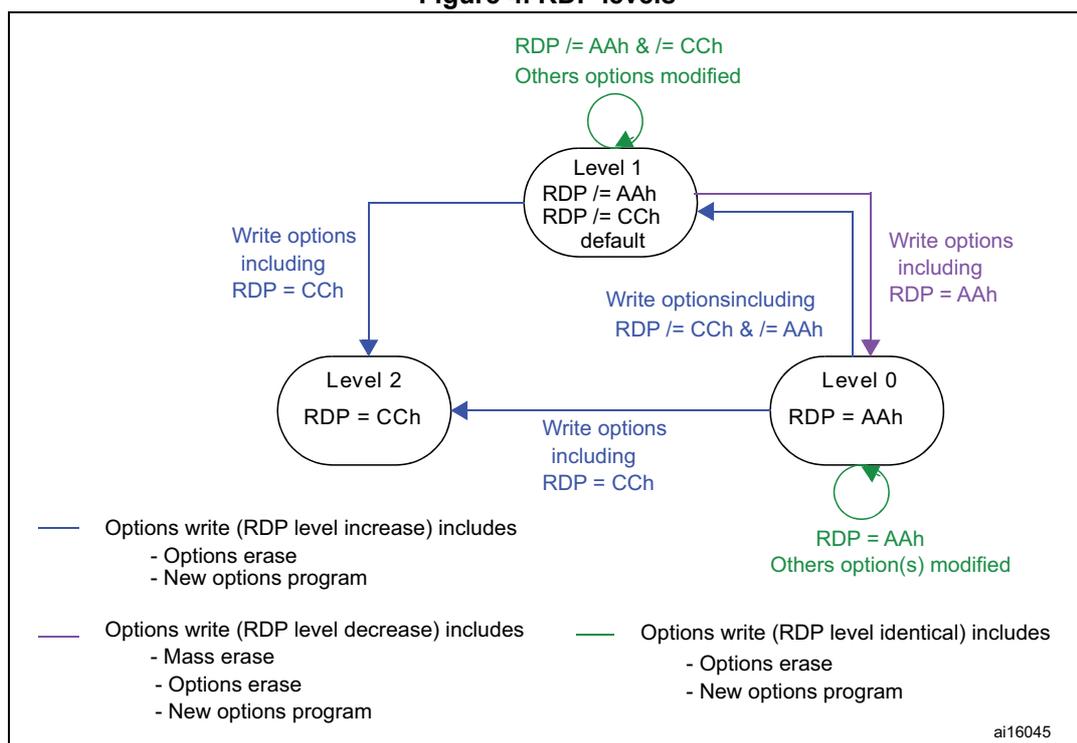
The diagram illustrates the Read Protection (RDP) levels and the transitions between them:
- Level 1 (Default): RDP != AAh, RDP != CCh. This is the initial state.
- Level 0: RDP = AAh. Reached from Level 1 by writing options including RDP = AAh. Self-loops indicate that writing options with RDP = AAh while already at Level 0 is a no-op (unless other options are modified).
- Level 2: RDP = CCh. Reached from Level 1 by writing options including RDP = CCh. It can also be reached from Level 0 by writing options including RDP = CCh.
- Transitions:
- Level 1 to Level 0: Write options including RDP = AAh.
- Level 1 to Level 2: Write options including RDP = CCh.
- Level 0 to Level 2: Write options including RDP = CCh.
- Level 2 to Level 1: Write options including RDP != CCh & != AAh.
Legend:
- Options write (RDP level increase) includes:
- - Options erase
- - New options program
- Options write (RDP level decrease) includes:
- - Mass erase
- - Options erase
- - New options program
- Options write (RDP level identical) includes:
- - Options erase
- - New options program
3.5.2 Write protections
Up to 8 user sectors in Flash memory can be protected against unwanted write operations due to loss of program counter contexts. When the non-write protection nWRPi bit (0 ≤ i ≤ 7) in the FLASH_OPTCR or FLASH_OPTCR1 registers is low, the corresponding sector
cannot be erased or programmed. Consequently, a mass erase cannot be performed if one of the sectors is write-protected.
If an erase/program operation to a write-protected part of the Flash memory is attempted (sector protected by write protection bit, OTP part locked or part of the Flash memory that can never be written like the ICP), the write protection error flag (WRPERR) is set in the FLASH_SR register.
Note: When the memory read protection level is selected (RDP level = 1), it is not possible to program or erase Flash memory sector i if the CPU debug features are connected (JTAG or single wire) or boot code is being executed from RAM, even if nWRPi = 1.
Write protection error flag
If an erase/program operation to a write-protected area of the Flash memory is performed, the Write Protection Error flag (WRPERR) is set in the FLASH_SR register.
If an erase operation is requested, the WRPERR bit is set when:
- • A sector erase is requested and the Sector Number SNB field is not valid
- • A mass erase is requested while at least one of the user sector is write protected by option bit (MER and nWRPi = 0 with \( 0 \leq i \leq 7 \) bits in the FLASH_OPTCR register)
- • A sector erase is requested on a write protected sector. (SER = 1, SNB = i and nWRPi = 0 with \( 0 \leq i \leq 7 \) bits in the FLASH_OPTCR register)
- • The Flash memory is readout protected and an intrusion is detected.
If a program operation is requested, the WRPERR bit is set when:
- • A write operation is performed on system memory or on the reserved part of the user specific sector.
- • A write operation is performed to the information block
- • A write operation is performed on a sector write protected by option bit.
- • A write operation is requested on an OTP area which is already locked
- • The Flash memory is read protected and an intrusion is detected.
3.6 One-time programmable bytes
Table 10 shows the organization of the one-time programmable (OTP) part of the OTP area.
Table 10. OTP area organization
| OTP Block | [255:224] | [223:193] | [192:161] | [160:128] | [127:96] | [95:64] | [63:32] | [31:0] | Address byte 0 |
|---|---|---|---|---|---|---|---|---|---|
| 0 | OTP0 | OTP0 | OTP0 | OTP0 | OTP0 | OTP0 | OTP0 | OTP0 | 0x1FF0 F000 |
| OTP0 | OTP0 | OTP0 | OTP0 | OTP0 | OTP0 | OTP0 | OTP0 | 0x1FF0 F020 | |
| 1 | OTP1 | OTP1 | OTP1 | OTP1 | OTP1 | OTP1 | OTP1 | OTP1 | 0x1FF0 F040 |
| OTP1 | OTP1 | OTP1 | OTP1 | OTP1 | OTP1 | OTP1 | OTP1 | 0x1FF0 F060 | |
| - | - | - | - | - | - | - | - | - | - |
| - | - | - | - | - | - | - | - | - | |
| - | - | - | - | - | - | - | - | - |
Table 10. OTP area organization (continued)
| OTP Block | [255:224] | [223:193] | [192:161] | [160:128] | [127:96] | [95:64] | [63:32] | [31:0] | Address byte 0 |
|---|---|---|---|---|---|---|---|---|---|
| 14 | OTP14 | OTP14 | OTP14 | OTP14 | OTP14 | OTP14 | OTP14 | OTP14 | 0x1FF0 F380 |
| OTP14 | OTP14 | OTP14 | OTP14 | OTP14 | OTP14 | OTP14 | OTP14 | 0x1FF0 F3A0 | |
| 15 | OTP15 | OTP15 | OTP15 | OTP15 | OTP15 | OTP15 | OTP15 | OTP15 | 0x1FF0 F3C0 |
| OTP15 | OTP15 | OTP15 | OTP15 | OTP15 | OTP15 | OTP15 | OTP15 | 0x1FF0 F3E0 | |
| Lock block | reserved | reserved | reserved | reserved | LOCK15... LOCKB12 | LOCK11... LOCKB8 | LOCK7... LOCKB4 | LOCK3... LOCKB0 | 0x1FF0 F400 |
The OTP area is divided into 16 OTP data blocks of 64 bytes and one lock OTP block of 16 bytes. The OTP data and lock blocks cannot be erased. The lock block contains 16 bytes LOCKBi ( \( 0 \leq i \leq 15 \) ) to lock the corresponding OTP data block (blocks 0 to 15). Each OTP data block can be programmed until the value 0x00 is programmed in the corresponding OTP lock byte. The lock bytes must only contain 0x00 and 0xFF values, otherwise the OTP bytes might not be taken into account correctly.
3.7 FLASH registers
3.7.1 Flash access control register (FLASH_ACR)
The Flash access control register is used to enable/disable the acceleration features and control the Flash memory access time according to CPU frequency.
Address offset: 0x00
Reset value: 0x0000 0000
Access: no wait state, word, half-word and byte access
| 31 | 30 | 29 | 28 | 27 | 26 | 25 | 24 | 23 | 22 | 21 | 20 | 19 | 18 | 17 | 16 |
|---|---|---|---|---|---|---|---|---|---|---|---|---|---|---|---|
| Res. | Res. | Res. | Res. | Res. | Res. | Res. | Res. | Res. | Res. | Res. | Res. | Res. | Res. | Res. | Res. |
| 15 | 14 | 13 | 12 | 11 | 10 | 9 | 8 | 7 | 6 | 5 | 4 | 3 | 2 | 1 | 0 |
| Res. | Res. | Res. | Res. | ARTRST | Res. | ARTEN | PRFTEN | Res. | Res. | Res. | Res. | LATENCY[3:0] | |||
| rw | rw | rw | rw | rw | rw | rw | |||||||||
Bits 31:12 Reserved, must be kept cleared.
Bit 11 ARTRST : ART Accelerator reset
0: ART Accelerator is not reset
1: ART Accelerator is reset
Bit 10 Reserved, must be kept cleared.
Bit 9 ARTEN : ART Accelerator Enable
0: ART Accelerator is disabled
1: ART Accelerator is enabled
Bit 8 PRFTEN : Prefetch enable
0: Prefetch is disabled
1: Prefetch is enabled
Bits 7:4 Reserved, must be kept cleared.
Bits 3:0 LATENCY[3:0] : Latency
These bits represent the ratio of the CPU clock period to the Flash memory access time.
0000: Zero wait state
0001: One wait state
0010: Two wait states
-
-
-
1110: Fourteen wait states
1111: Fifteen wait states
3.7.2 Flash key register (FLASH_KEYR)
The Flash key register is used to allow access to the Flash control register and so, to allow program and erase operations.
Address offset: 0x04
Reset value: 0x0000 0000
Access: no wait state, word access

| 31 | 30 | 29 | 28 | 27 | 26 | 25 | 24 | 23 | 22 | 21 | 20 | 19 | 18 | 17 | 16 |
| KEY[31:16] | |||||||||||||||
| w | w | w | w | w | w | w | w | w | w | w | w | w | w | w | w |
| 15 | 14 | 13 | 12 | 11 | 10 | 9 | 8 | 7 | 6 | 5 | 4 | 3 | 2 | 1 | 0 |
| KEY[15:0] | |||||||||||||||
| w | w | w | w | w | w | w | w | w | w | w | w | w | w | w | w |
Bits 31:0 FKEYR[31:0] : FPEC key
The following values must be programmed consecutively to unlock the FLASH_CR register and allow programming/erasing it:
- KEY1 = 0x45670123
- KEY2 = 0xCDEF89AB
3.7.3 Flash option key register (FLASH_OPTKEYR)
The Flash option key register is used to allow program and erase operations in the information block.
Address offset: 0x08
Reset value: 0x0000 0000
Access: no wait state, word access
| 31 | 30 | 29 | 28 | 27 | 26 | 25 | 24 | 23 | 22 | 21 | 20 | 19 | 18 | 17 | 16 |
|---|---|---|---|---|---|---|---|---|---|---|---|---|---|---|---|
| OPTKEYR[31:16] | |||||||||||||||
| w | w | w | w | w | w | w | w | w | w | w | w | w | w | w | w |
| 15 | 14 | 13 | 12 | 11 | 10 | 9 | 8 | 7 | 6 | 5 | 4 | 3 | 2 | 1 | 0 |
| OPTKEYR[15:0] | |||||||||||||||
| w | w | w | w | w | w | w | w | w | w | w | w | w | w | w | w |
Bits 31:0 OPTKEYR[31:0] : Option byte key
The following values must be programmed consecutively to unlock the FLASH_OPTCR register and allow programming it:
- OPTKEY1 = 0x08192A3B
- OPTKEY2 = 0x4C5D6E7F
3.7.4 Flash status register (FLASH_SR)
The Flash status register gives information on ongoing program and erase operations.
Address offset: 0x0C
Reset value: 0x0000 0000
Access: no wait state, word, half-word and byte access
| 31 | 30 | 29 | 28 | 27 | 26 | 25 | 24 | 23 | 22 | 21 | 20 | 19 | 18 | 17 | 16 |
|---|---|---|---|---|---|---|---|---|---|---|---|---|---|---|---|
| Res. | Res. | Res. | Res. | Res. | Res. | Res. | Res. | Res. | Res. | Res. | Res. | Res. | Res. | Res. | BSY |
| r | |||||||||||||||
| 15 | 14 | 13 | 12 | 11 | 10 | 9 | 8 | 7 | 6 | 5 | 4 | 3 | 2 | 1 | 0 |
| Res. | Res. | Res. | Res. | Res. | Res. | Res. | Res. | ERSERR | PGPERR | PGAERR | WRPERR | Res. | Res. | OPERR | EOP |
| rc_w1 | rc_w1 | rc_w1 | rc_w1 | rc_w1 | rc_w1 |
Bits 31:17 Reserved, must be kept cleared.
Bit 16 BSY : Busy
This bit indicates that a Flash memory operation is in progress. It is set at the beginning of a Flash memory operation and cleared when the operation finishes or an error occurs.
- 0: no Flash memory operation ongoing
- 1: Flash memory operation ongoing
Bits 15:8 Reserved, must be kept cleared.
Bit 7 ERSERR : Erase Sequence Error
Set by hardware when a write access to the Flash memory is performed by the code while the control register has not been correctly configured.
Cleared by writing 1.
Bit 6 PGPERR : Programming parallelism error
Set by hardware when the size of the access (byte, half-word, word, double word) during the program sequence does not correspond to the parallelism configuration PSIZE (x8, x16, x32, x64).
Cleared by writing 1.
Bit 5 PGAERR : Programming alignment error
Set by hardware when the data to program cannot be contained in the same 128-bit Flash memory row.
Cleared by writing 1.
Bit 4 WRPERR : Write protection error
Set by hardware when an address to be erased/programmed belongs to a write-protected part of the Flash memory.
Cleared by writing 1.
Bits 3:2 Reserved, must be kept cleared.
Bit 1 OPERR : Operation error
Set by hardware when a flash operation (programming / erase / read) request is detected and can not be run because of parallelism, alignment, or write protection error. This bit is set only if error interrupts are enabled (ERRIE = 1).
Bit 0 EOP : End of operation
Set by hardware when one or more Flash memory operations (program/erase) has/have completed successfully. It is set only if the end of operation interrupts are enabled (EOPIE = 1).
Cleared by writing a 1.
3.7.5 Flash control register (FLASH_CR)
The Flash control register is used to configure and start Flash memory operations.
Address offset: 0x10
Reset value: 0x8000 0000
Access: no wait state when no Flash memory operation is ongoing, word, half-word and byte access.
| 31 | 30 | 29 | 28 | 27 | 26 | 25 | 24 | 23 | 22 | 21 | 20 | 19 | 18 | 17 | 16 |
|---|---|---|---|---|---|---|---|---|---|---|---|---|---|---|---|
| LOCK | Res. | Res. | Res. | Res. | Res. | ERRIE | EOPIE | Res. | Res. | Res. | Res. | Res. | Res. | Res. | STRT |
| rs | rw | rw | rs | ||||||||||||
| 15 | 14 | 13 | 12 | 11 | 10 | 9 | 8 | 7 | 6 | 5 | 4 | 3 | 2 | 1 | 0 |
| Res. | Res. | Res. | Res. | Res. | Res. | PSIZE[1:0] | Res. | SNB[3:0] | MER | SER | PG | ||||
| rw | rw | rw | rw | rw | rw | rw | rw | rw | |||||||
Bit 31 LOCK : Lock
Write to 1 only. When it is set, this bit indicates that the FLASH_CR register is locked. It is cleared by hardware after detecting the unlock sequence.
In the event of an unsuccessful unlock operation, this bit remains set until the next reset.
Bits 30:26 Reserved, must be kept cleared.
Bit 25 ERRIE : Error interrupt enable
This bit enables the interrupt generation when the OPERR bit in the FLASH_SR register is set to 1.
0: Error interrupt generation disabled
1: Error interrupt generation enabled
Bit 24 EOPIE : End of operation interrupt enable
This bit enables the interrupt generation when the EOP bit in the FLASH_SR register goes to 1.
0: Interrupt generation disabled
1: Interrupt generation enabled
Bits 23:17 Reserved, must be kept cleared.
Bit 16 STRT : Start
This bit triggers an erase operation when set. It is set only by software and cleared when the BSY bit is cleared.
Bits 15:10 Reserved, must be kept cleared.
Bits 9:8 PSIZE : Program size
These bits select the program parallelism.
- 00 program x8
- 01 program x16
- 10 program x32
- 11 program x64
Bit 7 Reserved, must be kept cleared.
Bits 6:3 SNB[3:0] : Sector number
These bits select the sector to erase.
- 0000 sector 0
- 0001 sector 1
- ...
- 0111 sector 7
- Others not allowed
Bit 2 MER : Mass Erase
Erase activated for all user sectors.
Bit 1 SER : Sector Erase
Sector Erase activated.
Bit 0 PG : Programming
Flash programming activated.
3.7.6 Flash option control register (FLASH_OPTCR)
The FLASH_OPTCR register is used to modify the user option bytes.
Address offset: 0x14
Reset value: 0xC0FFAAFD. The option bytes are loaded with values from Flash memory at reset release.
Access: no wait state when no Flash memory operation is ongoing, word, half-word and byte access.
| 31 | 30 | 29 | 28 | 27 | 26 | 25 | 24 | 23 | 22 | 21 | 20 | 19 | 18 | 17 | 16 |
|---|---|---|---|---|---|---|---|---|---|---|---|---|---|---|---|
| IWDG_ STOP | IWDG_ STDBY | Res. | Res. | Res. | Res. | Res. | Res. | nWRP[7:0] | |||||||
| rw | rw | rw | rw | rw | rw | rw | rw | rw | rw | ||||||
| 15 | 14 | 13 | 12 | 11 | 10 | 9 | 8 | 7 | 6 | 5 | 4 | 3 | 2 | 1 | 0 |
| RDP[7:0] | nRST_ STDBY | nRST_ STOP | IWDG_ SW | WWDG_ SW | BOR_LEV[1:0] | OPTST RT | OPTLO CK | ||||||||
| rw | rw | rw | rw | rw | rw | rw | rw | rw | rw | rw | rw | rw | rw | rs | rs |
Bit 31 IWDG_STOP : Independent watchdog counter freeze in Stop mode
0: Freeze IWDG counter in STOP mode.
1: IWDG counter active in STOP mode.
Bit 30 IWDG_STDBY : Independent watchdog counter freeze in standby mode
0: Freeze IWDG counter in standby mode.
1: IWDG counter active in standby mode.
Bits 29:24 Reserved, must be kept cleared.
Bits 23:16 nWRP[7:0] : Not write protect
These bits contain the value of the write-protection option bytes for sectors 0 to 7 after reset. They can be written to program a new write-protect into Flash memory.
0: Write protection active on sector i
1: Write protection not active on sector i
Bits 15:8 RDP[7:0] : Read protect
These bits contain the value of the read-protection option level after reset. They can be written to program a new read protection value into Flash memory.
0xAA: Level 0, read protection not active
0xCC: Level 2, chip read protection active
Others: Level 1, read protection of memories active
Bits 7:4 USER : User option bytes
These bits contain the value of the user option byte after reset. They can be written to program a new user option byte value into Flash memory.
Bit 7: nRST_STDBY
Bit 6: nRST_STOP
Bit 5: IWDG_SW
Bit 4: WWDG_SW
Bits 3:2 BOR_LEV[1:0] : BOR reset Level
These bits contain the supply level threshold that activates/releases the reset. They can be written to program a new BOR level. By default, BOR is off. When the supply voltage (V DD ) drops below the selected BOR level, a device reset is generated.
00: BOR Level 3 (VBOR3), brownout threshold level 3
01: BOR Level 2 (VBOR2), brownout threshold level 2
10: BOR Level 1 (VBOR1), brownout threshold level 1
11: BOR off, POR/PDR reset threshold level is applied
Note: For full details on BOR characteristics, refer to the ‘Electrical characteristics’ section of the product datasheet.
Bit 1 OPTSTRT : Option start
This bit triggers a user option operation when set. It is set only by software and cleared when the BSY bit is cleared.
Bit 0 OPTLOCK : Option lock
Write to 1 only. When this bit is set, it indicates that the FLASH_OPTCR register is locked. This bit is cleared by hardware after detecting the unlock sequence.
In the event of an unsuccessful unlock operation, this bit remains set until the next reset.
Note: When modifying the IWDG_SW, IWDG_STOP or IWDG_STDBY option byte, a system reset is required to make the change effective.
3.7.7 Flash option control register (FLASH_OPTCR1)
The FLASH_OPTCR1 register is used to modify the user option bytes.
Address offset: 0x18
Reset value: 0x0040 0080 (ITCM-FLASH). The option bytes are loaded with values from Flash memory at reset release.
Access: no wait state when no Flash memory operation is ongoing, word, half-word and byte access.

| 31 | 30 | 29 | 28 | 27 | 26 | 25 | 24 | 23 | 22 | 21 | 20 | 19 | 18 | 17 | 16 |
| BOOT_ADD1[15:0] | |||||||||||||||
| rw | |||||||||||||||
| 15 | 14 | 13 | 12 | 11 | 10 | 9 | 8 | 7 | 6 | 5 | 4 | 3 | 2 | 1 | 0 |
| BOOT_ADD0[15:0] | |||||||||||||||
| rw | |||||||||||||||
Bits 31:16 BOOT_ADD1[15:0] : Boot base address when Boot pin =1
BOOT_ADD1[15:0] correspond to address [29:14],
The boot memory address can be programmed to any address in the range 0x0000 0000 to 0x2004 FFFF with a granularity of 16KB.
Example:
BOOT_ADD1 = 0x0000: Boot from ITCM RAM (0x0000 0000)
BOOT_ADD1 = 0x0040: Boot from System memory bootloader (0x0010 0000)
BOOT_ADD1 = 0x0080: Boot from Flash on ITCM interface (0x0020 0000)
BOOT_ADD1 = 0x2000: Boot from Flash on AXIM interface (0x0800 0000)
BOOT_ADD1 = 0x8000: Boot from DTCM RAM (0x2000 0000)
BOOT_ADD1 = 0x8004: Boot from SRAM1 (0x2001 0000)
BOOT_ADD1 = 0x8013: Boot from SRAM2 (0x2004 C000)
Bits 15:0 BOOT_ADD0[15:0] : Boot base address when Boot pin =0
BOOT_ADD0[15:0] correspond to address [29:14],
The boot base address can be programmed to any address in the range 0x0000 0000 to 0x2004 FFFF with a granularity of 16KB.
Example:
BOOT_ADD0 = 0x0000: Boot from ITCM RAM (0x0000 0000)
BOOT_ADD0 = 0x0040: Boot from System memory bootloader (0x0010 0000)
BOOT_ADD0 = 0x0080: Boot from Flash on ITCM interface (0x0020 0000)
BOOT_ADD0 = 0x2000: Boot from Flash on AXIM interface (0x0800 0000)
BOOT_ADD0 = 0x8000: Boot from DTCM RAM (0x2000 0000)
BOOT_ADD0 = 0x8004: Boot from SRAM1 (0x2001 0000)
BOOT_ADD0 = 0x8013: Boot from SRAM2 (0x2004 C000)
3.7.8 Flash interface register map
Table 11. Flash register map and reset values
| Offset | Register | 31 | 30 | 29 | 28 | 27 | 26 | 25 | 24 | 23 | 22 | 21 | 20 | 19 | 18 | 17 | 16 | 15 | 14 | 13 | 12 | 11 | 10 | 9 | 8 | 7 | 6 | 5 | 4 | 3 | 2 | 1 | 0 |
|---|---|---|---|---|---|---|---|---|---|---|---|---|---|---|---|---|---|---|---|---|---|---|---|---|---|---|---|---|---|---|---|---|---|
| 0x00 | FLASH_ACR | Res | Res | Res | Res | Res | Res | Res | Res | Res | Res | Res | Res | Res | Res | Res | Res | Res | Res | Res | Res | ARTIRST | Res | ARTEN | PRFTEN | Res | Res | Res | Res | LATENCY[3:0] | |||
| Reset value | 0 | 0 | 0 | 0 | 0 | 0 | 0 | ||||||||||||||||||||||||||
| 0x04 | FLASH_KEYR | KEY[31:16] | |||||||||||||||||||||||||||||||
| Reset value | 0 | 0 | 0 | 0 | 0 | 0 | 0 | 0 | 0 | 0 | 0 | 0 | 0 | 0 | 0 | 0 | 0 | 0 | 0 | 0 | 0 | 0 | 0 | 0 | 0 | 0 | 0 | 0 | 0 | 0 | 0 | 0 | |
| 0x08 | FLASH_OPTKEYR | OPTKEYR[31:16] | |||||||||||||||||||||||||||||||
| Reset value | 0 | 0 | 0 | 0 | 0 | 0 | 0 | 0 | 0 | 0 | 0 | 0 | 0 | 0 | 0 | 0 | 0 | 0 | 0 | 0 | 0 | 0 | 0 | 0 | 0 | 0 | 0 | 0 | 0 | 0 | 0 | 0 | |
| 0x0C | FLASH_SR | Res | Res | Res | Res | Res | Res | Res | Res | Res | Res | Res | Res | Res | Res | Res | BSY | Res | Res | Res | Res | Res | Res | Res | Res | ERSERR | PGPERR | PGAEERR | WRPERR | Res | Res | OPERR | EOP |
| Reset value | 0 | 0 | 0 | 0 | 0 | 0 | 0 | ||||||||||||||||||||||||||
| 0x10 | FLASH_CR | LOCK | Res | Res | Res | Res | Res | ERRIE | EOPIE | Res | Res | Res | Res | Res | Res | Res | STRT | Res | Res | Res | Res | Res | Res | PSIZE[1:0] | Res | SNB[3:0] | MER | SER | PG | ||||
| Reset value | 1 | 0 | 0 | 0 | 0 | 0 | 0 | 0 | 0 | 0 | 0 | 0 | 0 | ||||||||||||||||||||
| 0x14 | FLASH_OPTCR | nWDG_STOP | nWDG_STDBY | Res | Res | Res | Res | Res | Res | nWRP[7:0] | RDP[7:0] | nRST_STDBY | nRST_STOP | nWDG_SW | nWDG_SW | BOR_LEV[1:0] | OPTSTRT | OPTLOCK | |||||||||||||||
| Reset value | 1 | 1 | 1 | 1 | 1 | 1 | 1 | 1 | 1 | 1 | 0 | 1 | 0 | 1 | 0 | 1 | 0 | 1 | 1 | 1 | 1 | 1 | 1 | 0 | 1 | ||||||||
| 0x18 | FLASH_OPTCR1 | BOOT_ADD1[15:0] | |||||||||||||||||||||||||||||||
| Reset value | 0 | 0 | 0 | 0 | 0 | 0 | 0 | 0 | 0 | 1 | 0 | 0 | 0 | 0 | 0 | 0 | 0 | 0 | 0 | 0 | 0 | 0 | 0 | 0 | 1 | 0 | 0 | 0 | 0 | 0 | 0 | 0 | |