15. Comparator (COMP)
15.1 Introduction
STM32F334xx devices embed three ultra-fast comparators, COMP2, COMP4 and COMP6 that can be used either as standalone devices (all terminals are available on I/Os) or combined with the timers.
The comparators can be used for a variety of functions including:
- • Wakeup from low-power mode triggered by an analog signal,
- • Analog signal conditioning,
- • Cycle-by-cycle current control loop when combined with the DAC and a PWM output from a timer.
15.2 COMP main features
- • Rail-to-rail comparators
- • Each comparator has positive and configurable negative inputs used for flexible voltage selection:
- – Multiplexed I/O pins
- – DAC1 channel 1, DAC1 channel 2, DAC2 channel1
- – Internal reference voltage and three submultiple values (1/4, 1/2, 3/4) provided by scaler (buffered voltage divider)
- • The outputs can be redirected to an I/O or to timer inputs for triggering:
- – Capture events
- – OCREF_CLR events (for cycle-by-cycle current control)
- – Break events for fast PWM shutdowns
- • .Comparator outputs with blanking source
- • Each comparator has interrupt generation capability with wakeup from Sleep and Stop modes (through the EXTI controller)
15.3 COMP functional description
15.3.1 COMP block diagram
The block diagram of the comparators is shown in Figure 92: Comparator 2 block diagram .
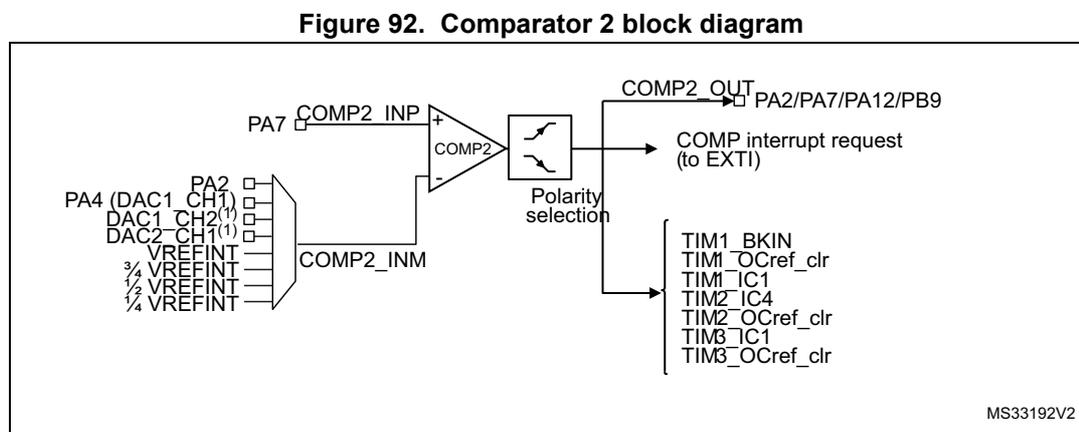
Figure 92. Comparator 2 block diagram
- 1. In STM32F334xx devices, DAC1_CH2 and DAC2_CH1 outputs are connected directly, thus PA5 and PA6 are not available as COMP2_INM inputs.
15.3.2 COMP pins and internal signals
The I/Os used as comparators inputs must be configured in analog mode in the GPIOs registers.
The comparator output can be connected to the I/Os using the alternate function channel given in “Alternate function mapping” table in the datasheet.
The table below summarizes the I/Os that can be used as comparators inputs and outputs.
The output can also be internally redirected to a variety of timer input for the following purposes:
- • Emergency shut-down of PWM signals, using BKIN and BKIN2 inputs
- • Cycle-by-cycle current control, using OCREF_CLR inputs
- • Input capture for timing measures
It is possible to have the comparator output simultaneously redirected internally and externally.
Table 56. STM32F334xx comparator input/outputs summary
| Comparator input/outputs | |||
|---|---|---|---|
| COMP2 | COMP4 | COMP6 | |
| Comparator inverting Input: connection to internal signals | DAC1_CH1/DAC1_CH2 DAC2_CH1 Vrefint \( \frac{3}{4} \) Vrefint \( \frac{1}{2} \) Vrefint \( \frac{1}{4} \) Vrefint | ||
| Comparator Inputs connected to I/Os (+: non inverting input; -: inverting input) | +: PA7 -: PA2 | +: PB0 -: PB2 | +: PB11 -: PB15 |
| Comparator outputs (motor control protection) | T1BKIN T1BKIN2 | ||
| Outputs on I/Os | PA2 PA12 | PB1 | PA10 PC6 |
| Outputs to internal signals | TIM1_OCREF_CLR TIM1_IC1 TIM2_IC4 TIM2_OCREF_CLR TIM3_IC1 TIM3_OCrefClear HRTIM_EEV1, HRTIM_EEV6 (1) | TIM3_IC3 TIM3_OCrefClear TIM15_OCREF_CLR TIM15_IC2 HRTIM_EEV2, HRTIM_EEV7 (1) | TIM2_IC2 TIM2_OCREF_CLR TIM16_OCREF_CLR TIM16_IC1 HRTIM_EEV3, HRTIM_EEV8 (1) |
- 1. COMP2/4/6 output is connected directly to HRTIM1 peripheral in order to speed-up the propagation delays.
15.3.3 COMP reset and clocks
The COMP clock provided by the clock controller is synchronous with the PCLK2 (APB2 clock).
There is no clock enable control bit provided in the RCC controller. To use a clock source for the comparator, the SYSCFG clock enable control bit must be set in the RCC controller.
Important: The polarity selection logic and the output redirection to the port works independently from the PCLK2 clock. This allows the comparator to work even in Stop mode.
15.3.4 Comparator LOCK mechanism
The comparators can be used for safety purposes, such as over-current or thermal protection. For applications having specific functional safety requirements, it is necessary to
insure that the comparator programming cannot be altered in case of spurious register access or program counter corruption.
For this purpose, the comparator control and status registers can be write-protected (read-only).
Once the programming is completed, using bits 30:0 of COMPx_CSR, the COMPx LOCK bit can be set to 1. This causes the whole COMPx_CSR register to become read-only, including the COMPx LOCK bit.
The write protection can only be reset by a MCU reset.
15.3.5 Comparator output blanking function
The purpose of the blanking function is to prevent the current regulation to trip upon short current spikes at the beginning of the PWM period (typically the recovery current in power switches anti parallel diodes). It consists of a selection of a blanking window which is a timer output compare signal. The selection is done by software (refer to the comparator register description for possible blanking signals). Then, the complementary of the blanking signal is ANDed with the comparator output to provide the wanted comparator output. See the example provided in the figure below.
Figure 93. Comparator output blanking
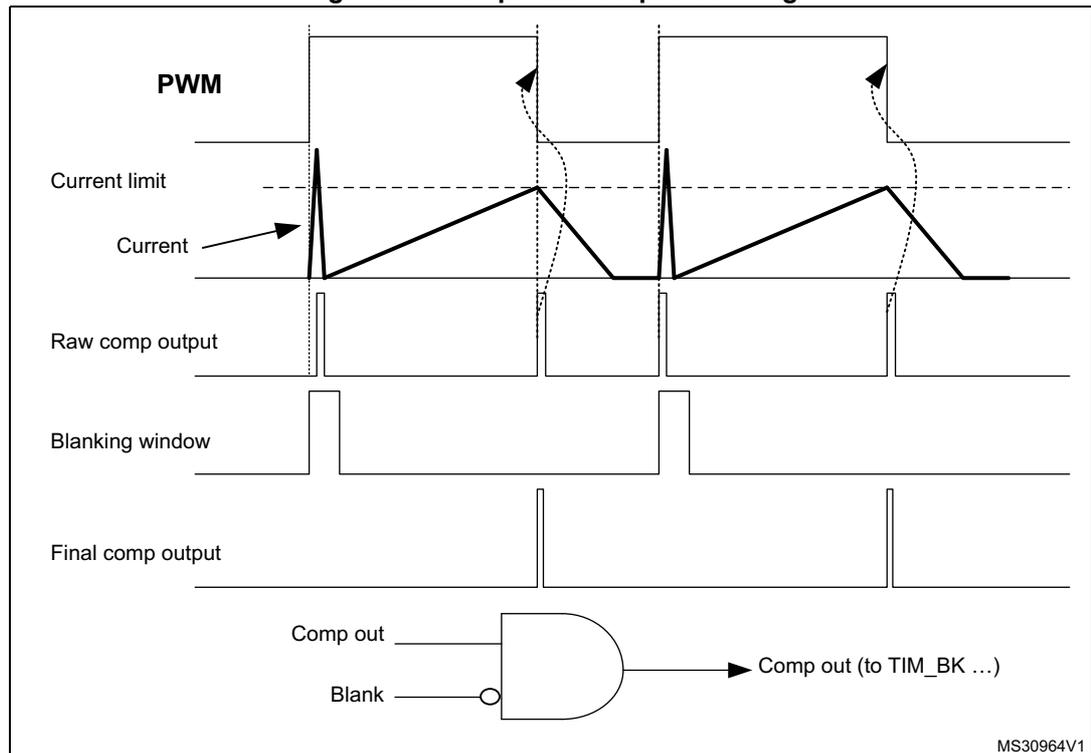
The figure illustrates the comparator output blanking function. The top part is a timing diagram showing the relationship between the PWM signal, Current limit, Current, Raw comp output, Blanking window, and Final comp output. The Current signal shows periodic spikes. The Raw comp output pulses are suppressed during the Blanking window. The Final comp output is the AND of the Raw comp output and the inverted Blanking window signal. The bottom part is a logic schematic showing an AND gate with inputs 'Comp out' and 'Blank' (inverted), resulting in 'Comp out (to TIM_BK ...)'.
MS30964V1
15.4 COMP interrupts
The comparator outputs are internally connected to the Extended interrupts and events controller. Each comparator has its own EXTI line and can generate either interrupts or events. The same mechanism is used to exit from low-power modes.
Refer to Interrupt and events section for more details.
15.5 COMP registers
15.5.1 COMP2 control and status register (COMP2_CSR)
Address offset: 0x20
Reset value: 0x0000 0000
| 31 | 30 | 29 | 28 | 27 | 26 | 25 | 24 | 23 | 22 | 21 | 20 | 19 | 18 | 17 | 16 |
|---|---|---|---|---|---|---|---|---|---|---|---|---|---|---|---|
| COMP2 LOCK | COMP2 OUT | Res. | Res. | Res. | Res. | Res. | Res. | Res. | COMP 2INMS EL[3] | Res. | COMP2_BLANKING[2:0] | Res. | |||
| rwo | r | rw | rw | rw | rw | rw | rw | ||||||||
| 15 | 14 | 13 | 12 | 11 | 10 | 9 | 8 | 7 | 6 | 5 | 4 | 3 | 2 | 1 | 0 |
|---|---|---|---|---|---|---|---|---|---|---|---|---|---|---|---|
| COMP 2POL | Res. | COMP2OUTSEL[3:0] | Res. | Res. | Res. | COMP2INMSEL[2:0] | Res. | Res. | COMP2 EN | ||||||
| rw | rw | rw | rw | rw | rw | rw | rw | rw | |||||||
Bit 31 COMP2LOCK : Comparator 2 lock
This bit is write-once. It is set by software. It can only be cleared by a system reset. It allows to have COMP2_CSR register as read-only.
0: COMP2_CSR is read-write.
1: COMP2_CSR is read-only.
Bit 30 COMP2OUT : Comparator 2 output
This read-only bit is a copy of comparator 1 output state.
0: Output is low (non-inverting input below inverting input).
1: Output is high (non-inverting input above inverting input).
Bits 29:23 Reserved, must be kept at reset value.
Bit 22 COMP2INMSEL[3] : Comparator 2 inverting input selection. It is used with Bits [6..4] to configure the Comp inverting input.
Bit 21 Reserved, must be kept at reset value.
Bits 20:18 COMP2_BLANKING[2:0] : Comparator 2 output blanking source
These bits select which Timer output controls the comparator 1 output blanking.
000: No blanking
001: TIM1 OC5 selected as blanking source
010: TIM2 OC3 selected as blanking source
011: TIM3 OC3 selected as blanking source
Other configurations: reserved
Bits 17:16 Reserved, must be kept at reset value.
Bit 15 COMP2POL : Comparator 2 output polarity
This bit is used to invert the comparator 2 output.
0: Output is not inverted
1: Output is inverted
Bit 14 Reserved, must be kept at reset value.
Bits 13:10 COMP2OUTSEL[3:0] : Comparator 2 output selection
These bits select which Timer input must be connected with the comparator2 output.
0000: No selection
0001: (BRK_ACTH) Timer 1 break input
0010: (BRK2) Timer 1 break input 2
0011: Reserved
0100: Reserved
0101: Timer 1 break input2
0110: Timer 1 OCREF_CLR input
0111: Timer 1 input capture 1
1000: Timer 2 input capture 4
1001: Timer 2 OCREF_CLR input
1010: Timer 3 input capture 1
1011: Timer 3 OCrefclear input
Remaining combinations: reserved.
Note: COMP2 output is connected directly to HRTIM1 to speed-up the propagation delay.
Bits 9:7 Reserved, must be kept at reset value.
Bits 6:4 COMP2INMSEL[3:0] : Comparator 2 inverting input selection
These bits, together with bit 22, allows to select the source connected to the inverting input of the comparator 2.
0000: 1/4 of Vrefint
0001: 1/2 of Vrefint
0010: 3/4 of Vrefint
0011: Vrefint
0100: PA4 or DAC1_CH1 output if enabled
0101: DAC1_CH2 output
0110: PA2
1000: DAC2_CH1 output
Remaining combinations: reserved.
Bit 0 COMP2EN : Comparator 2 enable
This bit switches COMP2 ON/OFF.
0: Comparator 2 disabled
1: Comparator 2 enabled
15.5.2 COMP4 control and status register (COMP4_CSR)
Address offset: 0x28
Reset value: 0x0000 0000
| 31 | 30 | 29 | 28 | 27 | 26 | 25 | 24 | 23 | 22 | 21 | 20 | 19 | 18 | 17 | 16 |
|---|---|---|---|---|---|---|---|---|---|---|---|---|---|---|---|
| COMP4LOCK | COMP4OUT | Res. | Res. | Res. | Res. | Res. | Res. | Res. | COMP4INMSEL[3] | Res. | COMP4_BLANKING[2:0] | Res. | |||
| rwo | r | rw | rw | rw | rw | rw | rw | ||||||||
| 15 | 14 | 13 | 12 | 11 | 10 | 9 | 8 | 7 | 6 | 5 | 4 | 3 | 2 | 1 | 0 |
|---|---|---|---|---|---|---|---|---|---|---|---|---|---|---|---|
| COMP 4POL | Res. | COMP4OUTSEL[3:0] | Res. | Res. | Res. | COMP4INMSEL[2:0] | Res. | Res. | COMP4 EN | ||||||
| rw | rw | rw | rw | rw | rw | rw | rw | rw | |||||||
Bit 31 COMP4LOCK : Comparator 4 lock
This bit is write-once. It is set by software. It can only be cleared by a system reset.
It allows to have COMP4_CSR register as read-only.
0: COMP4_CSR is read-write.
1: COMP4_CSR is read-only.
Bit 30 COMP4OUT : Comparator 4 output
This read-only bit is a copy of comparator 4 output state.
0: Output is low (non-inverting input below inverting input).
1: Output is high (non-inverting input above inverting input).
Bits 29:23 Reserved, must be kept at reset value.
Bit 22 COMP4INMSEL[3] : Comparator 4 inverting input selection. It is used with Bits [6..4] to configure the Comp inverting input.
Bit 21 Reserved, must be kept at reset value.
Bits 20:18 COMP4_BLANKING : Comparator 4 blanking source
These bits select which Timer output controls the comparator 4 output blanking.
000: No blanking
001: TIM3_OC4 selected as blanking source
010: Reserved
011: TIM15_OC1 selected as blanking source
Other configurations: reserved, must be kept at reset value
Bits 17:16 Reserved, must be kept at reset value.
Bit 15 COMP4POL : Comparator 4 output polarity
This bit is used to invert the comparator 4 output.
0: Output is not inverted
1: Output is inverted
Bit 14 Reserved, must be kept at reset value.
Bits 13:10 COMP4OUTSEL[3:0] : Comparator 4 output selection
These bits select which Timer input must be connected with the comparator4 output.
0000: No timer input selected
0001: (BRK) Timer 1 break input
0010: (BRK2) Timer 1 break input 2
0011: Reserved
0100: Reserved
0101: Timer 1 break input 2
0110: Timer 3 input capture 3
0111: Reserved
1000: Timer 15 input capture 2
1001: Reserved
1010: Timer 15 OCREF_CLR input
1011: Timer 3 OCrefclear input
Remaining combinations: reserved.
Note: COMP4 output is connected directly to HRTIM1 to speed-up the propagation delay.
Bits 9:7 Reserved, must be kept at reset value.
Bits 6:4 COMP4INMSEL[3:0] : Comparator 4 inverting input selection
These bits, together with bit 22, allows to select the source connected to the inverting input of the comparator 4.
- 0000: 1/4 of Vrefint
- 0001: 1/2 of Vrefint
- 0010: 3/4 of Vrefint
- 0011: Vrefint
- 0100: PA4 or DAC1_CH1 output if enabled
- 0101: DAC1_CH2 output
- 0110: Reserved
- 0111: PB2
- 1000: DAC2_CH1 output
- Remaining combinations: reserved.
Bits 3:1 Reserved, must be kept at reset value.
Bit 0 COMP4EN : Comparator 4 enable
This bit switches COMP4 ON/OFF.
- 0: Comparator 4 disabled
- 1: Comparator 4 enabled
15.5.3 COMP6 control and status register (COMP6_CSR)
Address offset: 0x30
Reset value: 0x0000 0000
| 31 | 30 | 29 | 28 | 27 | 26 | 25 | 24 | 23 | 22 | 21 | 20 | 19 | 18 | 17 | 16 |
|---|---|---|---|---|---|---|---|---|---|---|---|---|---|---|---|
| COMP6LOCK | COMP6OUT | Res. | Res. | Res. | Res. | Res. | Res. | Res. | COMP6INMSEL[3] | Res. | COMP6_BLANKING[2:0] | Res. | Res. | ||
| rw | r | rw | rw | rw | rw | rw | rw | ||||||||
| 15 | 14 | 13 | 12 | 11 | 10 | 9 | 8 | 7 | 6 | 5 | 4 | 3 | 2 | 1 | 0 |
|---|---|---|---|---|---|---|---|---|---|---|---|---|---|---|---|
| COMP6POL | Res. | COMP6OUTSEL[3:0] | Res. | Res. | Res. | COMP6INMSEL[2:0] | Res. | Res. | COMP6EN | ||||||
| rw | rw | rw | rw | rw | rw | rw | rw | rw | |||||||
Bit 31 COMP6LOCK : Comparator 6 lock
This bit is write-once. It is set by software. It can only be cleared by a system reset.
It allows to have COMP6_CSR register as read-only.
- 0: COMP6_CSR is read-write.
- 1: COMP6_CSR is read-only.
Bit 30 COMP6OUT : Comparator 6 output
This read-only bit is a copy of comparator 6 output state.
- 0: Output is low (non-inverting input below inverting input).
- 1: Output is high (non-inverting input above inverting input).
Bits 29:23 Reserved, must be kept at reset value.
Bit 22 COMP6INMSEL[3] : Comparator 6 inverting input selection. It is used with Bits [6..4] to configure the Comp inverting input.
Bit 21 Reserved, must be kept at reset value.
Bits 20:18 COMP6_BLANKING : Comparator 6 blanking source
These bits select which Timer output controls the comparator 6 output blanking.
000: No blanking
001: Reserved
010: Reserved
011: TIM2_OC4 selected as blanking source
100: TIM15_OC2 selected as blanking source
Other configurations: reserved
The blanking signal is active high (masking comparator output signal). It is up to the user to program the comparator and blanking signal polarity correctly.
Bits 17:16 Reserved, must be kept at reset value.
Bit 15 COMP6POL : Comparator 6 output polarity
This bit is used to invert the comparator 6 output.
0: Output is not inverted
1: Output is inverted
Bit 14 Reserved, must be kept at reset value.
Bits 13:10 COMP6OUTSEL[3:0] : Comparator 6 output selection
These bits select which Timer input must be connected with the comparator 6 output.
0000: No timer input
0001: (BRK_ACTH) Timer 1 break input
0010: (BRK2) Timer 1 break input 2
0101: Timer 1 break input 2
0110: Timer 2 input capture 2
1000: Timer 2 OCREF_CLR input
1001: Timer 16 OCREF_CLR input
1010: Timer 16 input capture 1
Remaining combinations: reserved.
Note: COMP6 output is connected directly to HRTIM1 to speed-up the propagation delay.
Bits 9:7 Reserved, must be kept at reset value.
Bits 6:4 COMP6INMSEL[3:0] : Comparator 6 inverting input selection
These bits, together with bit 22, allows to select the source connected to the inverting input of the comparator 6.
0000: 1/4 of Vrefint
0001: 1/2 of Vrefint
0010: 3/4 of Vrefint
0011: Vrefint
0100: PA4 or DAC1_CH1 output if enabled
0101: DAC1_CH2 output
0111: PB15
1000: DAC2_CH1
Remaining combinations: reserved.
Bits 3:1 Reserved, must be kept at reset value.
Bit 0 COMP6EN : Comparator 6 enable
This bit switches COMP6 ON/OFF.
0: Comparator 6 disabled
1: Comparator 6 enabled
15.5.4 COMP register map
The following table summarizes the comparator registers.
Table 57. COMP register map and reset values
| Offset | Register | 31 | 30 | 29 | 28 | 27 | 26 | 25 | 24 | 23 | 22 | 21 | 20 | 19 | 18 | 17 | 16 | 15 | 14 | 13 | 12 | 11 | 10 | 9 | 8 | 7 | 6 | 5 | 4 | 3 | 2 | 1 | 0 |
|---|---|---|---|---|---|---|---|---|---|---|---|---|---|---|---|---|---|---|---|---|---|---|---|---|---|---|---|---|---|---|---|---|---|
| 0x20 | COMP2_CSR | COMP2LOCK | COMP2OUT | Res. | Res. | Res. | Res. | Res. | Res. | Res. | COMP2INMSEL[3] | Res. | COMP2_BLANKING | Res. | Res. | Res. | COMP2POL | Res. | COMP2OUT SEL[3:0] | Res. | Res. | Res. | Res. | COMP2INMSEL[2:0] | Res. | Res. | Res. | Res. | Res. | Res. | Res. | Res. | COMP2EN |
| Reset value | 0 | 0 | 0 | 0 | 0 | 0 | 0 | 0 | 0 | 0 | 0 | 0 | 0 | 0 | 0 | 0 | |||||||||||||||||
| 0x28 | COMP4_CSR | COMP4LOCK | COMP4OUT | Res. | Res. | Res. | Res. | Res. | Res. | Res. | COMP4INMSEL[3] | Res. | COMP4_BLANKING | Res. | Res. | Res. | COMP4POL | Res. | COMP4OUT SEL[3:0] | Res. | Res. | Res. | Res. | COMP4INMSEL[2:0] | Res. | Res. | Res. | Res. | Res. | Res. | Res. | Res. | COMP4EN |
| Reset value | 0 | 0 | 0 | 0 | 0 | 0 | 0 | 0 | 0 | 0 | 0 | 0 | 0 | 0 | 0 | 0 | |||||||||||||||||
| 0x30 | COMP6_CSR | COMP6LOCK | COMP6OUT | Res. | Res. | Res. | Res. | Res. | Res. | Res. | COMP6INMSEL[3] | Res. | COMP6_BLANKING | Res. | Res. | Res. | COMP6POL | Res. | COMP6OUT SEL[3:0] | Res. | Res. | Res. | Res. | COMP6INMSEL[2:0] | Res. | Res. | Res. | Res. | Res. | Res. | Res. | Res. | COMP6EN |
| Reset value | 0 | 0 | 0 | 0 | 0 | 0 | 0 | 0 | 0 | 0 | 0 | 0 | 0 | 0 | 0 | 0 |
Refer to Section 2.2 on page 47 for the register boundary addresses.