13. Analog-to-digital converters (ADC)
13.1 Introduction
This section describes the implementation of up to 2 ADCs:
- • ADC1 and ADC2 are tightly coupled and can operate in dual mode (ADC1 is master).
Each ADC consists of a 12-bit successive approximation analog-to-digital converter.
Each ADC has up to 18 multiplexed channels. A/D conversion of the various channels can be performed in single, continuous, scan or discontinuous mode. The result of the ADC is stored in a left-aligned or right-aligned 16-bit data register.
The ADCs are mapped on the AHB bus to allow fast data handling.
The analog watchdog features allow the application to detect if the input voltage goes outside the user-defined high or low thresholds.
An efficient low-power mode is implemented to allow very low consumption at low frequency.
13.2 ADC main features
- • High-performance features
- – 2x ADC, each can operate in dual mode.
- – ADC1 is connected to 11 external channels + 3 internal channels
- – ADC2 is connected to 14 external channels + 3 internal channels
- – 12, 10, 8 or 6-bit configurable resolution
- – ADC conversion time:
Fast channels: 0.19 µs for 12-bit resolution (5.1 Ms/s)
Slow channels: 0.21 µs for 12-bit resolution (4.8 Ms/s) - – ADC conversion time is independent from the AHB bus clock frequency
- – Faster conversion time by lowering resolution: 0.16 µs for 10-bit resolution
- – Can manage Single-ended or differential inputs (programmable per channels)
- – AHB slave bus interface to allow fast data handling
- – Self-calibration
- – Channel-wise programmable sampling time
- – Up to four injected channels (analog inputs assignment to regular or injected channels is fully configurable)
- – Hardware assistant to prepare the context of the injected channels to allow fast context switching
- – Data alignment with in-built data coherency
- – Data can be managed by GP-DMA for regular channel conversions
- – 4 dedicated data registers for the injected channels
- • Low-power features
- – Speed adaptive low-power mode to reduce ADC consumption when operating at low frequency
- – Allows slow bus frequency application while keeping optimum ADC performance (0.19 µs conversion time for fast channels can be kept whatever the AHB bus clock frequency)
- – Provides automatic control to avoid ADC overrun in low AHB bus clock frequency application (auto-delayed mode)
- • External analog input channels for each of the 2 ADCs:
- – Up to 5 fast channels from dedicated GPIO pads
- – Up to 11 slow channels from dedicated GPIO pads
- • In addition, there are four internal dedicated channels:
- – One from internal temperature sensor ( \( V_{TS} \) ), connected to ADC1
- – One from \( V_{BAT}/2 \) , connected to ADC1
- – One from the internal reference voltage ( \( V_{REFINT} \) ), connected to the two ADCs
- – One from OPAMP2 reference voltage output (VREFOPAMP2), connected to ADC2
- • Start-of-conversion can be initiated:
- – by software for both regular and injected conversions
- – by hardware triggers with configurable polarity (internal timers events or GPIO input events) for both regular and injected conversions
- • Conversion modes
- – Each ADC can convert a single channel or can scan a sequence of channels
- – Single mode converts selected inputs once per trigger
- – Continuous mode converts selected inputs continuously
- – Discontinuous mode
- • Dual ADC mode
- • Interrupt generation at the end of conversion (regular or injected), end of sequence conversion (regular or injected), analog watchdog 1, 2 or 3 or overrun events
- • 3 analog watchdogs per ADC
- • ADC supply requirements: 2.0 V to 3.6 V
- • ADC input range: \( V_{REF-} \leq V_{IN} \leq V_{REF+} \)
Figure 23 shows the block diagram of one ADC.
13.3 ADC functional description
13.3.1 ADC block diagram
Figure 23 shows the ADC block diagram and Table 38 gives the ADC pin description.
Figure 23. ADC block diagram
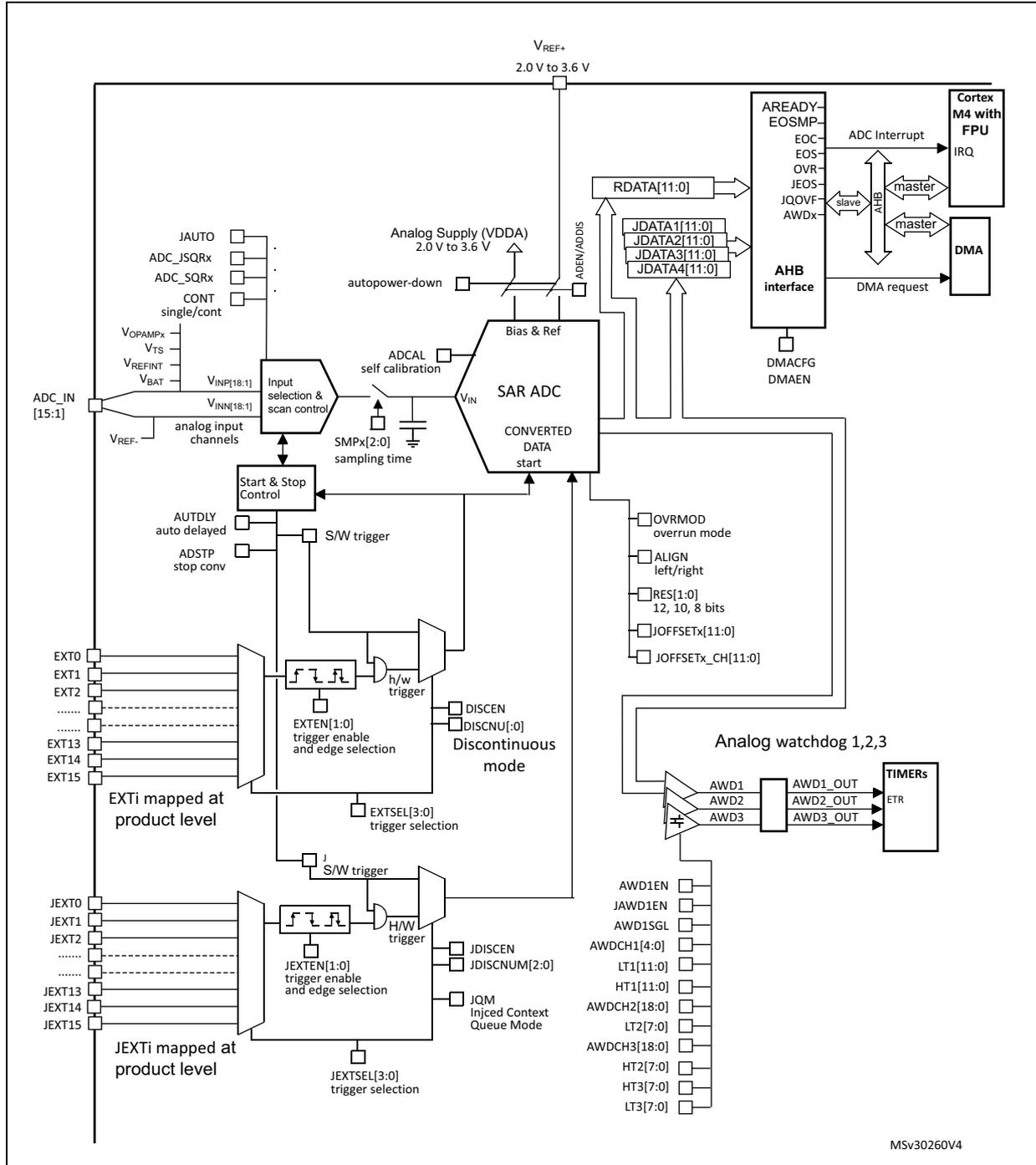
The diagram illustrates the internal architecture and external connections of the ADC. At the core is the SAR ADC block, which receives analog input from the Input selection & scan control block via its V IN pin. The Input selection & scan control block is connected to ADC_IN [15:1] pins and various internal reference voltages: V REF+ , V REF- , V REFINT , V BAT , V Ts , and V OPAMPx . It also receives control signals such as JAUTO , ADC_JSQRx , CONT (single/cont), and V INNN[18:1] . The SAR ADC outputs CONVERTED DATA to the AHB interface via RDATA[11:0] and JDATA1[11:0] through JDATA4[11:0] pins. The AHB interface is connected to the Cortex M4 with FPU (via ADC Interrupt and IRQ ) and DMA (via DMA request ). It also includes status flags: AREADY , EOSMP , EOC , EOS , OVR , JEOS , JQOVF , and AWDx . The SAR ADC is also controlled by Start & Stop Control (with S/W trigger , AUTDLY , and ADSTP ), ADCAL (self calibration), and Bias & Ref (connected to V REF+ and V DDA ). The Bias & Ref block also provides ADBN/ADIS and autopower-down signals. The ADC supports various trigger sources: S/W trigger , h/w trigger (from EXTI pins EXT0 through EXT15 and JEXT0 through JEXT15 ), and EXTI mapped at product level . It also features Discontinuous mode ( DISCEN , DISCNUM[0:0] ), Injected Context Queue Mode ( JDISCEN , JDISCNUM[2:0] , JQM ), and Analog watchdog 1,2,3 ( AWD1 , AWD2 , AWD3 to TIMERs via AWD1_OUT , AWD2_OUT , AWD3_OUT , and ETR ). Configuration registers include OVERMOD (overrun mode), ALIGN (left/right), RES[1:0] (12, 10, 8 bits), JOFFSETx[11:0] , and JOFFSETx_CH[11:0] . The AHB interface also includes DMACFG and DMAEN signals.
MSV30260V4
13.3.2 Pins and internal signals
Table 37. ADC internal signals
| Internal signal name | Signal type | Description |
|---|---|---|
| EXT[15:0] | Inputs | Up to 16 external trigger inputs for the regular conversions (can be connected to on-chip timers). These inputs are shared between the ADC master and the ADC slave. |
| JEXT[15:0] | Inputs | Up to 16 external trigger inputs for the injected conversions (can be connected to on-chip timers). These inputs are shared between the ADC master and the ADC slave. |
| ADC1_AWDx_OUT | Output | Internal analog watchdog output signal connected to on-chip timers. (x = Analog watchdog number 1,2,3) |
| V REFOPAMP2 | Input | Reference voltage output from internal operational amplifier 2 |
| V TS | Input | Output voltage from internal temperature sensor |
| V REFINT | Input | Output voltage from internal reference voltage |
| V BAT | Input supply | External battery voltage supply |
Table 38. ADC pins
| Name | Signal type | Comments |
|---|---|---|
| V REF+ | Input, analog reference positive | The higher/positive reference voltage for the ADC, \( 2.0\text{ V} \leq V_{REF+} \leq V_{DDA} \) |
| V DDA | Input, analog supply | Analog power supply equal V
DDA
: \( 2.0\text{ V} \leq V_{DDA} \leq 3.6\text{ V} \) |
| V REF- | Input, analog reference negative | The lower/negative reference voltage for the ADC, \( V_{REF-} = V_{SSA} \) |
| V SSA | Input, analog supply ground | Ground for analog power supply equal to V SS |
| V INP [18:1] | Positive input analog channels for each ADC | Connected either to external channels: ADC_INi or internal channels. |
| V INN [18:1] | Negative input analog channels for each ADC | Connected to V REF- or external channels: ADC_INi-1 |
| ADCx_IN15:1 | External analog input signals | Up to 16 analog input channels (x = ADC number = 1 or 2): – 5 fast channels – 10 slow channels |
13.3.3 Clocks
Dual clock domain architecture
The dual clock-domain architecture means that each ADC clock is independent from the AHB bus clock.
The input clock of the two ADCs (master and slave) can be selected between two different clock sources (see Figure 24: ADC clock scheme ):
- a) The ADC clock can be a specific clock source, named “ADCxy_CK (xy=12 or 34) which is independent and asynchronous with the AHB clock”.
It can be configured in the RCC to deliver up to 72 MHz (PLL output). Refer to RCC Section for more information on generating ADC12_CK.
To select this scheme, bits CKMODE[1:0] of the ADCx_CCR register must be reset. - b) The ADC clock can be derived from the AHB clock of the ADC bus interface, divided by a programmable factor (1, 2 or 4). In this mode, a programmable divider factor can be selected (/1, 2 or 4 according to bits CKMODE[1:0]).
To select this scheme, bits CKMODE[1:0] of the ADCx_CCR register must be different from “00”.
Note: Software can use option b) by writing CKMODE[1:0]=01 only if the AHB prescaler of the RCC is set to 1 (the duty cycle of the AHB clock must be 50% in this configuration).
Option a) has the advantage of reaching the maximum ADC clock frequency whatever the AHB clock scheme selected. The ADC clock can eventually be divided by the following ratio: 1, 2, 4, 6, 8, 12, 16, 32, 64, 128, 256; using the prescaler configured with bits ADCxPRES[4:0] in register RCC_CFGR2 (Refer to Section 8: Reset and clock control (RCC) ).
Option b) has the advantage of bypassing the clock domain resynchronizations. This can be useful when the ADC is triggered by a timer and if the application requires that the ADC is precisely triggered without any uncertainty (otherwise, an uncertainty of the trigger instant is added by the resynchronizations between the two clock domains).
Figure 24. ADC clock scheme
![Figure 24. ADC clock scheme diagram showing the RCC (Reset and clock controller) providing HCLK and ADC12_CK signals to the ADC1 & ADC2 block. The ADC1 & ADC2 block contains an AHB interface, a divider (/1 or /2 or /4) controlled by Bits CKMODE[1:0] of ADC12_CCR, and a multiplexer (Others) controlled by Bits CKMODE[1:0] of ADC12_CCR. The multiplexer selects between the divided AHB clock and the ADC12_CK signal for the Analog ADC1 (master) and Analog ADC2 (slave).](/RM0364-STM32F334/d9edf1a1fe1c6cd907639ca3b39627e1_img.jpg)
The diagram illustrates the clocking architecture for the ADCs. On the left, the RCC (Reset and clock controller) is shown with two output lines: HCLK and ADC12_CK. The HCLK line connects to the AHB interface within the ADC1 & ADC2 block. The ADC12_CK line connects to a multiplexer labeled 'Others'. Within the ADC1 & ADC2 block, the AHB interface output also connects to this 'Others' multiplexer. A divider block, labeled '/1 or /2 or /4', receives the HCLK signal and its output connects to the 'Others' multiplexer. The 'Others' multiplexer has two control inputs labeled 'Bits CKMODE[1:0] of ADC12_CCR'. The outputs of the 'Others' multiplexer are connected to 'Analog ADC1 (master)' and 'Analog ADC2 (slave)'. A small text 'MSv32648V1' is visible in the bottom right corner of the diagram area.
- 1. Refer to the RCC section to see how HCLK and ADC12_CK can be generated.
There are generally no constraints to be respected for the ratio between the ADC clock and the AHB clock except if some injected channels are programmed. In this case, it is mandatory to respect the following ratio:
- • \( F_{HCLK} \geq F_{ADC} / 4 \) if the resolution of all channels are 12-bit or 10-bit
- • \( F_{HCLK} \geq F_{ADC} / 3 \) if there are some channels with resolutions equal to 8-bit (and none with lower resolutions)
- • \( F_{HCLK} \geq F_{ADC} / 2 \) if there are some channels with resolutions equal to 6-bit
13.3.4 ADC1/2 connectivity
ADC1 and ADC2 are tightly coupled and share some external channels as described in Figure 25.
Figure 25. ADC1 and ADC2 connectivity
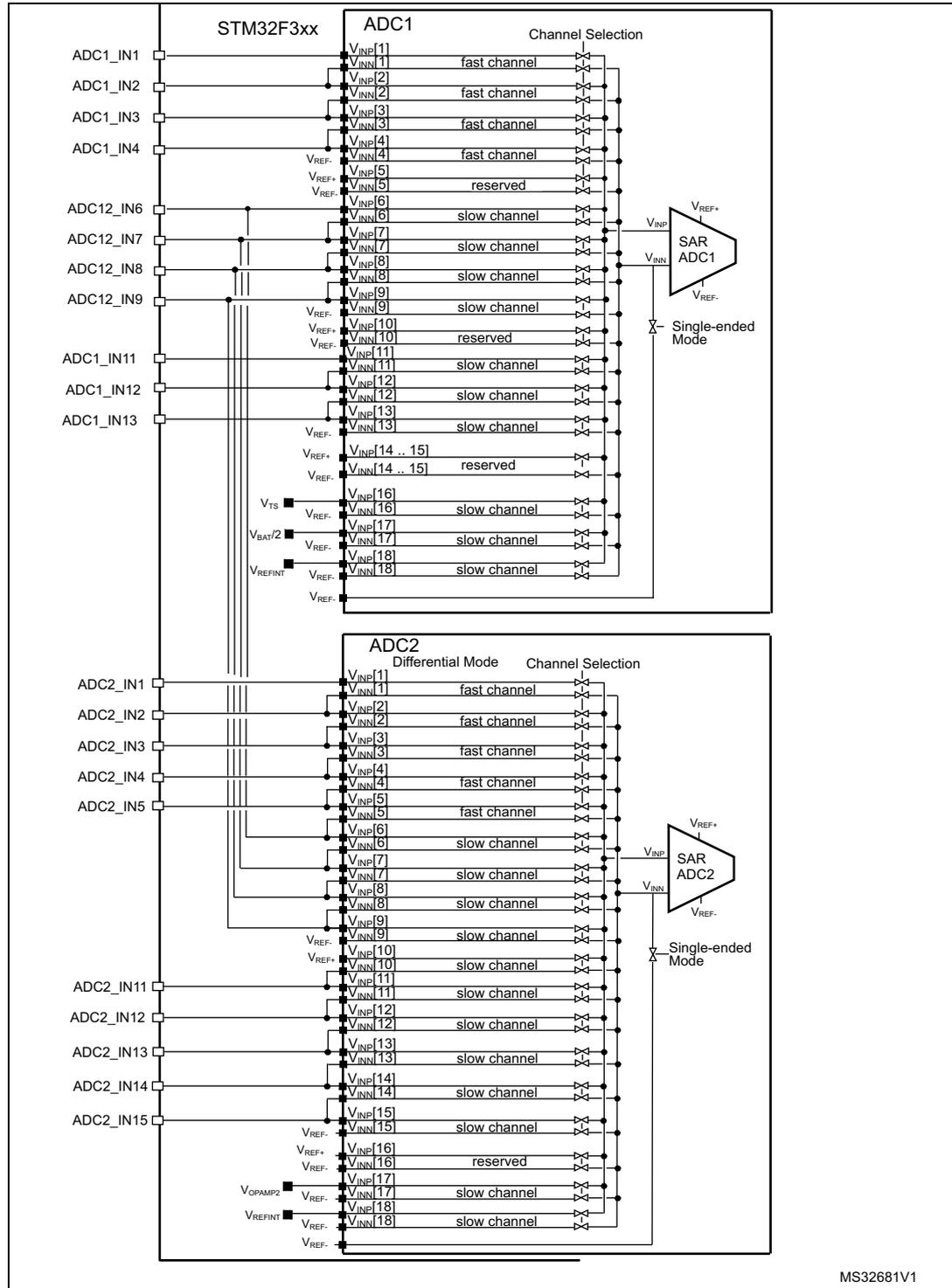
The diagram illustrates the internal architecture and external connectivity of ADC1 and ADC2 within an STM32F3xx microcontroller. Both ADCs are shown as SAR (Successive Approximation Register) blocks with single-ended mode inputs.
ADC1 Connectivity:
- External Pins: ADC1_IN1 through ADC1_IN13, and ADC12_IN6 through ADC12_IN9.
- Internal Channels:
- V_NP[1] to V_NN[4]: fast channel
- V_NP[5] to V_NN[5]: reserved
- V_NP[6] to V_NN[6]: slow channel
- V_NP[7] to V_NN[7]: slow channel
- V_NP[8] to V_NN[8]: slow channel
- V_NP[9] to V_NN[9]: slow channel
- V_NP[10] to V_NN[10]: reserved
- V_NP[11] to V_NN[11]: slow channel
- V_NP[12] to V_NN[12]: slow channel
- V_NP[13] to V_NN[13]: slow channel
- V_NP[14 .. 15] to V_NN[14 .. 15]: reserved
- V_NP[16] to V_NN[16]: slow channel
- V_NP[17] to V_NN[17]: slow channel
- V_NP[18] to V_NN[18]: slow channel
- Reference Voltages: V_REF+ and V_REF- are connected to the SAR ADC1 block. V_REF+ is also connected to internal signals V_TS, V_BAT2, and V_REFINT.
- Input Multiplexers: Each channel has a multiplexer (indicated by 'X' symbols) that selects between the external pin and the internal signal.
ADC2 Connectivity:
- External Pins: ADC2_IN1 through ADC2_IN15.
- Internal Channels:
- V_NP[1] to V_NN[5]: fast channel
- V_NP[6] to V_NN[6]: slow channel
- V_NP[7] to V_NN[7]: slow channel
- V_NP[8] to V_NN[8]: slow channel
- V_NP[9] to V_NN[9]: slow channel
- V_NP[10] to V_NN[10]: slow channel
- V_NP[11] to V_NN[11]: slow channel
- V_NP[12] to V_NN[12]: slow channel
- V_NP[13] to V_NN[13]: slow channel
- V_NP[14] to V_NN[14]: slow channel
- V_NP[15] to V_NN[15]: slow channel
- V_NP[16] to V_NN[16]: reserved
- V_NP[17] to V_NN[17]: slow channel
- V_NP[18] to V_NN[18]: slow channel
- Reference Voltages: V_REF+ and V_REF- are connected to the SAR ADC2 block. V_REF+ is connected to internal signals V_OAMP2 and V_REFINT.
- Input Multiplexers: Each channel has a multiplexer that selects between the external pin and the internal signal.
Shared Connections: Several internal signals are shared between ADC1 and ADC2, including V_REF+, V_REF-, V_TS, V_BAT2, V_OAMP2, and V_REFINT.
MS32681V1
13.3.5 Slave AHB interface
The ADCs implement an AHB slave port for control/status register and data access. The features of the AHB interface are listed below:
- • Word (32-bit) accesses
- • Single cycle response
- • Response to all read/write accesses to the registers with zero wait states.
The AHB slave interface does not support split/retry requests, and never generates AHB errors.
13.3.6 ADC voltage regulator (ADVREGEN)
The sequence below is required to start ADC operations:
- 1. Enable the ADC internal voltage regulator (refer to the ADC voltage regulator enable sequence).
- 2. The software must wait for the startup time of the ADC voltage regulator ( \( T_{ADCVREG\_STUP} \) ) before launching a calibration or enabling the ADC. This temporization must be implemented by software. \( T_{ADCVREG\_STUP} \) is equal to 10 µs in the worst case process/temperature/power supply.
After ADC operations are complete, the ADC is disabled (ADEN=0).
It is possible to save power by disabling the ADC voltage regulator (refer to the ADC voltage regulator disable sequence).
Note: When the internal voltage regulator is disabled, the internal analog calibration is kept.
ADVREG enable sequence
To enable the ADC voltage regulator, perform the sequence below:
- 1. Change ADVREGEN[1:0] bits from '10' (disabled state, reset state) into '00'.
- 2. Change ADVREGEN[1:0] bits from '00' into '01' (enabled state).
ADVREG disable sequence
To disable the ADC voltage regulator, perform the sequence below:
- 1. Change ADVREGEN[1:0] bits from '01' (enabled state) into '00'.
- 2. Change ADVREGEN[1:0] bits from '00' into '10' (disabled state)
13.3.7 Single-ended and differential input channels
Channels can be configured to be either single-ended input or differential input by writing into bits DIFSEL[15:1] in the ADCx_DIFSEL register. This configuration must be written while the ADC is disabled (ADEN=0). Note that DIFSEL[18:16] are fixed to single ended channels (internal channels only) and are always read as 0.
In single-ended input mode, the analog voltage to be converted for channel "i" is the difference between the external voltage ADC_INi (positive input) and V REF- (negative input).
In differential input mode, the analog voltage to be converted for channel "i" is the difference between the external voltage ADC_INi (positive input) and ADC_INi+1 (negative input).
For a complete description of how the input channels are connected for each ADC, refer to Figure 25: ADC1 and ADC2 connectivity on page 218 .
Caution: When configuring the channel “i” in differential input mode, its negative input voltage is connected to ADC_INi+1. As a consequence, channel “i+1” is no longer usable in single-ended mode or in differential mode and must never be configured to be converted. Some channels are shared between ADC1 and ADC2: this can make the channel on the other ADC unusable. Only exception is interleaved mode for ADC master and the slave.
Example: Configuring ADC1_IN5 in differential input mode will make ADC12_IN6 not usable: in that case, the channels 6 of both ADC1 and ADC2 must never be converted.
Note: Channels 16, 17 and 18 of ADC1 and channels 17 and 18 of ADC2 are connected to internal analog channels and are internally fixed to single-ended inputs configuration (corresponding bits DIFSEL[i] is always zero). Channel 15 of ADC1 is also an internal channel and the user must configure the corresponding bit DIFSEL[15] to zero.
13.3.8 Calibration (ADCAL, ADCALDIF, ADCx_CALFACT)
Each ADC provides an automatic calibration procedure which drives all the calibration sequence including the power-on/off sequence of the ADC. During the procedure, the ADC calculates a calibration factor which is 7-bit wide and which is applied internally to the ADC until the next ADC power-off. During the calibration procedure, the application must not use the ADC and must wait until calibration is complete.
Calibration is preliminary to any ADC operation. It removes the offset error which may vary from chip to chip due to process or bandgap variation.
The calibration factor to be applied for single-ended input conversions is different from the factor to be applied for differential input conversions:
- • Write ADCALDIF=0 before launching a calibration which will be applied for single-ended input conversions.
- • Write ADCALDIF=1 before launching a calibration which will be applied for differential input conversions.
The calibration is then initiated by software by setting bit ADCAL=1. Calibration can only be initiated when the ADC is disabled (when ADEN=0). ADCAL bit stays at 1 during all the calibration sequence. It is then cleared by hardware as soon as the calibration completes. At this time, the associated calibration factor is stored internally in the analog ADC and also in the bits CALFACT_S[6:0] or CALFACT_D[6:0] of ADCx_CALFACT register (depending on single-ended or differential input calibration)
The internal analog calibration is kept if the ADC is disabled (ADEN=0). However, if the ADC is disabled for extended periods, then it is recommended that a new calibration cycle is run before re-enabling the ADC.
The internal analog calibration is kept if the ADC is disabled (ADEN=0). When the ADC operating conditions change (V REF+ changes are the main contributor to ADC offset variations, V DDA and temperature change to a lesser extent), it is recommended to re-run a calibration cycle.
The internal analog calibration is lost each time the power of the ADC is removed (example, when the product enters in STANDBY or VBAT mode). In this case, to avoid spending time recalibrating the ADC, it is possible to re-write the calibration factor into the ADCx_CALFACT register without recalibrating, supposing that the software has previously saved the calibration factor delivered during the previous calibration.
The calibration factor can be written if the ADC is enabled but not converting (ADEN=1 and ADSTART=0 and JADSTART=0). Then, at the next start of conversion, the calibration factor
will automatically be injected into the analog ADC. This loading is transparent and does not add any cycle latency to the start of the conversion.
Software procedure to calibrate the ADC
- 1. Ensure ADVREGEN[1:0] =01 and that ADC voltage regulator startup time has elapsed.
- 2. Ensure that ADEN =0.
- 3. Select the input mode for this calibration by setting ADCALDIF =0 (Single-ended input) or ADCALDIF =1 (Differential input).
- 4. Set ADCAL =1.
- 5. Wait until ADCAL =0.
- 6. The calibration factor can be read from ADCx_CALFACT register.
Figure 26. ADC calibration
![Timing diagram for ADC calibration showing the sequence of events for ADCALDIF, ADCAL, ADC State, and CALFACT_x[6:0] signals.](/RM0364-STM32F334/181cffb84431bf3ff6130a6334dbc2ed_img.jpg)
The diagram illustrates the timing sequence for ADC calibration. It consists of four horizontal signal lines and a legend.
- ADCALDIF: A signal line with a legend indicating "0: Single-ended input" and "1: Differential input".
- ADCAL: A signal line that transitions from a low state to a high state (labeled "by S/W" with an upward arrow) and then back to a low state (labeled "by H/W" with a downward arrow). A horizontal double-headed arrow labeled \( t_{CAB} \) indicates the time interval between these two transitions.
- ADC State: A state transition diagram showing four states: OFF, Startup, Calibrate, and OFF. The transition from OFF to Startup occurs when ADCAL goes high. The transition from Calibrate to OFF occurs when ADCAL goes low.
- CALFACT_x[6:0]: A data bus line. It is initially set to 0x00. When the ADC enters the Calibrate state, it updates to the "Calibration factor".
Legend:
- by S/W (upward arrow)
- by H/W (downward arrow)
- Indicative timings (box containing \( t_{CAB} \) )
MSV30263V2
Software procedure to re-inject a calibration factor into the ADC
- 1. Ensure ADEN =1 and ADSTART =0 and JADSTART =0 (ADC enabled and no conversion is ongoing).
- 2. Write CALFACT_S and CALFACT_D with the new calibration factors.
- 3. When a conversion is launched, the calibration factor will be injected into the analog ADC only if the internal analog calibration factor differs from the one stored in bits CALFACT_S for single-ended input channel or bits CALFACT_D for differential input channel.
Figure 27. Updating the ADC calibration factor
![Timing diagram for updating the ADC calibration factor. It shows the ADC state (Ready, Converting channel), Internal calibration factor[6:0] (F1, F2), Start conversion (hardware or software), WRITE ADC_CALFACT, and CALFACT_S[6:0] signals over time. The diagram illustrates that writing a new calibration factor while the ADC is in a converting channel updates the internal factor, which is then reflected in the CALFACT_S register.](/RM0364-STM32F334/ab0d7a9a65fada7de67a2427e1ad83d0_img.jpg)
The diagram shows the following signals and states over time:
- ADC state: Starts in 'Ready (not converting)', then enters 'Converting channel (Single ended)'. A transition back to 'Ready' occurs after the conversion. A second 'Converting channel (Single ended)' state follows.
- Internal calibration factor[6:0]: Initially 'F1'. When the ADC enters the first 'Converting channel', it updates to 'F2' (labeled 'Updating calibration').
- Start conversion (hardware or software): Shows two pulses. The first pulse occurs while the ADC is 'Ready', causing it to enter the first 'Converting channel'. The second pulse occurs while the ADC is 'Ready' after the first conversion, causing it to enter the second 'Converting channel'.
- WRITE ADC_CALFACT: A pulse that occurs while the ADC is 'Ready' before the first conversion. This write updates the 'CALFACT_S[6:0]' register to 'F2'.
- CALFACT_S[6:0]: Initially 'F1'. It updates to 'F2' upon the 'WRITE ADC_CALFACT' pulse.
Legend:
by s/w (software)
by h/w (hardware)
MSV30529V2
Converting single-ended and differential analog inputs with a single ADC
If the ADC is supposed to convert both differential and single-ended inputs, two calibrations must be performed, one with ADCALDIF=0 and one with ADCALDIF=1. The procedure is the following:
- 1. Disable the ADC.
- 2. Calibrate the ADC in single-ended input mode (with ADCALDIF=0). This updates the register CALFACT_S[6:0].
- 3. Calibrate the ADC in Differential input modes (with ADCALDIF=1). This updates the register CALFACT_D[6:0].
- 4. Enable the ADC, configure the channels and launch the conversions. Each time there is a switch from a single-ended to a differential inputs channel (and vice-versa), the calibration will automatically be injected into the analog ADC.
Figure 28. Mixing single-ended and differential channels
![Timing diagram for mixing single-ended and differential channels. It shows the Trigger event, ADC state (RDY, CONV CH 1-4), Internal calibration factor[6:0] (F2, F3), CALFACT_S[6:0] (F2), and CALFACT_D[6:0] (F3) signals. The diagram shows that the internal calibration factor automatically switches between F2 (for single-ended) and F3 (for differential) as the ADC converts different channel types.](/RM0364-STM32F334/315469d2ab8d6b768b70509cd7f6d7c7_img.jpg)
The diagram shows the following signals and states over time:
- Trigger event: Four rising edges trigger the ADC conversions.
- ADC state: The sequence is RDY -> CONV CH 1 (Single ended inputs channel) -> RDY -> CONV CH 2 (Differential inputs channel) -> RDY -> CONV CH 3 (Differential inputs channel) -> RDY -> CONV CH 4 (Single inputs channel).
- Internal calibration factor[6:0]: Starts at 'F2'. When the ADC enters 'CONV CH 2' (differential), it updates to 'F3'. When it returns to 'RDY' and then enters 'CONV CH 4' (single-ended), it updates back to 'F2'.
- CALFACT_S[6:0]: Remains constant at 'F2' throughout the sequence.
- CALFACT_D[6:0]: Remains constant at 'F3' throughout the sequence.
MSV30530V2
13.3.9 ADC on-off control (ADEN, ADDIS, ADRDY)
First of all, follow the procedure explained in Section 13.3.6: ADC voltage regulator (ADVREGEN) .
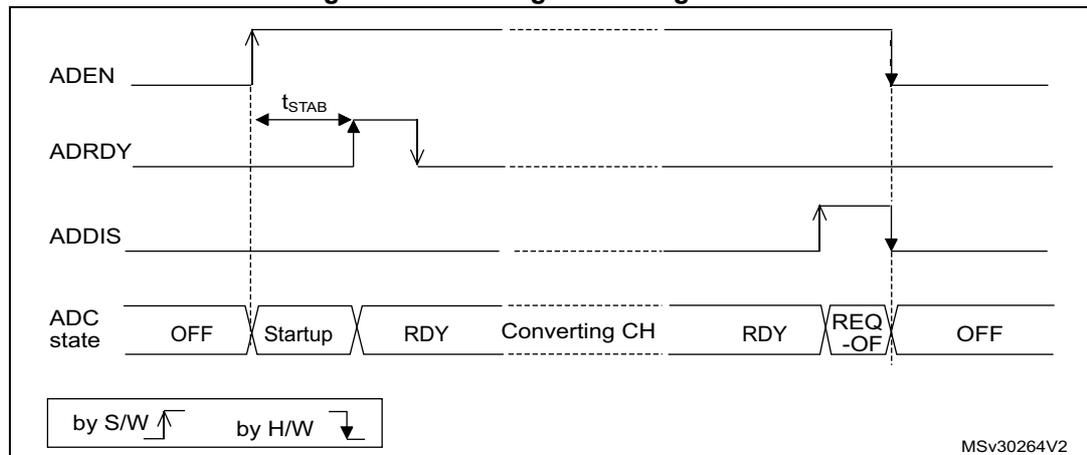
Once ADVREGEN[1:0] = 01, the ADC can be enabled and the ADC needs a stabilization time of \( t_{STAB} \) before it starts converting accurately, as shown in Figure 29 . Two control bits enable or disable the ADC:
- • ADEN=1 enables the ADC. The flag ADRDY will be set once the ADC is ready for operation.
- • ADDIS=1 disables the ADC and disable the ADC. ADEN and ADDIS are then automatically cleared by hardware as soon as the analog ADC is effectively disabled.
Regular conversion can then start either by setting ADSTART=1 (refer to Section 13.3.18: Conversion on external trigger and trigger polarity (EXTSEL, EXTEN, JEXTSEL, JEXTEN) ) or when an external trigger event occurs, if triggers are enabled.
Injected conversions start by setting JADSTART=1 or when an external injected trigger event occurs, if injected triggers are enabled.
Software procedure to enable the ADC
- 1. Set ADEN=1.
- 2. Wait until ADRDY=1 (ADRDY is set after the ADC startup time). This can be done using the associated interrupt (setting ADRDYIE=1).
Note: ADEN bit cannot be set during ADCAL=1 and 4 ADC clock cycle after the ADCAL bit is cleared by hardware(end of the calibration).
Software procedure to disable the ADC
- 1. Check that both ADSTART=0 and JADSTART=0 to ensure that no conversion is ongoing. If required, stop any regular and injected conversion ongoing by setting ADSTP=1 and JADSTP=1 and then wait until ADSTP=0 and JADSTP=0.
- 2. Set ADDIS=1.
- 3. If required by the application, wait until ADEN=0, until the analog ADC is effectively disabled (ADDIS will automatically be reset once ADEN=0).
Figure 29. Enabling / Disabling the ADC
13.3.10 Constraints when writing the ADC control bits
The software is allowed to write the RCC control bits to configure and enable the ADC clock (refer to RCC Section), the control bits DIFSEL in the ADCx_DIFSEL register and the control bits ADCAL and ADEN in the ADCx_CR register, only if the ADC is disabled (ADEN must be equal to 0).
The software is then allowed to write the control bits ADSTART, JADSTART and ADDIS of the ADCx_CR register only if the ADC is enabled and there is no pending request to disable the ADC (ADEN must be equal to 1 and ADDIS to 0).
For all the other control bits of the ADCx_CFGR, ADCx_SMPRx, ADCx_TRx, ADCx_SQRx, ADCx_JDRy, ADCx_OF Ry, ADCx_OFCHR and ADCx_IER registers:
- • For control bits related to configuration of regular conversions, the software is allowed to write them only if the ADC is enabled (ADEN=1) and if there is no regular conversion ongoing (ADSTART must be equal to 0).
- • For control bits related to configuration of injected conversions, the software is allowed to write them only if the ADC is enabled (ADEN=1) and if there is no injected conversion ongoing (JADSTART must be equal to 0).
The software is allowed to write the control bits ADSTP or JADSTP of the ADCx_CR register only if the ADC is enabled and eventually converting and if there is no pending request to disable the ADC (ADSTART or JADSTART must be equal to 1 and ADDIS to 0).
The software can write the register ADCx_JSQR at any time, when the ADC is enabled (ADEN=1).
Note: There is no hardware protection to prevent these forbidden write accesses and ADC behavior may become in an unknown state. To recover from this situation, the ADC must be disabled (clear ADEN=0 as well as all the bits of ADCx_CR register).
13.3.11 Channel selection (SQRx, JSQRx)
There are up to 18 multiplexed channels per ADC:
- • 5 fast analog inputs coming from GPIO pads (ADC_IN1..5)
- • Up to 10 slow analog inputs coming from GPIO pads (ADC_IN5..15). Depending on the products, not all of them are available on GPIO pads.
- • ADC1 is connected to 4 internal analog inputs:
- – ADC1_IN16 = V TS = temperature sensor
- – ADC1_IN17 = V BAT /2 = V BAT channel
- – ADC1_IN18 = V REFINT = internal reference voltage (also connected to ADC2_IN18).
- • ADC2_IN17 = V REFOPAMP2 = reference voltage for the operational amplifier 2
Warning: The user must ensure that only one of the two ADCs is converting V REFINT at the same time (it is forbidden to have several ADCs converting V REFINT at the same time).
Note: To convert one of the internal analog channels, the corresponding analog sources must first be enabled by programming bits VREFEN, TSEN or VBATEN in the ADCx_CCR registers.
It is possible to organize the conversions in two groups: regular and injected. A group consists of a sequence of conversions that can be done on any channel and in any order. For instance, it is possible to implement the conversion sequence in the following order: ADC_IN3, ADC_IN8, ADC_IN2, ADC_IN2, ADC_IN0, ADC_IN2, ADC_IN2, ADC_IN15.
- • A regular group is composed of up to 16 conversions. The regular channels and their order in the conversion sequence must be selected in the ADCx_SQR registers. The total number of conversions in the regular group must be written in the L[3:0] bits in the ADCx_SQR1 register.
- • An injected group is composed of up to 4 conversions. The injected channels and their order in the conversion sequence must be selected in the ADCx_JSQR register. The total number of conversions in the injected group must be written in the L[1:0] bits in the ADCx_JSQR register.
ADCx_SQR registers must not be modified while regular conversions can occur. For this, the ADC regular conversions must be first stopped by writing ADSTP=1 (refer to Section 13.3.17: Stopping an ongoing conversion (ADSTP, JADSTP) ).
It is possible to modify the ADCx_JSQR registers on-the-fly while injected conversions are occurring. Refer to Section 13.3.21: Queue of context for injected conversions
13.3.12 Channel-wise programmable sampling time (SMPR1, SMPR2)
Before starting a conversion, the ADC must establish a direct connection between the voltage source under measurement and the embedded sampling capacitor of the ADC. This sampling time must be enough for the input voltage source to charge the embedded capacitor to the input voltage level.
Each channel can be sampled with a different sampling time which is programmable using the SMP[2:0] bits in the ADCx_SMPR1 and ADCx_SMPR2 registers. It is therefore possible to select among the following sampling time values:
- • SMP = 000: 1.5 ADC clock cycles
- • SMP = 001: 2.5 ADC clock cycles
- • SMP = 010: 4.5 ADC clock cycles
- • SMP = 011: 7.5 ADC clock cycles
- • SMP = 100: 19.5 ADC clock cycles
- • SMP = 101: 61.5 ADC clock cycles
- • SMP = 110: 181.5 ADC clock cycles
- • SMP = 111: 601.5 ADC clock cycles
The total conversion time is calculated as follows:
Example:
With \( F_{\text{ADC\_CLK}} = 72 \text{ MHz} \) and a sampling time of 1.5 ADC clock cycles:
The ADC notifies the end of the sampling phase by setting the status bit EOSMP (only for regular conversion).
Constraints on the sampling time for fast and slow channels
For each channel, SMP[2:0] bits must be programmed to respect a minimum sampling time as specified in the ADC characteristics section of the datasheets.
13.3.13 Single conversion mode (CONT=0)
In Single conversion mode, the ADC performs once all the conversions of the channels. This mode is started with the CONT bit at 0 by either:
- • Setting the ADSTART bit in the ADCx_CR register (for a regular channel)
- • Setting the JADSTART bit in the ADCx_CR register (for an injected channel)
- • External hardware trigger event (for a regular or injected channel)
Inside the regular sequence, after each conversion is complete:
- • The converted data are stored into the 16-bit ADCx_DR register
- • The EOC (end of regular conversion) flag is set
- • An interrupt is generated if the EOCIE bit is set
Inside the injected sequence, after each conversion is complete:
- • The converted data are stored into one of the four 16-bit ADCx_JDRy registers
- • The JEOC (end of injected conversion) flag is set
- • An interrupt is generated if the JEOCIE bit is set
After the regular sequence is complete:
- • The EOS (end of regular sequence) flag is set
- • An interrupt is generated if the EOSIE bit is set
After the injected sequence is complete:
- • The JEOS (end of injected sequence) flag is set
- • An interrupt is generated if the JEOSIE bit is set
Then the ADC stops until a new external regular or injected trigger occurs or until bit ADSTART or JADSTART is set again.
Note: To convert a single channel, program a sequence with a length of 1.
13.3.14 Continuous conversion mode (CONT=1)
This mode applies to regular channels only.
In continuous conversion mode, when a software or hardware regular trigger event occurs, the ADC performs once all the regular conversions of the channels and then automatically re-starts and continuously converts each conversions of the sequence. This mode is started with the CONT bit at 1 either by external trigger or by setting the ADSTART bit in the ADCx_CR register.
Inside the regular sequence, after each conversion is complete:
- • The converted data are stored into the 16-bit ADCx_DR register
- • The EOC (end of conversion) flag is set
- • An interrupt is generated if the EOCIE bit is set
After the sequence of conversions is complete:
- • The EOS (end of sequence) flag is set
- • An interrupt is generated if the EOSIE bit is set
Then, a new sequence restarts immediately and the ADC continuously repeats the conversion sequence.
Note: To convert a single channel, program a sequence with a length of 1.
It is not possible to have both discontinuous mode and continuous mode enabled: it is forbidden to set both DISCEN=1 and CONT=1.
Injected channels cannot be converted continuously. The only exception is when an injected channel is configured to be converted automatically after regular channels in continuous mode (using JAUTO bit), refer to Auto-injection mode section ).
13.3.15 Starting conversions (ADSTART, JADSTART)
Software starts ADC regular conversions by setting ADSTART=1.
When ADSTART is set, the conversion starts:
- • Immediately: if EXTEN = 0x0 (software trigger)
- • At the next active edge of the selected regular hardware trigger: if EXTEN != 0x0
Software starts ADC injected conversions by setting JADSTART=1.
When JADSTART is set, the conversion starts:
- • Immediately, if JEXTEN = 0x0 (software trigger)
- • At the next active edge of the selected injected hardware trigger: if JEXTEN != 0x0
Note: In auto-injection mode (JAUTO=1), use ADSTART bit to start the regular conversions followed by the auto-injected conversions (JADSTART must be kept cleared).
ADSTART and JADSTART also provide information on whether any ADC operation is currently ongoing. It is possible to re-configure the ADC while ADSTART=0 and JADSTART=0 are both true, indicating that the ADC is idle.
ADSTART is cleared by hardware:
- • In single mode with software regular trigger (CONT=0, EXTSEL=0x0)
- – at any end of regular conversion sequence (EOS assertion) or at any end of sub-group processing if DISCEN = 1
- • In all cases (CONT=x, EXTSEL=x)
- – after execution of the ADSTP procedure asserted by the software.
Note: In continuous mode (CONT=1), ADSTART is not cleared by hardware with the assertion of EOS because the sequence is automatically relaunched.
When a hardware trigger is selected in single mode (CONT=0 and EXTSEL !=0x00), ADSTART is not cleared by hardware with the assertion of EOS to help the software which does not need to reset ADSTART again for the next hardware trigger event. This ensures that no further hardware triggers are missed.
JADSTART is cleared by hardware:
- • in single mode with software injected trigger (JEXTSEL=0x0)
- – at any end of injected conversion sequence (JEOS assertion) or at any end of sub-group processing if JDISCEN = 1
- • in all cases (JEXTSEL=x)
- – after execution of the JADSTP procedure asserted by the software.
13.3.16 Timing
The elapsed time between the start of a conversion and the end of conversion is the sum of the configured sampling time plus the successive approximation time depending on data resolution:
Figure 30. Analog to digital conversion time
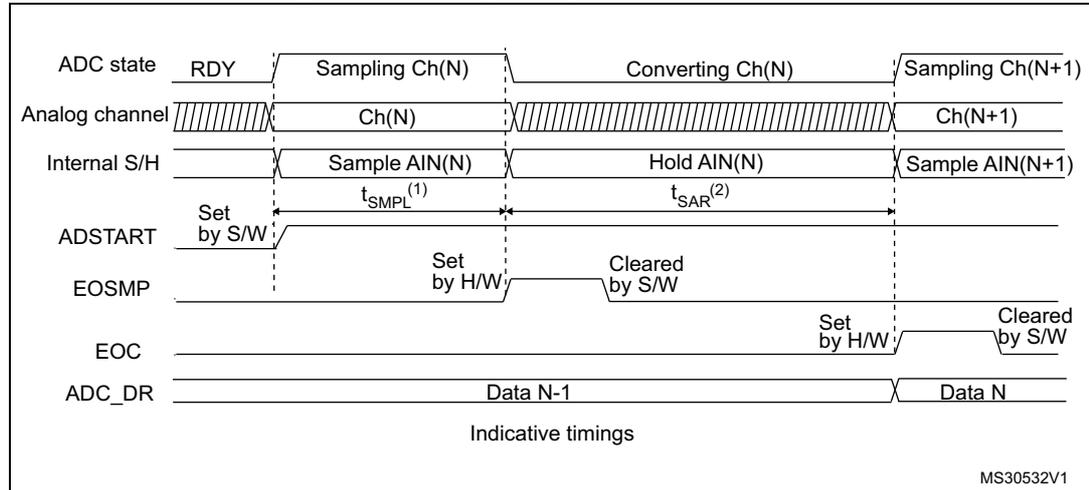
The diagram shows the timing of an ADC conversion across several signals:
- ADC state: Starts in RDY state, then transitions through Sampling Ch(N), Converting Ch(N), and Sampling Ch(N+1).
- Analog channel: Shows the active channel Ch(N) during sampling and conversion, and Ch(N+1) during the next sampling phase.
- Internal S/H: Shows Sample AIN(N) and Hold AIN(N) phases. Sampling time \( t_{SMPL}^{(1)} \) and conversion time \( t_{SAR}^{(2)} \) are indicated.
- ADSTART: Set by software (S/W) to begin conversion.
- EOSMP: End of sampling phase, set by hardware (H/W).
- EOC: End of conversion, set by hardware (H/W) and cleared by software (S/W).
- ADC_DR: Data register, containing Data N-1 and Data N.
MS30532V1
- 1. \( T_{SMPL} \) depends on SMP[2:0]
- 2. \( T_{SAR} \) depends on RES[2:0]
13.3.17 Stopping an ongoing conversion (ADSTP, JADSTP)
The software can decide to stop regular conversions ongoing by setting ADSTP=1 and injected conversions ongoing by setting JADSTP=1.
Stopping conversions will reset the ongoing ADC operation. Then the ADC can be reconfigured (ex: changing the channel selection or the trigger) ready for a new operation.
Note that it is possible to stop injected conversions while regular conversions are still operating and vice-versa. This allows, for instance, re-configuration of the injected conversion sequence and triggers while regular conversions are still operating (and vice-versa).
When the ADSTP bit is set by software, any ongoing regular conversion is aborted with partial result discarded (ADCx_DR register is not updated with the current conversion).
When the JADSTP bit is set by software, any ongoing injected conversion is aborted with partial result discarded (ADCx_JDRy register is not updated with the current conversion). The scan sequence is also aborted and reset (meaning that relaunching the ADC would restart a new sequence).
Once this procedure is complete, bits ADSTP/ADSTART (in case of regular conversion), or JADSTP/JADSTART (in case of injected conversion) are cleared by hardware and the software must wait until ADSTART = 0 (or JADSTART = 0) before starting a new conversion.
Note: In auto-injection mode (JAUTO=1), setting ADSTP bit aborts both regular and injected conversions (JADSTP must not be used).
Figure 31. Stopping ongoing regular conversions
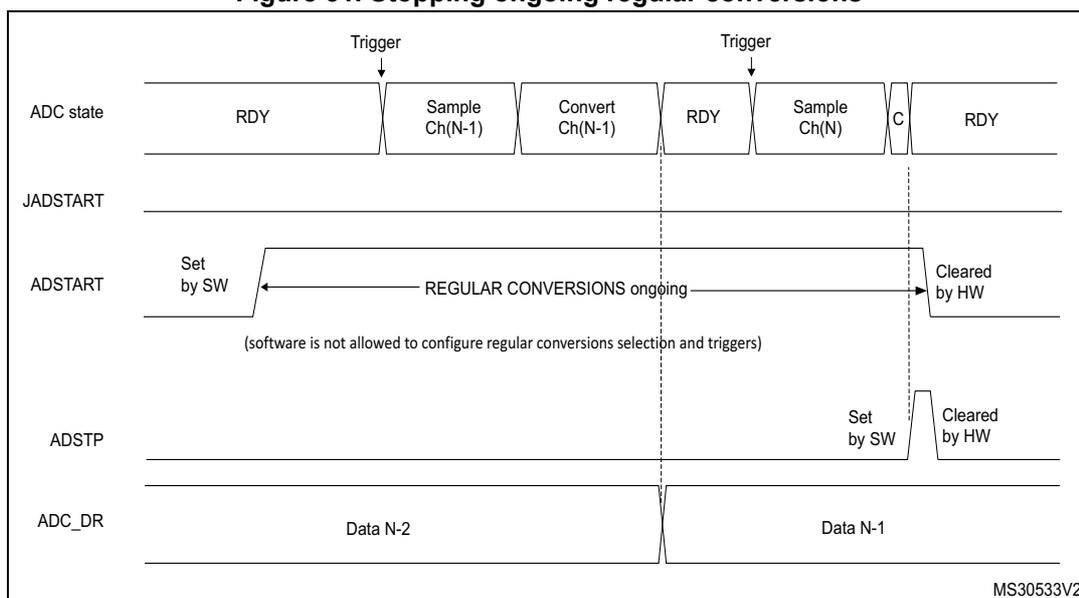
The diagram illustrates the timing and control signals for stopping ongoing regular conversions in an ADC. It consists of four horizontal timelines:
- ADC state: Shows a sequence of states: RDY, Sample Ch(N-1), Convert Ch(N-1), RDY, Sample Ch(N), C, and RDY. Triggers are indicated at the start of the first and third conversion sequences.
- JADSTART: Remains low throughout the sequence.
- ADSTART: Is set by software (SW) at the beginning of the first conversion sequence and is cleared by hardware (HW) at the end of the second conversion sequence (after the 'C' state of the second conversion).
- ADSTP: Is set by software (SW) at the beginning of the second conversion sequence and is cleared by hardware (HW) at the end of the second conversion sequence (after the 'C' state).
- ADC_DR: Shows the data register being updated. Data N-2 is present during the first conversion, and Data N-1 is present during the second conversion. The register is updated with Data N-1 at the end of the second conversion sequence.
(software is not allowed to configure regular conversions selection and triggers)
MS30533V2
Figure 32. Stopping ongoing regular and injected conversions
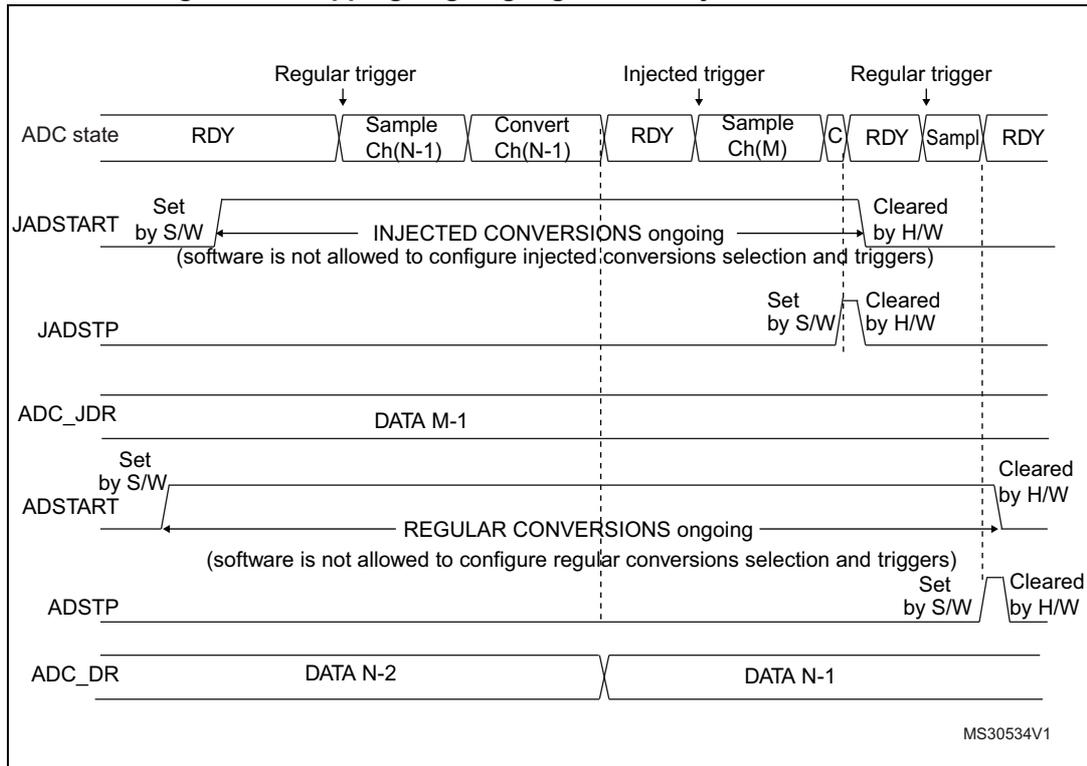
The diagram illustrates the timing for stopping ongoing conversions. The top row shows the ADC state: RDY → Sample Ch(N-1) → Convert Ch(N-1) → RDY → Sample Ch(M) → C → RDY → Sample → RDY. Triggers are indicated by downward arrows: Regular trigger (before Sample Ch(N-1)), Injected trigger (before Sample Ch(M)), and Regular trigger (before Sample). The JADSTART signal is set by software (S/W) and cleared by hardware (H/W) when injected conversions are ongoing. A note states: "(software is not allowed to configure injected conversions selection and triggers)". The JADSTP signal is set by software. The ADC_JDR register contains DATA M-1. The ADSTART signal is set by software and cleared by hardware when regular conversions are ongoing. A note states: "(software is not allowed to configure regular conversions selection and triggers)". The ADSTP signal is set by software and cleared by hardware. The ADC_DR register contains DATA N-2 and DATA N-1. The diagram is labeled MS30534V1.
13.3.18 Conversion on external trigger and trigger polarity (EXTSEL, EXTEN, JEXTSEL, JEXTEN)
A conversion or a sequence of conversions can be triggered either by software or by an external event (e.g. timer capture, input pins). If the EXTEN[1:0] control bits (for a regular conversion) or JEXTEN[1:0] bits (for an injected conversion) are different from 0b00, then external events are able to trigger a conversion with the selected polarity.
The regular trigger selection is effective once software has set bit ADSTART=1 and the injected trigger selection is effective once software has set bit JADSTART=1.
Any hardware triggers which occur while a conversion is ongoing are ignored.
- • If bit ADSTART=0, any regular hardware triggers which occur are ignored.
- • If bit JADSTART=0, any injected hardware triggers which occur are ignored.
Table 39 provides the correspondence between the EXTEN[1:0] and JEXTEN[1:0] values and the trigger polarity.
Table 39. Configuring the trigger polarity for regular external triggers
| EXTEN[1:0]/ JEXTEN[1:0] | Source |
|---|---|
| 00 | Hardware Trigger detection disabled, software trigger detection enabled |
| 01 | Hardware Trigger with detection on the rising edge |
| 10 | Hardware Trigger with detection on the falling edge |
| 11 | Hardware Trigger with detection on both the rising and falling edges |
Note: The polarity of the regular trigger cannot be changed on-the-fly.
Note: The polarity of the injected trigger can be anticipated and changed on-the-fly. Refer to Section 13.3.21: Queue of context for injected conversions .
The EXTSEL[3:0] and JEXTSEL[3:0] control bits select which out of 16 possible events can trigger conversion for the regular and injected groups.
A regular group conversion can be interrupted by an injected trigger.
Note: The regular trigger selection cannot be changed on-the-fly.
The injected trigger selection can be anticipated and changed on-the-fly. Refer to Section 13.3.21: Queue of context for injected conversions on page 235
Each ADC master shares the same input triggers with its ADC slave as described in Figure 33 .
Figure 33. Triggers are shared between ADC master & ADC slave
![Figure 33: Triggers are shared between ADC master & ADC slave. The diagram shows two ADC blocks, 'ADC MASTER' and 'ADC SLAVE', sharing common external trigger inputs. On the left, 'EXTi mapped at product level' inputs (EXT0, EXT1, ..., EXT15) are connected to the 'External regular trigger' multiplexers in both ADCs. These multiplexers are controlled by 'EXTSEL[3:0]' bits. 'JEXTi mapped at product level' inputs (JEXT0, JEXT1, ..., JEXT15) are connected to the 'External injected trigger' multiplexers in both ADCs. These multiplexers are controlled by 'JEXTSEL[3:0]' bits. The diagram illustrates that the same external events can trigger conversions in both the master and slave ADCs.](/RM0364-STM32F334/4317dcb0bddb94c543c5e339dd660d33_img.jpg)
Table 40 to Table 41 give all the possible external triggers of the two ADCs for regular and injected conversion.
Table 40. ADC1 (master) & 2 (slave) - External triggers for regular channels
| Name | Source | Type | EXTSEL[3:0] |
|---|---|---|---|
| EXT0 | TIM1_CC1 event | Internal signal from on chip timers | 0000 |
| EXT1 | TIM1_CC2 event | Internal signal from on chip timers | 0001 |
| EXT2 | TIM1_CC3 event | Internal signal from on chip timers | 0010 |
| EXT3 | TIM2_CC2 event | Internal signal from on chip timers | 0011 |
| Name | Source | Type | EXTSEL[3:0] |
|---|---|---|---|
| EXT4 | TIM3_TRGO event | Internal signal from on chip timers | 0100 |
| EXT5 | Reserved | - | 0101 |
| EXT6 | EXTI line 11 | External pin | 0110 |
| EXT7 | HRTIM_ADCTRG1 event | Internal signal from on chip timers | 0111 |
| EXT8 | HRTIM_ADCTRG3 event | Internal signal from on chip timers | 1000 |
| EXT9 | TIM1_TRGO event | Internal signal from on chip timers | 1001 |
| EXT10 | TIM1_TRGO2 event | Internal signal from on chip timers | 1010 |
| EXT11 | TIM2_TRGO event | Internal signal from on chip timers | 1011 |
| EXT12 | Reserved | - | 1100 |
| EXT13 | TIM6_TRGO event | Internal signal from on chip timers | 1101 |
| EXT14 | TIM15_TRGO event | Internal signal from on chip timers | 1110 |
| EXT15 | TIM3_CC4 event | Internal signal from on chip timers | 1111 |
| Name | Source | Type | JEXTSEL[3:0] |
|---|---|---|---|
| JEXT0 | TIM1_TRGO event | Internal signal from on chip timers | 0000 |
| JEXT1 | TIM1_CC4 event | Internal signal from on chip timers | 0001 |
| JEXT2 | TIM2_TRGO event | Internal signal from on chip timers | 0010 |
| JEXT3 | TIM2_CC1 event | Internal signal from on chip timers | 0011 |
| JEXT4 | TIM3_CC4 event | Internal signal from on chip timers | 0100 |
| JEXT5 | Reserved | - | 0101 |
| JEXT6 | EXTI line 15 | External pin | 0110 |
| JEXT7 | Reserved | - | 0111 |
| JEXT8 | TIM1_TRGO2 event | Internal signal from on chip timers | 1000 |
| JEXT9 | HRTIM_ADCTRG2 event | Internal signal from on chip timers | 1001 |
| JEXT10 | HRTIM_ADCTRG4 event | Internal signal from on chip timers | 1010 |
| JEXT11 | TIM3_CC3 event | Internal signal from on chip timers | 1011 |
| JEXT12 | TIM3_TRGO event | Internal signal from on chip timers | 1100 |
| JEXT13 | TIM3_CC1 event | Internal signal from on chip timers | 1101 |
| JEXT14 | TIM6_TRGO event | Internal signal from on chip timers | 1110 |
| JEXT15 | TIM15_TRGO event | Internal signal from on chip timers | 1111 |
13.3.19 Injected channel management
Triggered injection mode
To use triggered injection, the JAUTO bit in the ADCx_CFGR register must be cleared.
- 1. Start the conversion of a group of regular channels either by an external trigger or by setting the ADSTART bit in the ADCx_CR register.
- 2. If an external injected trigger occurs, or if the JADSTART bit in the ADCx_CR register is set during the conversion of a regular group of channels, the current conversion is reset and the injected channel sequence switches are launched (all the injected channels are converted once).
- 3. Then, the regular conversion of the regular group of channels is resumed from the last interrupted regular conversion.
- 4. If a regular event occurs during an injected conversion, the injected conversion is not interrupted but the regular sequence is executed at the end of the injected sequence.
Figure 34 shows the corresponding timing diagram.
Note: When using triggered injection, one must ensure that the interval between trigger events is longer than the injection sequence. For instance, if the sequence length is 28 ADC clock cycles (that is two conversions with a sampling time of 1.5 clock periods), the minimum interval between triggers must be 29 ADC clock cycles.
Auto-injection mode
If the JAUTO bit in the ADCx_CFGR register is set, then the channels in the injected group are automatically converted after the regular group of channels. This can be used to convert a sequence of up to 20 conversions programmed in the ADCx_SQR and ADCx_JSQR registers.
In this mode, the ADSTART bit in the ADCx_CR register must be set to start regular conversions, followed by injected conversions (JADSTART must be kept cleared). Setting the ADSTP bit aborts both regular and injected conversions (JADSTP bit must not be used).
In this mode, external trigger on injected channels must be disabled.
If the CONT bit is also set in addition to the JAUTO bit, regular channels followed by injected channels are continuously converted.
Note: It is not possible to use both the auto-injected and discontinuous modes simultaneously. When the DMA is used for exporting regular sequencer's data in JAUTO mode, it is necessary to program it in circular mode (CIRC bit set in DMA_CCRx register). If the CIRC bit is reset (single-shot mode), the JAUTO sequence will be stopped upon DMA Transfer Complete event.
Figure 34. Injected conversion latency
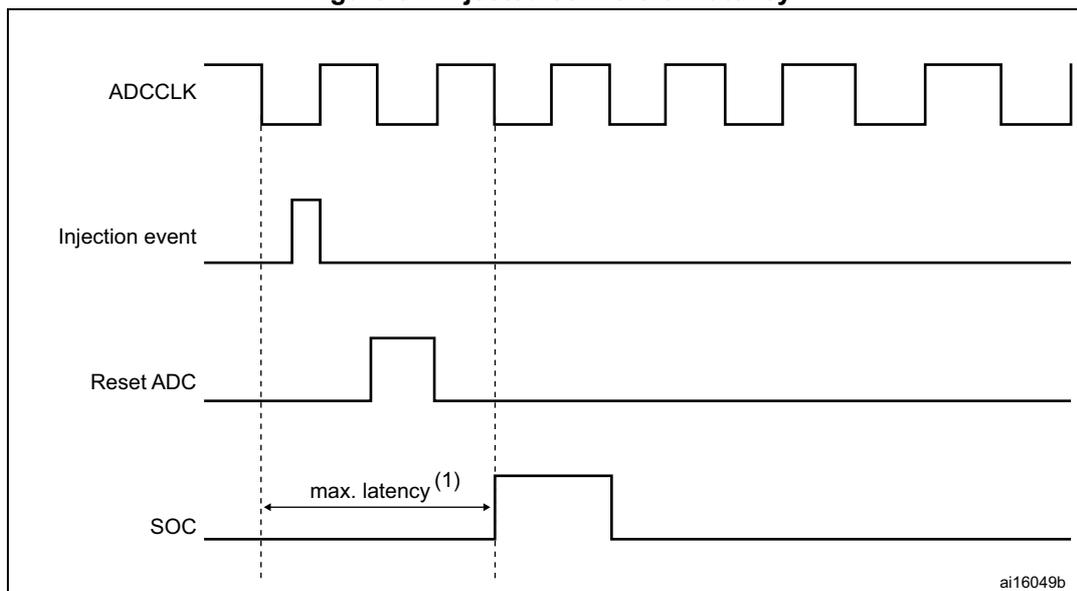
1. The maximum latency value can be found in the electrical characteristics of the STM32F334xx datasheets.
13.3.20 Discontinuous mode (DISCEN, DISCNUM, JDISCEN)
Regular group mode
This mode is enabled by setting the DISCEN bit in the ADCx_CFGR register.
It is used to convert a short sequence (sub-group) of n conversions ( \( n \leq 8 \) ) that is part of the sequence of conversions selected in the ADCx_SQR registers. The value of n is specified by writing to the DISCNUM[2:0] bits in the ADCx_CFGR register.
When an external trigger occurs, it starts the next n conversions selected in the ADCx_SQR registers until all the conversions in the sequence are done. The total sequence length is defined by the L[3:0] bits in the ADCx_SQR1 register.
Example:
- • DISCEN=1, n=3, channels to be converted = 1, 2, 3, 6, 7, 8, 9, 10, 11
- – 1st trigger: channels converted are 1, 2, 3 (an EOC event is generated at each conversion).
- – 2nd trigger: channels converted are 6, 7, 8 (an EOC event is generated at each conversion).
- – 3rd trigger: channels converted are 9, 10, 11 (an EOC event is generated at each conversion) and an EOS event is generated after the conversion of channel 11.
- – 4th trigger: channels converted are 1, 2, 3 (an EOC event is generated at each conversion).
- – ...
- • DISCEN=0, channels to be converted = 1, 2, 3, 6, 7, 8, 9, 10, 11
- – 1st trigger: the complete sequence is converted: channel 1, then 2, 3, 6, 7, 9, 10 and 11. Each conversion generates an EOC event and the last one also generates an EOS event.
- – all the next trigger events will relaunch the complete sequence.
Note: When a regular group is converted in discontinuous mode, no rollover occurs (the last subgroup of the sequence can have less than n conversions).
When all subgroups are converted, the next trigger starts the conversion of the first subgroup. In the example above, the 4th trigger reconverts the channels 1, 2 and 3 in the 1st subgroup.
It is not possible to have both discontinuous mode and continuous mode enabled. In this case (if DISCEN=1, CONT=1), the ADC behaves as if continuous mode was disabled.
Injected group mode
This mode is enabled by setting the JDISCEN bit in the ADCx_CFGR register. It converts the sequence selected in the ADCx_JSQR register, channel by channel, after an external injected trigger event. This is equivalent to discontinuous mode for regular channels where 'n' is fixed to 1.
When an external trigger occurs, it starts the next channel conversions selected in the ADCx_JSQR registers until all the conversions in the sequence are done. The total sequence length is defined by the JL[1:0] bits in the ADCx_JSQR register.
Example:
- • JDISCEN=1, channels to be converted = 1, 2, 3
- – 1st trigger: channel 1 converted (a JEOC event is generated)
- – 2nd trigger: channel 2 converted (a JEOC event is generated)
- – 3rd trigger: channel 3 converted and a JEOC event + a JEOS event are generated
- – ...
Note: When all injected channels have been converted, the next trigger starts the conversion of the first injected channel. In the example above, the 4th trigger reconverts the 1st injected channel 1.
It is not possible to use both auto-injected mode and discontinuous mode simultaneously: the bits DISCEN and JDISCEN must be kept cleared by software when JAUTO is set.
13.3.21 Queue of context for injected conversions
A queue of context is implemented to anticipate up to 2 contexts for the next injected sequence of conversions.
This context consists of:
- • Configuration of the injected triggers (bits JEXTEN[1:0] and JEXTSEL[3:0] in ADCx_JSQR register)
- • Definition of the injected sequence (bits JSQx[4:0] and JL[1:0] in ADCx_JSQR register)
All the parameters of the context are defined into a single register ADCx_JSQR and this register implements a queue of 2 buffers, allowing the bufferization of up to 2 sets of parameters:
- • The JSQR register can be written at any moment even when injected conversions are ongoing.
- • Each data written into the JSQR register is stored into the Queue of context.
- • At the beginning, the Queue is empty and the first write access into the JSQR register immediately changes the context and the ADC is ready to receive injected triggers.
- • Once an injected sequence is complete, the Queue is consumed and the context changes according to the next JSQR parameters stored in the Queue. This new context is applied for the next injected sequence of conversions.
- • A Queue overflow occurs when writing into register JSQR while the Queue is full. This overflow is signaled by the assertion of the flag JQOVF. When an overflow occurs, the write access of JSQR register which has created the overflow is ignored and the queue of context is unchanged. An interrupt can be generated if bit JQOVFIE is set.
- • Two possible behaviors are possible when the Queue becomes empty, depending on the value of the control bit JQM of register ADCx_CFGR:
- – If JQM=0, the Queue is empty just after enabling the ADC, but then it can never be empty during run operations: the Queue always maintains the last active context and any further valid start of injected sequence will be served according to the last active context.
- – If JQM=1, the Queue can be empty after the end of an injected sequence or if the Queue is flushed. When this occurs, there is no more context in the queue and both injected software and hardware triggers are disabled. Therefore, any further hardware or software injected triggers are ignored until the software re-writes a new injected context into JSQR register.
- • Reading JSQR register returns the current JSQR context which is active at that moment. When the JSQR context is empty, JSQR is read as 0x0000.
- • The Queue is flushed when stopping injected conversions by setting JADSTP=1 or when disabling the ADC by setting ADDIS=1:
- – If JQM=0, the Queue is maintained with the last active context.
- – If JQM=1, the Queue becomes empty and triggers are ignored.
Note: When configured in discontinuous mode (bit JDISCEN=1), only the last trigger of the injected sequence changes the context and consumes the Queue. The 1 st trigger only consumes the queue but others are still valid triggers as shown by the discontinuous mode example below (length = 3 for both contexts):
- • 1 st trigger, discontinuous. Sequence 1: context 1 consumed, 1 st conversion carried out.
- • 2 nd trigger, disc. Sequence 1: 2 nd conversion.
- • 3 rd trigger, discontinuous. Sequence 1: 3 rd conversion.
- • 4 th trigger, discontinuous. Sequence 2: context 2 consumed, 1 st conversion carried out.
- • 5 th trigger, discontinuous. Sequence 2: 2 nd conversion.
- • 6 th trigger, discontinuous. Sequence 2: 3 rd conversion.
Behavior when changing the trigger or sequence context
The Figure 35 and Figure 36 show the behavior of the context Queue when changing the sequence or the triggers.
Figure 35. Example of JSQR queue of context (sequence change)
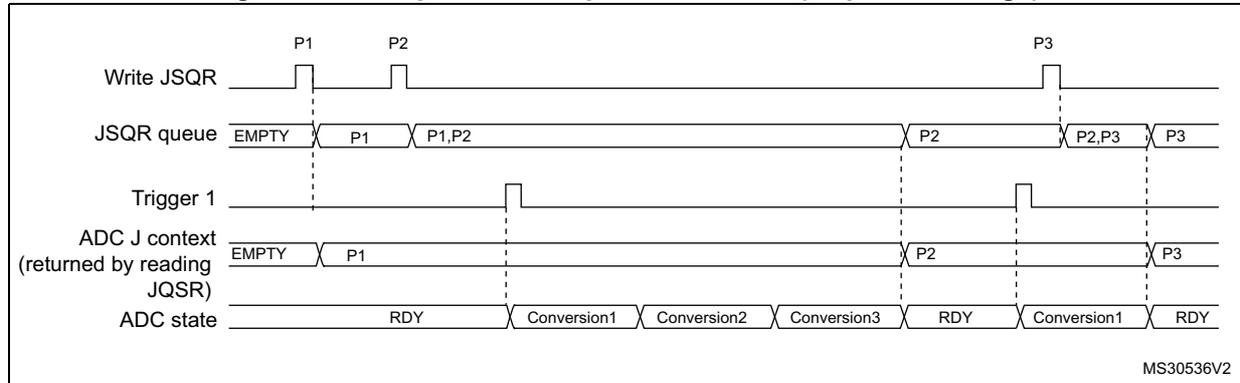
Timing diagram for Figure 35. The diagram shows the behavior of the JSQR queue and ADC state when the sequence context is changed. The signals are: Write JSQR, JSQR queue, Trigger 1, ADC J context (returned by reading JQSR), and ADC state. The sequence context is changed from P1 to P2 and then to P3. The ADC state transitions from RDY to Conversion1, Conversion2, Conversion3, and back to RDY. The JSQR queue shows the sequence context being updated from P1 to P1,P2 and then to P2, P2,P3, and finally P3. The ADC J context is updated from P1 to P2 and then to P3. The ADC state is shown as RDY, Conversion1, Conversion2, Conversion3, RDY, Conversion1, RDY.
MS30536V2
- Parameters:
P1: sequence of 3 conversions, hardware trigger 1
P2: sequence of 1 conversion, hardware trigger 1
P3: sequence of 4 conversions, hardware trigger 1
Figure 36. Example of JSQR queue of context (trigger change)
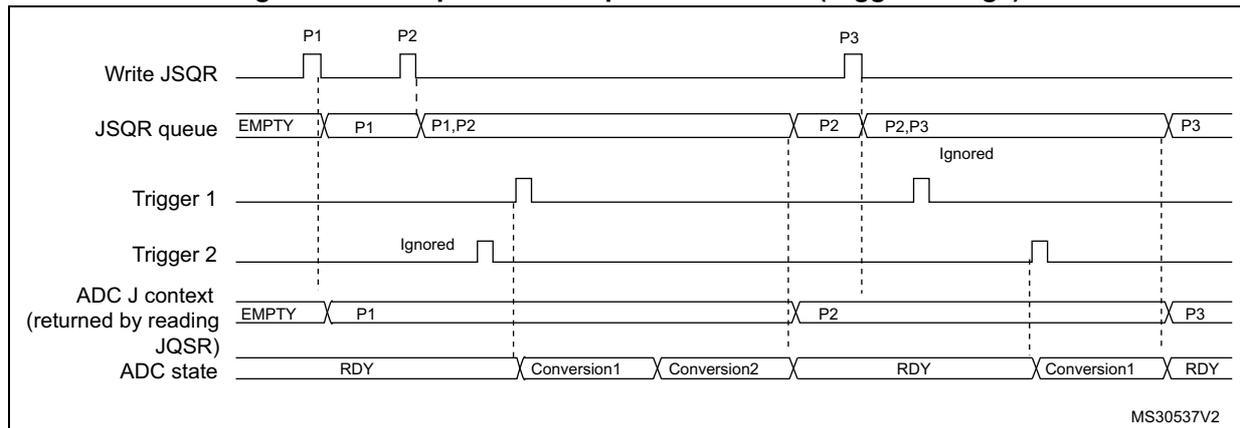
Timing diagram for Figure 36. The diagram shows the behavior of the JSQR queue and ADC state when the trigger context is changed. The signals are: Write JSQR, JSQR queue, Trigger 1, Trigger 2, ADC J context (returned by reading JQSR), and ADC state. The sequence context is changed from P1 to P2 and then to P3. The ADC state transitions from RDY to Conversion1, Conversion2, and back to RDY. The JSQR queue shows the sequence context being updated from P1 to P1,P2 and then to P2, P2,P3, and finally P3. The ADC J context is updated from P1 to P2 and then to P3. The ADC state is shown as RDY, Conversion1, Conversion2, RDY, Conversion1, RDY. Trigger 2 is ignored when the sequence context is P1.
MS30537V2
- Parameters:
P1: sequence of 2 conversions, hardware trigger 1
P2: sequence of 1 conversion, hardware trigger 2
P3: sequence of 4 conversions, hardware trigger 1
Queue of context: Behavior when a queue overflow occurs
The Figure 37 and Figure 38 show the behavior of the context Queue if an overflow occurs before or during a conversion.
Figure 37. Example of JSQR queue of context with overflow before conversion
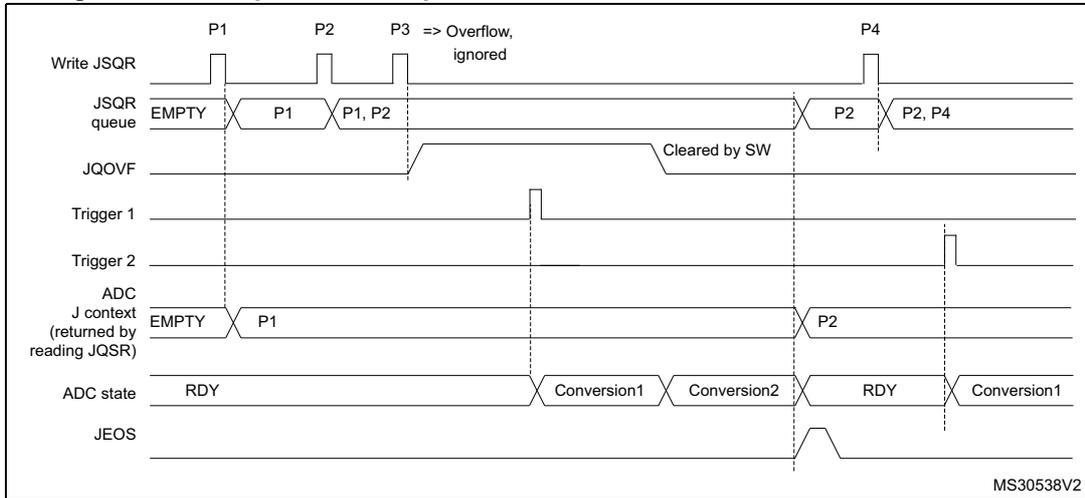
- 1. Parameters:
P1: sequence of 2 conversions, hardware trigger 1
P2: sequence of 1 conversion, hardware trigger 2
P3: sequence of 3 conversions, hardware trigger 1
P4: sequence of 4 conversions, hardware trigger 1
Figure 38. Example of JSQR queue of context with overflow during conversion
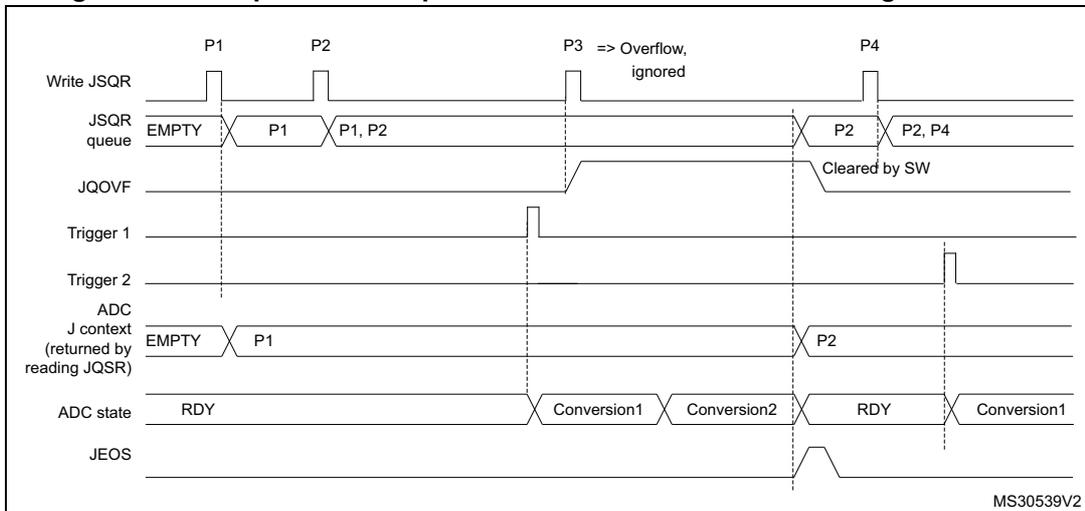
- 1. Parameters:
P1: sequence of 2 conversions, hardware trigger 1
P2: sequence of 1 conversion, hardware trigger 2
P3: sequence of 3 conversions, hardware trigger 1
P4: sequence of 4 conversions, hardware trigger 1
It is recommended to manage the queue overflows as described below:
- • After each P context write into JSQR register, flag JQOVF shows if the write has been ignored or not (an interrupt can be generated).
- • Avoid Queue overflows by writing the third context (P3) only once the flag JEOS of the previous context P2 has been set. This ensures that the previous context has been consumed and that the queue is not full.
Queue of context: Behavior when the queue becomes empty
Figure 39 and Figure 40 show the behavior of the context Queue when the Queue becomes empty in both cases JQM=0 or 1.
Figure 39. Example of JSQR queue of context with empty queue (case JQM=0)
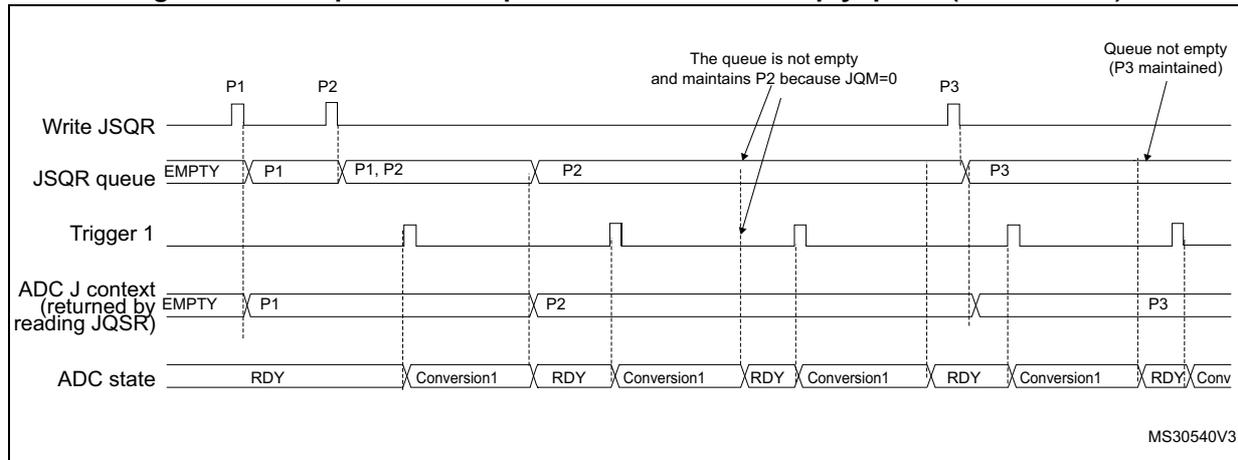
The diagram shows the following signals and states over time:
- Write JSQR: Shows pulses for writing contexts P1, P2, and P3.
- JSQR queue: Shows the queue state. It starts as EMPTY. After writing P1, it contains P1. After writing P2, it contains P1, P2. When P3 is written, the queue contains P2 (because P1 has been consumed). The queue then contains P2 until a trigger occurs. After the trigger, the queue contains P3. Annotations indicate: "The queue is not empty and maintains P2 because JQM=0" and "Queue not empty (P3 maintained)".
- Trigger 1: Shows periodic trigger pulses.
- ADC J context (returned by reading JQSR): Shows the context returned by reading the JQSR register. It starts as EMPTY. After the first trigger, it returns P1. After the second trigger, it returns P2. After the third trigger, it returns P3.
- ADC state: Shows the state of the ADC. It starts as RDY. After the first trigger, it becomes Conversion1. After the conversion, it returns to RDY. This cycle repeats for subsequent triggers.
MS30540V3
- 1. Parameters:
P1: sequence of 1 conversion, hardware trigger 1
P2: sequence of 1 conversion, hardware trigger 1
P3: sequence of 1 conversion, hardware trigger 1
Note: When writing P3, the context changes immediately. However, because of internal resynchronization, there is a latency and if a trigger occurs just after or before writing P3, it can happen that the conversion is launched considering the context P2. To avoid this situation, the user must ensure that there is no ADC trigger happening when writing a new context that applies immediately.
Figure 40. Example of JSQR queue of context with empty queue (case JQM=1)
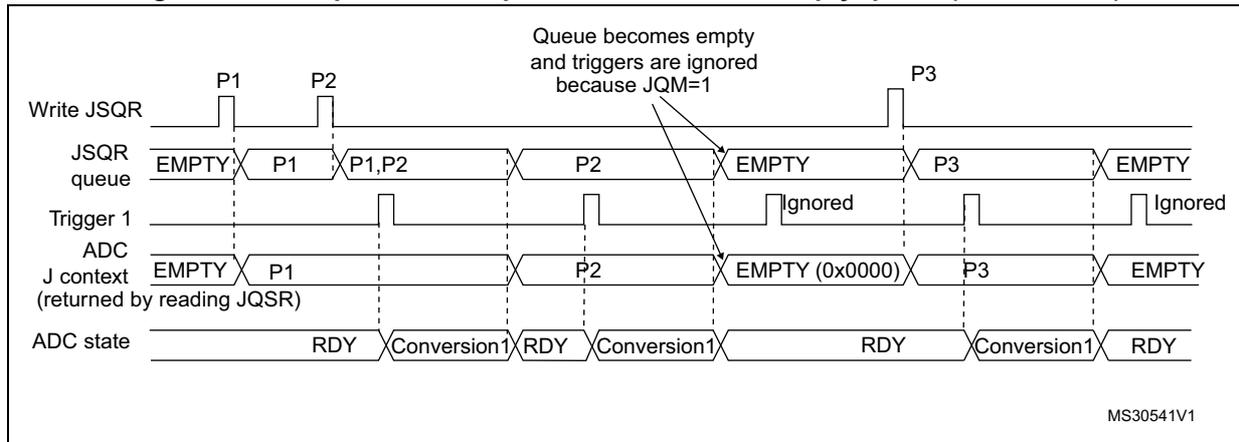
The diagram illustrates the behavior of the JSQR queue when JQM=1. The 'Write JSQR' signal shows three pulses for parameters P1, P2, and P3. The 'JSQR queue' starts as 'EMPTY', becomes 'P1', then 'P1,P2', then 'P2', then 'EMPTY', then 'P3', and finally 'EMPTY'. The 'Trigger 1' signal shows two rising edges. The first trigger occurs while the queue contains 'P1,P2' and starts a conversion. The second trigger occurs while the queue is 'EMPTY'. Because JQM=1, this trigger is ignored. The 'ADC' and 'J context' show the active context being updated from P1 to P2, then to P3. The 'ADC state' shows the sequence: RDY -> Conversion1 -> RDY -> Conversion1 -> RDY -> Conversion1 -> RDY.
- 1. Parameters:
P1: sequence of 1 conversion, hardware trigger 1
P2: sequence of 1 conversion, hardware trigger 1
P3: sequence of 1 conversion, hardware trigger 1
Flushing the queue of context
The figures below show the behavior of the context Queue in various situations when the queue is flushed.
Figure 41. Flushing JSQR queue of context by setting JADSTP=1 (JQM=0). Case when JADSTP occurs during an ongoing conversion.
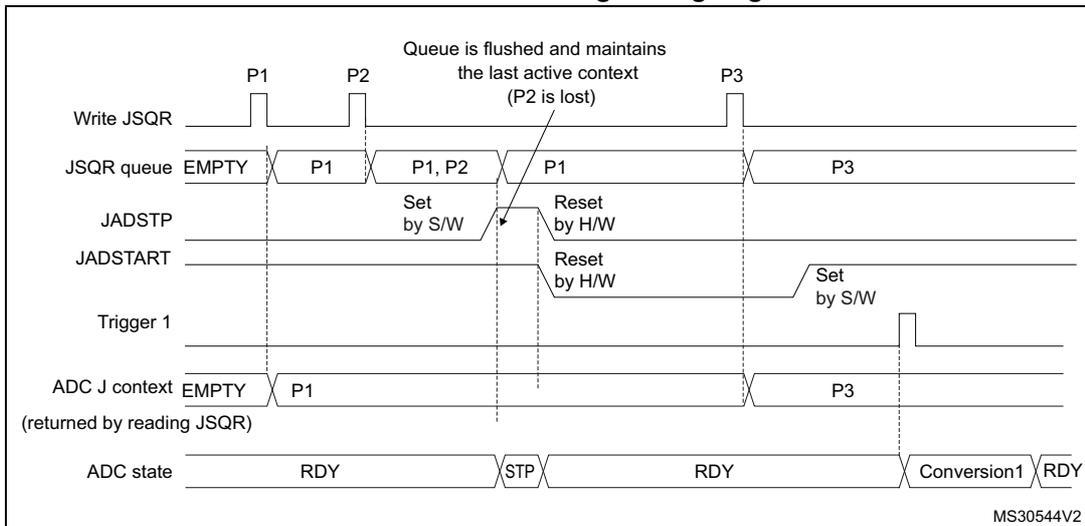
The diagram illustrates the behavior of the JSQR queue when JADSTP=1 (JQM=0) during an ongoing conversion. The 'Write JSQR' signal shows three pulses for parameters P1, P2, and P3. The 'JSQR queue' starts as 'EMPTY', becomes 'P1', then 'P1,P2', then 'P1', then 'P3'. The 'JADSTP' signal is set by software (S/W) and reset by hardware (H/W). The 'JADSTART' signal is reset by hardware (H/W) and set by software (S/W). The 'Trigger 1' signal shows a rising edge. The 'ADC J context' shows the active context being updated from P1 to P2, then to P1, then to P3. The 'ADC state' shows the sequence: RDY -> STP -> RDY -> Conversion1 -> RDY.
- 1. Parameters:
P1: sequence of 1 conversion, hardware trigger 1
P2: sequence of 1 conversion, hardware trigger 1
P3: sequence of 1 conversion, hardware trigger 1
Figure 42. Flushing JSQR queue of context by setting JADSTP=1 (JQM=0).
Case when JADSTP occurs during an ongoing conversion and a new trigger occurs.
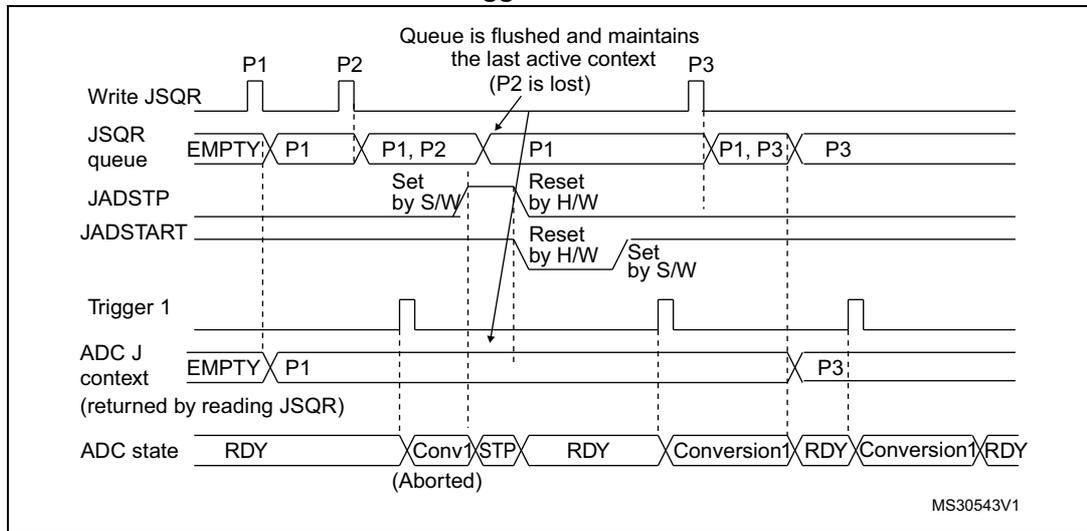
Timing diagram for Figure 42. The diagram shows the following signals and states over time:
- Write JSQR: Shows three write operations for sequences P1, P2, and P3.
- JSQR queue: Starts as EMPTY. After writing P1, it contains P1. After writing P2, it contains P1, P2. When JADSTP is set (during P1's conversion), the queue is flushed and contains only P1. After writing P3, it contains P1, P3. Finally, it contains P3.
- JADSTP: Set by software (S/W) during the conversion of P1. It is reset by hardware (H/W) when the conversion of P1 is aborted.
- JADSTART: Reset by hardware (H/W) when the conversion of P1 is aborted. It is set by software (S/W) to start the conversion of P3.
- Trigger 1: Hardware trigger for sequences P1, P2, and P3.
- ADC J context (returned by reading JSQR): Starts as EMPTY. It contains P1 during its conversion. When JADSTP is set, it becomes EMPTY. After the conversion of P1 is aborted, it contains P3.
- ADC state: Starts as RDY. It becomes Conv1 (Aborted) when JADSTP is set. It returns to RDY. Then, it becomes Conversion1 when P3 starts, and returns to RDY when it finishes.
A note indicates: "Queue is flushed and maintains the last active context (P2 is lost)". The diagram is labeled MS30543V1.
- 1. Parameters:
P1: sequence of 1 conversion, hardware trigger 1
P2: sequence of 1 conversion, hardware trigger 1
P3: sequence of 1 conversion, hardware trigger 1
Figure 43. Flushing JSQR queue of context by setting JADSTP=1 (JQM=0).
Case when JADSTP occurs outside an ongoing conversion
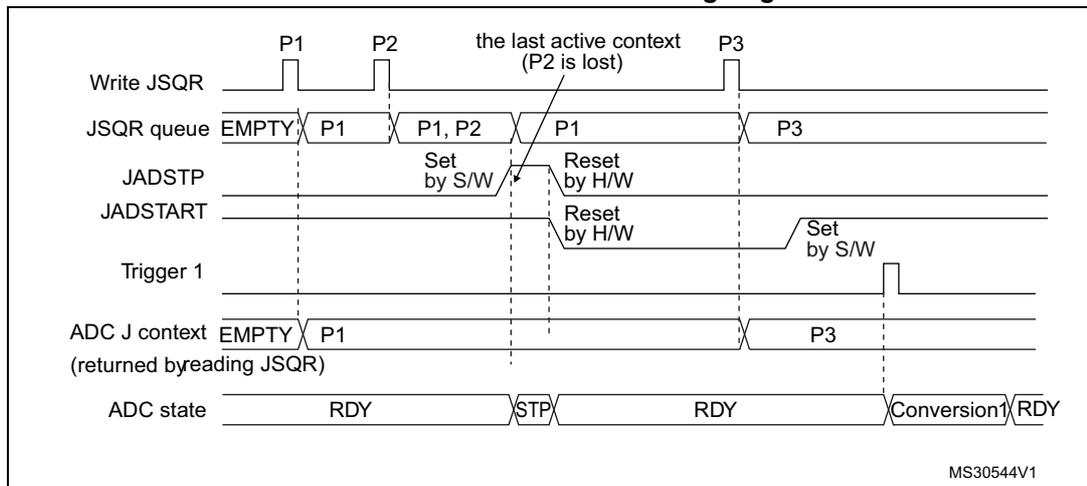
Timing diagram for Figure 43. The diagram shows the following signals and states over time:
- Write JSQR: Shows three write operations for sequences P1, P2, and P3.
- JSQR queue: Starts as EMPTY. After writing P1, it contains P1. After writing P2, it contains P1, P2. When JADSTP is set (outside an ongoing conversion), the queue is flushed and contains only P1. After writing P3, it contains P3.
- JADSTP: Set by software (S/W) outside an ongoing conversion. It is reset by hardware (H/W) when the conversion of P1 is aborted.
- JADSTART: Reset by hardware (H/W) when the conversion of P1 is aborted. It is set by software (S/W) to start the conversion of P3.
- Trigger 1: Hardware trigger for sequences P1, P2, and P3.
- ADC J context (returned by reading JSQR): Starts as EMPTY. It contains P1 during its conversion. When JADSTP is set, it becomes EMPTY. After the conversion of P1 is aborted, it contains P3.
- ADC state: Starts as RDY. It becomes STP when JADSTP is set. It returns to RDY. Then, it becomes Conversion1 when P3 starts, and returns to RDY when it finishes.
A note indicates: "the last active context (P2 is lost)". The diagram is labeled MS30544V1.
- 1. Parameters:
P1: sequence of 1 conversion, hardware trigger 1
P2: sequence of 1 conversion, hardware trigger 1
P3: sequence of 1 conversion, hardware trigger 1
Figure 44. Flushing JSQR queue of context by setting JADSTP=1 (JQM=1)
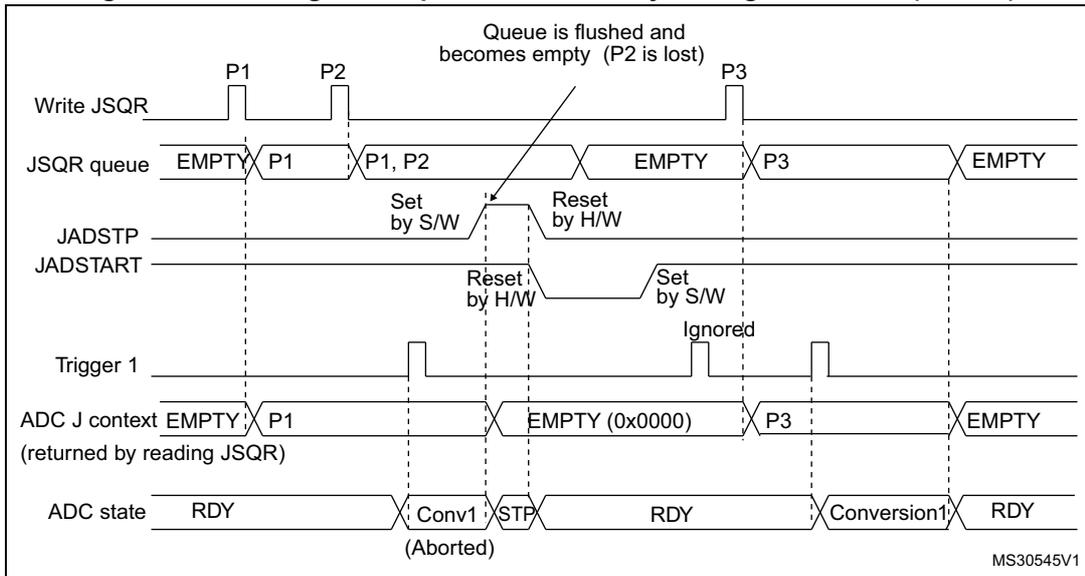
The diagram illustrates the sequence of events when JADSTP=1.
1.
Write JSQR
: P1 and P2 are written to the queue.
2.
JSQR queue
: Transitions from EMPTY to P1, then to P1, P2.
3.
JADSTP
: Set by S/W, then Reset by H/W.
4.
Queue flush
: An arrow indicates 'Queue is flushed and becomes empty (P2 is lost)'. The queue state becomes 'EMPTY'.
5.
JADSTART
: Reset by H/W, then Set by S/W.
6.
Write JSQR
: P3 is written.
7.
JSQR queue
: Contains 'P3', then becomes 'EMPTY' after conversion.
8.
ADC J context
: Transitions from EMPTY to P1, then to EMPTY (0x0000) when flushed, then to P3, and finally back to EMPTY.
9.
Trigger 1
: Hardware triggers occur. One is ignored while JADSTART is low.
10.
ADC state
: Goes from RDY to Conv1 (Aborted) when JADSTP is set, then back to RDY. Later, it performs Conversion1 and returns to RDY.
- 1. Parameters:
P1: sequence of 1 conversion, hardware trigger 1
P2: sequence of 1 conversion, hardware trigger 1
P3: sequence of 1 conversion, hardware trigger 1
Figure 45. Flushing JSQR queue of context by setting ADDIS=1 (JQM=0)
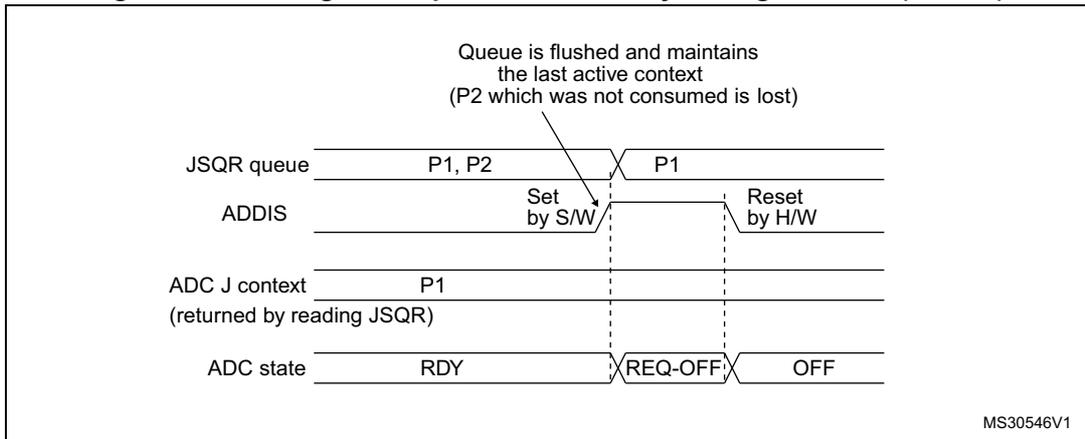
The diagram illustrates the sequence of events when ADDIS=1.
1.
JSQR queue
: Contains 'P1, P2'.
2.
ADDIS
: Set by S/W, then Reset by H/W.
3.
Queue flush
: An arrow indicates 'Queue is flushed and maintains the last active context (P2 which was not consumed is lost)'. The queue state becomes 'P1'.
4.
ADC J context
: Contains 'P1'.
5.
ADC state
: Goes from 'RDY' to 'REQ-OFF' when ADDIS is set, then to 'OFF'.
- 1. Parameters:
P1: sequence of 1 conversion, hardware trigger 1
P2: sequence of 1 conversion, hardware trigger 1
P3: sequence of 1 conversion, hardware trigger 1
Figure 46. Flushing JSQR queue of context by setting ADDIS=1 (JQM=1)
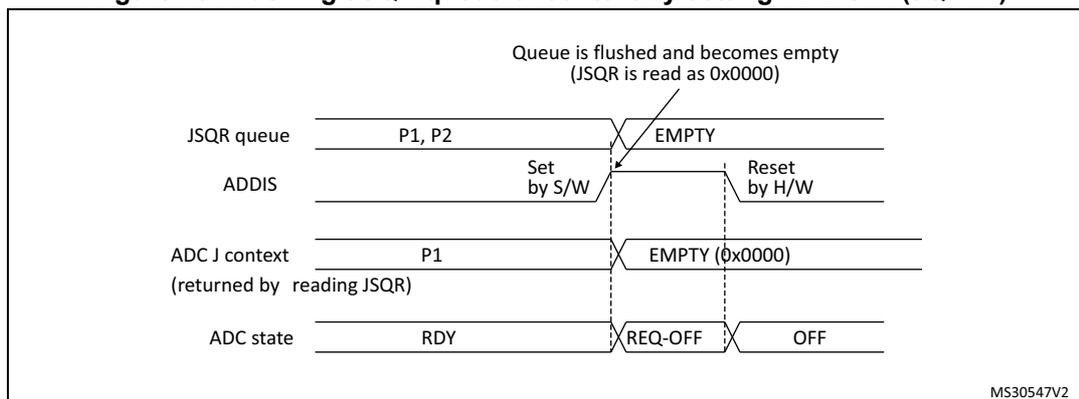
Figure 46 is a timing diagram illustrating the flushing of the JSQR queue. The diagram shows four horizontal timelines:
- JSQR queue: Initially contains parameters P1 and P2. When the ADDIS bit is set by software (S/W), the queue becomes EMPTY.
- ADDIS: A signal that is set by software (S/W) and reset by hardware (H/W).
- ADC J context (returned by reading JSQR): Initially contains parameter P1. When the queue becomes EMPTY, the context becomes EMPTY (0x0000).
- ADC state: Initially RDY. When the queue becomes EMPTY, the state changes to REQ-OFF and then to OFF.
A note indicates: "Queue is flushed and becomes empty (JSQR is read as 0x0000)". The diagram is labeled MS30547V2.
- Parameters:
P1: sequence of 1 conversion, hardware trigger 1
P2: sequence of 1 conversion, hardware trigger 1
P3: sequence of 1 conversion, hardware trigger 1
Changing context from hardware to software (or software to hardware) injected trigger
When changing the context from hardware trigger to software injected trigger, it is necessary to stop the injected conversions by setting JADSTP=1 after the last hardware triggered conversions. This is necessary to re-enable the software trigger (a rising edge on JADSTART is necessary to start a software injected conversion). Refer to Figure 47.
When changing the context from software trigger to hardware injected trigger, after the last software trigger, it is necessary to set JADSTART=1 to enable the hardware triggers. Refer to Figure 47.
Figure 47. Example of JSQR queue of context when changing SW and HW triggers
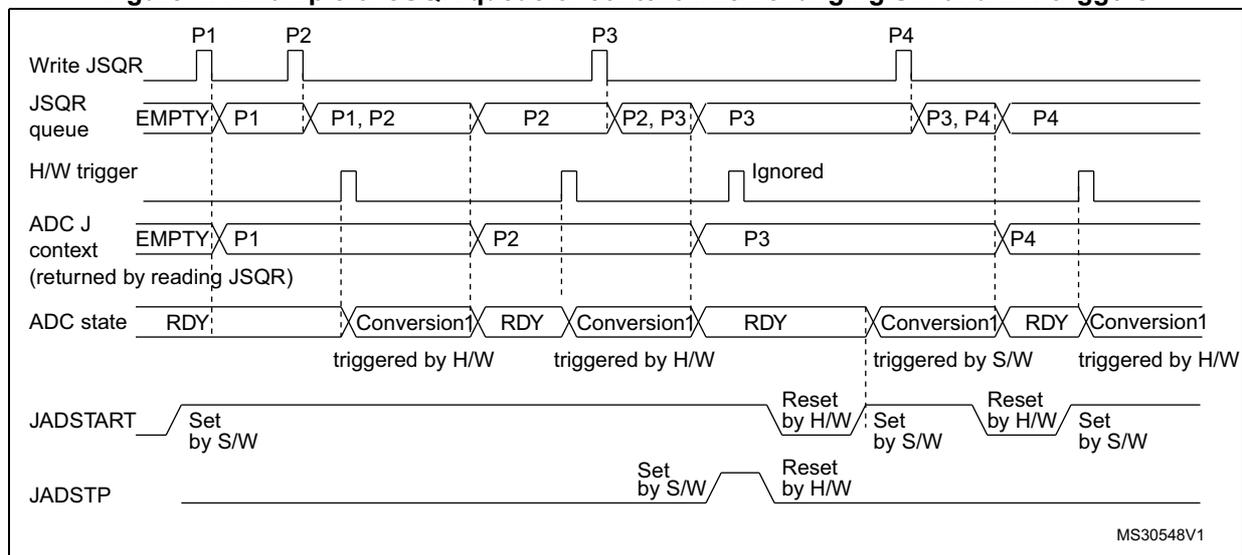
Figure 47 is a timing diagram illustrating the JSQR queue of context when changing SW and HW triggers. The diagram shows five horizontal timelines:
- Write JSQR: Signals used to write parameters P1, P2, P3, and P4 into the JSQR queue.
- JSQR queue: Shows the sequence of parameters: EMPTY, P1, P1, P2, P2, P2, P2, P3, P3, P3, P3, P3, P4, P4, P4, P4.
- H/W trigger: A signal that is ignored when the context is P3 (software trigger).
- ADC J context (returned by reading JSQR): Shows the sequence of parameters: EMPTY, P1, P2, P3, P4.
- ADC state: Shows the sequence: RDY, Conversion1 (triggered by H/W), RDY, Conversion1 (triggered by H/W), RDY, Conversion1 (triggered by S/W), RDY, Conversion1 (triggered by H/W).
- JADSTART: A signal that is set by software (S/W) and reset by hardware (H/W).
- JADSTP: A signal that is set by software (S/W) and reset by hardware (H/W).
The diagram is labeled MS30548V1.
- Parameters:
P1: sequence of 1 conversion, hardware trigger (JEXTEN /= 0x0)
P2: sequence of 1 conversion, hardware trigger (JEXTEN /= 0x0)
P3: sequence of 1 conversion, software trigger (JEXTEN = 0x0)
P4: sequence of 1 conversion, hardware trigger (JEXTEN /= 0x0)
Queue of context: Starting the ADC with an empty queue
The following procedure must be followed to start ADC operation with an empty queue, in case the first context is not known at the time the ADC is initialized. This procedure is only applicable when JQM bit is reset:
- 5. Write a dummy JSQR with JEXTEN not equal to 0 (otherwise triggering a software conversion)
- 6. Set JADSTART
- 7. Set JADSTP
- 8. Wait until JADSTART is reset
- 9. Set JADSTART.
13.3.22 Programmable resolution (RES) - fast conversion mode
It is possible to perform faster conversion by reducing the ADC resolution.
The resolution can be configured to be either 12, 10, 8, or 6 bits by programming the control bits RES[1:0]. Figure 52 , Figure 53 , Figure 54 and Figure 55 show the conversion result format with respect to the resolution as well as to the data alignment.
Lower resolution allows faster conversion time for applications where high-data precision is not required. It reduces the conversion time spent by the successive approximation steps according to Table 42 .
Table 42. T SAR timings depending on resolution
| RES (bits) | T SAR (ADC clock cycles) | T SAR (ns) at F ADC =72 MHz | T ADC (ADC clock cycles) (with Sampling Time= 1.5 ADC clock cycles) | T ADC (ns) at F ADC =72 MHz |
|---|---|---|---|---|
| 12 | 12.5 ADC clock cycles | 173.6 ns | 14 ADC clock cycles | 194.4 ns |
| 10 | 10.5 ADC clock cycles | 145.8 ns | 12 ADC clock cycles | 166.7 ns |
| 8 | 8.5 ADC clock cycles | 118.0 ns | 10 ADC clock cycles | 138.9 ns |
| 6 | 6.5 ADC clock cycles | 90.3 ns | 8 ADC clock cycles | 111.1 ns |
13.3.23 End of conversion, end of sampling phase (EOC, JEOC, EOSMP)
The ADC notifies the application for each end of regular conversion (EOC) event and each injected conversion (JEOC) event.
The ADC sets the EOC flag as soon as a new regular conversion data is available in the ADCx_DR register. An interrupt can be generated if bit EOCIE is set. EOC flag is cleared by the software either by writing 1 to it or by reading ADCx_DR.
The ADC sets the JEOC flag as soon as a new injected conversion data is available in one of the ADCx_JDRy register. An interrupt can be generated if bit JEOCIE is set. JEOC flag is cleared by the software either by writing 1 to it or by reading the corresponding ADCx_JDRy register.
The ADC also notifies the end of Sampling phase by setting the status bit EOSMP (for regular conversions only). EOSMP flag is cleared by software by writing 1 to it. An interrupt can be generated if bit EOSMPIE is set.
13.3.24 End of conversion sequence (EOS, JEOS)
The ADC notifies the application for each end of regular sequence (EOS) and for each end of injected sequence (JEOS) event.
The ADC sets the EOS flag as soon as the last data of the regular conversion sequence is available in the ADCx_DR register. An interrupt can be generated if bit EOSIE is set. EOS flag is cleared by the software either by writing 1 to it.
The ADC sets the JEOS flag as soon as the last data of the injected conversion sequence is complete. An interrupt can be generated if bit JEOSIE is set. JEOS flag is cleared by the software either by writing 1 to it.
13.3.25 Timing diagrams example (single/continuous modes, hardware/software triggers)
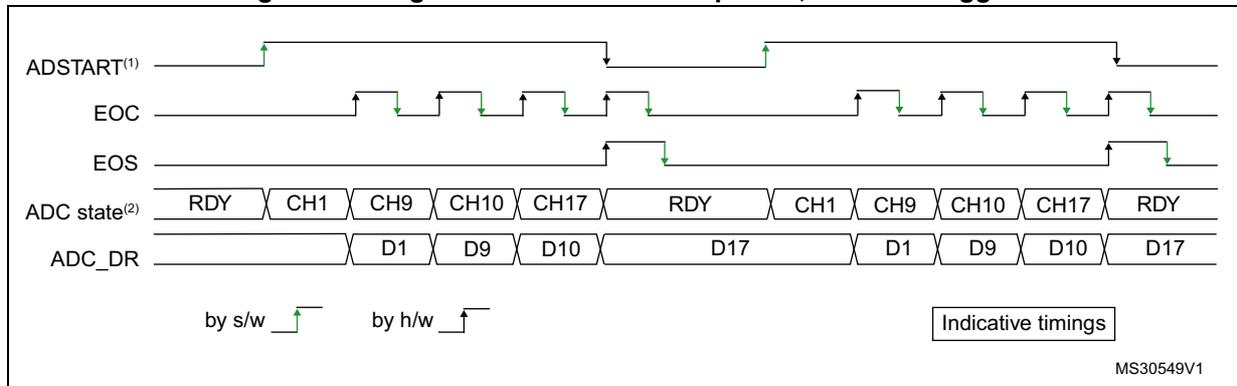
Figure 48. Single conversions of a sequence, software trigger
MS30549V1
- 1. EXTEN=0x0, CONT=0
- 2. Channels selected = 1,9, 10, 17; AUTDLY=0.
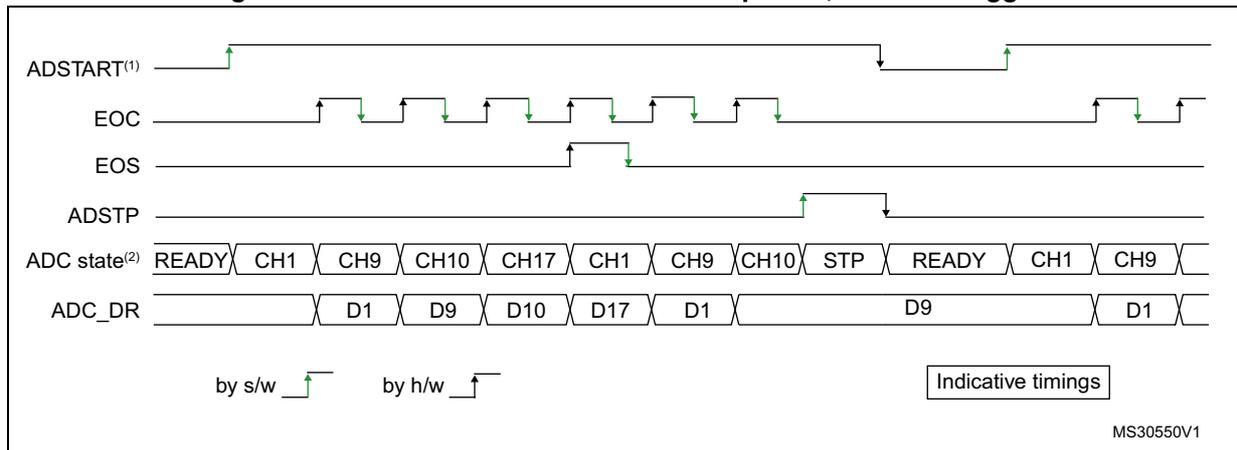
Figure 49. Continuous conversion of a sequence, software trigger
MS30550V1
- 1. EXTEN=0x0, CONT=1
- 2. Channels selected = 1,9, 10, 17; AUTDLY=0.
Figure 50. Single conversions of a sequence, hardware trigger
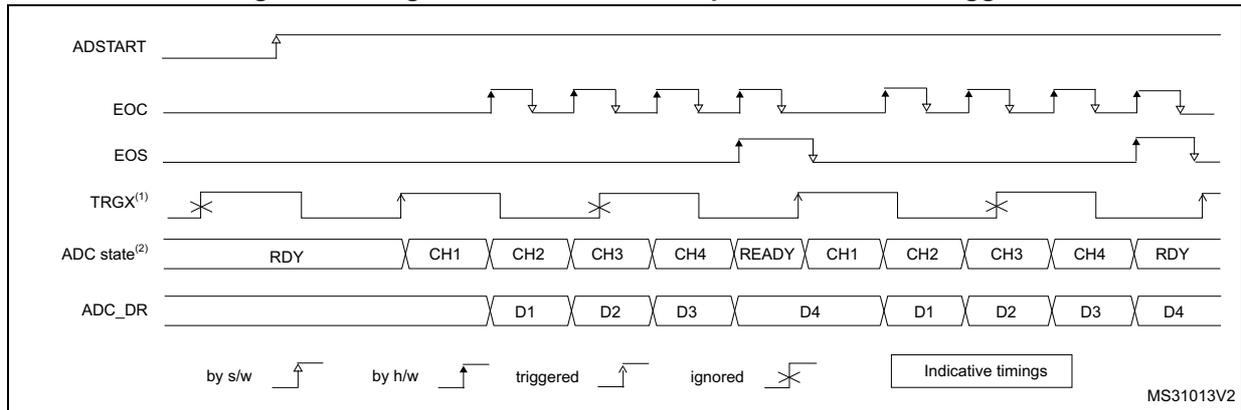
The diagram shows the following signals and states over time:
- ADSTART : A pulse indicating the start of the conversion sequence.
- EOC : End of Conversion pulses, occurring after each channel conversion.
- EOS : End of Sequence pulse, occurring after the last channel (CH4) in the sequence.
- TRGX (1) : Hardware trigger signal. It shows rising edges that are 'triggered' (leading to conversion) and 'ignored' (marked with an 'X').
- ADC state (2) : A sequence of states: RDY, CH1, CH2, CH3, CH4, READY, CH1, CH2, CH3, CH4, RDY.
- ADC_DR : Data register values: D1, D2, D3, D4, D1, D2, D3, D4.
Legend: by s/w (software), by h/w (hardware), triggered, ignored, Indicative timings. MS31013V2
- 1. TRGX (over-frequency) is selected as trigger source, EXTEN = 01, CONT = 0
- 2. Channels selected = 1, 2, 3, 4; AUTDLY=0.
Figure 51. Continuous conversions of a sequence, hardware trigger
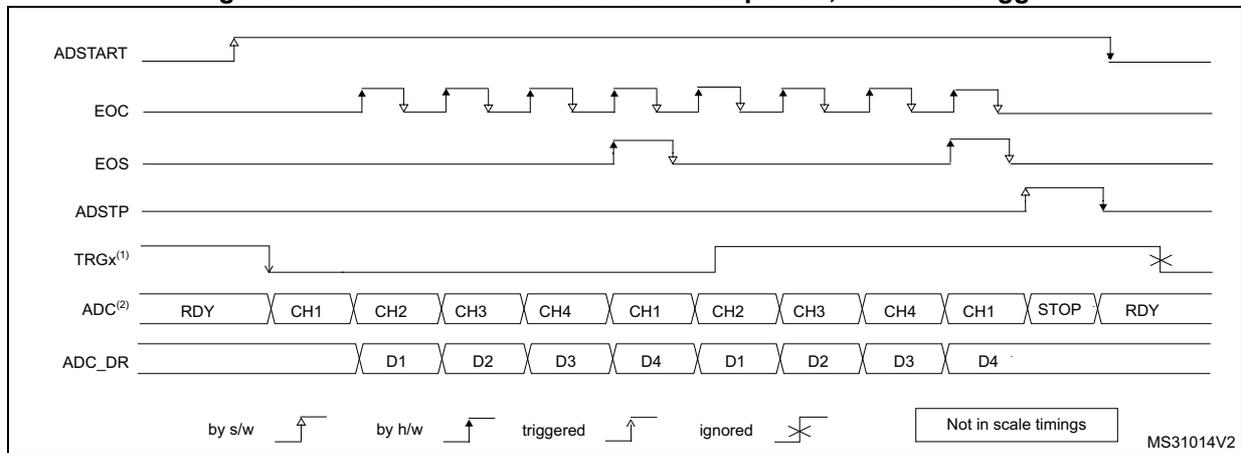
The diagram shows the following signals and states over time:
- ADSTART : A pulse indicating the start of the continuous conversion sequence.
- EOC : End of Conversion pulses, occurring after each channel conversion.
- EOS : End of Sequence pulse, occurring when the sequence stops.
- ADSTP : A pulse indicating the stop of the continuous conversion sequence.
- TRGX (1) : Hardware trigger signal. It shows rising edges that are 'triggered' (leading to conversion) and 'ignored' (marked with an 'X').
- ADC (2) : A sequence of states: RDY, CH1, CH2, CH3, CH4, CH1, CH2, CH3, CH4, CH1, STOP, RDY.
- ADC_DR : Data register values: D1, D2, D3, D4, D1, D2, D3, D4.
Legend: by s/w (software), by h/w (hardware), triggered, ignored, Not in scale timings. MS31014V2
- 1. TRGX is selected as trigger source, EXTEN = 10, CONT = 1
- 2. Channels selected = 1, 2, 3, 4; AUTDLY=0.
13.3.26 Data management
Data register, data alignment and offset (ADCx_DR, OFFSETy, OFFSETy_CH, ALIGN)
Data and alignment
At the end of each regular conversion channel (when EOC event occurs), the result of the converted data is stored into the ADCx_DR data register which is 16 bits wide.
At the end of each injected conversion channel (when JEOC event occurs), the result of the converted data is stored into the corresponding ADCx_JDRy data register which is 16 bits wide.
The ALIGN bit in the ADCx_CFGR register selects the alignment of the data stored after conversion. Data can be right- or left-aligned as shown in Figure 52, Figure 53, Figure 54 and Figure 55.
Special case: when left-aligned, the data are aligned on a half-word basis except when the resolution is set to 6-bit. In that case, the data are aligned on a byte basis as shown in Figure 54 and Figure 55 .
Offset
An offset \( y \) ( \( y=1,2,3,4 \) ) can be applied to a channel by setting the bit OFFSETy_EN=1 into ADCx_OFRy register. The channel to which the offset will be applied is programmed into the bits OFFSETy_CH[4:0] of ADCx_OFRy register. In this case, the converted value is decreased by the user-defined offset written in the bits OFFSETy[11:0]. The result may be a negative value so the read data is signed and the SEXT bit represents the extended sign value.
Table 45 describes how the comparison is performed for all the possible resolutions for analog watchdog 1.
Table 43. Offset computation versus data resolution
| Resolution (bits RES[1:0]) | Substraction between raw converted data and offset: | Result | Comments | |
|---|---|---|---|---|
| Raw converted Data, left aligned | Offset | |||
| 00: 12-bit | DATA[11:0] | OFFSET[11:0] | signed 12-bit data | - |
| 01: 10-bit | DATA[11:2],00 | OFFSET[11:0] | signed 10-bit data | The user must configure OFFSET[1:0] to “00” |
| 10: 8-bit | DATA[11:4],0000 | OFFSET[11:0] | signed 8-bit data | The user must configure OFFSET[3:0] to “0000” |
| 11: 6-bit | DATA[11:6],000000 | OFFSET[11:0] | signed 6-bit data | The user must configure OFFSET[5:0] to “000000” |
When reading data from ADCx_DR (regular channel) or from ADCx_JDRy (injected channel, \( y=1,2,3,4 \) ) corresponding to the channel “i”:
- • If one of the offsets is enabled (bit OFFSETy_EN=1) for the corresponding channel, the read data is signed.
- • If none of the four offsets is enabled for this channel, the read data is not signed.
Figure 52 , Figure 53 , Figure 54 and Figure 55 show alignments for signed and unsigned data.
Figure 52. Right alignment (offset disabled, unsigned value)
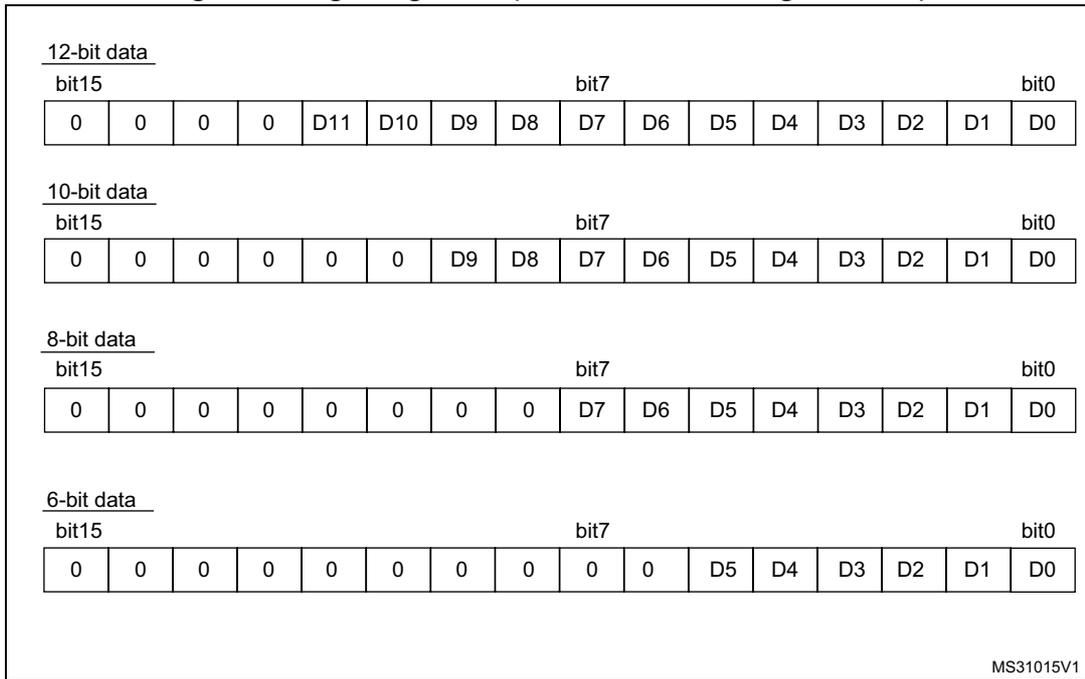
12-bit data
bit15
bit7
bit0
| 0 | 0 | 0 | 0 | D11 | D10 | D9 | D8 | D7 | D6 | D5 | D4 | D3 | D2 | D1 | D0 |
10-bit data
bit15
bit7
bit0
| 0 | 0 | 0 | 0 | 0 | 0 | D9 | D8 | D7 | D6 | D5 | D4 | D3 | D2 | D1 | D0 |
8-bit data
bit15
bit7
bit0
| 0 | 0 | 0 | 0 | 0 | 0 | 0 | 0 | D7 | D6 | D5 | D4 | D3 | D2 | D1 | D0 |
6-bit data
bit15
bit7
bit0
| 0 | 0 | 0 | 0 | 0 | 0 | 0 | 0 | 0 | 0 | D5 | D4 | D3 | D2 | D1 | D0 |
MS31015V1
Figure 53. Right alignment (offset enabled, signed value)
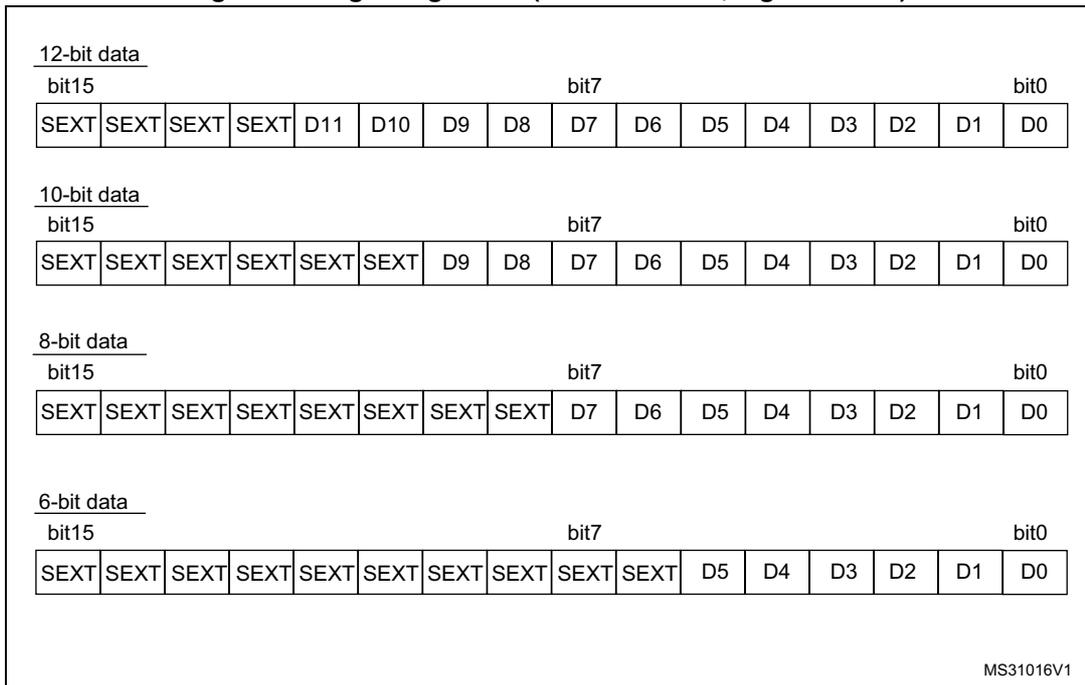
12-bit data
bit15
bit7
bit0
| SEXT | SEXT | SEXT | SEXT | D11 | D10 | D9 | D8 | D7 | D6 | D5 | D4 | D3 | D2 | D1 | D0 |
10-bit data
bit15
bit7
bit0
| SEXT | SEXT | SEXT | SEXT | SEXT | SEXT | D9 | D8 | D7 | D6 | D5 | D4 | D3 | D2 | D1 | D0 |
8-bit data
bit15
bit7
bit0
| SEXT | SEXT | SEXT | SEXT | SEXT | SEXT | SEXT | SEXT | D7 | D6 | D5 | D4 | D3 | D2 | D1 | D0 |
6-bit data
bit15
bit7
bit0
| SEXT | SEXT | SEXT | SEXT | SEXT | SEXT | SEXT | SEXT | SEXT | SEXT | D5 | D4 | D3 | D2 | D1 | D0 |
MS31016V1
Figure 54. Left alignment (offset disabled, unsigned value)
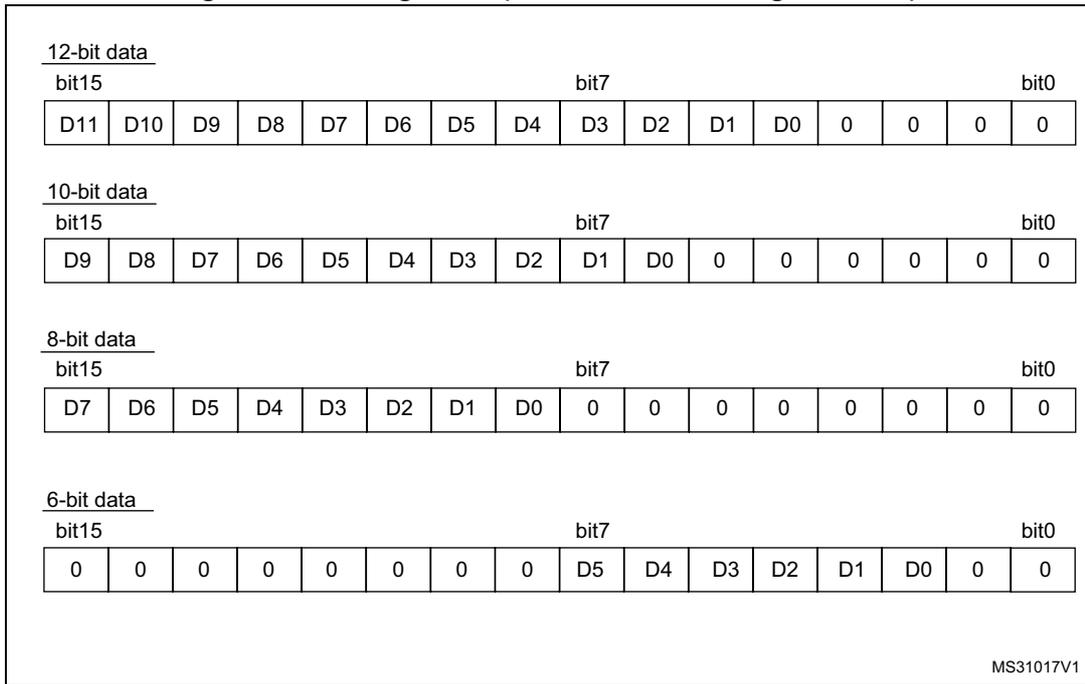
12-bit data
bit15 bit7 bit0
| D11 | D10 | D9 | D8 | D7 | D6 | D5 | D4 | D3 | D2 | D1 | D0 | 0 | 0 | 0 | 0 |
10-bit data
bit15 bit7 bit0
| D9 | D8 | D7 | D6 | D5 | D4 | D3 | D2 | D1 | D0 | 0 | 0 | 0 | 0 | 0 | 0 |
8-bit data
bit15 bit7 bit0
| D7 | D6 | D5 | D4 | D3 | D2 | D1 | D0 | 0 | 0 | 0 | 0 | 0 | 0 | 0 | 0 |
6-bit data
bit15 bit7 bit0
| 0 | 0 | 0 | 0 | 0 | 0 | 0 | 0 | D5 | D4 | D3 | D2 | D1 | D0 | 0 | 0 |
MS31017V1
Figure 55. Left alignment (offset enabled, signed value)
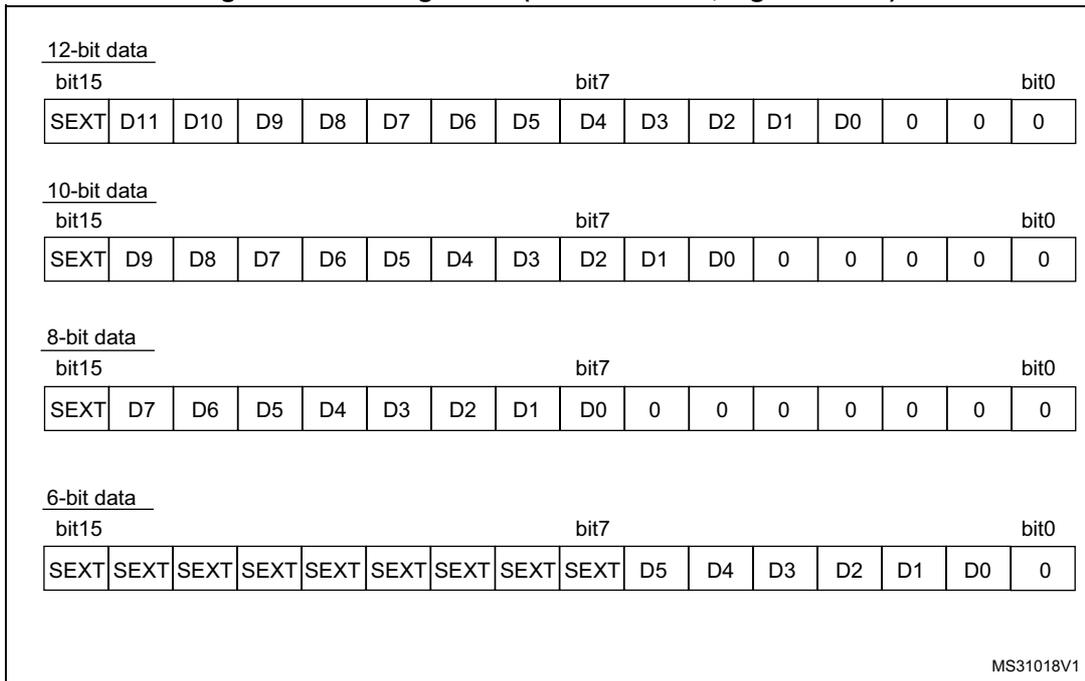
12-bit data
bit15 bit7 bit0
| SEXT | D11 | D10 | D9 | D8 | D7 | D6 | D5 | D4 | D3 | D2 | D1 | D0 | 0 | 0 | 0 |
10-bit data
bit15 bit7 bit0
| SEXT | D9 | D8 | D7 | D6 | D5 | D4 | D3 | D2 | D1 | D0 | 0 | 0 | 0 | 0 | 0 |
8-bit data
bit15 bit7 bit0
| SEXT | D7 | D6 | D5 | D4 | D3 | D2 | D1 | D0 | 0 | 0 | 0 | 0 | 0 | 0 | 0 |
6-bit data
bit15 bit7 bit0
| SEXT | SEXT | SEXT | SEXT | SEXT | SEXT | SEXT | SEXT | SEXT | D5 | D4 | D3 | D2 | D1 | D0 | 0 |
MS31018V1
ADC overrun (OVR, OVRMOD)
The overrun flag (OVR) notifies of a buffer overrun event, when the regular converted data was not read (by the CPU or the DMA) before new converted data became available.
The OVR flag is set if the EOC flag is still 1 at the time when a new conversion completes. An interrupt can be generated if bit OVRIE=1.
When an overrun condition occurs, the ADC is still operating and can continue to convert unless the software decides to stop and reset the sequence by setting bit ADSTP=1.
OVR flag is cleared by software by writing 1 to it.
It is possible to configure if data is preserved or overwritten when an overrun event occurs by programming the control bit OVRMOD:
- • OVRMOD=0: The overrun event preserves the data register from being overrun: the old data is maintained and the new conversion is discarded and lost. If OVR remains at 1, any further conversions will occur but the result data will be also discarded.
- • OVRMOD=1: The data register is overwritten with the last conversion result and the previous unread data is lost. If OVR remains at 1, any further conversions will operate normally and the ADCx_DR register will always contain the latest converted data.
Figure 56. Example of overrun (OVR)
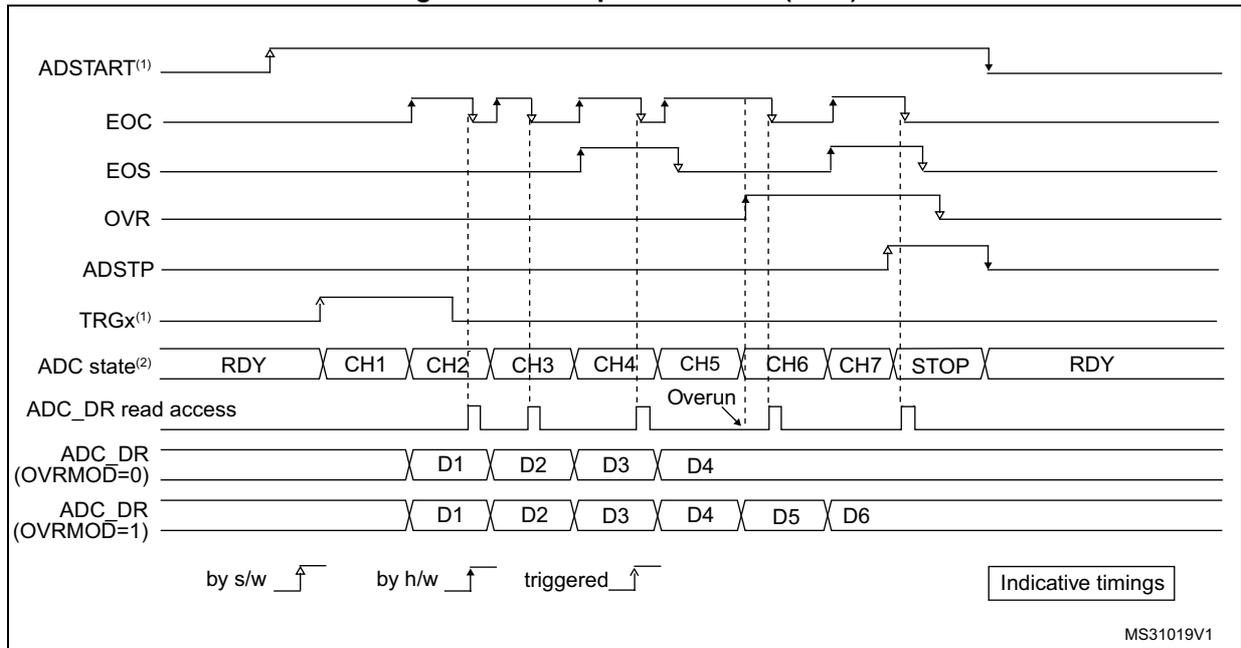
The diagram illustrates the timing of an ADC overrun event. The top section shows signal transitions for ADSTART (1) , EOC, EOS, OVR, ADSTP, and TRGx (1) . Below this, the 'ADC state (2) ' is shown as a sequence of states: RDY, CH1, CH2, CH3, CH4, CH5, CH6, CH7, STOP, and RDY. An 'Overrun' condition is indicated during the CH5 state. The 'ADC_DR read access' line shows when data is read from the register. Below this, two data register scenarios are shown: 'ADC_DR (OVRMOD=0)' where data D4 is preserved despite the overrun, and 'ADC_DR (OVRMOD=1)' where data D4 is overwritten by D5. A legend at the bottom indicates that 'by s/w' means software-initiated, 'by h/w' means hardware-initiated, and 'triggered' means triggered by an external event. The diagram is labeled 'Indicative timings' and 'MS31019V1'.
Note: There is no overrun detection on the injected channels since there is a dedicated data register for each of the four injected channels.
Managing a sequence of conversion without using the DMA
If the conversions are slow enough, the conversion sequence can be handled by the software. In this case the software must use the EOC flag and its associated interrupt to handle each data. Each time a conversion is complete, EOC is set and the ADCx_DR register can be read. OVRMOD should be configured to 0 to manage overrun events as an error.
Managing conversions without using the DMA and without overrun
It may be useful to let the ADC convert one or more channels without reading the data each time (if there is an analog watchdog for instance). In this case, the OVRMOD bit must be configured to 1 and OVR flag should be ignored by the software. An overrun event will not prevent the ADC from continuing to convert and the ADCx_DR register will always contain the latest conversion.
Managing conversions using the DMA
Since converted channel values are stored into a unique data register, it is useful to use DMA for conversion of more than one channel. This avoids the loss of the data already stored in the ADCx_DR register.
When the DMA mode is enabled (DMAEN bit set to 1 in the ADCx_CFGR register in single ADC mode or MDMA different from 0b00 in dual ADC mode), a DMA request is generated after each conversion of a channel. This allows the transfer of the converted data from the ADCx_DR register to the destination location selected by the software.
Despite this, if an overrun occurs (OVR=1) because the DMA could not serve the DMA transfer request in time, the ADC stops generating DMA requests and the data corresponding to the new conversion is not transferred by the DMA. Which means that all the data transferred to the RAM can be considered as valid.
Depending on the configuration of OVRMOD bit, the data is either preserved or overwritten (refer to Section : ADC overrun (OVR, OVRMOD) ).
The DMA transfer requests are blocked until the software clears the OVR bit.
Two different DMA modes are proposed depending on the application use and are configured with bit DMACFG of the ADCx_CFGR register in single ADC mode, or with bit DMACFG of the ADCx_CCR register in dual ADC mode:
- • DMA one shot mode (DMACFG=0).
This mode is suitable when the DMA is programmed to transfer a fixed number of data. - • DMA circular mode (DMACFG=1).
This mode is suitable when programming the DMA in circular mode.
DMA one shot mode (DMACFG=0)
In this mode, the ADC generates a DMA transfer request each time a new conversion data is available and stops generating DMA requests once the DMA has reached the last DMA transfer (when DMA_EOT interrupt occurs - refer to DMA paragraph) even if a conversion has been started again.
When the DMA transfer is complete (all the transfers configured in the DMA controller have been done):
- • The content of the ADC data register is frozen.
- • Any ongoing conversion is aborted with partial result discarded.
- • No new DMA request is issued to the DMA controller. This avoids generating an overrun error if there are still conversions which are started.
- • Scan sequence is stopped and reset.
- • The DMA is stopped.
DMA circular mode (DMACFG=1)
In this mode, the ADC generates a DMA transfer request each time a new conversion data is available in the data register, even if the DMA has reached the last DMA transfer. This allows configuring the DMA in circular mode to handle a continuous analog input data stream.
13.3.27 Dynamic low-power features
Auto-delayed conversion mode (AUTDLY)
The ADC implements an auto-delayed conversion mode controlled by the AUTDLY configuration bit. Auto-delayed conversions are useful to simplify the software as well as to optimize performance of an application clocked at low frequency where there would be risk of encountering an ADC overrun.
When AUTDLY=1, a new conversion can start only if all the previous data of the same group has been treated:
- • For a regular conversion: once the ADCx_DR register has been read or if the EOC bit has been cleared (see Figure 57 ).
- • For an injected conversion: when the JEOS bit has been cleared (see Figure 58 ).
This is a way to automatically adapt the speed of the ADC to the speed of the system which will read the data.
The delay is inserted after each regular conversion (whatever DISCEN=0 or 1) and after each sequence of injected conversions (whatever JDISCEN=0 or 1).
Note: There is no delay inserted between each conversions of the injected sequence, except after the last one.
During a conversion, a hardware trigger event (for the same group of conversions) occurring during this delay is ignored.
Note: This is not true for software triggers where it remains possible during this delay to set the bits ADSTART or JADSTART to re-start a conversion: it is up to the software to read the data before launching a new conversion.
No delay is inserted between conversions of different groups (a regular conversion followed by an injected conversion or conversely):
- • If an injected trigger occurs during the automatic delay of a regular conversion, the injected conversion starts immediately (see Figure 58 ).
- • Once the injected sequence is complete, the ADC waits for the delay (if not ended) of the previous regular conversion before launching a new regular conversion (see Figure 60 ).
The behavior is slightly different in auto-injected mode (JAUTO=1) where a new regular conversion can start only when the automatic delay of the previous injected sequence of conversion has ended (when JEOS has been cleared). This is to ensure that the software can read all the data of a given sequence before starting a new sequence (see Figure 61 ).
To stop a conversion in continuous auto-injection mode combined with autodelay mode (JAUTO=1, CONT=1 and AUTDLY=1), follow the following procedure:
- 1. Wait until JEOS=1 (no more conversions are restarted)
- 2. Clear JEOS,
- 3. Set ADSTP=1
- 4. Read the regular data.
If this procedure is not respected, a new regular sequence can re-start if JEOS is cleared after ADSTP has been set.
In AUTDLY mode, a hardware regular trigger event is ignored if it occurs during an already ongoing regular sequence or during the delay that follows the last regular conversion of the sequence. It is however considered pending if it occurs after this delay, even if it occurs during an injected sequence of the delay that follows it. The conversion then starts at the end of the delay of the injected sequence.
In AUTDLY mode, a hardware injected trigger event is ignored if it occurs during an already ongoing injected sequence or during the delay that follows the last injected conversion of the sequence.
Figure 57. AUTDLY=1, regular conversion in continuous mode, software trigger
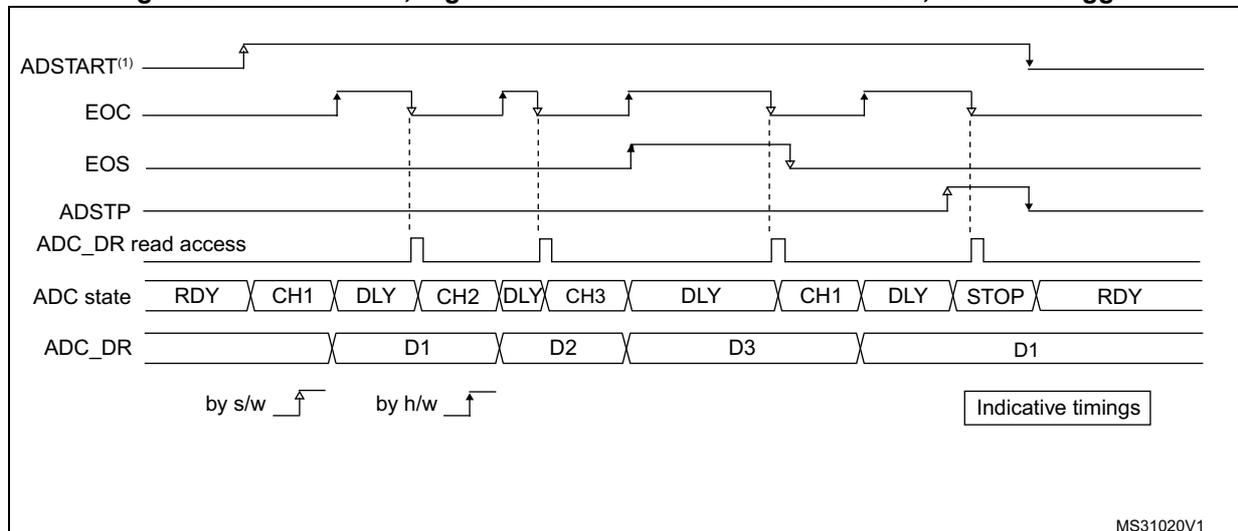
The timing diagram illustrates the operation of the ADC in continuous mode with AUTDLY=1. The signals shown are:
- ADSTART (1) : Software trigger signal, goes high to start the sequence and low to stop it.
- EOC : End of Conversion signal, pulses high when a conversion is complete.
- EOS : End of Sequence signal, goes high when the last conversion in the sequence (CH3) is complete.
- ADSTP : Stop signal, goes high to stop the sequence.
- ADC_DR read access : Signal indicating when the data register is being read.
- ADC state : Shows the sequence of states: RDY (Ready), CH1 (Channel 1), DLY (Delay), CH2 (Channel 2), DLY (Delay), CH3 (Channel 3), DLY (Delay), CH1 (Channel 1), DLY (Delay), STOP (Stopped), RDY (Ready).
- ADC_DR : Data Register, showing the converted values: D1, D2, D3, and D1.
Triggers are indicated by arrows: 'by s/w' (software) for ADSTART and 'by h/w' (hardware) for EOC. The diagram is labeled 'Indicative timings' and 'MS31020V1'.
- 1. AUTDLY=1
- 2. Regular configuration: EXTEN=0x0 (SW trigger), CONT=1, CHANNELS = 1,2,3
- 3. Injected configuration DISABLED
Figure 58. AUTODLY=1, regular HW conversions interrupted by injected conversions (DISCEN=0; JDISCEN=0)
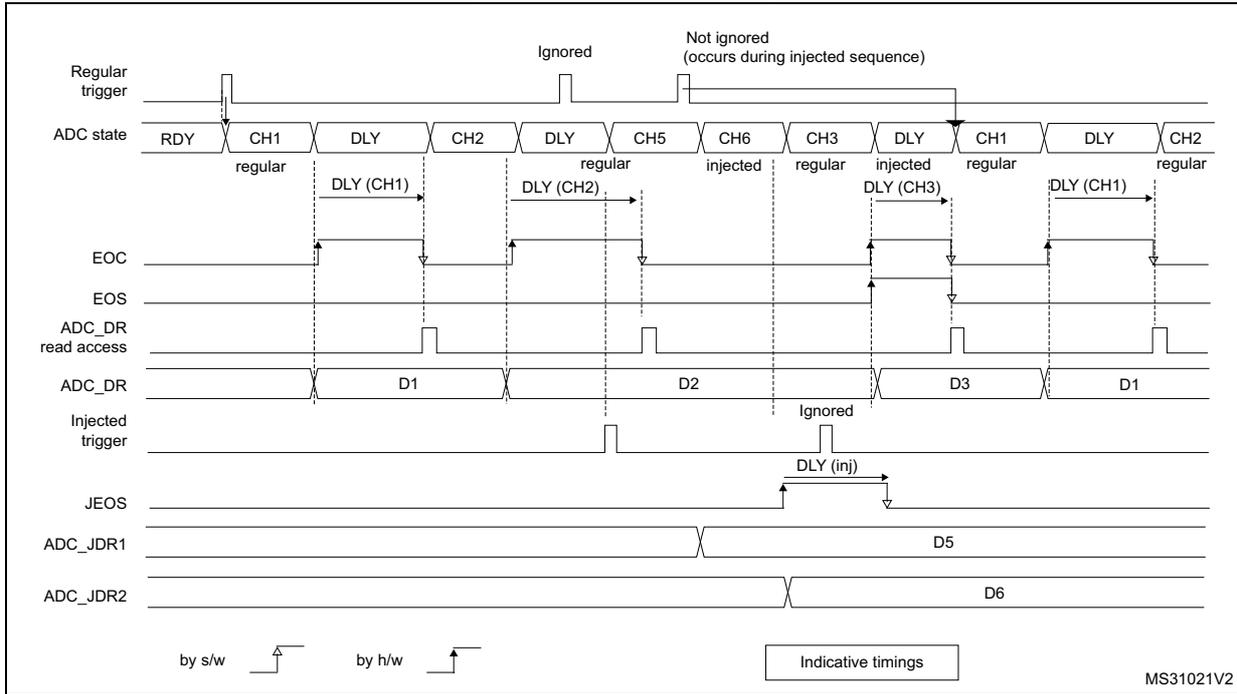
The diagram illustrates the timing of an ADC with AUTODLY=1, where regular hardware conversions are interrupted by injected conversions. The sequence starts with a 'Regular trigger' (by s/w) initiating a conversion of CH1 (regular). A delay 'DLY (CH1)' occurs before the 'EOC' (End of Conversion) signal is generated. The 'ADC_DR' register is updated with 'D1'. Next, CH2 (regular) is converted with a 'DLY (CH2)' delay, followed by 'EOC' and 'ADC_DR' update with 'D2'. Then, an 'Injected trigger' (by h/w) initiates CH5 (regular) and CH6 (injected) conversions. CH5 has a 'DLY (CH2)' delay. CH6 is 'Not ignored (occurs during injected sequence)'. After CH6, 'EOC' is generated. The 'ADC_DR' register is updated with 'D3'. Next, CH3 (regular) is converted with a 'DLY (CH3)' delay, followed by 'EOC' and 'ADC_DR' update with 'D5'. Then, CH1 (regular) is converted with a 'DLY (CH1)' delay, followed by 'EOC' and 'ADC_DR' update with 'D1'. Finally, CH2 (regular) is converted. The 'ADC_JDR1' register is updated with 'D5' and 'ADC_JDR2' with 'D6'. The 'JEOS' signal is generated after the injected sequence. A legend indicates 'by s/w' for software triggers and 'by h/w' for hardware triggers. 'Indicative timings' are shown for delays and signal transitions.
- 1. AUTODLY=1
- 2. Regular configuration: EXTEN=0x1 (HW trigger), CONT=0, DISCEN=0, CHANNELS = 1, 2, 3
- 3. Injected configuration: JEXTEN=0x1 (HW Trigger), JDISCEN=0, CHANNELS = 5,6
Figure 59. AUTODLY=1, regular HW conversions interrupted by injected conversions (DISCEN=1, JDISCEN=1)
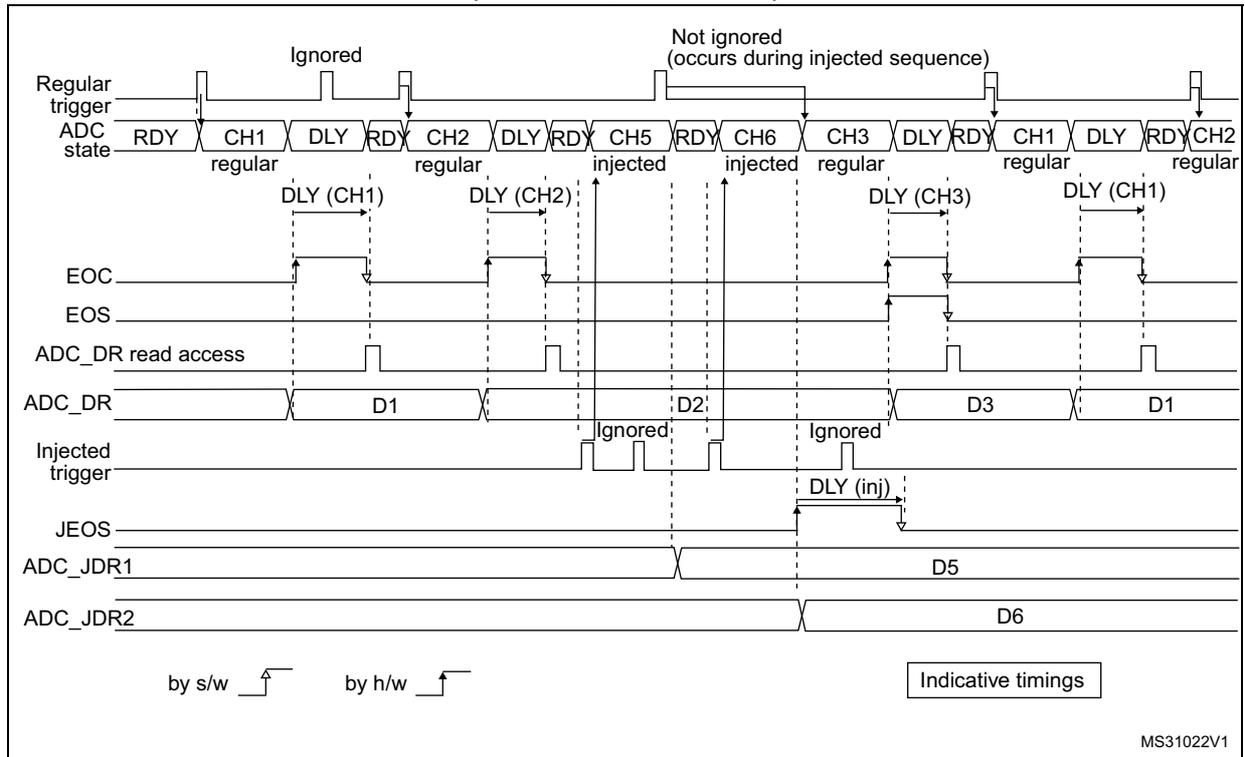
The timing diagram illustrates the interaction between regular and injected ADC conversions when AUTODLY=1, DISCEN=1, and JDISCEN=1. The top signal, 'Regular trigger', shows a series of pulses. The 'ADC state' signal shows the sequence of conversions: RDY, CH1 (regular), DLY, RDY, CH2 (regular), DLY, RDY, CH5 (injected), RDY, CH6 (injected), CH3 (regular), DLY, RDY, CH1 (regular), DLY, RDY, CH2 (regular). The 'EOC' signal is high during conversions and low when the ADC is ready. The 'EOS' signal is high during the injected sequence and low otherwise. The 'ADC_DR' signal shows data values D1, D2, D3, and D1. The 'Injected trigger' signal shows pulses for the injected sequence. The 'JEOS' signal is high during the injected sequence. The 'ADC_JDR1' and 'ADC_JDR2' signals show data values D5 and D6 respectively. The diagram also indicates 'Ignored' and 'Not ignored (occurs during injected sequence)' events. A legend at the bottom shows 'by s/w' and 'by h/w' trigger symbols, and a box labeled 'Indicative timings'.
MS31022V1
- 1. AUTODLY=1
- 2. Regular configuration: EXTEN=0x1 (HW trigger), CONT=0, DISCEN=1, DISCNUM=1, CHANNELS = 1, 2, 3.
- 3. Injected configuration: JEXTEN=0x1 (HW Trigger), JDISCEN=1, CHANNELS = 5,6
Figure 60. AUTODLY=1, regular continuous conversions interrupted by injected conversions
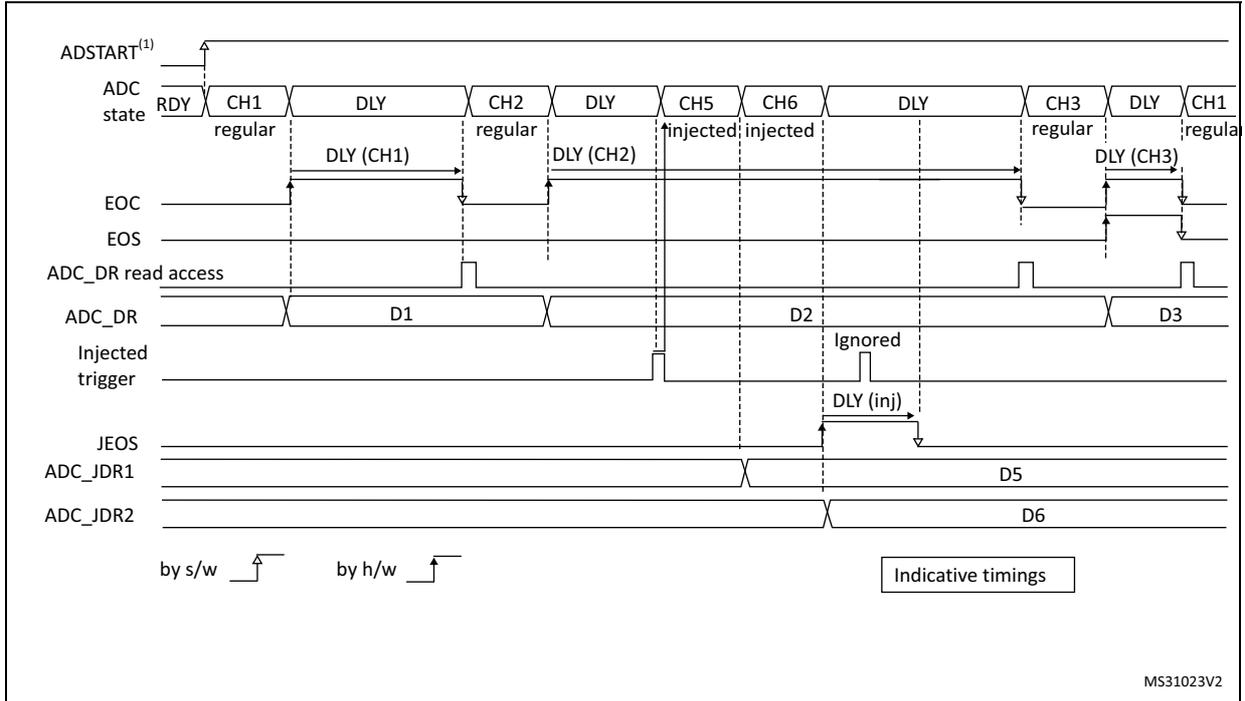
Timing diagram for Figure 60. The diagram shows the following signals and states over time:
- ADSTART (1) : Software trigger signal.
- ADC state : Sequence of states: RDY, CH1 (regular), DLY (CH1), CH2 (regular), DLY (CH2), CH5 (injected), CH6 (injected), DLY, CH3 (regular), DLY (CH3), CH1 (regular).
- EOC : End of Conversion signal for regular conversions.
- EOS : End of Sequence signal.
- ADC_DR read access : Software (s/w) and hardware (h/w) read accesses to the data register.
- ADC_DR : Data register containing values D1, D2, D3, D5, and D6. The value for the injected conversion is marked as "Ignored".
- Injected trigger : Hardware trigger signal for injected conversions.
- JEOS : End of Injected Sequence signal.
- ADC_JDR1 and ADC_JDR2 : Injected data registers containing values D5 and D6.
Legend:
by s/w by h/w
Indicative timings
MS31023V2
- 1. AUTODLY=1
- 2. Regular configuration: EXTEN=0x0 (SW trigger), CONT=1, DISCEN=0, CHANNELS = 1, 2, 3
- 3. Injected configuration: JEXTEN=0x1 (HW Trigger), JDISCEN=0, CHANNELS = 5,6
Figure 61. AUTODLY=1 in auto- injected mode (JAUTO=1)
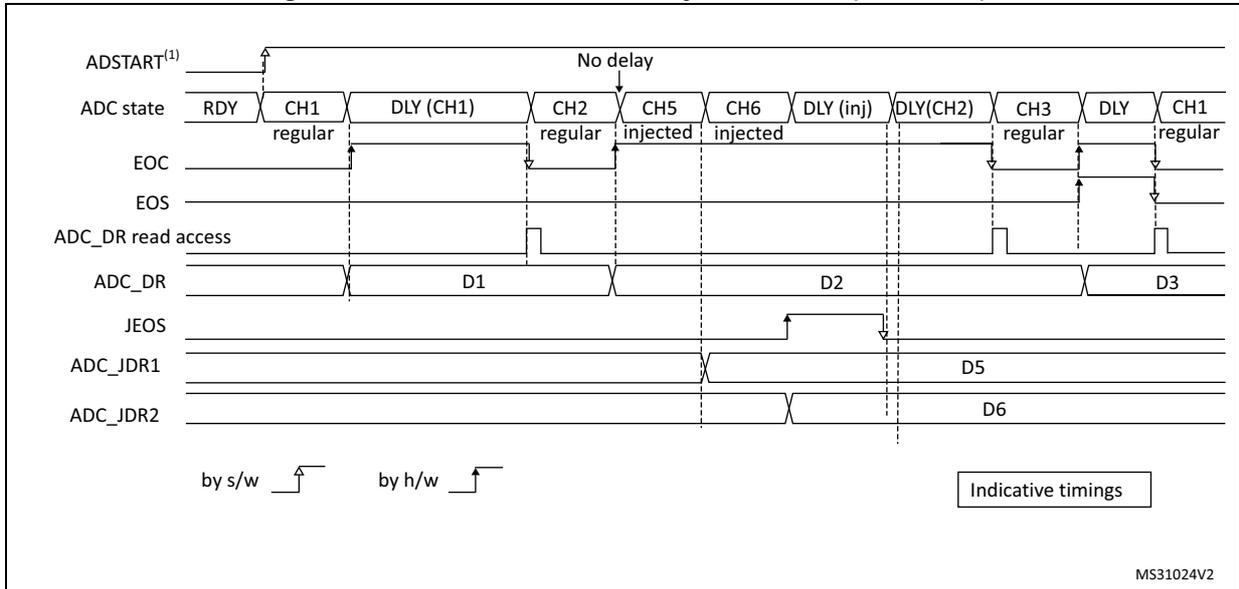
Timing diagram for Figure 61. The diagram shows the following signals and states over time:
- ADSTART (1) : Software trigger signal.
- ADC state : Sequence of states: RDY, CH1 (regular), DLY (CH1), CH2 (regular), CH5 (injected), CH6 (injected), DLY (inj), DLY(CH2), CH3 (regular), DLY, CH1 (regular). A "No delay" is indicated between the start of regular and injected conversions.
- EOC : End of Conversion signal for regular conversions.
- EOS : End of Sequence signal.
- ADC_DR read access : Software (s/w) and hardware (h/w) read accesses to the data register.
- ADC_DR : Data register containing values D1, D2, D3, D5, and D6.
- JEOS : End of Injected Sequence signal.
- ADC_JDR1 and ADC_JDR2 : Injected data registers containing values D5 and D6.
Legend:
by s/w by h/w
Indicative timings
MS31024V2
- 1. AUTODLY=1
- 2. Regular configuration: EXTEN=0x0 (SW trigger), CONT=1, DISCEN=0, CHANNELS = 1, 2
- 3. Injected configuration: JAUTO=1, CHANNELS = 5,6
13.3.28 Analog window watchdog (AWD1EN, JAWD1EN, AWD1SGL, AWD1CH, AWD2CH, AWD3CH, AWD_HTx, AWD_LTx, AWDx)
The three AWD analog watchdogs monitor whether some channels remain within a configured voltage range (window).
Figure 62. Analog watchdog's guarded area
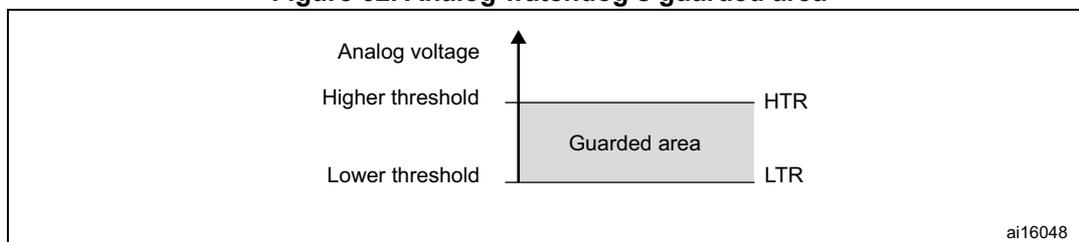
AWDx flag and interrupt
An interrupt can be enabled for each of the 3 analog watchdogs by setting AWDxIE in the ADCx_IER register (x=1,2,3).
AWDx (x=1,2,3) flag is cleared by software by writing 1 to it.
The ADC conversion result is compared to the lower and higher thresholds before alignment.
Description of analog watchdog 1
The AWD analog watchdog 1 is enabled by setting the AWD1EN bit in the ADCx_CFGFR register. This watchdog monitors whether either one selected channel or all enabled channels (1) remain within a configured voltage range (window).
Table 44 shows how the ADCx_CFGFR registers should be configured to enable the analog watchdog on one or more channels.
Table 44. Analog watchdog channel selection
| Channels guarded by the analog watchdog | AWD1SGL bit | AWD1EN bit | JAWD1EN bit |
|---|---|---|---|
| None | x | 0 | 0 |
| All injected channels | 0 | 0 | 1 |
| All regular channels | 0 | 1 | 0 |
| All regular and injected channels | 0 | 1 | 1 |
| Single (1) injected channel | 1 | 0 | 1 |
| Single (1) regular channel | 1 | 1 | 0 |
| Single (1) regular or injected channel | 1 | 1 | 1 |
1. Selected by the AWD1CH[4:0] bits. The channels must also be programmed to be converted in the appropriate regular or injected sequence.
The AWD1 analog watchdog status bit is set if the analog voltage converted by the ADC is below a lower threshold or above a higher threshold.
These thresholds are programmed in bits HT1[11:0] and LT1[11:0] of the ADCx_TR1 register for the analog watchdog 1. When converting data with a resolution of less than 12 bits (according to bits RES[1:0]), the LSB of the programmed thresholds must be kept cleared because the internal comparison is always performed on the full 12-bit raw converted data (left aligned).
Table 45 describes how the comparison is performed for all the possible resolutions for analog watchdog 1.
Table 45. Analog watchdog 1 comparison
| Resolution (bit RES[1:0]) | Analog watchdog comparison between: | Comments | |
|---|---|---|---|
| Raw converted data, left aligned (1) | Thresholds | ||
| 00: 12-bit | DATA[11:0] | LT1[11:0] and HT1[11:0] | - |
| 01: 10-bit | DATA[11:2],00 | LT1[11:0] and HT1[11:0] | User must configure LT1[1:0] and HT1[1:0] to 00 |
| 10: 8-bit | DATA[11:4],0000 | LT1[11:0] and HT1[11:0] | User must configure LT1[3:0] and HT1[3:0] to 0000 |
| 11: 6-bit | DATA[11:6],000000 | LT1[11:0] and HT1[11:0] | User must configure LT1[5:0] and HT1[5:0] to 000000 |
- 1. The watchdog comparison is performed on the raw converted data before any alignment calculation and before applying any offsets (the data which is compared is not signed).
Description of analog watchdog 2 and 3
The second and third analog watchdogs are more flexible and can guard several selected channels by programming the corresponding bits in AWDxCH[18:1] (x=2,3).
The corresponding watchdog is enabled when any bit of AWDxCH[18:1] (x=2,3) is set.
They are limited to a resolution of 8 bits and only the 8 MSBs of the thresholds can be programmed into HTx[7:0] and LTx[7:0]. Table 46 describes how the comparison is performed for all the possible resolutions.
Table 46. Analog watchdog 2 and 3 comparison
| Resolution (bits RES[1:0]) | Analog watchdog comparison between: | Comments | |
|---|---|---|---|
| Raw converted data, left aligned (1) | Thresholds | ||
| 00: 12-bit | DATA[11:4] | LTx[7:0] and HTx[7:0] | DATA[3:0] are not relevant for the comparison |
| 01: 10-bit | DATA[11:4] | LTx[7:0] and HTx[7:0] | DATA[3:2] are not relevant for the comparison |
| 10: 8-bit | DATA[11:4] | LTx[7:0] and HTx[7:0] | - |
| 11: 6-bit | DATA[11:6],00 | LTx[7:0] and HTx[7:0] | User must configure LTx[1:0] and HTx[1:0] to 00 |
- 1. The watchdog comparison is performed on the raw converted data before any alignment calculation and before applying any offsets (the data which is compared is not signed).
ADC y _AWD x _OUT signal output generation
Each analog watchdog is associated to an internal hardware signal ADC y _AWD x _OUT (y=ADC number, x=watchdog number) which is directly connected to the ETR input (external trigger) of some on-chip timers. Refer to the on-chip timers section to understand how to select the ADC y _AWD x _OUT signal as ETR.
ADC y _AWD x _OUT is activated when the associated analog watchdog is enabled:
- • ADC y _AWD x _OUT is set when a guarded conversion is outside the programmed thresholds.
- • ADC y _AWD x _OUT is reset after the end of the next guarded conversion which is inside the programmed thresholds (It remains at 1 if the next guarded conversions are still outside the programmed thresholds).
- • ADC y _AWD x _OUT is also reset when disabling the ADC (when setting ADDIS=1). Note that stopping regular or injected conversions (setting ADSTP=1 or JADSTP=1) has no influence on the generation of ADC y _AWD x _OUT.
Note: AWD x flag is set by hardware and reset by software: AWD x flag has no influence on the generation of ADC y _AWD x _OUT (ex: ADC y _AWD x _OUT can toggle while AWD x flag remains at 1 if the software did not clear the flag).
Figure 63. ADC y _AWD x _OUT signal generation (on all regular channels)
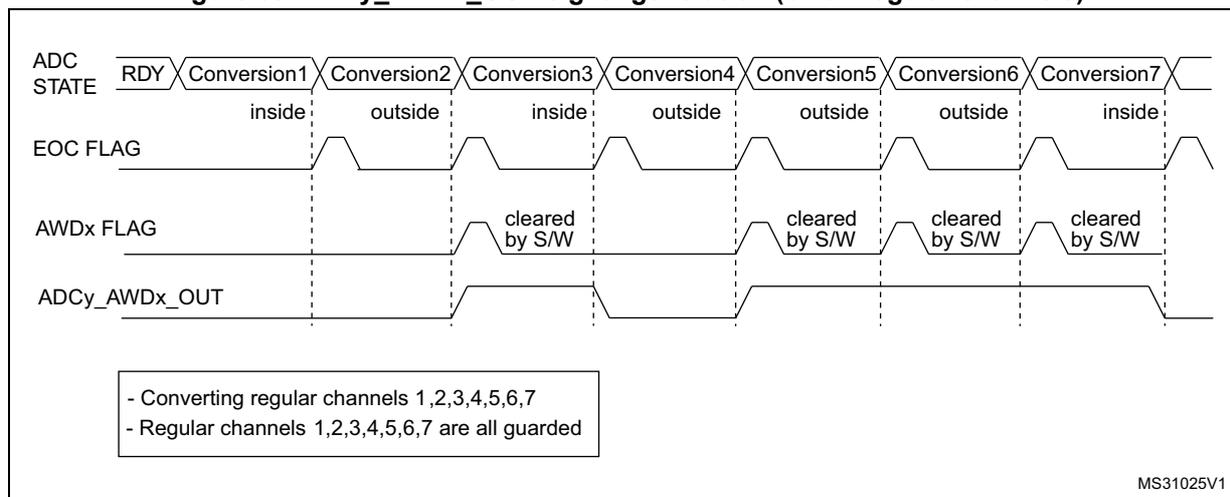
The diagram illustrates the timing of the ADC y _AWD x _OUT signal generation across seven regular conversions. The signals shown are:
- ADC STATE: RDY, Conversion1, Conversion2, Conversion3, Conversion4, Conversion5, Conversion6, Conversion7.
- EOC FLAG: Pulses at the end of each conversion.
- AWDx FLAG: Set when a conversion is 'outside' thresholds and cleared by software (S/W) when a conversion is 'inside' thresholds.
- ADC y _AWD x _OUT: Set when the AWDx FLAG is set and reset when the AWDx FLAG is cleared.
Legend:
- - Converting regular channels 1,2,3,4,5,6,7
- - Regular channels 1,2,3,4,5,6,7 are all guarded
MS31025V1
Figure 64. ADC y _AWD x _OUT signal generation (AWD x flag not cleared by SW)
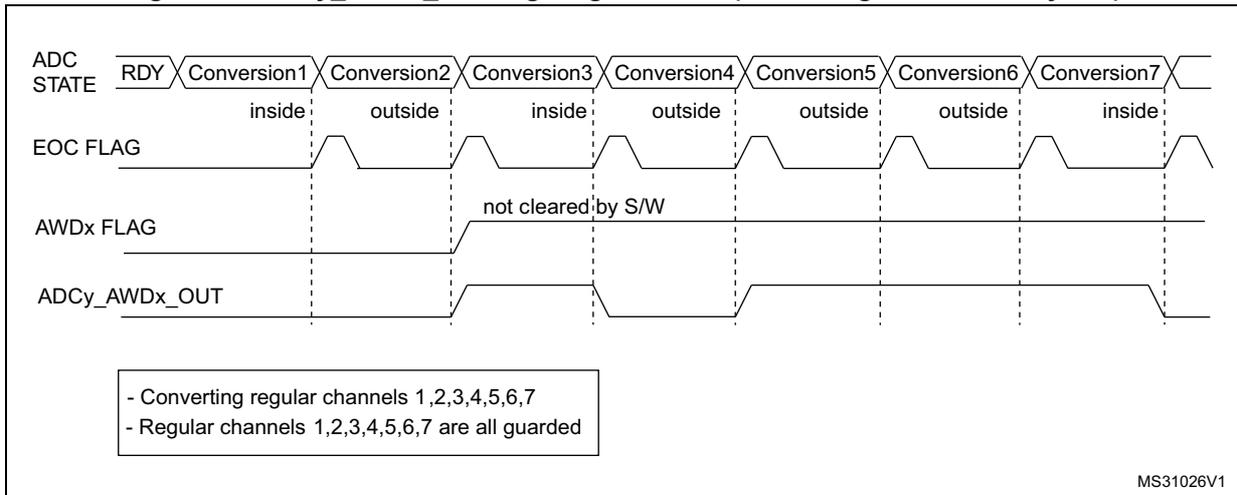
The diagram shows the following signal states over time:
- ADC STATE: Starts at RDY, then proceeds through Conversion 1 (inside), Conversion 2 (outside), Conversion 3 (inside), Conversion 4 (outside), Conversion 5 (outside), Conversion 6 (outside), and Conversion 7 (inside).
- EOC FLAG: Pulses high at the end of each conversion (Conversion 1 through 7).
- AWDx FLAG: Goes high after Conversion 2 (first 'outside' result) and remains high because it is 'not cleared by S/W'.
- ADC y _AWD x _OUT: Goes high after Conversion 2 and stays high until after Conversion 7.
- - Converting regular channels 1,2,3,4,5,6,7
- - Regular channels 1,2,3,4,5,6,7 are all guarded
MS31026V1
Figure 65. ADC y _AWD x _OUT signal generation (on a single regular channel)
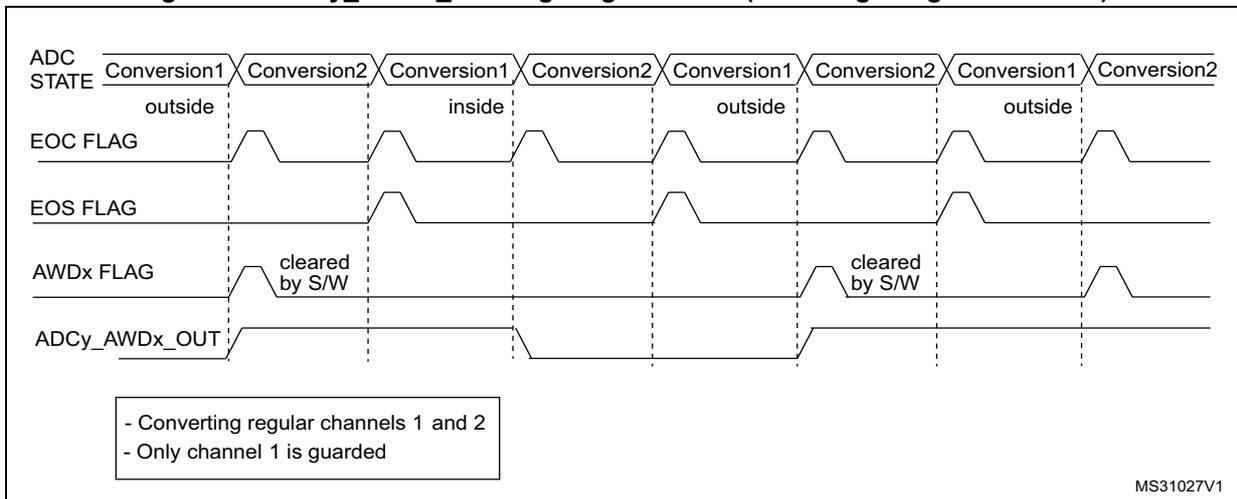
The diagram shows the following signal states over time:
- ADC STATE: Alternates between Conversion 1 (outside, then inside, then outside, then inside) and Conversion 2 (outside, then inside, then outside, then inside).
- EOC FLAG: Pulses high at the end of each Conversion 1.
- EOS FLAG: Pulses high at the end of each Conversion 2.
- AWDx FLAG: Goes high when Conversion 1 is 'outside', and is 'cleared by S/W' when Conversion 1 is 'inside'.
- ADC y _AWD x _OUT: Goes high when Conversion 1 is 'outside' and low when it is 'inside'.
- - Converting regular channels 1 and 2
- - Only channel 1 is guarded
MS31027V1
Figure 66. ADC y _AWD x _OUT signal generation (on all injected channels)
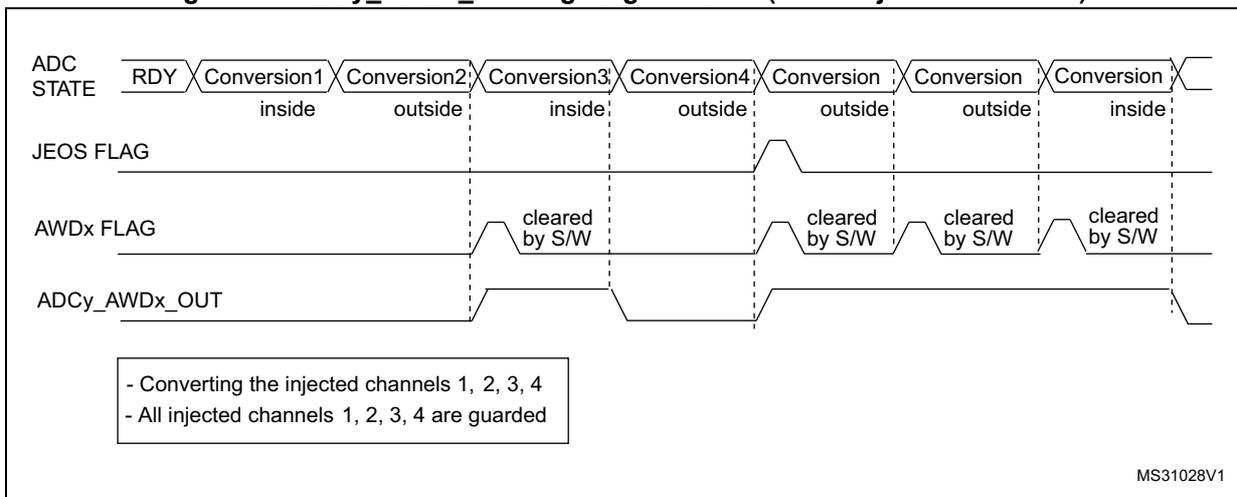
The diagram shows the following signal states over time:
- ADC STATE: Starts at RDY, then proceeds through Conversion 1 (inside), Conversion 2 (outside), Conversion 3 (inside), Conversion 4 (outside), Conversion (outside), Conversion (outside), and Conversion (inside).
- JEOS FLAG: Pulses high at the end of the sequence of injected channels.
- AWDx FLAG: Goes high when a conversion is 'outside' and is 'cleared by S/W' when a conversion is 'inside'.
- ADC y _AWD x _OUT: Goes high when a conversion is 'outside' and low when it is 'inside'.
- - Converting the injected channels 1, 2, 3, 4
- - All injected channels 1, 2, 3, 4 are guarded
MS31028V1
13.3.29 Dual ADC modes
In devices with two ADCs or more, dual ADC modes can be used (see Figure 67 ):
- • ADC1 and ADC2 can be used together in dual mode (ADC1 is master)
In dual ADC mode the start of conversion is triggered alternately or simultaneously by the ADCx master to the ADC slave, depending on the mode selected by the bits DUAL[4:0] in the ADCx_CCR register.
Four possible modes are implemented:
- • Injected simultaneous mode
- • Regular simultaneous mode
- • Interleaved mode
- • Alternate trigger mode
It is also possible to use these modes combined in the following ways:
- • Injected simultaneous mode + Regular simultaneous mode
- • Regular simultaneous mode + Alternate trigger mode
In dual ADC mode (when bits DUAL[4:0] in ADCx_CCR register are not equal to zero), the bits CONT, AUTDLY, DISCEN, DISCNUM[2:0], JDISCEN, JQM, JAUTO of the ADCx_CFGR register are shared between the master and slave ADC: the bits in the slave ADC are always equal to the corresponding bits of the master ADC.
To start a conversion in dual mode, the user must program the bits EXTEN, EXTSEL, JEXTEN, JEXTSEL of the master ADC only, to configure a software or hardware trigger, and a regular or injected trigger. (the bits EXTEN[1:0] and JEXTEN[1:0] of the slave ADC are don't care).
In regular simultaneous or interleaved modes: once the user sets bit ADSTART or bit ADSTP of the master ADC, the corresponding bit of the slave ADC is also automatically set. However, bit ADSTART or bit ADSTP of the slave ADC is not necessary cleared at the same time as the master ADC bit.
In injected simultaneous or alternate trigger modes: once the user sets bit JADSTART or bit JADSTP of the master ADC, the corresponding bit of the slave ADC is also automatically set. However, bit JADSTART or bit JADSTP of the slave ADC is not necessary cleared at the same time as the master ADC bit.
In dual ADC mode, the converted data of the master and slave ADC can be read in parallel, by reading the ADC common data register (ADCx_CDR). The status bits can be also read in parallel by reading the dual-mode status register (ADCx_CSR).
Figure 67. Dual ADC block diagram (1)
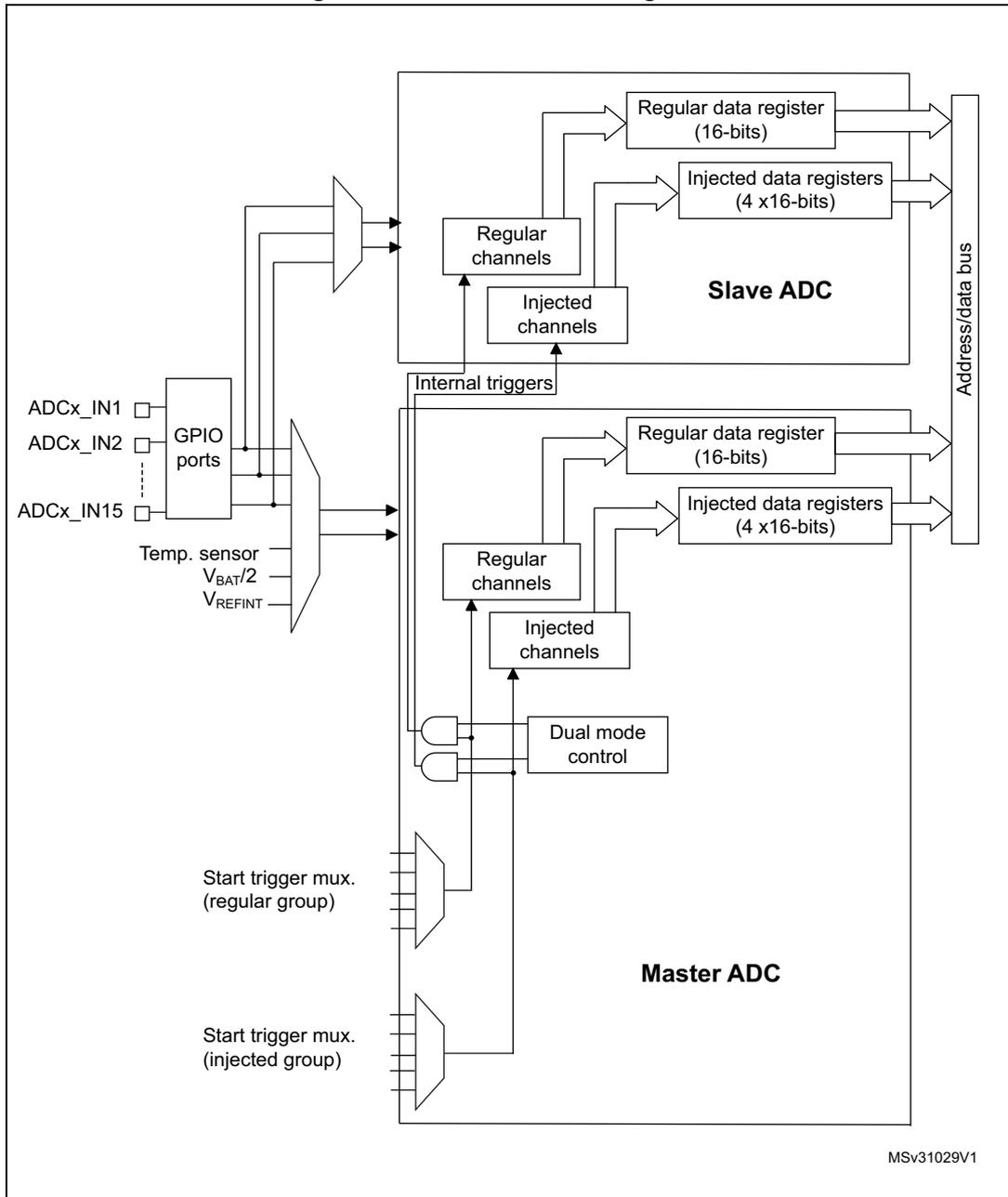
The diagram illustrates the internal architecture of a Dual ADC system. On the left, input sources include ADCx_IN1 through ADCx_IN15 connected to GPIO ports, and internal sensors: Temp. sensor, V BAT /2, and V REFINT . These inputs are multiplexed and fed into both the Master ADC and Slave ADC. The Master ADC contains two start trigger multiplexers (one for regular groups, one for injected groups), a dual mode control block, internal triggers, regular and injected channel blocks, a 16-bit regular data register, and four 16-bit injected data registers. The Slave ADC has a similar internal structure with its own regular and injected channel blocks, a 16-bit regular data register, and four 16-bit injected data registers. Both ADCs are connected to a common Address/data bus on the right. The diagram is labeled MSv31029V1 in the bottom right corner.
- 1. External triggers also exist on slave ADC but are not shown for the purposes of this diagram.
- 2. The ADC common data register (ADCx_CDR) contains both the master and slave ADC regular converted data.
Injected simultaneous mode
This mode is selected by programming bits DUAL[4:0]=00101
This mode converts an injected group of channels. The external trigger source comes from the injected group multiplexer of the master ADC (selected by the JEXTSEL[3:0] bits in the ADCx_JSQR register).
Note: Do not convert the same channel on the two ADCs (no overlapping sampling times for the two ADCs when converting the same channel).
In simultaneous mode, one must convert sequences with the same length or ensure that the interval between triggers is longer than the longer of the 2 sequences. Otherwise, the ADC with the shortest sequence may restart while the ADC with the longest sequence is completing the previous conversions.
Regular conversions can be performed on one or all ADCs. In that case, they are independent of each other and are interrupted when an injected event occurs. They are resumed at the end of the injected conversion group.
- • At the end of injected sequence of conversion event (JEOS) on the master ADC, the converted data is stored into the master ADCx_JDRy registers and a JEOS interrupt is generated (if enabled)
- • At the end of injected sequence of conversion event (JEOS) on the slave ADC, the converted data is stored into the slave ADCx_JDRy registers and a JEOS interrupt is generated (if enabled)
- • If the duration of the master injected sequence is equal to the duration of the slave injected one (like in Figure 68), it is possible for the software to enable only one of the two JEOS interrupt (ex: master JEOS) and read both converted data (from master ADCx_JDRy and slave ADCx_JDRy registers).
Figure 68. Injected simultaneous mode on 4 channels: dual ADC mode
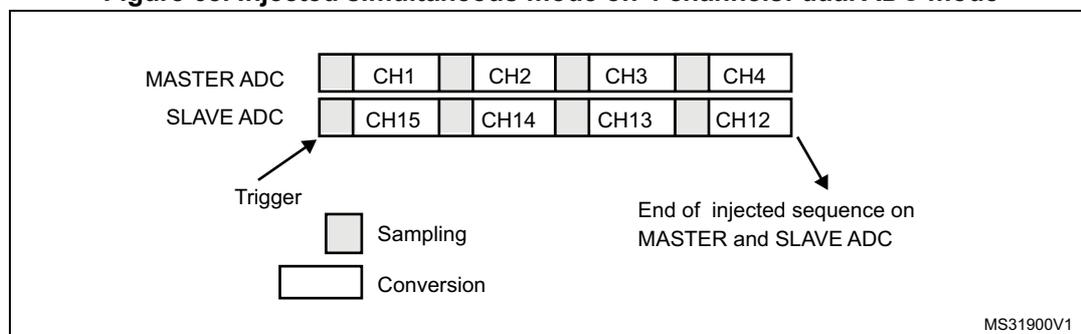
If JDISCEN=1, each simultaneous conversion of the injected sequence requires an injected trigger event to occur.
This mode can be combined with AUTDLY mode:
- • Once a simultaneous injected sequence of conversions has ended, a new injected trigger event is accepted only if both JEOS bits of the master and the slave ADC have been cleared (delay phase). Any new injected trigger events occurring during the ongoing injected sequence and the associated delay phase are ignored.
- • Once a regular sequence of conversions of the master ADC has ended, a new regular trigger event of the master ADC is accepted only if the master data register (ADCx_DR) has been read. Any new regular trigger events occurring for the master ADC during the
ongoing regular sequence and the associated delay phases are ignored.
There is the same behavior for regular sequences occurring on the slave ADC.
Regular simultaneous mode with independent injected
This mode is selected by programming bits DUAL[4:0] = 00110.
This mode is performed on a regular group of channels. The external trigger source comes from the regular group multiplexer of the master ADC (selected by the EXTSEL[3:0] bits in the ADCx_CFGR register). A simultaneous trigger is provided to the slave ADC.
In this mode, independent injected conversions are supported. An injection request (either on master or on the slave) will abort the current simultaneous conversions, which are re-started once the injected conversion is completed.
Note: Do not convert the same channel on the two ADCs (no overlapping sampling times for the two ADCs when converting the same channel).
In regular simultaneous mode, one must convert sequences with the same length or ensure that the interval between triggers is longer than the longer conversion time of the 2 sequences. Otherwise, the ADC with the shortest sequence may restart while the ADC with the longest sequence is completing the previous conversions.
Software is notified by interrupts when it can read the data:
- • At the end of each conversion event (EOC) on the master ADC, a master EOC interrupt is generated (if EOCIE is enabled) and software can read the ADCx_DR of the master ADC.
- • At the end of each conversion event (EOC) on the slave ADC, a slave EOC interrupt is generated (if EOCIE is enabled) and software can read the ADCx_DR of the slave ADC.
- • If the duration of the master regular sequence is equal to the duration of the slave one (like in Figure 69 ), it is possible for the software to enable only one of the two EOC interrupt (ex: master EOC) and read both converted data from the Common Data register (ADCx_CDR).
It is also possible to read the regular data using the DMA. Two methods are possible:
- • Using two DMA channels (one for the master and one for the slave). In this case bits MDMA[1:0] must be kept cleared.
- – Configure the DMA master ADC channel to read ADCx_DR from the master. DMA requests are generated at each EOC event of the master ADC.
- – Configure the DMA slave ADC channel to read ADCx_DR from the slave. DMA requests are generated at each EOC event of the slave ADC.
- • Using MDMA mode, which leaves one DMA channel free for other uses:
- – Configure MDMA[1:0]=0b10 or 0b11 (depending on resolution).
- – A single DMA channel is used (the one of the master). Configure the DMA master ADC channel to read the common ADC register (ADCx_CDR)
- – A single DMA request is generated each time both master and slave EOC events have occurred. At that time, the slave ADC converted data is available in the upper half-word of the ADCx_CDR 32-bit register and the master ADC converted data is available in the lower half-word of ADCx_CDR register.
- – both EOC flags are cleared when the DMA reads the ADCx_CDR register.
Note: In MDMA mode (MDMA[1:0]=0b10 or 0b11), the user must program the same number of conversions in the master's sequence as in the slave's sequence. Otherwise, the remaining conversions will not generate a DMA request.
Figure 69. Regular simultaneous mode on 16 channels: dual ADC mode
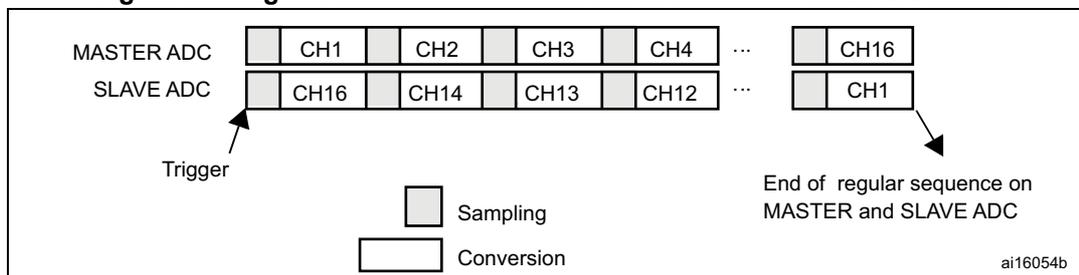
If DISCEN=1 then each “n” simultaneous conversions of the regular sequence require a regular trigger event to occur (“n” is defined by DISCNUM).
This mode can be combined with AUTDLY mode:
- Once a simultaneous conversion of the sequence has ended, the next conversion in the sequence is started only if the common data register, ADCx_CDR (or the regular data register of the master ADC) has been read (delay phase).
- Once a simultaneous regular sequence of conversions has ended, a new regular trigger event is accepted only if the common data register (ADCx_CDR) has been read (delay phase). Any new regular trigger events occurring during the ongoing regular sequence and the associated delay phases are ignored.
It is possible to use the DMA to handle data in regular simultaneous mode combined with AUTDLY mode, assuming that multi-DMA mode is used: bits MDMA must be set to 0b10 or 0b11.
When regular simultaneous mode is combined with AUTDLY mode, it is mandatory for the user to ensure that:
- The number of conversions in the master's sequence is equal to the number of conversions in the slave's.
- For each simultaneous conversions of the sequence, the length of the conversion of the slave ADC is inferior to the length of the conversion of the master ADC. Note that the length of the sequence depends on the number of channels to convert and the sampling time and the resolution of each channels.
Note: This combination of regular simultaneous mode and AUTDLY mode is restricted to the use case when only regular channels are programmed: it is forbidden to program injected channels in this combined mode.
Interleaved mode with independent injected
This mode is selected by programming bits DUAL[4:0] = 00111.
This mode can be started only on a regular group (usually one channel). The external trigger source comes from the regular channel multiplexer of the master ADC.
After an external trigger occurs:
- The master ADC starts immediately.
- The slave ADC starts after a delay of several ADC clock cycles after the sampling phase of the master ADC has complete.
The minimum delay which separates 2 conversions in interleaved mode is configured in the DELAY bits in the ADCx_CCR register. This delay starts to count after the end of the sampling phase of the master conversion. This way, an ADC cannot start a conversion if the complementary ADC is still sampling its input (only one ADC can sample the input signal at a given time).
- • The minimum possible DELAY is 1 to ensure that there is at least one cycle time between the opening of the analog switch of the master ADC sampling phase and the closing of the analog switch of the slave ADC sampling phase.
- • The maximum DELAY is equal to the number of cycles corresponding to the selected resolution. However the user must properly calculate this delay to ensure that an ADC does not start a conversion while the other ADC is still sampling its input.
If the CONT bit is set on both master and slave ADCs, the selected regular channels of both ADCs are continuously converted.
Software is notified by interrupts when it can read the data:
- • At the end of each conversion event (EOC) on the master ADC, a master EOC interrupt is generated (if EOCIE is enabled) and software can read the ADCx_DR of the master ADC.
- • At the end of each conversion event (EOC) on the slave ADC, a slave EOC interrupt is generated (if EOCIE is enabled) and software can read the ADCx_DR of the slave ADC.
Note: It is possible to enable only the EOC interrupt of the slave and read the common data register (ADCx_CDR). But in this case, the user must ensure that the duration of the conversions are compatible to ensure that inside the sequence, a master conversion is always followed by a slave conversion before a new master conversion restarts.
It is also possible to read the regular data using the DMA. Two methods are possible:
- • Using the two DMA channels (one for the master and one for the slave). In this case bits MDMA[1:0] must be kept cleared.
- – Configure the DMA master ADC channel to read ADCx_DR from the master. DMA requests are generated at each EOC event of the master ADC.
- – Configure the DMA slave ADC channel to read ADCx_DR from the slave. DMA requests are generated at each EOC event of the slave ADC.
- • Using MDMA mode, which allows to save one DMA channel:
- – Configure MDMA[1:0]=0b10 or 0b11 (depending on resolution).
- – A single DMA channel is used (the one of the master). Configure the DMA master ADC channel to read the common ADC register (ADCx_CDR).
- – A single DMA request is generated each time both master and slave EOC events have occurred. At that time, the slave ADC converted data is available in the upper half-word of the ADCx_CDR 32-bit register and the master ADC converted data is available in the lower half-word of ADCx_CDR register.
- – Both EOC flags are cleared when the DMA reads the ADCx_CDR register.
Figure 70. Interleaved mode on 1 channel in continuous conversion mode: dual ADC mode
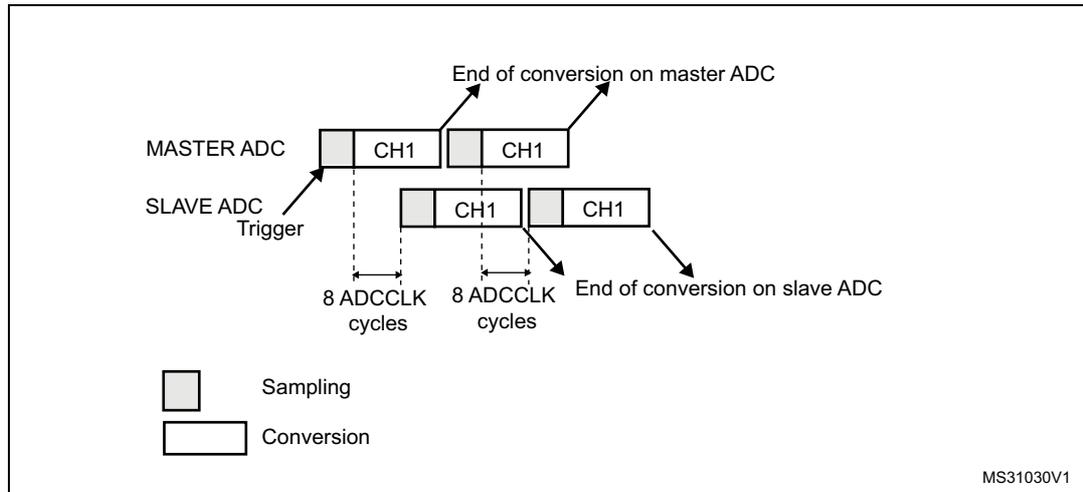
Figure 71. Interleaved mode on 1 channel in single conversion mode: dual ADC mode
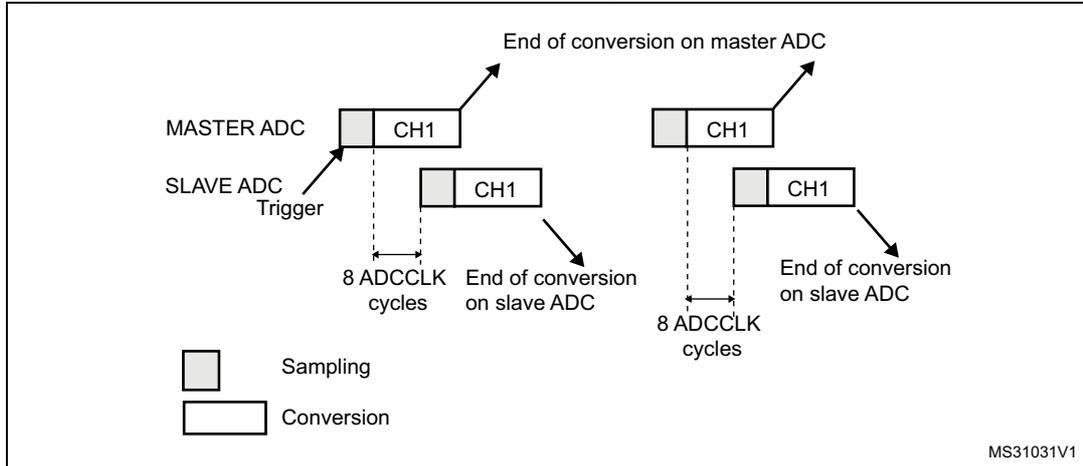
If DISCEN=1, each “n” simultaneous conversions (“n” is defined by DISCNUM) of the regular sequence require a regular trigger event to occur.
In this mode, injected conversions are supported. When injection is done (either on master or on slave), both the master and the slave regular conversions are aborted and the sequence is re-started from the master (see Figure 72 below).
Figure 72. Interleaved conversion with injection
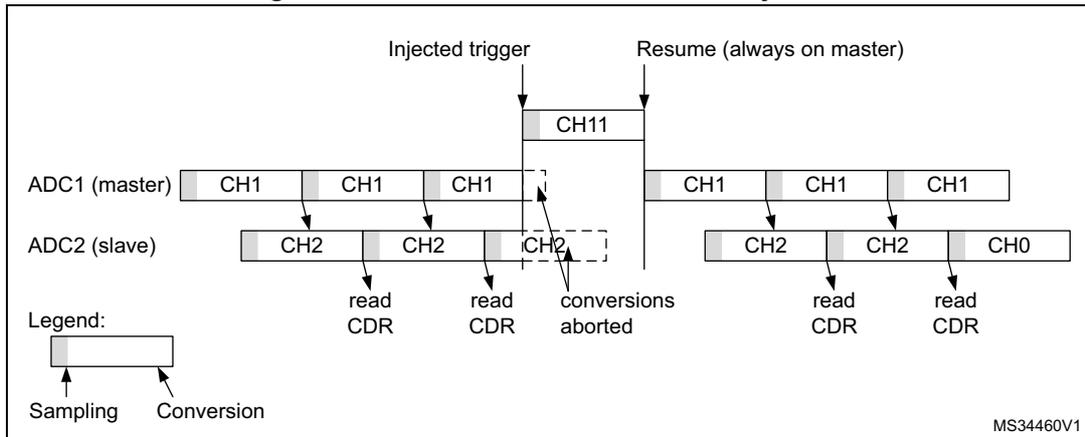
The diagram illustrates the timing of interleaved conversion with injection for two ADCs: ADC1 (master) and ADC2 (slave). The sequence of events is as follows:
- ADC1 (master): Shows a sequence of sampling (light gray) and conversion (dark gray) for channel CH1. An "Injected trigger" occurs, interrupting the regular sequence to convert channel CH11. After CH11, the sequence resumes with CH1. A "Resume (always on master)" signal is shown.
- ADC2 (slave): Shows a sequence of sampling and conversion for channels CH2 and CH0. When the injected trigger occurs on ADC1, the conversion of CH2 on ADC2 is aborted (indicated by a dashed box). After the master ADC resumes its regular sequence, the slave ADC resumes its sequence with CH2 and then CH0.
- Read CDR: Arrows indicate the reading of the Conversion Data Register (CDR) after each conversion.
- Legend: A box is divided into a light gray "Sampling" section and a dark gray "Conversion" section.
- Reference: MS34460V1
Alternate trigger mode
This mode is selected by programming bits DUAL[4:0] = 01001.
This mode can be started only on an injected group. The source of external trigger comes from the injected group multiplexer of the master ADC.
This mode is only possible when selecting hardware triggers: JEXTEN must not be 0x0.
Injected discontinuous mode disabled (JDISCEN=0 for both ADC)
- 1. When the 1st trigger occurs, all injected master ADC channels in the group are converted.
- 2. When the 2nd trigger occurs, all injected slave ADC channels in the group are converted.
- 3. And so on.
A JEOS interrupt, if enabled, is generated after all injected channels of the master ADC in the group have been converted.
A JEOS interrupt, if enabled, is generated after all injected channels of the slave ADC in the group have been converted.
JEOC interrupts, if enabled, can also be generated after each injected conversion.
If another external trigger occurs after all injected channels in the group have been converted then the alternate trigger process restarts by converting the injected channels of the master ADC in the group.
Figure 73. Alternate trigger: injected group of each ADC
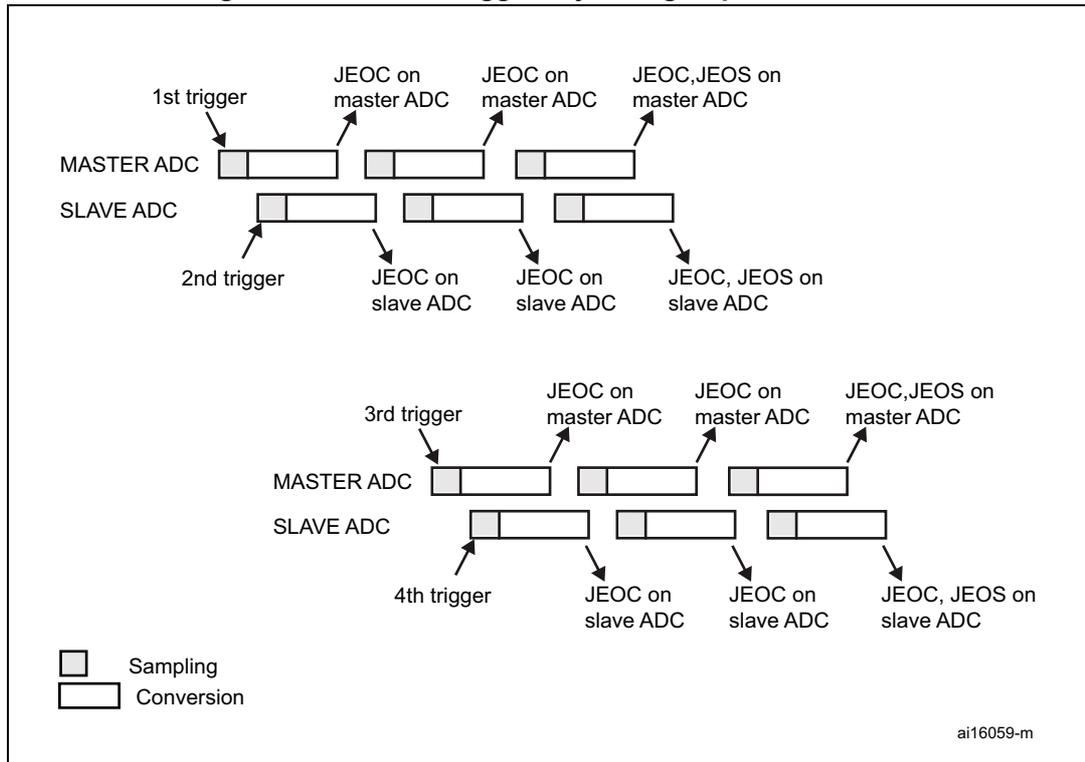
The diagram illustrates the timing sequence for alternate triggering of injected groups in a MASTER ADC and a SLAVE ADC. The sequence is as follows:
- 1st trigger: Initiates the first injected channel of the MASTER ADC. The sequence shows Sampling followed by Conversion. Interrupts JEOC on master ADC and JEOS on master ADC are generated after the conversion.
- 2nd trigger: Initiates the first injected channel of the SLAVE ADC. The sequence shows Sampling followed by Conversion. Interrupts JEOC on slave ADC and JEOS on slave ADC are generated after the conversion.
- 3rd trigger: Initiates the second injected channel of the MASTER ADC. The sequence shows Sampling followed by Conversion. Interrupts JEOC on master ADC and JEOS on master ADC are generated after the conversion.
- 4th trigger: Initiates the second injected channel of the SLAVE ADC. The sequence shows Sampling followed by Conversion. Interrupts JEOC on slave ADC and JEOS on slave ADC are generated after the conversion.
Legend:
- Sampling (represented by a shaded rectangle)
- Conversion (represented by a white rectangle)
ai16059-m
Note:
Regular conversions can be enabled on one or all ADCs. In this case the regular conversions are independent of each other. A regular conversion is interrupted when the ADC has to perform an injected conversion. It is resumed when the injected conversion is finished.
The time interval between 2 trigger events must be greater than or equal to 1 ADC clock period. The minimum time interval between 2 trigger events that start conversions on the same ADC is the same as in the single ADC mode.
Injected discontinuous mode enabled (JDISCEN=1 for both ADC)
If the injected discontinuous mode is enabled for both master and slave ADCs:
- • When the 1st trigger occurs, the first injected channel of the master ADC is converted.
- • When the 2nd trigger occurs, the first injected channel of the slave ADC is converted.
- • And so on.
A JEOS interrupt, if enabled, is generated after all injected channels of the master ADC in the group have been converted.
A JEOS interrupt, if enabled, is generated after all injected channels of the slave ADC in the group have been converted.
JEOC interrupts, if enabled, can also be generated after each injected conversions.
If another external trigger occurs after all injected channels in the group have been converted then the alternate trigger process restarts.
Figure 74. Alternate trigger: 4 injected channels (each ADC) in discontinuous mode
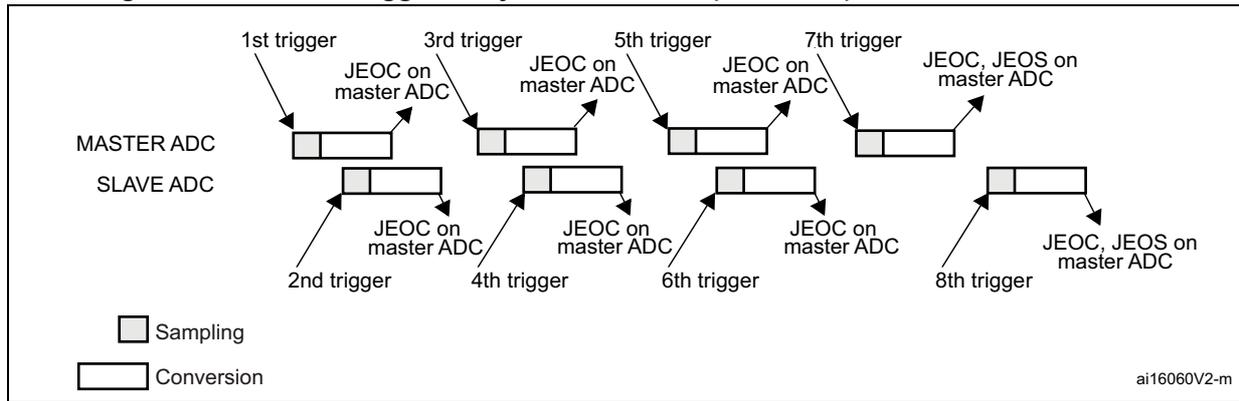
Combined regular/injected simultaneous mode
This mode is selected by programming bits DUAL[4:0] = 00001.
It is possible to interrupt the simultaneous conversion of a regular group to start the simultaneous conversion of an injected group.
Note: In combined regular/injected simultaneous mode, one must convert sequences with the same length or ensure that the interval between triggers is longer than the long conversion time of the 2 sequences. Otherwise, the ADC with the shortest sequence may restart while the ADC with the longest sequence is completing the previous conversions.
Combined regular simultaneous + alternate trigger mode
This mode is selected by programming bits DUAL[4:0]=00010.
It is possible to interrupt the simultaneous conversion of a regular group to start the alternate trigger conversion of an injected group. Figure 75 shows the behavior of an alternate trigger interrupting a simultaneous regular conversion.
The injected alternate conversion is immediately started after the injected event. If a regular conversion is already running, in order to ensure synchronization after the injected conversion, the regular conversion of all (master/slave) ADCs is stopped and resumed synchronously at the end of the injected conversion.
Note: In combined regular simultaneous + alternate trigger mode, one must convert sequences with the same length or ensure that the interval between triggers is longer than the long conversion time of the 2 sequences. Otherwise, the ADC with the shortest sequence may restart while the ADC with the longest sequence is completing the previous conversions.
Figure 75. Alternate + regular simultaneous
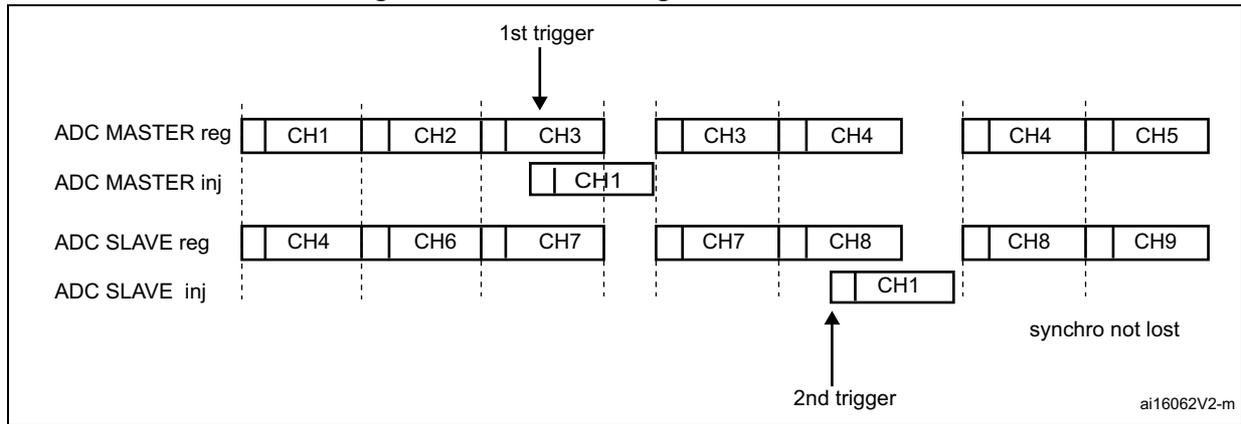
If a trigger occurs during an injected conversion that has interrupted a regular conversion, the alternate trigger is served. Figure 76 shows the behavior in this case (note that the 6th trigger is ignored because the associated alternate conversion is not complete).
Figure 76. Case of trigger occurring during injected conversion
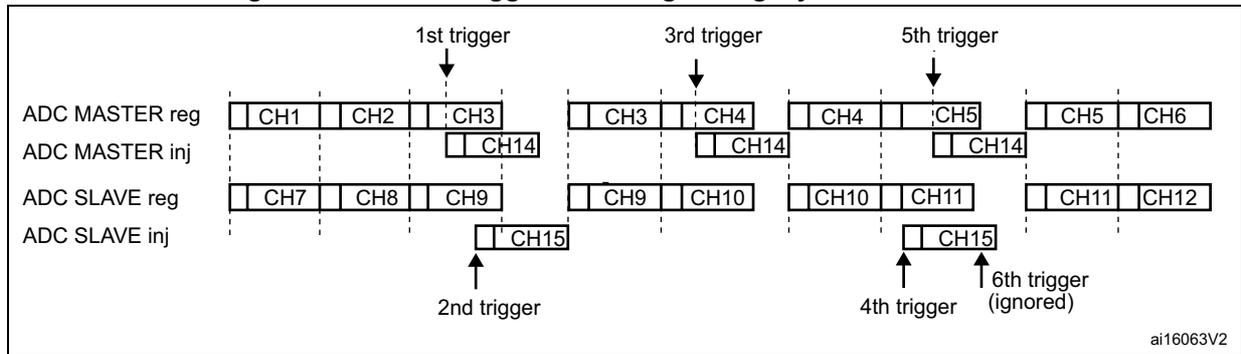
DMA requests in dual ADC mode
In all dual ADC modes, it is possible to use two DMA channels (one for the master, one for the slave) to transfer the data, like in single mode (refer to Figure 77: DMA Requests in regular simultaneous mode when MDMA=0b00 ).
Figure 77. DMA Requests in regular simultaneous mode when MDMA=0b00
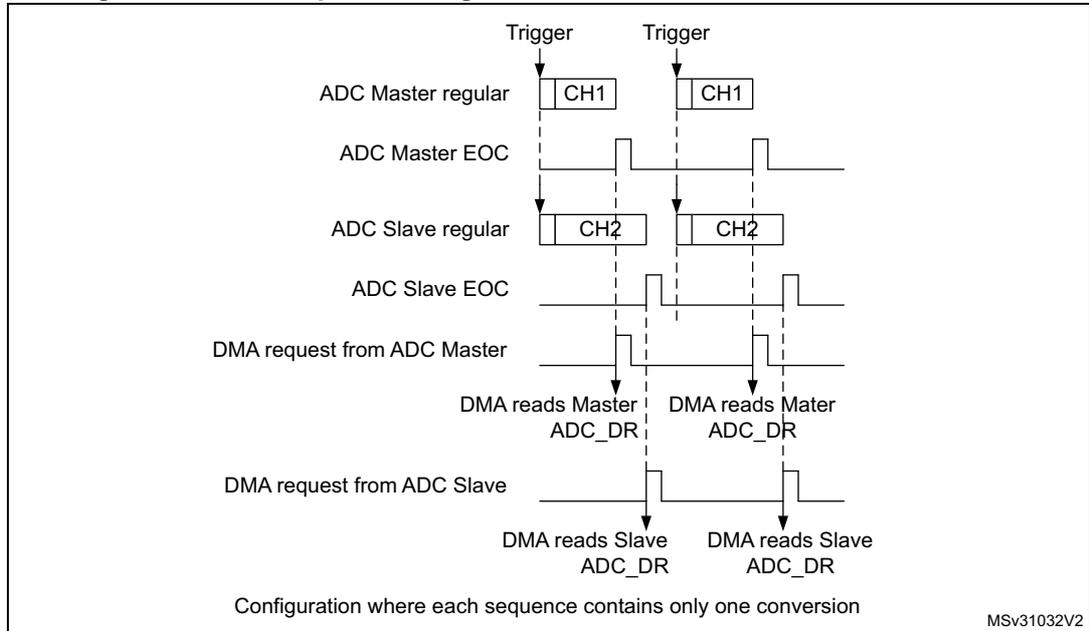
MSV31032V2
In simultaneous regular and interleaved modes, it is also possible to save one DMA channel and transfer both data using a single DMA channel. For this MDMA bits must be configured in the ADCx_CCR register:
- MDMA=0b10: A single DMA request is generated each time both master and slave EOC events have occurred. At that time, two data items are available and the 32-bit register ADCx_CDR contains the two half-words representing two ADC-converted data items. The slave ADC data take the upper half-word and the master ADC data take the lower half-word. This mode is used in interleaved mode and in regular simultaneous mode when resolution is 10-bit or 12-bit.
Example:
Interleaved dual mode: a DMA request is generated each time 2 data items are available:
1st DMA request: ADCx_CDR[31:0] = SLV_ADCx_DR[15:0] | MST_ADCx_DR[15:0]
2nd DMA request: ADCx_CDR[31:0] = SLV_ADCx_DR[15:0] | MST_ADCx_DR[15:0]
Figure 78. DMA requests in regular simultaneous mode when MDMA=0b10
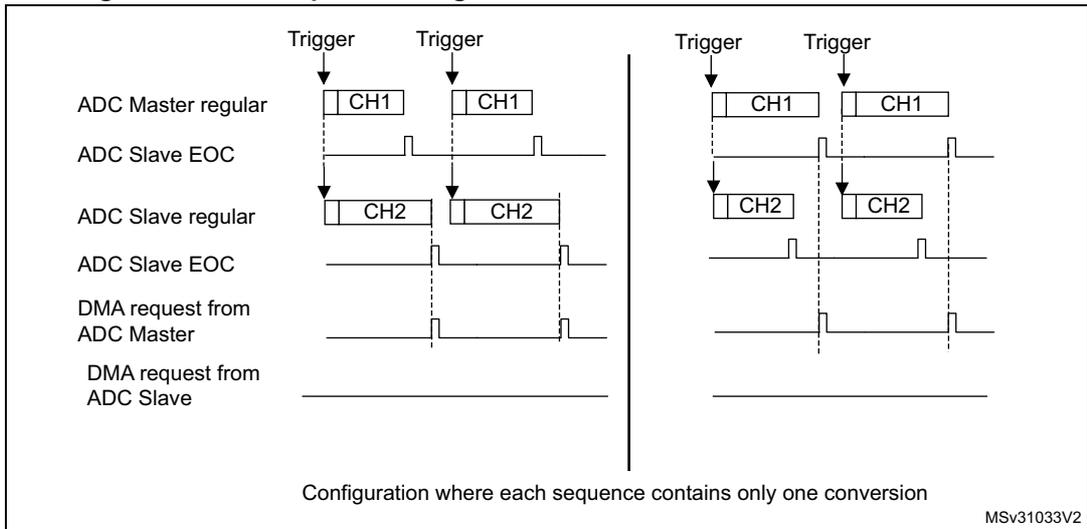
Configuration where each sequence contains only one conversion
MSv31033V2
Figure 79. DMA requests in interleaved mode when MDMA=0b10
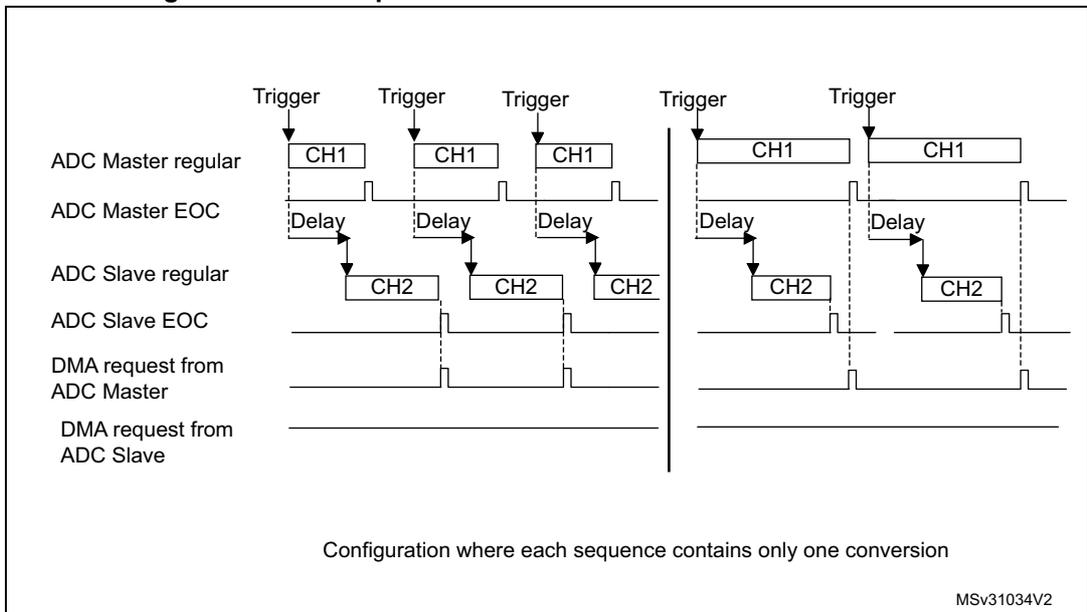
Configuration where each sequence contains only one conversion
MSv31034V2
Note: When using MDMA mode, the user must take care to configure properly the duration of the master and slave conversions so that a DMA request is generated and served for reading both data (master + slave) before a new conversion is available.
- • MDMA=0b11: This mode is similar to the MDMA=0b10. The only differences are that on each DMA request (two data items are available), two bytes representing two ADC converted data items are transferred as a half-word.
This mode is used in interleaved and regular simultaneous mode when resolution is 6-bit or when resolution is 8-bit and data is not signed (offsets must be disabled for all the involved channels).
Example:
Interleaved dual mode: a DMA request is generated each time 2 data items are available:
1st DMA request: ADCx_CDR[15:0] = SLV_ADCx_DR[7:0] | MST_ADCx_DR[7:0]
2nd DMA request: ADCx_CDR[15:0] = SLV_ADCx_DR[7:0] | MST_ADCx_DR[7:0]
Overrun detection
In dual ADC mode (when DUAL[4:0] is not equal to b00000), if an overrun is detected on one of the ADCs, the DMA requests are no longer issued to ensure that all the data transferred to the RAM are valid (this behavior occurs whatever the MDMA configuration). It may happen that the EOC bit corresponding to one ADC remains set because the data register of this ADC contains valid data.
DMA one shot mode/ DMA circular mode when MDMA mode is selected
When MDMA mode is selected (0b10 or 0b11), bit DMACFG of the ADCx_CCR register must also be configured to select between DMA one shot mode and circular mode, as explained in section Section : Managing conversions using the DMA (bits DMACFG of master and slave ADCx_CFGR are not relevant).
Stopping the conversions in dual ADC modes
The user must set the control bits ADSTP/JADSTP of the master ADC to stop the conversions of both ADC in dual ADC mode. The other ADSTP control bit of the slave ADC has no effect in dual ADC mode.
Once both ADC are effectively stopped, the bits ADSTART/JADSTART of the master and slave ADCs are both cleared by hardware.
13.3.30 Temperature sensor
The temperature sensor can be used to measure the junction temperature (TJ) of the device. The temperature sensor is internally connected to the input channels which are used to convert the sensor output voltage to a digital value. When not in use, the sensor can be put in power down mode.
Figure 80 shows the block diagram of connections between the temperature sensor and the ADC.
The temperature sensor output voltage changes linearly with temperature. The offset of this line varies from chip to chip due to process variation (up to 45 °C from one chip to another).
The uncalibrated internal temperature sensor is more suited for applications that detect temperature variations instead of absolute temperatures. To improve the accuracy of the
temperature sensor measurement, calibration values are stored in system memory for each device by ST during production.
During the manufacturing process, the calibration data of the temperature sensor and the internal voltage reference are stored in the system memory area. The user application can then read them and use them to improve the accuracy of the temperature sensor or the internal reference. Refer to the STM32F334xx datasheet for additional information.
Main features
- • Supported temperature range: \( -40 \) to \( 125 \) \( ^{\circ}\text{C} \)
- • Precision: \( \pm 2 \) \( ^{\circ}\text{C} \)
The temperature sensor is internally connected to the ADC1_IN16 input channel which is used to convert the sensor's output voltage to a digital value. Refer to the electrical characteristics section of STM32F334xx datasheet for the sampling time value to be applied when converting the internal temperature sensor.
When not in use, the sensor can be put in power-down mode.
Figure 80 shows the block diagram of the temperature sensor.
Figure 80. Temperature sensor channel block diagram
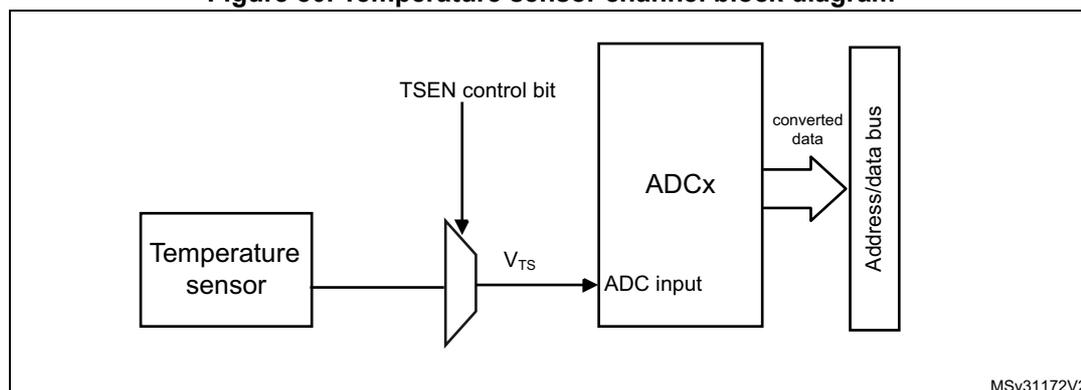
graph LR; TS[Temperature sensor] -- V_TS --> MUX; TSEN[TSEN control bit] --> MUX; MUX --> ADC[ADCx]; ADC -- converted data --> Bus[Address/data bus];
Note: The TSEN bit must be set to enable the conversion of the temperature sensor voltage \( V_{\text{TS}} \) .
Reading the temperature
To use the sensor:
- 1. Select the ADC1_IN16 input channel (with the appropriate sampling time).
- 2. Program with the appropriate sampling time (refer to electrical characteristics section of the STM32F334xx datasheet).
- 3. Set the TSEN bit in the ADC1_CCR register to wake up the temperature sensor from power-down mode.
- 4. Start the ADC conversion.
- 5. Read the resulting \( V_{TS} \) data in the ADC data register.
- 6. Calculate the actual temperature using the following formula:
Where:
- – \( V_{25} = V_{TS} \) value for \( 25^\circ\text{C} \)
- – Avg_Slope = average slope of the temperature vs. \( V_{TS} \) curve (given in \( \text{mV}/^\circ\text{C} \) or \( \mu\text{V}/^\circ\text{C} \) )
Refer to the datasheet electrical characteristics section for the actual values of \( V_{25} \) and Avg_Slope.
Note: The sensor has a startup time after waking from power-down mode before it can output \( V_{TS} \) at the correct level. The ADC also has a startup time after power-on, so to minimize the delay, the ADEN and TSEN bits should be set at the same time.
13.3.31 \( V_{BAT} \) supply monitoring
The VBATEN bit in the ADC12_CCR register is used to switch to the battery voltage. As the \( V_{BAT} \) voltage could be higher than \( V_{DDA} \) , to ensure the correct operation of the ADC, the \( V_{BAT} \) pin is internally connected to a bridge divider by 2. This bridge is automatically enabled when VBATEN is set, to connect \( V_{BAT}/2 \) to the ADC1_IN17 input channel. As a consequence, the converted digital value is half the \( V_{BAT} \) voltage. To prevent any unwanted consumption on the battery, it is recommended to enable the bridge divider only when needed, for ADC conversion.
Refer to the electrical characteristics of the STM32F334xx datasheet for the sampling time value to be applied when converting the \( V_{BAT}/2 \) voltage.
Figure 81 shows the block diagram of the \( V_{BAT} \) sensing feature.
Figure 81.\( V_{BAT} \) channel block diagram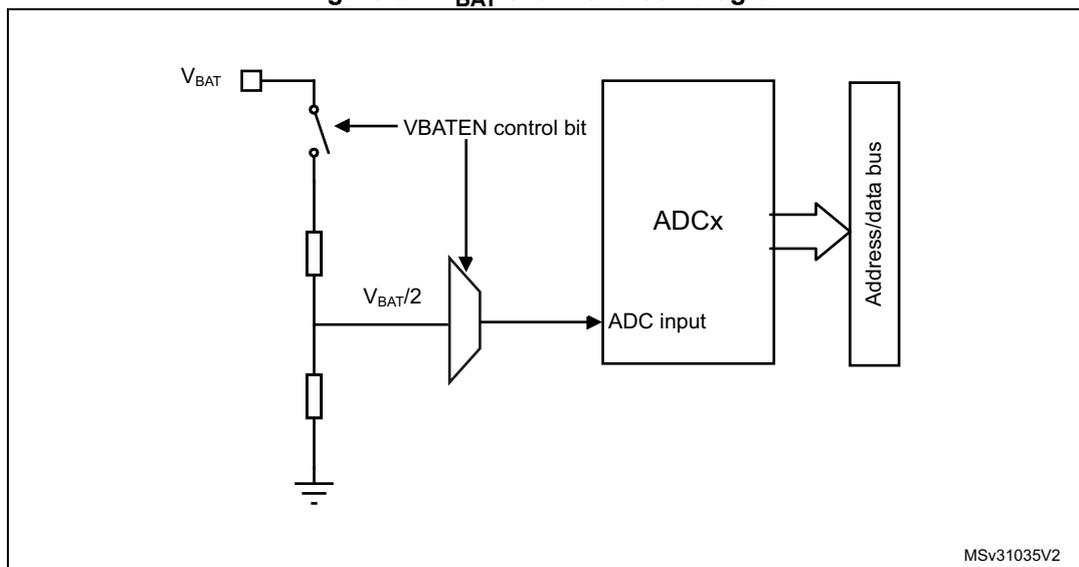
The diagram shows a switch connected to \( V_{BAT} \) and controlled by the \( V_{BATEN} \) control bit. The switch is connected to a voltage divider consisting of two resistors in series, with the midpoint outputting \( V_{BAT}/2 \) . This \( V_{BAT}/2 \) signal is connected to a multiplexer, which is also controlled by the \( V_{BATEN} \) control bit. The output of the multiplexer is connected to the \( ADC \) input of an \( ADCx \) block. The \( ADCx \) block is connected to an \( Address/data bus \) . The bottom of the voltage divider is connected to ground. The diagram is labeled MSv31035V2.
Note: The \( V_{BATEN} \) bit must be set to enable the conversion of internal channel \( ADC1\_IN17 \) ( \( V_{BATEN} \) ).
13.3.32 Monitoring the internal voltage reference
It is possible to monitor the internal voltage reference ( \( V_{REFINT} \) ) to have a reference point for evaluating the \( ADC \) \( V_{REF+} \) voltage level.
The internal voltage reference is internally connected to the input channel 18 of the two \( ADCs \) ( \( ADCx\_IN18 \) ).
Refer to the electrical characteristics section of the STM32F334xx datasheet for the sampling time value to be applied when converting the internal voltage reference voltage.
Figure 81 shows the block diagram of the \( V_{REFINT} \) sensing feature.
Figure 82.\( V_{REFINT} \) channel block diagram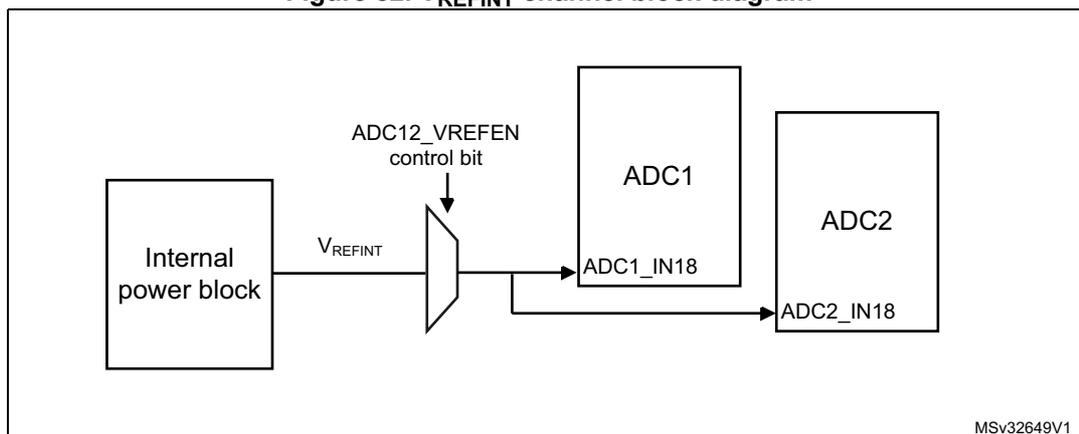
The diagram shows an \( Internal\ power\ block \) outputting \( V_{REFINT} \) . This signal is connected to a multiplexer, which is controlled by the \( ADC12\_VREFEN \) control bit. The output of the multiplexer is connected to the \( ADC1\_IN18 \) input of an \( ADC1 \) block and the \( ADC2\_IN18 \) input of an \( ADC2 \) block. The diagram is labeled MSv32649V1.
Note: The \( VREFEN \) bit into \( ADC12\_CCR \) register must be set to enable the conversion of internal channels \( ADC1\_IN18 \) or \( ADC2\_IN18 \) ( \( V_{REFINT} \) ).
Calculating the actual \( V_{DDA} \) voltage using the internal reference voltage
The \( V_{DDA} \) power supply voltage applied to the microcontroller may be subject to variation or not precisely known. The embedded internal voltage reference ( \( V_{REFINT} \) ) and its calibration data acquired by the ADC during the manufacturing process at \( V_{DDA} = 3.3\text{ V} \) can be used to evaluate the actual \( V_{DDA} \) voltage level.
The following formula gives the actual \( V_{DDA} \) voltage supplying the device:
Where:
- • \( VREFINT\_CAL \) is the \( VREFINT \) calibration value
- • \( VREFINT\_DATA \) is the actual \( VREFINT \) output value converted by ADC
Converting a supply-relative ADC measurement to an absolute voltage value
The ADC is designed to deliver a digital value corresponding to the ratio between the analog power supply and the voltage applied on the converted channel. For most application use cases, it is necessary to convert this ratio into a voltage independent of \( V_{DDA} \) . For applications where \( V_{DDA} \) is known and ADC converted values are right-aligned user can use the following formula to get this absolute value:
For applications where \( V_{DDA} \) value is not known, user must use the internal voltage reference and \( V_{DDA} \) can be replaced by the expression provided in the section Calculating the actual \( V_{DDA} \) voltage using the internal reference voltage , resulting in the following formula:
Where:
- • \( VREFINT\_CAL \) is the \( VREFINT \) calibration value
- • \( ADCx\_DATA \) is the value measured by the ADC on channel x (right-aligned)
- • \( VREFINT\_DATA \) is the actual \( VREFINT \) output value converted by the ADC
- • \( FULL\_SCALE \) is the maximum digital value of the ADC output. For example with 12-bit resolution, it will be \( 2^{12} - 1 = 4095 \) or with 8-bit resolution, \( 2^8 - 1 = 255 \) .
Note: If ADC measurements are done using an output format other than 12 bit right-aligned, all the parameters must first be converted to a compatible format before the calculation is done.
13.4 ADC interrupts
For each ADC, an interrupt can be generated:
- • After ADC power-up, when the ADC is ready (flag ADRDY)
- • On the end of any conversion for regular groups (flag EOC)
- • On the end of a sequence of conversion for regular groups (flag EOS)
- • On the end of any conversion for injected groups (flag JEOC)
- • On the end of a sequence of conversion for injected groups (flag JEOS)
- • When an analog watchdog detection occurs (flag AWD1, AWD2 and AWD3)
- • When the end of sampling phase occurs (flag EOSMP)
- • When the data overrun occurs (flag OVR)
- • When the injected sequence context queue overflows (flag JQOVF)
Separate interrupt enable bits are available for flexibility.
Table 47. ADC interrupts per each ADC
| Interrupt event | Event flag | Enable control bit |
|---|---|---|
| ADC ready | ADRDY | ADRDYIE |
| End of conversion of a regular group | EOC | EOCIE |
| End of sequence of conversions of a regular group | EOS | EOSIE |
| End of conversion of a injected group | JEOC | JEOCIE |
| End of sequence of conversions of an injected group | JEOS | JEOSIE |
| Analog watchdog 1 status bit is set | AWD1 | AWD1IE |
| Analog watchdog 2 status bit is set | AWD2 | AWD2IE |
| Analog watchdog 3 status bit is set | AWD3 | AWD3IE |
| End of sampling phase | EOSMP | EOSMPIE |
| Overrun | OVR | OVRIE |
| Injected context queue overflows | JQOVF | JQOVFIE |
13.5 ADC registers (for each ADC)
Refer to Section 1.2 on page 43 for a list of abbreviations used in register descriptions.
13.5.1 ADC interrupt and status register (ADCx_ISR, x=1..2)
Address offset: 0x00
Reset value: 0x0000 0000
| 31 | 30 | 29 | 28 | 27 | 26 | 25 | 24 | 23 | 22 | 21 | 20 | 19 | 18 | 17 | 16 |
|---|---|---|---|---|---|---|---|---|---|---|---|---|---|---|---|
| Res. | Res. | Res. | Res. | Res. | Res. | Res. | Res. | Res. | Res. | Res. | Res. | Res. | Res. | Res. | Res. |
| 15 | 14 | 13 | 12 | 11 | 10 | 9 | 8 | 7 | 6 | 5 | 4 | 3 | 2 | 1 | 0 |
| Res. | Res. | Res. | Res. | Res. | JQOVF | AWD3 | AWD2 | AWD1 | JEOS | JEOC | OVR | EOS | EOC | EOSMP | ADRDY |
| rc_w1 | rc_w1 | rc_w1 | rc_w1 | rc_w1 | rc_w1 | rc_w1 | rc_w1 | rc_w1 | rc_w1 | rc_w1 |
Bits 31:11 Reserved, must be kept at reset value.
Bit 10 JQOVF : Injected context queue overflow
This bit is set by hardware when an Overflow of the Injected Queue of Context occurs. It is cleared by software writing 1 to it. Refer to Section 13.3.21: Queue of context for injected conversions for more information.
0: No injected context queue overflow occurred (or the flag event was already acknowledged and cleared by software)
1: Injected context queue overflow has occurred
Bit 9 AWD3 : Analog watchdog 3 flag
This bit is set by hardware when the converted voltage crosses the values programmed in the fields LT3[7:0] and HT3[7:0] of ADCx_TR3 register. It is cleared by software writing 1 to it.
0: No analog watchdog 3 event occurred (or the flag event was already acknowledged and cleared by software)
1: Analog watchdog 3 event occurred
Bit 8 AWD2 : Analog watchdog 2 flag
This bit is set by hardware when the converted voltage crosses the values programmed in the fields LT2[7:0] and HT2[7:0] of ADCx_TR2 register. It is cleared by software writing 1 to it.
0: No analog watchdog 2 event occurred (or the flag event was already acknowledged and cleared by software)
1: Analog watchdog 2 event occurred
Bit 7 AWD1 : Analog watchdog 1 flag
This bit is set by hardware when the converted voltage crosses the values programmed in the fields LT1[11:0] and HT1[11:0] of ADCx_TR1 register. It is cleared by software writing 1 to it.
0: No analog watchdog 1 event occurred (or the flag event was already acknowledged and cleared by software)
1: Analog watchdog 1 event occurred
Bit 6 JEOS : Injected channel end of sequence flag
This bit is set by hardware at the end of the conversions of all injected channels in the group. It is cleared by software writing 1 to it.
0: Injected conversion sequence not complete (or the flag event was already acknowledged and cleared by software)
1: Injected conversions complete
Bit 5 JEOC: Injected channel end of conversion flagThis bit is set by hardware at the end of each injected conversion of a channel when a new data is available in the corresponding ADCx_JDRy register. It is cleared by software writing 1 to it or by reading the corresponding ADCx_JDRy register
- 0: Injected channel conversion not complete (or the flag event was already acknowledged and cleared by software)
- 1: Injected channel conversion complete
This bit is set by hardware when an overrun occurs on a regular channel, meaning that a new conversion has completed while the EOC flag was already set. It is cleared by software writing 1 to it.
- 0: No overrun occurred (or the flag event was already acknowledged and cleared by software)
- 1: Overrun has occurred
This bit is set by hardware at the end of the conversions of a regular sequence of channels. It is cleared by software writing 1 to it.
- 0: Regular Conversions sequence not complete (or the flag event was already acknowledged and cleared by software)
- 1: Regular Conversions sequence complete
This bit is set by hardware at the end of each regular conversion of a channel when a new data is available in the ADCx_DR register. It is cleared by software writing 1 to it or by reading the ADCx_DR register
- 0: Regular channel conversion not complete (or the flag event was already acknowledged and cleared by software)
- 1: Regular channel conversion complete
This bit is set by hardware during the conversion of any channel (only for regular channels), at the end of the sampling phase.
- 0: not at the end of the sampling phase (or the flag event was already acknowledged and cleared by software)
- 1: End of sampling phase reached
This bit is set by hardware after the ADC has been enabled (bit ADEN=1) and when the ADC reaches a state where it is ready to accept conversion requests.
It is cleared by software writing 1 to it.
- 0: ADC not yet ready to start conversion (or the flag event was already acknowledged and cleared by software)
- 1: ADC is ready to start conversion
13.5.2 ADC interrupt enable register (ADCx_IER, x=1..2)
Address offset: 0x04
Reset value: 0x0000 0000
| 31 | 30 | 29 | 28 | 27 | 26 | 25 | 24 | 23 | 22 | 21 | 20 | 19 | 18 | 17 | 16 |
|---|---|---|---|---|---|---|---|---|---|---|---|---|---|---|---|
| Res. | Res. | Res. | Res. | Res. | Res. | Res. | Res. | Res. | Res. | Res. | Res. | Res. | Res. | Res. | Res. |
| 15 | 14 | 13 | 12 | 11 | 10 | 9 | 8 | 7 | 6 | 5 | 4 | 3 | 2 | 1 | 0 |
| Res. | Res. | Res. | Res. | Res. | JQ OVFIE | AWD3 IE | AWD2 IE | AWD1 IE | JEOSIE | JEOCIE | OVRIE | EOSIE | EOCIE | EOSMP IE | ADRDY IE |
| rw | rw | rw | rw | rw | rw | rw | rw | rw | rw | rw |
Bits 31:11 Reserved, must be kept at reset value.
Bit 10 JQOVFIE: Injected context queue overflow interrupt enable
This bit is set and cleared by software to enable/disable the Injected Context Queue Overflow interrupt.
0: Injected Context Queue Overflow interrupt disabled
1: Injected Context Queue Overflow interrupt enabled. An interrupt is generated when the JQOVF bit is set.
Note: Software is allowed to write this bit only when JADSTART=0 (which ensures that no injected conversion is ongoing).
Bit 9 AWD3IE: Analog watchdog 3 interrupt enable
This bit is set and cleared by software to enable/disable the analog watchdog 2 interrupt.
0: Analog watchdog 3 interrupt disabled
1: Analog watchdog 3 interrupt enabled
Note: Software is allowed to write this bit only when ADSTART=0 and JADSTART=0 (which ensures that no conversion is ongoing).
Bit 8 AWD2IE: Analog watchdog 2 interrupt enable
This bit is set and cleared by software to enable/disable the analog watchdog 2 interrupt.
0: Analog watchdog 2 interrupt disabled
1: Analog watchdog 2 interrupt enabled
Note: Software is allowed to write this bit only when ADSTART=0 and JADSTART=0 (which ensures that no conversion is ongoing).
Bit 7 AWD1IE: Analog watchdog 1 interrupt enable
This bit is set and cleared by software to enable/disable the analog watchdog 1 interrupt.
0: Analog watchdog 1 interrupt disabled
1: Analog watchdog 1 interrupt enabled
Note: Software is allowed to write this bit only when ADSTART=0 and JADSTART=0 (which ensures that no conversion is ongoing).
Bit 6 JEOSIE: End of injected sequence of conversions interrupt enable
This bit is set and cleared by software to enable/disable the end of injected sequence of conversions interrupt.
0: JEOS interrupt disabled
1: JEOS interrupt enabled. An interrupt is generated when the JEOS bit is set.
Note: Software is allowed to write this bit only when JADSTART=0 (which ensures that no injected conversion is ongoing).
Bit 5 JEOCIE: End of injected conversion interrupt enableThis bit is set and cleared by software to enable/disable the end of an injected conversion interrupt.
0: JEOC interrupt disabled.
1: JEOC interrupt enabled. An interrupt is generated when the JEOC bit is set.
Note: Software is allowed to write this bit only when JADSTART=0 (which ensures that no regular conversion is ongoing).
Bit 4 OVRIE: Overrun interrupt enableThis bit is set and cleared by software to enable/disable the Overrun interrupt of a regular conversion.
0: Overrun interrupt disabled
1: Overrun interrupt enabled. An interrupt is generated when the OVR bit is set.
Note: Software is allowed to write this bit only when ADSTART=0 (which ensures that no regular conversion is ongoing).
Bit 3 EOSIE: End of regular sequence of conversions interrupt enableThis bit is set and cleared by software to enable/disable the end of regular sequence of conversions interrupt.
0: EOS interrupt disabled
1: EOS interrupt enabled. An interrupt is generated when the EOS bit is set.
Note: Software is allowed to write this bit only when ADSTART=0 (which ensures that no regular conversion is ongoing).
Bit 2 EOCIE: End of regular conversion interrupt enableThis bit is set and cleared by software to enable/disable the end of a regular conversion interrupt.
0: EOC interrupt disabled.
1: EOC interrupt enabled. An interrupt is generated when the EOC bit is set.
Note: Software is allowed to write this bit only when ADSTART=0 (which ensures that no regular conversion is ongoing).
Bit 1 EOSMPIE: End of sampling flag interrupt enable for regular conversionsThis bit is set and cleared by software to enable/disable the end of the sampling phase interrupt for regular conversions.
0: EOSMP interrupt disabled.
1: EOSMP interrupt enabled. An interrupt is generated when the EOSMP bit is set.
Note: Software is allowed to write this bit only when ADSTART=0 (which ensures that no regular conversion is ongoing).
Bit 0 ADRDYIE: ADC ready interrupt enableThis bit is set and cleared by software to enable/disable the ADC Ready interrupt.
0: ADRDY interrupt disabled
1: ADRDY interrupt enabled. An interrupt is generated when the ADRDY bit is set.
Note: Software is allowed to write this bit only when ADSTART=0 and JADSTART=0 (which ensures that no conversion is ongoing).
13.5.3 ADC control register (ADCx_CR, x=1..2)
Address offset: 0x08
Reset value: 0x2000 0000
| 31 | 30 | 29 | 28 | 27 | 26 | 25 | 24 | 23 | 22 | 21 | 20 | 19 | 18 | 17 | 16 |
|---|---|---|---|---|---|---|---|---|---|---|---|---|---|---|---|
| ADCAL | ADCALDIF | ADVREGEN[1:0] | Res. | Res. | Res. | Res. | Res. | Res. | Res. | Res. | Res. | Res. | Res. | Res. | |
| rs | rw | rw | rw | ||||||||||||
| 15 | 14 | 13 | 12 | 11 | 10 | 9 | 8 | 7 | 6 | 5 | 4 | 3 | 2 | 1 | 0 |
|---|---|---|---|---|---|---|---|---|---|---|---|---|---|---|---|
| Res. | Res. | Res. | Res. | Res. | Res. | Res. | Res. | Res. | Res. | JADSTP | ADSTP | JADSTART | ADSTART | ADDIS | ADEN |
| rs | rs | rs | rs | rs | rs |
Bit 31 ADCAL: ADC calibration
This bit is set by software to start the calibration of the ADC. Program first the bit ADCALDIF to determine if this calibration applies for single-ended or differential inputs mode.
It is cleared by hardware after calibration is complete.
0: Calibration complete
1: Write 1 to calibrate the ADC. Read at 1 means that a calibration in progress.
Note: Software is allowed to launch a calibration by setting ADCAL only when ADEN=0.
Note: Software is allowed to update the calibration factor by writing ADCx_CALFACT only when ADEN=1 and ADSTART=0 and JADSTART=0 (ADC enabled and no conversion is ongoing)
Bit 30 ADCALDIF: Differential mode for calibration
This bit is set and cleared by software to configure the single-ended or differential inputs mode for the calibration.
0: Writing ADCAL will launch a calibration in Single-ended inputs Mode.
1: Writing ADCAL will launch a calibration in Differential inputs Mode.
Note: Software is allowed to write this bit only when the ADC is disabled and is not calibrating (ADCAL=0, JADSTART=0, JADSTP=0, ADSTART=0, ADSTP=0, ADDIS=0 and ADEN=0).
Bits 29:28 ADVREGEN[1:0]: ADC voltage regulator enable
These bits are set by software to enable the ADC voltage regulator.
Before performing any operation such as launching a calibration or enabling the ADC, the ADC voltage regulator must first be enabled and the software must wait for the regulator start-up time.
00: Intermediate state required when moving the ADC voltage regulator from the enabled to the disabled state or from the disabled to the enabled state.
01: ADC Voltage regulator enabled.
10: ADC Voltage regulator disabled (Reset state)
11: reserved
For more details about the ADC voltage regulator enable and disable sequences, refer to Section 13.3.6: ADC voltage regulator (ADVREGEN) .
Note: The software can program this bit field only when the ADC is disabled (ADCAL=0, JADSTART=0, ADSTART=0, ADSTP=0, ADDIS=0 and ADEN=0).
Bits 27:6 Reserved, must be kept at reset value.
Bit 5 JADSTP: ADC stop of injected conversion commandThis bit is set by software to stop and discard an ongoing injected conversion (JADSTP Command). It is cleared by hardware when the conversion is effectively discarded and the ADC injected sequence and triggers can be re-configured. The ADC is then ready to accept a new start of injected conversions (JADSTART command).
0: No ADC stop injected conversion command ongoing
1: Write 1 to stop injected conversions ongoing. Read 1 means that an ADSTP command is in progress.
Note: Software is allowed to set JADSTP only when JADSTART=1 and ADDIS=0 (ADC is enabled and eventually converting an injected conversion and there is no pending request to disable the ADC)
Note: In auto-injection mode (JAUTO=1), setting ADSTP bit aborts both regular and injected conversions (do not use JADSTP)
Bit 4 ADSTP: ADC stop of regular conversion commandThis bit is set by software to stop and discard an ongoing regular conversion (ADSTP Command). It is cleared by hardware when the conversion is effectively discarded and the ADC regular sequence and triggers can be re-configured. The ADC is then ready to accept a new start of regular conversions (ADSTART command).
0: No ADC stop regular conversion command ongoing
1: Write 1 to stop regular conversions ongoing. Read 1 means that an ADSTP command is in progress.
Note: Software is allowed to set ADSTP only when ADSTART=1 and ADDIS=0 (ADC is enabled and eventually converting a regular conversion and there is no pending request to disable the ADC)
Note: In auto-injection mode (JAUTO=1), setting ADSTP bit aborts both regular and injected conversions (do not use JADSTP)
Note: In dual ADC regular simultaneous mode and interleaved mode, the bit ADSTP of the master ADC must be used to stop regular conversions. The other ADSTP bit is inactive.
Bit 3 JADSTART: ADC start of injected conversionThis bit is set by software to start ADC conversion of injected channels. Depending on the configuration bits JEXTEN, a conversion will start immediately (software trigger configuration) or once an injected hardware trigger event occurs (hardware trigger configuration).
It is cleared by hardware:
- – in single conversion mode when software trigger is selected (JEXTSEL=0x0): at the assertion of the End of Injected Conversion Sequence (JEOS) flag.
- – in all cases: after the execution of the JADSTP command, at the same time that JADSTP is cleared by hardware.
0: No ADC injected conversion is ongoing.
1: Write 1 to start injected conversions. Read 1 means that the ADC is operating and eventually converting an injected channel.
Note: Software is allowed to set JADSTART only when ADEN=1 and ADDIS=0 (ADC is enabled and there is no pending request to disable the ADC)
Note: In auto-injection mode (JAUTO=1), regular and auto-injected conversions are started by setting bit ADSTART (JADSTART must be kept cleared)
Bit 2 ADSTART: ADC start of regular conversionThis bit is set by software to start ADC conversion of regular channels. Depending on the configuration bits EXTEN, a conversion will start immediately (software trigger configuration) or once a regular hardware trigger event occurs (hardware trigger configuration).
It is cleared by hardware:
- – in single conversion mode when software trigger is selected (EXTSEL=0x0): at the assertion of the End of Regular Conversion Sequence (EOS) flag.
- – in all cases: after the execution of the ADSTP command, at the same time that ADSTP is cleared by hardware.
0: No ADC regular conversion is ongoing.
1: Write 1 to start regular conversions. Read 1 means that the ADC is operating and eventually converting a regular channel.
Note: Software is allowed to set ADSTART only when ADEN=1 and ADDIS=0 (ADC is enabled and there is no pending request to disable the ADC)
Note: In auto-injection mode (JAUTO=1), regular and auto-injected conversions are started by setting bit ADSTART (JADSTART must be kept cleared)
Bit 1 ADDIS: ADC disable commandThis bit is set by software to disable the ADC (ADDIS command) and put it into power-down state (OFF state).
It is cleared by hardware once the ADC is effectively disabled (ADEN is also cleared by hardware at this time).
0: no ADDIS command ongoing
1: Write 1 to disable the ADC. Read 1 means that an ADDIS command is in progress.
Note: Software is allowed to set ADDIS only when ADEN=1 and both ADSTART=0 and JADSTART=0 (which ensures that no conversion is ongoing)
Bit 0 ADEN: ADC enable controlThis bit is set by software to enable the ADC. The ADC will be effectively ready to operate once the flag ADRDY has been set.
It is cleared by hardware when the ADC is disabled, after the execution of the ADDIS command.
0: ADC is disabled (OFF state)
1: Write 1 to enable the ADC.
Note: Software is allowed to set ADEN only when all bits of ADCx_CR registers are 0 (ADCAL=0, JADSTART=0, ADSTART=0, ADSTP=0, ADDIS=0 and ADEN=0) except for bit ADVREGEN which must be 1 (and the software must have wait for the startup time of the voltage regulator)
13.5.4 ADC configuration register (ADCx_CFGR, x=1..2)
Address offset: 0x0C
Reset value: 0x0000 00000
| 31 | 30 | 29 | 28 | 27 | 26 | 25 | 24 | 23 | 22 | 21 | 20 | 19 | 18 | 17 | 16 |
|---|---|---|---|---|---|---|---|---|---|---|---|---|---|---|---|
| Res. | AWD1CH[4:0] | JAUTO | JAWD1EN | AWD1EN | AWD1SGL | JQM | JDISCEN | DISCNUM[2:0] | DISCEN | ||||||
| rw | rw | rw | rw | rw | rw | rw | rw | rw | rw | rw | rw | rw | rw | rw | |
| 15 | 14 | 13 | 12 | 11 | 10 | 9 | 8 | 7 | 6 | 5 | 4 | 3 | 2 | 1 | 0 |
|---|---|---|---|---|---|---|---|---|---|---|---|---|---|---|---|
| Res. | AUT DLY | CONT | OVR MOD | EXTEN[1:0] | EXTSEL[3:0] | ALIGN | RES[1:0] | Res. | DMA CFG | DMA EN | |||||
| rw | rw | rw | rw | rw | rw | rw | rw | rw | rw | rw | rw | rw | rw | ||
Bit 31 Reserved, must be kept at reset value.
Bits 30:26 AWD1CH[4:0] : Analog watchdog 1 channel selection
These bits are set and cleared by software. They select the input channel to be guarded by the analog watchdog.
00000: reserved (analog input channel 0 is not mapped)
00001: ADC analog input channel-1 monitored by AWD1
.....
10010: ADC analog input channel-18 monitored by AWD1
others: reserved, must not be used
Note: The channel selected by AWD1CH must be also selected into the SQRi or JSQRi registers.
Note: Software is allowed to write these bits only when ADSTART=0 and JADSTART=0 (which ensures that no conversion is ongoing).
Bit 25 JAUTO : Automatic injected group conversion
This bit is set and cleared by software to enable/disable automatic injected group conversion after regular group conversion.
0: Automatic injected group conversion disabled
1: Automatic injected group conversion enabled
Note: Software is allowed to write this bit only when ADSTART=0 and JADSTART=0 (which ensures that no regular nor injected conversion is ongoing).
Note: When dual mode is enabled (bits DUAL of ADCx_CCR register are not equal to zero), the bit JAUTO of the slave ADC is no more writable and its content is equal to the bit JAUTO of the master ADC.
Bit 24 JAWD1EN : Analog watchdog 1 enable on injected channels
This bit is set and cleared by software
0: Analog watchdog 1 disabled on injected channels
1: Analog watchdog 1 enabled on injected channels
Note: Software is allowed to write this bit only when JADSTART=0 (which ensures that no injected conversion is ongoing).
Bit 23 AWD1EN : Analog watchdog 1 enable on regular channels
This bit is set and cleared by software
0: Analog watchdog 1 disabled on regular channels
1: Analog watchdog 1 enabled on regular channels
Note: Software is allowed to write this bit only when ADSTART=0 (which ensures that no regular conversion is ongoing).
Bit 22 AWD1SGL: Enable the watchdog 1 on a single channel or on all channelsThis bit is set and cleared by software to enable the analog watchdog on the channel identified by the AWD1CH[4:0] bits or on all the channels
- 0: Analog watchdog 1 enabled on all channels
- 1: Analog watchdog 1 enabled on a single channel
Note: Software is allowed to write these bits only when ADSTART=0 and JADSTART=0 (which ensures that no conversion is ongoing).
Bit 21 JQM: JSQR queue modeThis bit is set and cleared by software.
It defines how an empty Queue is managed.
- 0: JSQR Mode 0: The Queue is never empty and maintains the last written configuration into JSQR.
- 1: JSQR Mode 1: The Queue can be empty and when this occurs, the software and hardware triggers of the injected sequence are both internally disabled just after the completion of the last valid injected sequence.
Refer to Section 13.3.21: Queue of context for injected conversions for more information.
Note: Software is allowed to write this bit only when JADSTART=0 (which ensures that no injected conversion is ongoing).
Note: When dual mode is enabled (bits DUAL of ADCx_CCR register are not equal to zero), the bit JQM of the slave ADC is no more writable and its content is equal to the bit JQM of the master ADC.
Bit 20 JDISCEN: Discontinuous mode on injected channelsThis bit is set and cleared by software to enable/disable discontinuous mode on the injected channels of a group.
- 0: Discontinuous mode on injected channels disabled
- 1: Discontinuous mode on injected channels enabled
Note: Software is allowed to write this bit only when JADSTART=0 (which ensures that no injected conversion is ongoing).
Note: It is not possible to use both auto-injected mode and discontinuous mode simultaneously: the bits DISCEN and JDISCEN must be kept cleared by software when JAUTO is set.
Note: When dual mode is enabled (bits DUAL of ADCx_CCR register are not equal to zero), the bit JDISCEN of the slave ADC is no more writable and its content is equal to the bit JDISCEN of the master ADC.
Bits 19:17 DISCNUM[2:0]: Discontinuous mode channel countThese bits are written by software to define the number of regular channels to be converted in discontinuous mode, after receiving an external trigger.
- 000: 1 channel
- 001: 2 channels
- ...
- 111: 8 channels
Note: Software is allowed to write these bits only when ADSTART=0 (which ensures that no regular conversion is ongoing).
Note: When dual mode is enabled (bits DUAL of ADCx_CCR register are not equal to zero), the bits DISCNUM[2:0] of the slave ADC are no more writable and their content is equal to the bits DISCNUM[2:0] of the master ADC.
Bit 16 DISCEN: Discontinuous mode for regular channelsThis bit is set and cleared by software to enable/disable Discontinuous mode for regular channels.
0: Discontinuous mode for regular channels disabled
1: Discontinuous mode for regular channels enabled
Note: It is not possible to have both discontinuous mode and continuous mode enabled: it is forbidden to set both DISCEN=1 and CONT=1.
Note: It is not possible to use both auto-injected mode and discontinuous mode simultaneously: the bits DISCEN and JDISCEN must be kept cleared by software when JAUTO is set.
Note: Software is allowed to write this bit only when ADSTART=0 (which ensures that no regular conversion is ongoing).
Note: When dual mode is enabled (bits DUAL of ADCx_CCR register are not equal to zero), the bit DISCEN of the slave ADC is no more writable and its content is equal to the bit DISCEN of the master ADC.
Bit 15 Reserved, must be kept at reset value. Bit 14 AUTDLY: Delayed conversion modeThis bit is set and cleared by software to enable/disable the Auto Delayed Conversion mode.
0: Auto-delayed conversion mode off
1: Auto-delayed conversion mode on
Note: Software is allowed to write this bit only when ADSTART=0 and JADSTART=0 (which ensures that no conversion is ongoing).
Note: When dual mode is enabled (bits DUAL of ADCx_CCR register are not equal to zero), the bit AUTDLY of the slave ADC is no more writable and its content is equal to the bit AUTDLY of the master ADC.
Bit 13 CONT: Single / continuous conversion mode for regular conversionsThis bit is set and cleared by software. If it is set, regular conversion takes place continuously until it is cleared.
0: Single conversion mode
1: Continuous conversion mode
Note: It is not possible to have both discontinuous mode and continuous mode enabled: it is forbidden to set both DISCEN=1 and CONT=1.
Note: Software is allowed to write this bit only when ADSTART=0 (which ensures that no regular conversion is ongoing).
Note: When dual mode is enabled (bits DUAL of ADCx_CCR register are not equal to zero), the bit CONT of the slave ADC is no more writable and its content is equal to the bit CONT of the master ADC.
Bit 12 OVRMOD: Overrun ModeThis bit is set and cleared by software and configure the way data overrun is managed.
0: ADCx_DR register is preserved with the old data when an overrun is detected.
1: ADCx_DR register is overwritten with the last conversion result when an overrun is detected.
Note: Software is allowed to write this bit only when ADSTART=0 (which ensures that no regular conversion is ongoing).
Bits 11:10 EXTEN[1:0]: External trigger enable and polarity selection for regular channelsThese bits are set and cleared by software to select the external trigger polarity and enable the trigger of a regular group.
- 00: Hardware trigger detection disabled (conversions can be launched by software)
- 01: Hardware trigger detection on the rising edge
- 10: Hardware trigger detection on the falling edge
- 11: Hardware trigger detection on both the rising and falling edges
Note: Software is allowed to write these bits only when ADSTART=0 (which ensures that no regular conversion is ongoing).
Bits 9:6 EXTSSEL[3:0]: External trigger selection for regular groupThese bits select the external event used to trigger the start of conversion of a regular group:
- 0000: Event 0
- 0001: Event 1
- 0010: Event 2
- 0011: Event 3
- 0100: Event 4
- 0101: Event 5
- 0110: Event 6
- 0111: Event 7
- ...
- 1111: Event 15
Note: Software is allowed to write these bits only when ADSTART=0 (which ensures that no regular conversion is ongoing).
Bit 5 ALIGN: Data alignmentThis bit is set and cleared by software to select right or left alignment. Refer to Figure : Data register, data alignment and offset (ADCx_DR, OFFSETy, OFFSETy_CH, ALIGN)
- 0: Right alignment
- 1: Left alignment
Note: Software is allowed to write this bit only when ADSTART=0 and JADSTART=0 (which ensures that no conversion is ongoing).
Bits 4:3 RES[1:0]: Data resolutionThese bits are written by software to select the resolution of the conversion.
- 00: 12-bit
- 01: 10-bit
- 10: 8-bit
- 11: 6-bit
Note: Software is allowed to write these bits only when ADSTART=0 and JADSTART=0 (which ensures that no conversion is ongoing).
Bit 2 Reserved, must be kept at reset value.
Bit 1 DMACFG : Direct memory access configuration
This bit is set and cleared by software to select between two DMA modes of operation and is effective only when DMAEN=1.
0: DMA One Shot Mode selected
1: DMA Circular Mode selected
For more details, refer to
Section : Managing conversions using the DMA
Note: Software is allowed to write this bit only when ADSTART=0 and JADSTART=0 (which ensures that no conversion is ongoing).
Note: In dual-ADC modes, this bit is not relevant and replaced by control bit DMACFG of the ADCx_CCR register.
Bit 0 DMAEN : Direct memory access enable
This bit is set and cleared by software to enable the generation of DMA requests. This allows to use the GP-DMA to manage automatically the converted data. For more details, refer to
Section : Managing conversions using the DMA
.
0: DMA disabled
1: DMA enabled
Note: Software is allowed to write this bit only when ADSTART=0 and JADSTART=0 (which ensures that no conversion is ongoing).
Note: In dual-ADC modes, this bit is not relevant and replaced by control bits MDMA[1:0] of the ADCx_CCR register.
13.5.5 ADC sample time register 1 (ADCx_SMPR1, x=1..2)
Address offset: 0x14
Reset value: 0x0000 0000
| 31 | 30 | 29 28 27 | 26 25 24 | 23 22 21 | 20 19 18 | 17 16 | |||||||||
|---|---|---|---|---|---|---|---|---|---|---|---|---|---|---|---|
| Res. | Res. | SMP9[2:0] | SMP8[2:0] | SMP7[2:0] | SMP6[2:0] | SMP5[2:1] | |||||||||
| rw | rw | rw | rw | rw | rw | rw | rw | rw | rw | rw | rw | rw | rw | ||
| 15 | 14 13 12 | 11 10 9 | 8 7 6 | 5 4 3 | 2 | 1 | 0 | ||||||||
| SMP5_0 | SMP4[2:0] | SMP3[2:0] | SMP2[2:0] | SMP1[2:0] | Res. | Res. | Res. | ||||||||
| rw | rw | rw | rw | rw | rw | rw | rw | rw | rw | rw | rw | rw | |||
Bits 31:30 Reserved, must be kept at reset value.
Bits 29:3 SMPx[2:0] : Channel x sampling time selection
These bits are written by software to select the sampling time individually for each channel. During sample cycles, the channel selection bits must remain unchanged.
- 000: 1.5 ADC clock cycles
- 001: 2.5 ADC clock cycles
- 010: 4.5 ADC clock cycles
- 011: 7.5 ADC clock cycles
- 100: 19.5 ADC clock cycles
- 101: 61.5 ADC clock cycles
- 110: 181.5 ADC clock cycles
- 111: 601.5 ADC clock cycles
Note: Software is allowed to write these bits only when ADSTART=0 and JADSTART=0 (which ensures that no conversion is ongoing).
Bits 2:0 Reserved
13.5.6 ADC sample time register 2 (ADCx_SMPR2, x=1..2)
Address offset: 0x18
Reset value: 0x0000 0000
| 31 | 30 | 29 | 28 | 27 | 26 | 25 | 24 | 23 | 22 | 21 | 20 | 19 | 18 | 17 | 16 |
|---|---|---|---|---|---|---|---|---|---|---|---|---|---|---|---|
| Res. | Res. | Res. | Res. | Res. | SMP18[2:0] | SMP17[2:0] | SMP16[2:0] | SMP15[2:1] | |||||||
| rw | rw | rw | rw | rw | rw | rw | rw | rw | rw | rw | |||||
| 15 | 14 | 13 | 12 | 11 | 10 | 9 | 8 | 7 | 6 | 5 | 4 | 3 | 2 | 1 | 0 |
| SMP15_0 | SMP14[2:0] | SMP13[2:0] | SMP12[2:0] | SMP11[2:0] | SMP10[2:0] | ||||||||||
| rw | rw | rw | rw | rw | rw | rw | rw | rw | rw | rw | rw | rw | rw | rw | rw |
Bits 31:27 Reserved, must be kept at reset value.
Bits 26:0 SMPx[2:0] : Channel x sampling time selection
These bits are written by software to select the sampling time individually for each channel. During sampling cycles, the channel selection bits must remain unchanged.
- 000: 1.5 ADC clock cycles
- 001: 2.5 ADC clock cycles
- 010: 4.5 ADC clock cycles
- 011: 7.5 ADC clock cycles
- 100: 19.5 ADC clock cycles
- 101: 61.5 ADC clock cycles
- 110: 181.5 ADC clock cycles
- 111: 601.5 ADC clock cycles
Note: Software is allowed to write these bits only when ADSTART=0 and JADSTART=0 (which ensures that no conversion is ongoing).
13.5.7 ADC watchdog threshold register 1 (ADCx_TR1, x=1..2)
Address offset: 0x20
Reset value: 0x0FFF 0000
| 31 | 30 | 29 | 28 | 27 | 26 | 25 | 24 | 23 | 22 | 21 | 20 | 19 | 18 | 17 | 16 |
|---|---|---|---|---|---|---|---|---|---|---|---|---|---|---|---|
| Res. | Res. | Res. | Res. | HT1[11:0] | |||||||||||
| 15 | 14 | 13 | 12 | 11 | 10 | 9 | 8 | 7 | 6 | 5 | 4 | 3 | 2 | 1 | 0 |
| Res. | Res. | Res. | Res. | LT1[11:0] | |||||||||||
| rw | rw | rw | rw | rw | rw | rw | rw | rw | rw | rw | rw | ||||
Bits 31:28 Reserved, must be kept at reset value.
Bits 27:16 HT1[11:0] : Analog watchdog 1 higher threshold
These bits are written by software to define the higher threshold for the analog watchdog 1.
Note: Software is allowed to write these bits only when ADSTART=0 and JADSTART=0 (which ensures that no conversion is ongoing).
Bits 15:12 Reserved, must be kept at reset value.
Bits 11:0 LT1[11:0] : Analog watchdog 1 lower threshold
These bits are written by software to define the lower threshold for the analog watchdog 1.
Note: Software is allowed to write these bits only when ADSTART=0 and JADSTART=0 (which ensures that no conversion is ongoing).
13.5.8 ADC watchdog threshold register 2 (ADCx_TR2, x = 1..2)
Address offset: 0x24
Reset value: 0x00FF 0000
| 31 | 30 | 29 | 28 | 27 | 26 | 25 | 24 | 23 | 22 | 21 | 20 | 19 | 18 | 17 | 16 |
|---|---|---|---|---|---|---|---|---|---|---|---|---|---|---|---|
| Res. | Res. | Res. | Res. | Res. | Res. | Res. | Res. | HT2[7:0] | |||||||
| rw | rw | rw | rw | rw | rw | rw | rw | ||||||||
| 15 | 14 | 13 | 12 | 11 | 10 | 9 | 8 | 7 | 6 | 5 | 4 | 3 | 2 | 1 | 0 |
| Res. | Res. | Res. | Res. | Res. | Res. | Res. | Res. | LT2[7:0] | |||||||
| rw | rw | rw | rw | rw | rw | rw | rw | ||||||||
Bits 31:24 Reserved, must be kept at reset value.
Bits 23:16 HT2[7:0] : Analog watchdog 2 higher threshold
These bits are written by software to define the higher threshold for the analog watchdog 2.
Note: Software is allowed to write these bits only when ADSTART=0 and JADSTART=0 (which ensures that no conversion is ongoing).
Bits 15:8 Reserved, must be kept at reset value.
Bits 7:0 LT2[7:0] : Analog watchdog 2 lower threshold
These bits are written by software to define the lower threshold for the analog watchdog 2.
Note: Software is allowed to write these bits only when ADSTART=0 and JADSTART=0 (which ensures that no conversion is ongoing).
13.5.9 ADC watchdog threshold register 3 (ADCx_TR3, x=1..2)
Address offset: 0x28
Reset value: 0x00FF 0000
| 31 | 30 | 29 | 28 | 27 | 26 | 25 | 24 | 23 | 22 | 21 | 20 | 19 | 18 | 17 | 16 |
|---|---|---|---|---|---|---|---|---|---|---|---|---|---|---|---|
| Res. | Res. | Res. | Res. | Res. | Res. | Res. | Res. | HT3[7:0] | |||||||
| rw | rw | rw | rw | rw | rw | rw | rw | ||||||||
| 15 | 14 | 13 | 12 | 11 | 10 | 9 | 8 | 7 | 6 | 5 | 4 | 3 | 2 | 1 | 0 |
| Res. | Res. | Res. | Res. | Res. | Res. | Res. | Res. | LT3[7:0] | |||||||
| rw | rw | rw | rw | rw | rw | rw | rw | ||||||||
Bits 31:24 Reserved, must be kept at reset value.
Bits 23:16 HT3[7:0] : Analog watchdog 3 higher threshold
These bits are written by software to define the higher threshold for the analog watchdog 3.
Note: Software is allowed to write these bits only when ADSTART=0 and JADSTART=0 (which ensures that no conversion is ongoing).
Bits 15:8 Reserved, must be kept at reset value.
Bits 7:0 LT3[7:0] : Analog watchdog 3 lower threshold
These bits are written by software to define the lower threshold for the analog watchdog 3.
This watchdog compares the 8-bit of LT3 with the 8 MSB of the converted data.
Note: Software is allowed to write these bits only when ADSTART=0 and JADSTART=0 (which ensures that no conversion is ongoing).
13.5.10 ADC regular sequence register 1 (ADCx_SQR1, x=1..2)
Address offset: 0x30
Reset value: 0x0000 0000
| 31 | 30 | 29 | 28 | 27 | 26 | 25 | 24 | 23 | 22 | 21 | 20 | 19 | 18 | 17 | 16 |
|---|---|---|---|---|---|---|---|---|---|---|---|---|---|---|---|
| Res. | Res. | Res. | SQ4[4:0] | Res. | SQ3[4:0] | Res. | SQ2[4] | ||||||||
| rw | rw | rw | rw | rw | rw | rw | rw | rw | rw | rw | |||||
| 15 | 14 | 13 | 12 | 11 | 10 | 9 | 8 | 7 | 6 | 5 | 4 | 3 | 2 | 1 | 0 |
| SQ2[3:0] | Res. | SQ1[4:0] | Res. | Res. | L[3:0] | ||||||||||
| rw | rw | rw | rw | rw | rw | rw | rw | rw | rw | rw | rw | rw | |||
Bits 31:29 Reserved, must be kept at reset value.
Bits 28:24 SQ4[4:0] : 4th conversion in regular sequence
These bits are written by software with the channel number (1..18) assigned as the 4th in the regular conversion sequence.
Note: Software is allowed to write these bits only when ADSTART=0 (which ensures that no regular conversion is ongoing).
Note: Analog input channel 0 is not mapped: value "00000" should not be used
Bit 23 Reserved, must be kept at reset value.
Bits 22:18 SQ3[4:0] : 3rd conversion in regular sequence
These bits are written by software with the channel number (1..18) assigned as the 3rd in the regular conversion sequence.
Note: Software is allowed to write these bits only when ADSTART=0 (which ensures that no regular conversion is ongoing).
Note: Analog input channel 0 is not mapped: value "00000" should not be used
Bit 17 Reserved, must be kept at reset value.
Bits 16:12 SQ2[4:0] : 2nd conversion in regular sequence
These bits are written by software with the channel number (1..18) assigned as the 2nd in the regular conversion sequence.
Note: Software is allowed to write these bits only when ADSTART=0 (which ensures that no regular conversion is ongoing).
Note: Analog input channel 0 is not mapped: value "00000" should not be used
Bit 11 Reserved, must be kept at reset value.
Bits 10:6 SQ1[4:0] : 1st conversion in regular sequence
These bits are written by software with the channel number (1..18) assigned as the 1st in the regular conversion sequence.
Note: Software is allowed to write these bits only when ADSTART=0 (which ensures that no regular conversion is ongoing).
Note: Analog input channel 0 is not mapped: value "00000" should not be used
Bits 5:4 Reserved, must be kept at reset value.
Bits 3:0 L[3:0] : Regular channel sequence length
These bits are written by software to define the total number of conversions in the regular channel conversion sequence.
0000: 1 conversion
0001: 2 conversions
...
1111: 16 conversions
Note: Software is allowed to write these bits only when ADSTART=0 (which ensures that no regular conversion is ongoing).
13.5.11 ADC regular sequence register 2 (ADCx_SQR2, x=1..2)
Address offset: 0x34
Reset value: 0x0000 0000
| 31 | 30 | 29 | 28 | 27 | 26 | 25 | 24 | 23 | 22 | 21 | 20 | 19 | 18 | 17 | 16 |
|---|---|---|---|---|---|---|---|---|---|---|---|---|---|---|---|
| Res. | Res. | Res. | SQ9[4:0] | Res. | SQ8[4:0] | Res. | SQ7[4] | ||||||||
| rw | rw | rw | rw | rw | rw | rw | rw | rw | rw | rw | |||||
| 15 | 14 | 13 | 12 | 11 | 10 | 9 | 8 | 7 | 6 | 5 | 4 | 3 | 2 | 1 | 0 |
| SQ7[3:0] | Res. | SQ6[4:0] | Res. | SQ5[4:0] | |||||||||||
| rw | rw | rw | rw | rw | rw | rw | rw | rw | rw | rw | rw | rw | rw | ||
Bits 31:29 Reserved, must be kept at reset value.
Bits 28:24 SQ9[4:0] : 9th conversion in regular sequence
These bits are written by software with the channel number (1..18) assigned as the 9th in the regular conversion sequence.
Note: Software is allowed to write these bits only when ADSTART=0 (which ensures that no regular conversion is ongoing).
Note: Analog input channel 0 is not mapped: value "00000" should not be used
Bit 23 Reserved, must be kept at reset value.
Bits 22:18 SQ8[4:0] : 8th conversion in regular sequence
These bits are written by software with the channel number (1..18) assigned as the 8th in the regular conversion sequence
Note: Software is allowed to write these bits only when ADSTART=0 (which ensures that no regular conversion is ongoing).
Note: Analog input channel 0 is not mapped: value "00000" should not be used
Bit 17 Reserved, must be kept at reset value.
Bits 16:12 SQ7[4:0] : 7th conversion in regular sequence
These bits are written by software with the channel number (1..18) assigned as the 7th in the regular conversion sequence.
Note: Software is allowed to write these bits only when ADSTART=0 (which ensures that no regular conversion is ongoing).
Note: Analog input channel 0 is not mapped: value "00000" should not be used
Bit 11 Reserved, must be kept at reset value.
Bits 10:6 SQ6[4:0] : 6th conversion in regular sequence
These bits are written by software with the channel number (1..18) assigned as the 6th in the regular conversion sequence.
Note: Software is allowed to write these bits only when ADSTART=0 (which ensures that no regular conversion is ongoing).
Note: Analog input channel 0 is not mapped: value "00000" should not be used
Bit 5 Reserved, must be kept at reset value.
Bits 4:0 SQ5[4:0] : 5th conversion in regular sequence
These bits are written by software with the channel number (1..18) assigned as the 5th in the regular conversion sequence.
Note: Software is allowed to write these bits only when ADSTART=0 (which ensures that no regular conversion is ongoing).
Note: Analog input channel 0 is not mapped: value "00000" should not be used
13.5.12 ADC regular sequence register 3 (ADCx_SQR3, x=1..2)
Address offset: 0x38
Reset value: 0x0000 0000
| 31 | 30 | 29 | 28 | 27 | 26 | 25 | 24 | 23 | 22 | 21 | 20 | 19 | 18 | 17 | 16 |
|---|---|---|---|---|---|---|---|---|---|---|---|---|---|---|---|
| Res. | Res. | Res. | SQ14[4:0] | Res. | SQ13[4:0] | Res. | SQ12[4] | ||||||||
| rw | rw | rw | rw | rw | rw | rw | rw | rw | rw | rw | |||||
| 15 | 14 | 13 | 12 | 11 | 10 | 9 | 8 | 7 | 6 | 5 | 4 | 3 | 2 | 1 | 0 |
| SQ12[3:0] | Res. | SQ11[4:0] | Res. | SQ10[4:0] | |||||||||||
| rw | rw | rw | rw | rw | rw | rw | rw | rw | rw | rw | rw | rw | rw | ||
Bits 31:29 Reserved, must be kept at reset value.
Bits 28:24 SQ14[4:0] : 14th conversion in regular sequence
These bits are written by software with the channel number (1..18) assigned as the 14th in the regular conversion sequence.
Note: Software is allowed to write these bits only when ADSTART=0 (which ensures that no regular conversion is ongoing).
Note: Analog input channel 0 is not mapped: value “00000” should not be used
Bit 23 Reserved, must be kept at reset value.
Bits 22:18 SQ13[4:0] : 13th conversion in regular sequence
These bits are written by software with the channel number (1..18) assigned as the 13th in the regular conversion sequence.
Note: Software is allowed to write these bits only when ADSTART=0 (which ensures that no regular conversion is ongoing).
Note: Analog input channel 0 is not mapped: value “00000” should not be used
Bit 17 Reserved, must be kept at reset value.
Bits 16:12 SQ12[4:0] : 12th conversion in regular sequence
These bits are written by software with the channel number (1..18) assigned as the 12th in the regular conversion sequence.
Note: Software is allowed to write these bits only when ADSTART=0 (which ensures that no regular conversion is ongoing).
Note: Analog input channel 0 is not mapped: value “00000” should not be used
Bit 11 Reserved, must be kept at reset value.
Bits 10:6 SQ11[4:0] : 11th conversion in regular sequence
These bits are written by software with the channel number (1..18) assigned as the 11th in the regular conversion sequence.
Note: Software is allowed to write these bits only when ADSTART=0 (which ensures that no regular conversion is ongoing).
Note: Analog input channel 0 is not mapped: value “00000” should not be used
Bit 5 Reserved, must be kept at reset value.
Bits 4:0 SQ10[4:0] : 10th conversion in regular sequence
These bits are written by software with the channel number (1..18) assigned as the 10th in the regular conversion sequence.
Note: Software is allowed to write these bits only when ADSTART=0 (which ensures that no regular conversion is ongoing).
Note: Analog input channel 0 is not mapped: value “00000” should not be used
13.5.13 ADC regular sequence register 4 (ADCx_SQR4, x=1..2)
Address offset: 0x3C
Reset value: 0x0000 0000
| 31 | 30 | 29 | 28 | 27 | 26 | 25 | 24 | 23 | 22 | 21 | 20 | 19 | 18 | 17 | 16 |
|---|---|---|---|---|---|---|---|---|---|---|---|---|---|---|---|
| Res. | Res. | Res. | Res. | Res. | Res. | Res. | Res. | Res. | Res. | Res. | Res. | Res. | Res. | Res. | Res. |
| 15 | 14 | 13 | 12 | 11 | 10 | 9 | 8 | 7 | 6 | 5 | 4 | 3 | 2 | 1 | 0 |
| Res. | Res. | Res. | Res. | Res. | SQ16[4:0] | Res. | SQ15[4:0] | ||||||||
| rw | rw | rw | rw | rw | rw | rw | rw | rw | rw | ||||||
Bits 31:11 Reserved, must be kept at reset value.
Bits 10:6 SQ16[4:0] : 16th conversion in regular sequence
These bits are written by software with the channel number (1..18) assigned as the 16th in the regular conversion sequence.
Note: Software is allowed to write these bits only when ADSTART=0 (which ensures that no regular conversion is ongoing).
Note: Analog input channel 0 is not mapped: value “00000” should not be used
Bit 5 Reserved, must be kept at reset value.
Bits 4:0 SQ15[4:0] : 15th conversion in regular sequence
These bits are written by software with the channel number (1..18) assigned as the 15th in the regular conversion sequence.
Note: Software is allowed to write these bits only when ADSTART=0 (which ensures that no regular conversion is ongoing).
Note: Analog input channel 0 is not mapped: value “00000” should not be used
13.5.14 ADC regular Data Register (ADCx_DR, x=1..2)
Address offset: 0x40
Reset value: 0x0000 0000
| 31 | 30 | 29 | 28 | 27 | 26 | 25 | 24 | 23 | 22 | 21 | 20 | 19 | 18 | 17 | 16 |
|---|---|---|---|---|---|---|---|---|---|---|---|---|---|---|---|
| Res. | Res. | Res. | Res. | Res. | Res. | Res. | Res. | Res. | Res. | Res. | Res. | Res. | Res. | Res. | Res. |
| 15 | 14 | 13 | 12 | 11 | 10 | 9 | 8 | 7 | 6 | 5 | 4 | 3 | 2 | 1 | 0 |
| RDATA[15:0] | |||||||||||||||
| r | r | r | r | r | r | r | r | r | r | r | r | r | r | r | r |
Bits 31:16 Reserved, must be kept at reset value.
Bits 15:0 RDATA[15:0] : Regular Data converted
These bits are read-only. They contain the conversion result from the last converted regular channel. The data are left- or right-aligned as described in Section 13.3.26: Data management .
13.5.15 ADC injected sequence register (ADCx_JSQR, x=1..2)
Address offset: 0x4C
Reset value: 0x0000 0000
| 31 | 30 | 29 | 28 | 27 | 26 | 25 | 24 | 23 | 22 | 21 | 20 | 19 | 18 | 17 | 16 |
|---|---|---|---|---|---|---|---|---|---|---|---|---|---|---|---|
| Res. | JSQ4[4:0] | Res. | JSQ3[4:0] | Res. | JSQ2[4:2] | ||||||||||
| rw | rw | rw | rw | rw | rw | rw | rw | rw | rw | rw | rw | rw | |||
| 15 | 14 | 13 | 12 | 11 | 10 | 9 | 8 | 7 | 6 | 5 | 4 | 3 | 2 | 1 | 0 |
| JSQ2[1:0] | Res. | JSQ1[4:0] | JEXTEN[1:0] | JEXTSEL[3:0] | JL[1:0] | ||||||||||
| rw | rw | rw | rw | rw | rw | rw | rw | rw | rw | rw | rw | rw | rw | rw | |
Bit 31 Reserved, must be kept at reset value.
Bits 30:26 JSQ4[4:0] : 4th conversion in the injected sequence
These bits are written by software with the channel number (1..18) assigned as the 4th in the injected conversion sequence.
Note: Software is allowed to write these bits at any time, once the ADC is enabled (ADEN=1).
Note: Analog input channel 0 is not mapped: value "00000" should not be used
Bit 25 Reserved, must be kept at reset value.
Bits 24:20 JSQ3[4:0] : 3rd conversion in the injected sequence
These bits are written by software with the channel number (1..18) assigned as the 3rd in the injected conversion sequence.
Note: Software is allowed to write these bits at any time, once the ADC is enabled (ADEN=1).
Note: Analog input channel 0 is not mapped: value "00000" should not be used
Bit 19 Reserved, must be kept at reset value.
Bits 18:14 JSQ2[4:0] : 2nd conversion in the injected sequence
These bits are written by software with the channel number (1..18) assigned as the 2nd in the injected conversion sequence.
Note: Software is allowed to write these bits at any time, once the ADC is enabled (ADEN=1).
Note: Analog input channel 0 is not mapped: value "00000" should not be used
Bit 13 Reserved, must be kept at reset value.
Bits 12:8 JSQ1[4:0] : 1st conversion in the injected sequence
These bits are written by software with the channel number (1..18) assigned as the 1st in the injected conversion sequence.
Note: Software is allowed to write these bits at any time, once the ADC is enabled (ADEN=1).
Note: Analog input channel 0 is not mapped: value "00000" should not be used
Bits 7:6 JEXTEN[1:0]: External Trigger Enable and Polarity Selection for injected channelsThese bits are set and cleared by software to select the external trigger polarity and enable the trigger of an injected group.
- 00: Hardware trigger detection disabled (conversions can be launched by software)
- 01: Hardware trigger detection on the rising edge
- 10: Hardware trigger detection on the falling edge
- 11: Hardware trigger detection on both the rising and falling edges
Note: Software is allowed to write these bits at any time, once the ADC is enabled (ADEN=1).
Note: If JQM=1 and if the Queue of Context becomes empty, the software and hardware triggers of the injected sequence are both internally disabled (refer to Section 13.3.21: Queue of context for injected conversions )
Bits 5:2 JEXTSEL[3:0]: External Trigger Selection for injected groupThese bits select the external event used to trigger the start of conversion of an injected group:
- 0000: Event 0
- 0001: Event 1
- 0010: Event 2
- 0011: Event 3
- 0100: Event 4
- 0101: Event 5
- 0110: Event 6
- 0111: Event 7
- ...
- 1111: Event 15
Note: Software is allowed to write these bits at any time, once the ADC is enabled (ADEN=1).
Bits 1:0 JL[1:0]: Injected channel sequence lengthThese bits are written by software to define the total number of conversions in the injected channel conversion sequence.
- 00: 1 conversion
- 01: 2 conversions
- 10: 3 conversions
- 11: 4 conversions
Note: Software is allowed to write these bits at any time, once the ADC is enabled (ADEN=1).
13.5.16 ADC offset register (ADCx_OF Ry, x=1..2) (y=1..4)
Address offset: 0x60, 0x64, 0x68, 0x6C
Reset value: 0x0000 0000
| 31 | 30 | 29 | 28 | 27 | 26 | 25 | 24 | 23 | 22 | 21 | 20 | 19 | 18 | 17 | 16 |
|---|---|---|---|---|---|---|---|---|---|---|---|---|---|---|---|
| OFFSETy_EN | OFFSETy_CH[4:0] | Res. | Res. | Res. | Res. | Res. | Res. | Res. | Res. | Res. | |||||
| rw | rw | rw | rw | rw | rw | ||||||||||
| 15 | 14 | 13 | 12 | 11 | 10 | 9 | 8 | 7 | 6 | 5 | 4 | 3 | 2 | 1 | 0 |
| Res. | Res. | Res. | Res. | OFFSETy[11:0] | |||||||||||
| rw | rw | rw | rw | rw | rw | rw | rw | rw | rw | rw | rw | ||||
Bit 31 OFFSETy_EN: Offset y Enable
This bit is written by software to enable or disable the offset programmed into bits OFFSETy[11:0].
Note: Software is allowed to write this bit only when ADSTART=0 and JADSTART=0 (which ensures that no conversion is ongoing).
Bits 30:26 OFFSETy_CH[4:0]: Channel selection for the Data offset y
These bits are written by software to define the channel to which the offset programmed into bits OFFSETy[11:0] will apply.
Note: Software is allowed to write these bits only when ADSTART=0 and JADSTART=0 (which ensures that no conversion is ongoing).
Note: Analog input channel 0 is not mapped: value “00000” should not be used
Bits 25:12 Reserved, must be kept at reset value.
Bits 11:0 OFFSETy[11:0]: Data offset y for the channel programmed into bits OFFSETy_CH[4:0]
These bits are written by software to define the offset y to be subtracted from the raw converted data when converting a channel (can be regular or injected). The channel to which applies the data offset y must be programmed in the bits OFFSETy_CH[4:0]. The conversion result can be read from in the ADCx_DR (regular conversion) or from in the ADCx_JDRyi registers (injected conversion).
Note: Software is allowed to write these bits only when ADSTART=0 and JADSTART=0 (which ensures that no conversion is ongoing).
Note: If several offset (OFFSETy) point to the same channel, only the offset with the lowest x value is considered for the subtraction.
Ex: if OFFSET1_CH[4:0]=4 and OFFSET2_CH[4:0]=4, this is OFFSET1[11:0] which is subtracted when converting channel 4.
13.5.17 ADC injected data register (ADCx_JDRy, x=1..2, y= 1..4)
Address offset: 0x80 - 0x8C
Reset value: 0x0000 0000

| 31 | 30 | 29 | 28 | 27 | 26 | 25 | 24 | 23 | 22 | 21 | 20 | 19 | 18 | 17 | 16 |
| Res. | Res. | Res. | Res. | Res. | Res. | Res. | Res. | Res. | Res. | Res. | Res. | Res. | Res. | Res. | Res. |
| 15 | 14 | 13 | 12 | 11 | 10 | 9 | 8 | 7 | 6 | 5 | 4 | 3 | 2 | 1 | 0 |
| JDATA[15:0] | |||||||||||||||
| r | r | r | r | r | r | r | r | r | r | r | r | r | r | r | r |
Bits 31:16 Reserved, must be kept at reset value.
Bits 15:0 JDATA[15:0] : Injected data
These bits are read-only. They contain the conversion result from injected channel y. The data are left -or right-aligned as described in Section 13.3.26: Data management .
13.5.18 ADC Analog Watchdog 2 Configuration Register (ADCx_AWD2CR, x=1..2)
Address offset: 0xA0
Reset value: 0x0000 0000

| 31 | 30 | 29 | 28 | 27 | 26 | 25 | 24 | 23 | 22 | 21 | 20 | 19 | 18 | 17 | 16 |
| Res. | Res. | Res. | Res. | Res. | Res. | Res. | Res. | Res. | Res. | Res. | Res. | Res. | AWD2CH[18:16] | ||
| rw | rw | rw | |||||||||||||
| 15 | 14 | 13 | 12 | 11 | 10 | 9 | 8 | 7 | 6 | 5 | 4 | 3 | 2 | 1 | 0 |
| AWD2CH[15:1] | Res. | ||||||||||||||
| rw | rw | rw | rw | rw | rw | rw | rw | rw | rw | rw | rw | rw | rw | rw | |
Bits 31:19 Reserved, must be kept at reset value.
Bits 18:1 AWD2CH[18:1] : Analog watchdog 2 channel selection
These bits are set and cleared by software. They enable and select the input channels to be guarded by the analog watchdog 2.
AWD2CH[i] = 0: ADC analog input channel-i is not monitored by AWD2
AWD2CH[i] = 1: ADC analog input channel-i is monitored by AWD2
When AWD2CH[18:1] = 000..0, the analog Watchdog 2 is disabled
Note: The channels selected by AWD2CH must be also selected into the SQRi or JSQRi registers.
Note: Software is allowed to write these bits only when ADSTART=0 and JADSTART=0 (which ensures that no conversion is ongoing).
Bit 0 Reserved, must be kept at reset value.
13.5.19 ADC Analog Watchdog 3 Configuration Register (ADCx_AWD3CR, x=1..2)
Address offset: 0xA4
Reset value: 0x0000 0000
| 31 | 30 | 29 | 28 | 27 | 26 | 25 | 24 | 23 | 22 | 21 | 20 | 19 | 18 | 17 | 16 |
|---|---|---|---|---|---|---|---|---|---|---|---|---|---|---|---|
| Res. | Res. | Res. | Res. | Res. | Res. | Res. | Res. | Res. | Res. | Res. | Res. | Res. | AWD3CH[18:16] | ||
| rw | rw | rw | |||||||||||||
| 15 | 14 | 13 | 12 | 11 | 10 | 9 | 8 | 7 | 6 | 5 | 4 | 3 | 2 | 1 | 0 |
| AWD3CH[15:1] | Res. | ||||||||||||||
| rw | rw | rw | rw | rw | rw | rw | rw | rw | rw | rw | rw | rw | rw | rw | |
Bits 31:19 Reserved, must be kept at reset value.
Bits 18:1 AWD3CH[18:1] : Analog watchdog 3 channel selection
These bits are set and cleared by software. They enable and select the input channels to be guarded by the analog watchdog 3.
AWD3CH[i] = 0: ADC analog input channel-i is not monitored by AWD3
AWD3CH[i] = 1: ADC analog input channel-i is monitored by AWD3
When AWD3CH[18:1] = 000..0, the analog Watchdog 3 is disabled
Note: The channels selected by AWD3CH must be also selected into the SQRi or JSQRi registers.
Note: Software is allowed to write these bits only when ADSTART=0 and JADSTART=0 (which ensures that no conversion is ongoing).
Bit 0 Reserved, must be kept at reset value.
13.5.20 ADC Differential Mode Selection Register (ADCx_DIFSEL, x=1..2)
Address offset: 0xB0
Reset value: 0x0000 0000
| 31 | 30 | 29 | 28 | 27 | 26 | 25 | 24 | 23 | 22 | 21 | 20 | 19 | 18 | 17 | 16 |
|---|---|---|---|---|---|---|---|---|---|---|---|---|---|---|---|
| Res. | Res. | Res. | Res. | Res. | Res. | Res. | Res. | Res. | Res. | Res. | Res. | Res. | DIFSEL[18:16] | ||
| r | r | r | |||||||||||||
| 15 | 14 | 13 | 12 | 11 | 10 | 9 | 8 | 7 | 6 | 5 | 4 | 3 | 2 | 1 | 0 |
| DIFSEL[15:1] | Res. | ||||||||||||||
| rw | rw | rw | rw | rw | rw | rw | rw | rw | rw | rw | rw | rw | rw | rw | |
Bits 31:19 Reserved, must be kept at reset value.
Bits 18:16 DIFSEL[18:16] : Differential mode for channels 18 to 16.
These bits are read only. These channels are forced to single-ended input mode (either connected to a single-ended I/O port or to an internal channel).
Bits 15:1 DIFSEL[15:1] : Differential mode for channels 15 to 1
These bits are set and cleared by software. They allow to select if a channel is configured as single ended or differential mode.
DIFSEL[i] = 0: ADC analog input channel-i is configured in single ended mode
DIFSEL[i] = 1: ADC analog input channel-i is configured in differential mode
Note: Software is allowed to write these bits only when the ADC is disabled (ADCAL=0, JADSTART=0, JADSTP=0, ADSTART=0, ADSTP=0, ADDIS=0 and ADEN=0).
Note: It is mandatory to keep cleared ADC1_DIFSEL[15] (connected to an internal single ended channel)
Bit 0 Reserved, must be kept at reset value.
13.5.21 ADC Calibration Factors (ADCx_CALFACT, x=1..2)
Address offset: 0xB4
Reset value: 0x0000 0000
| 31 | 30 | 29 | 28 | 27 | 26 | 25 | 24 | 23 | 22 | 21 | 20 | 19 | 18 | 17 | 16 |
|---|---|---|---|---|---|---|---|---|---|---|---|---|---|---|---|
| Res. | Res. | Res. | Res. | Res. | Res. | Res. | Res. | Res. | CALFACT_D[6:0] | ||||||
| rw | rw | rw | rw | rw | rw | rw | |||||||||
| 15 | 14 | 13 | 12 | 11 | 10 | 9 | 8 | 7 | 6 | 5 | 4 | 3 | 2 | 1 | 0 |
| Res. | Res. | Res. | Res. | Res. | Res. | Res. | Res. | Res. | CALFACT_S[6:0] | ||||||
| rw | rw | rw | rw | rw | rw | rw | |||||||||
Bits 31:23 Reserved, must be kept at reset value.
Bits 22:16 CALFACT_D[6:0] : Calibration Factors in differential mode
These bits are written by hardware or by software.
Once a differential inputs calibration is complete, they are updated by hardware with the calibration factors.
Software can write these bits with a new calibration factor. If the new calibration factor is different from the current one stored into the analog ADC, it will then be applied once a new differential calibration is launched.
Note: Software is allowed to write these bits only when ADEN=1, ADSTART=0 and JADSTART=0 (ADC is enabled and no calibration is ongoing and no conversion is ongoing).
Bits 15:7 Reserved, must be kept at reset value.
Bits 6:0 CALFACT_S[6:0] : Calibration Factors In Single-Ended mode
These bits are written by hardware or by software.
Once a single-ended inputs calibration is complete, they are updated by hardware with the calibration factors.
Software can write these bits with a new calibration factor. If the new calibration factor is different from the current one stored into the analog ADC, it will then be applied once a new single-ended calibration is launched.
Note: Software is allowed to write these bits only when ADEN=1, ADSTART=0 and JADSTART=0 (ADC is enabled and no calibration is ongoing and no conversion is ongoing).
13.6 ADC common registers
These registers define the control and status registers common to master and slave ADCs:
13.6.1 ADC Common status register (ADCx_CSR, x=12)
Address offset: 0x00 (this offset address is relative to the master ADC base address + 0x300)
Reset value: 0x0000 0000
This register provides an image of the status bits of the different ADCs. Nevertheless it is read-only and does not allow to clear the different status bits. Instead each status bit must be cleared by writing 0 to it in the corresponding ADCx_SR register.
| 31 | 30 | 29 | 28 | 27 | 26 | 25 | 24 | 23 | 22 | 21 | 20 | 19 | 18 | 17 | 16 |
|---|---|---|---|---|---|---|---|---|---|---|---|---|---|---|---|
| Res. | Res. | Res. | Res. | Res. | JQOVF_ SLV | AWD3_ SLV | AWD2_ SLV | AWD1_ SLV | JEOS_ SLV | JEOC_ SLV | OVR_ SLV | EOS_ SLV | EOC_ SLV | EOSMP_ SLV | ADRDY_ SLV |
| Slave ADC | |||||||||||||||
| r | r | r | r | r | r | r | r | r | r | r | |||||
| 15 | 14 | 13 | 12 | 11 | 10 | 9 | 8 | 7 | 6 | 5 | 4 | 3 | 2 | 1 | 0 |
|---|---|---|---|---|---|---|---|---|---|---|---|---|---|---|---|
| Res. | Res. | Res. | Res. | Res. | JQOVF_ MST | AWD3_ MST | AWD2_ MST | AWD1_ MST | JEOS_ MST | JEOC_ MST | OVR_ MST | EOS_ MST | EOC_ MST | EOSMP_ MST | ADRDY_ MST |
| Master ADC | |||||||||||||||
| r | r | r | r | r | r | r | r | r | r | r | |||||
Bits 31:27 Reserved, must be kept at reset value.
Bit 26
JQOVF_
SLV
: Injected Context Queue Overflow flag of the slave ADC
This bit is a copy of the JQOVF bit in the corresponding ADCx_ISR register.
Bit 25
AWD3_
SLV
: Analog watchdog 3 flag of the slave ADC
This bit is a copy of the AWD3 bit in the corresponding ADCx_ISR register.
Bit 24
AWD2_
SLV
: Analog watchdog 2 flag of the slave ADC
This bit is a copy of the AWD2 bit in the corresponding ADCx_ISR register.
Bit 23
AWD1_
SLV
: Analog watchdog 1 flag of the slave ADC
This bit is a copy of the AWD1 bit in the corresponding ADCx_ISR register.
Bit 22
JEOS_
SLV
: End of injected sequence flag of the slave ADC
This bit is a copy of the JEOS bit in the corresponding ADCx_ISR register.
Bit 21
JEOC_
SLV
: End of injected conversion flag of the slave ADC
This bit is a copy of the JEOC bit in the corresponding ADCx_ISR register.
Bit 20
OVR_
SLV
: Overrun flag of the slave ADC
This bit is a copy of the OVR bit in the corresponding ADCx_ISR register.
Bit 19
EOS_
SLV
: End of regular sequence flag of the slave ADC
This bit is a copy of the EOS bit in the corresponding ADCx_ISR register.
Bit 18
EOC_
SLV
: End of regular conversion of the slave ADC
This bit is a copy of the EOC bit in the corresponding ADCx_ISR register.
Bit 17
EOSMP_
SLV
: End of Sampling phase flag of the slave ADC
This bit is a copy of the EOSMP2 bit in the corresponding ADCx_ISR register.
Bit 16 ADRDY_SLV : Slave ADC ready
This bit is a copy of the ADRDY bit in the corresponding ADCx_ISR register.
Bits 15:11 Reserved, must be kept at reset value.
Bit 10 JQOVF_MST : Injected Context Queue Overflow flag of the master ADC
This bit is a copy of the JQOVF bit in the corresponding ADCx_ISR register.
Bit 9 AWD3_MST : Analog watchdog 3 flag of the master ADC
This bit is a copy of the AWD3 bit in the corresponding ADCx_ISR register.
Bit 8 AWD2_MST : Analog watchdog 2 flag of the master ADC
This bit is a copy of the AWD2 bit in the corresponding ADCx_ISR register.
Bit 7 AWD1_MST : Analog watchdog 1 flag of the master ADC
This bit is a copy of the AWD1 bit in the corresponding ADCx_ISR register.
Bit 6 JEOS_MST : End of injected sequence flag of the master ADC
This bit is a copy of the JEOS bit in the corresponding ADCx_ISR register.
Bit 5 JEOC_MST : End of injected conversion flag of the master ADC
This bit is a copy of the JEOC bit in the corresponding ADCx_ISR register.
Bit 4 OVR_MST : Overrun flag of the master ADC
This bit is a copy of the OVR bit in the corresponding ADCx_ISR register.
Bit 3 EOS_MST : End of regular sequence flag of the master ADC
This bit is a copy of the EOS bit in the corresponding ADCx_ISR register.
Bit 2 EOC_MST : End of regular conversion of the master ADC
This bit is a copy of the EOC bit in the corresponding ADCx_ISR register.
Bit 1 EOSMP_MST : End of Sampling phase flag of the master ADC
This bit is a copy of the EOSMP bit in the corresponding ADCx_ISR register.
Bit 0 ADRDY_MST : Master ADC ready
This bit is a copy of the ADRDY bit in the corresponding ADCx_ISR register.
13.6.2 ADC common control register (ADCx_CCR, x=12)
Address offset: 0x08 (this offset address is relative to the master ADC base address + 0x300)
Reset value: 0x0000 0000
| 31 | 30 | 29 | 28 | 27 | 26 | 25 | 24 | 23 | 22 | 21 | 20 | 19 | 18 | 17 | 16 |
|---|---|---|---|---|---|---|---|---|---|---|---|---|---|---|---|
| Res. | Res. | Res. | Res. | Res. | Res. | Res. | VBAT EN | TS EN | VREF EN | Res. | Res. | Res. | Res. | CKMODE[1:0] | |
| rw | rw | rw | rw | rw |
| 15 | 14 | 13 | 12 | 11 | 10 | 9 | 8 | 7 | 6 | 5 | 4 | 3 | 2 | 1 | 0 |
|---|---|---|---|---|---|---|---|---|---|---|---|---|---|---|---|
| MDMA[1:0] | DMA CFG | Res. | DELAY[3:0] | Res. | Res. | Res. | DUAL[4:0] | ||||||||
| rw | rw | rw | rw | rw | rw | rw | rw | rw | rw | rw | rw | ||||
Bits 31:25 Reserved, must be kept at reset value.
Bit 24 VBATEN : V BAT enable
This bit is set and cleared by software to enable/disable the V BAT channel.
0: V BAT channel disabled
1: V BAT channel enabled
Note: Software is allowed to write this bit only when the ADCs are disabled (ADCAL=0, JADSTART=0, ADSTART=0, ADSTP=0, ADDIS=0 and ADEN=0).
Bit 23 TSEN : Temperature sensor enable
This bit is set and cleared by software to enable/disable the temperature sensor channel.
0: Temperature sensor channel disabled
1: Temperature sensor channel enabled
Note: Software is allowed to write this bit only when the ADCs are disabled (ADCAL=0, JADSTART=0, ADSTART=0, ADSTP=0, ADDIS=0 and ADEN=0).
Bit 22 VREFEN : V REFINT enable
This bit is set and cleared by software to enable/disable the V REFINT channel.
0: V REFINT channel disabled
1: V REFINT channel enabled
Note: Software is allowed to write this bit only when the ADCs are disabled (ADCAL=0, JADSTART=0, ADSTART=0, ADSTP=0, ADDIS=0 and ADEN=0).
Bits 21:18 Reserved, must be kept at reset value.
Bits 17:16 CKMODE[1:0] : ADC clock modeThese bits are set and cleared by software to define the ADC clock scheme (which is common to both master and slave ADCs):
00: CK_ADCx (x=123) (Asynchronous clock mode), generated at product level (refer to Section 8: Reset and clock control (RCC) )
01: HCLK/1 (Synchronous clock mode). This configuration must be enabled only if the AHB clock prescaler is set to 1 (HPRE[3:0] = 0xxx in RCC_CFGR register) and if the system clock has a 50% duty cycle.
10: HCLK/2 (Synchronous clock mode)
11: HCLK/4 (Synchronous clock mode)
In all synchronous clock modes, there is no jitter in the delay from a timer trigger to the start of a conversion.
Note: Software is allowed to write these bits only when the ADCs are disabled (ADCAL=0, JADSTART=0, ADSTART=0, ADSTP=0, ADDIS=0 and ADEN=0).
Bits 15:14 MDMA[1:0] : Direct memory access mode for dual ADC modeThis bit-field is set and cleared by software. Refer to the DMA controller section for more details.
00: MDMA mode disabled
01: reserved
10: MDMA mode enabled for 12 and 10-bit resolution
11: MDMA mode enabled for 8 and 6-bit resolution
Note: Software is allowed to write these bits only when ADSTART=0 (which ensures that no regular conversion is ongoing).
Bit 13 DMACFG : DMA configuration (for dual ADC mode)This bit is set and cleared by software to select between two DMA modes of operation and is effective only when DMAEN=1.
0: DMA One Shot Mode selected
1: DMA Circular Mode selected
For more details, refer to Section : Managing conversions using the DMA
Note: Software is allowed to write these bits only when ADSTART=0 (which ensures that no regular conversion is ongoing).
Bit 12 Reserved, must be kept at reset value.
Bits 11:8 DELAY : Delay between 2 sampling phases
Set and cleared by software. These bits are used in dual interleaved modes. Refer to Table 48 for the value of ADC resolution versus DELAY bits values.
Note: Software is allowed to write these bits only when the ADCs are disabled (ADCAL=0, JADSTART=0, ADSTART=0, ADSTP=0, ADDIS=0 and ADEN=0).
Bits 7:5 Reserved, must be kept at reset value.
Bits 4:0 DUAL[4:0] : Dual ADC mode selection
These bits are written by software to select the operating mode.
All the ADCs independent:
00000: Independent mode
00001 to 01001: Dual mode, master and slave ADCs working together
00001: Combined regular simultaneous + injected simultaneous mode
00010: Combined regular simultaneous + alternate trigger mode
00011: Combined Interleaved mode + injected simultaneous mode
00100: Reserved
00101: Injected simultaneous mode only
00110: Regular simultaneous mode only
00111: Interleaved mode only
01001: Alternate trigger mode only
All other combinations are reserved and must not be programmed
Note: Software is allowed to write these bits only when the ADCs are disabled (ADCAL=0, JADSTART=0, ADSTART=0, ADSTP=0, ADDIS=0 and ADEN=0).
Table 48. DELAY bits versus ADC resolution
| DELAY bits | 12-bit resolution | 10-bit resolution | 8-bit resolution | 6-bit resolution |
|---|---|---|---|---|
| 0000 | \( 1 * T_{ADC\_CLK} \) | \( 1 * T_{ADC\_CLK} \) | \( 1 * T_{ADC\_CLK} \) | \( 1 * T_{ADC\_CLK} \) |
| 0001 | \( 2 * T_{ADC\_CLK} \) | \( 2 * T_{ADC\_CLK} \) | \( 2 * T_{ADC\_CLK} \) | \( 2 * T_{ADC\_CLK} \) |
| 0010 | \( 3 * T_{ADC\_CLK} \) | \( 3 * T_{ADC\_CLK} \) | \( 3 * T_{ADC\_CLK} \) | \( 3 * T_{ADC\_CLK} \) |
| 0011 | \( 4 * T_{ADC\_CLK} \) | \( 4 * T_{ADC\_CLK} \) | \( 4 * T_{ADC\_CLK} \) | \( 4 * T_{ADC\_CLK} \) |
| 0100 | \( 5 * T_{ADC\_CLK} \) | \( 5 * T_{ADC\_CLK} \) | \( 5 * T_{ADC\_CLK} \) | \( 5 * T_{ADC\_CLK} \) |
| 0101 | \( 6 * T_{ADC\_CLK} \) | \( 6 * T_{ADC\_CLK} \) | \( 6 * T_{ADC\_CLK} \) | \( 6 * T_{ADC\_CLK} \) |
| 0110 | \( 7 * T_{ADC\_CLK} \) | \( 7 * T_{ADC\_CLK} \) | \( 7 * T_{ADC\_CLK} \) | \( 6 * T_{ADC\_CLK} \) |
| 0111 | \( 8 * T_{ADC\_CLK} \) | \( 8 * T_{ADC\_CLK} \) | \( 8 * T_{ADC\_CLK} \) | \( 6 * T_{ADC\_CLK} \) |
| 1000 | \( 9 * T_{ADC\_CLK} \) | \( 9 * T_{ADC\_CLK} \) | \( 8 * T_{ADC\_CLK} \) | \( 6 * T_{ADC\_CLK} \) |
| 1001 | \( 10 * T_{ADC\_CLK} \) | \( 10 * T_{ADC\_CLK} \) | \( 8 * T_{ADC\_CLK} \) | \( 6 * T_{ADC\_CLK} \) |
| 1010 | \( 11 * T_{ADC\_CLK} \) | \( 10 * T_{ADC\_CLK} \) | \( 8 * T_{ADC\_CLK} \) | \( 6 * T_{ADC\_CLK} \) |
| 1011 | \( 12 * T_{ADC\_CLK} \) | \( 10 * T_{ADC\_CLK} \) | \( 8 * T_{ADC\_CLK} \) | \( 6 * T_{ADC\_CLK} \) |
| others | \( 12 * T_{ADC\_CLK} \) | \( 10 * T_{ADC\_CLK} \) | \( 8 * T_{ADC\_CLK} \) | \( 6 * T_{ADC\_CLK} \) |
13.6.3 ADC common regular data register for dual mode (ADCx_CDR, x=12)
Address offset: 0x0C (this offset address is relative to the master ADC base address + 0x300)
Reset value: 0x0000 0000

| 31 | 30 | 29 | 28 | 27 | 26 | 25 | 24 | 23 | 22 | 21 | 20 | 19 | 18 | 17 | 16 |
| RDATA_SLV[15:0] | |||||||||||||||
| r | r | r | r | r | r | r | r | r | r | r | r | r | r | r | r |
| 15 | 14 | 13 | 12 | 11 | 10 | 9 | 8 | 7 | 6 | 5 | 4 | 3 | 2 | 1 | 0 |
| RDATA_MST[15:0] | |||||||||||||||
| r | r | r | r | r | r | r | r | r | r | r | r | r | r | r | r |
Bits 31:16 RDATA_SLV[15:0] : Regular data of the slave ADC
In dual mode, these bits contain the regular data of the slave ADC. Refer to Section 13.3.29: Dual ADC modes .
The data alignment is applied as described in Section : Data register, data alignment and offset (ADCx_DR, OFFSETy, OFFSETy_CH, ALIGN)
Bits 15:0 RDATA_MST[15:0] : Regular data of the master ADC.
In dual mode, these bits contain the regular data of the master ADC. Refer to Section 13.3.29: Dual ADC modes .
The data alignment is applied as described in Section : Data register, data alignment and offset (ADCx_DR, OFFSETy, OFFSETy_CH, ALIGN)
In MDMA=0b11 mode, bits 15:8 contains SLV_ADC_DR[7:0], bits 7:0 contains MST_ADC_DR[7:0].
13.7 ADC register map
The following table summarizes the ADC registers.
Table 49. ADC global register map (1)
| Offset | Register |
|---|---|
| 0x000 - 0x04C | Master ADC1 |
| 0x050 - 0x0FC | Reserved |
| 0x100 - 0x14C | Slave ADC2 |
| 0x118 - 0x1FC | Reserved |
| 0x200 - 0x24C | Reserved |
| 0x250 - 0x2FC | Reserved |
| 0x300 - 0x308 | Master and slave ADCs common registers (ADC12) |
1. The gray color is used for reserved memory addresses.
Table 50. ADC register map and reset values for each ADC (offset=0x000 for master ADC, 0x100 for slave ADC, x=1..2)
| Offset | Register | 31 | 30 | 29 | 28 | 27 | 26 | 25 | 24 | 23 | 22 | 21 | 20 | 19 | 18 | 17 | 16 | 15 | 14 | 13 | 12 | 11 | 10 | 9 | 8 | 7 | 6 | 5 | 4 | 3 | 2 | 1 | 0 | |
|---|---|---|---|---|---|---|---|---|---|---|---|---|---|---|---|---|---|---|---|---|---|---|---|---|---|---|---|---|---|---|---|---|---|---|
| 0x00 | ADCx_ISR | Res. | Res. | Res. | Res. | Res. | Res. | Res. | Res. | Res. | Res. | Res. | Res. | Res. | Res. | Res. | Res. | Res. | Res. | Res. | Res. | Res. | QOVF | AWD3 | AWD2 | AWD1 | JEOS | JE0C | OVR | EOS | EOC | EOSMP | ADRDY | |
| Reset value | 0 | 0 | 0 | 0 | 0 | 0 | 0 | 0 | 0 | 0 | 0 | |||||||||||||||||||||||
| 0x04 | ADCx_IER | Res. | Res. | Res. | Res. | Res. | Res. | Res. | Res. | Res. | Res. | Res. | Res. | Res. | Res. | Res. | Res. | Res. | Res. | Res. | Res. | Res. | QOVFIE | AWD3IE | AWD2IE | AWD1IE | JEOSIE | JE0CIE | OVRIE | EOSIE | EOCIE | EOSMPIE | ADRDYIE | |
| Reset value | 0 | 0 | 0 | 0 | 0 | 0 | 0 | 0 | 0 | 0 | 0 | |||||||||||||||||||||||
| 0x08 | ADCx_CR | ADCAL | ADCALDIF | ADVREGEN[1:0] | Res. | Res. | Res. | Res. | Res. | Res. | Res. | Res. | Res. | Res. | Res. | Res. | Res. | Res. | Res. | Res. | Res. | Res. | Res. | Res. | Res. | Res. | Res. | JADSTP | ADSTP | JADSTART | ADSTART | ADDIS | ADEN | |
| Reset value | 0 | 0 | 1 0 | 0 | 0 | 0 | 0 | 0 | 0 | |||||||||||||||||||||||||
| 0x0C | ADCx_CFGR | Res. | AWD1CH[4:0] | JAUTO | JAWD1EN | AWD1EN | AWD1SGL | JQM | JDISCEN | DISCNUM [2:0] | DISCEN | Res. | AUTDLY | CONT | OVRMOD | EXTEN[1:0] | EXTSEL [3:0] | ALIGN | RES [1:0] | Res. | DMACFG | DMAEN | ||||||||||||
| Reset value | 0 | 0 | 0 | 0 | 0 | 0 | 0 | 0 | 0 | 0 | 0 | 0 | 0 | 0 | 0 | 0 | 0 | 0 | 0 | 0 | 0 | 0 | 0 | 0 | 0 | 0 | 0 | 0 | 0 | |||||
| 0x10 | Reserved | Res. | ||||||||||||||||||||||||||||||||
| 0x14 | ADCx_SMPR1 | Res. | Res. | SMP9 [2:0] | SMP8 [2:0] | SMP7 [2:0] | SMP6 [2:0] | SMP5 [2:0] | SMP4 [2:0] | SMP3 [2:0] | SMP2 [2:0] | SMP1 [2:0] | Res. | Res. | Res. | Res. | Res. | Res. | Res. | Res. | Res. | Res. | Res. | Res. | Res. | Res. | Res. | Res. | Res. | Res. | Res. | Res. | Res. | Res. |
| Reset value | 0 0 0 | 0 0 0 | 0 0 0 | 0 0 0 | 0 0 0 | 0 0 0 | 0 0 0 | 0 0 0 | 0 0 0 | |||||||||||||||||||||||||
| 0x18 | ADCx_SMPR2 | Res. | Res. | Res. | Res. | SMP18 [2:0] | SMP17 [2:0] | SMP16 [2:0] | SMP15 [2:0] | SMP14 [2:0] | SMP13 [2:0] | SMP12 [2:0] | SMP11 [2:0] | SMP10 [2:0] | Res. | Res. | Res. | Res. | Res. | Res. | Res. | Res. | Res. | Res. | Res. | Res. | Res. | Res. | Res. | Res. | Res. | Res. | Res. | Res. |
| Reset value | 0 0 0 | 0 0 0 | 0 0 0 | 0 0 0 | 0 0 0 | 0 0 0 | 0 0 0 | 0 0 0 | 0 0 0 | |||||||||||||||||||||||||
| 0x1C | Reserved | Res. | ||||||||||||||||||||||||||||||||
| 0x20 | ADCx_TR1 | Res. | Res. | Res. | Res. | HT1[11:0] | LT1[11:0] | |||||||||||||||||||||||||||
| Reset value | 1 1 1 1 1 1 1 1 1 1 1 | 0 | 0 | 0 | 0 | 0 | 0 | 0 | 0 | 0 | 0 | 0 | ||||||||||||||||||||||
| 0x24 | ADCx_TR2 | Res. | Res. | Res. | Res. | Res. | Res. | Res. | Res. | HT2[7:0] | ||||||||||||||||||||||||
| Reset value | 1 1 1 1 1 1 1 1 | |||||||||||||||||||||||||||||||||
| 0x28 | ADCx_TR3 | Res. | Res. | Res. | Res. | Res. | Res. | Res. | Res. | HT3[7:0] | ||||||||||||||||||||||||
| Reset value | 1 1 1 1 1 1 1 1 | |||||||||||||||||||||||||||||||||
| 0x2C | Reserved | Res. | ||||||||||||||||||||||||||||||||
| 0x30 | ADCx_SQR1 | Res. | Res. | Res. | SQ4[4:0] | Res. | SQ3[4:0] | Res. | SQ2[4:0] | Res. | SQ1[4:0] | Res. | Res. | Res. | L[3:0] | Res. | Res. | Res. | Res. | Res. | Res. | Res. | Res. | |||||||||||
| Reset value | 0 0 0 0 0 | 0 0 0 0 0 | 0 0 0 0 0 | 0 0 0 0 0 | 0 0 0 0 | |||||||||||||||||||||||||||||
| 0x34 | ADCx_SQR2 | Res. | Res. | Res. | SQ9[4:0] | Res. | SQ8[4:0] | Res. | SQ7[4:0] | Res. | SQ6[4:0] | Res. | Res. | Res. | SQ5[4:0] | Res. | Res. | Res. | Res. | Res. | Res. | Res. | Res. | |||||||||||
| Reset value | 0 0 0 0 0 | 0 0 0 0 0 | 0 0 0 0 0 | 0 0 0 0 0 | 0 0 0 0 0 | |||||||||||||||||||||||||||||
| 0x38 | ADCx_SQR3 | Res. | Res. | Res. | SQ14[4:0] | Res. | SQ13[4:0] | Res. | SQ12[4:0] | Res. | SQ11[4:0] | Res. | Res. | Res. | SQ10[4:0] | Res. | Res. | Res. | Res. | Res. | Res. | Res. | Res. | |||||||||||
| Reset value | 0 0 0 0 0 | 0 0 0 0 0 | 0 0 0 0 0 | 0 0 0 0 0 | 0 0 0 0 0 | |||||||||||||||||||||||||||||
| 0x3C | ADCx_SQR4 | Res. | Res. | Res. | Res. | Res. | Res. | Res. | Res. | Res. | Res. | Res. | Res. | Res. | Res. | Res. | Res. | Res. | Res. | Res. | Res. | Res. | SQ16[4:0] | Res. | Res. | Res. | Res. | SQ15[4:0] | Res. | |||||
| Reset value | 0 0 0 0 0 | 0 0 0 0 0 | ||||||||||||||||||||||||||||||||
| 0x40 | ADCx_DR | Res. | Res. | Res. | Res. | Res. | Res. | Res. | Res. | Res. | Res. | Res. | Res. | Res. | Res. | Res. | Res. | Res. | Res. | Res. | Res. | Res. | regular RDATA[15:0] | |||||||||||
| Reset value | 0 | 0 | 0 | 0 | 0 | 0 | 0 | 0 | 0 | 0 | ||||||||||||||||||||||||
| 0x44-0x48 | Reserved | Res. | ||||||||||||||||||||||||||||||||
| 0x4C | ADCx_JSQR | Res. | JSQ4[4:0] | Res. | JSQ3[4:0] | Res. | JSQ2[4:0] | Res. | JSQ1[4:0] | Res. | JEXTEN[1:0] | JEXTSEL [3:0] | JL[1:0] | Res. | Res. | Res. | Res. | Res. | Res. | |||||||||||||||
| Reset value | 0 0 0 0 0 | 0 0 0 0 0 | 0 0 0 0 0 | 0 0 0 0 0 | 0 0 | 0 0 0 0 | 0 0 | |||||||||||||||||||||||||||
| 0x50-0x5C | Reserved | Res. | ||||||||||||||||||||||||||||||||
Table 50. ADC register map and reset values for each ADC (offset=0x000 for master ADC, 0x100 for slave ADC, x=1..2) (continued)
| Offset | Register | 31 | 30 | 29 | 28 | 27 | 26 | 25 | 24 | 23 | 22 | 21 | 20 | 19 | 18 | 17 | 16 | 15 | 14 | 13 | 12 | 11 | 10 | 9 | 8 | 7 | 6 | 5 | 4 | 3 | 2 | 1 | 0 |
|---|---|---|---|---|---|---|---|---|---|---|---|---|---|---|---|---|---|---|---|---|---|---|---|---|---|---|---|---|---|---|---|---|---|
| 0x60 | ADCx_OFR1 | OFFSET1_EN | OFFSET1_CH[4:0] | Res. | Res. | Res. | Res. | Res. | Res. | Res. | Res. | Res. | Res. | Res. | Res. | Res. | Res. | OFFSET1[11:0] | |||||||||||||||
| Reset value | 0 | 0 | 0 | 0 | 0 | 0 | 0 | 0 | 0 | 0 | 0 | 0 | 0 | 0 | 0 | 0 | 0 | 0 | |||||||||||||||
| 0x64 | ADCx_OFR2 | OFFSET2_EN | OFFSET2_CH[4:0] | Res. | Res. | Res. | Res. | Res. | Res. | Res. | Res. | Res. | Res. | Res. | Res. | Res. | Res. | OFFSET2[11:0] | |||||||||||||||
| Reset value | 0 | 0 | 0 | 0 | 0 | 0 | 0 | 0 | 0 | 0 | 0 | 0 | 0 | 0 | 0 | 0 | 0 | 0 | |||||||||||||||
| 0x68 | ADCx_OFR3 | OFFSET3_EN | OFFSET3_CH[4:0] | Res. | Res. | Res. | Res. | Res. | Res. | Res. | Res. | Res. | Res. | Res. | Res. | Res. | Res. | OFFSET3[11:0] | |||||||||||||||
| Reset value | 0 | 0 | 0 | 0 | 0 | 0 | 0 | 0 | 0 | 0 | 0 | 0 | 0 | 0 | 0 | 0 | 0 | 0 | |||||||||||||||
| 0x6C | ADCx_OFR4 | OFFSET4_EN | OFFSET4_CH[4:0] | Res. | Res. | Res. | Res. | Res. | Res. | Res. | Res. | Res. | Res. | Res. | Res. | Res. | Res. | OFFSET4[11:0] | |||||||||||||||
| Reset value | 0 | 0 | 0 | 0 | 0 | 0 | 0 | 0 | 0 | 0 | 0 | 0 | 0 | 0 | 0 | 0 | 0 | 0 | |||||||||||||||
| 0x70-0x7C | Reserved | Res. | |||||||||||||||||||||||||||||||
| 0x80 | ADCx_JDR1 | Res. | Res. | Res. | Res. | Res. | Res. | Res. | Res. | Res. | Res. | Res. | Res. | Res. | Res. | Res. | Res. | JDATA1[15:0] | |||||||||||||||
| Reset value | 0 | 0 | 0 | 0 | 0 | 0 | 0 | 0 | 0 | 0 | 0 | 0 | 0 | 0 | 0 | 0 | |||||||||||||||||
| 0x84 | ADCx_JDR2 | Res. | Res. | Res. | Res. | Res. | Res. | Res. | Res. | Res. | Res. | Res. | Res. | Res. | Res. | Res. | Res. | JDATA2[15:0] | |||||||||||||||
| Reset value | 0 | 0 | 0 | 0 | 0 | 0 | 0 | 0 | 0 | 0 | 0 | 0 | 0 | 0 | 0 | 0 | |||||||||||||||||
| 0x88 | ADCx_JDR3 | Res. | Res. | Res. | Res. | Res. | Res. | Res. | Res. | Res. | Res. | Res. | Res. | Res. | Res. | Res. | Res. | JDATA3[15:0] | |||||||||||||||
| Reset value | 0 | 0 | 0 | 0 | 0 | 0 | 0 | 0 | 0 | 0 | 0 | 0 | 0 | 0 | 0 | 0 | |||||||||||||||||
| 0x8C | ADCx_JDR4 | Res. | Res. | Res. | Res. | Res. | Res. | Res. | Res. | Res. | Res. | Res. | Res. | Res. | Res. | Res. | Res. | JDATA4[15:0] | |||||||||||||||
| Reset value | 0 | 0 | 0 | 0 | 0 | 0 | 0 | 0 | 0 | 0 | 0 | 0 | 0 | 0 | 0 | 0 | |||||||||||||||||
| 0x8C-0x9C | Reserved | Res. | |||||||||||||||||||||||||||||||
| 0xA0 | ADCx_AWD2CR | Res. | Res. | Res. | Res. | Res. | Res. | Res. | Res. | Res. | Res. | Res. | Res. | Res. | AWD2CH[18:1] | Res. | |||||||||||||||||
| Reset value | 0 | 0 | 0 | 0 | 0 | 0 | 0 | 0 | 0 | 0 | 0 | 0 | 0 | 0 | 0 | 0 | 0 | 0 | |||||||||||||||
| 0xA4 | ADCx_AWD3CR | Res. | Res. | Res. | Res. | Res. | Res. | Res. | Res. | Res. | Res. | Res. | Res. | Res. | AWD3CH[18:1] | Res. | |||||||||||||||||
| Reset value | 0 | 0 | 0 | 0 | 0 | 0 | 0 | 0 | 0 | 0 | 0 | 0 | 0 | 0 | 0 | 0 | 0 | 0 | |||||||||||||||
| 0xA8-0xAC | Reserved | Res. | |||||||||||||||||||||||||||||||
| 0xB0 | ADCx_DIFSEL | Res. | Res. | Res. | Res. | Res. | Res. | Res. | Res. | Res. | Res. | Res. | Res. | Res. | DIFSEL[18:1] | Res. | |||||||||||||||||
| Reset value | 0 | 0 | 0 | 0 | 0 | 0 | 0 | 0 | 0 | 0 | 0 | 0 | 0 | 0 | 0 | 0 | 0 | 0 | |||||||||||||||
| 0xB4 | ADCx_CALFACT | Res. | Res. | Res. | Res. | Res. | Res. | Res. | CALFACT_D[6:0] | Res. | Res. | Res. | Res. | Res. | Res. | Res. | Res. | Res. | CALFACT_S[6:0] | Res. | |||||||||||||
| Reset value | 0 | 0 | 0 | 0 | 0 | 0 | 0 | 0 | 0 | 0 | 0 | 0 | 0 | 0 | |||||||||||||||||||
Table 51. ADC register map and reset values (master and slave ADC common registers) offset =0x300, x=1
| Offset | Register | 31 | 30 | 29 | 28 | 27 | 26 | 25 | 24 | 23 | 22 | 21 | 20 | 19 | 18 | 17 | 16 | 15 | 14 | 13 | 12 | 11 | 10 | 9 | 8 | 7 | 6 | 5 | 4 | 3 | 2 | 1 | 0 |
|---|---|---|---|---|---|---|---|---|---|---|---|---|---|---|---|---|---|---|---|---|---|---|---|---|---|---|---|---|---|---|---|---|---|
| 0x00 | ADCx_CSR | Res. | Res. | Res. | Res. | Res. | JQOVF_SLV | AWD3_SLV | AWD2_SLV | AWD1_SLV | JEOS_SLV | JEOC_SLV | OVR_SLV | EOS_SLV | EOC_SLV | EOSMP_SLV | ADRDY_SLV | Res. | Res. | Res. | Res. | Res. | JQOVF_MST | AWD3_MST | AWD2_MST | AWD1_MST | JEOS_MST | JEOC_MST | OVR_MST | EOS_MST | EOC_MST | EOSMP_MST | ADRDY_MST |
| Reset value | 0 | 0 | 0 | 0 | 0 | 0 | 0 | 0 | 0 | 0 | |||||||||||||||||||||||
| 0x04 | Reserved | Res. | |||||||||||||||||||||||||||||||
| 0x08 | ADCx_CCR | Res. | Res. | Res. | Res. | Res. | Res. | Res. | VBATEN | TSEN | VREFEN | Res. | Res. | Res. | Res. | CKMODE[1:0] | MDMA[1:0] | DMACFG | Res. | DELAY[3:0] | Res. | Res. | Res. | DUAL[4:0] | |||||||||
| Reset value | 0 | 0 | 0 | 0 | 0 | 0 | 0 | 0 | 0 | 0 | |||||||||||||||||||||||
| 0x0C | ADCx_CDR | RDATA_SLV[15:0] | |||||||||||||||||||||||||||||||
| Reset value | 0 | 0 | 0 | 0 | 0 | 0 | 0 | 0 | 0 | 0 | 0 | 0 | 0 | 0 | 0 | 0 | 0 | 0 | 0 | 0 | 0 | 0 | 0 | 0 | 0 | 0 | 0 | 0 | 0 | 0 | 0 | 0 | |
Refer to Section 2.2 on page 47 for the register boundary addresses.